新版本新增的面板不会自动出现在已有配置里,需按 w 手动开启;首次运行会写入示例任务和笔记,需用 d 自行删除;行情数据来自 Yahoo 公开接口,稳定性与可用性需自行评估。
mirador
jchultarskyMIT活跃维护一个用 Rust 写的终端个人仪表盘,把世界时钟、日历日程、天气、任务、笔记、行情和系统监控集中在一个常驻标签页里,省得来回切窗口。
An opinionated personal dashboard for your terminal — world clocks, calendar and agenda, weather, tasks, notes, markets and live system metrics in a tab you leave open all day. Rust + ratatui.
v1.22.2发布于 2026-10-22 16:51 UTC328star +2 / 7 天31fork同步于 2026-11-11 05:57 UTC
cargo install mirador
mirador 硬件要求按 README 说明
README 未说明;仅要求 Rust 1.95+,支持 macOS、Linux、Windows、NetBSD。
支持 Apple Silicon
终端里的个人仪表盘,常驻一个标签页,随时扫一眼时钟、日历、天气、任务和系统指标
一个用 Rust 写的终端个人仪表盘,把世界时钟、日历日程、天气、任务、笔记、行情和系统监控集中在一个常驻标签页里,省得来回切窗口。
核心能力
- 用 ratatui 渲染十四个面板,聚焦面板高亮、其余变暗
- 任务面板支持截止日期、优先级、标签、筛选和完整编辑
- 任务、笔记、自选股存为可手改的 TOML 文件,无数据库无账号
- 用 w 开关面板、m 调整布局,改动以单行编辑写回配置
- 天气、行情、新闻走免密钥接口,关掉面板即停止请求
容易踩的坑
内容由模型根据 README 生成,可能不完整或不准确,以官方文档为准。看原文 README
- v1.22.21.22.2 - 2026-10-22最新正式版2026-10-22 · 2026-10-22 16:51 UTC
Release Notes
Changed
- The manifest no longer sets
homepage, which named the same URL asrepository. Cargo from Rust 1.100 warns about the pair (cargo::redundant_homepage) on every build, which is how it was found: by the NetBSD package building on a beta toolchain (#309). crates.io still links the repository, and the release plandistproduces is unchanged.
Security
webpki-roots1.0.10, for RUSTSEC-2026-0381: 1.0.9 still trusted emSign ECC Root CA - G3, through which certificate paths could pass distrusted emSign intermediates whose private keys are now known. These are the roots every fetch mirador makes is checked against. Reported by @0323pin (#313).rustls0.23.46 andrustls-webpki0.103.16, for RUSTSEC-2026-0346 to 0349 and RUSTSEC-2026-0382, published alongside it. The last is the same distrusted-intermediate problem from the verifier's side. Of the four inrustls, the Brotli certificate decompression one needs a feature mirador does not build with; the bump is taken whole rather than argued advisory by advisory.
Install mirador 1.22.2
Install prebuilt binaries via shell script
curl --proto '=https' --tlsv1.2 -LsSf https://github.com/jchultarsky/mirador/releases/download/v1.22.2/mirador-installer.sh | shInstall prebuilt binaries via powershell script
powershell -ExecutionPolicy Bypass -c "irm https://github.com/jchultarsky/mirador/releases/download/v1.22.2/mirador-installer.ps1 | iex"Download mirador 1.22.2
File Platform Checksum mirador-aarch64-apple-darwin.tar.gz Apple Silicon macOS checksum mirador-x86_64-apple-darwin.tar.gz Intel macOS checksum mirador-x86_64-pc-windows-msvc.zip x64 Windows checksum mirador-aarch64-unknown-linux-gnu.tar.gz ARM64 Linux checksum mirador-x86_64-unknown-linux-gnu.tar.gz x64 Linux checksum Verifying GitHub Artifact Attestations
The artifacts in this release have attestations generated with GitHub Artifact Attestations. These can be verified by using the GitHub CLI:
gh attestation verify <file-path of downloaded artifact> --repo jchultarsky/miradorYou can also download the attestation from GitHub and verify against that directly:
gh attestation verify <file-path of downloaded artifact> --bundle <file-path of downloaded attestation> - The manifest no longer sets
- v1.22.11.22.1 - 2026-10-082026-10-08 · 2026-10-08 20:26 UTC
查看更新说明
Release Notes
Changed
- A plugin that stops reading has one tick waiting, not one per poll.
Mirador offers an external panel a
tickeach time it polls the panel, through the same 256-message queue as its keys. Once a plugin had stopped reading long enough to fill its pipe — 4,096 ticks on macOS, about two and a quarter minutes at the default 33 ms while the panel is focused and capturing input, about seventeen minutes at the dashboard's default 250 ms otherwise — ticks took the whole queue in 256 polls more, eight seconds or about a minute. The panel then saidplugin input queue is fullabout input nobody had typed, and dropped every key that was. At most one tick now waits in the queue, and one that finds no room is dropped without that warning. This changes what protocol v1 delivers to a plugin that falls behind: it no longer has a tick queued for each poll it missed, though ticks already in the pipe still arrive. The protocol document had said ticks arrive at the negotiated refresh cadence, which held only for a panel that is focused and capturing input; it now says they come at most once perrefresh_ms, save for up to a second after a key a passive panel accepts, and no more often than the dashboard's own loop unless the panel is focused and capturing input. It also says plainly that a tick is a cue to redraw, not a clock; a plugin that counted them to measure time was already losing count whenever the queue was full.
Install mirador 1.22.1
Install prebuilt binaries via shell script
curl --proto '=https' --tlsv1.2 -LsSf https://github.com/jchultarsky/mirador/releases/download/v1.22.1/mirador-installer.sh | shInstall prebuilt binaries via powershell script
powershell -ExecutionPolicy Bypass -c "irm https://github.com/jchultarsky/mirador/releases/download/v1.22.1/mirador-installer.ps1 | iex"Download mirador 1.22.1
File Platform Checksum mirador-aarch64-apple-darwin.tar.gz Apple Silicon macOS checksum mirador-x86_64-apple-darwin.tar.gz Intel macOS checksum mirador-x86_64-pc-windows-msvc.zip x64 Windows checksum mirador-aarch64-unknown-linux-gnu.tar.gz ARM64 Linux checksum mirador-x86_64-unknown-linux-gnu.tar.gz x64 Linux checksum Verifying GitHub Artifact Attestations
The artifacts in this release have attestations generated with GitHub Artifact Attestations. These can be verified by using the GitHub CLI:
gh attestation verify <file-path of downloaded artifact> --repo jchultarsky/miradorYou can also download the attestation from GitHub and verify against that directly:
gh attestation verify <file-path of downloaded artifact> --bundle <file-path o - A plugin that stops reading has one tick waiting, not one per poll.
Mirador offers an external panel a
- v1.22.01.22.0 - 2026-10-082026-10-08 · 2026-10-08 19:16 UTC
查看更新说明
Release Notes
Added
- A note's body takes the line keys every one-line field has.
Ctrl+Egoes to the end of the line, andCtrl+U,Ctrl+KandCtrl+Wdelete to its start, to its end and the word before the cursor. They did nothing in the body, though the title above it has always had them. Each acts on the cursor's line and never takes a line break. A selection is let go first rather than deleted, and the key acts from the cursor, the selection's moving end.Ctrl+Astill selects the whole body, and still goes to the start of a one-line field. The README is where the four are listed: the?overlay cannot open while a note is being edited, since?is typed into it.
Fixed
- The key map's explanations arrive whole. At its widest the dialog gave
them 34 cells and nineteen were longer, so they ended in
…on every screen. It now grows to 100 columns, and the six longest — four of arrange mode's and the task list's two priority keys — are reworded to fit. - An empty panel offers the key you gave it. The task, notes, markets and
agenda panels' empty states, and the watch log's line about where calendar
entries come from, named the default key whatever
[<widget>.keys]said. They name the key the panel reads now, and leave the offer out when the action is unbound. - An empty markets, notes or task panel says its whole hint. The markets
and notes hints went to the terminal at full length, so at the width the
shipped layout gives the markets panel the hint stopped just after the key
it names, and a notes search that matched nothing said "Nothing matches
this search. Esc to clea" in a pane 40 columns wide, with nothing to say
the rest was gone; the task list's was cut to one row with an
…, so a narrow panel lost the key it names over rows left blank. All three wrap into the rows the panel has now, and end in…only where those run out. With no search and no failed save, an empty notes panel gives its sentence every row above the status line, rather than the half under a blank list and a row sayingno notes, and an empty task list gives it the row that said the sort order of nothing; an empty markets board writes in the row its header would take and may grow as tall as the hint needs. - Wrapped text no longer leaves a gap where a row breaks. A note, a headline or a task's notes carried spaces at a break over to the next row: the one after a word exactly as wide as its row, and the second of two after a full stop wherever the row broke between them. The row they were carried to was indented by a cell or, when the next word did not fit beside the space, left blank. A no-break space, an ideographic space or a tab at a break is taken the same way.
- An empty watch log says when its explanation has been cut. Its rows ran
off the foot of the panel in silence: at 100x34 the default dashboard's
log stopped mid-sentence at "the day turning, a task", and a log 30 cells
by 10 rows stopped at "Calendar entries come from", before the key that
sentence names. The last row that fits now ends in
…. - An external panel's line cut short by the render budget says so. The
host reads only as much of a line as its rows can show, and a line too
dense for that budget, such as one heavy in combining marks, stopped where
the budget did, over rows left blank and with nothing to say the rest was
missing. It now ends in
…. Escin the notes search box clears the search. It closed the box and left the half-typed term filtering the list, where the task filter'sEscdrops it and the README says both do.- The notes title and search line draw their caret where typing lands.
The caret was drawn after the text wherever the cursor was, so after
Homeor an arrow it sat at the end while typing went in elsewhere. A title longer than its field lost the caret off the edge, and a search longer than its lin
- A note's body takes the line keys every one-line field has.
- v1.21.01.21.0 - 2026-10-082026-10-08 · 2026-10-08 07:59 UTC
查看更新说明
Release Notes
Changed
- The Windows build carries the default config with the same line endings
as every other build. It used to embed the file as the build machine's
checkout wrote it, which on Windows is CRLF, so
--print-configand the first-run config differed from macOS and Linux for no reason in the code. The repository now asks for LF everywhere. A config already on disk is untouched, and edits keep whatever endings it has. - Every dialog punches its title into the border. The
wpicker'sPANELSand a prompt's label —ADD A CLOCK,WEATHER LOCATION,AGENDA FILE— were laid on the border bare, where the theme picker, the key map and every panel draw┤TITLE├. All four dialogs now draw it the same way, and one too narrow for its title cuts it with…rather than letting the corner take the closing├.
Fixed
- An absurd pomodoro length is refused instead of overflowing. The three
[pomodoro]lengths were checked only for being above zero, and the panel turns minutes into seconds unchecked, so a hand-edited length too large for that sum crashed a debug build and gave a release build a phase of some other length nobody wrote. Like the weather, markets and news refresh settings, each now stops at a year, and a config past it is refused with the key named. --migrate-configno longer overwrites an earlier backup. It copied the original toconfig.toml.bakwhether or not that name was taken, so the config a--reset-confighad set aside there, or an earlier migration's backup, was replaced for good. It now takes the next free number, as the resets do.- The error for a key from an older version points at
--migrate-configexactly when the migration would fix the file. The error kept its own list of those keys, and the list had three of the four the migration fixes, so a pre-0.1.0[notes] side_by_side_min_widthwas told to read--print-configinstead. It went by the key's name alone, where the migration also needs the right table, soforecast_daysunder[clocks]was sent to a migration that then refused it. And it promised an update in place wherever the key matched, though the migration writes nothing when the result would still not load: aforecast_hoursadded beside the staleforecast_dayswas refused as a duplicate. The error now asks the migration about the line the parser stopped on and whether it would finish. When it would, the error says what it will change; when it would not, it says what the line becomes and the first problem that stops the migration, by line. - The theme picker draws the theme it is previewing on a short terminal.
Its list kept a twelve-row window in a dialog sixteen rows tall, so on a
terminal under sixteen rows the foot of the window was cut, footer first,
and
Endor↓previewed a theme whose name was nowhere on screen. The list now scrolls within the rows the terminal leaves it, as thewpicker's does, the footer gives way to nothing but the row of the theme being previewed, and a page moves as far as the rows drawn. - A dialog's keys drop whole on a narrow terminal, and Esc goes last.
The
wandtpickers drew their key rows at full width and the terminal cut them wherever the edge fell —Esc putwith noback, and narrower still the keep hint whole and Esc gone without a mark. The key map's row dropped from the end, so a narrow one said how to reload and not how to leave, and a prompt on a screen under twenty columns measured its help for the twenty it asked for. Every dialog's keys now drop whole, the way out last, and Esc on its own and still too wide ends in…, as a prompt's help already did. - The
wpicker says when it has cut a message. The line under its list gives way to what was just refused or why the config could not be written, and most of those are longer than the dialog's forty columns — `the e
- The Windows build carries the default config with the same line endings
as every other build. It used to embed the file as the build machine's
checkout wrote it, which on Windows is CRLF, so
- v1.20.01.20.0 - 2026-10-072026-10-08 · 2026-10-08 03:21 UTC
查看更新说明
Release Notes
Changed
- A setting given a word it does not take now stops startup and says what
to write.
[todo].sort,[notes].previewand[calendar].week_startseach take one of a few words, and a misspelt one —sort = "dues",preview = "besides", orweek_starts = "Monday "with its trailing space — used to start the dashboard on the default without a word, so the setting looked broken. mirador now refuses the config, names the key and lists the words it takes, as it already did for the twounitskeys. Case still does not matter for these three, so every value a panel actually read still loads; only a word it was ignoring is refused. - The test suite no longer reaches the network or your data directory. It
is documented as never touching the network, and that had stopped being true
a second time: the weather and news panels start a fetch thread as they are
built, and two tests built every widget, so each run asked Open-Meteo for a
forecast and read the three shipped news feeds. Those tests, and almost
every one that built a dashboard, also found the task list, notes,
watchlist and world clocks in mirador's own data directory — reading your
tasks, and on a machine that had none of the others yet, writing them there
from the default config, after which your
[clocks].zonesand[stocks].symbolswould never have been read, since a list seeds only while its file is missing. Undercfg(test)the three panels with a fetch thread are refused rather than built, the tests build them offline, and the data directory is one of the test run's own. No effect on the shipped binary. - A charging or full battery stays brass. The battery panel painted its
label, its cell and its figure green whenever the laptop was charging or
full, where the README and the panel's own notes said brass while there is
plenty, the signal colours only for a charge that is low while the machine
runs on it, and charging told by the label. The face now does what they
say:
CHARGINGandFULLname the state, in brass, so plugging in no longer turns the panel green. Amber and red are unchanged.
Fixed
- A symlinked config or data file stays a symlink. A save writes a new
file and renames it into place, and a rename replaces whatever has the
name — so a
config.tomllinked into a dotfiles repository, or a task list linked into a synced folder, was turned into a plain file by the first change, and the copy the link pointed at silently stopped receiving anything after it. Saves now go to the file at the end of the link, and a link to a file that does not exist yet creates that file — but not the folder it would be in, which is reported instead, so a link into a sync folder not yet set up never gets a default file put where the real one is about to arrive. A loop of links is refused with an error rather than replaced. A config linked into a read-only place, as Nix home-manager does, is no longer replaced by a plain file either, so a layout change there now reports that it could not be saved, reason first.--reset-configmoves a linked config aside as the link itself and writes the defaults to a new file, so the file the link points at is left as it was. Both resets set a link aside even when its file is missing, and a backup that is such a link is never taken for a free name, so a later reset does not write through it. - A failed save no longer leaves a temporary file behind. Each save is
written to a temporary under a name of its own first, and when the write or
the rename failed it stayed there. A failed save is tried again at the next
change, so a full disk, or a task list held open by another program on
Windows, gathered one more
.tmpfile beside your data for every attempt. - A file you restricted is never written anywhere wider. The mode of a
chmod 600task list was copied onto the replacement only after the
- A setting given a word it does not take now stops startup and says what
to write.
用户点评
登录用户的真实使用记录,可按版本和硬件筛选共 0 条
还没有人点评。第一个说出真实体验的人最有价值。
mirador



An opinionated personal dashboard for your terminal: world clocks, a calendar, weather, a real task list, notes, a market watchlist, and live CPU and network charts, laid out how you want them.
It is built for one job — to sit in a terminal tab you leave open all day and glance at. That single constraint drives every decision below: nothing blinks, nothing shimmers, and nothing is designed to pull you back to it.
A mirador is a lookout — the tower you climb to see everything at once.
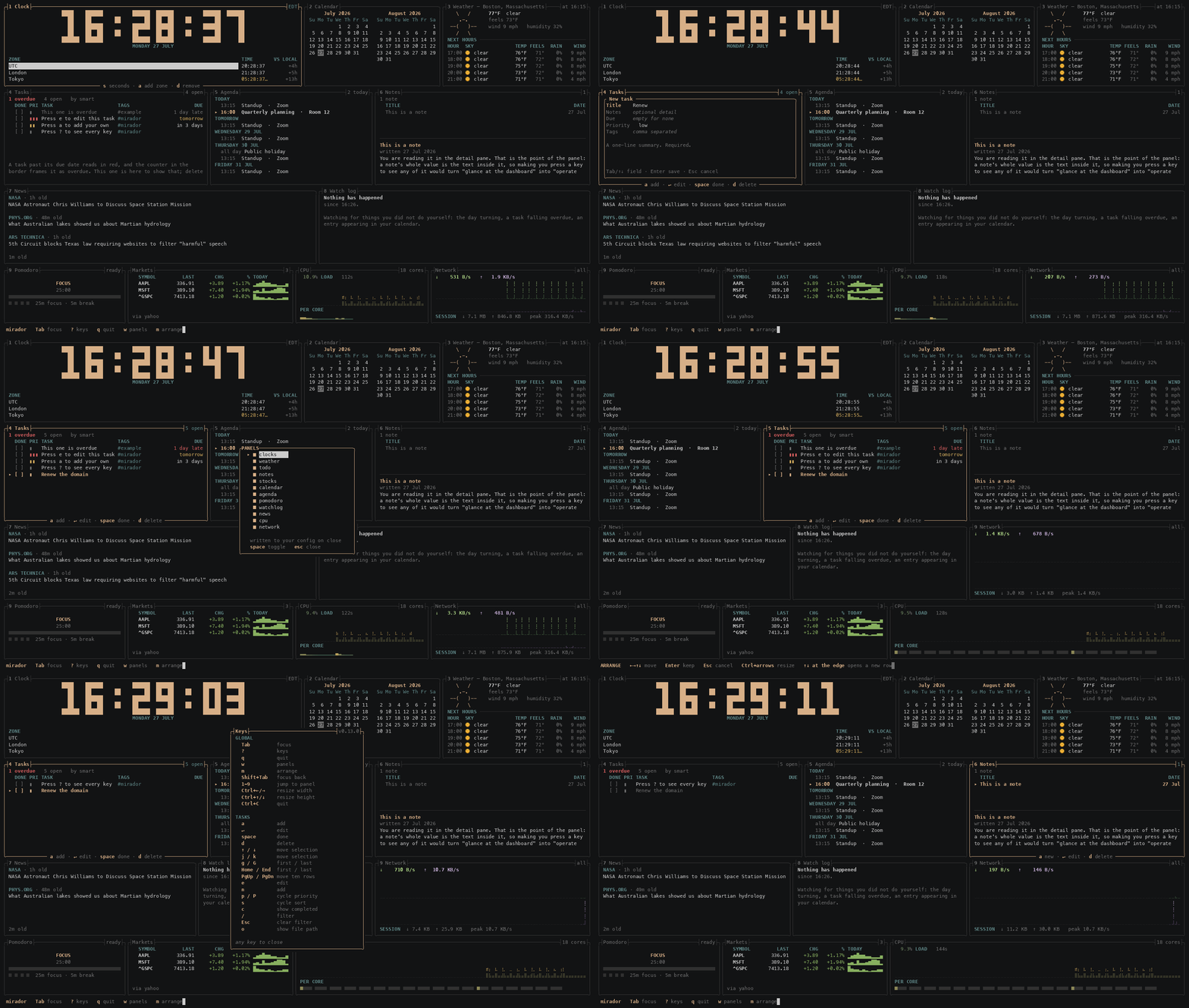
The fourteen default panels on a first run, at 200x50 — wide enough that nothing has to fall back. The lit frame is the focused panel, with its own keys in its bottom border; every other panel is dimmed, so exactly one thing is at full brightness.
A minute of it in use. Focus moves with Tab; a task is typed in and
lands in the list, which goes from four open to five. w opens the panel picker,
switches one off, and the grid closes over the gap. m starts arranging: the
task panel moves along its row, then up into the row above, then past the top
edge into a row of its own — the real panels move as the keys are pressed, and
Esc puts it all back. ? lists every binding for the focused panel and
scrolls when there are more than fit. Then three sums go into the calculator:
each answer appears in the right-hand column as it is typed, and Enter feeds it
up the tape, where the results line up on their decimal points.
The tasks and the note are the examples mirador seeds on a first run, and the
weather, the prices and the graphs are whatever was true while it recorded —
docs/record-demo.sh drives a real build under tmux. The one staged thing is
the calendar, because mirador deliberately never invents one: without a sample
the agenda panel would spend the recording explaining how to point it at a file.
Why
Most terminal dashboards are built to be watched — a system monitor you open when something is wrong, dense and busy and refreshing as fast as it can. mirador is built to be glanced at: one tab, all day, in the corner of your eye. Everything follows from that. Nothing blinks or shimmers. The unfocused panels dim so exactly one thing is at full brightness. A notice retires on your first keypress, because a dashboard that nags is a dashboard you close.
Your data stays in files you own. Tasks, notes and the watchlist are plain TOML you can hand-edit, keep in git, or delete. No database, no sync service, no account, no API key, no telemetry, and nothing phones home unless you ask it to — including the updater, which runs only when you run it, and an update check that is off until you turn it on.
It is a real task list, not a checklist. Due dates, priorities, notes, tags, filtering and full editing without leaving the dashboard. That is the panel most dashboards treat as a checkbox, and it is the one you will use most.
The three network panels use free key-less endpoints:
Open-Meteo for weather, Yahoo's public chart endpoint
for prices — see Market data for what that one means for you —
and, for news, whichever RSS feeds you configure. The shipped feeds are NASA,
Phys.org and Ars Technica; change or empty them in [news.feeds].
Those three fetch the data their panels exist to show, which is not the same as
phoning home: nothing is sent about you, and switching a panel off with w
stops its requests entirely.
How this was built
mirador is written with heavy AI assistance. The implementation, the tests and most of this documentation were written by Claude (Anthropic), working from my direction and review. The product decisions — what to build, what to leave out, what the thing is for — are mine.
This is stated plainly because anyone evaluating the code deserves to know how it was made, and because some communities reasonably want to know before they adopt or recommend something. It is not a claim about quality in either direction: judge it the way you would judge any other code.
What that means in practice, if you want to weigh it:
- Every change lands through CI that runs the test suite on macOS, Linux and
Windows, plus
clippywith-D warnings,rustdocwith-D warnings, a minimum-supported-Rust-version check,cargo publish --dry-runandcargo-denyfor advisories, licences and sources. - Behavioural claims in the commit history are measured rather than asserted, and several fixes were verified by reverting them to confirm the new test actually failed. Two tests in this repository were found to be pinning the bug they existed to catch.
CLAUDE.mdrecords the design decisions and the reasoning behind them, including the ones that were reversed and why.
Install
From crates.io, if you have Rust:
cargo install mirador
Without Rust, on macOS or Linux:
curl --proto '=https' --tlsv1.2 -LsSf https://github.com/jchultarsky/mirador/releases/latest/download/mirador-installer.sh | sh
and on Windows:
irm https://github.com/jchultarsky/mirador/releases/latest/download/mirador-installer.ps1 | iex
Both fetch the right archive for your platform and unpack the binary. If you would rather read the script before running it, it is an ordinary file at that URL, and the manual route is below.
The shell installer checks the archive against its published sha256; the PowerShell one does no verification, and neither verifies the updater binary. That is dist's behaviour rather than ours, and SECURITY.md says what it does and does not buy you. Every artifact carries a GitHub provenance attestation, which is the stronger check and the one to run if you care:
gh attestation verify --repo jchultarsky/mirador mirador-aarch64-apple-darwin.tar.gz
Whether you installed with Cargo or one of those installers, a later upgrade is:
mirador --update
The flag hands an installer-managed copy to the mirador-update program placed
beside it, and a crates.io copy back to Cargo. The separate mirador-update
command remains available for compatibility. A binary installed directly from
an archive has no installation record to follow, so update it manually or run
an installer once.
Updating runs only when you ask for it — the normal dashboard never phones
home, unless you set
[general].check_for_updates = true, which asks crates.io once a day whether a
newer version exists and says so once in the status bar. That setting is off by
default, sends no identifier, caches its answer, fails silently, and is
overridden by NO_UPDATE_CHECK=1 or DO_NOT_TRACK=1 in your environment. If you
installed from source or through another package manager, upgrade the same way
you installed.
From source:
git clone https://github.com/jchultarsky/mirador
cd mirador
cargo install --path .
Or download a pre-built binary from the
latest release.
Every archive carries a .sha256 beside it, so verify it before running. On
macOS:
grep . mirador-aarch64-apple-darwin.tar.gz.sha256 | shasum -a 256 -c -
and on Linux:
grep . mirador-x86_64-unknown-linux-gnu.tar.gz.sha256 | sha256sum -c -
Either prints … OK and exits 0, or prints FAILED and exits 1. The grep .
drops a trailing blank line that the checksum files are written with; without
it the command still verifies correctly but adds WARNING: 1 line is improperly formatted, and a warning printed next to a checksum is exactly the
wrong thing to make someone squint at.
On Windows, print the hash and compare it with the .sha256 file beside the
archive:
Get-FileHash .\mirador-x86_64-pc-windows-msvc.zip
Get-Content .\mirador-x86_64-pc-windows-msvc.zip.sha256
| Platform | Archive |
|---|---|
| macOS, Apple silicon | mirador-aarch64-apple-darwin.tar.gz |
| macOS, Intel | mirador-x86_64-apple-darwin.tar.gz |
| Linux x86-64 | mirador-x86_64-unknown-linux-gnu.tar.gz |
| Linux, ARM64 | mirador-aarch64-unknown-linux-gnu.tar.gz |
| Windows x86-64 | mirador-x86_64-pc-windows-msvc.zip |
| NetBSD | no prebuilt archive — via pkgsrc: sysutils/mirador |
Requires Rust 1.95 or newer to build from source.
The NetBSD package is maintained in pkgsrc rather than by this repository —
the first BSD packaging of mirador, and the platform whose bug report fixed
IPv6-preferring networks for everyone (1.6.1). pkgin install mirador once
binary packages are built, or build from the pkgsrc tree.
Windows has been run and works — installed with the PowerShell one-liner
above, in the default Windows terminal. It is still the least-travelled of
the prebuilt platforms: macOS and Linux are used daily and Windows has been
checked rather than lived in, so a report of something off there is genuinely
useful. NetBSD is the newest arrival, running from pkgsrc since 1.6.1 and
tested by its packager rather than by CI — reports from there are equally
welcome. Windows on ARM is deliberately absent: ring, reached through
ureq's TLS, does not build for it.
Quick start
mirador
On first run it writes a commented config file, lays out every panel, and seeds
the task list and notes with a few examples so nothing starts blank. The
examples are ordinary entries — they explain the keys and then you delete them
with d. They are seeded only when there is no file yet, so once you clear
them they stay cleared.
To find the config:
mirador --config-path
Set your city with L in the weather panel, or edit [weather].location.
Either way you are done: no account, no API key, no environment variables.
Remembered settings
Some settings you change with a keystroke are remembered across restarts:
| Setting | Key | Panel |
|---|---|---|
| Weather units | u | Weather |
| Task sort order | s | Tasks |
| Whether completed tasks show | c | Tasks |
| Seconds on the clock | s | Clock |
| 12- or 24-hour clock | h | Clock |
| Pomodoro durations | + / - | Pomodoro |
| Watchlist symbols | a / d | Markets |
| World clocks | a / e / d | Clock |
| World clock order | Shift+↑/↓ | Clock |
| Weather location | L | Weather |
| Agenda file | f | Agenda |
| Which panels are shown | w | — |
| Where the panels are | m | — |
| Panel sizes | Ctrl+←→↑↓ | — |
They go to three different places, and the split is deliberate.
Anything to do with [layout] is written back into your config — which
panels exist, and how wide they are. That is the part of the file you actually
read and curate, so a change you make with w has to show up there or your
config would end up describing a dashboard nobody is looking at.
The edit is surgical, never a reserialise: mirador rewrites the one line it has
to and leaves your comments, spacing and ordering exactly as they were. Adding
a panel is a one-line diff. If your [layout] is formatted in a way it cannot
edit confidently, it says so in the picker and changes nothing rather than
guessing — the failure mode is "that did not stick", not a mangled config.
Everything else goes to a small state file beside your tasks, and only what
you actually changed is written. Pressing u records the units and nothing
else, so editing any other value in your config still takes effect. Delete that
file and every remembered setting falls back to what the config says; it says
so at the top of itself, because a preference you cannot remember setting needs
an obvious way back.
And the two editable lists are data, not settings. Watchlist symbols and
the world-clock list go to files of their own beside your tasks —
watchlist.toml and zones.toml — because a list you edit from the panel is
something mirador owns, not a preference measured against the config. That is
also why [stocks].symbols and the clock zones in the config only seed the
first run: after that, the files are the truth.
Upgrading
A new widget will not appear in a config you already have. A config written by an earlier version lays out exactly the panels that existed when it was written, and nothing since. Leaving a panel out is a legitimate choice, so this cannot be an error and cannot be decided for you — and mirador does not tell you about it either. It used to, in the status bar and in the help overlay, and that was a mistake in the same family as an unread badge: a dashboard cannot tell "hasn't discovered this yet" from "decided against it", and it was reminding the second group for ever.
Press w — a key that is on the status bar and in the help — to see every
widget mirador has and which of them your layout places:
╭┤PANELS├──────────────────────────────╮
│    ■ clocks                          │
│    ■ weather                         │
│    ■ todo                            │
│    ■ notes                           │
│    ■ stocks                          │
│    ■ calendar                        │
│    ■ agenda                          │
│  ▸ □ pomodoro                        │
│    ■ watchlog                        │
│    ■ news                            │
│    ■ cpu                             │
│    ■ memory                          │
│    □ disk                            │
│    ■ network                         │
│    □ battery                         │
│    □ temperature                     │
│    ■ calculator                      │
│                                      │
│   written to your config on close    │
│   space toggle   Esc close           │
╰──────────────────────────────────────╯
space toggles, ↑/↓ or j/k move, Esc closes. A panel appears or
disappears the moment you toggle it, and the change is written to your config
when you close the dialog — as a one-line edit, with your comments untouched.
A new panel joins the row carrying the fewest panels; m moves it wherever you
want it afterwards, and Ctrl+←→↑↓ move the
space around, and that is written too.
The last panel cannot be switched off, because a layout with nothing in it is rejected at startup and would leave you with a config that will not open.
Shift+↑ and Shift+↓ move the whole row the focused panel is in, which is
how you reorder rows rather than move a panel between them. Plain ↑/↓ still
moves the panel itself, merging it into the neighbouring row.
mirador --migrate-config is still there for keys renamed between versions,
and leaves a backup beside the original.
If a config has gone past fixing, mirador --reset-config writes the shipped
defaults over it and copies the old one to config.toml.bak first. It also puts
aside the preferences you changed from the keyboard, because those outrank the
config — leaving them would apply your old choices straight back over the file
just restored, and the dashboard would come back looking untouched. Your tasks,
notes and watchlist are left alone, and it says so.
If you want the whole thing back to how it arrived, mirador --factory-reset
sets aside everything mirador has written — config, preferences, tasks, notes,
watchlist and world clocks — and the next launch seeds them all again. Nothing
is deleted. Every file is renamed to a .bak beside itself, so a factory
reset is something you can walk back from with mv. Your calendar is not
touched: mirador only ever reads an .ics, so that file is yours even when it
sits in mirador's own directory.
Both say what they are about to do and wait for a y, and neither runs without
a terminal to ask on unless you add --yes. An existing backup is never
overwritten, so resetting twice still leaves the first one recoverable.
The panels
Seventeen widgets, each answering one question. Put the ones you want in the layout and drop the rest — a widget your layout leaves out is never built, and nothing will nag you about it.
Tasks
The reason this project exists. Other terminal dashboards tend to render a to-do list as a flat checklist; this one has due dates, priorities, tags, notes, filtering and full editing without leaving the dashboard.
╭┤4 Tasks├───────────────────────────────────────────────────────────┤3 open├╮
│ 1 overdue   1 due today   by smart                                         │
│   DONE PRI TASK                              TAGS                      DUE │
│   [ ]  ▮▮▮ Renew the domain                  #admin            2 days late │
│   [ ]  ▮▮  Reply to the design review        #work                   today │
│   [ ]  ▮   Read the ratatui layout docs      #rust              Fri 07 Aug │
│                                                                            │
│ Card on file expired; the registrar will not auto-renew.                   │
╰────────────────────────────────────────────────────────────────────────────╯
The selected task's note sits at the foot of the panel, so a one-line summary in the list does not mean losing the detail behind it. Priority reads as bars rather than colour alone, and an overdue task is red and counted in the header — the same fact twice, because colour is the first thing a terminal theme can take away from you.
smart sort is the default and means: unfinished first, then overdue, then by
priority, then by due date. s cycles to plain due, priority, created
or title when you want something simpler.
[todo].horizon_days keeps the list to what is near: a task due more than that
many days out is hidden until the day it comes within range, and the summary
line says how many are waiting. A task with no due date, or one already late,
always shows, and 0, the default, shows everything. A filter searches past
the horizon, so a task given a due date further out than you meant can still
be found, edited and deleted.
Notes
Free-form notes in a master-detail layout, the shape a mail client uses.
╭┤6 Notes├───────────────────────────────┤1├╮
│   TITLE                              DATE │
│   Release checklist               ·25 Jul │
│                                           │
│ ───────────────────────────────────────── │
│ Release checklist                         │
│ written 22 Jul 2026   edited 25 Jul 2026  │
│ Bump the version, run the four gates, tag │
│ v-something, and let CI build the three   │
╰───────────────────────────────────────────╯
The body is visible without pressing anything, which is the whole point: a
note's value is the text inside it, and making you press a key to see any of
it turns "glance at the dashboard" into "operate the dashboard". / searches
bodies as well as titles, because the title you wrote in a hurry is often not
what you later search for.
The list's keys can be moved in [notes.keys] — see
Changing a panel's keys. Open a note with Enter,
then move to its body with Tab. Shift plus the
arrow keys (or Home/End) selects text, and Ctrl+A selects the whole body.
Ctrl+C sends that selection to the terminal clipboard and also keeps an
in-Mirador copy; Ctrl+V pastes that copy at the cursor or replaces the next
selection. Typing, Backspace and Delete replace selected text too. With
nothing selected, Ctrl+C keeps its ordinary terminal meaning and quits.
Your terminal's normal paste shortcut remains the way to bring outside text
into the note; multiline pastes and literal tabs are kept intact in the body.
The body also takes the line keys every one-line field has — Ctrl+E to the
end of the line, and Ctrl+U, Ctrl+K and Ctrl+W to delete to its start,
to its end and the word before the cursor — but not Ctrl+A, which goes to
the start of a one-line field and selects everything here. They act on the
cursor's line alone and never delete a line break. A selection is let go
first rather than deleted, and the key acts from the cursor, the moving end
of the selection.
Ctrl+S saves, from either field. Enter also saves, but only from the
title, where it cannot be mistaken for a newline — in the body it starts one.
Esc cancels and keeps nothing. It is worth knowing which of those you pressed:
trusting the footer and reaching for Esc is how a note gets lost.
Clock and calendar
The first configured zone renders large; the rest become a table showing their
offset relative to that zone, which is the number you actually want when
scheduling across one. The calendar prints month grids in the shape cal
does, with today marked.
The clock is 24-hour unless you ask otherwise: h switches it to 12-hour and
back, and the choice is remembered, or set [clocks].twelve_hour = true. AM or
PM sits small at the top right of the numerals, over the seconds, and the table
follows — its time_format is converted to 12-hour, keeping your padding. s
hides the seconds from the table as well as from the big clock: they come out
of time_format with the separator before them, a fraction of a second goes
with them, and %T, %X and %r become their seconds-less selves. With
12-hour off and the seconds showing, time_format is used exactly as you wrote
it.
a adds a clock and d removes the selected one. Adding one opens a list of
cities; type to narrow it, ↑↓ to choose, Enter to add.
Search by the city you mean, not the one in the identifier. Seattle keeps
time in America/Los_Angeles, Bengaluru in Asia/Kolkata, Boston in
America/New_York — and nobody should have to know that before they can add a
clock. Typing matches the city or the identifier, anywhere in either, so
seattle, los_angeles and america/ all find the same zone. The city you
picked becomes the clock's label, and the identifier is shown beside it so what
ends up in your config is never a surprise — whole, or on a terminal too narrow
for the longest in the list, on no row at all, since half an identifier names
some other zone or none.
Anything not on the list still works: type a zone it does not carry and it is
taken as written, with HQ = Europe/Berlin naming it yourself.
e reopens that dialog on the selected clock, pre-filled, so fixing a label
does not mean deleting the entry and adding it back. Shift+↑ and Shift+↓
(or J and K) move the selected clock through the table, and o shows where
the file lives.
Like the watchlist, the live list is a data file (zones.toml) rather than
config, which is what lets the panel own it; [clocks].zones seeds your first
run. The large clock is not removable, and nothing can be moved into its place
either, because a clock panel with nothing to draw large is not a clock panel.
╭┤2 Calendar├───────────────────╮
│      July 2026                │
│ Su Mo Tu We Th Fr Sa          │
│           1  2  3  4          │
│  5  6  7  8  9 10 11          │
│ 12 13 14 15 16 17 18          │
│ 19 20 21 22 23 24 25          │
│ 26 27 28 29 30 31             │
╰──── n / p month · t today ────╯
The calendar is deliberately offline — it reads no mail server and no account.
months sets how many sit across; a taller panel stacks more rather than
leaving a void, up to a year in view.
Weather
Current conditions and an hourly forecast from Open-Meteo,
which needs no key and no account. u switches between imperial and metric at
runtime, converting what is already on screen rather than re-fetching. L sets
the location without touching your config; the panel re-geocodes and refetches
on the spot. If [weather] sets latitude and longitude, those decide the
place, and L asks you to remove them first. r refetches by hand, ahead of
the regular refresh.
A failed refresh keeps the last reading and shows its age in amber rather than blanking the panel — weather two hours old is still useful, and an empty panel is not. Columns drop as the panel narrows, in the order that costs you least.
Markets
A watchlist with the last price, the day's change, and an intraday sparkline.
╭┤Markets├────────────────────────────────────────────────────────┤7 · yahoo├╮
│   SYMBOL         LAST       CHG        % TODAY                             │
│ ▸ ^GSPC       7413.18     +1.20   +0.02% ▇▄▃▃▂▃▂▁▂▂▃▃                      │
│   ^DJI       52210.08   +262.83   +0.51% ▇▅▃▃▂▂▂▂▂▂▃▄                      │
│   ^IXIC      24932.08    -43.74   -0.18% ▇▄▃▃▂▃▂▂▂▂▄▄                      │
│   ^RUT        2948.03    +18.04   +0.62% ▇▄▃▃▂▃▂▂▃▃▄▄                      │
│   ^NDX       28039.21    -89.13   -0.32% ▇▄▃▃▂▃▂▂▃▂▄▄                      │
│   AAPL         336.91     +3.89   +1.17% ▂▄▅▇▅▅▃▃▂▂▂▄                      │
│   MSFT         389.10     +7.40   +1.94% ▃▄▂▆▃▃▄▅▇▇▆▂                      │
╰─────────────────────── a add · d remove · r refresh ───────────────────────╯
The default watchlist is the five major US indexes — S&P 500, Dow, Nasdaq
Composite, Russell 2000 and Nasdaq-100 — plus two ordinary stocks, so the panel
shows both kinds on a first run. ^VIX is the volatility index if you want it,
and EURUSD=X and BTC-USD work too.
a adds a symbol and d removes one, and those edits stick — the watchlist
is a data file rather than config, which is what lets the panel own it. See
Market data before filing a bug about HTTP 429.
Agenda
What is actually next, read from an .ics file on your disk. f points it at
one from the panel, with Tab completing path segments as you type; a path
that cannot be read is refused there and then rather than after the fact.
╭┤5 Agenda├──────────────────────────────┤2 today├╮
│ TODAY                                           │
│   09:15  Standup  ·  Zoom                       │
│ ▸ 14:00  Quarterly planning  ·  Room 12         │
│ TOMORROW                                        │
│   all day Public holiday                        │
│ THURSDAY 30 Jul                                 │
│   09:00  Call with London                       │
╰─────────────────── r reload ────────────────────╯
The ▸ marks an event happening now. Days are headed TODAY and TOMORROW
where that is clearer than a date, and an event you are already in stays on
screen until it ends — the meeting you are late for is the one you most want to
see.
mirador does not sign in to anything. No account, no token to refresh, no
background process holding your credentials. Point [agenda].file at a calendar
you already have; whatever keeps that file current is your business — an export,
a vdirsyncer run, a cron job with curl, a symlink into a synced folder. It
is re-read on a timer and when you press r.
Until you set file, the panel says so and names the path it looked at. Nothing
creates that file: unlike the task list, an empty calendar mirador invented
would be a lie about your day.
Recurring events are expanded for the rules people actually have — daily, weekly
with BYDAY, monthly and yearly, with INTERVAL, COUNT, UNTIL and
EXDATE. A rule using anything more elaborate, such as BYSETPOS or an ordinal
BYDAY like 1MO, shows only its first occurrence rather than guessing.
That is deliberate: a calendar that invents a meeting costs you a wasted trip,
where one that misses a repeat costs you a glance at the real thing.
An entry the parser cannot read is counted at the bottom of the panel rather than dropped silently, so a half-read calendar does not just look empty.
News
Headlines from RSS feeds you choose.
╭┤7 News├──────────────────────────────────────────────╮
│ NASA · 1h old                                        │
│ Astronaut Chris Williams to discuss station mission  │
│                                                      │
│ PHYS.ORG · 22m old                                   │
│ What Australian lakes showed us about Martian        │
│ hydrology                                            │
│                                                      │
│ ARS TECHNICA · 45m old                               │
│ 5th Circuit blocks Texas law requiring websites to   │
│ filter "harmful" speech                              │
╰───── o show link · y copy · ↵ open · r refresh ──────╯
A window, not a feed. It shows however many stories fit and no more. There is no scrolling, no count, no unread state, and nothing to dismiss — you glance at it the way you glance at the weather. That is deliberate and it is the same reasoning that keeps unread-message counts off this dashboard: a number that accumulates is a number demanding you zero it.
Stories are interleaved rather than sorted purely by date, so the top of the panel holds the newest from each feed. Sorting by date alone hands the whole window to whichever outlet publishes most often, which is fresh but is not a window on the world.
The headline itself is a hyperlink in terminals that render OSC 8 — iTerm2, WezTerm, kitty, recent GNOME Terminal among them — so clicking it the way your terminal opens links (usually a modifier plus a click, since mirador holds the mouse) goes straight to the story. No key, no configuration, and no cost anywhere else: where the terminal does not support it the link is invisible bytes and the panel reads identically. The three keys below work everywhere.
o shows the selected story's link, in brass beneath a ↳, wrapped whole so
you can read all of it.
y copies it, by asking your terminal to set the clipboard (OSC 52). No
configuration and no dependency — but it is best-effort: some terminals refuse
the sequence, and tmux needs set-clipboard on. mirador cannot tell whether it
worked, which is why it says it sent the link rather than claiming it copied one.
↵ opens it, and only if you name a program:
[news]
open_command = ["open"]                                      # macOS
# open_command = ["xdg-open"]                                # Linux
# open_command = ["rundll32", "url.dll,FileProtocolHandler"] # Windows
Empty by default, so mirador launches nothing you did not ask for. It is run
directly rather than through a shell, and the link goes on as its own argument,
so nothing in a URL can be read as shell syntax. Same shape as
[pomodoro].chime_command: mirador does not pick the program, you name it.
Do not name a shell. cmd and PowerShell read their arguments as a
command line, and &, ;, | and % are all ordinary in a URL, so a link
handed to one is a command a feed wrote. mirador refuses to: it says not opened: cmd is a shell instead. Earlier versions of this README suggested
["cmd", "/c", "start"] for Windows; use the line above, which hands the link
to Windows' own URL handler without a shell. It has not yet been tried on a
Windows machine, so if it does not open your browser, please say so in an
issue. A link that is not an http or https address is not
opened at all, and one with characters a URL cannot hold as written is
percent-encoded first.
If you would rather select the text with the mouse, note that mirador holds the
mouse — use your terminal's override modifier (Shift in most, Option in macOS
Terminal and iTerm2), or set [general].mouse = false.
The shipped feeds are science, space and technology only. Choosing outlets for
general or political news is an editorial act this project has no business
making on your behalf; add your own in [news.feeds]. A topic is a feed —
RSS has no topic parameter, so subscribing to a science feed is how you ask for
science. Feeds must be RSS 2.0: Atom is not read, and an Atom feed is
reported as a feed that failed, rather than shown as one with nothing in it.
Only the headline, link and date are read. Feed summaries are article prose belonging to whoever wrote them. Refresh is hourly, and an hour is also the floor.
Watch log
What happened while you were not looking.
╭┤8 Watch log├──────────────────────────────────╮
│ 14:02  Standup appeared in your calendar      │
│ ──────────────────── since you were here ──── │
│ 13:30  Renew the domain went overdue          │
│ watching from 08:12                           │
╰───────────────────────────────────────────────╯
Almost nothing qualifies, and that is the point. The clock, the readings, the
prices and the graphs change continuously and none of it is news; your notes and
tasks change because you changed them. An entry is something that happened to
you rather than because of you, and that you would want to know even if you
never looked at the panel it came from. Out of the box that means three things:
the day turning, a task crossing into overdue because of it, and an event
appearing in your .ics that you did not put there. An external panel can be
a fourth source: a plugin may hand the log a bounded, completed event —
outcomes, not progress — and it appears here under that plugin's id.
The day turning is the one that always happens, which is more useful than it sounds — it is the divider that tells you where one day's entries end, and it means the panel has something to say even before you point it at a calendar.
It has no counter, no unread state, and no effect on any other panel. Unread message counts were considered for this dashboard and rejected — a number that accumulates is a number demanding you zero it. This is a record you consult, not an inbox that consults you, and nothing in it can be dismissed or acknowledged because an entry you can dismiss is an entry you are expected to dismiss.
The rule line marks where you were last seen. mirador asks your terminal to
report window focus, which is the only honest signal for "the reader is here" —
every other one measures interaction, and a dashboard you glance at is precisely
one you do not touch. Where the terminal does not report it (and under tmux
unless focus-events on is set) it falls back to your last keypress, and where
neither has happened it draws no line at all rather than one in the wrong place.
The log lives in memory and says when it started watching. One written to disk would come back after a restart with a gap it could not mark — the hours mirador was not running — and a log that implies a completeness it does not have is worse than one that admits where it begins.
Pomodoro
A focus timer, in the same block numerals the clock uses.
| Key | Action |
|---|---|
space | Start or pause |
n | Skip to the next phase |
r | Put the current phase back to full |
+ / - | Lengthen or shorten the phase you are in, by a minute |
Each of these can be moved in [pomodoro.keys] — see
Changing a panel's keys.
Focus intervals are brass and breaks are moss, and the phase is spelled out above the numerals as well — colour alone is a bad way to tell someone whether they are meant to be working. A paused timer goes grey rather than blinking: this is a dashboard you leave open, and a flashing clock is the opposite of that. Pips along the bottom count the set, and the long break falls when they fill.
+ and - move the phase length and what is left of it together, so adding
a minute eighteen minutes into a focus interval does not rewind you to the
start. A change is remembered across restarts, and a phase set back to what
[pomodoro] says is forgotten again. + stops at 180 minutes, or at a longer
length set in [pomodoro]: such a phase is kept, - shortens it a minute at a
time, and + takes it back up as far as the config's length.
A running phase counts through sleep. Close the lid with ten minutes to go and
open it an hour later, and that phase has ended — once, with one chime if you
asked for one. The timer does not race through the phases you were away for:
the next waits at its full length for a key, or with auto_start set begins
from the moment you come back. A paused timer stays where you left it.
A chime is available and off by default, because a dashboard you leave open
all day has no business making noise you did not ask for. Set
[pomodoro].chime = true and each phase ends with the terminal bell — which
your terminal is free to render as a sound, a flash, or nothing, according to
settings you have already chosen.
mirador ships no audio library on purpose. Playing a sound file means linking your platform's audio stack, which on Linux means a C library and its dev headers on every machine that builds this. If you want a particular sound, name a player instead and it is run directly, with no shell in the way:
[pomodoro]
chime = true
chime_command = ["afplay", "/System/Library/Sounds/Glass.aiff"]
If that program cannot be started, the panel says so where the durations usually sit. A notification you believe is working but is not is worse than none at all.
Calculator
Type an expression and press Enter. 2 + 3 * 4 is 14, not 20 — precedence is
the arithmetic kind, and brackets work — because what this replaces is bc or
python3 -c, not a pocket calculator. The answer forms beside the line as you
type; Enter keeps it, and what you have kept feeds up the tape above.
| Key | Action |
|---|---|
0–9 . | Type a number |
+ - * / | Operators; x also multiplies |
( ) | Group |
Enter or = | Keep the answer |
c | Clear the entry |
C | Clear the tape as well |
Backspace | Rub out the last character |
y | Send the selected answer to the clipboard |
p | Paste the selected answer into the live expression |
↑ / ↓ | Select an answer on the tape |
An operator typed straight after an answer carries it forward, so + 10 after
a result of 57 reads as 57 + 10. That is what a memory key was for.
The selected tape row stays at full body weight while the others recede. Use
↑/↓ to choose an older answer, then y to copy it or p to append it to
the expression you are typing. Once the tape has a result, those two actions
replace the typing reminder in the focused panel's border so they remain
discoverable at the default width.
Results are aligned on the decimal point, and the row you are typing is the
brightest thing in the panel with its answer in brass; the tape behind it
recedes. While this panel has focus, 1–9 type digits instead of jumping
to a panel. It is the only panel that changes what a global key does, and it
is unavoidable — a calculator needs the digits. Tab still moves focus, and
q, ?, w, m and t all still work.
An answer too wide for the panel is shown in scientific notation rather than cut. Everywhere else in mirador a value that will not fit reads as a narrow terminal; here a number missing its tail is a different number, and there would be nothing on screen to say so. Narrower still, the working column goes and the answers stay: an answer without its sum is still an answer.
Nothing is kept when you quit. There is no memory key, no percent key and no functions — the tape and carrying an answer forward cover what those were for.
CPU, memory and network
CPU shows average load, a moving history graph and a per-core meter row —
c toggles that row when the panel is focused. Memory shows the share in use,
the same kind of graph, and a swap meter when the machine has swap — s
toggles that. Network shows receive and transmit rates as two graphs, plus a
session total and the peak rate seen.
All three draw their history in braille, which packs two samples into every character cell and four levels into every row — twice the horizontal resolution of a block-element sparkline in the same space. The colour gradient runs vertically by magnitude, one colour per row, so the profile stays put as data scrolls: a graph left on screen all day changes colour when the load changes, not merely because time passed.
These three panels are the one thing this README will not show you in a code block. Braille is missing from several of the fonts GitHub falls back to, so the glyphs render at a width the surrounding box characters do not share and the panel tears itself apart. The recording at the top of this file shows them as they actually look. It is a real terminal, which is the only place the alignment is guaranteed.
Every buffer grows to fill its panel, so history is a floor on what is kept
rather than a cap on what a wider panel can draw.
Battery
For laptops. A battery, drawn: a rounded cell with its terminal, filled to the
charge, and the percentage beside it; a label saying which way things are
going — ON BATTERY, CHARGING, PLUGGED IN, FULL; the time left, or to
full, in the border; and a line of detail: health, cycle count, power draw.
Nothing is said twice. The cell grows with the panel and keeps its shape, and
a panel too short or too narrow for an outline draws a bare meter with the
figure beside it instead. Brass while there is
plenty, and while charging or full, which the label says; amber below 20% and
red below 10% only while running on the battery, since a low battery on mains
is nothing to be told about. Below 10% and
discharging it is the one battery fact that gets worse if nobody acts, so the
status bar says so.
It is not in the default layout: a desktop would open on No battery, and
the default is a dashboard for any machine. Press w and switch it on.
Temperature
The hottest thing in the machine, in the same face as the CPU panel: a
readout, a braille history, and a table of every sensor with its current and
peak reading, hottest first. The platform's list is grouped the way a person
would write it — Apple silicon's fourteen PMU tdie readings become one
CPU die row, a calibration reference and eight sensors reporting minus nine
thousand degrees are dropped — and the same colour ramp as the CPU graph runs
from cool to hot, so the two panels change colour together. u toggles
Celsius and Fahrenheit. Above alert_above_c (95 by default) the hottest
sensor reaches the status bar, since a die past its limit is the one reading
here that gets worse if nobody acts.
Also not in the default layout, for a different reason: the panel reads
what the platform reports, and that is uneven. Windows exposes at most one
ACPI thermal zone through WMI, which many machines do not provide and some
provide only to an administrator; NetBSD's sensors live in envsys, which
sysinfo does not read yet; a VM or a container reports nothing. Where there
is nothing to read the panel says so, and says why for that platform, rather
than drawing an empty graph. Press w and switch it on.
Disk
Every volume that can fill up, one block per device: the mount point, how
full it is, what is free and what it holds, over a meter. The platform's
list of volumes is folded into the devices a person would name — / and
/System/Volumes/Data are one APFS container with one pool of free space,
so they are one row — and read-only volumes are left out, since nothing can
fill them, which is what keeps every snap off a Linux list. Brass while there
is room, amber from warn_above_pct (80 by default), red from
alert_above_pct (95), where the status bar names the fullest volume. The
figures are decimal, the way a disk is sold. Under each device, the network
panel's face: a ↓ read ↑ write readout and two braille histories, scaled to
the device's own peak and never below a megabyte a second, so the trickle of
background writes every disk carries stays low. i hides the graphs.
Reading a volume can block on a network mount that has gone to sleep, so it
happens on a thread and the dashboard never waits for it.
Also not in the default layout, for a third reason: the instrument row
has no room for a sixth panel at 120 columns without costing the watchlist
its change column. Press w and switch it on.
Command line
Every flag is optional; with none of them mirador opens the dashboard.
| Flag | What it does |
|---|---|
-c, --config <PATH> | Use a specific config file |
--config-path | Print the resolved config path and exit |
--print-config | Print the default config to stdout and exit |
--migrate-config | Update a config written by an older version |
--reset-config | Replace the config with the defaults, keeping a copy |
--reset-keys | Put every key back to its default by commenting out [keys] and the panels' key tables |
--factory-reset | Start over: config, preferences, tasks, notes and watchlist all set aside |
--update | Update through the installer or Cargo and exit |
-y, --yes | Do not ask for confirmation |
-h, --help | Print help and exit |
-V, --version | Print the version and exit |
The config path resolves in that order: --config wins over the
MIRADOR_CONFIG environment variable, which wins over the platform default —
the same order --config-path reports.
Neither reset deletes anything. Every file they touch is renamed to a numbered
.bak beside itself, and both list what they will affect before doing it.
They are also separate commands rather than degrees of one: --reset-config is
about configuration, --factory-reset about everything mirador has written.
--reset-keys is narrower than either: it comments out the lines under
[keys] and the panels' own key tables in the config and changes nothing
else, for a keymap mistake that stops mirador starting.
Keys
| Key | Action |
|---|---|
Tab / Shift+Tab | Move focus between panels |
1 – 9 | Jump straight to a panel |
? | Show all key bindings |
w | Choose which panels are shown |
m | Rearrange the panels — see below |
t | Choose a theme, previewing as you move — see below |
Ctrl+←→↑↓ | Resize the focused panel against its neighbour |
q / Ctrl+C | Quit |
Changing the keys
Every key in the table above except 1 – 9 and Ctrl+C can be moved in the
config's [keys] section, which lists each action with its default. Change
the ones you want and leave the rest:
[keys]
# Ctrl+arrows switch desktops on a Mac. Option+arrows, as iTerm2 sends them;
# Terminal needs letters instead — see below.
resize_wider    = "alt+right"
resize_narrower = "alt+left"
resize_taller   = "alt+down"
resize_shorter  = "alt+up"
quit            = ["q", "x"]   # several keys for one action
theme           = []           # or none at all
Keys are written in words — q, ?, tab, shift+tab, space, f5,
ctrl+left, alt+h — and the status bar, the help overlay and the arrange
legend all show the keys you chose rather than the defaults.
On a Mac, what arrives depends on the terminal, and these were measured rather than assumed:
- iTerm2 passes Option+arrows through as Alt+arrows unchanged, so the example above works as it is. Ctrl+Shift+arrows and Ctrl+Option+arrows arrive intact too. Option with a letter types a symbol unless the Left Option key is set to "Esc+".
- Terminal passes no Option, Ctrl+Shift or Ctrl+Option arrow through
intact. Turn on "Use Option as Meta key" and use letters —
alt+h/j/k/l— which then arrive as Alt+letters. Do not use Option+↑/↓there: with that setting Terminal sends each asEscfollowed by two characters, so theEscbacks out of whatever is open and the characters are typed into the focused panel.
A few rules keep a keymap from locking you out. Ctrl+C always quits and
Esc always backs out of whatever is open, so neither can be bound. The resize
keys are read before the focused panel sees them, so each needs Ctrl or Alt
held. Every other key is offered to the focused panel first, the way q is
today. And a key given to two actions is refused at startup, naming the line to
change.
Changing a panel's keys
Every panel's own keys move the same way, in a table under the panel's section. The shipped config lists every action in each table with its default, and the key map below shows them too:
| Table | Actions |
|---|---|
[clocks.keys] | seconds add edit move_up move_down twelve_hour remove up down show_path |
[weather.keys] | refresh units location |
[todo.keys] | add edit done delete up down first last page_up page_down priority_next priority_previous sort completed filter show_path |
[notes.keys] | new edit delete up down first last scroll_up scroll_down search show_path |
[stocks.keys] | add remove refresh up down first last show_path |
[calendar.keys] | next_month previous_month today previous_year next_year |
[agenda.keys] | file reload up down first last page_up page_down show_path |
[news.keys] | show_link copy open refresh up down |
[watchlog.keys] | up down first last page_up page_down |
[pomodoro.keys] | toggle next longer shorter reset |
[cpu.keys] | per_core |
[memory.keys] | swap |
[disk.keys] | io |
[temperature.keys] | units |
[todo.keys]
delete = "x"
up     = ["up", "k", "i"]   # a list gives an action several keys

[calendar.keys]
today = "."                 # keep t for the theme picker
What moves is what a panel does while you are looking at it. A form, an
editor, a search box, a dialog or a delete question keeps its own keys,
because it takes typing and a key moved there could never be typed; Esc
still backs out of each and clears a filter or a search. The calculator has
no table for the same reason: its keys are the digits and operators you type.
The same rules hold, with one difference. A panel key may be one the
dashboard also uses — it wins while that panel is focused, the way the
calendar's t means "today" there and "theme" everywhere else — but not a
resize key, which is read before the panel would see it. The panel's border
and the help overlay show the keys you chose.
Press ? twice for the key map: every one of these actions with the key it
has now, its default, and what it does, with the keys you changed picked out,
followed by each panel's table under its heading.
It also says which file to edit, and it has keys of its own:
rreloads[keys]and the panels' tables, so you can edit the config in another pane and try the result without restarting. A mistake is shown in the dialog and the keys you had stay in force.dputs every key back to its default, after asking. Your key lines are commented out rather than deleted, with a line above them saying when.Escorqcloses it, as they close the two pickers.
These keys, and the arrows that scroll it, are the dialog's own and no table moves them, so the dialog that changes your keys can always be closed.
If a mistake in a key table stops mirador starting, the error says so, and
mirador --reset-keys does the same reset from the command line.
Rearranging the dashboard
Press m, then move the focused panel with the arrow keys. ← and → swap it
with its neighbour; ↑ and ↓ move it between rows, landing it under wherever
it already was rather than at the same index.
Rows are managed through the panels, not separately. There is no "add row" command because there is nothing useful an empty row could do:
- To open a row, push a panel past the top or bottom edge. Hold
↑and the panel climbs through the rows; press it once more from the top row and the panel takes a row of its own. The height comes out of the row it left, so nothing else on screen resizes. - To close one, move its last panel into a neighbour. The row closes behind it and hands its height to the row that took the panel.
A panel that already has a row to itself will not take another, so holding ↑
at the edge stops rather than spawning a row per keypress.
The panels themselves move as you press, so what you see is what you will get.
Enter keeps the arrangement and Esc puts everything back exactly as it was.
Ctrl+C quits and keeps it, as Enter would: the arrangement on screen when
you leave is the one you come back to.
Tab picks a different panel to move without leaving the mode, and Ctrl+←→↑↓
still resize while you are in there.
Every one of these keys except Esc and 1 – 9 can be moved under
[arrange.keys] in the config, which lists each action with its default —
move_left, row_up, keep and so on — and the legend at the foot of the
screen shows the keys you chose. A key there may not also be a resize key,
since resizing is read first and the mode would never see it.
The two pickers' keys move the same way: [panel_picker.keys] for w (up,
down, first, last, toggle, close) and [theme_picker.keys] for t
(the same moves, page_up, page_down, keep and put_back). Esc always
closes either one. An open picker sees every key first, so its keys may be the
same as a resize key.
The help overlay's scroll keys are [help_overlay.keys] (up, down,
page_up, page_down, first, last). They scroll only when the overlay has
more than fits, and any other key closes it. The help key itself is read first
there, to open the key map, so none of them may be that key.
A panel keeps the width you gave it when it moves, and the row weights always add up to what they added up to before — so rearranging one corner of the dashboard never quietly rescales another.
In the task panel:
| Key | Action |
|---|---|
j / k, ↑ / ↓ | Move the selection |
g / G, Home / End | Jump to first / last |
PageUp / PageDown | Move ten rows at a time |
Space | Toggle done |
a / n | Add a task |
e / Enter | Edit the selected task |
d | Delete (asks first) |
p / P | Cycle priority forward / back |
s | Cycle sort mode |
c | Show or hide completed tasks |
/ | Filter by title, tag or notes |
o | Show the task file path |
Every key in this table can be moved in [todo.keys] — see
Changing a panel's keys. In the add/edit form, Tab and Shift+Tab move between fields, Enter saves
and Esc cancels. While a form is open, global keys are suppressed, so typing
a q into a task title does not quit the dashboard.
When something needs you
The status bar carries one line when something will get worse if you ignore it, and carries nothing otherwise:
 ⚠ Quarterly planning in 5m · Room 12
 ⚠ Tasks could not be saved — read-only file system (os error 30)
There is no all-clear. An indicator saying everything is fine is a light you have to read in order to learn nothing, and reading it is work. Absence is the signal.
It names one thing, never a count, and it clears itself when the thing resolves. Nothing to acknowledge, nothing to dismiss.
The bar is deliberately strict about what qualifies: will this get worse if nobody acts in the next few minutes. A save that is failing, an event about to start, a layout change that did not persist. An overdue task does not qualify — it is notable, the task panel already shows it in red, and a signal lit for it would be lit permanently. A permanently lit warning is furniture you stop seeing inside a week, which is the same failure as an unread badge arrived at from the other direction.
Due dates
The due field accepts more than ISO dates:
| Input | Meaning |
|---|---|
2026-07-28 | That date |
today, tomorrow, yesterday | Relative to now |
mon, friday, sat | The next such weekday, never today |
+3d, 3d, 2w, 1m, 1y | An offset from today |
| (empty) | No due date |
Anything else is rejected with an explanation rather than silently guessed.
Configuration
One TOML file. Run mirador --print-config to see the fully commented default.
The layout is a grid of rows, where height and width are relative weights
rather than cell counts, so proportions hold at any terminal size:
[layout]
rows = [
  { height = 30, panels = [
    { widget = "clocks",   width = 26 },
    { widget = "calendar", width = 34 },
    { widget = "weather",  width = 40 },
  ] },
  { height = 45, panels = [
    { widget = "todo",     width = 44 },
    { widget = "notes",    width = 30 },
    { widget = "pomodoro", width = 26 },
  ] },
  { height = 25, panels = [
    { widget = "stocks",  width = 40 },
    { widget = "cpu",     width = 30 },
    { widget = "network", width = 30 },
  ] },
]
Keep that shape if you want w and m to work. TOML lets you spell the
same layout as a series of [[layout.rows]] sections, and mirador reads it
perfectly well — but it writes your config by editing the text, so your
comments survive, and the text it knows how to edit is the form above.
Rearranging a layout written the other way tells you so in the status bar
rather than failing quietly.
Widgets
| Widget | What it shows |
|---|---|
clocks | Any number of world clocks, by IANA timezone |
weather | Current conditions plus an hour-by-hour forecast |
todo | The task list, with full editing |
notes | Free-form notes: a list of titles and dates above the note you are reading |
stocks | A watchlist: last price, the day's change, and an intraday sparkline |
calendar | Month grids in the shape cal prints, with today marked |
agenda | What is next, from a local .ics file |
watchlog | The watch log: what changed while you were not looking |
news | Headlines from the RSS feeds you choose |
pomodoro | A focus timer: phase, time left, progress, and the set so far |
calculator | Type a sum, press Enter; an adding machine's tape of what you worked out |
cpu | Average utilisation, a moving chart, and per-core meters |
memory | Memory in use, a moving chart, and a swap meter |
disk | Every volume that can fill up: how full, what is free, a meter and I/O graphs per device; not placed by default |
network | Receive and transmit rates as moving charts |
battery | Charge, which way it is going, and how long that gives you — laptops; not placed by default |
temperature | The hottest sensor with its history, and every sensor's now and peak — where the platform reports them; not placed by default |
External panels (optional)
Mirador can host an explicitly configured panel process through its versioned JSON-lines protocol. This is a constrained customization boundary, not a second built-in widget system: the release binary embeds no interpreter, discovers nothing, and starts no process unless both its command is declared and its id is placed in the layout.
[[plugins]]
id = "example"
command = ["example-mirador-plugin"]

[plugins.config]
plugin_owned_setting = true
The h
joplin
laurent22·TypeScript
跨平台开源笔记应用,支持端到端加密和 WebDAV、Dropbox、Nextcloud 等多端同步,可导入 Evernote 数据,注重隐私保护。
笔记应用+4笔记工具进阶
57133+666.4kv3.7.222026-11-11 00:21 UTC

siyuan
siyuan-note·TypeScript
开源、隐私优先、可自托管的知识工作空间,用 Markdown 管理笔记与知识库,并支持人与 AI 智能体在同一空间协作。
知识库+4笔记工具进阶
47172+573.1kv3.8.102026-11-11 04:39 UTC
logseq
logseq·Clojure
本地优先的开源知识管理平台,用 Markdown 或 Org-mode 记笔记并自动构建知识图谱,数据存在本地、隐私可控。
知识管理+4笔记工具进阶
45551+432.9k2.0.22026-11-11 04:17 UTC
open-notebook
lfnovo·TypeScript
开源自托管的 Notebook LM 替代品,能上传资料让 AI 帮你整理笔记、生成摘要和问答,比原版更灵活、功能更多。
笔记工具+4笔记工具进阶
41838+1254.8kv1.15.12026-11-08 21:47 UTC