需先运行 piknik -genkeys 生成密钥并手动把对应段落写入 ~/.piknik.toml(Windows 为 piknik.toml),服务器段与客户端段不能混用;中转服务器必须公网可达且开放配置中的端口(示例 8075);源码编译需 Go >= 1.24。
brew install piknik
piknik -genkeys 硬件要求按 README 说明
README 未说明硬件要求;支持 MacOS、Linux(i386/x86_64/ARM)、Windows、DragonflyBSD、NetBSD、FreeBSD,需一台公网可达的 TCP 中转服务器。
跨网络安全复制粘贴文本和文件的工具,靠中转服务器穿透 NAT 和防火墙
在终端里跨设备复制粘贴文本和文件,数据经自建中转服务器加密传输,适合多机协作或远程办公。
核心能力
- 用 pkc/pkp 别名从标准输入复制、向标准输出粘贴
- 内容经中转服务器走 TCP,穿透 NAT 与防火墙
- 端到端加密并签名,服务器只转发不透明字节
- 支持 -push/-pull 实时流式传输,多个接收方同时收
- 可用 -cid 标签绑定密钥派生,标签不上线传输
容易踩的坑
内容由模型根据 README 生成,可能不完整或不准确,以官方文档为准。看原文 README
- 0.10.2最新正式版2024-12-12 · 2024-12-12 10:14 UTC
这个版本没有写更新说明。
- 0.10.12021-02-22 · 2021-02-22 09:49 UTC
查看更新说明
This version uses a slightly different wire protocol than versions 0.9.x, so make sure to use the same version on all your nodes.
- 0.9.12016-10-09 · 2016-10-09 14:18 UTC
这个版本没有写更新说明。
- 0.92016-07-31 · 2016-07-31 10:09 UTC
这个版本没有写更新说明。
- 0.82016-07-29 · 2016-07-29 16:12 UTC
这个版本没有写更新说明。
用户点评
登录用户的真实使用记录,可按版本和硬件筛选共 0 条
还没有人点评。第一个说出真实体验的人最有价值。


Piknik
Copy/paste anything over the network!
[watch a demo on Asciinema] - [download the source code / binaries]
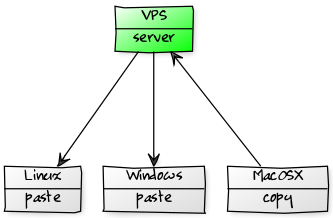
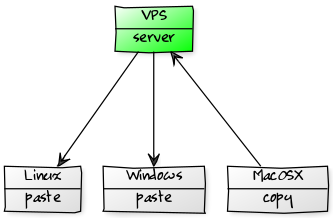
Ever needed a copy/paste clipboard that works over the network?
Piknik seamlessly and securely transfers URLs, code snippets, documents, virtually anything between arbitrary hosts.
No SSH needed, and hosts can sit behind NAT gateways, on different networks.
Fill in the clipboard ("copy") with whatever comes in to the standard input:
$ pkc
clipboard content
Magically retrieve that content from any other host having Piknik installed with the same configuration:
$ pkp
clipboard content
Boom.
Obviously, it can be used to transfer files as well:
pkc < kitten.gif
pkp > kittencopy.gif
tar cvf - *.txt | pkc
pkp | tar xvf -
In order to work around firewalls/NAT gatways, the clipboard content transits over TCP via a staging server.
Nothing transits without end-to-end encryption; the server cannot learn much about what the clipboard actually contains.
Data can be shared between different operating systems, including MacOS, Linux and Windows.
Installation
Option 1: use precompiled binaries
Precompiled binaries for MacOS, Linux (i386, x86_64, ARM), Win32, Win64, DragonflyBSD, NetBSD and FreeBSD can be downloaded here: https://github.com/jedisct1/piknik/releases/latest
Option 2 (on MacOS): use Homebrew
brew install piknik
Option 3: compile the source code
This project is written in Go.
Go >= 1.24 is required, as well as the following incantation:
go build
The piknik executable file should then be available in current path.
Setup
Piknik requires a bunch of keys. Generate them all with
piknik -genkeys
This generates random keys (highly recommended).
You will need to copy parts (not all!) of that command's output to a piknik.toml configuration file.
A temporary alternative is to derive the keys from a password. The same password will always generate the same set of keys, on all platforms. In order to do so, add the -password switch:
piknik -genkeys -password
The output of the -genkeys command is all you need to build a configuration file.
Only copy the section for servers on the staging server. Only copy the section for clients on the clients.
Is a host gonna act both as a staging server and as a client? Ponder on it before copying the "hybrid" section, but it's there, just in case.
The default location for the configuration file is ~/.piknik.toml. With the exception of Windows, where dot-files are not so common. On that platform, the file is simply called piknik.toml.
Sample configuration file for a staging server:
Listen = "0.0.0.0:8075"         # Edit appropriately
Psk    = "bf82bab384697243fbf616d3428477a563e33268f0f2307dd14e7245dd8c995d"
SignPk = "0c41ca9b0a1b5fe4daae789534e72329a93a352a6ad73d6f1d368d8eff37271c"

# Optional streaming limits (defaults shown):
# MaxStreamBytes    = 10737418240   # 10 GiB
# MaxStreamDuration = 86400         # 24 hours, in seconds
# MaxWaitingPullers = 100
Sample configuration file for clients:
Connect   = "127.0.0.1:8075"    # Edit appropriately
Psk       = "bf82bab384697243fbf616d3428477a563e33268f0f2307dd14e7245dd8c995d"
SignPk    = "0c41ca9b0a1b5fe4daae789534e72329a93a352a6ad73d6f1d368d8eff37271c"
SignSk    = "cecf1d92052f7ba87da36ac3e4a745b64ade8f9e908e52b4f7cd41235dfe7481"
EncryptSk = "2f530eb85e59c1977fce726df9f87345206f2a3d40bf91f9e0e9eeec2c59a3e4"
Do not use these, uh? Get your very own keys with the piknik -genkeys command.
Edit the Connect and Listen properties to reflect the staging server IP and port.
And chmod 600 ~/.piknik.toml might not be a bad idea.
Don't like the default config file location? Use the -config switch.
Usage (staging server)
Run the following command on the staging server (or use runit, openrc, systemd, whatever to run it as a background service):
piknik -server
The staging server has to be publicly accessible. At the very least, it must be reachable by the clients over TCP with the port you specify in the configuration.
Commands without a valid API key (present in the client configuration file) will be rejected by the server.
Usage (clients)
piknik -copy
Copy the standard input to the clipboard.
piknik -paste
Retrieve the content of the clipboard and spit it to the standard output.
-paste is actually a no-op. This is the default action if -copy was not specified.
piknik -move
Retrieve the content of the clipboard, spit it to the standard output and clear the clipboard. Not necessarily in this order. Only one lucky client will have the privilege to see the content.
That's it.
Feed it anything. Text, binary data, whatever. As long as it fits in memory.
Streaming mode
Piknik also supports real-time streaming between hosts. One or more receivers connect and wait, then a sender streams data that all receivers get simultaneously.
Start a receiver on one or more hosts:
piknik -pull > received_data
Then stream from the sender:
piknik -push < data_to_send
Or pipe a live process:
tar cf - /important/stuff | piknik -push
All connected receivers get the same stream. Only one sender can be active at a time.
Streaming works like copy/paste: everything is end-to-end encrypted and signed. The server just relays opaque bytes.
Content identifiers
The optional -cid flag binds a label into the stream's key derivation, so both sides must agree on the same value for decryption to succeed:
piknik -pull -cid "deploy-v42" > payload    # receiver
piknik -push -cid "deploy-v42" < payload    # sender
The label is never sent over the wire. If the sender and receiver use different labels, the receiver will fail with a decryption error.
The PIKNIK_CONTENT_ID environment variable can be used instead of -cid.
Trust model
Stream output should be considered tentative until the process exits with code 0. A zero exit status means all chunks were authenticated via AEAD and the complete stream signature was verified. A non-zero exit means the stream was incomplete or tampered with. Pipelines should check the exit status before trusting the output.
Suggested shell aliases
Wait. Where are the pkc and pkp commands mentioned earlier?
Sample shell aliases:
# pko <content> : copy <content> to the clipboard
pko() {
    echo "$*" | piknik -copy
}

# pkf <file> : copy the content of <file> to the clipboard
pkf() {
    piknik -copy < $1
}

# pkc : read the content to copy to the clipboard from STDIN
alias pkc='piknik -copy'

# pkp : paste the clipboard content
alias pkp='piknik -paste'

# pkm : move the clipboard content
alias pkm='piknik -move'

# pkz : delete the clipboard content
alias pkz='piknik -copy < /dev/null'

# pkfr [<dir>] : send a whole directory to the clipboard, as a tar archive
pkfr() {
    tar czpvf - ${1:-.} | piknik -copy
}

# pkpr : extract clipboard content sent using the pkfr command
alias pkpr='piknik -paste | tar xzpvf -'

# pkpush : stream stdin to connected pullers
alias pkpush='piknik -push'

# pkpull : wait and receive a stream to stdout
alias pkpull='piknik -pull'
Piknik integration in third-party packages
- The Piknik package for Atom allows copying/pasting text between hosts running the Atom text editor.
- The Piknik package for Visual Studio Code allows copying/pasting text between hosts running the Visual Studio Code text editor.
Use cases
Use it to:
- Securely send passwords, API keys, URLs from one host to another
- Share a clipboard with your teammates (which can be a lot of fun)
- Copy data from/to isolated VMs, without the VMWare tools or shared volumes (great for unsupported operating systems and malware sandboxes)
- Copy files from/to a Windows machine, without Samba or SSH
- Transfer data between hosts sitting behind firewalls/NAT gateways
- Easily copy configuration files to multiple hosts
- Start a slow download at the office, retrieve it later at home
- Quickly backup a file to the cloud before messing with it
- ...and more!
Protocol
Common definitions
k: API key
ek: 256-bit symmetric encryption key
ekid: encryption key id encoded as a 64-bit little endian integer
m: plaintext
ct: XChaCha20 ek,n (m)
Hk,s: BLAKE2b(domain="PK", key=k, salt=s, size=32)
Len(x): x encoded as a 64-bit little endian unsigned integer
n: random 192-bit nonce
r: random 256-bit client nonce
r': random 256-bit server nonce
ts: Unix timestamp as a 64-bit little endian integer
Sig: Ed25519
v: 6 (copy/paste/move), 7 (streaming)
Copy (v6)
-> v || r || h0
h0 := Hk,0(v || r)

<- v || r' || h1
h1 := Hk,1(v || r' || h0)

-> 'S' || h2 || Len(ekid || n || ct) || ts || s || ekid || n || ct
s := Sig(ekid || n || ct)
h2 := Hk,2(h1 || 'S' || ts || s)

<- Hk,3(h2)
Move/Paste (v6)
Move:  opcode := 'M'
Paste: opcode := 'G'

-> v || r || h0
h0 := Hk,0(v || r)

<- v || r' || h1
h1 := Hk,1(v || r' || H0)

-> opcode || h2
h2 := Hk,2(h1 || opcode)

<- Hk,3(h2 || ts || s) || Len(ekid || n || ct) || ts || s || ekid || n || ct
s := Sig(ekid || n || ct)
Streaming (v7)
Streaming uses protocol version 7. The handshake is the same as v6, but the
opcode is P (push) or L (pull) and the data flow is chunked.
Additional definitions:
AEAD: XChaCha20-Poly1305
np: random 128-bit nonce prefix (also serves as stream identifier)
streamKey: BLAKE2b-256(key=ek, person="pkv7-stream-key",
           input=ts || ekid || np || uint16(len(cid)) || cid)
chunkNonce(i): np || uint64_le(i)     (24 bytes)
cidBind: BLAKE2b-256(key=ek, person="pk-v7-cid-bind",
         input=uint16(len(cid)) || cid)    if cid present
         32 zero bytes                     if cid absent
Push (sender):
-> v=7 || r || h0                       (handshake)
<- v=7 || r' || h1

-> 'P' || h2                            (opcode auth)
h2 := Hk,2(h1 || 'P')

<- status                               (1 byte: 0x01=accepted,
                                         0x00=no pullers, 0x02=busy)

-> ts || ekid || np                     (stream header, 32 bytes)

-> uint32_le(len) || AEAD.Seal(streamKey, chunkNonce(0), chunk0)
-> uint32_le(len) || AEAD.Seal(streamKey, chunkNonce(1), chunk1)
...                                     (data frames, len=1..65536)

-> uint32_le(0) || Sig(transcriptHash)  (end frame)
The server rejects the push immediately if no pullers are waiting or another push is already active. The sender receives a distinct status code for each case and can report a meaningful error without transmitting any data.
Pull (receiver):
-> v=7 || r || h0                       (handshake)
<- v=7 || r' || h1

-> 'L' || h2                            (opcode auth)
h2 := Hk,2(h1 || 'L')

<- status                               (1 byte: 0x01=accepted,
                                         0x00=stream active, 0x02=full)

<- ts || ekid || np                     (stream header)
<- uint32_le(len) || sealed_chunk       (data frames)
...
<- uint32_le(0) || signature            (end frame)
The server rejects the pull immediately if a push is already in progress or if the maximum number of waiting pullers has been reached.
The transcript hash covers:
transcriptHash := BLAKE2b-256(person="pk-v7-transcript",
    v(1) || 'P'(1) || ts(8) || ekid(8) || np(16) || cidBind(32)
    || for each chunk: chunkIndex(8) || chunkLen(4) || sealedChunk(len+16)
)
All integers are little-endian. The content identifier (-cid) is never
transmitted on the wire; it is bound into key derivation and the transcript
hash so that both sides must agree on the same label.
License
ISC.
Credits
Piknik diagram by EasyPi.