Peacock 只在 Workspace 中生效,单文件打开时命令可能不出现;需先创建或打开一个 VS Code Workspace
vscode-peacock
johnpapaMIT活跃维护给 VS Code 工作区换个低调的主题色,多开窗口或使用 Live Share、Remote 时一眼就能认出当前编辑器。
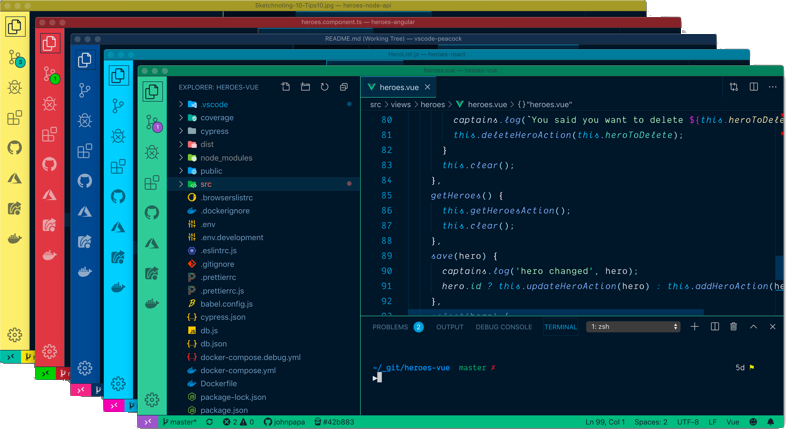
Subtly change the color of your Visual Studio Code workspace. Ideal when you have multiple VS Code instances, use VS Live Share, or use VS Code's Remote features, and you want to quickly identify your editor.
v4.5.1发布于 2026-09-29 17:37 UTC1,194star +2 / 7 天159fork同步于 2026-11-10 17:52 UTC
在 VS Code 扩展面板搜索 Peacock 并点击 Install,必要时点击 Reload 硬件要求按 README 说明
README 未说明,仅需安装 VS Code 即可使用
VS Code 扩展,给不同工作区换标题栏颜色,多开窗口时一眼认出是哪个项目
给 VS Code 工作区换个低调的主题色,多开窗口或使用 Live Share、Remote 时一眼就能认出当前编辑器。
核心能力
- 用命令面板执行 Peacock 命令切换工作区颜色
- 提供预定义收藏色板供快速选择
- 同时适配 VS Code 经典 UI 与 Modern UI
- 适合多实例、Live Share 和 Remote 场景区分编辑器
容易踩的坑
内容由模型根据 README 生成,可能不完整或不准确,以官方文档为准。看原文 README
- v4.5.14.5.1最新正式版2026-09-29 · 2026-09-29 17:37 UTC
A patch release focused on Custom Color Picker performance, plus a 92% smaller published package.
Fixes
- Fixed the Custom Color Picker slowing VS Code down while dragging the color well (#776). Dragging the well fires an
inputevent on essentially every pixel of movement, and each one used to callapplyColor()-- a read-modify-write ofworkbench.colorCustomizationsinsettings.jsonplus a full workbench theme re-render. Previewing now debounces that write, so an entire drag gesture collapses into a single write once the cursor settles (150ms) instead of one write per event. The picker's own title-bar contrast swatch still updates instantly on every event (a cheap in-memory computation), your real title bar/status bar still update live a fraction of a second after you stop moving, and Apply still commits the final color immediately without waiting out the debounce.
Infrastructure
- Shrunk the published VSIX from 841 KB to 67 KB (a 92% reduction) by excluding files that were never needed at runtime.
resources/hero.png,resources/modern-ui-classic.png,resources/modern-ui-modern.png, andresources/peacock-icon-small.pngaccounted for ~838 KB of that, but every one of them is referenced fromREADME.mdby an absoluteraw.githubusercontent.comURL -- so the Marketplace and the VS Code extension pane have always rendered them straight from GitHub, never from the package. Onlyresources/peacock-icon.pngis genuinely required (it backspackage.json'siconfield) and it still ships.AGENTS.mdand.mcp.jsonwere also leaking in as dev-only tooling config.scripts/check-vsix-contents.jsnow treatsAGENTS.mdand.mcp.jsonas disallowed filenames, and its size ceiling drops from 2048 KB to 256 KB, so a future regression of this kind fails CI instead of silently shipping (#780) - Routed all three of the Custom Color Picker's
applyColor()calls -- the debounced preview, Apply, and Cancel/panel-close -- through a single shared serializer. Debouncing moved the preview's write off the picker's existing message queue and onto a timer, so a debounced write that had already fired could still be in flight when the user committed or canceled; the two overlappingworkbench.colorCustomizationsread-modify-writes could then land out of order, clobbering the committed color or leaving a canceled one applied. Serializing restores the guarantee that the last write requested is the last one written (#777) - Fixed Cancel (and closing the panel) not reverting an already-applied preview when the picker was opened with no color previously set (
startingColor === '') -- the revert now always callsapplyColor(startingColor)and relies on its existing empty-string handling to unapply, instead of skipping the call wheneverstartingColorwas falsy (#777)
Tests
- Added a
debounce()utility (src/debounce.ts) with unit tests covering burst-collapsing, cancellation, and back-to-back separate bursts, plus host-lane coverage proving a simulated 40-event color-well drag collapses into a singleapplyColor()write with the final previewed color -- not one write per event -- guarding against the exact performance regression reported in #776 - Added a regression test proving Cancel unapplies (rather than leaves applied) a debounce-settled preview when the picker started with no color set, covering the empty-
startingColorcase the rest of the cancel/close coverage didn't exercise (#777) - Added a regression test that stubs
applyColor()with a deliberately slow fake and asserts a debounced preview wri
- Fixed the Custom Color Picker slowing VS Code down while dragging the color well (#776). Dragging the well fires an
- v4.5.0Peacock 4.5.02026-09-28 · 2026-09-28 01:09 UTC
查看更新说明
Fixes
- Fixed unfocused windows losing Peacock's status bar color: when
peacock.affectStatusBaris enabled, Peacock now writesstatusBar.inactiveBackgroundalongside the active status bar token so VS Code keeps the Peacock color even after the window loses focus (#773) - Re-pinned
@types/vscodeto1.49.0(matchingengines.vscode) sovscepackaging no longer fails with@types/vscode ... greater than engines.vscode ...when CI runsnpm run package:check. Also told Dependabot to ignore@types/vscodeuntil Peacock intentionally raises its minimum supported VS Code version, preventing the same incompatible bump from reopening CI failures.
Infrastructure
- Bumped
morgan(transitive dev dependency) from 1.10.1 to 1.12.0, picking up fixes for log-injection CVEs in the:remote-usertoken and token value escaping (#760) - Added a required
mainbranch ruleset (theCI / buildstatus check, plus automatic Copilot code review on every PR/push) now that CI passing is enforced before merge, not just advisory. Becauseci.yml'sbuildjob previously usedpaths-ignoreto skip docs/markdown-only changes, a docs-only PR could never satisfy this new required check and would be permanently blocked;ci.ymlnow always triggers and instead detects a docs-only diff internally (viadorny/paths-filter) to skip the actual lint/build/test steps while still reporting the same singlebuildcheck. An initial fix using a second, docs-only-triggered workflow was reverted after code review flagged that a mixed docs+code PR would trigger both workflows and produce two ambiguous, identically-namedCI / buildchecks.
Features
- Added a visual color picker to the Peacock: Change to a Favorite Color flow. The favorites Quick Pick now ends with a
$(paintcan) Custom color…item that opens a webview with a native color well kept in sync with a hex/name/formula text field. Every edit previews live (the same way hovering a favorite already does, without unapplying your current color just from arrowing over the item), Apply keeps the color, and Cancel (or closing the panel) reverts to the color that was active before the picker opened. The Quick Pick now always opens, even with zero favorites saved, so the picker is reachable regardless (#708) - Merged Peacock: Enter a Color with the visual picker into a single Peacock: Choose a Custom Color command: running it with no arguments now opens the Custom Color Picker directly, and its color field accepts every format the old input box did (hex, named colors, and
rgb/rgba/hsl/hsla/hsv/hsvavalues), not just hex. Thepeacock.enterColorcommand ID is unchanged, so existing keybindings and scripts that invoke it programmatically with a color argument keep working exactly as before (#708 follow-up) - Designed the color picker panel with a modern layout: a labeled color-well/field group, an eyedropper button (shown when the browser EyeDropper API is available) to sample any color from anywhere on screen, and a live title bar contrast preview — a sample swatch plus a WCAG contrast ratio badge — that reuses Peacock's own title-bar contrast logic, so a light custom color (e.g. orange or pink) is confirmed to get the same automatic dark-font contrast treatment as any other color, before you even apply it. The preview reflects your actual
peacock.affectTitleBar/peacock.keepForegroundColorsettings (with a note when the pairing doesn't apply), an invalid typed color (e.g. a color-name typo) marks the field invalid and disables Apply instead of doing nothing, Enter/Escape apply/cancel no matter which control has focus, and the panel's state (including the preview)
- Fixed unfocused windows losing Peacock's status bar color: when
- v4.4.1Peacock 4.4.12026-09-07 · 2026-09-07 17:03 UTC
查看更新说明
Fixes
- Fixed the currently-selected activity bar icon rendering VS Code's default gray instead of Peacock's colorized foreground under Modern UI's "activity bar on top" layout (and, more subtly, in the classic side layout too). Peacock now sets
activityBar.activeBorderandactivityBarTop.activeBorderexplicitly to match the computed foreground (#652)
Docs
- Documented why a colored vertical line can appear between the side bar and editor with
modernUIenabled — this is expected behavior when Peacock'saffectEditorGroupBordersetting is on, not a bug (#652)
Full Changelog: https://github.com/johnpapa/vscode-peacock/compare/v4.4.0...v4.4.1
- Fixed the currently-selected activity bar icon rendering VS Code's default gray instead of Peacock's colorized foreground under Modern UI's "activity bar on top" layout (and, more subtly, in the classic side layout too). Peacock now sets
- v4.4.02026-09-07 · 2026-09-07 16:23 UTC
查看更新说明
Features
- Added automatic migration that backs up existing
workbench.colorCustomizationson first extension activation, preventing data loss when installing Peacock in workspaces with pre-existing color customizations. Users receive a notification with the option to view backed-up settings (#687)
Fixes
- Fixed a release-blocking
vsce packagefailure: dependabot PR #733 bumped@types/vscodeto^1.134.0without a correspondingengines.vscodebump, andvscerefuses to package when the declared type definitions are newer than the minimum VS Code version the extension claims to support (@types/vscode ^1.134.0 greater than engines.vscode ^1.49.0). Reverted@types/vscodeto1.49.0to match the existingengines.vscodefloor rather than raising the minimum supported VS Code version as a side effect of an unrelated dependency bump — Peacock's code doesn't use any VS Code API newer than 1.49.0 - Fixed title bar text readability on dark color schemes in Cursor IDE. Peacock now gates the mid-gray title bar foreground workaround (#647) behind a
background.isLight()check, using adaptive light foreground (#e7e7e7) for dark schemes to maintain WCAG AA contrast ratios while preserving the toolbar icon visibility fix on light backgrounds (#700) - Fixed a
tinycolor2CJS/ESM interop bug:color-library.ts'simport * as tinycolor from 'tinycolor2'compiles to a rawrequire()under the project's classic (non-esModuleInterop) TypeScript/webpack build, but under Vite/esbuild's stricter ESM semantics a namespace import can never be callable, so any color-manipulation call built with Vite (including the new Vitest unit lane) failed withTypeError: ... is not a function. Switched toimport tinycolor = require('tinycolor2'), which compiles identically (a plainrequire()) under both toolchains (#670) - Reconciled the title bar foreground fix (#700) with the extracted
getTitleBarForegroundForApphelper (#670) — the helper now takes the background color and applies the same light/dark gating as the host fix, instead of unconditionally overriding the Cursor foreground - Removed the one-time
workbench.experimental.modernUIcompatibility notice. The root cause was upstream in VS Code: modern UI mode forced the title bar, activity bar, and status bar totransparentbackgrounds/borders with!important, overriding Peacock's (and any theme's) color customizations — reported as microsoft/vscode#326126 "Some color theme settings and color customizations are ignored in modern UI mode", fixed by microsoft/vscode#329701 "Restore theme colors in Modern UI shell" (merged August 2026). This is confirmed by multiple independent user reports on #652, so the warning was no longer accurate and was confusing users (#711). Added a regression test assertingapplyColor()writes an identicalworkbench.colorCustomizationspayload whether modernUI is enabled or disabled, so Peacock's own write path stays provably UI-mode-agnostic. The first version of that test actually caught a bug in itself, not in Peacock: it compared VS Code's liveWorkspaceConfigurationobject directly, which carriesget/has/inspect/updatemethods as own properties, soassert.deepStrictEqualfailed on function-reference identity even though every real color value matched. Fixed by comparing plain data viagetColorCustomizationConfigFromWorkspace()instead.
Docs
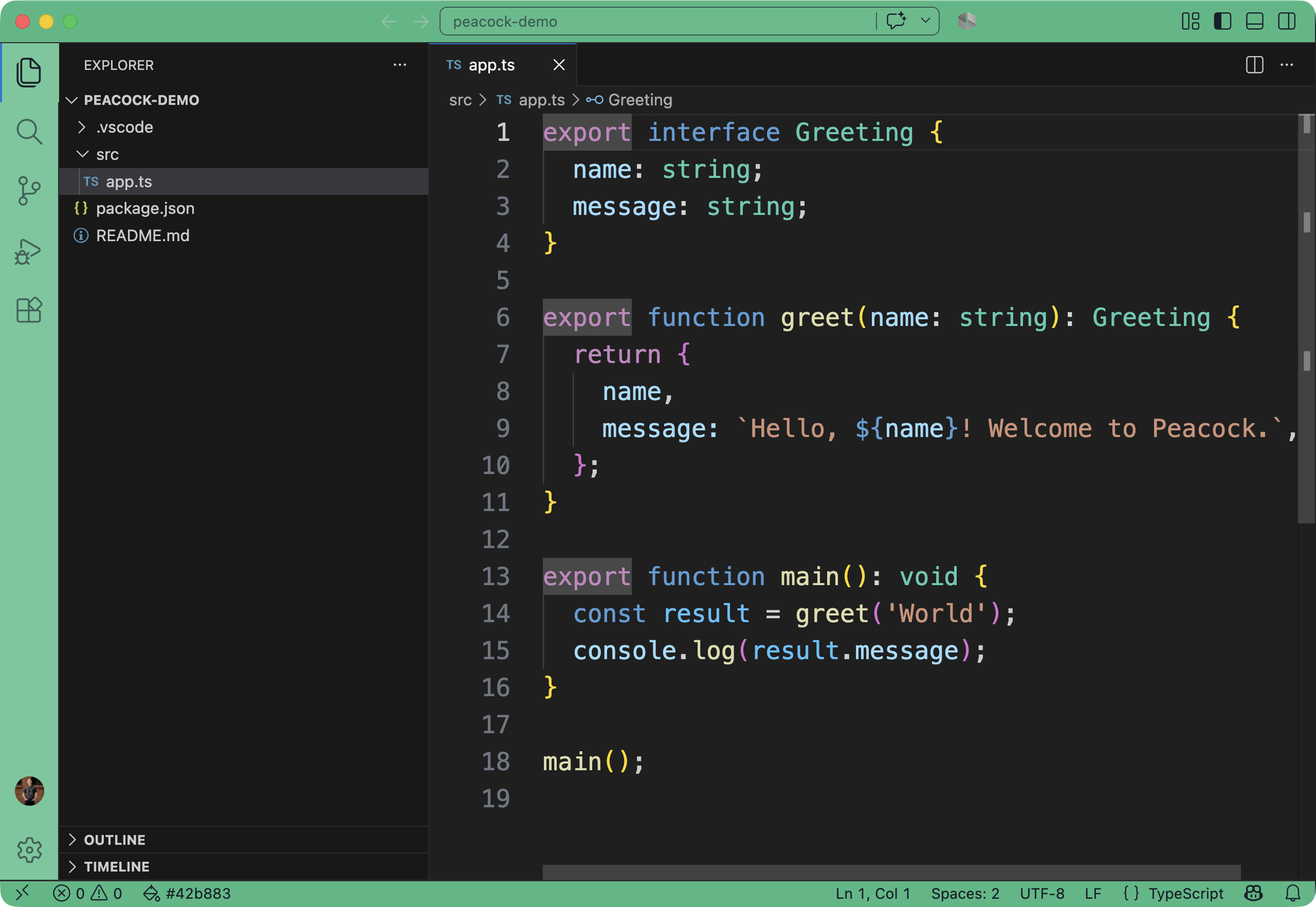
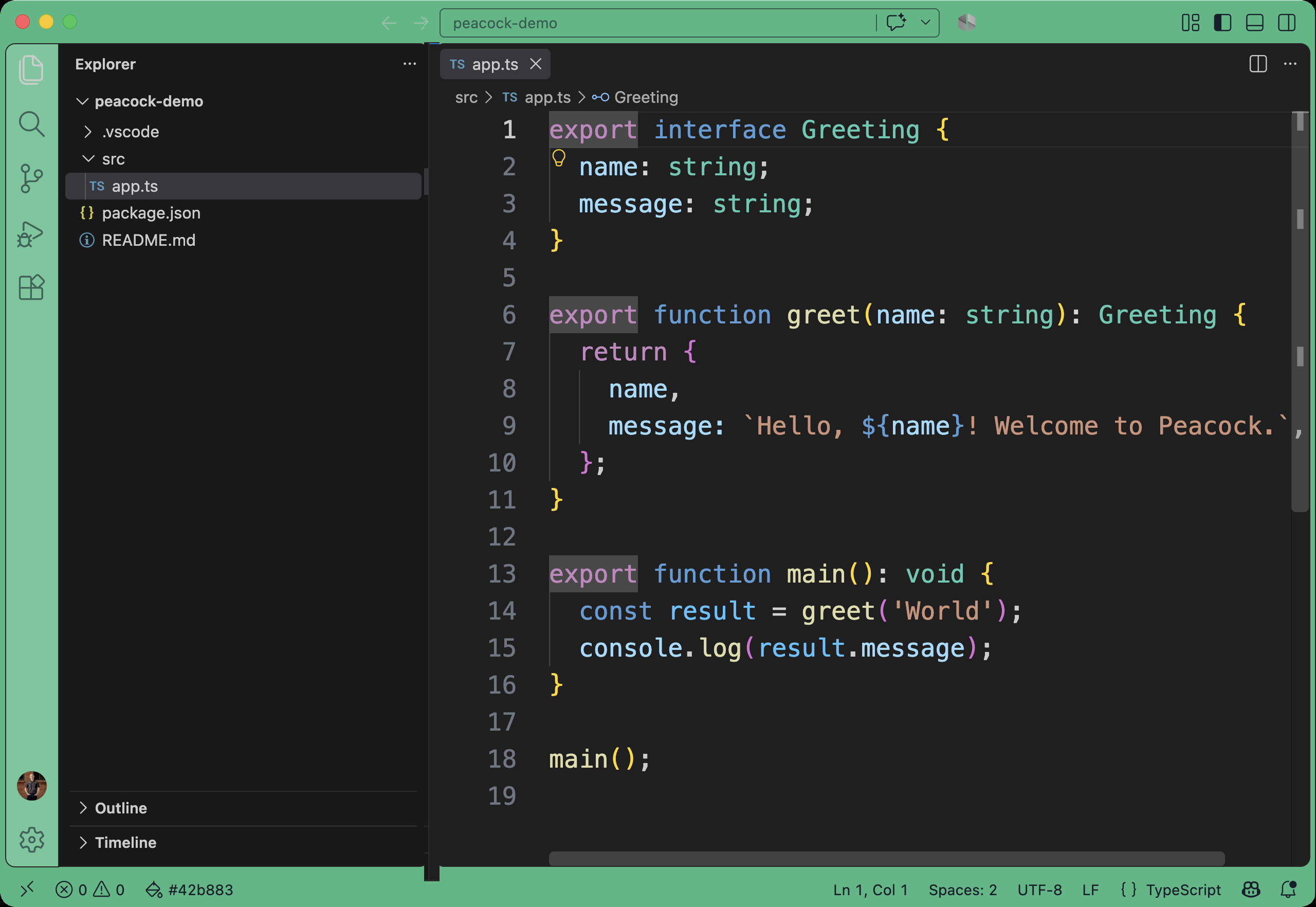
- Added a README comparison showing Peacock working identically in VS Code's classic UI and the new Modern UI, as a visual companion to the Modern UI compatibility fix above.
- Clarified `pea
- Added automatic migration that backs up existing
- v4.3.4Peacock 4.3.42026-07-19 · 2026-07-19 18:49 UTC
查看更新说明
Includes a one-time in-product notice when workbench.experimental.modernUI is enabled, docs FAQ update, changelog entry, regression tests, and packaging fix to exclude e2e screenshots so VSIX is small (~243KB). PRs: #682 (notice/docs/tests), #683/#684/#685 (.vscodeignore and packaging). Tracking issue: #652.
用户点评
登录用户的真实使用记录,可按版本和硬件筛选共 0 条
还没有人点评。第一个说出真实体验的人最有价值。
Peacock for Visual Studio Code



Subtly change the color of your Visual Studio Code workspace. Ideal when you have multiple VS Code instances, use VS Live Share, or use VS Code's Remote features, and you want to quickly identify your editor.
Read the extensive documentation here which includes a guide on how to use Peacock and a changelog
Install
- Open Extensions sideBar panel in Visual Studio Code and choose the menu options for View → Extensions
- Search for
Peacock - Click Install
- Click Reload, if required
Documentation
Read the extensive documentation here which includes a guide on how to use Peacock and a changelog
Quick Usage
Let's see Peacock in action!
- Create/Open a VSCode Workspace (Peacock only works in a Workspace)
- Press
F1to open the command palette - Type
Peacock - Choose
Peacock: Change to a favorite color - Choose one of the pre-defined colors and see how it changes your editor
Now enjoy exploring the rest of the features explained in the docs!
Works with Modern UI
Peacock works whether you're on VS Code's classic UI or the new Modern UI — same colors, same experience.
| Classic UI | Modern UI |
|---|---|
 |  |
Resources
- Peacock docs on GitHub Pages
- Peacock on the VS Code Marketplace
- CI workflow (GitHub Actions)
- Docs workflow (GitHub Actions)
- MIT License
- Get VS Code
- Create your first VS Code extension
- VS Code Extension API
- Learn how to add WebPack bundles to your favorite extensions
Credits
Inspiration comes in many forms. These folks and teams have contributed either through ideas, issues, pull requests, or guidance. Thank you!
-
The VS Code team and their incredibly helpful guide for creating extensions
-
Here are some great examples for extensions from the VS Code team
Code of Conduct
Contributing
The fastest way to contribute is with Copilot CLI — it knows this repo's conventions automatically:
copilot "Add a new command called 'Change to a Seasonal Color' that picks a color based on the current season"
Or contribute manually — see CONTRIBUTING.md for the full guide:
- Fork this repo and create a branch
npm install→ make your changes →npm test- Open a PR
See AGENTS.md for the full project guide including architecture, patterns, and how to add commands/settings.
Problems or Suggestions
workbench.experimental.modernUI compatibility was fixed upstream in VS Code and Peacock colors now apply normally with it enabled. See #652 for history.
Contributors
Contribution guidelines are located here
Thanks goes to these wonderful people (emoji key):
This project follows the all-contributors specification. Contributions of any kind welcome!
vscode
microsoft·TypeScript
微软开源的跨平台代码编辑器,基于 Electron 和 TypeScript 构建,支持插件扩展、调试和 Git 集成,适合日常开发写代码。
代码编辑器+4编辑器 / IDE
195262+17844k1.145.22026-11-10 17:16 UTC
neovim
neovim·Vim Script
Vim 的分支版本,用 Lua 做配置和插件开发,内置 LSP 与异步 API,让终端编辑器更好扩展、更好用。
文本编辑器+4编辑器 / IDE
103547+857.4kv0.12.62026-11-10 16:22 UTC
zed
zed-industries·Rust
用 Rust 打造的高性能多人协作代码编辑器,由 Atom 和 Tree-sitter 作者开发,主打低延迟编辑与实时协同编码。
代码编辑器+4编辑器 / IDE
94661+80912kv1.27.02026-11-10 16:11 UTC

AFFiNE
toeverything·TypeScript
把文档、白板、表格融为一体的开源知识库,可离线使用、支持多人实时协作,是 Notion 和 Miro 的替代方案。
知识库+4编辑器 / IDE
74421+1345.5kv2026.11.9-canary.9072026-11-10 16:20 UTC