字体选择器需配置 NUXT_PUBLIC_GOOGLE_FONTS_KEY,否则只显示本地字体;自托管默认 base URL 为 /markdown-resume/,部署到根路径需改 NUXT_APP_BASE_URL;数据存在浏览器 IndexedDB,换浏览器或清缓存会丢简历
markdown-resume
junianMIT活跃维护用 Markdown 写简历,输出对 ATS 友好、人读也舒服的格式,全程在本地运行,不上传数据,免费开源。
Write Resume with Markdown in ATS and Human-friendly format. Free and Open Source, Privacy-friendly, Local-first resume builder. Simple, private, local.
v2026.07.08发布于 2026-07-09 01:29 UTC720star +1 / 7 天156fork同步于 2026-11-10 11:56 UTC
pnpm install
pnpm run dev 硬件要求按 README 说明
README 未说明;浏览器端运行,推荐使用 Chrome 或 Microsoft Edge 等 Chromium 内核浏览器
用 Markdown 写 ATS 友好简历的本地优先编辑器,数据只存在浏览器里
用 Markdown 写简历,输出对 ATS 友好、人读也舒服的格式,全程在本地运行,不上传数据,免费开源。
核心能力
- Markdown 编辑配分页实时预览
- 导出 PDF、Markdown、自包含 HTML 和 DOCX
- 支持 A4 与 US Letter 纸张及页边距、主题色、字体调整
- 用 ::icon:: 语法经 Iconify 插入图标
- 支持 KaTeX 公式、交叉引用与自动分页
容易踩的坑
内容由模型根据 README 生成,可能不完整或不准确,以官方文档为准。看原文 README
- v2026.07.08最新正式版2026-07-09 · 2026-07-09 01:29 UTC
What's Changed
- Fix the margin after page break by @pingtimeout in https://github.com/junian/markdown-resume/pull/5
- feat: set minimum font size to 10px by @djmaxus in https://github.com/junian/markdown-resume/pull/8
New Contributors
- @pingtimeout made their first contribution in https://github.com/junian/markdown-resume/pull/5
- @djmaxus made their first contribution in https://github.com/junian/markdown-resume/pull/8
Full Changelog: https://github.com/junian/markdown-resume/commits/v2026.07.08
用户点评
登录用户的真实使用记录,可按版本和硬件筛选共 0 条
还没有人点评。第一个说出真实体验的人最有价值。
Markdown Resume
Write an ATS-friendly resume in Markdown. Available for everyone, optimized for developers.


About
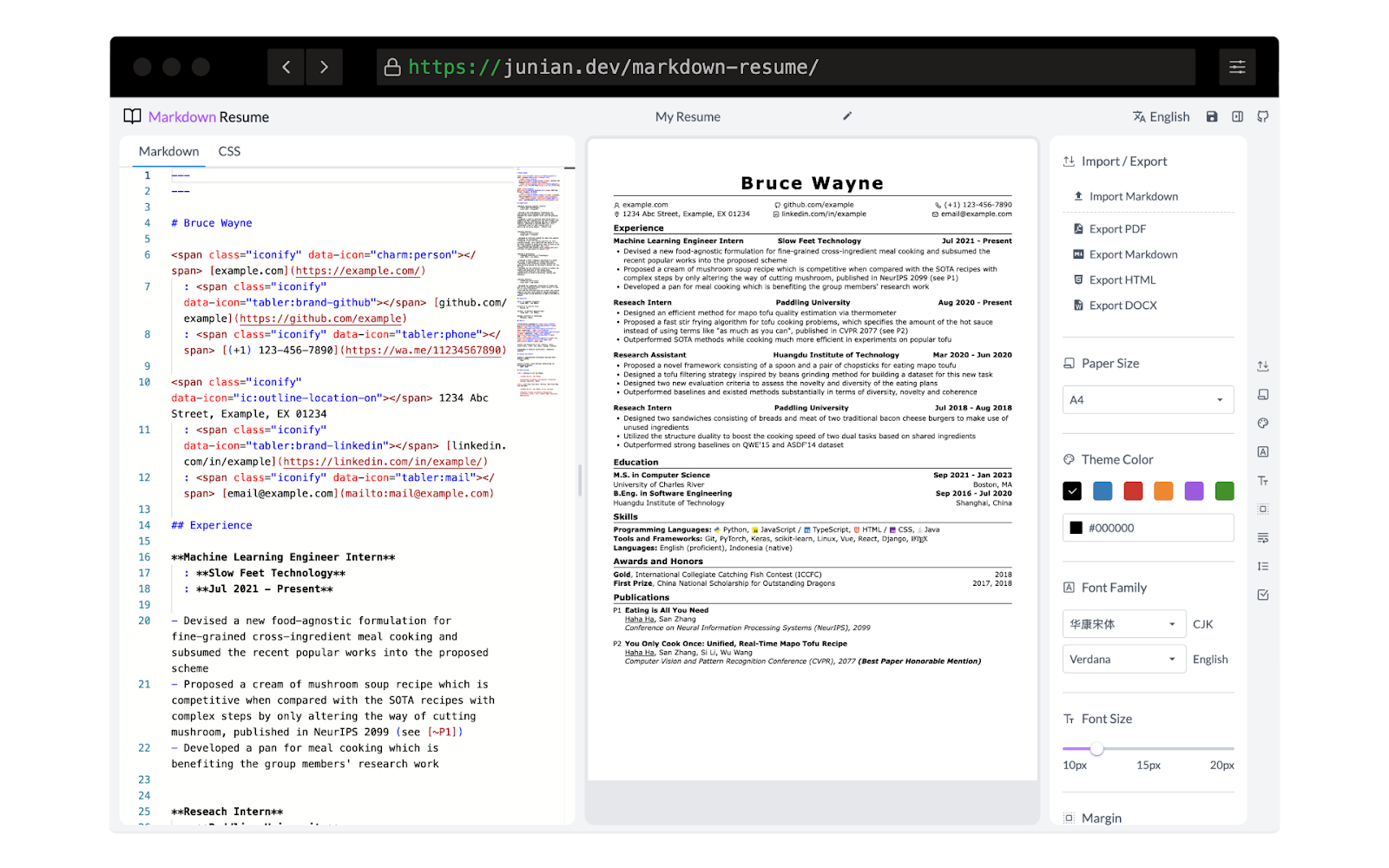
Markdown Resume is a local-first editor for creating clean, ATS-friendly resumes with Markdown. It combines a code editor with a paginated live preview, practical formatting controls, and self-contained export options.
The default template is based on CareerCup's resume template, using a restrained layout, web-safe fonts, and readable content structure so a resume works well for both applicant tracking systems and people.
Your resumes, images, and settings stay in your browser. No account is required, and your resume content is not uploaded to an application server.
I can’t guarantee that using this will improve your job search success rate. But I hope it helps.
See the Changelog for the complete project history and latest changes.
Notice
Highly recommend using Chromium-based browsers, e.g., Chrome or Microsoft Edge.
Features
- Write your resume in Markdown and preview it in real time — smooth experience!
- Works offline (PWA)
- Export to PDF, Markdown, self-contained HTML, and DOCX
- Export to A4 and US Letter paper sizes
- Customize page margins, theme colors, line heights, fonts, etc.
- Add icons easily with Markdown syntax (
::icon::) via Iconify (search icons on Icônes) - Fix legacy Iconify markup from older resumes by converting it to Markdown icon syntax
- TeX support (KaTeX)
- Cross-referencing (useful for academic CVs)
- Case correction (e.g.,
Github→GitHub) - Add line breaks (
\\[10px]) or start a new page (\newpage) like in LaTeX - Automatic page breaking
- Custom CSS support
- Manage, rename, duplicate, import, back up, and delete multiple resumes
- Automatically save editor changes when adding a new line, with Ctrl/Cmd+S support
- Responsive editing layout for desktop, tablet, and mobile
- Optional Monaco editor minimap
- Light document previews in every color theme
- Light, dark, and system appearance modes
- English and Indonesian interface languages
- Local storage usage estimates, refresh controls, and a protected factory-reset action
- Data is saved locally in your browser using IndexedDB browser feature (see
localForagerepo for details) - Image Gallery — upload images and reference them in your resume using Markdown or HTML (see below)
Icon Support
Add icons to your resume with Markdown syntax, e.g. ::mdi:home::. Search icons on Icônes and use the Iconify icon names.
You can also set the size and color of an icon:
::mdi:home =24 /red::
The Fix Icons toolbar tool automatically converts legacy markup — both old <span class="iconify" data-icon="..."> markup and <iconify-icon icon="..."> tags — into this Markdown syntax.
Image Support
The Image Gallery screen lets you upload images and use them directly in your resume.
Once uploaded, each image gets a stable URL in the format ./images/<id> served by a Service Worker — no external hosting needed. You can copy the URL from the gallery and paste it into your Markdown:

Or as an HTML tag:
<img src="https://raw.githubusercontent.com/junian/markdown-resume/HEAD/images/1234567890_abc123" alt="My photo" />
When exporting to HTML or DOCX, image references are automatically replaced with inline base64 data URLs so the exported file is fully self-contained.
Privacy: Images are stored entirely inside your browser's IndexedDB — the same storage used for your resumes. They are never uploaded to any server and never leave your computer.
Self-Hosting
-
Clone the repository:
git clone https://github.com/junian/markdown-resume.git cd markdown-resume -
(Optional) Set up your environment variables. Copy the example file and fill in the values you need:
cp .env.example .envSee the Environment Variables section for details on each variable.
-
Run the build script:
./build.sh -
Deploy the contents of the
.output/publicdirectory to any static hosting provider (GitHub Pages, Netlify, Vercel, Nginx, etc.).
Environment Variables
Configuration is done via a .env file in the project root. You can copy .env.example as a starting point:
cp .env.example .env
| Variable | Description |
|---|---|
NUXT_PUBLIC_SITE_URL | Site origin URL (e.g. https://example.com). Defaults to https://www.junian.dev. |
NUXT_APP_BASE_URL | Site base URL (e.g. / for root or /my-app/ for a subpath). Defaults to /markdown-resume/. |
NUXT_PUBLIC_GOOGLE_FONTS_KEY | Google Fonts Developer API Key. Required to enable the font picker that lists fonts from Google Fonts. Without this key the font selection will only show locally available fonts. |
NUXT_PUBLIC_SCRIPTS_GOOGLE_ANALYTICS_ID | Google Analytics 4 Measurement ID (e.g. G-XXXXXXXXXX). Enables GA4 page-view and event tracking. Leave empty to disable analytics. |
NUXT_PUBLIC_DISQUS_SHORTNAME | Disqus shortname for your site. Enables the Disqus comment section. Leave empty to hide comments. |
Development
Clone the repo and install dependencies:
pnpm install
Start developing / building the site:
pnpm run dev
pnpm run build
License
This project is licensed under the MIT license.
See ACKNOWLEDGMENTS for credits.
Made with ☕ by Junian.dev.
markitdown
microsoft·Python
把 PDF、Office 文档等各类文件转成 Markdown 的 Python 工具,方便喂给 LLM 或做文档处理。
文档转换+4Markdown 编辑器
194693+46215kv0.1.92026-11-07 00:14 UTC
memos
usememos·Go
开源可自托管的轻量笔记应用,把日常想法按时间线整理,数据完全归自己所有,可自由选择私密或分享。
自托管笔记+4Markdown 编辑器
64375+474.9k26.11.02026-11-09 00:37 UTC

marktext
marktext·TypeScript
一款简洁优雅的跨平台 Markdown 编辑器,支持实时预览、专注模式和打字机模式,适合日常写作与文档编辑。
Markdown 编辑器+3Markdown 编辑器
63816+1364.7kv0.23.02026-11-10 07:55 UTC

rich
Textualize·Python
Python 终端富文本渲染库,能在命令行里输出彩色文字、表格、进度条、Markdown 和语法高亮,让终端界面更好看、更好读。
终端渲染+4Markdown 编辑器
57777+362.5kv15.0.02026-11-07 11:26 UTC