自动同步依赖云盘 App 的后台刷新,需在系统设置中开启 Background App Refresh;Mega、Cryptomator 仅支持手动导入导出;GPLv3 与 App Store 条款冲突,自行构建的衍生版本不要提交 App Store
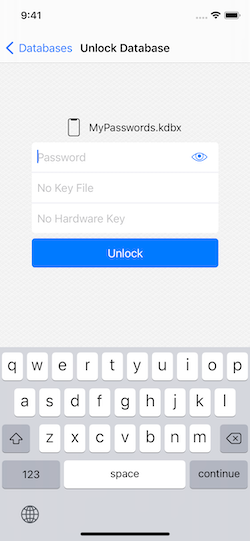
从 App Store 安装:https://apps.apple.com/us/app/id1435127111;自行构建:下载项目后用 Xcode 10.2+ 打开,依赖已内置 硬件要求按 README 说明
README 未说明硬件要求;运行于 iOS 与 macOS 设备,构建需 Xcode 10.2 或以上
KeePass 兼容的 iOS 密码管理器,自动同步数据库并支持系统级密码自动填充
兼容 KeePass 数据库的 iOS 与 macOS 密码管理器,可直接打开和编辑 kdbx 文件,让苹果设备用户沿用已有的密码库。
核心能力
- 自动同步 iCloud、Dropbox、OneDrive 等云盘数据库
- 支持 iOS 12+ 系统密码 AutoFill 自动填充
- 读写 kdbx4、kdbx3、kdb 全部 KeePass 格式
- 支持 ChaCha20、Argon2、AES、Twofish 等加密算法
- 提供 Face ID/Touch ID 与超时锁定多层保护
容易踩的坑
内容由模型根据 README 生成,可能不完整或不准确,以官方文档为准。看原文 README
- 1.54.157Release 1.54.157pre-release最新正式版2024-12-09 · 2024-12-09 22:51 UTC
Added
- macOS: Database export to CSV format (#262)
- Search for passkeys (
is:passkey) and large attachments (is:large)
Improved
- AutoFill: faster Quick mode for remote databases (prefers local cache)
- AutoFill: Warn if not enough memory to save changes
- Updated all translations [thanks, everyone]
- Minor UI fixes here and there [thanks, everyone]
Fixed
- AutoFill: passkey creation on iOS 17 / macOS 14
- AutoFill: passkey creation when there is already a perfect match
- AutoFill: Empty Caller ID when creating a passkey [thanks, jasperweiss]
- AutoFill: Keyboard could cover Passkey creation dialog [thanks, jasperweiss]
- Crash when changing group/entry icon on iOS 18 [thanks, everyone]
- AutoFill setup messages updated for iOS 18 / macOS 15
- Possible crash when closing on iOS 18
- 1.54.156Release 1.54.156pre-release2024-11-28 · 2024-11-28 23:22 UTC
查看更新说明
Added
- AutoFill: Create new passkeys (#297)
Improved
- macOS: Main menu, toolbar and keyboard shortcuts
Fixed
- macOS: can be built for Intel again (excluded yubikit-ios from macOS build)
- Added iPhone 16, iPad Air 6/7 and iPad Pro 7 to YubiKit device recognition
…also includes 1.54.155, which refused to compile for macOS
Added
- AutoFill: Sign in using existing passkeys (#297)
- AutoFill: Insert any field to any input via context menu (iOS 18+) (#396)
- AutoFill: Fill out OTP codes (iOS 18+)
Changed
- This version requires at least iOS 17 / macOS 14
Improved
- Protecting key file field like a password [thanks, Jason]
- Added possibility to download favicons for selected entries (#320)
- Added possibility to delete unused custom icons
- Replaced Entry Viewer tab titles with icons
- Folder lists are sorted for all direct connections now
- Entry Viewer indicates presence of attachments in Files tab [thanks, u/gripe_and_complain]
- Removed post-AutoFill popups with OTP codes as redundant
- Updated all translations [thanks, everyone]
Fixed
- macOS: AutoFill dialog could get stuck in a blank state (#392)
- macOS: Tag selection/deselection did not work properly
- AutoFill could load databases twice sometimes
- Incorrect processing on
otpauthURIs - Enforce strength checks on new app passcode and DB passwords (Cure53/KEE-01-001)
- Warn about risks of bulk favicon download (Cure53/KEE-01-002)
- Enforce reasonable KDF parameter limits (Cure53/KEE-01-003)
- 1.53.154Release 1.53.154pre-release2024-09-12 · 2024-09-12 19:46 UTC
查看更新说明
Added
- Support for linked databases aka AutoOpen (#202) [thanks, everyone]
- Support for extended search syntax (closes #190 and #383) [thanks, everyone]
- Detecting external DB changes on app activation (related #373)
- Ability to hide local files from iOS Files / macOS Finder [thanks, everyone]
- Added OTP overview mode in smart group (closes #8) [thanks, everyone]
Improved
- Allow entry field references in free version, no longer a premium feature
- Refined DB viewer and DB picker toolbars and menus
- New parameters for managed AppConfig:
allowFaviconDownloadandallowPasswordAudit[thanks, I.R.] - Possibility to disable copy-to-clipboard via managed AppConfig
- Added presets to Smart Group Editor
- macOS: Propose app reset if launching with Ctrl pressed
- Enable cache fallback for local DBs (#381) [thanks, Andreas]
- AutoFill: notify user if main app's dir unavailable (closes #381) [thanks, Andreas]
- Improved AutoFill setup workflow
- Updated all translations [thanks, everyone]
- Minor UI improvements here and there
Fixed
- macOS: Copying of URLs (fixes #384) [thanks, Johannes]
- macOS: Printing in "Designed for iPad" builds [thanks, Bernhard]
- Processing WebDAV file lists without namespaces [thanks, D.J.]
- Some toolbar buttons were untranslated in VoiceOver mode [thanks, Michael]
- Org: Ignore local files if local storage is forbidden via AppConfig [thanks, I.R.]
- Enforcing clipboard timeout also in text fields' menus
- macOS: DB saving after drag-and-drop reorder and bulk operations
- Wrapping of long group titles in DB viewer (regression in 1.53.152)
- macOS: fixed entry selection (regression in 1.53.153)
- DB viewer could crash when deleting in mutli-select mode
- 1.53.153Release 1.53.153pre-release2024-07-20 · 2024-07-20 12:28 UTC
查看更新说明
Fixed
- Crash when starting search (fixes #379) [thanks, everyone]
- 1.53.152Release 1.53.152pre-release2024-07-20 · 2024-07-20 12:28 UTC
查看更新说明
Added
- Reordering of groups and entries
- Multi-select and bulk operations on groups and entries
- Support for smart groups (#8, #190, #264)
Improved
- AutoFill will auto-insert perfect-match entry even if there are partial matches, too (#76) [thanks, BoKKeR111]
Fixed
- Direct Dropbox connection sometimes failed with "network connection lost" (fixes #377)
- Processing WebDAV file lists with custom namespaces (fixes #378) [thanks, QueenGit]
- Better protection of file references and user activity timestamp (#299) [thanks, eonist]
- Localization of app and DB icon settings [thanks, katullo11]
- Minor UI fixes here and there
用户点评
登录用户的真实使用记录,可按版本和硬件筛选共 0 条
还没有人点评。第一个说出真实体验的人最有价值。
KeePassium Password Manager
KeePassium is a KeePass-compatible password manager for iOS. It offers automatic database synchronization, respect to privacy and premium user experience.
KeePassium is a commercial open source app. The "commercial" part gives you a well-maintained app with premium support. The "open source" part gives you the transparency expected from a password manager: you can personally audit the code and build the app you can trust.
Contents
Screenshots
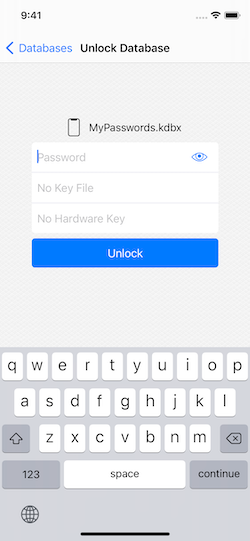
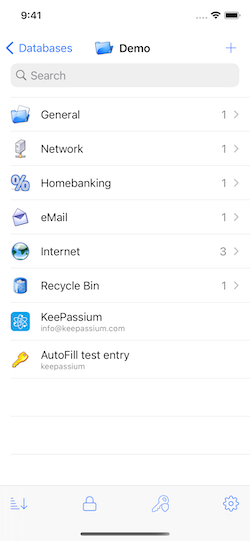
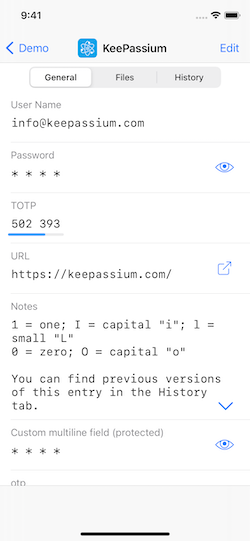
Features
- Automatic database synchronization with zero setup
- Integrates with the system, does not ask for your storage credentials
- Works with iCloud Drive, Dropbox, OneDrive, Google Drive, Box, Nextcloud, SFTP, and probably more.
- Password AutoFill (iOS 12+) — also with synchronization.
- App and data protection:
- Biometric (Face ID / Touch ID) and passcode-based protection.
- Customizable timeouts for app, database and clipboard.
- Database names and app settings are also protected.
- Read/write support for all KeePass formats:
kdbx4(KeePass 2.35+),kdbx3(KeePass 2.x) andkdb(KeePass 1.x)- ChaCha20, Argon2, AES, Salsa20, Twofish algorithms
- Easy switching between multiple databases
- And more:
- Viewing TOTP codes (both RFC-6238 and Steam TOTP)
- YubiKey challenge-response support
- File attachments
- Custom fields
- Custom icons
- No ads
Automatic sync
KeePassium relies on OS-provided integration with storage providers, and supports most providers that appear in iOS Files app.
- Full support (files are automatically downloaded and uploaded when changed): iCloud Drive, Box, Dropbox, Google Drive, OneDrive, Resilio Sync, Nextcloud (with hiccups), SFTP / WebDAV (via third-party apps)
- Limited support (no background sync, files have to be imported and exported manually): Mega, Cryptomator (it supports only import/export operations)
- Not tested yet: ownCloud, Tresorit
If automatic sync does not work for you, please make sure the cloud provider app can work in background (device settings — Dropbox/OneDrive/... — Background App Refresh = Enabled).
Password AutoFill
To fill your passwords easily and quickly, enable AutoFill feature: device settings — Passwords & Accounts — AutoFill Passwords — select KeePassium in the list.
App and Data Protection
KeePassium has multi-layer protection from unauthorized access.
- App Lock protects the app itself, by covering any in-app screens. This way, only you can see the unlocked database, the list of databases, or change app settings.
- Database Lock closes all opened databases after a timeout, or after a failed AppLock attempt. It also removes any remembered master keys from keychain.
- Encryption protects the contents of database files. The app relies on CommonCrypto library (for AES and SHA) and time-proven reference implementations of crypto algorithms (see Credits).
By default, AppLock requires a passcode (of any complexity). For convenience, you can configure the app to use Face ID/Touch ID instead.
Installation
KeePassium is available on the App Store. Current beta can be installed via TestFlight.
To build your own binary, download the project and open it in Xcode 10.2 (or above). All the dependencies are already included.
Is it free?
Yes, KeePassium can be used free of charge (gratis) and is also free as in speech (libre). An optional premium subscription enables a few convenience and time-saving features, and supports the project.
But I can just... Yes, you can take the source code and build your personal premium version for free (gratis). Feel free to do so, but please be nice and don't request premium support for personal builds. Also, if you delegate this to a freelancer, please make sure you can trust them.
How to Contribute
Code contributions cannot be accepted due to formalities, but feel free to:
- Report bugs, suggest new features
- Contribute to translation
- Write an AppStore review
- Consider buying a premium subscription :)
Support
- Bug reports: GitHub Issues
- Discussion: /r/KeePassium
- Updates: KeePassium Blog and Twitter
Author and Credits
KeePassium is created and maintained by Andrei Popleteev, founder of KeePassium Labs.
The project would not be the same without some third-party components:
- Graphics:
- Feather icons by Cole Bemis (MIT licence)
- Ionicons by Ionic (MIT license)
- Linecons by Andrian Valeanu (CC-BY-ND 3.0 license)
- Fancy deboss pattern by Daniel Beaton (CC-BY-3.0 when downloaded)
- Icons8 icons (paid license, can also be used with attribution only)
- System settings icon by Vicons Design (CC-BY 3.0 license)
- Bold outline icons by Round Icons (proprietary license).
- KeePassXC icons by KeePassXC team (MIT license).
- Code:
- AEXML by Marko Tadić (MIT license)
- Rijndael implementation by Szymon Stefanek (public domain)
- Argon2 by Daniel Dinu, Dmitry Khovratovich, Jean-Philippe Aumasson, and Samuel Neves (CC0 license)
- ChaCha20 & Salsa20 implementation by D. J. Bernstein (public domain)
- Twofish implementation by Niels Ferguson (custom very permissive license).
- Yubico Mobile iOS SDK by Yubico AB (Apache 2.0 license)
- TPInAppReceipt by Pavel Tikhonenko (MIT license)
- SwiftDomainParser by Dashlane (MIT license)
- GzipSwift by 1024jp (MIT license)
- Base32 for Swift by Norio Nomura (MIT license)
- Toast-Swift by Charles Scalesse (MIT license)
- WhatsNewKit by Sven Tiigi (MIT license)
- zxcvbn-ios by Dropbox (MIT license)
- Other:
- Passphrase wordlists by Electronic Frontiers Foundation (CC-BY-3.0 license)
To avoid backdoors in third-party code, it has been checked by the main developer. Verified files are directly included in the project — we don't want any surprises sneaking via package managers.
License
KeePassium Password Manager
Copyright ©2018–2023 Andrei Popleteev, KeePassium Labs.
KeePassium is a commercial open-source app, available under the GPLv3 license. Our intention is to provide the maximal possible transparency: you can personally audit the code and build your own binary.
While derivative works (forks) are explicitly allowed by the GPL, please don't submit them to AppStore. Due to a conflict between GPL and AppStore terms of service, GPL-licensed apps are banned from AppStore. For the same reason, KeePassium cannot accept code contributions.
For commercial licensing or custom modifications, please contact us.

keepassxc
keepassxreboot·C++
跨平台开源密码管理器,兼容 KeePass 数据库格式,把账号密码集中加密保管,支持 YubiKey 等硬件密钥,本地存储不上云。
密码管理器+4密码管理
29897+562.0k2.8.02026-11-08 08:46 UTC
clients
bitwarden·TypeScript
Bitwarden 官方客户端集合,覆盖网页、浏览器扩展、桌面和命令行,用一套 TypeScript 代码统一管理密码与凭据。
密码管理+4密码管理
14199+262.2kdesktop-v2026.10.42026-11-10 11:24 UTC
keeweb
keeweb·HTML
跨平台免费密码管理器,兼容 KeePass 数据库格式,用浏览器或桌面端统一管理密码,免去多设备同步和格式迁移的麻烦。
密码管理器+4密码管理
13037+31.2kv1.18.72026-05-08 03:29 UTC
KeePassDX
Kunzisoft·Kotlin
Android 上的轻量级 KeePass 密码管理器,可在单一加密文件中编辑凭据,并安全地自动填充表单,支持指纹和 Passkey。
密码管理器+4密码管理
7650+144324.5.82026-11-01 09:37 UTC