README 未给出具体安装命令,需按官方文档安装 CLI;从 HuggingFace 导入模型需额外执行导入流程;推送到仓库前需已有可用的 OCI 容器仓库
kitops
kitops-mlApache-2.0活跃维护把 AI/ML 模型、数据集、代码和配置打包成 OCI Artifact 并做版本管理,让模型交付像容器镜像一样标准化、可复现。
An open source DevOps tool from the CNCF for packaging and versioning AI/ML models, datasets, code, and configuration into an OCI Artifact.
v1.17.0发布于 2026-11-06 21:38 UTC1,441star188fork同步于 2026-11-10 05:54 UTC
把模型、数据集、代码和配置打包成 OCI 制品并版本化的 CNCF 工具
把 AI/ML 模型、数据集、代码和配置打包成 OCI Artifact 并做版本管理,让模型交付像容器镜像一样标准化、可复现。
核心能力
- 用 ModelKit 把模型权重、数据集、代码和配置打包成不可变制品
- 复用现有 OCI 容器仓库做 push/pull 存储与分发
- 按 SHA-256 摘要校验完整性,支持 Cosign 签名与验证
- 支持按层选择性解包,只拉取需要的模型或数据集层
- 提供 Kit CLI 与 PyKitOps Python SDK 两套操作入口
容易踩的坑
内容由模型根据 README 生成,可能不完整或不准确,以官方文档为准。看原文 README
- v1.17.0Release v1.17.0最新正式版2026-11-06 · 2026-11-06 21:38 UTC
Welcome to the v1.17.0 release of Kit! This release adds support for ModelKit indexes and improves how
kit unpackhandles remote references.Breaking Changes
- The
sizefield inkit list --format jsonoutput is now an integer number of bytes rather than a human-readable string (e.g.7168instead of"7.0 KiB"), which is easier to work with in scripts. The table output ofkit listis unchanged.
New Features
ModelKit indexes
KitOps v1.17.0 adds ModelKit indexes. Similar to OCI image indexes, which group builds of one image for different platforms, a ModelKit index groups variants of one model (e.g. different quantizations) under a single reference. That reference can be shared as-is, and the format leaves room for automation that picks a variant based on the runtime environment, such as available VRAM.
Indexes are managed with the new
kit indexcommand and its subcommandscreate,add,remove,delete,list,info,inspect,push, andpull. Each ModelKit in an index can carry labels, which are used to select a ModelKit from the index. To create an index and add ModelKits to it:kit index create my-org/my-model:all kit index add my-org/my-model:all my-org/my-model:q4_0 -l quantization=q4_0 -l vram=6GB kit index add my-org/my-model:all my-org/my-model:q8_0 -l quantization=q8_0 -l vram=10GBModelKits in an index must be in the same repository as the index, but they don't need to be stored locally:
kit index add --remoteadds a ModelKit that's only in the remote registry, so you can create an index for an existing model without downloading it.kit index pushandkit index pullshare the index itself; each ModelKit in an index must already be in the registry when the index is pushed.kit pullandkit unpacknow accept an index reference along with a-l(--label) selector that matches exactly one ModelKit in the index:kit unpack my-org/my-model:all -l quantization=q4_0 -d ./my-modelWhen you pull a ModelKit from an index, it is tagged locally with the index's tag, similar to how
docker pullhandles image indexes. To see which ModelKits an index contains and their labels, usekit index info(add--remotefor an index that isn't stored locally, and--format jsonfor scripting).For more information, see
kit index --help, or PR https://github.com/kitops-ml/kitops/pull/1292Significant Changes
kit unpacknow verifies the digest of every layer it unpacks. Previously, data unpacked directly from a remote registry wasn't verified as thoroughly as ModelKits pulled withkit pullfirst. Additionally, if unpacking a layer fails for any reason, including a digest mismatch, the files already unpacked from that layer are removed so a failed unpack doesn't look complete. See PR https://github.com/kitops-ml/kitops/pull/1300 for details.
Bug Fixes
- Always include layers field, even if there are no layers in ModelKit by @amisevsk in https://github.com/kitops-ml/kitops/pull/1291
- Handle duplicate files when packing ModelKits as raw layers by @amisevsk in https://github.com/kitops-ml/kitops/pull/1293
Full Changelog: https://github.com/kitops-ml/kitops/compare/v1.16.0...v1.17.0
- The
- v1.16.0Release v1.16.02026-09-29 · 2026-09-29 17:59 UTC
查看更新说明
Welcome to the v1.16.0 release of Kit! This release includes a couple new features, as well as a significant number of bugfixes. This release also addresses security advisory https://github.com/kitops-ml/kitops/security/advisories/GHSA-78cw-mw37-jmjg affecting the
kit devcommand. See the advisory for details.Breaking Changes
KitOps v1.16.0 removes the
kit devcommand. We found that this command was not utilized often and updated rarely, while also not fully aligning with the goals of the project overall. For running LLM models locally, dedicated runtimes such as ollama and llama.cpp are a better choice.New Features
kit skillcommandThis release adds a new command:
kit skill. This is a simple command that can be used to teach an AI agent how to use thekitCLI by installing aSKILL.mdfile for installed agents on the system.For more information, see
kit skill --help, or the original PR by @youdie006: https://github.com/kitops-ml/kitops/pull/1252Pack and push in one step
The
kit packcommand now has a new--pushflag, which can be used to push each layer to a remote registry on the fly, rather than storing the ModelKit locally. This can help in storage-constrained situations by avoiding the need to store the entire ModelKit locally before pushing it to a remote registry. Note, however, that this implementation still needs to store each layer (temporarily) before uploading it, so some additional storage is required.When the
--pushflag is included, the behaviour of Kit is similar to runningkit pack --tag myregistry.io/myorg/myrepo:tag . kit push myregistry.io/myorg/myrepo:tag kit remove --force myregistry.io/myorg/myrepo:tagFor more information, see the PR by @Hemanth-1354 in https://github.com/kitops-ml/kitops/pull/1243
Significant Changes
- feat: respect SOURCE_DATE_EPOCH for reproducible manifest digests by @ericsigurdson-dial in https://github.com/kitops-ml/kitops/pull/1225
- [BREAKING CHANGE] Remove kit dev command and LLM harness by @gorkem in https://github.com/kitops-ml/kitops/pull/1288
Bug Fixes
- Fixup duplicated default documented in pack command by @amisevsk in https://github.com/kitops-ml/kitops/pull/1230
- fix(dev-mode): use animationend for modal scroll lock by @AdeshDeshmukh in https://github.com/kitops-ml/kitops/pull/1220
- Print a warning when skipping symlinks during kit pack by @amisevsk in https://github.com/kitops-ml/kitops/pull/1238
- fix: return error on extra tag removal failure by @AdeshDeshmukh in https://github.com/kitops-ml/kitops/pull/1247
- fix: remove redundant double-close in HuggingFace download by @AdeshDeshmukh in https://github.com/kitops-ml/kitops/pull/1231
- fix: exclude OS-specific files from kit init Kitfile generation by @rishi-jat in https://github.com/kitops-ml/kitops/pull/1099
- fix: correct format verb errors in error messages and logging output by @AdeshDeshmukh in https://github.com/kitops-ml/kitops/pull/1221
- fix: use %w instead of %s for error wrapping in fmt.Errorf calls by @AdeshDeshmukh in https://github.com/kitops-ml/kitops/pull/1222
- fix: merge Prompts from referenced modelkits during Kitfile resolution by @AdeshDeshmukh in https://github.com/kitops-ml/kitops/pull/1232
- fix(git): check destination emptiness without full readdir by @AdeshDeshmukh in https://github.com/kitops-ml/kitops/pull/1141
- fix(skill): tolerate unparseable SKILL.md frontmatter in kit init by @gorkem in https://github.com/kitops-ml/kitops/pull/1239
- fix(pack): compare layer paths by path element, not string prefix by @rishabhsai in https://github.com/kitops-ml/kitops/pull/1280
- Drop empty trace log for license detection in Kitfile generation by @amisevsk in https://github.com/kitops-ml/kitops/pull/1274
- Fix color output handling in logs by @amisevsk in https://github.com/kitops-ml/kitops/pull/1285
- v1.15.0Release v1.15.02026-06-25 · 2026-06-25 17:34 UTC
查看更新说明
Welcome to the v1.15.0 release of Kit! This release improves support for the CNCF ModelPack format, adds support for more options when packing ModelKit data, and adds support for MCP bundles.
New Features
Improved CNCF ModelPack support
Kit is now better at handling CNCF ModelPack artifacts. When working with a ModelPack that was not generated by Kit, Kit can interpret the fields normally found within a Kitfile from the ModelPack's configuration and annotations.
To use Kit to package artifacts in the ModelPack format instead of ModelKit, you can use the flag
--use-model-packfor thepackcommand. Note that not all KitOps features are supported by ModelPacks currently.Ultimately, you should be able to use ModelPacks with KitOps, regardless of how they were created. For example, the Docker CLI recently added support for creating ModelPacks, and those are now compatible with KitOps.
For more details, see PR #1202
Additional format and compression options for artifact layers
By default, Kit packages each layer (model weights, datasets, code, etc.) as an uncompressed tarball, which provides a good tradeoff in terms of usability, size, and speed. With KitOps v1.15.0, the following extra options are now available while packing ModelKits (or ModelPacks)
-
Compression options: in addition to the existing
--compression=gzipoption, KitOps now supports using Zstandard compression via the flag--compression=zstd. -
Layer format options: instead of packaging files and/or directories as tarballs, Kit can now package single files as-is -- i.e. with no tar wrapper. The primary benefit of the raw format is that the layer DiffID (and digest, for the no compression case) match the actual SHA256 sum of the file on disk, making it easier to track which files are stored in which ModelKits.
To enable raw layers, use the flag
--layer-format=rawon the pack command, though note that this flag currently applies to all layers in the Kitfile.
These changes were added as part of improving ModelPack support; for more information, see PR #1202
MCP support in ModelKits
With Kit v1.15.0, the Kitfile now has a
mcpServerssection, which can be used to package MCP bundles (.mcpb) files in a new layer format. These bundles are a common way to distribute MCP servers, and adding them to the Kitfile allows for building automation and management around MCP servers specifically.For more details on how MCP bundles are handled, see PR #1214
Bug Fixes
- Improve auth header handling for push operations by @amisevsk in https://github.com/kitops-ml/kitops/pull/1194
- Respect KITOPS_HOME in library config path by @puneetdixit200 in https://github.com/kitops-ml/kitops/pull/1189
- Add image manifest mediatype to manifests created by Kit by @amisevsk in https://github.com/kitops-ml/kitops/pull/1218
- fix: tolerate missing content in local list and remove by @gorkem in https://github.com/kitops-ml/kitops/pull/1217
New Contributors
- @puneetdixit200 made their first contribution in https://github.com/kitops-ml/kitops/pull/1189
Full Changelog: https://github.com/kitops-ml/kitops/compare/v1.14.0...v1.15.0
-
- v1.14.0Release v1.14.02026-05-21 · 2026-05-21 21:02 UTC
查看更新说明
Welcome to the v1.14.0 release of Kit! We've added some exciting new features and improvements.
New Features
SLSA attestation generation for
kit importKitOps can now generate attestations when running
kit import, saving information about what was imported. The new flag,--attestation-output, can be used to generate a SLSA Provenance v1 predicate for the import process, which can then be pushed alongside the ModelKit to your OCI registry (e.g. by usingcosign)For more information, see PR #1175 by @gorkem.
Support for remote ModelKit references for datasets
Version v1.12.0 added support for datasets stored in S3 buckets via the
remotePathfield. In version v1.14.0, we are extending theremotePathfield to support ModelKit references in addition to S3 URLs.To illustrate how this changes the behaviour of Kit, consider the Kitfile
manifestVersion: v1.0.0 model: path: my-model.safetensors datasets: - path: my-dataset/ remotePath: docker.io/jozu/my-dataset:latest- When packing this ModelKit, the contents of
my-dataset/will be ignored and not included as a layer in the manifest - When pushing this ModelKit, only the layer generated for the model will be pushed, saving bandwidth and potentially storage.
- When pulling, the
docker.io/jozu/my-dataset:latestModelKit will also be pulled. - When unpacking, if the
--include-remoteflag is provided, the contents ofdocker.io/jozu/my-dataset:latestwill be unpacked intomy-dataset/. This is similar to runningkit unpack docker.io/jozu/my-dataset:latest -d my-dataset/.
This can be used to group multiple datasets together into one ModelKit for easier management, or to link datasets to model weights without requiring the datasets be pushed and pulled alongside the model.
For details on this change and more explanation, see PR https://github.com/kitops-ml/kitops/pull/1185
More control over output of
kit initwith--depthflagWith v1.14.0, the output of
kit initcan be adjusted slightly to include more or less information. Previously,kit initwould analyze the files and directories in its target and attempt to group each based on whether it seemed like a dataset, model, code, documentation, or prompt element. With the new--depthflag, this process can continue into subdirectories of the target directory, adding more individual layers to the Kitfile before starting to group entries into whole directories.This may be useful if a subdirectory contains many large files that ideally should not be included in a single layer. When the flag is not specified, it defaults to
--depth=0, which is similar to howkit initbehaved prior to this change.For more details and examples, see PR https://github.com/kitops-ml/kitops/pull/1176
Significant Changes
-
During
kit init, the generation of a "catch all" code layer, that contains all other files in the directory has changed. You should only see a layer withpath: '.'when there are more than 5 files in the base directory. Additionally, when a "catch all" code layer is generated, it no longer replaces all previously-generated code layers. To see the discussion around this change, see https://github.com/kitops-ml/kitops/pull/1176#discussion_r3268339692 -
KitOps now sets the
org.opencontainers.image.createdannotation on manifests created when runningkit pack. This means that re-packing a ModelKit will result in a different overall digest hash, though individual layers should retain reproducible digests (saving the need to re-push them). For more information, see PR https://github.com/kitops-ml/kitops/pull/1139 by @itniuma2026. -
Unpacking ModelKits as skills now supports auto-detecting more tools and agents. See PR https://github.com/kitops-ml/kitops/pull/1181 for more details
Bug Fixes
- Starting in v1.14.0, KitOps will be less intrusive with notif
- When packing this ModelKit, the contents of
- v1.13.0Release v1.13.02026-04-20 · 2026-04-20 13:21 UTC
查看更新说明
Welcome to the v1.13.0 release of Kit! In this release, we've improved how KitOps handles ModelKits that contain AI agent skills.
New Features
Support for unpacking skills to agent directories directly
The
kit unpackcommand now supports flag--as-skill. When specified, any skills within that ModelKit are automatically installed for any AI tools (e.g. Codex, Claude Code) that you have installed on your system. By default, Kit will install skills to all agents, globally.To install skills only for a specific tool, e.g. Claude Code, specify the tool name as an argument for the
--as-skillflag:kit unpack <my-modelkit> --as-skill=claude-codeTo install the skill to a local directory rather than globally, the
--directoryflag can be used to add skills only for the specified directory.For more details, see PR https://github.com/kitops-ml/kitops/pull/1158
Full Changelog: https://github.com/kitops-ml/kitops/compare/v1.12.0...v1.13.0
用户点评
登录用户的真实使用记录,可按版本和硬件筛选共 0 条
还没有人点评。第一个说出真实体验的人最有价值。
KitOps: Standards-based packaging & versioning for AI/ML projects



Table of Contents
- What is KitOps?
- Try KitOps
- How Teams Use KitOps
- KitOps Architecture
- Security and Compliance
- KitOps by Role
- Integrations
- Community and Support
What is KitOps?
KitOps is a CNCF open source tool for packaging, versioning, and securely sharing AI/ML projects.
Built on the same OCI (Open Container Initiative) technology that underlies containers, KitOps packages everything your model needs for development or production into a versioned and layered artifact stored in your existing container registry. It integrates with all your AI/ML, CI/CD, and DevOps tools.
As part of the Kubernetes AI/ML technology stack, KitOps is the preferred solution for packaging, versioning, and managing AI assets in security-conscious enterprises, governments, and cloud operators who need to self-host AI models and agents.
KitOps and the CNCF
KitOps is governed by the CNCF (the same organization that manages Kubernetes, OpenTelemetry, and Prometheus). This video provides an outline of KitOps in the CNCF.
KitOps is also the enterprise implementation of the CNCF ModelPack specification for a vendor-neutral AI/ML interchange format. The Kit CLI supports both ModelKit and ModelPack formats transparently. Contributing companies to ModelPack include Red Hat, PayPal, ANT Group, and ByteDance.


Try KitOps in Under 15 Minutes
- Install the CLI: for MacOS, Windows, and Linux.
- Pack your first ModelKit: Either:
- Import from HuggingFace: Pull models directly from HuggingFace into a ModelKit with HuggingFace Import.
- Navigate to your project directory and run
kit init .to auto-generate a Kitfile, then follow the Getting Started guide to pack, push, and pull.
- Push it to your registry: Use
kit pushto start using your existing enterprise registry as a secure and curated registry for AI agents, models, and MCP servers. - Explore pre-built ModelKits: Try quick starts for LLMs, computer vision models, and more.
For those who prefer to build from source, follow these steps to get the latest version from our repository.
How Teams Use KitOps
Level 1: Production Handoff
Most teams start by using KitOps to version a model or agent when it's ready for staging or production. ModelKits serve as immutable, self-contained packages that simplify CI/CD deployment, artifact signing, AI SBOM creation, and deployment / rollback. This prevents unknown AI workloads from entering production and keeps datasets, model weights, and config synced and trackable.
Learn more: CI/CD integration
Level 2: Model Security
Teams in regulated industries use KitOps to scan and gate models before they reach production. Build a ModelKit, sign it with Cosign, run security scans, attach reports as signed attestations, and only allow attested ModelKits to move forward. KitOps provides a security and auditing layer on top of whatever tools you already use.
Learn more: Securing ModelKits
Level 3: Full Lifecycle Versioning
Mature teams extend KitOps to development. Every milestone (new dataset, tuning checkpoint, retraining event) is stored as a versioned ModelKit. One standard system (OCI) for every model version, with tamper-evident and content-addressable storage.
Learn more: How KitOps is Used
KitOps Architecture
ModelKit
KitOps packages your project into a ModelKit - a self-contained, immutable bundle that includes everything required to reproduce, test, or deploy your AI/ML model.
ModelKits can include agents, model weights, MCP servers, datasets, prompts, experiment run results and hyperparameters, metadata, environment configurations, code, and more.
ModelKits are:
- Tamper-proof - Every component protected by SHA-256 digests, ensuring consistency and traceability
- Signable - Full Cosign compatibility for cryptographic verification
- Compatible - Natively stored and retrieved in all major OCI container registries
- Selectively unpacked - Pull only the layers you need (just the model, just the dataset, etc.)
KitOps can also create ModelPack-compliant packages using the CNCF model-spec format. Both formats are vendor-neutral standards, and Kit commands (pull, push, unpack, inspect, list) work transparently with both.
ModelKits elevate AI artifacts to first-class, governed assets, just like application code.
Kitfile
A Kitfile defines where each artifact lives in your ModelKit. You can generate one automatically with kit init.
Kit CLI
The Kit CLI lets you create, manage, run, and deploy ModelKits. Key commands include:
kit pack- Package your project into a ModelKit (add--use-model-packfor ModelPack format)kit unpack- Extract all or specific layers from a ModelKitkit push/kit pull- Share ModelKits through any OCI registrykit init- Auto-generate a Kitfile from an existing project directorykit diff- Compare differences between two ModelKitskit list- List available ModelKits and ModelPackskit inspect- View the contents of a ModelKit without unpacking
PyKitOps Python SDK
The PyKitOps library lets data scientists work with ModelKits in Python. Use it to pack, push, pull, and inspect ModelKits without leaving your favorite tool's workflow.
Watch KitOps in Action
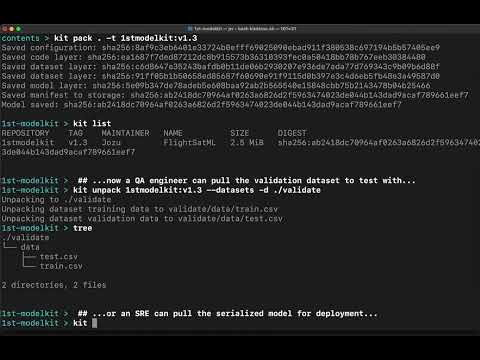
This video shows how KitOps streamlines collaboration between data scientists, developers, and SREs using ModelKits.
Security and Compliance
KitOps provides artifact and project metadata for organizations that need to establish and maintain chain-of-custody and provenance for their AI/ML assets:
- Immutable digests - Every ModelKit component is SHA-256 hashed. Any modification to any file is detected via OCI digest verification when the artifact is pulled or fetched, and the tampered artifact is rejected.
- Cryptographic signatures - Sign ModelKits with Cosign (key-based or keyless via OIDC). Unsigned or tampered ModelKits can be blocked in CI/CD.
- AI Bill of Materials - ModelKits provide a structured inventory of all components (model weights, datasets, code, configs) with version tracking, serving as the foundation for AI SBOMs.
- Transparency logging - Combine with Rekor for append-only signature records.
- Audit-ready lineage - Full version history from experiment through staging to production, stored in your OCI registry.
These properties make ModelKits suitable for compliance frameworks that require artifact integrity, provenance verification, and audit trails, including the EU AI Act, NIST AI RMF, ISO 42001, and similar regulatory requirements.
Learn more: Securing Your Model Supply Chain
KitOps is also used by Jozu Hub, that adds centralized policy administration, five-layer security scanning, signed attestations, and tamper-evident audit logs. Jozu Hub installs behind your firewall and works with your existing OCI registry in private cloud, datacenter, or air-gapped environments.
KitOps by Role
DevOps and Platform Engineers
- Use ModelKits in existing CI/CD pipelines with GitHub Actions, Dagger, and other systems
- Store and manage models in your current container registry
- Deploy to Kubernetes using the init container or KServe
- Build golden paths for secure AI/ML deployment
Data Scientists
- Package datasets and models without infrastructure hassle using
kit packor the PyKitOps SDK - Import models from HuggingFace into governed ModelKits
- Track experiments with MLFlow integration
Developers
- Use AI/ML models like any dependency with standard tools and APIs
- Pull only the layers you need (model, dataset, code) without downloading the full package
- Integrate with Kubeflow Pipelines and other ML tooling
Integrations
KitOps works with the tools you already use:
- MLFlow - Package experiment runs as versioned ModelKits
- CI/CD - GitHub Actions, Dagger, and other pipeline tools
- Kubernetes initContainer - Unpack ModelKits as init containers
- KServe - Serve models directly from ModelKits
- Kubeflow Pipelines - Use ModelKits in ML pipeline steps
- ModelPack - CNCF vendor-neutral packaging format
- KubeStellar Console - Use KubeStellar missions to deploy and manage KitOps across clusters (includes guided install with pre-flight checks, validation, and troubleshooting)
See the full integration list.
Join KitOps Community
For support, release updates, and general KitOps discussion, please join the KitOps Discord. Follow KitOps on X for daily updates.
If you need help there are several ways to reach our community and Maintainers outlined in our support doc
Joining the KitOps Contributors
We love our KitOps community and contributors. To learn more about the many ways you can contribute (you don't need to be a coder) and how to get started see our Contributor's Guide. Please read our Governance and our Code of Conduct before contributing.
Reporting Issues and Suggesting Features
Your insights help KitOps evolve as an open standard for AI/ML. We deeply value the issues and feature requests we get from users in our community. To contribute your thoughts, navigate to the Issues tab and click the New Issue button.
KitOps Community Calls (bi-weekly)
Wednesdays @ 13:30 - 14:00 (America/Toronto)
- Google Meet
- +1 647-736-3184 (PIN: 144 931 404#)
- More numbers
A Community Built on Respect
At KitOps, inclusivity, empathy, and responsibility are at our core. Please read our Code of Conduct to understand the values guiding our community.

datasets
huggingface·Python
Hugging Face 官方数据集库,汇集海量即用型 AI 数据集,并提供高效的数据加载与处理工具,省去自己找数据、写加载代码的麻烦。
数据集托管+4数据集托管
22123+63.6k5.1.02026-11-09 21:41 UTC
easy-dataset
ConardLi·JavaScript
面向大模型微调、RAG 和评测的数据集制作工具,支持数据生成、清洗与导出,省去手工整理训练数据的麻烦。
数据集制作+4数据集托管
15103+101.5k1.7.32026-05-01 15:03 UTC
phoenix
Arize-ai·Python
开源的 LLM 可观测性与评测平台,能追踪、调试和评估 RAG 与 Agent 应用,帮团队定位大模型链路中的问题。
LLM 可观测性+4数据集托管
12223+301.3k@arizeai/[email protected]2026-11-10 04:24 UTC

techniques
satellite-image-deep-learning
汇集卫星与航拍影像深度学习的技术清单,涵盖数据集、模型与工具,帮遥感从业者快速找到可用的方法和资源。
遥感影像+4数据集托管
103011.6kv1.32026-11-07 14:51 UTC