3.1.x 需 Angular 20+、RxJS 7.8+、TypeScript 5.6+;需在 angular.json 配置图标 assets 并引入 default.scss 主题;ngModel 需导入 FormsModule,formControlName 需导入 ReactiveFormsModule
angular-editor
kolkovMIT活跃维护Angular 20+ 原生富文本编辑器,支持 Markdown、自定义内容清洗和响应式工具栏,适合在 Angular 应用中快速集成所见即所得编辑能力。
Native WYSIWYG/Rich Text editor for Angular 20+ with Markdown support, custom sanitization, and reactive toolbar
v3.4.0发布于 2026-10-01 05:46 UTC722star +1 / 7 天352fork同步于 2026-11-10 11:56 UTC
npm install @kolkov/angular-editor --save 硬件要求按 README 说明
README 未说明
Angular 20+ 原生所见即所得富文本编辑器,支持 Markdown 与自定义净化
Angular 20+ 原生富文本编辑器,支持 Markdown、自定义内容清洗和响应式工具栏,适合在 Angular 应用中快速集成所见即所得编辑能力。
核心能力
- 基于 Angular 原生组件,支持 ngModel 与响应式表单
- 可配置工具栏按钮、字体、自定义样式类与隐藏按钮
- 支持自定义 HTML 净化函数,可接入 DOMPurify
- 支持图片上传 URL 或自定义上传函数
- 通过 CSS 变量覆盖默认主题样式
容易踩的坑
内容由模型根据 README 生成,可能不完整或不准确,以官方文档为准。看原文 README
- v3.4.0最新正式版2026-10-01 · 2026-10-01 05:46 UTC
What's Changed
- chore(release): 3.4.0 by @kolkov in https://github.com/kolkov/angular-editor/pull/648
Full Changelog: https://github.com/kolkov/angular-editor/compare/v3.3.0...v3.4.0
- v3.3.02026-09-30 · 2026-09-30 11:37 UTC
查看更新说明
What's Changed
- chore(release): 3.3.0 by @kolkov in https://github.com/kolkov/angular-editor/pull/646
Full Changelog: https://github.com/kolkov/angular-editor/compare/v3.2.0...v3.3.0
- v3.2.02026-09-29 · 2026-09-29 12:53 UTC
查看更新说明
What's Changed
- chore(release): 3.2.0 by @kolkov in https://github.com/kolkov/angular-editor/pull/643
Full Changelog: https://github.com/kolkov/angular-editor/compare/v3.1.2...v3.2.0
- v3.1.22026-09-28 · 2026-09-28 14:03 UTC
查看更新说明
What's Changed
- build(deps-dev): bump baseline-browser-mapping from 2.10.43 to 2.11.21 by @dependabot[bot] in https://github.com/kolkov/angular-editor/pull/624
- build(deps-dev): bump vitest from 4.1.10 to 4.1.11 by @dependabot[bot] in https://github.com/kolkov/angular-editor/pull/623
- build(deps): bump fast-uri from 3.1.3 to 3.1.7 by @dependabot[bot] in https://github.com/kolkov/angular-editor/pull/620
- build(deps): bump hono from 4.12.30 to 4.13.7 by @dependabot[bot] in https://github.com/kolkov/angular-editor/pull/622
- build(deps-dev): bump undici from 6.27.0 to 6.28.0 by @dependabot[bot] in https://github.com/kolkov/angular-editor/pull/613
- build(deps): bump ip-address from 10.2.0 to 10.4.0 by @dependabot[bot] in https://github.com/kolkov/angular-editor/pull/612
- build(deps-dev): bump eslint from 10.7.0 to 10.8.0 by @dependabot[bot] in https://github.com/kolkov/angular-editor/pull/608
- build(deps-dev): bump ng-packagr from 22.0.1 to 22.1.0 by @dependabot[bot] in https://github.com/kolkov/angular-editor/pull/610
- build(deps-dev): bump postcss from 8.5.19 to 8.5.26 by @dependabot[bot] in https://github.com/kolkov/angular-editor/pull/615
- build(deps-dev): bump typescript-eslint from 8.64.0 to 8.70.0 by @dependabot[bot] in https://github.com/kolkov/angular-editor/pull/609
- build(deps-dev): bump jsdom from 29.1.1 to 30.1.0 by @dependabot[bot] in https://github.com/kolkov/angular-editor/pull/611
- build(deps): bump the angular group across 1 directory with 10 updates by @dependabot[bot] in https://github.com/kolkov/angular-editor/pull/631
- fix(toolbar): handle hidden buttons in triggerButtons() + docs update by @kolkov in https://github.com/kolkov/angular-editor/pull/642
Full Changelog: https://github.com/kolkov/angular-editor/compare/v3.1.1...v3.1.2
- v3.1.12026-09-24 · 2026-09-24 08:30 UTC
查看更新说明
What's Changed
- build(deps): bump actions/setup-node from 6 to 7 by @dependabot[bot] in https://github.com/kolkov/angular-editor/pull/602
- build(deps): bump actions/checkout from 4 to 7 by @dependabot[bot] in https://github.com/kolkov/angular-editor/pull/603
- build(deps): bump zone.js from 0.15.1 to 0.16.2 by @dependabot[bot] in https://github.com/kolkov/angular-editor/pull/604
- fix(toolbar): use *ngIf instead of hidden binding to prevent renderin… by @moamenelbarky in https://github.com/kolkov/angular-editor/pull/600
- feat: add starhistory.io star chart by @kolkov in https://github.com/kolkov/angular-editor/pull/619
- chore(release): 3.1.1 by @kolkov in https://github.com/kolkov/angular-editor/pull/629
New Contributors
- @moamenelbarky made their first contribution in https://github.com/kolkov/angular-editor/pull/600
Full Changelog: https://github.com/kolkov/angular-editor/compare/v3.1.0...v3.1.1
用户点评
登录用户的真实使用记录,可按版本和硬件筛选共 0 条
还没有人点评。第一个说出真实体验的人最有价值。
AngularEditor


A simple native WYSIWYG/Rich Text editor for Angular 20+
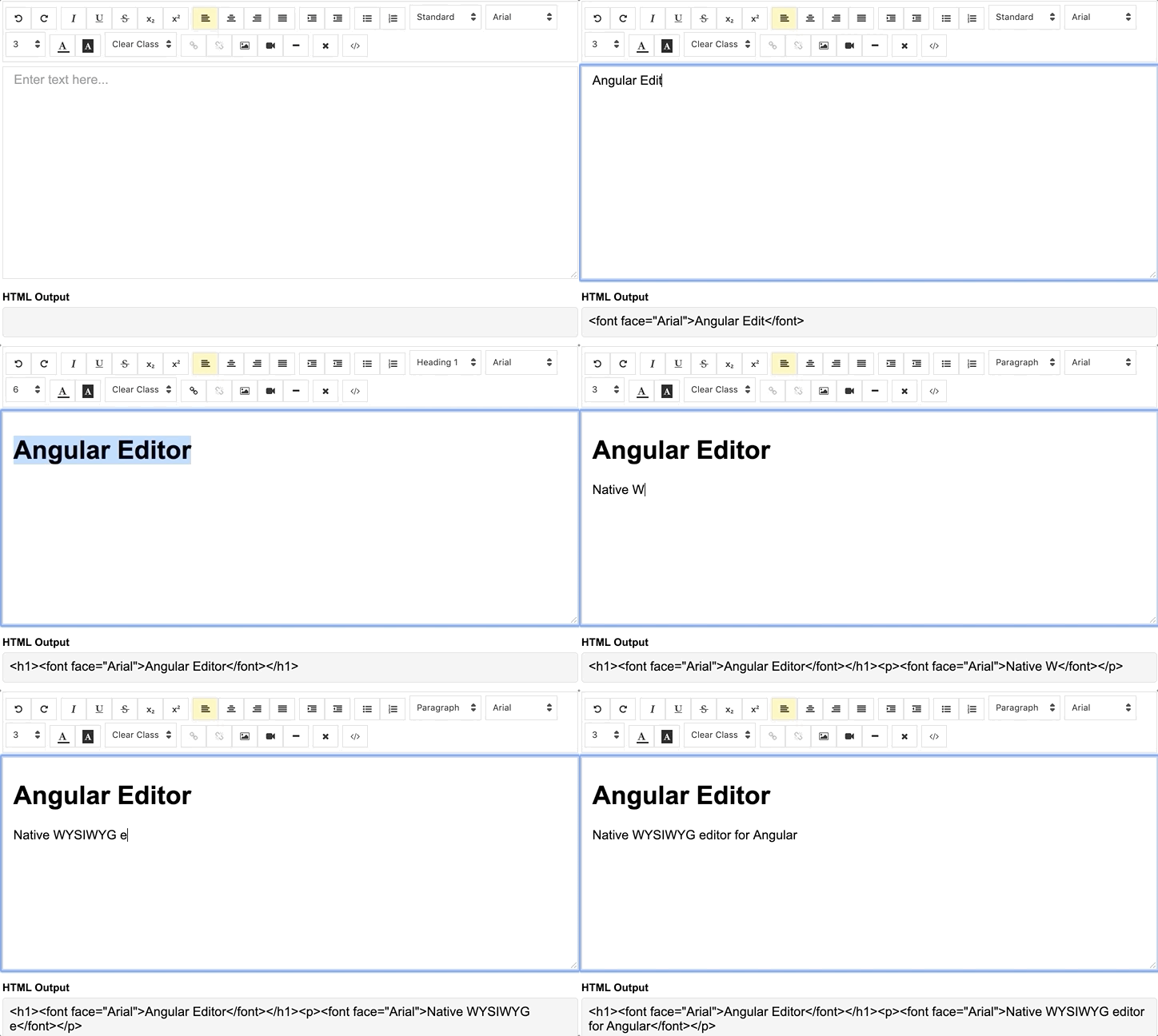
Demo
demo | See the code in StackBlitz.
Getting Started
Installation
Install via npm package manager
npm install @kolkov/angular-editor --save
Versions
3.1.x - for Angular v20, v21, v22 (CSS variables, SVG icons, Vitest testing)
3.0.x - for Angular v20, v21 (CSS variables, modern Angular)
2.0.0 and above - for Angular v13-19
1.0.0 and above - for Angular v8-12
0.18.4 and above - for Angular v7.x.x
0.15.x - for Angular v6.x.x
Note: Version 3.1.x requires:
- Angular 20.0.0 or higher (supports 20, 21, and 22)
- RxJS 7.8.0 or higher
- TypeScript 5.6+ (Angular 20/21) or 6.0+ (Angular 22)
Attention! alpha and beta versions may contain breaking changes.
Usage
Import angular-editor module
import { HttpClientModule} from '@angular/common/http';
import { AngularEditorModule } from '@kolkov/angular-editor';

@NgModule({
  imports: [ HttpClientModule, AngularEditorModule ]
})
Then in HTML
<angular-editor [placeholder]="'Enter text here...'" [(ngModel)]="htmlContent"></angular-editor>
or for usage with reactive forms
<angular-editor formControlName="htmlContent" [config]="editorConfig"></angular-editor>
if you are using more than one editor on same page set id property
<angular-editor id="editor1" formControlName="htmlContent1" [config]="editorConfig"></angular-editor>
<angular-editor id="editor2" formControlName="htmlContent2" [config]="editorConfig"></angular-editor>
where
import { AngularEditorConfig } from '@kolkov/angular-editor';


editorConfig: AngularEditorConfig = {
    editable: true,
      spellcheck: true,
      height: 'auto',
      minHeight: '0',
      maxHeight: 'auto',
      width: 'auto',
      minWidth: '0',
      translate: 'yes',
      enableToolbar: true,
      showToolbar: true,
      placeholder: 'Enter text here...',
      defaultParagraphSeparator: '',
      defaultFontName: '',
      defaultFontSize: '',
      fonts: [
        {class: 'arial', name: 'Arial'},
        {class: 'times-new-roman', name: 'Times New Roman'},
        {class: 'calibri', name: 'Calibri'},
        {class: 'comic-sans-ms', name: 'Comic Sans MS'}
      ],
      customClasses: [
      {
        name: 'quote',
        class: 'quote',
      },
      {
        name: 'redText',
        class: 'redText'
      },
      {
        name: 'titleText',
        class: 'titleText',
        tag: 'h1',
      },
    ],
    uploadUrl: 'v1/image',
    upload: (file: File) => { ... }
    uploadWithCredentials: false,
    sanitize: true,
    toolbarPosition: 'top',
    toolbarHiddenButtons: [
      ['bold', 'italic'],
      ['fontSize']
    ]
};
For ngModel to work, you must import FormsModule from @angular/forms, or for formControlName, you must import ReactiveFormsModule from @angular/forms
To serve the icons file, ensure that your angular.json contains the following asset configuration:
{
  "glob": "**/*",
  "input": "node_modules/@kolkov/angular-editor/assets/icons",
  "output": "assets/ae-icons/"
}
Styling
Connect default theme file to your angular.json or nx.json
"styles": [
     "projects/angular-editor-app/src/styles.scss",
     "node_modules/@kolkov/angular-editor/themes/default.scss"
],
or @include or @use in your project styles.scss file, and then override default theme variables like this:
:root {
  --ae-gap: 5px;
  --ae-text-area-border: 1px solid #ddd;
  --ae-text-area-border-radius: 0;
  --ae-focus-outline-color: #afaeae auto 1px;
  --ae-toolbar-padding: 1px;
  --ae-toolbar-bg-color: #b3dca0;
  --ae-toolbar-border-radius: 1px solid #ddd;
  --ae-button-bg-color: #dadad7;
  --ae-button-border: 3px solid #3fb74e;
  --ae-button-radius: 5px;
  --ae-button-hover-bg-color: #3fb74e;
  --ae-button-active-bg-color: red;
  --ae-button-active-hover-bg-color: blue;
  --ae-button-disabled-bg-color: gray;
  --ae-picker-label-color: rgb(78, 84, 155);
  --ae-picker-icon-bg-color: rgb(34, 41, 122);
  --ae-picker-option-bg-color: rgba(221, 221, 84, 0.76);
  --ae-picker-option-active-bg-color: rgba(237, 237, 62, 0.9);
  --ae-picker-option-focused-bg-color: rgb(255, 255, 0);
}
Custom buttons
You can define your custom buttons with custom actions using executeCommandFn. It accepts commands from execCommand. The first argument of this method is aCommandName and the second argument is aValueArgument. Example shows a button that adds Angular editor logo into the editor.
<angular-editor id="editor1" [(ngModel)]="htmlContent1" [config]="config1" (ngModelChange)="onChange($event)"
                (blur)="onBlur($event)">
  <ng-template #customButtons let-executeCommandFn="executeCommandFn">
    <ae-toolbar-set>
      <button aeButton title="Angular editor logo" (click)="executeCommandFn('insertHtml', angularEditorLogo)">
        <svg viewBox="-8 0 272 272" xmlns="http://www.w3.org/2000/svg"
             preserveAspectRatio="xMidYMid" fill="#000000">
          <g id="SVGRepo_bgCarrier" stroke-width="0"></g>
          <g id="SVGRepo_tracerCarrier" stroke-linecap="round" stroke-linejoin="round"></g>
          <g id="SVGRepo_iconCarrier">
            <g>
              <path
                d="M0.0996108949,45.522179 L125.908171,0.697276265 L255.103502,44.7252918 L234.185214,211.175097 L125.908171,271.140856 L19.3245136,211.971984 L0.0996108949,45.522179 Z"
                fill="#E23237"></path>
              <path
                d="M255.103502,44.7252918 L125.908171,0.697276265 L125.908171,271.140856 L234.185214,211.274708 L255.103502,44.7252918 L255.103502,44.7252918 Z"
                fill="#B52E31"></path>
              <path
                d="M126.107393,32.27393 L126.107393,32.27393 L47.7136187,206.692607 L76.9992218,206.194553 L92.7377432,166.848249 L126.207004,166.848249 L126.306615,166.848249 L163.063035,166.848249 L180.29572,206.692607 L208.286381,207.190661 L126.107393,32.27393 L126.107393,32.27393 Z M126.306615,88.155642 L152.803113,143.5393 L127.402335,143.5393 L126.107393,143.5393 L102.997665,143.5393 L126.306615,88.155642 L126.306615,88.155642 Z"
                fill="#FFFFFF"></path>
            </g>
          </g>
        </svg>
      </button>
    </ae-toolbar-set>
  </ng-template>
</angular-editor>
API
Inputs
| Input | Type | Default | Required | Description |
|---|---|---|---|---|
| id | string | - | no | Id property when multiple editor used on same page |
| [config] | AngularEditorConfig | default config | no | config for the editor |
| placeholder | string | - | no | Set custom placeholder for input area |
| tabIndex | number | - | no | Set Set tabindex on angular-editor |
Outputs
| Output | Description |
|---|---|
| (html) | Output html |
| (viewMode) | Fired when switched visual and html source mode |
| (blur) | Fired when editor blur |
| (focus) | Fired when editor focus |
Methods
| Name | Description |
|---|---|
| focus | Focuses the editor element |
Other
| Name | Type | Description |
|---|---|---|
| AngularEditorConfig | configuration | Configuration for the AngularEditor component. |
Configuration
| Input | Type | Default | Required | Description |
|---|---|---|---|---|
| editable | bolean | true | no | Set editing enabled or not |
| spellcheck | bolean | true | no | Set spellchecking enabled or not |
| translate | string | yes | no | Set translating enabled or not |
| sanitize | bolean | true | no | Set DOM sanitizing enabled or not |
| height | string | auto | no | Set height of the editor |
| minHeight | string | 0 | no | Set minimum height of the editor |
| maxHeight | string | auto | no | Set maximum height of the editor |
| width | string | auto | no | Set width of the editor |
| minWidth | string | 0 | no | Set minimum width of the editor |
| enableToolbar | bolean | true | no | Set toolbar enabled or not |
| showToolbar | bolean | true | no | Set toolbar visible or not |
| toolbarPosition | string | top | no | Set toolbar position top or bottom |
| placeholder | string | - | no | Set placeholder text |
| defaultParagraphSeparator | string | - | no | Set default paragraph separator such as p |
| defaultFontName | string | - | no | Set default font such as Comic Sans MS |
| defaultFontSize | string | - | no | Set default font size such as 1 - 7 |
| uploadUrl | string | - | no | Set image upload endpoint https://api.exapple.com/v1/image/upload and return response with imageUrl key. {"imageUrl" : } |
| upload | function | - | no | Set image upload function |
| uploadWithCredentials | bolean | false | no | Set passing or not credentials in the image upload call |
| fonts | Font[] | - | no | Set array of available fonts [{name, class},...] |
| customClasses | CustomClass[] | - | no | Set array of available fonts [{name, class, tag},...] |
| outline | bolean | true | no | Set outline of the editor if in focus |
| toolbarHiddenButtons | string[][] | - | no | Set of the array of button names or elements to hide |
toolbarHiddenButtons: [
  [
    'undo',
    'redo',
    'bold',
    'italic',
    'underline',
    'strikeThrough',
    'subscript',
    'superscript',
    'justifyLeft',
    'justifyCenter',
    'justifyRight',
    'justifyFull',
    'indent',
    'outdent',
    'insertUnorderedList',
    'insertOrderedList',
    'heading',
    'fontName'
  ],
  [
    'fontSize',
    'textColor',
    'backgroundColor',
    'customClasses',
    'link',
    'unlink',
    'insertImage',
    'insertVideo',
    'insertHorizontalRule',
    'removeFormat',
    'toggleEditorMode'
  ]
]
Custom Sanitization
By default, the editor uses Angular's built-in DomSanitizer for HTML sanitization. You can provide a custom sanitizer function via the AE_SANITIZER injection token — for example, to use DOMPurify which preserves non-ASCII characters (Cyrillic, Chinese, Arabic, etc.) without converting them to HTML entities.
npm install dompurify
npm install -D @types/dompurify
Global (all editors in the app):
import DOMPurify from 'dompurify';
import { provideEditorSanitizer } from '@kolkov/angular-editor';

bootstrapApplication(AppComponent, {
  providers: [
    provideEditorSanitizer((html) => DOMPurify.sanitize(html)),
  ],
});
Per-component (different sanitizers for different editors):
import DOMPurify from 'dompurify';
import { provideEditorSanitizer } from '@kolkov/angular-editor';

@Component({
  selector: 'app-strict-editor',
  template: '<angular-editor [(ngModel)]="content"></angular-editor>',
  providers: [
    provideEditorSanitizer((html) => DOMPurify.sanitize(html, {
      ALLOWED_TAGS: ['b', 'i', 'em', 'strong', 'a', 'p', 'br', 'ul', 'ol', 'li'],
    })),
  ],
})
export class StrictEditorComponent {
  content = '';
}
Setting sanitize: false in the editor config bypasses sanitization entirely (not recommended for user-generated content).
Markdown Support
The editor supports Markdown output via the @kolkov/angular-editor/markdown secondary entry point. HTML remains the canonical data model — Markdown conversion happens at the I/O boundary.
Install dependencies:
npm install marked turndown
npm install -D @types/turndown
Register the Markdown converter:
import { provideMarkdownConverter } from '@kolkov/angular-editor/markdown';

// In NgModule providers or bootstrapApplication:
providers: [
  provideMarkdownConverter(),
]
Markdown output via ngModel (outputFormat):
<angular-editor [(ngModel)]="markdownContent"
                [config]="{ outputFormat: 'markdown' }">
</angular-editor>
<!-- markdownContent is now a Markdown string -->
Dual output via contentChanged event (HTML + Markdown simultaneously):
<angular-editor [(ngModel)]="htmlContent"
                (contentChanged)="onContentChanged($event)">
</angular-editor>
onContentChanged(event: { html: string; markdown?: string; text: string }) {
  console.log(event.html);      // HTML output
  console.log(event.markdown);  // Markdown output (when converter provided)
  console.log(event.text);      // Plain text
}
Explicit methods:
@ViewChild(AngularEditorComponent) editor: AngularEditorComponent;

getContent() {
  const html = this.editor.getHtml();
  const markdown = this.editor.getMarkdown();
}
Markdown paste: When outputFormat: 'markdown' or pasteMarkdown: true, plain text pasted from clipboard is automatically treated as Markdown and converted to rich text. HTML paste works as usual.
Note: Markdown conversion is lossy for features without Markdown equivalents (font colors, font sizes, custom classes, subscript/superscript, text alignment). These features are preserved in HTML output but lost in Markdown output.
What's included
Within the download you'll find the following directories and files. You'll see something like this:
angular-editor/
└── projects/
    ├── angular-editor/
    └── angular-editor-app/
angular-editor/ - library
angular-editor-app/ - demo application
Documentation
The documentation for the AngularEditor is hosted at our website AngularEditor
Icons from Ligature Symbols Icons Collection icons
Contributing
Please read through our contributing guidelines. Included are directions for opening issues, coding standards, and notes on development.
Editor preferences are available in the editor config for easy use in common text editors. Read more and download plugins at http://editorconfig.org.
Versioning
For a transparency into our release cycle and in striving to maintain backward compatibility, AngularEditor is maintained under the Semantic Versioning guidelines.
See the Releases section of our project for changelogs for each release version.
Creators
Andrey Kolkov
Donate
If you like my work and I save your time you can buy me a :beer: or :pizza:
Star History
vscode
microsoft·TypeScript
微软开源的跨平台代码编辑器,基于 Electron 和 TypeScript 构建,支持插件扩展、调试和 Git 集成,适合日常开发写代码。
代码编辑器+4编辑器 / IDE
195250+16644k1.145.22026-11-10 11:10 UTC
neovim
neovim·Vim Script
Vim 的分支版本,用 Lua 做配置和插件开发,内置 LSP 与异步 API,让终端编辑器更好扩展、更好用。
文本编辑器+4编辑器 / IDE
103537+757.4kv0.12.62026-11-10 05:17 UTC
zed
zed-industries·Rust
用 Rust 打造的高性能多人协作代码编辑器,由 Atom 和 Tree-sitter 作者开发,主打低延迟编辑与实时协同编码。
代码编辑器+4编辑器 / IDE
94639+78712kv1.27.02026-11-10 11:13 UTC

AFFiNE
toeverything·TypeScript
把文档、白板、表格融为一体的开源知识库,可离线使用、支持多人实时协作,是 Notion 和 Miro 的替代方案。
知识库+4编辑器 / IDE
74415+1285.5kv2026.11.9-canary.9072026-11-10 10:49 UTC