需 Docker Compose v2.35.0 或更高版本并安装 OpenSSL;启动前必须把生成的随机值填入 .env 的 DIFY_AGENT_LOCAL_SANDBOX_AUTH_TOKEN;初始化完成后访问 http://localhost/install 完成设置,init_permissions 服务退出码 0 属正常。
dify
langgenius活跃维护可视化搭建 Agentic 工作流和 RAG 流水线,支持多种大模型与工具,可云端或私有化部署,帮团队从原型直接走到生产。
Build Agentic workflows, RAG pipelines, with rich AI model and tool support on one collaborative workspace. Deploy on cloud, VPC, or self-hosted, so teams move from prototype to production without rebuilding the stack.
cd docker
cp .env.example .env
openssl rand -hex 32
docker compose up -dREADME 只给出最低系统要求:CPU ≥ 2 核、RAM ≥ 4 GiB;未提及 GPU 或显存要求。
开源 LLM 应用开发平台,可视化编排工作流、RAG 与 Agent 并直接上生产
可视化搭建 Agentic 工作流和 RAG 流水线,支持多种大模型与工具,可云端或私有化部署,帮团队从原型直接走到生产。
核心能力
- 在可视化画布上搭建并测试 AI 工作流
- 接入数十家推理提供商的数百个专有与开源模型
- RAG 流水线覆盖文档摄取到检索,支持 PDF、PPT 解析
- Agent 自带沙箱,可执行命令、装软件、处理文件
- 提供 LLMOps 日志监控与全量 API 便于集成
容易踩的坑
- 1.19.0v1.19.0 - Trace Your Workflows, Layer by Layer最新正式版2026-11-04 · 2026-11-04 07:36 UTC
Dify 1.19.0 brings nested workflow tracing to your observability tools. Follow a workflow into the Workflow Tools it calls, inspect the steps inside each invocation, and keep the LLM context alongside the execution tree.
This release also makes Workflow Tools portable with App packages, adds Skill Hub automation, and makes Agent files easier to upload and preview. The bundled plugin daemon is upgraded to 0.6.14-local.
Release highlights · Upgrade guide · Detailed changes
Release highlights
Nested workflow tracing
See what happens inside a Workflow Tool, all the way down to its LLM calls.
Building on the Console drilldown introduced in 1.18.0, new external traces now include the persisted execution steps inside called Workflow Tools. Child steps appear beneath the Tool span that invoked them, preserving the hierarchy across nested and repeated calls. (#44673)
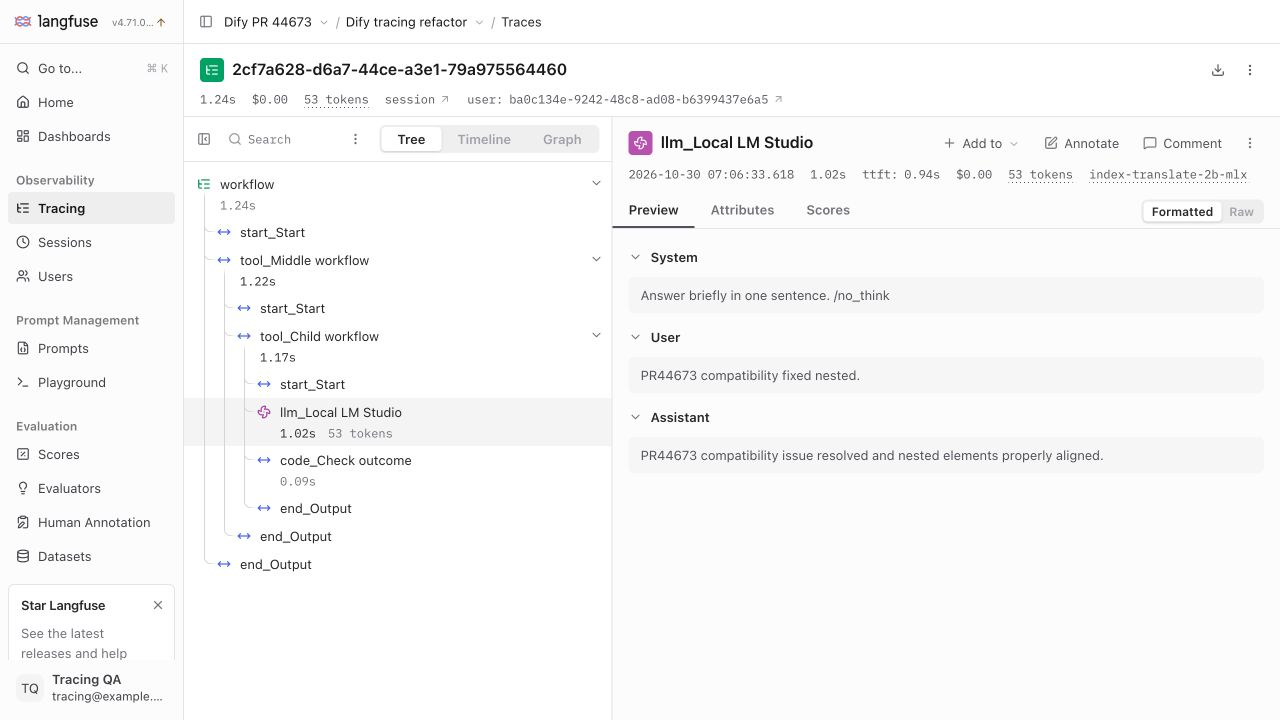
From the outer workflow to a nested LLM call: the execution tree and formatted messages, together in Langfuse. Screenshot from #44673.
- Follow the hierarchy. Expand called Workflow Tools to see their internal execution steps under the invoking Tool span.
- Understand each invocation. Repeated calls and failures retain their place in the trace.
- Keep the LLM context. Inspect formatted prompts and responses, token usage, and project, trace, and observation links.
[!NOTE] Your saved provider settings continue to work. The richer hierarchy applies to new executions; historical traces are not backfilled. Independently nested workflow runs remain separate traces linked by parent identifiers. For rolling deployments, follow the tracing queue transition below.
Take Workflow Tools with your apps
Export an app and bring the workflows behind its Workflow Tools with it.
.ifpkgpackages include those workflows at their bound versions, including transitive dependencies. Import reuses tools already in the destination workspace and recreates, publishes, and registers missing ones, remapping their references. (#44592)All Dify app exports now use package format v2, including apps without Workflow Tools. Existing v1 imports and explicit YAML export remain supported. See the upgrade guide before importing new packages into older installations. (#45353)
Upload together. Preview in place.
Select or drop multiple Agent configuration files and upload them in parallel. Successful uploads are bound in one atomic batch, concurrent Composer saves preserve the latest files, and Prompt uploads keep the cursor position while inserting multiple references. (#44947)
Read PDFs inline, inspect source files with syntax highlighting, and see when text has been truncated. Previews cover configured files, Skill members, and working-directory files, with a download action when a PDF cannot be loaded. (#45032, #45045)
Read a PDF directly in the Agent file preview and switch between project files.
Select several files and upload them together.
![Syntax-hi
- 1.18.0v1.18.0 — Smarter Agent Routing, Portable Apps, Deeper Workflow Visibility2026-10-23 · 2026-10-23 06:33 UTC
查看更新说明
Dify 1.18.0 brings Agents that route workflows, portable app packages, deeper visibility into nested workflow runs, and the opt-in Agent Knowledge Base experience. OpenAPI and the new difyctl expand how you build and manage apps from the command line.
[!IMPORTANT] Read the upgrade guide below before deploying. Upgrade the API, workers, Agent Backend, and Agent runtime images together. Local Agent sandboxes require a non-empty authentication token, and Agent Backend uses a new run protocol. Source installations require Python 3.13. Install the new difyctl client and sign in again. Preserve your existing
PASSWORD_PEPPERconfiguration.Release highlights
Agents that choose the next step
Let an Agent decide which workflow branch to take. Enable Output Routes, give each route a selection condition, and connect it to the next step—such as resolving a request directly or handing it to a specialist. The read-only
switchoutput exposes the chosen route. (#42599)Output Routes configuration with two branches in the workflow editor.
Plain Agent v2 nodes also stream text as it is generated. Structured results, routed results, and nodes using default-value error handling remain buffered. (#43986)
Portable apps in one package
Move an app with its supported resources in a single
.ifpkgpackage. Workflow and Chatflow packages carry inline Agents, Skills, and their files; imports recreate those resources in the destination workspace and remap references. File and URL imports support both packages and YAML, and explicit YAML export remains available. (#42066, #42579, #42626, #42863)Studio's
.ifpkgimport preview.See inside nested workflow runs
Open a Workflow Tool invocation from the run history and inspect the child workflow's individual steps. Nested tools now run as child graphs with coordinated pause, resume, stop, and file outputs. Access checks protect the source app's details. (#40277, #42819, #42820, #42821, #42822)
Trace drilldown into a successful Workflow Tool invocation.
Nested usage and step totals can still be approximate, particularly after a pause or stop. Console drilldown and external trace export have different scopes; see the full feature details below.
Agent Knowledge Base · Beta
Create a knowledge space for your agents, add files or connect sources, and inspect document processing, metadata, retrieval traces, and quality evaluations in one place. The new Knowledge Retrieval node and Agent integrations share access-controlled KnowledgeFS spaces. Classic Knowledge remains available. This is an opt-in integration with a separate service and database; see the deployment requirements below. (#44165)
Will soon be available on cloud.dify.ai
Developer spotlight
Build and manage apps with OpenAPI and difyctl. The CLI discovers commands from the server's operation catalog, with searchable help and support for Workflow and Chatflow creation, DSL import/export, settings, environment variables, publishing, and version restoration. Draft hashes protect concurrent edits. (#42487, #42608, #43067)
Install the bundled skill for agents building Dify apps:
difyctl install skills <dir>The new client requires a fresh sign-in; see the deployment instructions below. (#43819)
Upgrade guide
Compatibility and Rollout
- Back up first. Retain the database, vector-store data, uploaded fil
- 1.17.1v1.17.1 - Bug Fixes and Improvements2026-09-10 · 2026-09-10 10:04 UTC
查看更新说明
[!WARNING] Self-hosted deployments using the bundled Weaviate must complete a manual, staged upgrade before starting 1.17.1. The bundled Weaviate server moves from
1.27.0to1.39.2— 12 minor versions — and skipping minors is unsupported. Pulling and restarting can silently and permanently break vector search. See Upgrade Guide below. Fresh deployments, external Weaviate, and other vector stores are unaffected.New Features
Dataset-Scoped Knowledge Base API Keys
- Knowledge base service-API keys were scoped to the whole workspace: one key could read and write every knowledge base in the tenant, so giving an integration access to a single knowledge base meant giving it access to all of them. Keys can now be bound to specific knowledge bases from the knowledge base's API access panel, with a workspace / this-knowledge-base scope selector at creation time. A bound key returns
403for any other dataset — both documents and retrieval — and for endpoints that carry no dataset ID, such as list-all. Existing keys are unbound and keep their workspace-wide behavior, so nothing changes when you upgrade. (#37569)
Keyboard Movement for Workflow Nodes and Comments
- The workflow canvas required a mouse to reposition anything. Nodes, multi-node selections, comment markers, and draft comments can now be moved with the arrow keys — hold Shift for larger steps — including Note, Iteration, and Loop nodes. Continuous movement is committed on key release or blur, so it produces one undo entry rather than one per keypress, and read-only mode, container boundaries, and collaboration updates are all still respected. (#41967)
Marketplace Creator Profiles and Homepage Redesign
- Plugin authors now have public profile pages at
/marketplace/creator/<handle>, listing their creations with a publisher sidebar, reachable from a new Creator Center entry in the sidebar help menu. The marketplace homepage was rebuilt around a hero, a banner carousel, sticky search, catalog tabs, and tag/language filters, with a stacked-and-swipeable mobile layout. Bundles are no longer mixed into plugin categories. (#41538)
Configurable Markdown Form Field Name Length
- The Markdown form field-name limit was hard-coded at 128 characters, with no way to accommodate longer generated field names. It is now configurable through
MARKDOWN_FORM_FIELD_NAME_MAX_LENGTH(Docker) orNEXT_PUBLIC_MARKDOWN_FORM_FIELD_NAME_MAX_LENGTH(direct Web deployments), defaulting to the previous 128. Character validation and prototype-pollution protections are unchanged. (#41697)
Bug Fixes
Knowledge Base
This release fixes a cluster of extraction bugs that changed document content without reporting an error. Re-import affected documents after upgrading; indexed text is not retroactively repaired.
- CSV cells were passed through pandas type inference before indexing. Leading-zero codes became floats (
00123→123.0), empty cells became the literal stringnan, and cells containingNAorNULLbecame missing values. The extractor now reads everything as text and disables missing-value inference; an explicitcsv_argsstill overrides this for callers that want typed parsing. (#41922) - Notion table rows lost or gained columns. Each rich-text segment inside a cell was emitted as its own Markdown column, so any cell with mixed formatting — bold, links, mentions — produced extra columns and corrupted the table, while an empty cell was skipped entirely and shifted the rest of the row left. Cells are now emitted one-per-column with their segments concatenated. (#41993)
- Notion database properties were truncated at the first formatting change.
rich_textandtitleproperties read only their first segment, so a title ofHello worldwithworldin bold was indexed as justHello. All segments are now joined. (#42050) .xlscells containing double quotes corrupted the row. The extractor
- Knowledge base service-API keys were scoped to the whole workspace: one key could read and write every knowledge base in the tenant, so giving an integration access to a single knowledge base meant giving it access to all of them. Keys can now be bound to specific knowledge bases from the knowledge base's API access panel, with a workspace / this-knowledge-base scope selector at creation time. A bound key returns
- 1.17.0v1.17.02026-08-25 · 2026-08-25 11:28 UTC
查看更新说明
New Features
Agent: E2B Sandbox, Home Snapshots, and Skill Management
- E2B sandbox backend: agent shell/code execution can now run on E2B cloud sandboxes in addition to the local sandbox. Select the backend with
DIFY_AGENT_RUNTIME_BACKEND; a newdocker-compose.e2b.yamlships the E2B stack, E2B traffic is authenticated, and the E2B template is synced on release (#39480, #39705, #39873, #39996, #40858, #40871, #40891, #40892). - Build-time Home Snapshots: when an agent build is applied (published), the agent's sandbox home directory — installed packages, prepared files, working state — is captured and subsequent runs of the published agent restore their home directory from that snapshot, so the agent starts from the exact filesystem state it had at build time. (#39702, #40876, #40996).
- Workspace-level Skill management: Skills are reusable, versioned capabilities packaged with code and tool definitions that agents can discover and invoke. A new workspace-level skills manager with draft → publish → version lifecycle ships alongside a web UI (skill listing, builder panel, file editor). (#39675, #39798, #39799, #41180).
- Context-aware history compaction: long agent conversations no longer blow past the model's context window — Dify resolves each model's effective window and tiers compaction (clear old tool results first, then summarize older history) so runs stay within budget without losing recent context (#40872).
Reusable LLM Environment Variables in Workflows
- Define a shared provider/model/mode/parameter configuration once (e.g.
for_summarize,for_research) and reference it from any LLM node. Coordinated model changes now happen in one place instead of drifting node-by-node, and the references survive DSL import/export, snippets, RAG pipelines, and collaborative editing (#39125).
Human Input in Loops and Iterations
- Human-in-the-loop forms now work inside Loop and Iteration nodes, pausing and resuming correctly across page refreshes for both debug and installed apps — enabling review/approval steps within repeated work (#39243).
Provider-Neutral Unified Tracing
- Opt-in unified tracing (
OPS_TRACE_UNIFIED_ENABLED) assembles the full parent-child span tree (workflows, chatflows, messages, nodes, loops, iterations, nested workflows) once in core and delegates only transport to lightweight adapters. Phoenix and LangSmith adapters ship first; disabled by default and fully backward compatible (#39451). - New GenAI spans surface LLM TTFT, agent ReAct steps, tool calls, and failed LLM nodes for deeper observability (#39339).
Cloudflare Turnstile (CAPTCHA) Support
- Optional Turnstile challenge on sign-in and email-code login to protect authentication endpoints from abuse, with configurable site/secret keys and allowed hostnames (#40494).
Azure Key Vault / Pluggable KMS
- Introduces a KMS provider abstraction with Azure Key Vault support for key provisioning, encryption, and decryption, plus key rotation configuration — a step toward externally-managed encryption keys (#39933).
TiDB Vector Full-Text & Hybrid Search
- TiDB Vector deployments can now enable full-text and hybrid retrieval (
TIDB_VECTOR_ENABLE_FULLTEXT_SEARCH, default off), using a multilingual full-text index alongside vector search (#38112).
Broader Model & File Handling
- LLM nodes and agents can now pass image files directly to multimodal models, and non-vision attachments are no longer silently dropped from agent chats (#39848, #40179).
- New multimodal retrieval guidance helps users pick embedding models correctly for image-bearing knowledge bases (#40566).
- Audio ASR now accepts
audio/x-m4a, and audio MIME types are validated more accurately (#40776, #41043).
Go to Anything (⌘K / Ctrl+K)
- Press ⌘K (Ctrl+K on Windows/Linux) anywhere in the console to open the command palette and jump to apps, agents, skills, knowledge bases, plugi
- E2B sandbox backend: agent shell/code execution can now run on E2B cloud sandboxes in addition to the local sandbox. Select the backend with
- 1.16.1v1.16.1 - Bug Fixes and Security Enhancements2026-07-28 · 2026-07-28 03:43 UTC
查看更新说明
What's Changed
New Features
Tool Multi-Select Input
- Workflow tool nodes now support multi-select dropdown inputs, allowing users to choose multiple values from a predefined list when configuring tool parameters. (#39346)
Workflow Node Locator
- You can now click a node_id in workflow run logs or error messages to locate and highlight the corresponding node in the workflow editor canvas. (#38187)
Workflow Block Selector Improvements
- The block selector panel now features improved keyboard navigation, category previews, and a more intuitive search experience when adding nodes to workflows. (#39212)
Export Agent DSL from Sidebar
- Agent apps can now be exported as DSL YAML directly from the app sidebar menu, making it easy to back up or version-control agent configurations. (#39299)
Knowledge Tracing
- Added more observability traces to knowledge/RAG document processing operations, improving visibility into indexing pipelines. (#38959)
Bug Fixes
Workflow & Collaboration
- Fixed hidden-tab collaboration leader saving stale drafts when the tab is inactive (#38997)
- Fixed unsaved edits being dropped when collaboration never connects (#39579)
- Preserved latest collaboration session after reconnection (#39646)
- Fixed false draft save error during Strict Mode initialization (#39353)
- Show persistent error notification when workflow draft save fails (#39293)
- Wait for workflow worker threads to finish before Celery tasks complete, preventing orphaned executions (#39614)
- Lazy-load Loro collaboration runtime to reduce initial bundle size (#39631)
- Don't open node settings panel when clicking a node in comment mode (#39500)
- Don't close active comment panel when a different comment is resolved (#39491)
RAG & Knowledge
- Fixed document cleaner stripping valid characters ï (U+00EF), ¿ (U+00BF), ¾ (U+00BE) (#39215)
- Preserved spaces during recursive text splitting (#39498)
- Used
flush()instead ofcommit()in dataset service to preserve caller transaction boundaries (#39223) - Sent valid body in external knowledge validation probe (#39410)
Agent
- Fixed agent preview: start new Preview conversations without inheriting an old ID (#39463)
- Fixed agent chat input being replaced when conversation history updates (#39289)
- Preserved complete model usage pricing in agent logs (#39201)
- Show workflow node runs in agent execution logs (#39471)
- Include workflow runs in agent monitoring stats (#39354)
- Block unpublished agents from being used in workflows (#39532)
- Prevent agent preview actions from being clipped (#39510)
- Prevent build reset from clearing preview chat history (#39490)
- Fixed agent build draft UI flashing during apply (#39642)
Web App & UI
- Fixed webapp JWT expiration time being incorrectly set (#39537)
- Fixed TTS playback in Safari and Firefox (#39444)
- Fixed clipboard writes failing in embedded apps (#39511)
- Fixed text generation web app showing infinite loading after timeout (#39268)
- Fixed chat not passing document if model doesn't support vision (#39461)
- Stopped chunk length/overlap inputs collapsing to unusable width in narrow containers (#39600)
- Fixed search hotkey hydration mismatch (#39574)
- Improved DSL import/export dialog states (#39432, #39409)
- Fixed basePath doubling in auth refresh redirects (#39273)
- Show unavailable state for disabled Web Apps (#39392)
- Fixed permission selector semantics (#39269)
- Fixed customization page horizontal overflow (#39557)
API & Backend
- Fixed MCP tool
output_schemabeing treated as required when it's optional (#39453) - Honored array-element limit and byte budget for
list[File]in VariableTruncator (#39220) - Prevented identity logging deadlock (#39449)
- Rejected
host:port-shapedPLUGIN_REMOTE_INSTALL_PORTvalues with an actionable hint (#39329) - Fixed
PaginatedResult.pagesreturning 1 instead of 0
用户点评
登录用户的真实使用记录,可按版本和硬件筛选还没有人点评。第一个说出真实体验的人最有价值。

Dify is an open-source LLM app development platform. Its intuitive interface combines AI workflow, RAG pipeline, agent capabilities, model management, observability features (including Opik, Langfuse, and Arize Phoenix) and more, letting you quickly go from prototype to production. Here's a list of the core features:
Quick start
Before installing Dify, make sure your machine meets the following minimum system requirements:
- CPU >= 2 Core
- RAM >= 4 GiB
The easiest way to start the Dify server is through Docker Compose. Install Docker with a running daemon, Docker Compose v2.35.0 or later, and OpenSSL.
For a new deployment, run the following commands from the repository root. For an existing deployment, preserve your .env and follow the upgrade guidance.
cd docker
cp .env.example .env
openssl rand -hex 32
Open .env and set DIFY_AGENT_LOCAL_SANDBOX_AUTH_TOKEN to the generated value. Keep the default COMPOSE_PROFILES value for the bundled services. Service defaults load automatically; no additional configuration files are required.
From the same docker directory, start the services:
docker compose up -d
docker compose ps --all
Once the services are running, open http://localhost/install to complete the initial setup. The one-time init_permissions service is expected to exit with code 0.
For optional settings and service overrides, see the Docker deployment guide.
Seeking help
Please refer to our FAQ if you encounter problems setting up Dify. Reach out to the community and us if you are still having issues.
If you'd like to contribute to Dify or do additional development, refer to our guide to deploying from source code
Key features
1. Workflow: Build and test powerful AI workflows on a visual canvas, leveraging all the following features and beyond.
2. Comprehensive model support: Seamless integration with hundreds of proprietary / open-source LLMs from dozens of inference providers and self-hosted solutions, covering GPT, Mistral, Llama3, and any OpenAI API-compatible models. A full list of supported model providers can be found here.
3. Prompt IDE: Intuitive interface for crafting prompts, comparing model performance, and adding additional features such as text-to-speech to a chat-based app.
4. RAG Pipeline: Extensive RAG capabilities that cover everything from document ingestion to retrieval, with out-of-box support for text extraction from PDFs, PPTs, and other common document formats.
5. Agent: Autonomous agents with a sandbox of their own: they run commands, install software, and handle files to get open-ended tasks done. Describe the agent you want and it builds itself. Give it skills, connect tools from Dify Marketplace, MCP servers, or your own APIs, and put it to work as a chat app or as a step in any workflow.
6. LLMOps: Monitor and analyze application logs and performance over time. You could continuously improve prompts, datasets, and models based on production data and annotations.
7. Backend-as-a-Service: All of Dify's offerings come with corresponding APIs, so you could effortlessly integrate Dify into your own business logic.
Using Dify
-
Cloud We host Dify Cloud so you can try Dify without managing a server. See the pricing page for current plans and usage allowances. If you run into issues, contact our Cloud support team.
-
Self-hosting Dify Community Edition Quickly get Dify running in your environment with this starter guide. Use our documentation for further references and more in-depth instructions.
-
Dify Enterprise For organizations requiring self-hosting, SSO, RBAC Security and Enterprise Support SLAs, please fill out this form to speak to a solution representative.
Staying ahead
Star Dify on GitHub and be instantly notified of new releases.
Advanced Setup
For custom configuration, observability, and deployment options, see Advanced Setup.
Contributing
Dify welcomes contributions of all kinds:
- Code: Read the Contribution Guide, then browse good first issues.
- Ideas and feedback: Start or join a GitHub Discussion.
- Translations: Follow the internationalization guide to add or update a locale.
- Community: Share the apps you build, help other users, and spread the word about Dify.
Contributors
Community & contact
Choose the channel that best fits your question:
- GitHub Discussions: Get help, share feedback, and propose ideas.
- GitHub Issues: Report reproducible bugs and track engineering work. Read the Contribution Guide before opening one.
- Discord: Chat in real time, share your apps, and connect with other Dify users.
- X: Follow Dify for release news and project updates.
Star History
Security disclosure
Report vulnerabilities privately through GitHub Security Advisories, following our security policy. Do not disclose them in public issues, discussions, or pull requests.
License
This repository is licensed under the Dify Open Source License, based on Apache 2.0 with additional conditions.