需先安装 NodeJS 与 PNPM;iOS 构建需 Xcode 且只能在 Mac 上;Android 构建需安装 Android SDK;使用前须在设置中填写 Jellyfin 服务器地址并登录

fintunes
leinelissenMIT活跃维护基于 React Native 的 Jellyfin 音乐客户端,在 iOS 和 Android 上提供美观流畅的音频串流与播放体验。
🎵 A gorgeous Jellyfin audio streaming app for iOS and Android
v2.4.6发布于 2025-08-04 22:53 UTC1,426star63fork同步于 2026-11-07 07:34 UTC
pnpm install
pnpm ios 硬件要求按 README 说明
README 未说明;这是 iOS/Android 移动应用,需自备可访问的 Jellyfin 服务器
Jellyfin 音频库的 iOS/Android 客户端,可全质量串流、下载离线听
基于 React Native 的 Jellyfin 音乐客户端,在 iOS 和 Android 上提供美观流畅的音频串流与播放体验。
核心能力
- 全质量串流 Jellyfin 音频库,支持曲目、专辑与播放列表
- 通过 AirPlay 或 Chromecast 无线投放到音箱和电视
- 下载喜欢的曲目,离线也能播放
- 跟随系统设置自动切换深色与浅色模式
- 内置搜索,可查找曲目、专辑和播放列表
容易踩的坑
内容由模型根据 README 生成,可能不完整或不准确,以官方文档为准。看原文 README
- v2.5.0-beta.2pre-release2026-02-07 · 2026-02-07 22:16 UTC
查看更新说明
Adds support for CarPlay and Android Auto!
- v2.5.0-beta.1pre-release2026-01-25 · 2026-01-25 20:30 UTC
查看更新说明
This is a pre-release that tests out all the new goodies we get with updated libraries, such as Liquid Glass on iOS. Additionally, it contains language updates and a new search screen.
- v2.4.6最新正式版2025-08-04 · 2025-08-04 22:53 UTC
We're pleased to bring you some useful improvements in this update!
Performance for large album collections has been significantly enhanced, making browsing through your music library smoother and more responsive.
We've also fixed an issue that was causing the top part of the app to be cut off on Android 15 and newer versions. The app should now display properly on the latest Android devices.
Thanks for using Fintunes!
What's Changed
- Fixed Android Safe View Areas by @OfficialKris in https://github.com/leinelissen/jellyfin-audio-player/pull/294
New Contributors
- @OfficialKris made their first contribution in https://github.com/leinelissen/jellyfin-audio-player/pull/294
Full Changelog: https://github.com/leinelissen/jellyfin-audio-player/compare/v2.4.5...v2.4.6
- v2.4.52025-05-13 · 2025-05-13 21:01 UTC
查看更新说明
This version fixes an issue where Fintunes was only able to play back the first disc in a multi-disc album. Also, thanks to our amazing language contributors, Fintunes is now available in Tamil. Additionally, there's 12 languages that have been updated. Enjoy this new version of Fintunes and consider joining our Discord server!
Full Changelog: https://github.com/leinelissen/jellyfin-audio-player/compare/v2.4.4...v2.4.5
- v2.4.42025-02-04 · 2025-02-04 21:41 UTC
查看更新说明
This fixes an issue on Android, causing the application to reset every launch.
Full Changelog: https://github.com/leinelissen/jellyfin-audio-player/compare/v2.4.3...v2.4.4
用户点评
登录用户的真实使用记录,可按版本和硬件筛选共 0 条
还没有人点评。第一个说出真实体验的人最有价值。






With Fintunes, you can stream your Jellyfin audio library in full quality. List or search through your favourite tracks, albums and playlists. Stream to speakers and TVs wirelessly via either AirPlay or Chromecast. Download your favourite tracks and play them back, even when you are offline. Available in both a dark and a light mode, based on your operating system settings.
 |  |  |
|---|---|---|
 |  |  |
Getting Started
Fintunes is available on the App Store. It is in the process of being released on both Google Play and F-Droid. You can also grab either an APK or IPA from the release page. If you are feeling frisky, you can compile Fintunes from source using the settings below.
Using the app
You will need to setup your Jellyfin account for the application to be able to pull in all your audio. To do this, go over to the "Settings" tab and click the "Set Jellyfin server"-button. A modal will pop up in which you will enter your Jellyfin server URL, after which you enter your credentials in the provided browser view. When the app detects your credentials, they will automatically be remembered for the future.
Building from source
Prerequisites
This project is built on React Native, and first of all requires NodeJS and PNPM to be installed. After installing it and cloning this repository, don't forget to run pnpm install on your command line, so that all Node dependencies are installed.
iOS Prerequisites
XCode is required to build the iOS application. It also comes bundled with iOS simulators which make development exceedingly easy. This does mean that iOS development is limited to macs.
Android prerequisites
Android Studio is recommended for development as it includes the Android SDK as well as Android Simulators for development. At the very least, installing the Android SDK is necessary for building any version of the app.
Development Build
As soon as all prerequisites are covered, you can start development in either iOS or Android simulators by running the following
pnpm ios
pnpm android
Production Build
This project is configured using Fastlane, which allows for easy IPA and APK generation. To get started with this, make sure you install Fastlane first either using bundler (see below), or alternatively via e.g. Homebrew (see supported methods).
gem install bundler
bundle install -j 6
When fastlane is setup, you can run either commands for generating IPA (iOS) or APK (Android) bundles.
fastlane ios beta
fastlane android beta
Translations
Translations for this project are managed using Weblate. All contributions are warmly welcomed. Click the chart below to contribute a translation.
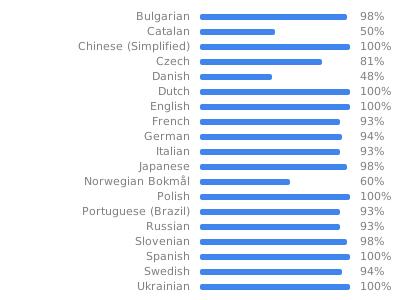
Licensing and Credits
This work is licensed under the MIT license and was built by Lei Nelissen.
An Apple Developer license, as well as various forms of support are graciously provided for by BMD Studio, experts in finding creative solutions for difficult problems.

lx-music-desktop
lyswhut·TypeScript
基于 Electron 的跨平台桌面音乐播放器,聚合多源在线音乐搜索与播放,界面清爽,适合日常听歌。
音乐播放器+4音乐播放器进阶
55238+1067.1kv2.12.62026-11-10 04:44 UTC
spotube
team-spotube·Kotlin
开源跨平台音乐播放器,桌面和手机都能用,通过 Spotify 和 YouTube 等公开来源获取歌曲,无需付费订阅即可播放。
音乐播放器+4音乐播放器硬核
50712+762.4kv6.0.02026-11-10 08:05 UTC
pear-desktop
pear-devs·TypeScript
基于 Electron 的跨平台桌面音乐播放器,为 YouTube Music 等流媒体服务提供增强扩展,支持 Windows、macOS 和 Linux。
音乐播放器+4音乐播放器
34017+212.0kv3.12.02026-11-08 01:55 UTC

YesPlayMusic
qier222·Vue
基于 Electron 和 Vue 的第三方网易云音乐播放器,界面精致,支持 Windows、macOS、Linux 以及 PWA,让你在桌面端也能获得流畅的在线听歌体验。
网易云音乐+4音乐播放器
33616+194.7kv0.4.112026-10-10 11:05 UTC