需 Windows 环境并依赖 .NET Framework 4.7.2;在 Options 中改完设置要点击 Save 而不是 Connect;README 未提供命令行安装方式,只能下载发布包
从 https://github.com/louislam/rdp-portal/releases/latest 下载发布包 硬件要求按 README 说明
README 未说明硬件要求;仅支持 Windows,基于 .NET Framework 4.7.2 与 Windows Form 开发
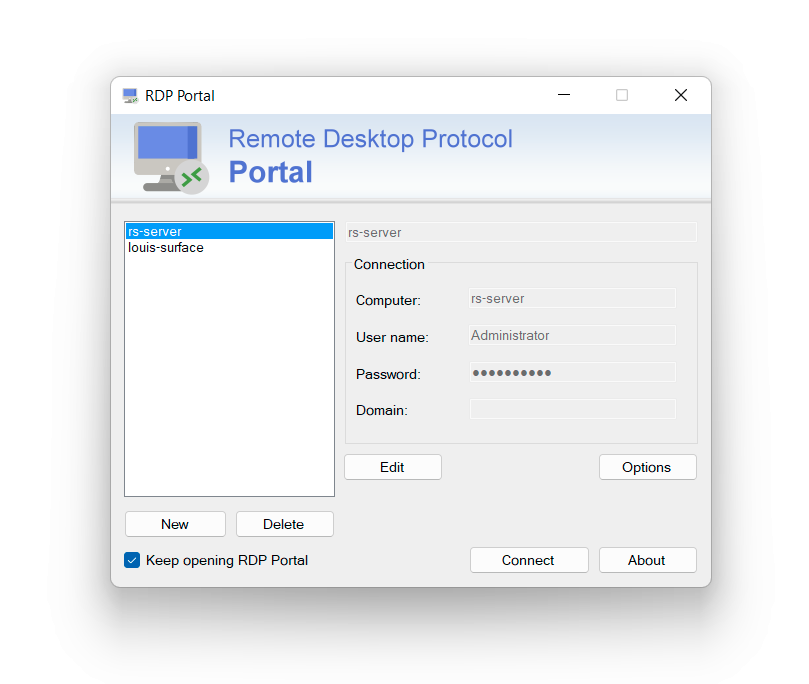
Windows 上的便携式远程桌面管理器,解决 mstsc 密码无法备份、连接管理差的问题
Windows 上的轻量远程桌面管理器,比系统自带工具更顺手,可集中管理多个 RDP 连接并便携使用。
核心能力
- 便携运行,备份整个文件夹即可迁移
- 保存远程桌面密码并可跨 Windows 电脑使用
- 连接后保持原生远程桌面体验
- 操作流程类似 WinSCP 或 HeidiSQL
- 通过 Options 调用原生 mstsc 配置更多参数
容易踩的坑
内容由模型根据 README 生成,可能不完整或不准确,以官方文档为准。看原文 README
- 1.0.4最新正式版2022-11-29 · 2022-11-29 10:39 UTC
这个版本没有写更新说明。
- 1.0.32022-11-26 · 2022-11-26 13:31 UTC
查看更新说明
- Update dependencies
- 1.0.22022-10-29 · 2022-10-29 09:00 UTC
查看更新说明
- Add double click to connect
- 1.0.12022-10-28 · 2022-10-28 19:49 UTC
查看更新说明
First Release!
用户点评
登录用户的真实使用记录,可按版本和硬件筛选共 0 条
还没有人点评。第一个说出真实体验的人最有价值。
RDP Portal
A slightly smarter and simple Remote Desktop manager for Windows.
Why RDP Portal?
By default, Remote Desktop Connection (mstsc.exe) is not possible to backup the saved passwords and the connection management is not good.
With RDP Portal, it is possible to save password and use it on any other Windows PCs.
⭐ Features
- Portable
- Backup-able Saved Passwords
- Same user experience while connected to your remote desktop.
- The workflow is similar to WinSCP or HeidiSQL
Download
From GitHub: https://github.com/louislam/rdp-portal/releases/latest
FAQ
- How to Backup?
RDP Portal is a portable application, you just need to backup the folder.
- How to config more settings like screen resolution?
You can click
Optionsin RDP Portal, it will open the original Remote Desktop Connection application. You can set anything there, but you have to clickSaveat the end. Don't clickConnect.
Credit
- Computer icons created by Freepik - Flaticon
Development
- IDE: Rider
- .NET Framework 4.7.2
- Windows Form

rustdesk
rustdesk·Rust
开源自托管的远程桌面控制软件,可替代 TeamViewer,支持自建中继服务器,跨 Android、iOS、Linux、macOS 等平台使用。
远程桌面+4远程桌面 / 控制硬核
128959+46621k1.5.12026-11-10 20:41 UTC
Sunshine
SunshineStream·C++
Self-hosted game stream host for Moonlight.
远程桌面 / 控制
432452.4k2026-11-11 04:38 UTC

Sunshine
LizardByte·C++
自建的游戏串流主机端,配合 Moonlight 客户端把 PC 游戏低延迟推流到电视、手机等设备,替代 NVIDIA GameStream。
游戏串流+4远程桌面 / 控制进阶
43234+1472.4kv2026.914.2336132026-11-10 16:14 UTC

neko
m1k1o·Go
在 Docker 里跑的自托管虚拟浏览器,通过 WebRTC 把画面实时推给多人,用来远程共享浏览和协作操作。
虚拟浏览器+4远程桌面 / 控制进阶
22662+481.7kv3.2.02026-11-07 10:39 UTC