lxml、pycocotools、opencv-python 为可选依赖,用到对应功能时需自行安装;Windows 上 pycocotools 需用 README 给出的 git 地址单独安装;3D 关键点与 Mesh 可视化依赖 Open3D 可视化服务端,需另起客户端发送数据
alfred
lucasjinrealGPL-3.0活跃维护面向人的深度学习实用工具库,封装了 3D 目标检测、分割、传感器融合和视频合成等常用功能,省去重复造轮子。
alfred-py: A deep learning utility library for **human**, more detail about the usage of lib to: https://zhuanlan.zhihu.com/p/341446046
latest发布于 2022-01-05 14:43 UTC913star134fork同步于 2026-11-07 07:30 UTC
alfred-py 是面向深度学习日常开发的 Python 工具库兼命令行工具,帮你省去可视化、数据转换和部署的重复代码
面向人的深度学习实用工具库,封装了 3D 目标检测、分割、传感器融合和视频合成等常用功能,省去重复造轮子。
核心能力
- 用 alfred 命令行直接查看 VOC、COCO、YOLO 格式的标注
- 支持绘制检测框、分割掩码、关键点以及点云 3D 框
- 提供 COCO 转 VOC 等数据格式转换与 evalvoc 评估工具
- 内置视频抽帧、图片合成视频、文件计数与数据集切分
- 可导入 API 完成 TRT 模型部署与 torch.device 等常用操作
容易踩的坑
内容由模型根据 README 生成,可能不完整或不准确,以官方文档为准。看原文 README
- latestFirst released on GitHub, recent stable version.最新正式版2022-01-05 · 2022-01-05 14:43 UTC
Added functions:
- inference via tensorrt;
- visualization on keypoints;
用户点评
登录用户的真实使用记录,可按版本和硬件筛选共 0 条
还没有人点评。第一个说出真实体验的人最有价值。
alfred-py can be called from terminal via alfred as a tool for deep-learning usage. It also provides massive utilities to boost your daily efficiency APIs, for instance, if you want draw a box with score and label, if you want logging in your python applications, if you want convert your model to TRT engine, just import alfred, you can get whatever you want. More usage you can read instructions below.
Functions Summary
Since many new users of alfred maybe not very familiar with it, conclude functions here briefly, more details see my updates:
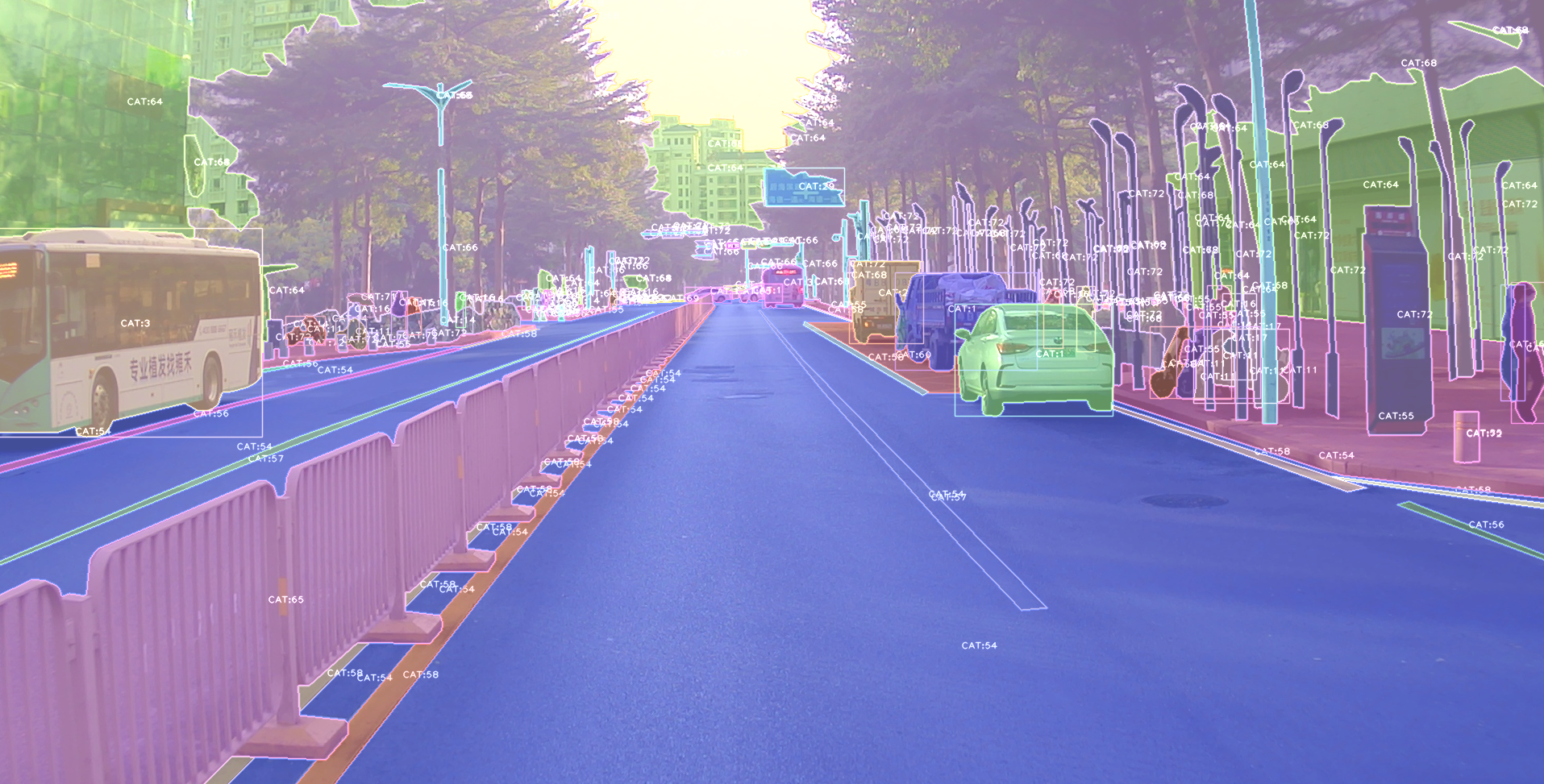
- Visualization, draw boxes, masks, keypoints is very simple, even 3D boxes on point cloud supported;
- Command line tools, such as view your annotation data in any format (yolo, voc, coco any one);
- Deploy, you can using alfred deploy your tensorrt models;
- DL common utils, such as torch.device() etc;
- Renders, render your 3D models.
A pic visualized from alfred:
Install
To install alfred, it is very simple:
requirements:
lxml [optional]
pycocotools [optional]
opencv-python [optional]
then:
pip install alfred-py
alfred is both a lib and a tool, you can import it's APIs, or you can directly call it inside your terminal.
A glance of alfred, after you installed above package, you will have alfred:
-
datamodule:# show VOC annotations alfred data vocview -i JPEGImages/ -l Annotations/ # show coco annotations alfred data cocoview -j annotations/instance_2017.json -i images/ # show yolo annotations alfred data yoloview -i images -l labels # show detection label with txt format alfred data txtview -i images/ -l txts/ # convert coco to voc alfred data coco2voc -c /path/to/coco -j annotations.json # show more of data alfred data -h # eval tools alfred data evalvoc -h -
cabmodule:# count files number of a type alfred cab count -d ./images -t jpg # split a txt file into train and test alfred cab split -f all.txt -r 0.9,0.1 -n train,val -
visionmodule:# extract video to images alfred vision extract -v video.mp4 # combine images to video alfred vision 2video -d images/ -
-hto see more:usage: alfred [-h] [--version] {vision,text,scrap,cab,data} ... positional arguments: {vision,text,scrap,cab,data} vision vision related commands. text text related commands. scrap scrap related commands. cab cabinet related commands. data data related commands. optional arguments: -h, --help show this help message and exit --version, -v show version info.inside every child module, you can call it's
-has well:alfred text -h.
if you are on windows, you can install pycocotools via:
pip install "git+https://github.com/philferriere/cocoapi.git#egg=pycocotools&subdirectory=PythonAPI", we have made pycocotools as an dependencies since we need pycoco API.
Updates
alfred-py has been updating for 3 years, and it will keep going!
-
2024.08.02: Version 3.1.1 - Added COCO to VOC conversion, fixed syntax errors, added pyproject.toml for modern packaging, added
__version__to package. -
2023.04.28: Update the 3d keypoints visualizer, now you can visualize Human3DM kpts in realtime:
 For detailes reference to
examples/demo_o3d_server.py. The result is generated from MotionBert. -
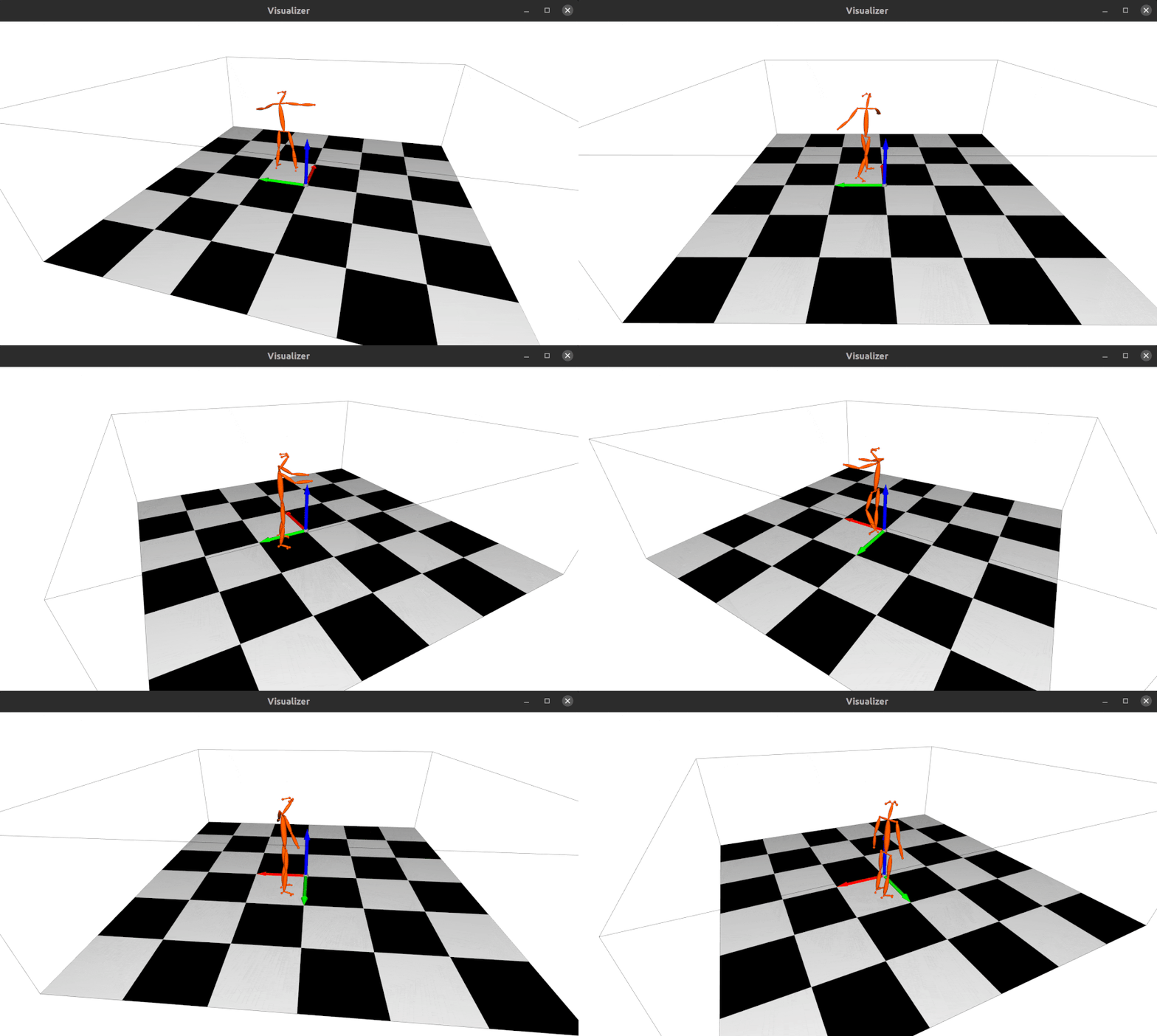
2022.01.18: Now alfred support a Mesh3D visualizer server based on Open3D:
from alfred.vis.mesh3d.o3dsocket import VisOpen3DSocket

def main():
    server = VisOpen3DSocket()
    while True:
        server.update()


if __name__ == "__main__":
    main()
Then, you just need setup a client, send keypoints3d to server, and it will automatically visualized out. Here is what it looks like:
-
2021.12.22: Now alfred supported keypoints visualization, almost all datasets supported in mmpose were also supported by alfred:
from alfred.vis.image.pose import vis_pose_result

# preds are poses, which is (Bs, 17, 3) for coco body
vis_pose_result(ori_image, preds, radius=5, thickness=2, show=True)

ultralytics
ultralytics·Python
YOLO 系列官方实现库,一套 PyTorch 代码覆盖目标检测、实例与语义分割、图像分类、姿态估计和目标跟踪,训练到部署全流程打通。
目标检测+4检测 / 分割入门
63283+10012kv8.4.2102026-11-10 23:12 UTC

yolov5
ultralytics·Python
基于 PyTorch 的目标检测全家桶,覆盖训练、推理、实例分割、图像分类和模型导出,开箱即用,适合快速落地视觉任务。
目标检测+4检测 / 分割进阶
58260+717kv7.02026-11-07 16:59 UTC
pytorch-image-models
huggingface·Python
收录最全的 PyTorch 图像骨干网络合集,涵盖 ResNet、ViT、ConvNeXt 等主流模型,自带训练、评估、推理和导出脚本及预训练权重,省去自己搭网络和找权重的麻烦。
图像分类+4检测 / 分割进阶
37274+95.2kv1.0.312026-11-07 23:22 UTC

detectron2
facebookresearch·Python
Detectron2 是 Facebook 开源的目标检测与分割平台,提供模块化架构和丰富预训练模型,方便快速搭建和训练视觉识别任务。
目标检测+4检测 / 分割进阶
34981+67.9kv0.62026-10-27 09:21 UTC