启动 RMS 前必须先让 frida-server 在目标设备上运行,且 RMS 要在其后启动;RMS 目前无法识别多设备,请只连接一台设备;Web 界面建议用 Chrome,Safari 下 Socket 不可用。

RMS-Runtime-Mobile-Security
m0bilesecurityGPL-3.0活跃维护基于 Frida 的 Web 界面,让你在运行时动态操纵 Android 和 iOS 应用,方便做移动端逆向分析与安全测试。
Runtime Mobile Security (RMS) 📱🔥 - is a powerful web interface that helps you to manipulate Android and iOS Apps at Runtime
1.5.25发布于 2026-07-01 15:48 UTC3,143star +1 / 7 天418fork同步于 2026-11-10 17:43 UTC
npm install -g rms-runtime-mobile-security
rms 硬件要求按 README 说明
README 未说明显存或 GPU 要求;需在电脑上安装 NodeJS 与 FRIDA CLI 工具,并在目标 Android 或 iOS 设备上运行 frida-server。
支持 Apple Silicon
基于 FRIDA 的 Web 界面,用于在运行时动态分析和操控 Android 与 iOS 应用
基于 Frida 的 Web 界面,让你在运行时动态操纵 Android 和 iOS 应用,方便做移动端逆向分析与安全测试。
核心能力
- 导出已加载的类及其方法列表
- 在运行时 Hook 类和方法并追踪参数与返回值
- 在堆中搜索指定类的实例并调用其方法
- 为选中类的所有方法自动生成 Hook 模板
- 注入自定义 FRIDA 脚本并监控 Android API 调用
容易踩的坑
内容由模型根据 README 生成,可能不完整或不准确,以官方文档为准。看原文 README
- 1.5.25Runtime Mobile Security (RMS) - Version 1.5.25最新正式版2026-07-01 · 2026-07-01 15:48 UTC

Runtime Mobile Security (RMS) 📱🔥 - v1.5.25 is out 🎉🎉🎉

CHANGELOG
- 🌟 Merged PR #165 by @tranquac and #170 by @Iankie
- 📦 Updated various other dependencies
INSTALLATION
Follow the instructions below to install and run the new NodeJS version:
- Open the terminal and run the following command to install the npm package
npm install -g rms-runtime-mobile-security
- Make sure frida-server is up and running on the target device 📲.
- Instructions are here: prerequisites / quick smoke-test
- Launch RMS via the following command
rms(orRMS-Runtime-Mobile-Security)
- Open your browser at
http://127.0.0.1:5491/ - Start enjoying RMS 📱🔥
- 1.5.24Runtime Mobile Security (RMS) - Version 1.5.242025-11-15 · 2025-11-15 14:04 UTC
查看更新说明
Runtime Mobile Security (RMS) 📱🔥 - v1.5.24 is out 🎉🎉🎉
CHANGELOG
- 🌟 Full support for Frida 17+! (Huge thanks to @saullocarvalho for the #153 ! 🥳)
- 📦 Updated various other dependencies
INSTALLATION
Follow the instructions below to install and run the new NodeJS version:
- Open the terminal and run the following command to install the npm package
npm install -g rms-runtime-mobile-security
- Make sure frida-server is up and running on the target device 📲.
- Instructions are here: prerequisites / quick smoke-test
- Launch RMS via the following command
rms(orRMS-Runtime-Mobile-Security)
- Open your browser at
http://127.0.0.1:5491/ - Start enjoying RMS 📱🔥
- 1.5.23Runtime Mobile Security (RMS) - Version 1.5.232024-10-05 · 2024-10-05 20:13 UTC
查看更新说明
Runtime Mobile Security (RMS) 📱🔥 - v1.5.23 is out 🎉🎉🎉
CHANGELOG
- dependencies update (including latest version of FRIDA)
INSTALLATION
Follow the instructions below to install and run the new NodeJS version:
- Open the terminal and run the following command to install the npm package
npm install -g rms-runtime-mobile-security
- Make sure frida-server is up and running on the target device.
- Instructions are here: prerequisites / quick smoke-test
- Launch RMS via the following command
rms(orRMS-Runtime-Mobile-Security)
- Open your browser at
http://127.0.0.1:5491/ - Start enjoying RMS 📱🔥
- 1.5.20Runtime Mobile Security (RMS) - Version 1.5.202023-12-26 · 2023-12-26 10:57 UTC
查看更新说明
Runtime Mobile Security (RMS) 📱🔥 - v1.5.2o is out 🎉🎉🎉
CHANGELOG
- dependencies update (including latest version of FRIDA)
- support for NodeJS 20.10.0 - Fix Issue #122
- added docker - PR #127 by @sdcampbell 🙏🏻
INSTALLATION
Follow the instructions below to install and run the new NodeJS version:
- Open the terminal and run the following command to install the npm package
npm install -g rms-runtime-mobile-security
- Make sure frida-server is up and running on the target device.
- Instructions are here: prerequisites / quick smoke-test
- Launch RMS via the following command
rms(orRMS-Runtime-Mobile-Security)
- Open your browser at
http://127.0.0.1:5491/ - Start enjoying RMS 📱🔥
- 1.5.19Runtime Mobile Security (RMS) - Version 1.5.192023-08-30 · 2023-08-30 17:35 UTC
查看更新说明
Runtime Mobile Security (RMS) 📱🔥 - v1.5.19 is out 🎉🎉🎉
CHANGELOG
- changed RMS default port from 5000 to 5491. It is also possibile to launch rms on different port via the --port parameter (thanks to @thomasync)
- dependencies update
INSTALLATION Follow the instructions below to install and run the new NodeJS version:
- Open the terminal and run the following command to install the npm package
npm install -g rms-runtime-mobile-security
- Make sure frida-server is up and running on the target device.
- Instructions are here: prerequisites / quick smoke-test
- Launch RMS via the following command
rms(orRMS-Runtime-Mobile-Security)
- Open your browser at
http://127.0.0.1:5491/ - Start enjoying RMS 📱🔥
用户点评
登录用户的真实使用记录,可按版本和硬件筛选共 0 条
还没有人点评。第一个说出真实体验的人最有价值。
Runtime Mobile Security (RMS) 📱🔥


Runtime Mobile Security (RMS), powered by FRIDA, is a powerful web interface that helps you to manipulate Android and iOS Apps at Runtime.
With RMS you can easily dump all loaded classes and relative methods, hook everything on the fly, trace methods args and return value, load custom scripts and many other useful stuff.
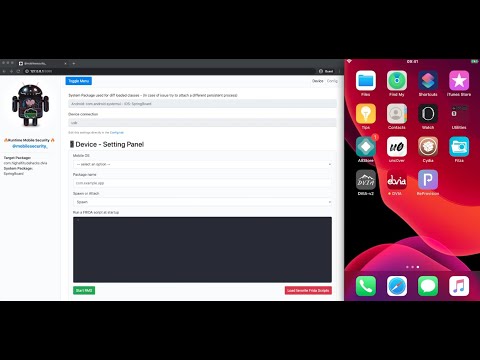
iOS DEMO - VIDEO
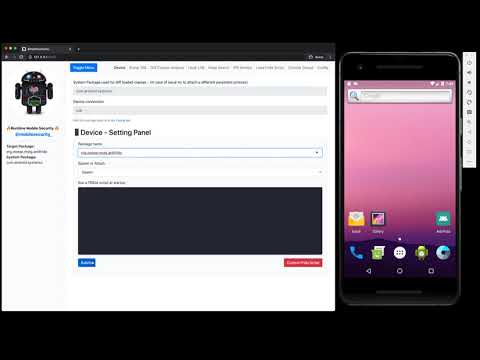
Android DEMO - VIDEO
Tutorial - Android
- Solving OWASP UnCrackable Android App Level 1 with Runtime Mobile Security (RMS)
- Solving OWASP UnCrackable Android App Level 2 with Runtime Mobile Security (RMS)
- Solving SANS Holiday Hack Challenge 2024 with Runtime Mobile Security (RMS) by Andrea Lamonato
Prerequisites
- NodeJS installed on your computer
- FRIDA's CLI tools installed on your computer
- FRIDA server up and running on the target device
Quick smoke-test
As suggested by the official FRIDA doc, please perform a quick smoke-test to make sure FRIDA is working properly on your test device.
By running the frida-ps -U command from your desktop, you should receive the list of the processes running on your connected mobile device.
Android                    | iOS
  PID NAME                 |  PID NAME
 1590 com.facebook.katana  |  488 Clock
 3282 com.twitter.android  |  116 Facebook
 …                            …
Tips
Some cool projects that can help you to auto install, update and run FRIDA on Android devices are:
They are not needed on iOS devices, since FRIDA starts just after the boot of the device (jailbreak mode).
Installation
- Open the terminal and run the following command to install the npm package
npm install -g rms-runtime-mobile-security- If you can't install the frida-node dependency, please check this troubleshooting post written by Chichou to choose another version of Node.js
- Make sure frida-server is up and running on the target device.
- Instructions are here: prerequisites / quick smoke-test
- Launch RMS via the following command
rms(orRMS-Runtime-Mobile-Security)
- Open your browser at
http://127.0.0.1:5491/ - Start enjoying RMS 📱🔥
NOTE
Default RMS port has been changed from 5000 to 5491 because since MacOS Ventura, port 5000 is the Control Center's default port. If you wish to change the default port, you can also run RMS with the --port parameter followed by the desired port number e.g. rms --port 9000
Notes and possibile issues
- In case of issues with the npm package installed as a global cli app, please try the local installation (development mode)
- In case of issues with your favorite Browser (e.g. logs not printed in the web console), please use Google Chrome (fully supported)
- If RMS is not able to detect your device, please perform the following checks:
- double check if frida-server is up and running on the target device. Instructions are here: prerequisites / quick smoke-test
- RMS must be started after frida-server
- make sure that only 1 device is connected to your computer. RMS is currently not able to detect multiple devices
- kill RMS and start it again
Development mode
Follow the steps below if you want to develop new features for RMS 😉
git clone https://github.com/m0bilesecurity/RMS-Runtime-Mobile-Security.gitcd RMS-Runtime-Mobile-Securitynpm install(local installation)- Launch RMS via
node rms.js - You can also install RMS as global package by running the following commands:
npm install -gto install dependenciesnpm run compileto compile the frida-agentrmsto run RMS (anywhere)
NOTE: If you add new features to the agent (/agent/RMS_core.js), please remember to recompile the code by running npm run compile or directly via the frida-compile command (frida-compile agent/RMS_core.js -o agent/compiled_RMS_core.js)
General Info
Runtime Mobile Security (RMS) supports Android and iOS devices.
It has been tested on MacOS and with the following devices:
- AVD emulator
- Genymotion emulator
- Amazon Fire Stick 4K
- iPhone 7
- Chrome (Web Interface)
It should also work well on Windows and Linux but some minor adjustments may be needed.
Known issues and improvements
- Sometime RMS fails to load complex methods. Use a filter when this happens or feel free to improve the algo (agent/RMS_core.js)
- Socket are not working on Safari, please use Chrome instead
- RMS is not able to recognize multiple devices. Please do not connect more than one device at the same time
- Code is not optimized
- Feel free to send me your best JS script via a Pull Request. I'll be happy to bundle all the best as default scripts in the next RMS release (e.g. root detection bypass, ssl pinning, etc)
Usage
1. Run your favorite app by simply inserting its package name
NOTE RMS attachs a persistence process called com.android.systemui on Android and SpringBoard on iOS devices to get the list of all the classes that are already loaded in memory before the launch of the target app. If you have an issue with them, try to find a different default package that works well on your device. You can set another default package via the Config Tab or by simply editing the /config/config.json file.


2. Check which Classes and Methods have been loaded in memory


3. Hook on the fly Classes/Methods and trace their args and return values

Go back to the dump page in order to have an overview of all the hooked methods that have been executed by the app ✅

4. Search instances of a specific class on the Heap and call its methods


5. Select a Class and generate on the fly an Hook template for all its methods


6. Easily detect new classes that have been loaded in memory

7. Inject your favorite FRIDA CUSTOM SCRIPTS on the fly
Just add your .js files inside the custom_script folder and they will be automatically loaded by the web interface ready to be executed.


8. API Monitor - Android Only
via the API Monitor TAB you can easily monitor tons of Android APIs organized in 20 different Categories. Support can be easily extended by adding more classes/methods to the /config/api_monitor.json file.

You can also monitor native functions: libc.so - open, close, read, write, unlink, remove

9. FRIDA Script to load Stetho by Facebook [BONUS]
Inject the FRIDA script to load the amazing Stetho.
Stetho is a sophisticated debug bridge for Android applications. When enabled, developers have access to the Chrome Developer Tools feature natively part of the Chrome desktop browser. Developers can also choose to enable the optional dumpapp tool which offers a powerful command-line interface to application internals.

10. File Manager [BETA]
A simple File Manager has been implemented to help you exploring app's private folders and files. This feature is still in BETA.
improvement: frida-fs needs to be implemented to enable files download directly from the browser (File Manager TAB).


11. Static Analysis - iOS Only

Acknowledgements
Special thanks to the following Open Source projects for the inspiration:
FRIDA Custom Scripts bundled in RMS - Credits:
- Runtime Mobile Security (RMS)
- FSecureLABS
- Mediaservice
- federicodotta
- iddoeldor
- dzonerzy
- akabe1
- Areizen
- int3rf3r3nc3
- dki
- ay-kay
- chaitin
- lich4
- fadeevab
- realgam3
- noobpk
- enovella
DEMO apps:
- RootBeer Sample is the DEMO app used to show how RMS works. RootBeer is an amazing root detection library. I decided to use the Sample app as DEMO just to show that, as every client-side only check, its root detection logic can be easily bypassed if not combined with a server-side validation.
- DVIA a vulnerable app to test your iOS Penetration Testing Skills
- Anti-Frida Frida Detection Examples by Bernhard Mueller.
License
RMS is licensed under a GNU General Public v3 License.
rea
morluto·TypeScript
用 AI Agent 做逆向工程,从应用行为分析一路深入到原生二进制,覆盖 Android、C++ 等多平台场景。
逆向工程+4逆向工程
449300+10486111krea-agents-6.8.02026-11-10 13:53 UTC

ghidra
NationalSecurityAgency·Java
NSA 开源的软件逆向工程框架,支持反汇编、反编译和二进制分析,可替代 IDA Pro 做恶意代码分析与漏洞研究。
逆向工程+4逆向工程
99290+84411kGhidra_12.2_build2026-11-10 11:31 UTC

gpt4free
xtekky·Python
聚合多家厂商语言模型的 Python 接口库,通过逆向方式免费调用 GPT、DeepSeek、Gemini 等模型,省去官方 API 费用。
逆向工程+4逆向工程
67023+313kv8.9.22026-11-03 02:49 UTC
librepods
librepods-org·Kotlin
让 AirPods 在 Android 和 Linux 上也能用的逆向工程工具,支持电量监控、入耳检测、助听器模式和对话感知等原生功能。
逆向工程+4逆向工程
30696+391.9kv1.0.42026-11-09 11:31 UTC