EPUB 需额外装 lxml,cb7 需 py7zr,orjson 为可选加速依赖,可用 [optional] 一次装齐;Docker 镜像默认不含可选功能,需拉 latest-optional 标签;Docker 下载文件固定写入容器内 /downloads 目录,需挂载卷才能取回
mangadex-downloader
mansufMIT更新放缓用 Python 写的 MangaDex 漫画下载命令行工具,支持按章节批量抓取并保存到本地,省去手动逐页保存的麻烦。
A command-line tool to download manga from MangaDex, written in Python.
v3.1.4发布于 2025-05-19 07:49 UTC939star87fork同步于 2026-11-07 07:34 UTC
python3 -m pip install mangadex-downloader
mangadex-dl "insert MangaDex URL here" 硬件要求按 README 说明
README 未说明,纯命令行工具无 GPU 或显存要求;需 Python 3.10 及以上,Windows 也可直接用打包好的可执行文件
有 Docker 镜像
用 Python 写的 MangaDex 漫画命令行下载器,支持批量抓取并转成多种电子书格式
用 Python 写的 MangaDex 漫画下载命令行工具,支持按章节批量抓取并保存到本地,省去手动逐页保存的麻烦。
核心能力
- 按章节、卷或合并单文件下载漫画
- 支持搜索并带过滤条件批量下载
- 可按汉化组或用户过滤章节
- 支持标签、组、用户黑名单
- 导出原始图片、EPUB、PDF、CBZ、CB7
容易踩的坑
内容由模型根据 README 生成,可能不完整或不准确,以官方文档为准。看原文 README
- v3.1.4mangadex-downloader v3.1.4最新正式版2025-05-19 · 2025-05-19 07:49 UTC
Fix bugs
- Fix UnicodeEncodeError when saving manga info in json format
- Fix comic book (.cbz) title metadata #155
- Fix memory leak ? (progress 1)
- Fix application is being falsely flagged by several AVs #157
- Fix volume cover become null when creating chapter info #159
- Fix check_login throwing error when refreshing token from cache #158
Files hash
Name SHA-256 mangadex-dl_x64_v3.1.4.zip 5c694bd011947dcb89914070718948d111d3f1873b5fef1ddbf00d6a286f5bcd mangadex-dl_x86_v3.1.4.zip a32433e86ece53d0e9e2bbd9cad68d08aed96c4131082ebd11901a30def3834b These binaries are for Windows only.
- v3.1.3mangadex-downloader v3.1.32025-04-23 · 2025-04-23 06:18 UTC
查看更新说明
Fix bugs
- Fix --use-alt-details is not working due to missing language (lang: Georgian) #154
- Fix chapter cover doesn't work due to CoverArtIterator cache issue #152
- Fix volume number not in EPUB title resulting duplicated entry in comic reader #149
Files hash
Name SHA-256 mangadex-dl_x64_v3.1.3.zip b3624c301a3e1c232935b7eef5a7fe8a1d60cca0eb2db3c0cf614c561710138b mangadex-dl_x86_v3.1.3.zip 1e1b737b68c6f201bb98a0520298c9d3c3553a60a03e306483517d15993528cd These binaries are for Windows only.
- v3.1.2mangadex-downloader v3.1.22025-04-09 · 2025-04-09 19:53 UTC
查看更新说明
Fix bugs
- Fixed application is left hanging when download is completed (report system is not working) #146
- Fixed validator always not passed for "group_nomatch_behaviour" config
- Fixed negative value when rate-limited #147
Files hash
Name SHA-256 mangadex-dl_x64_v3.1.2.zip b9d6656f36a8a57d09fd6c880ca7b148c30780ed28ebd72090c0c79aae12d8b9 mangadex-dl_x86_v3.1.2.zip 7bab35504de7141e5728643b0ec00ee29551978d6083784ec6d0e318cd7e4f89 These binaries are for Windows only.
- v3.1.1mangadex-downloader v3.1.12025-03-07 · 2025-03-07 18:02 UTC
查看更新说明
Fix bugs
Documentation
- Fix typo in documentation and source code #130
Files hash
Name SHA-256 mangadex-dl_x64_v3.1.1.zip 2a199664e87378745a965531cb71dbbfbcbb3465f12809faa7d090638964d3d4 mangadex-dl_x86_v3.1.1.zip f6d9bbb8d7347bf916f002cdde8e5670f1c502146510c93bef57cafc4502f619 These binaries are for Windows only.
- v3.1.0mangadex-downloader v3.1.02025-02-18 · 2025-02-18 11:36 UTC
查看更新说明
New features
- Added
mihonmanga info format (--manga-info-format)
Fix bugs
- Fixed
--updateoption is not working in bundled executable version when updating from v2 to v3 - Fixed
FileNotFoundErrorwhen using--create-manga-infowith--manga-info-format=json#129 - Fixed
--use-volume-coveralways use main cover #131 - Fixed
--no-trackisn't working after updating to v3.0.0 #133
Files hash
Name SHA-256 mangadex-dl_x64_v3.1.0.zip 1ec40cffea0172be1ad85677c11b4e08b2cb065bc1266747f5d457861956bb38 mangadex-dl_x86_v3.1.0.zip 369c77e1b71fd64d09a778c31b8ae2e84e03f9309dfa23444d4b10c6af73ba44 These binaries are for Windows only.
- Added
用户点评
登录用户的真实使用记录,可按版本和硬件筛选共 0 条
还没有人点评。第一个说出真实体验的人最有价值。


mangadex-downloader


A command-line tool to download manga from MangaDex, written in Python.
Table of Contents
Key Features
- Download manga, cover manga, chapter, or list directly from MangaDex
- Download manga or list from user library
- Find and download MangaDex URLs from MangaDex forums (https://forums.mangadex.org/)
- Download manga in each chapters, each volumes, or wrap all chapters into single file
- Search (with filters) and download manga
- Filter chapters with scalantion groups or users
- Manga tags, groups, and users blacklist support
- Batch download support
- Authentication (with cache) support
- Control how many chapters and pages you want to download
- Multi languages support
- Legacy MangaDex url support
- Save as raw images, EPUB, PDF, Comic Book Archive (.cbz or .cb7)
- Respect API rate limit
And ability to not download oneshot chapter
Supported formats
Read here for more info.
Installation
What will you need:
- Python 3.10.x or up with Pip (if you are in Windows, you can download bundled executable. See this instructions how to install it)
That's it.
Python Package Index (PyPI)
Installing mangadex-downloader is easy, as long as you have requirements above.
# For Windows
py -3 -m pip install mangadex-downloader

# For Linux / Mac OS
python3 -m pip install mangadex-downloader
You can also install optional dependencies
Or you can install all optional dependencies
# For Windows
py -3 -m pip install mangadex-downloader[optional]

# For Mac OS / Linux
python3 -m pip install mangadex-downloader[optional]
There you go, easy ain't it ?.
Bundled executable
NOTE: This installation only apply to Windows.
Because this is bundled executable, Python are not required to install.
Steps:
- Download latest version here -> https://github.com/mansuf/mangadex-downloader/releases
- Extract it.
- That's it ! You have successfully install mangadex-downloader. See this instructions to run mangadex-downloader
Docker
Available at:
- https://hub.docker.com/r/mansuf/mangadex-downloader
- https://gallery.ecr.aws/mansuf/mangadex-downloader
# Dockerhub
docker pull mansuf/mangadex-downloader

# AWS ECR (Alternative)
docker pull public.ecr.aws/mansuf/mangadex-downloader
If you want to get optional features such as EPUB support, cb7 support, etc.
You can use tag ending with -optional
# Dockerhub
docker pull mansuf/mangadex-downloader:latest-optional
docker pull mansuf/mangadex-downloader:v3.1.4-optional

# AWS ECR (Alternative)
docker pull public.ecr.aws/mansuf/mangadex-downloader:latest-optional
docker pull public.ecr.aws/mansuf/mangadex-downloader:v3.1.4-optional
NOTE: If you're wondering why optional tags doesn't have arm/v6 platform support.
That's because some dependencies (most notably orjson) require rust compiler
and i give up installing rust compiler in arm/v6 platform, there is too much errors for me.
Development version
NOTE: You must have git installed. If you don't have it, install it from here https://git-scm.com/.
git clone https://github.com/mansuf/mangadex-downloader.git
cd mangadex-downloader
python setup.py install # or "pip install ."
Usage
PyPI version
mangadex-dl "insert MangaDex URL here"
# or
mangadex-downloader "insert MangaDex URL here"

# Use this if "mangadex-dl" or "mangadex-downloader" didn't work

# For Windows
py -3 -m mangadex_downloader "insert MangaDex URL here"

# For Linux / Mac OS
python3 -m mangadex_downloader "insert MangaDex URL here"
Bundled executable version
- Navigate to folder where you downloaded mangadex-downloader
- Open "start cmd.bat" (don't worry it's not a virus, it will open a command prompt)
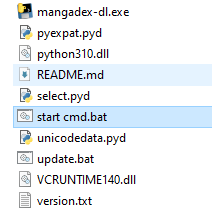
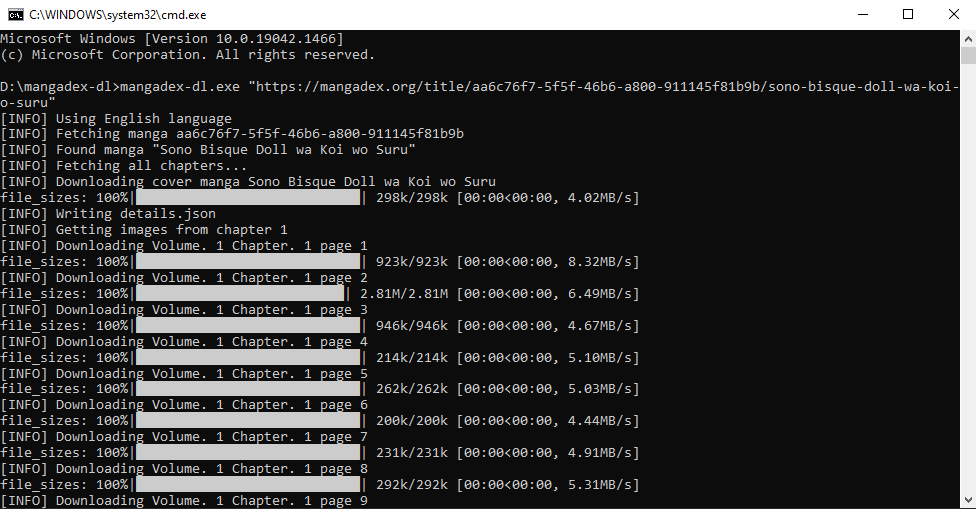
- And then start using mangadex-downloader, see example below:
mangadex-dl.exe "insert MangaDex URL here"
Docker version
The downloaded files in the container are stored in /downloads directory
# Dockerhub
docker run --rm -v /home/sussyuser/sussymanga:/downloads mansuf/mangadex-downloader "insert MangaDex URL"

# AWS ECR (alternative)
docker run --rm -v /home/sussyuser/sussymanga:/downloads public.ecr.aws/mansuf/mangadex-downloader "insert MangaDex URL"
For more example usage, you can read here
For more info about CLI options, you can read here
Contributing
See CONTRIBUTING.md for more info
Donation
If you like this project, please consider donate to one of these websites:
Any donation amount will be appreciated 💖
Support
Need help ? Have questions or you just wanna chat ?
Please note, that the Discord server is really new and it doesn't have anything on it. So please be respect and kind.
Links
Disclaimer
mangadex-downloader are not affiliated with MangaDex. Also, the current maintainer (@mansuf) is not a MangaDex dev
yt-dlp
yt-dlp·Python
功能丰富的命令行音视频下载器,支持从 YouTube 等大量网站抓取视频和音频,还能调用 SponsorBlock 自动跳过广告片段。
命令行下载器+4下载管理器
206765+91018k2026.10.262026-11-04 07:16 UTC

Motrix
agalwood·TypeScript
基于 aria2 的全功能下载管理器,支持 HTTP、FTP、BT 和磁力链接,界面清爽,跨 Windows、macOS、Linux 使用。
下载管理器+4下载管理器进阶
58121+2265.1kv2.4.12026-11-09 16:32 UTC

cobalt
imputnet·Svelte
一个开源的社交媒体下载器,支持从 Instagram、TikTok、Twitter、Reddit、SoundCloud 等平台保存视频和音乐,界面清爽、无需广告。
社交媒体下载+4下载管理器进阶
45972+894.1k2026-04-06 11:59 UTC
aria2
aria2·C++
轻量级命令行下载工具,支持 HTTP、FTP、BitTorrent、Metalink 等多种协议和多源并发下载,适合脚本化批量下载和远程 RPC 控制。
下载工具+4下载管理器进阶
43469+474.0krelease-1.37.02026-06-25 14:49 UTC