项目仍处于 WIP 阶段,功能尚不完善,保存文件格式未来可能变化;CI 构建版本可能不稳定,使用前请备份文件。
Lorien
mbrlabsMIT长期未更新一款基于 Godot 的无限画布白板与绘图应用,支持 Windows、Linux 和 macOS,适合做笔记、画草图和整理思路。
Infinite canvas drawing/whiteboarding app for Windows, Linux and macOS. Made with Godot.
v0.6.0发布于 2023-11-06 15:27 UTC6,879star +3 / 7 天314fork同步于 2026-11-10 17:34 UTC
从 GitHub Releases 下载最新稳定版安装包;如需自行构建,需使用 Godot 引擎打开项目。 硬件要求按 README 说明
README 未说明具体硬件要求;支持 Windows、Linux 和 macOS,并设计为配合 Wacom 等数位板使用。
基于 Godot 的无限画布绘图与白板应用,把笔迹存成点集,文件极小、渲染流畅
一款基于 Godot 的无限画布白板与绘图应用,支持 Windows、Linux 和 macOS,适合做笔记、画草图和整理思路。
核心能力
- 把笔迹存为点集,运行时渲染,不依赖位图
- 提供无限画布、无限撤销重做与近乎无限缩放
- 内置自由笔、橡皮、直线、矩形、椭圆与选择工具
- 支持移动和删除选中的笔迹,并可导出 SVG
- 支持数位板压感与可自定义快捷键、调色板
容易踩的坑
内容由模型根据 README 生成,可能不完整或不准确,以官方文档为准。看原文 README
- v0.6.0最新正式版2023-11-06 · 2023-11-06 15:27 UTC
It's been a while - so a new release is long overdue! A special thanks goes to @MrApplejuice for adding support for rebindable keyboard shortcuts and @hansemro for enabling the eraser mode when the pen is inverted!
This will be the last "major" version using Godot 3. After this release i will start porting Lorien to Godot 4.
Thank you everybody who contributed to this release!
Added
- Rebindable keyboard shortcuts
- Use eraser tool while tablet pen is inverted
- Dotted grid pattern; can be changed back to lines (or none at all) in the settings
- Translations: Simplified Chinese, Traditional Chinese
Fixed
- Fixed blurry interface on some macOS devices
- Fixed invisible cursor in some situations
- Fixed issue where moved brush strokes stayed in their original positions after exporting to SVG
- Fixed not being able to draw simple dots by just clicking/tapping the brush once
Changed
- Changing the application language does not require a restart now
- Improved translations: Spanish, Brasilian Portuguese
- Improved UI auto scaling, especially for Windows and OSX
- Moved to grid toggle button from the toolbar to the settings
- Removed the canvas background color from the toolbar and moved it to Settings > Canvas Color. The previous setting (Appearance > Default canvas color was removed)
- Savefiles do no longer store the canvas background color
- Updated to Godot 3.5.3
- v0.5.02022-06-12 · 2022-06-12 14:23 UTC
查看更新说明
It's time for a new release! Notable new features include: much improved Antialiasing, SVG exporter, Supereraser, UI scaling for high-dpi monitors and the circle/ellipse tool.
Thank you everybody who contributed to this release!
Breaking Changes
Version
v0.5of Lorien features a new SuperEraser, which erases brush strokes as soon as it inserects with them. The previous implementation just painted over new brush strokes, which always had the same color as the background - giving you the illusion of a traditional eraser like in bitmap-based programs (Gimp, Photoshop, etc.). The old implementation has been completely removed in favor of the SuperEraser. The savefile format did not change. However previously made eraser-strokes will be skipped when loading.lorienfiles. Moreover when saving these files, the eraser-strokes will be permanently lost.If you rely on these eraser-strokes: DO NOT UPDATE to this version or BACKUP you
.lorienfiles before opening them in the new version.Added
- Zooming with CTRL+MMB
- Automatically remembering and auto-opening .lorien files upon exit & launch
- Fullscreen support
- Basic SVG exporter (variable brush stroke thinkness not supported yet)
- Circle/Ellipse tool
- New eraser tool behaviour (SuperEraser): intersecting a brush stroke with the eraser brush removes the entiry brush stroke
- The window size will be saved and restored across program restarts
- Center the canvas based on current mouse position (shortcut:
SPACE) - UI scaling for high-dpi monitors
- Toolbar can be scrolled through when the entire toolbar cannot be shown
- Changing the brush color while having strokes actively selected changes the color of these strokes
- Translations: Turkish, Brazilian Portuguese
Fixed
- Fixed misplaced color picker after window resize
- Fixed keyboard shortcuts for MacOS
Changed
- Updated to Godot 3.4.4
- Enabled low-energy mode
- Improved brush stroke antialiasing
- Improved selection tool performance on large documents
- Removed old fake-eraser in favor of new SuperEraser
- Removed rudimentary png export in favor of the new SVG exporter
- Made the brush stroke optimizer less aggresive, which results in smoother lines at the expense of slightly bigger savefiles
- Increased the default pressure sensitvity from 1.0 to 1.5
- Lowered minimum window size
- Default to rounded brush stoke caps
- v0.4.02021-10-10 · 2021-10-10 12:43 UTC
查看更新说明
It's finally time for a new release! The new main features in this release are: the new Color Palette System and the Rectangular Shape Tool. The savefile format did not change, so you are safe to use this new version. Just in case making a backup of your files is recommended.
Added
- Distraction free mode which hides the UI. Can be toggled with TAB
- Color palettes: You can use the built-in palette or create custom palettes yourself
- Easteregg: Pressing F12 spwans a playable character who can walk on the drawn lines
- Rectangle tool: Easily draw rectangular shapes
- Translations: Korean, French
Fixed
- Issue where the the mouse cursor vanished when switching from annother program to Lorien while a dialog was open
- Some UI elements were not hooked up to the localization system
Changed
- Updated to Godot 3.3.4
- Lines created with the line tool are now subdivided (more points between start and end point) so that it's easier to select them
- Removed the color picker tool in favour of the new palette system
- Removed the default brush color setting in favour of the new palette system
- UI: subtle rounded corners for most elements
- UI: replaced some default Godot icons with custom versions
- UI: General polish
- v0.3.02021-07-23 · 2021-07-23 16:32 UTC
查看更新说明
It's been a while since the last update but here it is at last. It's a pretty feature packed release with a lot of bugfixes and improvements contributed by a lot of new contributors and me.
The main features i want to highlight are the new infinite grid and the copy'n paste feature.
Added
- Infinite grid
- Copy-Paste selected brush strokes with CTRL+C/CTRL+V or duplicate in one step with CTRL+D
- The selection tool can now also deselect seperate brush strokes by holding down shift
- "Save as" functionality to save a file as a new file with a new file name, while keeping the original
- Implemented "Open" and "Save" functionality in menu
- Translations: Spanish, Russian
- Open files via drag'n drop from the filesystem
- Open files via cli arguments and "Open with.." functionality on Windows
- Option to set foreground and backgound FPS in the settings menu
- Option to set the line cap in settings menu (flat & round)
- Option to change the pressure sensitivity by a fixed multilpier
Fixed
- Fixed camera position & zoom getting reset when switching between tabs
- Fixed an issue where a brush stroke disappeared if it got too long (See: #26)
- Use default canvas color from settings for newly opened tabs
- Fixed wrong pen pressure display in status bar
- Wrong scaling of cursors when switching between files
- Fixed issue where the brush tool won't activate when switching from annother program to the unfocused Lorien window
Changed
- Disabled VSync and set the fixed target FPS to 144, which results in much smoother brush strokes and a better feeling on low Hz monitors
- Lower the FPS to 10 if the window is unfocused to reduce the CPU/GPU load and save energy
- Improved camera zoom
- Switched to GLES3 backend
- Removed unimplemented color-preset ui-elements from colorpickers
- Introduced a minimum window size so it can't be resized to 0 anymore
- The selection tool now selects any brush stroke when at least one stroke point is inside the selection rectangle
- v0.2.02021-06-03 · 2021-06-03 13:35 UTC
查看更新说明
Besides bugfixes, the most notable new feature in this release is the Selection tool, which lets you select, move and delete arbitrary brush strokes. Thank you @fenix-hub for the initial implementation.
Also thank you @irishgreencitrus and @albanobattistella who contributed bugfixes and translations.
This new version is fully compatible with the previous version, so your savefiles should work without problems. But just in case, please make a safety copy.
Changelog
Added
- Mention contributors in the About Dialog
- Improved closing of files with unsaved changes
- Export the whole canvas as PNG image
- Selection tool
- Ability to delete selected brush strokes with delete key
- Ability to move selected brush strokes
- Implemented the color picker tool, which let's you pick any color on the canvas
- Added an option to switch between languages: English, German and Italian
- Line Tool: snap in 15° steps when holding down shift
Fixed
- Fixed the size of the drawing area/viewport for high resolution displays
- Fixed some memory leaks
- Various smaller fixes
Changed
- Switched to GLES2 for better compability with older hardware
- Improved tooltip styling
用户点评
登录用户的真实使用记录,可按版本和硬件筛选共 0 条
还没有人点评。第一个说出真实体验的人最有价值。
Lorien
Lorien is an infinite canvas drawing/note-taking app that is focused on performance, small savefiles and simplicity. It's not based on bitmap images like Krita, Gimp or Photoshop; it rather saves brush strokes as a collection of points and renders them at runtime (kind of like SVG). It's primarily designed to be used as a digital notebook and as brainstorming tool. While it can totally be used to make small sketches and diagrams, it is not meant to replace traditional art programs that operate on bitmap images. It is entirely written in the Godot Game Engine. For an overview on how to use Lorien have a look at the manual.
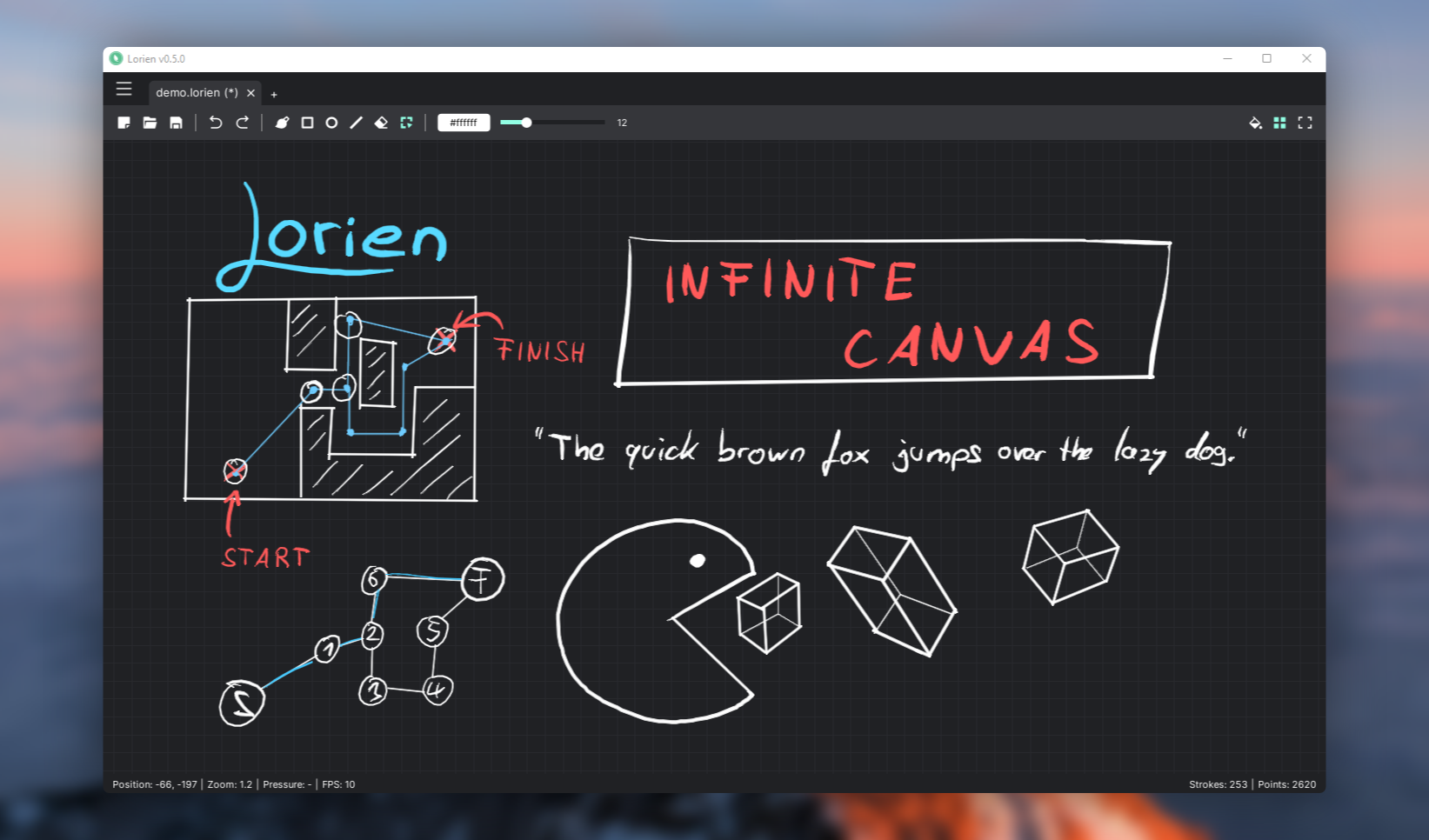
⚠ This is very much a WIP and still a bit rough around the edges ⚠. The savefile format might also change in the future. Contributions (be it bug reports, code, art or translations) are very welcome.
Features as of v0.7.0-dev:
- Infinite canvas
- Infinite undo/redo
- (Almost) Infinite zoom
- Infinite grid
- Zen mode (toggles the UI on/off)
- Extremely small savefiles (File format specs)
- Work on multiple documents simultaneously
- Tools: Freehand brush, eraser, line tool, rectangle tool, circle/ellipse tool, selection tool
- Move and delete selected brush strokes
- SVG export
- Rebindable keyboard shortcuts
- Built-in and custom color palettes
- Designed to be used with a drawing tablet (Wacom, etc.). It also supports pressure sensitivity
- A little Surprise Mechanic™ when pressing F12
- Runs on Windows, Linux & macOS
- Localizations: German, English, Spanish, French, Italian, Korean, Brasilian Portuguese, Russian, Turkish, Ukrainian, Chinese
Download
You can download the latest stable releases on Github.
If you want to check out the bleeding edge main branch without building the project yourself you can also check out the CI builds. But make sure to backup your files and be prepared for bugs if you do that.
More information
Credits
- Brush stroke antialiasing: godot-antialiased-line2d
- Icons used for the UI: Remix Icon
- Blurred background image of demo screenshot: https://unsplash.com/photos/nO0V_T0g2fM
joplin
laurent22·TypeScript
跨平台开源笔记应用,支持端到端加密和 WebDAV、Dropbox、Nextcloud 等多端同步,可导入 Evernote 数据,注重隐私保护。
笔记应用+4笔记工具
57129+626.4kv3.7.222026-11-10 13:17 UTC

siyuan
siyuan-note·TypeScript
开源、隐私优先、可自托管的知识工作空间,用 Markdown 管理笔记与知识库,并支持人与 AI 智能体在同一空间协作。
知识库+4笔记工具
47162+473.1kv3.8.10-rc.52026-11-10 16:01 UTC
logseq
logseq·Clojure
本地优先的开源知识管理平台,用 Markdown 或 Org-mode 记笔记并自动构建知识图谱,数据存在本地、隐私可控。
知识管理+4笔记工具
45544+362.9k2.0.22026-11-10 16:28 UTC
open-notebook
lfnovo·TypeScript
开源自托管的 Notebook LM 替代品,能上传资料让 AI 帮你整理笔记、生成摘要和问答,比原版更灵活、功能更多。
笔记工具+4笔记工具
41827+1144.8kv1.15.12026-11-08 21:47 UTC