VS Code 扩展测试提示词前必须先配置模型提供方、API key 和 endpoint,否则无法运行;示例中引用的图片需与 .poml 文件放在同一目录;Python 本地开发安装需先克隆仓库再执行 pip install -e .
poml
microsoftMIT更新放缓用类 HTML 的标记语言来组织 LLM 提示词,把散落在代码里的 prompt 拆成可复用、可维护的模块,并配套 VS Code 扩展方便编写和调试。
Prompt Orchestration Markup Language
v0.0.8发布于 2025-08-25 05:52 UTC4,962star253fork同步于 2026-11-10 11:36 UTC
pip install poml
npm install pomljs 硬件要求按 README 说明
README 未说明;提示词测试需自行配置 LLM 模型、API key 和 endpoint
用类 HTML 标记语言组织 LLM 提示词,解决提示词结构混乱、数据难集成和格式敏感问题
用类 HTML 的标记语言来组织 LLM 提示词,把散落在代码里的 prompt 拆成可复用、可维护的模块,并配套 VS Code 扩展方便编写和调试。
核心能力
- 用 role、task、example 等语义组件模块化组织提示词
- 用 document、table、img 组件嵌入外部文本、表格和图片
- 用 CSS 式 stylesheet 分离内容与呈现,缓解格式敏感
- 内置模板引擎支持变量、for 循环、if 条件与 let 定义
- 提供 VS Code 扩展与 Node.js、Python SDK
容易踩的坑
内容由模型根据 README 生成,可能不完整或不准确,以官方文档为准。看原文 README
- v0.0.8POML v0.0.8pre-release最新正式版2025-08-25 · 2025-08-25 05:52 UTC
Summary: Version 0.0.8 includes 52 merged pull requests from July–August 2025. This release incorporates numerous issue resolutions, new feature requests, and contributions from three new external contributors. If no critical issues are reported, this will be the final pre-release.
Highlights
- Token Management: Introduced token counting and controls via
charLimit,tokenLimit, andpriority. Documentation - Meta Enhancements: Added support for output schemas, tool definitions, and per-file runtime configuration. Documentation
- OpenAI Chat Format Integration: Details
- MCP Integration (Preview): Details
- Ecosystem Integrations: Added support for LangChain, MLflow, AgentOps, and Weave.
- Tutorial: New example for building a travel expense agent. Documentation
- Tracing Improvements: Increased robustness and usability. Documentation
- VS Code CodeLens: Added CodeLens support for template local debugging. Documentation
- VS Code Testing: Enhanced Test command reliability with Vercel AI SDK and multi-provider support. Documentation
Complete PR List
- Add panel auto-add tests in https://github.com/microsoft/poml/pull/60
- Enable tracing artifacts and pretty result dumps in https://github.com/microsoft/poml/pull/61
- Support per-resource options for prompts in https://github.com/microsoft/poml/pull/62
- Add priority-based truncation in https://github.com/microsoft/poml/pull/63
- Implement BufferCollection for Document caching in https://github.com/microsoft/poml/pull/64
- Fix lint warnings in tokenCounterImage in https://github.com/microsoft/poml/pull/65
- Initiate support for agent and tracing frameworks in https://github.com/microsoft/poml/pull/66
- test: ensure if evaluated in loop in https://github.com/microsoft/poml/pull/67
- refactor: centralize fs usage in poml in https://github.com/microsoft/poml/pull/69
- test: add poml format tests for vision prompts in https://github.com/microsoft/poml/pull/71
- Auto-load context and stylesheet for diagnostics in https://github.com/microsoft/poml/pull/70
- feat: add expression evaluation codelens in https://github.com/microsoft/poml/pull/72
- Enable VS Code LSP tests in https://github.com/microsoft/poml/pull/73
- feat: add documentation website with GitHub Pages deployment in https://github.com/microsoft/poml/pull/79
- Nightly build in https://github.com/microsoft/poml/pull/82
- Add nightly build installation guides to documentation in https://github.com/microsoft/poml/pull/85
- docs: add Discord community badge in https://github.com/microsoft/poml/pull/87
- docs: update Discord invite link in https://github.com/microsoft/poml/pull/88
- test: expand CI platforms in https://github.com/microsoft/poml/pull/89
- solve the problem when speaker is "ai" by @icelinks in https://github.com/microsoft/poml/pull/86
- Support response schema, tools and runtime sampling parameters in https://github.com/microsoft/poml/pull/81
- docs: update Discord invite link in https://github.com/microsoft/poml/pull/90
- Retry macOS 13 VS Code test step in https://github.com/microsoft/poml/pull/92
- Test with models in https://gi
- Token Management: Introduced token counting and controls via
- v0.0.7POML v0.0.7pre-release2025-07-25 · 2025-07-25 10:25 UTC
查看更新说明
Highlights
- Preview now supports a customized context and stylesheet that can be dynamically attached and configured.
- Tracing is now alive. Use trace to debug and test POML living in a large agent application.
@pomlcomes into VSCode Copilot in a beta stage. Try@poml /askand@poml /edit. Explore the prompt gallery.- Token counts of the messages are added to the live preview.
- Supports enabling/disabling components and specifying min/maxVersion (beta stage).
What's Changed
- Add npm package build and publish flow in https://github.com/microsoft/poml/pull/36
- Add context and stylesheet support in preview in https://github.com/microsoft/poml/pull/27
- Improve trace directory naming in https://github.com/microsoft/poml/pull/45
- Merge token counter to master in https://github.com/microsoft/poml/pull/49
- Extended reader proposal in https://github.com/microsoft/poml/pull/46
- Add chat capability in https://github.com/microsoft/poml/pull/51
- Add gallery prompt templates in https://github.com/microsoft/poml/pull/52
- Update ask edit prompt in https://github.com/microsoft/poml/pull/55
- Fix publish workflow NPM packaging in https://github.com/microsoft/poml/pull/56
- Add selective alias disable and version check in https://github.com/microsoft/poml/pull/53
- Dump env with original source path in https://github.com/microsoft/poml/pull/57
- Bump to 0.0.7 in https://github.com/microsoft/poml/pull/58
- Fix bumping version bugs (0.0.7) in https://github.com/microsoft/poml/pull/59
Full Changelog: https://github.com/microsoft/poml/compare/v0.0.6...v0.0.7
- v0.0.6POML v0.0.6pre-release2025-07-04 · 2025-07-04 09:57 UTC
查看更新说明
What's Changed
- Update README in https://github.com/microsoft/poml/pull/13
- Minimize the code with webpack in https://github.com/microsoft/poml/pull/14
- [codex] Fix preview test and extend mocha timeout in https://github.com/microsoft/poml/pull/17
- [codex] Add webview tests and fix copy behavior in https://github.com/microsoft/poml/pull/18
- Address several user experience issues in https://github.com/microsoft/poml/pull/19
- Implement include tag support in https://github.com/microsoft/poml/pull/20
- Fix duplicate diagnostics on save in https://github.com/microsoft/poml/pull/22
- Add CLI trace directory support in https://github.com/microsoft/poml/pull/25
- Add source map support in https://github.com/microsoft/poml/pull/26
- Add example expected outputs in https://github.com/microsoft/poml/pull/28
- Ensure the correctness of examples in https://github.com/microsoft/poml/pull/29
- Add daily test schedule in https://github.com/microsoft/poml/pull/31
- Fix jump-to-source mapping in https://github.com/microsoft/poml/pull/30
- Add Codex setup instructions in https://github.com/microsoft/poml/pull/33
- Validate base64 and render outside Prompt with-blocks in https://github.com/microsoft/poml/pull/35
- Add LSP server tests in https://github.com/microsoft/poml/pull/32
- Fix whitespace between images in example in https://github.com/microsoft/poml/pull/37
- Fix trailing spaces in generated captions in https://github.com/microsoft/poml/pull/41
- Bump to 0.0.6 in https://github.com/microsoft/poml/pull/42
- Add azure-pipelines yaml in https://github.com/microsoft/poml/pull/43
- Make RUN_ID a queue time variable in azure-pipelines.yml in https://github.com/microsoft/poml/pull/44
Full Changelog: https://github.com/microsoft/poml/compare/v0.0.5...v0.0.6
- v0.0.5POML v0.0.5pre-release2025-06-05 · 2025-06-05 10:44 UTC
查看更新说明
This is the pre-release before we actually push to public channels. Please use it as a preview of POML features.
To install the VSCode extension, download the
.vsixpackage and click "install from VSIX" in your extension manager (thanks to stackoverflow for the image).To install the Python SDK, use
pip install poml-0.0.5-py3-none-any.whlin command line. I haven't confirmed the usability of the package yet. Development installation is still recommended.Node.JS SDK is not packed in this pre-release.
用户点评
登录用户的真实使用记录,可按版本和硬件筛选共 0 条
还没有人点评。第一个说出真实体验的人最有价值。
POML: Prompt Orchestration Markup Language


POML (Prompt Orchestration Markup Language) is a novel markup language designed to bring structure, maintainability, and versatility to advanced prompt engineering for Large Language Models (LLMs). It addresses common challenges in prompt development, such as lack of structure, complex data integration, format sensitivity, and inadequate tooling. POML provides a systematic way to organize prompt components, integrate diverse data types seamlessly, and manage presentation variations, empowering developers to create more sophisticated and reliable LLM applications.
Demo Video
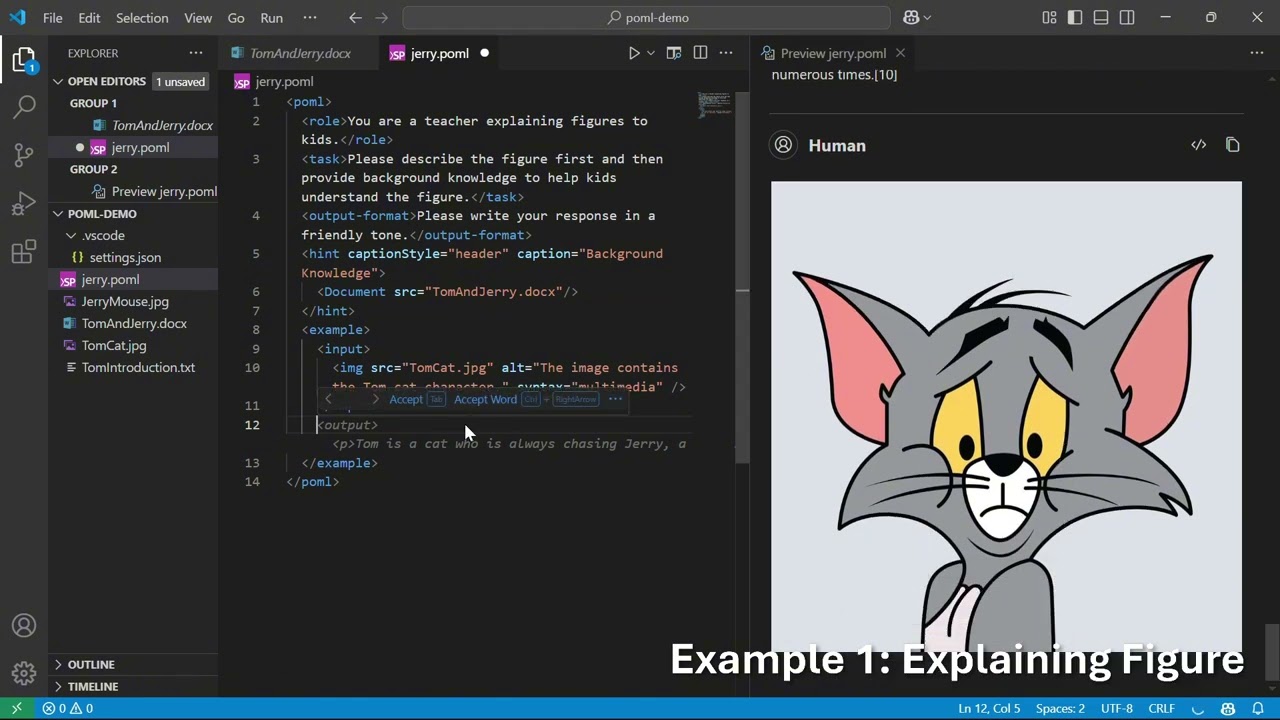
Key Features
- Structured Prompting Markup: Employs an HTML-like syntax with semantic components such as
<role>,<task>, and<example>to encourage modular design, enhancing prompt readability, reusability, and maintainability. - Comprehensive Data Handling: Incorporates specialized data components (e.g.,
<document>,<table>,<img>) that seamlessly embed or reference external data sources like text files, spreadsheets, and images, with customizable formatting options. - Decoupled Presentation Styling: Features a CSS-like styling system that separates content from presentation. This allows developers to modify styling (e.g., verbosity, syntax format) via
<stylesheet>definitions or inline attributes without altering core prompt logic, mitigating LLM format sensitivity. - Integrated Templating Engine: Includes a built-in templating engine with support for variables (
{{ }}), loops (for), conditionals (if), and variable definitions (<let>) for dynamically generating complex, data-driven prompts. - Rich Development Toolkit:
- IDE Extension (Visual Studio Code): Provides essential development aids like syntax highlighting, context-aware auto-completion, hover documentation, real-time previews, inline diagnostics for error checking, and integrated interactive testing.
- Software Development Kits (SDKs): Offers SDKs for Node.js (JavaScript/TypeScript) and Python for seamless integration into various application workflows and popular LLM frameworks.
Quick Start
Here's a very simple POML example. Please put it in a file named example.poml. Make sure it resides in the same directory as the photosynthesis_diagram.png image file.
<poml>
  <role>You are a patient teacher explaining concepts to a 10-year-old.</role>
  <task>Explain the concept of photosynthesis using the provided image as a reference.</task>

  <img src="https://raw.githubusercontent.com/microsoft/poml/HEAD/photosynthesis_diagram.png" alt="Diagram of photosynthesis" />

  <output-format>
    Keep the explanation simple, engaging, and under 100 words.
    Start with "Hey there, future scientist!".
  </output-format>
</poml>
This example defines a role and task for the LLM, includes an image for context, and specifies the desired output format. With the POML toolkit, the prompt can be easily rendered with a flexible format, and tested with a vision LLM.
Installation
Visual Studio Code Extension
Install from Visual Studio Code Marketplace.
You can also install the extension manually by downloading the .vsix file from our GitHub releases page and installing it in VS Code via the Extensions view.
Before testing prompts with the POML toolkit, make sure you have configured your preferred LLM model, API key, and endpoint. If these are not set, prompt testing will not work.
To configure in Visual Studio Code:
- Open the extension settings (open "Settings" and search for "POML").
- Set your model provider (e.g., OpenAI, Azure, Google), API key, and endpoint URL in the POML section.
- Alternatively, you can add these settings directly to your
settings.jsonfile.
Node.js (via npm)
npm install pomljs
Python (via pip)
pip install poml
For development or local installation, you might use pip install -e . from a cloned repository.
Refer to the documentation for more details on installing the nightly build.
Documentation
For detailed information on POML syntax, components, styling, templating, SDKs, and the VS Code extension, please refer to our documentation.
Learn More
- Watch our Demo Video on YouTube: POML Introduction & Demo
- Join our Discord community: Connect with the team and other users on our Discord server.
- Read the Prompt Orchestration Markup Language paper: Prompt Orchestration Markup Language presents the design of POML and its impact on prompt engineering.
- Explore Content-Format Integrated Prompt Optimization: Beyond Prompt Content: Enhancing LLM Performance via Content-Format Integrated Prompt Optimization proposes an iterative approach that jointly optimizes prompt content and formatting to improve LLM performance.
Citation
If you find POML useful or related to your research, please cite the following paper:
@misc{zhang2025promptorchestrationmarkuplanguage,
      title={Prompt Orchestration Markup Language},
      author={Yuge Zhang and Nan Chen and Jiahang Xu and Yuqing Yang},
      year={2025},
      eprint={2508.13948},
      archivePrefix={arXiv},
      primaryClass={cs.HC},
      url={https://arxiv.org/abs/2508.13948},
}
Ecosystem & Community Projects
- mini-poml-rs – Experimental Rust-based POML renderer for environments without JavaScript or Python interpreters.
- poml-ruby – Ruby gem implementation of POML for Ruby applications.
- ai-chatbot-with-python-and-angular – A chatbot built with Python and Angular (version 20), utilizing POML for prompting and the Langchain framework. Developed by HERE AND NOW AI.
- PomlSDK.jl – Julia implementation of the POML specification.
Contributing
This project welcomes contributions and suggestions. Most contributions require you to agree to a Contributor License Agreement (CLA) declaring that you have the right to, and actually do, grant us the rights to use your contribution. For details, visit https://cla.opensource.microsoft.com.
When you submit a pull request, a CLA bot will automatically determine whether you need to provide a CLA and decorate the PR appropriately (e.g., status check, comment). Simply follow the instructions provided by the bot. You will only need to do this once across all repos using our CLA.
This project has adopted the Microsoft Open Source Code of Conduct. For more information see the Code of Conduct FAQ or contact [email protected] with any additional questions or comments.
Trademarks
This project may contain trademarks or logos for projects, products, or services. Authorized use of Microsoft trademarks or logos is subject to and must follow Microsoft's Trademark & Brand Guidelines. Use of Microsoft trademarks or logos in modified versions of this project must not cause confusion or imply Microsoft sponsorship. Any use of third-party trademarks or logos are subject to those third-party's policies.
Responsible AI
This project has been evaluated and certified to comply with the Microsoft Responsible AI Standard. The team will continue to monitor and maintain the repository, addressing any severe issues, including potential harms, if they arise. For more details, refer to the Responsible AI Readme.
License
This project is licensed under the MIT License. See the LICENSE file for details.
gitignore
github
汇集各种语言和开发环境的 .gitignore 模板,帮你在初始化仓库时快速挑到合适的忽略规则,省去手写配置的麻烦。
gitignore模板+3开发库 / 框架
176305+12382k2026-11-09 17:05 UTC

30-seconds-of-code
Chalarangelo·JavaScript
收录大量短小精悍的 JavaScript、CSS、Git 等代码片段与教程,帮开发者在几分钟内学会一个实用技巧,快速补齐日常开发所需知识。
代码片段+4开发库 / 框架
129475+3513kv14.0.02026-11-09 00:53 UTC

devops-exercises
bregman-arie·Python
一套覆盖 Linux、Kubernetes、AWS、Terraform 等主题的 DevOps 练习题与面试题库,帮运维和 SRE 系统刷题、准备面试。
DevOps 面试题+4开发库 / 框架
86681+9221k2025-12-27 14:22 UTC

lazygit
jesseduffield·Go
在终端里用键盘快捷操作完成提交、分支、rebase、cherry-pick 等 Git 日常操作,不用记命令,适合喜欢命令行但嫌 Git 命令繁琐的开发者。
终端界面+4开发库 / 框架
83788+913.3kv0.66.32026-11-09 16:59 UTC