安装后需新开一个 Agent 会话,hooks 和 MCP server 才会在会话启动时绑定;成本是按价格表估算的 ≈$,不是账单;卸载后需手动删除 ~/.local/state/agentacct/state 并清理 onboard 写入的客户端配置。
agentacct
mikehasaMIT活跃维护本地优先的编码智能体观测面板,把每个任务拆成工具调用、文件改动、测试运行、耗时和 token 消耗,让你看清 Claude Code、Codex 等智能体到底做了什么、花了多少钱。
See what your coding agents did and what it cost. Breaks each task down into work steps — tools used, files changed, tests run, time and tokens spent. Local-first dashboard for Claude Code, Codex, OpenCode, and more. No login, no telemetry.
v0.12.11发布于 2026-10-03 12:59 UTC755star81fork同步于 2026-11-07 07:29 UTC
pipx install agentacct
agentacct onboard
agentacct tui 硬件要求按 README 说明
README 未说明显存或 GPU 要求;需 Python >= 3.11,支持 macOS 或 Linux,Windows 仅通过 WSL;也可下载 macOS 14+ 原生应用。
本地统计编码 Agent 干了什么、花了多少钱,把任务拆成工具调用、改文件、跑测试和 token 成本
本地优先的编码智能体观测面板,把每个任务拆成工具调用、文件改动、测试运行、耗时和 token 消耗,让你看清 Claude Code、Codex 等智能体到底做了什么、花了多少钱。
核心能力
- 从各客户端本地会话日志读取 token 与成本
- 用 MCP 记录步骤和检查,区分 Reported 与 Verified
- 按会话与 transcript id 关联用量和实际工作并标注置信度
- 按日期、Agent、模型、Provider 独立筛选用量
- 提供 TUI 与本地 JSON API,数据不出本机
容易踩的坑
内容由模型根据 README 生成,可能不完整或不准确,以官方文档为准。看原文 README
- v0.12.11agentacct 0.12.11最新正式版2026-10-03 · 2026-10-03 12:59 UTC
Download
Download agentacct 0.12.11 for macOS (Apple Silicon, macOS 14+)
What's changed
Two Claude accounts on one machine no longer read as one client's contradictory meters: every provider-limit reading is labeled with the account and source it belongs to. (#355)
- The macOS Usage page, the TUI, and
agentacct limitslabel each reading —CLI · [email protected],desktop app · org 07c55a50— so a second account's Weekly meter can no longer be mistaken for the first account's. - The terminal statusLine stream is attributed to the account its config home is signed in as: email and org uuid only, read from that home's own
.claude.jsonoauthAccount; credentials are never opened. A relocated spool claims no account rather than a guessed one. - Nothing else changes: existing streams keep their identity,
limits --jsonkeeps its byte-stable shape, and readings with no provable account render exactly as before.
Release provenance
DMG decision: REBUILD. Since v0.12.10, both
src/agentacct/andapps/agentacct/changed and the DMG embeds the frozen Python CLI. The DMG is rebuilt from the exact release-PR squash commit, not reused from an earlier version.Source commit:
03f1dd803662bddef90e811c36e43ae98fd7c779(release PR #356).The DMG is Developer ID signed, notarized, and stapled. The mounted App passed Gatekeeper and exact App/CLI version and commit verification.
DMG SHA-256:
afab8fa35dfbc54e86b020a52b3dda942f35ddc189858b71fe256521da837ca0.Full changelog: v0.12.10...v0.12.11.
- The macOS Usage page, the TUI, and
- v0.12.10agentacct 0.12.102026-10-01 · 2026-10-01 12:57 UTC
查看更新说明
macOS app
Download agentacct 0.12.10 for macOS
Fixed
- Recovery notifications no longer accumulate behind identical banners. A recurring source issue replaces its previous recovery banner, and recovered notices disappear after ten seconds.
- Recovery titles identify the affected client and issue. Recent updates keeps the recovery history, while active faults remain visible until dismissed or confirmed recovered.
Includes #353. The DMG is rebuilt for this release because the Swift app payload changed; it contains the matching frozen 0.12.10 CLI and is signed, notarized, and stapled.
CLI installation after the PyPI publishing job completes:
pip install --upgrade agentacct==0.12.10. - v0.12.9agentacct 0.12.92026-09-30 · 2026-09-30 14:00 UTC
查看更新说明
Codex's gpt-6.1-sol usage rows are priced instead of importing cost-unknown. Nothing else changed.
macOS app (no Python, pipx, or terminal needed): agentacct-0.12.9.dmg — signed, notarized, and stapled, built from this release's own commit. The app embeds the frozen
agentacctCLI, so the DMG is rebuilt here even though no Swift file changed: the fix lives in the CLI, and reusing the 0.12.8 DMG would have shipped the old price table and silently dropped it.CLI:
pipx install agentacct==0.12.9(oruv tool install agentacct==0.12.9).What changed since 0.12.8:
-
gpt-6.1-sol has a price row. Codex was reporting this model while neither the builtin price table nor the local LiteLLM snapshot carried it, so those rows imported
cost_confidence: unknown— and a later scan only reprices what a catalog row now covers, so they stayed that way. The builtin table now carries the published list rates on both routes a codex row can report, the client's owncodexkey and OpenAI'sopenaikey: $2/1M in, $10/1M out, $0.10/1M cache read, $2.50/1M cache write. No multiplier — the 2.5x ccusage fast-pricing convention stays scoped to gpt-5.5, so the two routes price identically rather than one of them silently carrying a convention. -
Both keys mean it prices immediately. Exact-key lookup answers for the codex route instead of waiting on the snapshot's TTL refresh to alias it onto OpenAI's row, and if a snapshot does carry the model the dollars agree.
-
Coverage stays per model. A sibling id no row carries (
gpt-6.1-sol-pro) remains cost-unknown rather than borrowing this row's price. -
Rows already in your ledger are repaired by a command, not by upgrading. Prices are estimated from local token counts (
cost_basis: pricing_table), never provider billing:agentacct usage import-local --refresh --estimate-costsThe watcher path does the same on its scans once it is running the new importer. Verified on a copy of a real ledger with no pricing snapshot at all (builtin table only, no network): 11/11 gpt-6.1-sol rows repriced, $6.528786 total,
pricing_source: agent_sentinel_builtin.
Asset verification:
agentacct-0.12.9.dmg— 37,059,269 bytes,sha256 6eb8202358b7b9adfcfae901a6b1afac8a42a39a05d35eebc22541d93d7b6025, built from26c01a9dc089895821a74600100d897c9b920985; the mounted app reportsagentacct 0.12.9 (26c01a9dc089895821a74600100d897c9b920985)andspctlaccepts it asNotarized Developer IDfromDeveloper ID Application: Yuxuan Hu (L7656X6G3Q). -
- v0.12.8agentacct 0.12.82026-09-29 · 2026-09-29 12:25 UTC
查看更新说明
A reboot no longer strands the macOS app with a dead recorder and no way to act: the recording-health surfaces, the window's recovery gate, the setup sheet, and the menu bar all offer a one-click Start recorder that runs
agentacct startin the background — including on a machine whoseagentacctcame from pipx/uv rather than the app's own install.macOS app (no Python, pipx, or terminal needed): agentacct-0.12.8.dmg — signed, notarized, and stapled, built from this release's own commit; the frozen
agentacctCLI it embeds carries the same behavior, and the app installs that CLI on first setup. It opens with a normal double-click.CLI:
pipx install agentacct==0.12.8(oruv tool install agentacct==0.12.8).What changed since 0.12.7:
- The app can start the recorder after a reboot. The window's "The recorder needs recovery" gate previously offered only View saved work and Open recording setup; it now leads with the same one-click start the health popover, the notice stack, the menu-bar dropdown, and the setup sheet's reconnect button use. It runs
agentacct start --no-sync-clients --store-dir <the store this window displays> --jsonand confirms the result with the samestatus --jsonreadiness check the app-owned reconnect uses. - It also works when the app owns no verified recorder — a development build, or a machine where pipx/uv installed
agentacctover the app's wrapper. The app resolves~/.local/bin/agentacctand thenagentacctonPATH, and accepts a candidate only if its own--versionbanner saysagentacct <version>. The button's caption names what will run: "Starts agentacct 0.12.4 at ~/.local/bin/agentacct — not installed or managed by this app." - The recorder is genuinely in the background. The CLI's runtime manager spawns the watcher and dashboard detached, so they outlive the app; the app only waits for the start command and then re-reads the recorder's own state.
- The app-owned path is unchanged.
reconnectRecorder's provenance and ownership checks, and its precedence whenever it is available, are exactly as before. The external path never installs, updates, replaces or uninstalls that CLI, never refreshes client integrations (--no-sync-clients), and never signals a process it did not start. - Coverage: 13 new Swift tests pin the external path (candidate order, symlink following, banner rejection, exact argv, store gate, readiness failure and retry, no writes) and the routing rule that the app-owned recorder always wins; the full suite is 669 tests in release mode.
- The app can start the recorder after a reboot. The window's "The recorder needs recovery" gate previously offered only View saved work and Open recording setup; it now leads with the same one-click start the health popover, the notice stack, the menu-bar dropdown, and the setup sheet's reconnect button use. It runs
- v0.12.7agentacct 0.12.72026-09-28 · 2026-09-28 10:56 UTC
查看更新说明
dsh (DeepSeek Harness) usage rows are priced again after a provider-name mismatch left every one cost-unknown.
DeepSeek Harness records its own route name,
deepseek-official, as the provider on every usage row, while the pricing tables key DeepSeek's own models under providerdeepseek. No lookup step matched — not the exact key, the provider aliases, the client model aliases, nor the generic<vendor>/<model>fallback (the id carries no slash) — soapply_pricing_estimate_to_eventreturnedFalseand every imported dsh row stayed cost-unknown, which the Usage views render asunpriced.macOS app (no Python, pipx, or terminal needed): agentacct-0.12.7.dmg — signed, notarized, and stapled, built from this release's own commit; the frozen
agentacctCLI it embeds carries the fix, and the app installs that CLI on first setup. It opens with a normal double-click.CLI:
pipx install agentacct==0.12.7(oruv tool install agentacct==0.12.7).What changed since 0.12.6:
- dsh rows are priced again. A provider alias (
deepseek-official→deepseek) resolves the client's route name to the catalog's DeepSeek list prices (deepseek-flash,deepseek-v4-flash,deepseek-v4-flash-vision-exp,deepseek-v4-pro). It is a name mapping only: the target row's list price applies as an ≈ estimate, never provider billing, and a dsh model id no catalog row covers still stays cost-unknown. - Stored dsh rows repair themselves without rereading transcripts.
agentacct usage import-local --client dsh --refresh --estimate-costs, and the watcher's equivalent scan, promote previously imported unknown-cost dsh rows toestimated_from_tokensestimates — 95 rows on the maintainer's own store, 75 of them outside the discovery window — while already-priced rows and recorded token counts stay untouched. - The dsh import fixture now matches the client it claims to model (
deepseek-official/deepseek-flashinstead of the staledeepseek/deepseek-chatshape no current dsh version reports), alongside an alias test, an end-to-end pricing test, and a stored-row reprice test.
- dsh rows are priced again. A provider alias (
用户点评
登录用户的真实使用记录,可按版本和硬件筛选共 0 条
还没有人点评。第一个说出真实体验的人最有价值。
agentacct
English · 简体中文


agentacct answers one simple question: what the fuck are my agents actually doing?
See what your coding agents have been working on, across projects and clients: recent activity, tool calls, recorded steps, checks, tokens, and estimated cost. Open a task for its Work Receipt and follow the activity timeline from attempt to result. Built from the local session logs of Claude Code, Codex, Kimi Code, OpenCode, Hermes, and others. No account, no cloud, nothing leaves your computer.
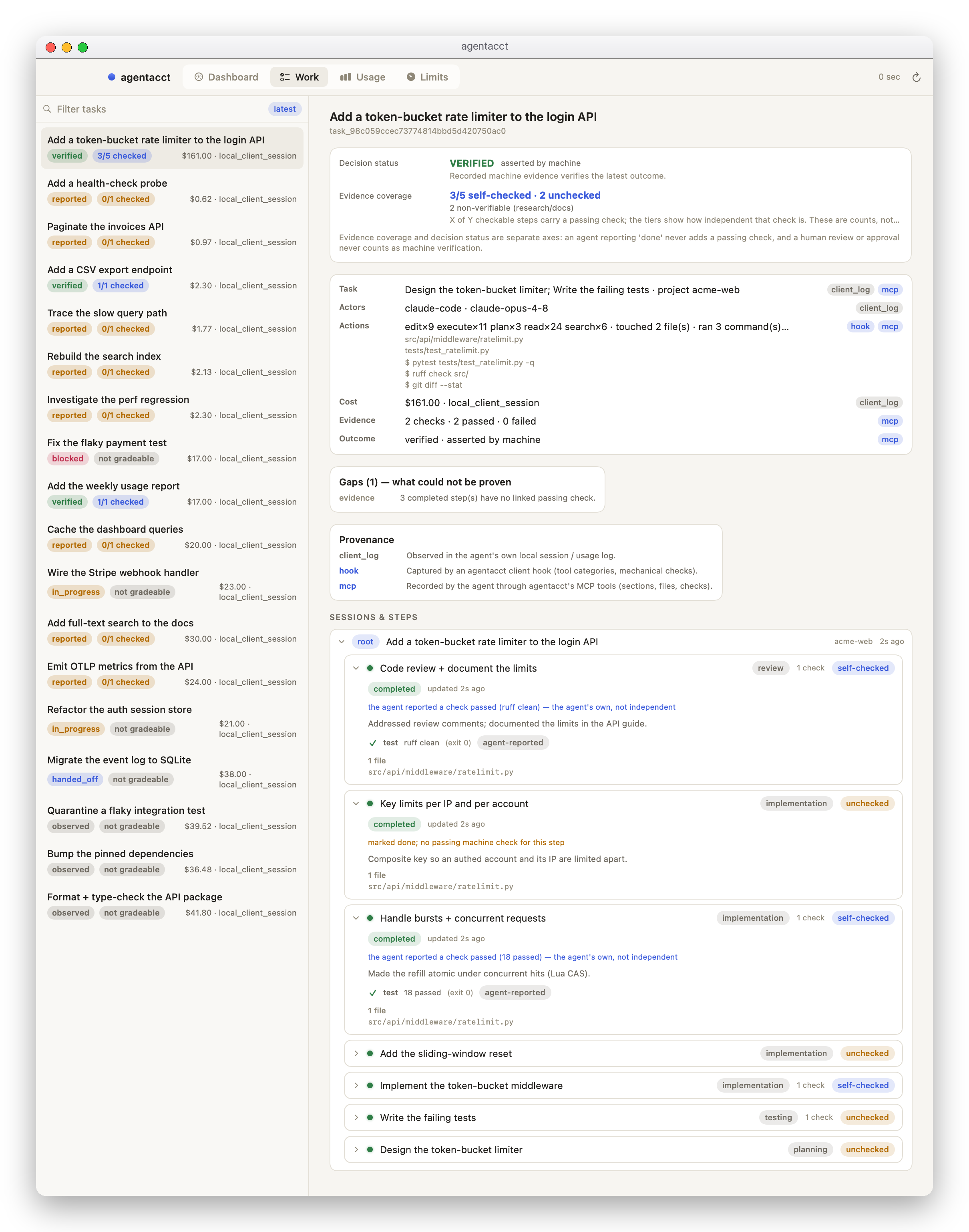
Screenshots show a synthetic demo workspace; your install renders your own local data.
Install
pipx install agentacct
agentacct onboard   # once per machine: finds your agents, sets up a local store, starts the recorder
agentacct tui       # the terminal app
Requires Python >= 3.11 on macOS or Linux; Windows is supported only via WSL. For a native window with no Python, download the signed, notarized macOS app from the latest release (macOS 14+).
Either way, open a new agent session afterwards: hooks and MCP servers bind at session start.
The per-agent setup, a --scope project install, and the uv/venv alternatives are in INSTALL.md.
Follow what happened
Sessions opens with the most recently active tasks. Search by task or project, or choose another sort when you need it. Each receipt brings together the participating sessions, recorded outcome, estimated cost, claims, and check results; its activity timeline comes first, with steps and full check details one click away.
An agent's own "done" is Reported. A Verified result needs current passing checks after the last recorded change. Claims and checks stay separate, and a failed attempt stays visible in the history alongside later results. A recorded failure is useful context, not automatically a request for you to intervene.
A day's work, across every agent you run
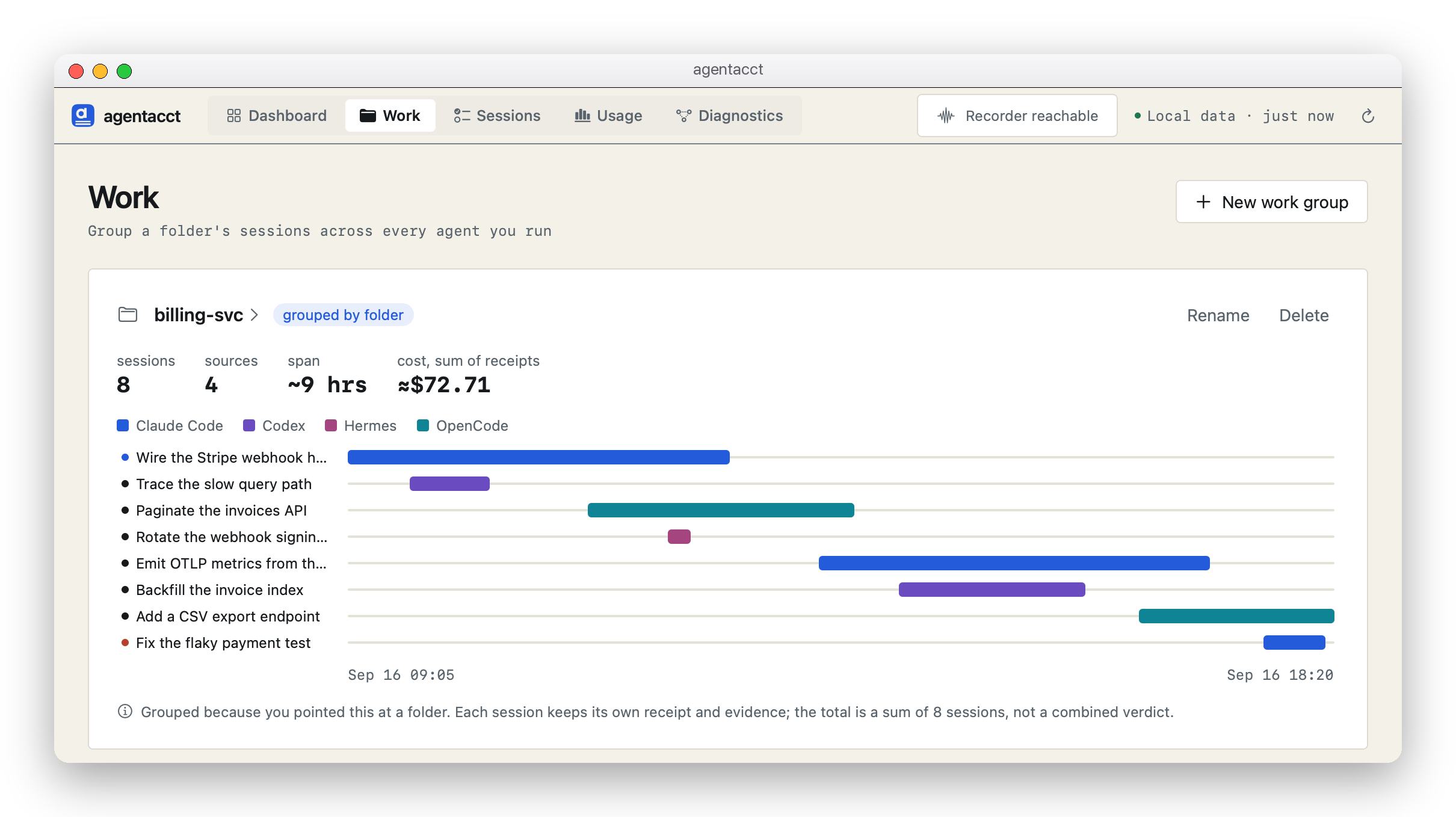
Point a work group at a project folder to see which agents worked there and what they did most recently. Open the group for session details and a shared timeline. Each session keeps its own evidence; group totals are sums of the participating sessions, with partial coverage and overlap labeled.
Start with recent activity
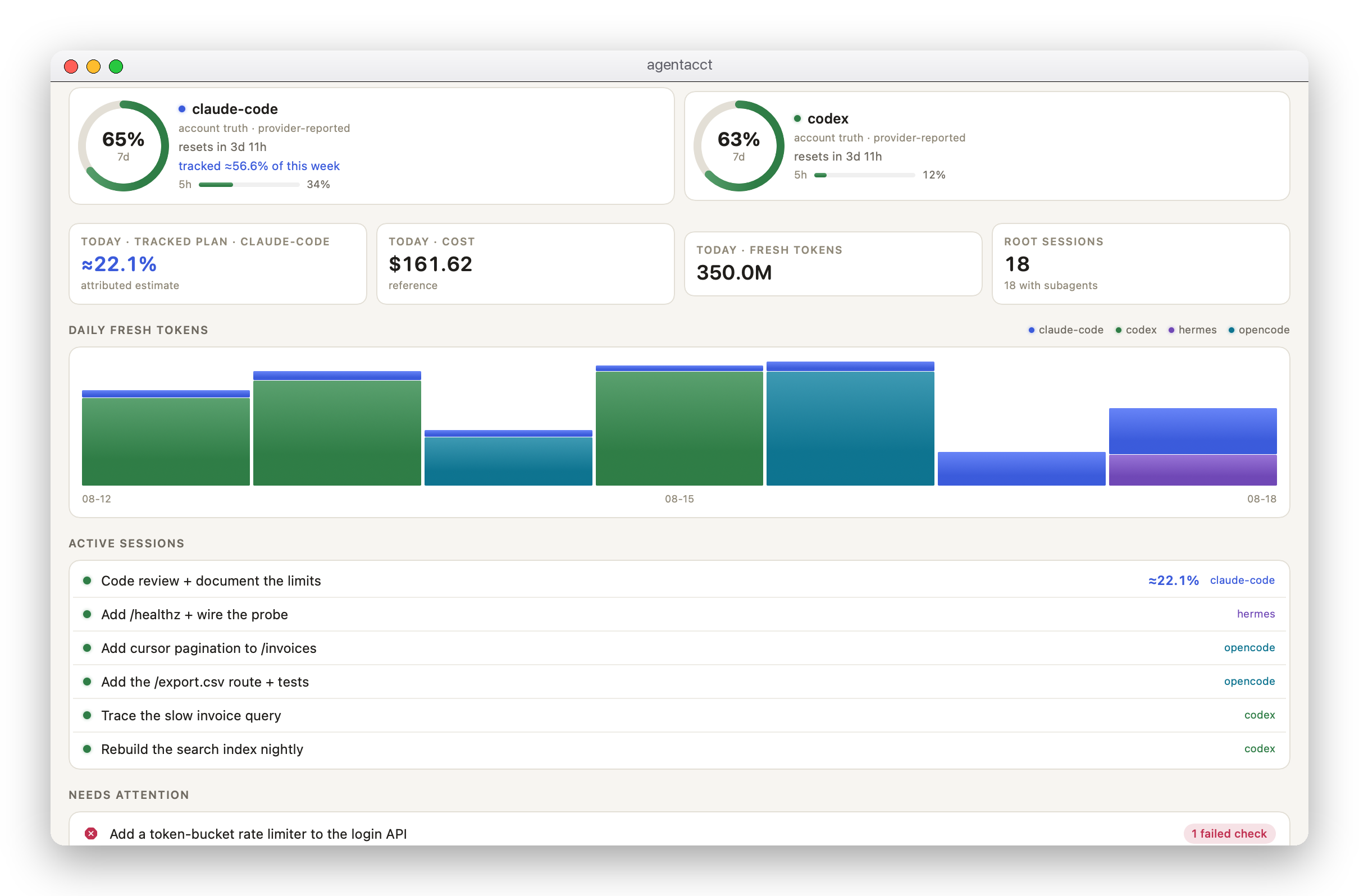
The Dashboard shows the latest recorded work across your projects, with its client, activity time, outcome, evidence, and cost. Historical failed checks and blockers remain available in Recorded issues. They do not decide the default order or become a list of things you must fix. Right-click a Recorded issues row to copy a brief from recorded facts.
Understand the usage behind the work
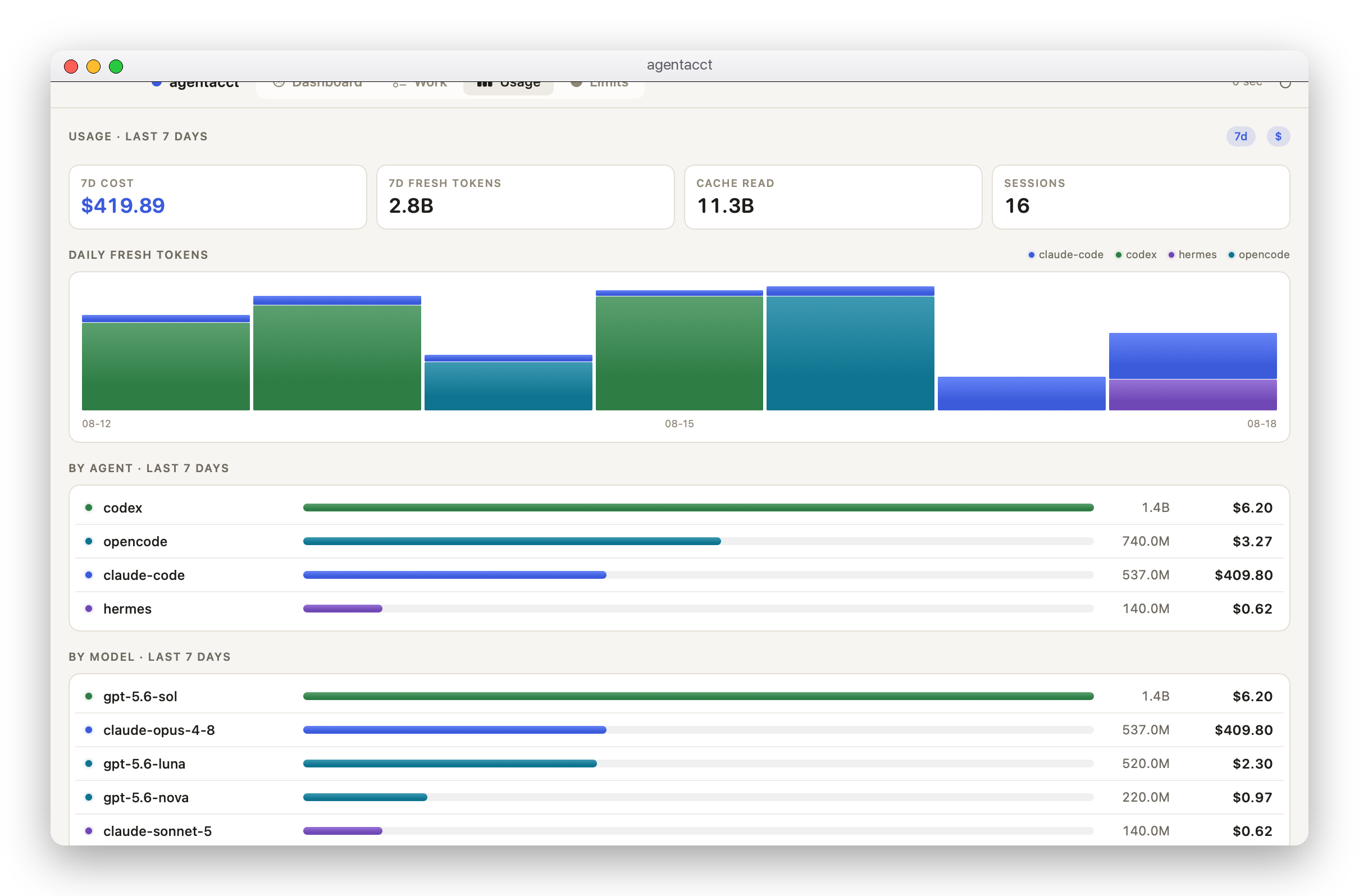
Filter by date, agent, model, or provider—independently, so "Codex on Opus, last 7 days" is one selection instead of a page you reset. This range totals the same rows by agent and by model, and selecting a date narrows the client/model breakdown under the date table. The chart remembers your Fresh or All tokens choice, and the tables show fresh, cache, and total tokens side by side with cache reads and writes separated. Hover a Fresh value for input and output counts.
The top bar always says how fresh the local data is (Local data · just now, or the last saved copy). Dates show session totals by activity date; sessions spanning several days are not split into exact daily consumption. Provider-reported quota windows and reset times are available on the same page. Tokens come from client records; costs are pricing-table estimates marked ≈, never an invoice.
Also in the terminal
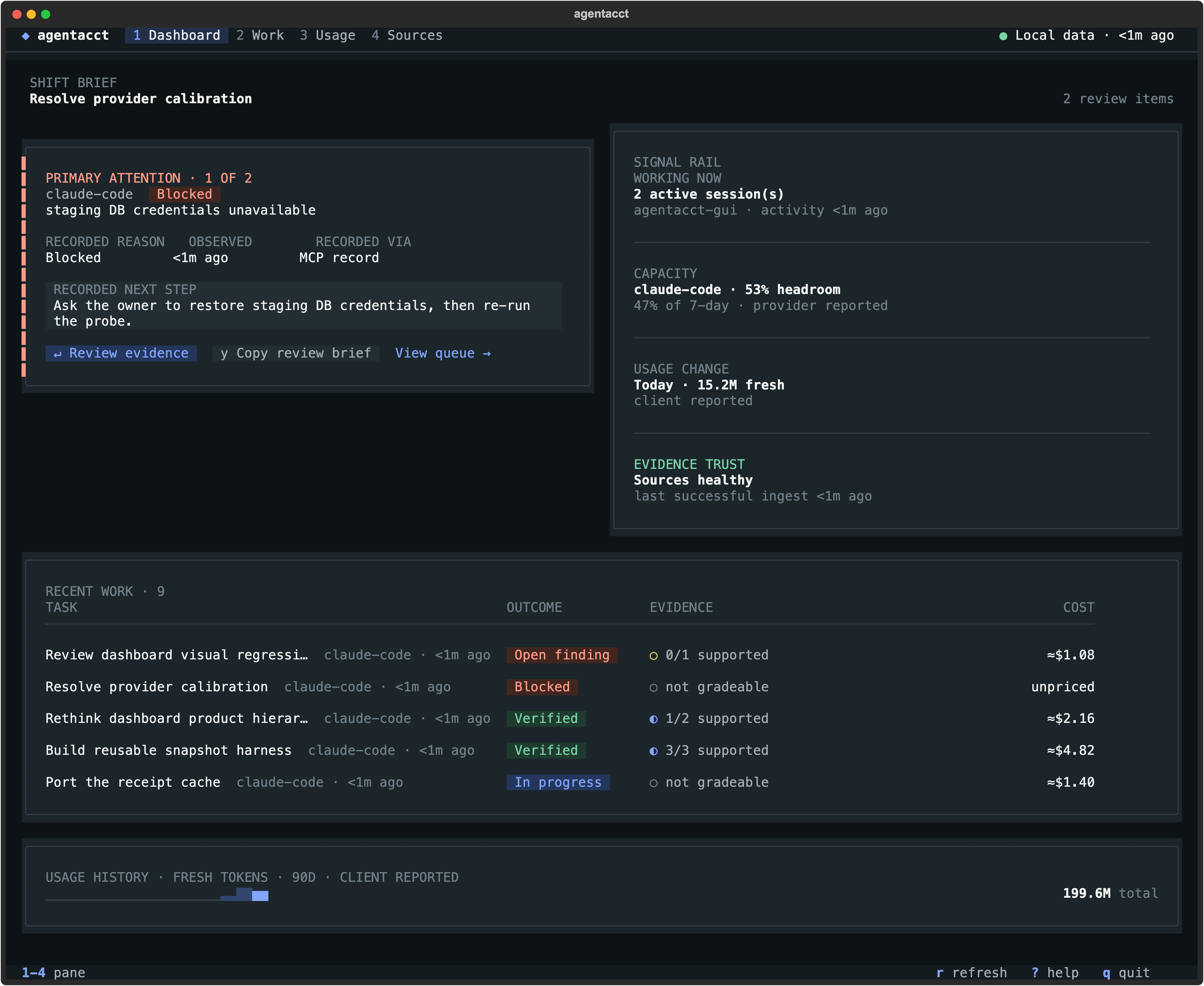
agentacct tui provides receipts, usage, capacity, and its own review overview in your shell — including the folder-anchored Work tab, where each group draws its sessions across every agent on one cross-agent timeline you can open (↵) and zoom/scrub by keyboard. Its top bar carries the same local-data stamp as the app. Press ? for the keys.
Honest by design
agentacct is early alpha and would rather show you a gap than a guess.
- Reported is not Verified. An agent's claim can never dress up as verification.
- Estimates are labeled.
≈$is a pricing-table estimate,~$a known-partial subtotal; there is no invoice access. docs/usage-truth-table.md says what each path can prove. - Missing beats wrong. Every join between usage and recorded work carries a confidence label (
exact,high,medium,low); an unproven link shows as a gap, not a zero. - Support is per capability, not per logo. Claude Code and Codex carry the fullest receipts today; the coverage matrix rates every lane for OpenCode, Hermes, DeepSeek Harness, Kimi Code, OpenClaw, and Cursor separately, and
agentacct capabilities agentsprints the same matrix from your installed version. - It records the work, not the conversation. Tool names and categories, touched files, credential-scrubbed commands, exit codes, tokens, and recorded steps. Never your prompts, the model's responses, or transcripts; see the privacy threat model.
- Nothing phones home. It reads only the local session files of detected clients, listens only on
127.0.0.1, and never stores or requests a provider API key.
How it works
agentacct is local-first Agent Work Intelligence: two evidence streams, kept separate and joined on real client ids instead of guesses.
- What it used comes from each client's own session files: tokens as the client reported them, costs as pricing-table estimates.
- What it did comes from the steps and checks the agent records over MCP as it works, plus machine checks such as test runs. How a check was observed decides its evidence tier, never the agent's wording.
- The join links the two by session and transcript id and labels every attribution with a confidence. Claude Code binds real ids through an installed hook bridge; Codex and OpenCode are matched from their own session logs at import time; Hermes joins recorded work only on ids the agent passes explicitly. The receipt says which path it used.
Join mechanics, the confidence glossary, and the MCP tool list are in docs/reference.md; per-agent integration detail is in docs/coding-agent-integrations.md.
Let your coding agent install it
Paste this into your coding agent:
Install and set up agentacct — a local-first agent work ledger that reads my
coding-agent logs read-only and shows honest token usage, cost, and recorded work.

Run `pipx install agentacct`
(or `pipx install git+https://github.com/mikehasa/agentacct`),
then `agentacct onboard` (installs once per machine, global by default, zero
files written into the repo), then tell me how to open `agentacct tui` and the
local JSON API at http://127.0.0.1:8765.

Observe-only: never store, request, or echo any API key; all state stays local
on this machine. Don't modify my global client config without showing the exact
command first.
The agent then follows INSTALL.md. agentacct setup prompt --agent <client> prints the same prompt.
Uninstall
agentacct stop                 # stop the managed sync + local API (owned processes only)
agentacct uninstall-autostart  # only if you installed autostart
pipx uninstall agentacct
Then delete the store at ~/.local/state/agentacct/state (keep it if you want the history) and remove the entries that agentacct onboard added to your client configs; they are listed per client in docs/coding-agent-integrations.md. A --scope project install keeps everything in that repo's .agent-sentinel/ directory instead.
More
- Worked examples: when an agent says done · Claude Code vs Codex on one task
- Reference · Coverage matrix · Architecture · Safety boundaries · Full flow demo
- Contributing: CONTRIBUTING.md covers running the tests and regenerating the screenshots above from the synthetic demo store.
- Feedback: open an issue naming the agent you use and the join, attribution, or receipt that looked wrong, or what a receipt would need to show before you trusted a run. Scrub API keys and private paths from logs first.