项目已不再积极维护;从源码构建需参考 Docs/Building.md,README 未给出具体步骤;夜间构建需登录 GitHub 账号从 Actions 的 Artifacts 下载
brew install nimble-commander 硬件要求按 README 说明
仅支持 macOS,README 未说明具体硬件或显存要求
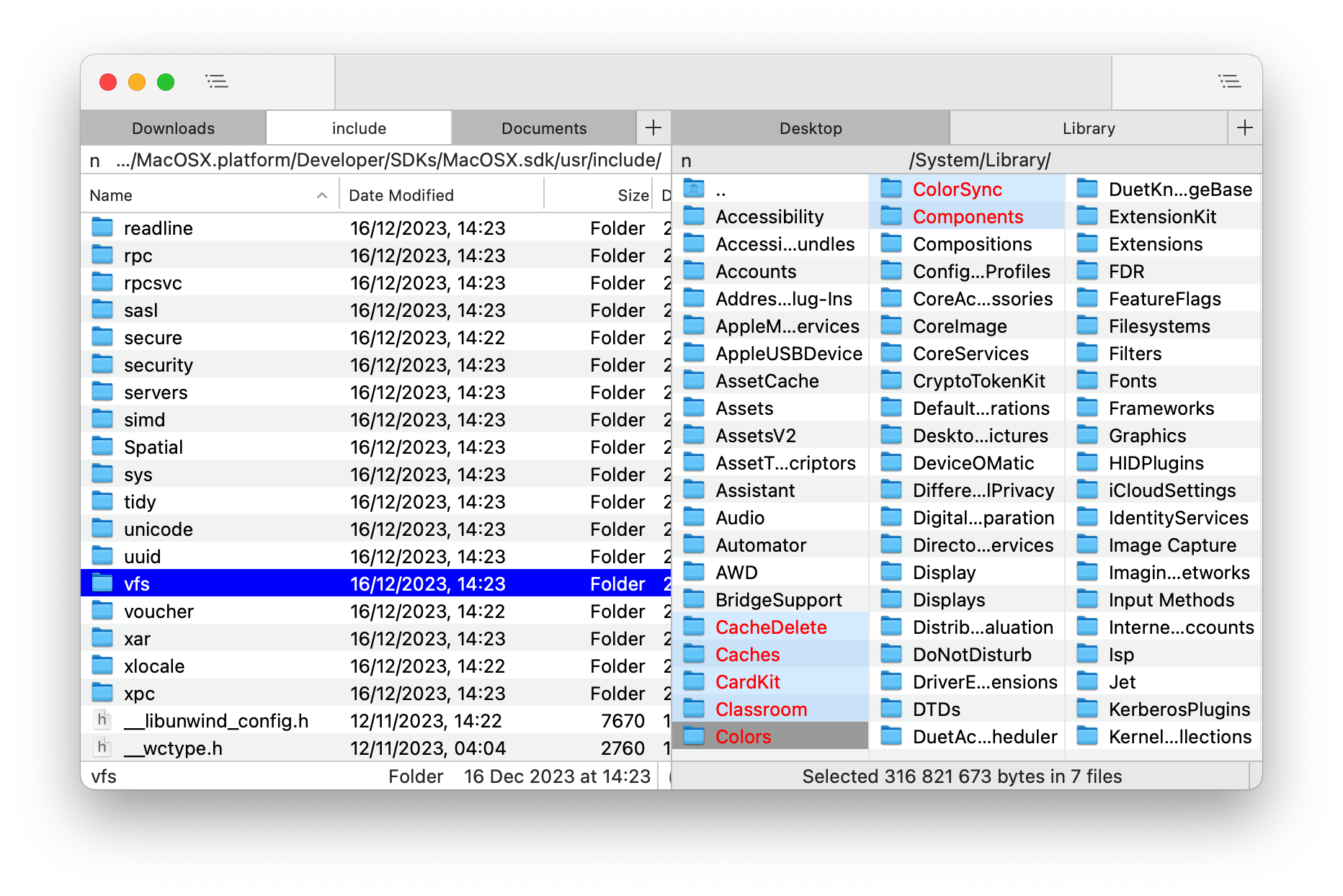
macOS 上的免费双窗格文件管理器,主打键盘操作与速度
Mac 上的双栏文件管理器,内置终端模拟器和虚拟文件系统,方便在左右两个面板间高效浏览、复制和整理文件。
核心能力
- 双窗格布局,便于在两个目录间复制移动
- 面向键盘导航,减少鼠标操作
- 融合 80-90 年代经典文件管理器体验与 Mac 现代外观
- 提供 Homebrew 安装与 Mac App Store 版本
容易踩的坑
内容由模型根据 README 生成,可能不完整或不准确,以官方文档为准。看原文 README
- v1.9.0最新正式版2026-11-01 · 2026-11-01 18:41 UTC
What's Changed
- Explicitly tell row views about the theme changes, switched from upda… by @mikekazakov in https://github.com/mikekazakov/nimble-commander/pull/637
- Added syntax highlighting for TOML by @mikekazakov in https://github.com/mikekazakov/nimble-commander/pull/638
- clang-tidy - strcpy, strcnpy, strcat, strlen are disallowed by @mikekazakov in https://github.com/mikekazakov/nimble-commander/pull/643
- Fixed the visibility of the revert and clear buttons in the hotkey fi… by @mikekazakov in https://github.com/mikekazakov/nimble-commander/pull/644
- Deducing a default application to open files with, instead of feeding 'nil' in, which no longer works. Fixed #642 by @mikekazakov in https://github.com/mikekazakov/nimble-commander/pull/646
- v1.9.0 by @mikekazakov in https://github.com/mikekazakov/nimble-commander/pull/647
- Fixed the issue with illegible quick search in Classic theme by @mikekazakov in https://github.com/mikekazakov/nimble-commander/pull/657
- Added a missing early return in case there's no default role handler or an UTI by @mikekazakov in https://github.com/mikekazakov/nimble-commander/pull/658
- More correct unit test for a spinlock by @mikekazakov in https://github.com/mikekazakov/nimble-commander/pull/659
- No more fetching tags from network volumes, more parallelism in I/O by @mikekazakov in https://github.com/mikekazakov/nimble-commander/pull/660
- Add Finder-style pathname copy alternate in file context menu by @stivlo in https://github.com/mikekazakov/nimble-commander/pull/664
- Make clang-tidy@22 happy by @mikekazakov in https://github.com/mikekazakov/nimble-commander/pull/667
- Use an updated version of colimactl by @mikekazakov in https://github.com/mikekazakov/nimble-commander/pull/669
- Updated CONTRIBUTING.md by @mikekazakov in https://github.com/mikekazakov/nimble-commander/pull/670
- Accept quoted paths in Go To Folder by @stivlo in https://github.com/mikekazakov/nimble-commander/pull/674
- Run CI jobs in stages with needs dependencies by @stivlo in https://github.com/mikekazakov/nimble-commander/pull/679
- A new Tab Bar control to replace the very old MMTabBarView entirely by @mikekazakov in https://github.com/mikekazakov/nimble-commander/pull/680
- New action: Create Directory In Opposite Panel (Shift+F7) by @mikekazakov in https://github.com/mikekazakov/nimble-commander/pull/681
- Migrated the test Docker containers from Ubuntu to Alpine by @mikekazakov in https://github.com/mikekazakov/nimble-commander/pull/683
- Fixed two logic issues in the terminal emulator by @mikekazakov in https://github.com/mikekazakov/nimble-commander/pull/684
- Corrected the tags parsing to avoid misaligned reads, made UBSAN issues a hard stop by @mikekazakov in https://github.com/mikekazakov/nimble-commander/pull/688
- Removed the human-readable machine name from the system information entirely since there's no official neither reliable way to get it by @mikekazakov in https://github.com/mikekazakov/nimble-commander/pull/689
- Updated OpenSSL to 3.5.5 and CURL to 8.20 by @mikekazakov in https://github.com/mikekazakov/nimble-commander/pull/692
- Make ChildrenTracker more accurate by @mikekazakov in https://github.com/mikekazakov/nimble-commander/pull/690
- Fixed missing or incorrect timestamps in archived files by @mikekazakov in https://github.com/mikekazakov/nimble-commander/pull/694
- Allow opening VFS files larger than a threshold (64MB by default) by @mikekazakov in https://github.com/mikekazakov/nimble-commander/pull/696
- Bump to Xcode 26.5 and update 3rd party versions by @mikekazakov in https://github.com/mikekazakov/nimble-commander/pull/697
- Update limactl to run integration tests again by @mikekazakov in https://github.com/mikekazakov/nimble-commander/pull/699
- Updated RegisterRemoteFileUploading() to make the main/background queues more explicit by @mikekazakov in https://github.com/mikekazakov/nimble-commander/pull/700
- An attempt to fix a hang on ftp read ca
- v1.8.02025-12-19 · 2025-12-19 11:22 UTC
查看更新说明
What's New
- Updated for macOS Tahoe.
- Added a new presentation mode: Gallery.
- Added support for up to four hotkeys per action.
- Added syntax highlighting for Dart, Diff, Rust, and Zig.
- Added configurable padding between rows in Brief and List modes.
- Added an option to dim secondary columns in List mode.
- Updated the icons in the Settings dialog.
- Improved handling of config files by allowing symlink traversal.
- Allowed external tools to use the %r / %-r placeholders when the panel has no items.
- Extended the application documentation.
- Fixed a bug causing the Go To popup to appear on the wrong screen.
- Fixed an issue in the Find Files dialog where the text search query would sometimes not apply.
- Fixed a bug causing incorrect handling of external tool icons placed on the toolbar.
- Fixed a bug that prevented correct symlink resolution in some archives.
- Fixed a bug causing symlinks to regular files to be compressed incorrectly.
- Disabled the File Attributes dialog for VFSs that do not support it.
- Reassigned the hotkey for the internal viewer to F3.
- Raised the minimum supported macOS version to Big Sur.
- Removed the Dropbox VFS.
- Many other internal improvements and minor fixes.
New Contributors
- @trmmy made their first contribution in https://github.com/mikekazakov/nimble-commander/pull/537
- @tiagof made their first contribution in https://github.com/mikekazakov/nimble-commander/pull/551
Full Changelog: https://github.com/mikekazakov/nimble-commander/compare/v1.7.0...v1.8.0
- v1.7.02024-12-18 · 2024-12-18 10:59 UTC
查看更新说明
What's new
- Updated for macOS Sequoia.
- The integrated viewer now provides syntax highlighting using the Lexilla library.
- The integrated viewer no longer uses toolbars; instead, a status bar is used to save space.
- The user guide has been significantly expanded.
- Updated the application icon.
- Added an option for natural collation when sorting filenames.
- Fixed a bug causing unstable ordering of tool icons on the toolbar.
- The "Go To" popup now allows numeric keys to filter items.
- Added a new hotkey: Ctrl+Return to display a context menu.
- Fixed an issue with incomplete FTP transfers.
- Fixed an issue where an overlapped terminal caused the mouse cursor to display the wrong type.
- Fixed a broken Shift+Tilde shortcut.
- Removed the built-in checksum calculation feature.
- Cmd+B now adds the current directory of a panel instead of the path to the currently focused item.
- Fixed an issue where excessive refresh requests during file operations caused incorrect behavior in file panels.
- Numerous small UI polish improvements have been made.
New Contributors
- @fabsantana made their first contribution in https://github.com/mikekazakov/nimble-commander/pull/428
Full Changelog: https://github.com/mikekazakov/nimble-commander/compare/v1.6.0...v1.7.0
- v1.6.12024-07-23 · 2024-07-23 20:52 UTC
查看更新说明
What's new
- Improved the security checks in the privileged helper.
- v1.6.02024-05-14 · 2024-05-14 20:30 UTC
查看更新说明
What's new
- Nimble Commander is now completely free and open source.
- Added support for file tags.
- Fixed an issue that could stop directory updates on SMB volumes.
- Fixed an issue where the mouse cursor could navigate to the wrong directory.
- You can now extract files from archives by dragging them into the ".." directory.
- Fixed an issue where file permissions might not be restored correctly after extracting from an archive.
- Fixed a crash when accessing an FTP server.
- Fixed keyboard navigation issues with F1/F2 and Quick Lists pop-ups.
- Fixed a bug preventing correct duplication of a file that's being written to.
New Contributors
- @vladstudio made their first contribution in https://github.com/mikekazakov/nimble-commander/pull/122
用户点评
登录用户的真实使用记录,可按版本和硬件筛选共 0 条
还没有人点评。第一个说出真实体验的人最有价值。


[!IMPORTANT] Nimble Commander is no longer actively maintained
More details in the discussion.
Nimble Commander
 Nimble Commander is a free dual-pane file manager for macOS, designed with a focus on speed, keyboard-based navigation, and flexibility.
The project's aim is to blend the user experience of classic file managers from the '80s-'90s with the modern look and feel of Mac computers.
Visit the project's website at: https://magnumbytes.com.
Getting Nimble Commander
Nightly Builds
You can download the latest nightly build of the app from GitHub Actions.
Go to the most recent integration and select the nimble-commander-nightly in the Artifacts section (a GitHub account is required).
Current Release
Direct download link: https://magnumbytes.com/downloads/releases/nimble-commander.dmg.
Available on Mac App Store: https://itunes.apple.com/app/files-lite/id905202937?ls=1&mt=12.
Install via Homebrew: brew install nimble-commander.
Past Releases
Access all previous releases at https://github.com/mikekazakov/nimble-commander-releases.
Documentation
The user guide can be found here: Help.md.
Changelog
Details about each released version can be found in the WHATS_NEW.md file.
Building from Source
For build instructions and an overview of the source code, please refer to the Building.md document.
Contributing to the Project
Your contributions are welcome and greatly appreciated! For guidelines on how to contribute, including reporting bugs, suggesting features, and submitting code changes, please see the CONTRIBUTING.md file.
License
Copyright (C) 2013-2026 Michael Kazakov ([email protected])
The source code is distributed under GNU General Public License version 3.
Files
files-community·C#
一款面向 Windows 的现代文件管理器,用多标签页、双栏浏览和 Fluent 设计改进资源管理器的使用体验,方便整理文件和文件夹。
文件管理器+4文件管理
46581+643.0kv4.32026-11-10 22:39 UTC

yazi
sxyazi·Rust
用 Rust 写的终端文件管理器,基于异步 I/O 实现极快的目录浏览和文件操作,适合习惯命令行的开发者日常管理文件。
终端文件管理器+4文件管理
43341+631.1kv26.9.12026-11-10 07:28 UTC

spacedrive
spacedriveapp·Rust
用 Rust 写的跨平台开源文件管理器,底层是虚拟分布式文件系统,能把多台设备上的文件统一管理,像访问本地一样浏览和整理。
文件管理器+4文件管理
39482+311.4k0.4.32026-11-06 11:49 UTC
filebrowser
filebrowser·Go
File Browser provides a file managing interface within a specified directory and it can be used to upload, delete, preview and edit your files.
文件管理
358704.2k2026-07-31 10:06 UTC