需要在本地和远程机器的相同位置(相对于 ~ 或 /)各克隆一份仓库,并在两边都配置 PATH;GUI Linux 下必须先安装 xclip 或 wl-clipboard,否则没有系统剪贴板可用;Neovim 需要设置 DISPLAY 环境变量才会调用 xclip,Vim 则需要额外配置 autocmd。
git clone https://github.com/ms-jpq/isomorphic-copy
export PATH="$XDG_CONFIG_HOME/isomorphic-copy/bin:$PATH" 硬件要求按 README 说明
README 未说明硬件要求;在 GUI Linux 下需要安装 xclip 或 wl-clipboard。
跨平台剪贴板工具,让 SSH 和 Docker 里的复制粘贴直接落到本地系统剪贴板
跨平台剪贴板工具,能在 tmux、vim 等终端环境与系统剪贴板之间复制粘贴,无需网络即可远程同步。
核心能力
- 仅通过 stdio 和 unix socket 通信,不依赖网络
- 把 bin 目录加入 PATH 后,自动接管 pbcopy、xclip、wl-copy 等命令
- 用 cssh 和 cdocker 一条命令连接远程,无需本地常驻守护进程
- 支持本地到 SSH 再到 Docker 的多层嵌套链路
- 提供 c 复制、p 粘贴两个便捷命令,并可回退到 tmux 或临时文件
容易踩的坑
内容由模型根据 README 生成,可能不完整或不准确,以官方文档为准。看原文 README
暂无 release 数据(可能没有发版,或尚未同步)。
用户点评
登录用户的真实使用记录,可按版本和硬件筛选共 0 条
还没有人点评。第一个说出真实体验的人最有价值。
Isomorphic Copy
Cross platform clipboard.
Both remote and local
Works out of the 📦 with most programs that use pbcopy, xclip, wl-copy, etc.
Works the same locally as over SSH, inside Docker containers, et al.
It even works inside Docker over SSH and then inside Docker!, infinitely chainable.

Networkless
isomorphic-cp communicates by stdio and unix socket only!
All it does is spawn subprocesses and listen to IO.
This makes it amazingly versatile.
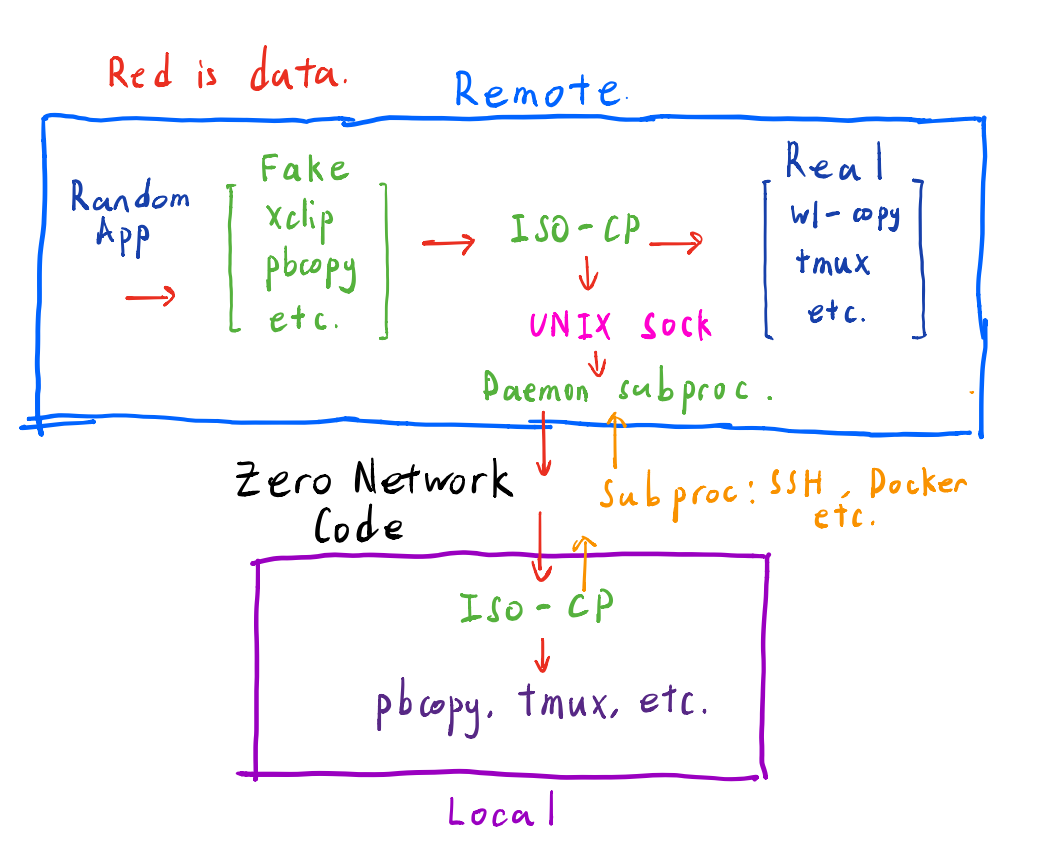
Daemonless
You literally just run cssh <ssh-args> or cdocker <container-name>.
No local daemon required. The remote "daemon" is just a subprocess of a subprocess. Zero cost when you are not using it.
How to use
Requires xclip or wl-clipboard under GUI linux.
Clone this repo to the same location on two machines. Either relative to ~ or /.
Prepend isomorphic-copy/bin to your PATH for example:
export PATH="$XDG_CONFIG_HOME/isomorphic-copy/bin:$PATH" in your bash/zshrc file.
You need to do this on both local and remote.
--
Automatically most applications that use xclip, wl-clipboard, pbcopy and so forth will use isomorphic-copy with zero setup.
Works just like python virtualenv!
--
I added two convenience functions:
You don't have to use these. Things like pbcopy and pbpaste will continue to work.
echo <my message> | c Use c to copy to system clipboard
p > my_message.txt Use p to paste from system clipboard
--
Connect to remote with one of
cssh <ssh-args>
cdocker <docker container name>
Once daemon is launched, remote copy will propagate to local system clipboard.
Remote applications that use xclip, pbcopy, wl-copy will propagate to local system clipboard.
--
Local -> SSH -> Docker
If you want to copy from a Docker container on a remote machine.
from local run cssh <ssh-args> to remote
from remote run cdocker <container name / sha> to container
And you are set!
Integrations
Tmux
Copy will automatically propagate to local / remote tmux clipboard.
If daemon is run under tmux, copy will also propagate to the local tmux clipboard.
If no system clipboard is available, copy / paste will use tmux clipboard.
Copying FROM tmux will require this snippet.
set -g mouse on

bind -T copy-mode MouseDragEnd1Pane \
  send-keys -X stop-selection

bind -T copy-mode MouseDown1Pane \
  select-pane \;\
  send-keys -X copy-pipe "c" \;\
  send-keys -X clear-selection
Drag to select, click in dragged area to copy.
Replace copy-mode with copy-mode-vi if you are using vi emulation.
Vim
Neovim will only use xclip if the x11 environmental variable DISPLAY is set.
Vim will require an autocmd event.
Add this snippet to your vimrc, to work for both vims.
if has('nvim')
  " use unnamedplus only! or else will double set
  set clipboard=unnamedplus
  if getenv('DISPLAY') == v:null
    exe setenv('DISPLAY', 'FAKE')
  endif
else
  autocmd TextYankPost * call system("c", getreg('"'))
endif
Others
Most CLI applications will work out of the box. (such as lazygit, for example).
If not, check if they require DISPLAY like Neovim.
Fallback
If no system / tmux clipboard is found, setting environmental variable ISOCP_USE_FILE=1 will enable using a temp file as a crude clipboard.
It will write inside the git repo, put it somewhere safe.
vscode
microsoft·TypeScript
微软开源的跨平台代码编辑器,基于 Electron 和 TypeScript 构建,支持插件扩展、调试和 Git 集成,适合日常开发写代码。
代码编辑器+4编辑器 / IDE
195262+17844k1.145.22026-11-10 17:16 UTC
neovim
neovim·Vim Script
Vim 的分支版本,用 Lua 做配置和插件开发,内置 LSP 与异步 API,让终端编辑器更好扩展、更好用。
文本编辑器+4编辑器 / IDE
103547+857.4kv0.12.62026-11-10 16:22 UTC
zed
zed-industries·Rust
用 Rust 打造的高性能多人协作代码编辑器,由 Atom 和 Tree-sitter 作者开发,主打低延迟编辑与实时协同编码。
代码编辑器+4编辑器 / IDE
94661+80912kv1.27.02026-11-10 16:11 UTC

AFFiNE
toeverything·TypeScript
把文档、白板、表格融为一体的开源知识库,可离线使用、支持多人实时协作,是 Notion 和 Miro 的替代方案。
知识库+4编辑器 / IDE
74421+1345.5kv2026.11.9-canary.9072026-11-10 16:20 UTC