仅支持 Python 3.11-3.12,Python 3.13+ 不支持;安装后必须手动下载 voices-v1.0.bin 和 kokoro-v1.0.onnx 并放在运行命令的同一目录;本地安装或无安装方式运行时,命令需改为 uv run kokoro-tts 或 python -m kokoro_tts。
kokoro-tts
nazdridoyMIT活跃维护基于 Kokoro 模型的命令行语音合成工具,支持多语言、音色混合,可直接把 EPUB 电子书和 PDF 文档转成有声书或播客音频。
A CLI text-to-speech tool using the Kokoro model, supporting multiple languages, voices (with blending), and various input formats including EPUB books and PDF documents.
v2.3.2发布于 2026-08-22 22:27 UTC1,990star180fork同步于 2026-11-07 07:30 UTC
uv tool install kokoro-tts
wget https://github.com/nazdridoy/kokoro-tts/releases/download/v1.0.0/voices-v1.0.bin
wget https://github.com/nazdridoy/kokoro-tts/releases/download/v1.0.0/kokoro-v1.0.onnx 硬件要求按 README 说明
README 提到支持 GPU,但未说明具体显存要求、GPU 厂商或型号;模型以 ONNX 格式运行,README 未明确说明是否可纯 CPU 运行。
基于 Kokoro 模型的命令行 TTS 工具,支持多语言、音色混合和 EPUB/PDF 输入
基于 Kokoro 模型的命令行语音合成工具,支持多语言、音色混合,可直接把 EPUB 电子书和 PDF 文档转成有声书或播客音频。
核心能力
- 支持 EPUB、PDF、TXT 及 stdin 管道输入
- 按权重混合多个音色,如 af_sarah:60,am_adam:40
- 支持流式播放,也可输出 WAV 或 MP3 文件
- 按章节拆分输出,并支持合并已有分块
- 支持中英日法意多语言及对应音色
容易踩的坑
内容由模型根据 README 生成,可能不完整或不准确,以官方文档为准。看原文 README
- v2.3.2最新正式版2026-08-22 · 2026-08-22 22:27 UTC
What's Changed in v2.3.2
This maintenance release focuses on modernizing dependencies and ensuring compatibility with the latest PDF processing libraries.
- fix: Replace deprecated fitz API by @andres07a in https://github.com/nazdridoy/kokoro-tts/pull/90
What's Changed
- PDF Processing Compatibility: Replaced deprecated PyMuPDF (
fitz) API usages with supported modules and namespaces to ensure reliable PDF document handling. - Dependency & Version Updates: Updated project version and refined core package definitions - including
librosa,numpy, andscipy- with proper Python version resolution markers for improved stability.
New Contributors
- @andres07a made their first contribution in https://github.com/nazdridoy/kokoro-tts/pull/90
Full Changelog: https://github.com/nazdridoy/kokoro-tts/compare/v2.3.1...v2.3.2
- v2.3.12026-04-08 · 2026-04-08 14:47 UTC
查看更新说明
Full Changelog: https://github.com/nazdridoy/kokoro-tts/compare/v2.3.0...v2.3.1
- v2.3.02025-08-17 · 2025-08-17 21:22 UTC
查看更新说明
What's New in v2.3.0
This release brings greater flexibility to how you manage your models and voices, alongside enhanced stability with stricter model file validation.
Highlights
- Custom Model & Voice Paths: You can now specify custom paths for your
.onnxmodels and voice files directly from the command line. - Improved Startup Reliability: The application now performs an upfront check for all necessary model files, ensuring a smoother experience.
Breaking Changes
- Mandatory Model Files: The application now strictly requires
.onnxand.binmodel files to be present at startup. If these files are missing, the application will exit with an error. Ensure your environment is set up correctly with all required model assets.
What's Changed
- New Command-Line Options: Introduced
--modeland--voicesoptions, allowing you to specify custom paths for your ONNX models and voice configuration files. - Enhanced Model Validation: Implemented robust checks to ensure all required
.onnxand.binmodel files are present before the application starts, improving overall stability. - Documentation Updates: The README has been updated to reflect the new requirements for model files.
Installation
# For new installations
pip install kokoro-tts # Or your project's package name

# To upgrade
pip install --upgrade kokoro-tts # Or your project's package name
Full Changelog
Full Changelog: https://github.com/nazdridoy/kokoro-tts/compare/v2.2.1...v2.3.0
- Custom Model & Voice Paths: You can now specify custom paths for your
- v2.2.12025-08-14 · 2025-08-14 22:12 UTC
查看更新说明
What's Changed in v2.2.1
This is a minor patch release focused on internal maintenance and ensuring the stability of our development and release processes.
What's Changed
- Internal Improvements: Addressed an issue within our continuous integration pipeline to ensure smoother and more reliable future releases.
Installation
# For new installations
pip install kokoro-tts

# To upgrade
pip install --upgrade kokoro-tts
Full Changelog
Full Changelog: https://github.com/nazdridoy/kokoro-tts/compare/v2.2.0...v2.2.1
- v2.2.02025-08-14 · 2025-08-14 22:01 UTC
查看更新说明
What's Changed in v2.2.0
We're thrilled to announce a major step forward in making our project more accessible! This release focuses on simplifying the installation process by making the project available on PyPI.
Highlights
- Now on PyPI!: Easily install the project using
pip. - Streamlined Installation: Our recommended installation method is now
pip install.
What's Changed
- PyPI Availability: The project is now published on PyPI, enabling straightforward installation via
pip. This includes the setup of automated publishing workflows and comprehensive updates to project metadata (license, authors, URLs). - Documentation Updates: Installation instructions have been thoroughly revised, making
pipinstallation the primary and recommended method.
Installation
# For new installations
pip install kokoro-tts

# To upgrade
pip install --upgrade kokoro-tts
Full Changelog
Full Changelog: https://github.com/nazdridoy/kokoro-tts/compare/v2.1.1...v2.2.0
- Now on PyPI!: Easily install the project using
用户点评
登录用户的真实使用记录,可按版本和硬件筛选共 0 条
还没有人点评。第一个说出真实体验的人最有价值。
Kokoro TTS
A CLI text-to-speech tool using the Kokoro model, supporting multiple languages, voices (with blending), and various input formats including EPUB books and PDF documents.
Features
- Multiple language and voice support
- Voice blending with customizable weights
- EPUB, PDF and TXT file input support
- Standard input (stdin) and
|piping from other programs - Streaming audio playback
- Split output into chapters
- Adjustable speech speed
- WAV and MP3 output formats
- Chapter merging capability
- Detailed debug output option
- GPU Support
Demo
Kokoro TTS is an open-source CLI tool that delivers high-quality text-to-speech right from your terminal. Think of it as your personal voice studio, capable of transforming any text into natural-sounding speech with minimal effort.
https://github.com/user-attachments/assets/8413e640-59e9-490e-861d-49187e967526
Demo Audio (MP3) | Demo Audio (WAV)
TODO
- Add GPU support
- Add PDF support
- Add GUI
Prerequisites
- Python 3.11-3.12 (Python 3.13+ is not currently supported)
Installation
Method 1: Install from PyPI (Recommended)
The easiest way to install Kokoro TTS is from PyPI:
# Using uv (recommended)
uv tool install kokoro-tts

# Using pip
pip install kokoro-tts
After installation, you can run:
kokoro-tts --help
Method 2: Install from Git
Install directly from the repository:
# Using uv (recommended)
uv tool install git+https://github.com/nazdridoy/kokoro-tts

# Using pip
pip install git+https://github.com/nazdridoy/kokoro-tts
Method 3: Clone and Install Locally
- Clone the repository:
git clone https://github.com/nazdridoy/kokoro-tts.git
cd kokoro-tts
- Install the package:
With uv (recommended):
uv venv
uv pip install -e .
With pip:
python -m venv .venv
source .venv/bin/activate  # On Windows: .venv\Scripts\activate
pip install -e .
- Run the tool:
# If using uv
uv run kokoro-tts --help

# If using pip with activated venv
kokoro-tts --help
Method 4: Run Without Installation
If you prefer to run without installing:
- Clone the repository:
git clone https://github.com/nazdridoy/kokoro-tts.git
cd kokoro-tts
- Install dependencies only:
With uv:
uv venv
uv sync
With pip:
python -m venv .venv
source .venv/bin/activate  # On Windows: .venv\Scripts\activate
pip install -r requirements.txt
- Run directly:
# With uv
uv run -m kokoro_tts --help

# With pip (venv activated)
python -m kokoro_tts --help
Download Model Files
After installation, download the required model files to your working directory:
# Download voice data (bin format is preferred)
wget https://github.com/nazdridoy/kokoro-tts/releases/download/v1.0.0/voices-v1.0.bin

# Download the model
wget https://github.com/nazdridoy/kokoro-tts/releases/download/v1.0.0/kokoro-v1.0.onnx
The script requires
voices-v1.0.binandkokoro-v1.0.onnxto be present in the same directory where you run thekokoro-ttscommand.
Supported voices:
| Category | Voices | Language Code |
|---|---|---|
| 🇺🇸 👩 | af_alloy, af_aoede, af_bella, af_heart, af_jessica, af_kore, af_nicole, af_nova, af_river, af_sarah, af_sky | en-us |
| 🇺🇸 👨 | am_adam, am_echo, am_eric, am_fenrir, am_liam, am_michael, am_onyx, am_puck | en-us |
| 🇬🇧 | bf_alice, bf_emma, bf_isabella, bf_lily, bm_daniel, bm_fable, bm_george, bm_lewis | en-gb |
| 🇫🇷 | ff_siwis | fr-fr |
| 🇮🇹 | if_sara, im_nicola | it |
| 🇯🇵 | jf_alpha, jf_gongitsune, jf_nezumi, jf_tebukuro, jm_kumo | ja |
| 🇨🇳 | zf_xiaobei, zf_xiaoni, zf_xiaoxiao, zf_xiaoyi, zm_yunjian, zm_yunxi, zm_yunxia, zm_yunyang | cmn |
Usage
Basic Usage
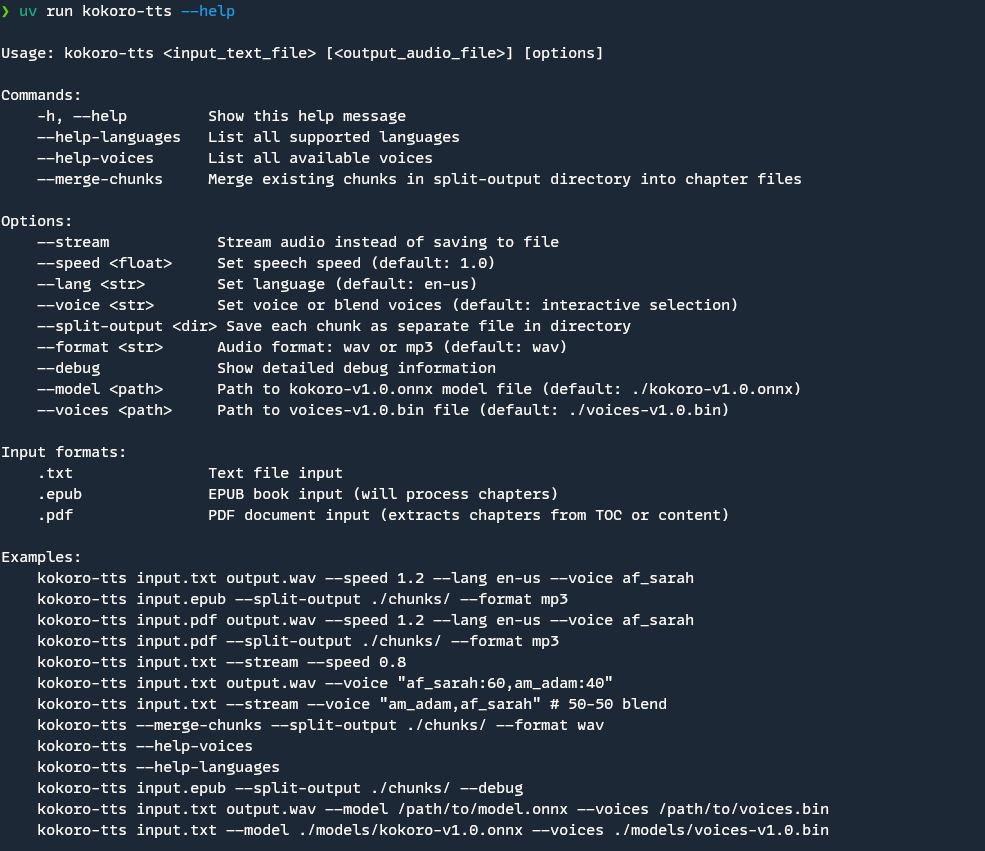
kokoro-tts <input_text_file> [<output_audio_file>] [options]
[!NOTE]
- If you installed via Method 1 (PyPI) or Method 2 (git install), use
kokoro-ttsdirectly- If you installed via Method 3 (local install), use
uv run kokoro-ttsor activate your virtual environment first- If you're using Method 4 (no install), use
uv run -m kokoro_ttsorpython -m kokoro_ttswith activated venv
Commands
-h, --help: Show help message--help-languages: List supported languages--help-voices: List available voices--merge-chunks: Merge existing chunks into chapter files
Options
--stream: Stream audio instead of saving to file--speed <float>: Set speech speed (default: 1.0)--lang <str>: Set language (default: en-us)--voice <str>: Set voice or blend voices (default: interactive selection)- Single voice: Use voice name (e.g., "af_sarah")
- Blended voices: Use "voice1:weight,voice2:weight" format
--split-output <dir>: Save each chunk as separate file in directory--format <str>: Audio format: wav or mp3 (default: wav)--debug: Show detailed debug information during processing
Input Formats
.txt: Text file input.epub: EPUB book input (will process chapters).pdf: PDF document input (extracts chapters from TOC or content)-or/dev/stdin(Linux/macOS) orCONIN$(Windows): Standard input (stdin)
Examples
# Basic usage with output file
kokoro-tts input.txt output.wav --speed 1.2 --lang en-us --voice af_sarah

# Read from standard input (stdin)
echo "Hello World" | kokoro-tts - --stream
cat input.txt | kokoro-tts - output.wav

# Cross-platform stdin support:
# Linux/macOS: echo "text" | kokoro-tts - --stream
# Windows: echo "text" | kokoro-tts - --stream
# All platforms also support: kokoro-tts /dev/stdin --stream (Linux/macOS) or kokoro-tts CONIN$ --stream (Windows)

# Use voice blending (60-40 mix)
kokoro-tts input.txt output.wav --voice "af_sarah:60,am_adam:40"

# Use equal voice blend (50-50)
kokoro-tts input.txt --stream --voice "am_adam,af_sarah"

# Process EPUB and split into chunks
kokoro-tts input.epub --split-output ./chunks/ --format mp3

# Stream audio directly
kokoro-tts input.txt --stream --speed 0.8

# Merge existing chunks
kokoro-tts --merge-chunks --split-output ./chunks/ --format wav

# Process EPUB with detailed debug output
kokoro-tts input.epub --split-output ./chunks/ --debug

# Process PDF and split into chapters
kokoro-tts input.pdf --split-output ./chunks/ --format mp3

# List available voices
kokoro-tts --help-voices

# List supported languages
kokoro-tts --help-languages
[!TIP] If you're using Method 3, replace
kokoro-ttswithuv run kokoro-ttsin the examples above. If you're using Method 4, replacekokoro-ttswithuv run -m kokoro_ttsorpython -m kokoro_ttsin the examples above.
Features in Detail
EPUB Processing
- Automatically extracts chapters from EPUB files
- Preserves chapter titles and structure
- Creates organized output for each chapter
- Detailed debug output available for troubleshooting
Audio Processing
- Chunks long text into manageable segments
- Supports streaming for immediate playback
- Voice blending with customizable mix ratios
- Progress indicators for long processes
- Handles interruptions gracefully
Output Options
- Single file output
- Split output with chapter organization
- Chunk merging capability
- Multiple audio format support
Debug Mode
- Shows detailed information about file processing
- Displays NCX parsing details for EPUB files
- Lists all found chapters and their metadata
- Helps troubleshoot processing issues
Input Options
- Text file input (.txt)
- EPUB book input (.epub)
- Standard input (stdin)
- Supports piping from other programs
Contributing
This is a personal project. But if you want to contribute, please feel free to submit a Pull Request.
License
This project is licensed under the MIT License. See the LICENSE file for details.
Acknowledgments
free-programming-books-zh_CN
justjavac
收录大量免费中文编程书籍的资源清单,覆盖 Python、JavaScript、Android、iOS 等方向,方便按技术栈查找学习资料。
免费书籍+4PDF 工具入门
119566+5228k3.02026-07-29 00:39 UTC
Stirling-PDF
Stirling-Tools·TypeScript
本地部署的 PDF 全能工具箱,支持合并拆分、格式转换、OCR 和编辑,Docker 一键启动,数据不出内网。
PDF 工具+4PDF 工具进阶
96238+3349.3kv3.3.02026-11-11 01:11 UTC

awesome-english-ebooks
hehonghui·CSS
每周更新《经济学人》《纽约客》《卫报》等英文杂志的免费下载资源,提供 epub、mobi、pdf 多种格式,方便英语学习者获取原版阅读材料。
英文杂志下载+4PDF 工具入门
39402+1973.3k2026-11-06 21:46 UTC
PDFMathTranslate
PDFMathTranslate·Python
翻译 PDF 科学论文时完整保留公式、图表和排版,输出双语对照版本,支持 Google、DeepL、Ollama、OpenAI 等多种翻译后端,并提供 CLI、GUI、Docker 和 Zotero 插件。
PDF翻译+4PDF 工具进阶
38356+843.4kv1.9.112026-11-11 04:53 UTC