完整系统还需 nebula-worker 处理媒体,线性播出规划需 Firefly 桌面客户端;Firefly 已停止新增功能;README 未说明默认端口与依赖版本
README 未给出安装命令,仅说明仓库含 Dockerfile,并指向 nebula-tutorial 仓库的 docker-compose.yml 示例 硬件要求按 README 说明
README 未说明具体显存或 CPU 要求;仅提到 h.264 和 HEVC 转码可利用 NVIDIA nvenc 的 GPU 加速。
开源广播自动化与媒体资产管理服务端,面向电视台、电台和 VOD 平台
面向电视台和直播场景的媒体资产管理与播出自动化系统,可编排播放列表、调度节目并驱动 CasparCG 图形与视频输出。
核心能力
- 基于 EBU Core 的媒体编目与快速检索
- 低分辨率预览支持审片、裁剪和子片段创建
- 自动转码与 EBU R128 响度归一化
- h.264/HEVC 可用 NVIDIA nvenc 加速转码
- 拖放式线性排播并控制 CasparCG 播出
容易踩的坑
内容由模型根据 README 生成,可能不完整或不准确,以官方文档为准。看原文 README
- v6.1.6Nebula 6.1.6最新正式版2026-10-31 · 2026-10-31 11:09 UTC
Nebula 6.1.6: a new browser, a REST API, and a security overhaul
Nebula 6.1.6 looks like a patch release on paper. It isn't. Over 120 commits went into it during October, and they touch almost every part of the system: the asset browser has been rebuilt from scratch, the rundown is more flexible, user accounts got a proper self-service profile, logins and sessions were hardened from top to bottom, and developers get a new REST API plus the Nebula core library on PyPI.
Here's what changed and what it means for you. If you run a Nebula site, read the upgrade notes at the end before you update.
A completely new asset browser
The browser is where most people spend their day in Nebula, so it got the biggest overhaul in this release.
Tabs. You can now keep several browser tabs open side by side. Each tab remembers its own view, filters, search, sort order, selection and even its own set of columns. Keep one tab on today's ingest, another on a promo folder, and a third on a search you're working through, and switch between them without losing your place.
One search bar, one popover. The filter bar is now a single search field. Click into it and a popover opens with everything in one place: your views, the filters active in the current tab (including the view's own filters, which you can now edit), a quick form to add a new filter, and the column picker. The old condition and prompt dialogs are gone.
Smarter filters.
- Status, content type and media type offer the actual values by name, so there's no need to remember what the numbers mean.
- Text fields filter with "contains" by default, which is what you want most of the time.
- Hierarchical fields like genre show up as a tree, with a search box for long lists. Picking a value includes everything underneath it, so choosing "Sport" also finds "Sport / Football".
- A new "has aired" field lets you filter and show whether an asset has already been on air.
Columns your way. Drag columns to reorder them, resize them, and save the result. Personal views can now be saved in place, so tweaking a view no longer means creating a new one.
Fast with big libraries. Results load as you scroll instead of page by page, and the table only draws the rows you can actually see, so browsing tens of thousands of assets stays smooth. Rows also update live when someone else changes an asset, without a reload.
A small one that will save some frustration: pressing Backspace in the search field no longer wipes your filters.
Rundown and scheduler
Mix and match rundown modes. Edit, Control and Plugins used to be an either/or choice. They are now independent toggles, so an operator can edit the rundown and control playout at the same time, with the playout plugins open alongside. Each toggle only appears if you have the matching permission on that channel: rundown editing for Edit, master control for Control and Plugins. The clock, progress bar and Take/Freeze/Retake buttons now show only when Control is on, which keeps the screen clean for people who only edit.
F1 takes you to what's on air. Press F1 and the rundown jumps to the item currently playing and centres it on screen. Function keys now work even while you're typing in a field, and they no longer trigger the browser's own shortcuts (F1 used to open the browser's help).
Edit events right from the rundown. The event dialog from the scheduler is now shared with the rundown, so you can change an event's start time and metadata without switching pages. Changes go through the scheduler, so the event moves and the rundown retimes automatically. Double-clicking an event in the scheduler opens the rundown scrolled straight to it.
Templates west of London. Sites with a negative UTC offset (the Americas, for example) could see a week template applied to the previous week. That's fixed.
Profiles, users and sessions
Your profile, self-service. Everyone can no
- v6.1.5Nebula 6.1.52026-10-08 · 2026-10-08 15:24 UTC
查看更新说明
What's Changed
🎉 New Features
- Channel in a box by @martastain in https://github.com/nebulabroadcast/nebula/pull/181
- Empty rundown placeholder by @martastain in https://github.com/nebulabroadcast/nebula/pull/189
❤️ Improvements
- Use NX Framework by @martastain in https://github.com/nebulabroadcast/nebula/pull/177
- Frontend maintenance: yarn 4, typed API/websocket/dialogs, zero lint errors by @martastain in https://github.com/nebulabroadcast/nebula/pull/183
🛠️ Bugfixes
- Fixed preview play icon update on asset change by @martastain in https://github.com/nebulabroadcast/nebula/pull/188
- Fix transparent table header by @martastain in https://github.com/nebulabroadcast/nebula/pull/190
- Websockets asgi error handling by @martastain in https://github.com/nebulabroadcast/nebula/pull/187
Full Changelog: https://github.com/nebulabroadcast/nebula/compare/v6.1.4...v6.1.5
- v6.1.4Nebula 6.1.42026-09-17 · 2026-09-17 19:58 UTC
查看更新说明
What's Changed
🎉 New Features
- MediaBunny based playback engine by @martastain in https://github.com/nebulabroadcast/nebula/pull/169
- Spreadsheet ingest by @martastain in https://github.com/nebulabroadcast/nebula/pull/178
- Warning overlays in the player by @martastain in https://github.com/nebulabroadcast/nebula/pull/175
- Series scheduling by @martastain in https://github.com/nebulabroadcast/nebula/pull/176
- Browser: Filter by key by @martastain in https://github.com/nebulabroadcast/nebula/pull/172
❤️ Improvements
- Jobs table in asset detail by @martastain in https://github.com/nebulabroadcast/nebula/pull/166
- Typed API by @martastain in https://github.com/nebulabroadcast/nebula/pull/167
- Enum aliases by @martastain in https://github.com/nebulabroadcast/nebula/pull/168
- Run mode in scheduler template by @martastain in https://github.com/nebulabroadcast/nebula/pull/179
🛠️ Bugfixes
- Fix: Browser row multiselect by @martastain in https://github.com/nebulabroadcast/nebula/pull/170
Full Changelog: https://github.com/nebulabroadcast/nebula/compare/v6.1.3...v6.1.4
- v6.1.3Nebula 6.1.32026-05-31 · 2026-05-31 14:11 UTC
查看更新说明
What's Changed
🎉 New Features
- Invitation and password reset emails by @martastain in https://github.com/nebulabroadcast/nebula/pull/145
- New asset preview sidebar by @martastain in https://github.com/nebulabroadcast/nebula/pull/161
❤️ Improvements
- Websocket rewrite by @martastain in https://github.com/nebulabroadcast/nebula/pull/138
- Rewrite table component to typescript by @martastain in https://github.com/nebulabroadcast/nebula/pull/139
- Nebula provider by @martastain in https://github.com/nebulabroadcast/nebula/pull/140
- Include default classification schemes by @martastain in https://github.com/nebulabroadcast/nebula/pull/144
- Select component and tooltips improvements by @martastain in https://github.com/nebulabroadcast/nebula/pull/150
- Better type annotations by @martastain in https://github.com/nebulabroadcast/nebula/pull/146
- Stricter linting rules by @martastain in https://github.com/nebulabroadcast/nebula/pull/154
🛠️ Bugfixes
- Seek to frame fix by @martastain in https://github.com/nebulabroadcast/nebula/pull/160
Full Changelog: https://github.com/nebulabroadcast/nebula/compare/v6.1.2...v6.1.3
- v6.1.2Nebula 6.1.22026-01-17 · 2026-01-17 15:14 UTC
查看更新说明
What's Changed
🎉 New Features
- Media upload overhaul by @martastain in https://github.com/nebulabroadcast/nebula/pull/131
- Host storage configuration overrides by @martastain in https://github.com/nebulabroadcast/nebula/pull/134
❤️ Improvements
- Refactor components by @martastain in https://github.com/nebulabroadcast/nebula/pull/132
- Allow setting preview and marks position using timecode inputs by @martastain in https://github.com/nebulabroadcast/nebula/pull/133
- Asset editor live update and outdated proxy warning by @martastain in https://github.com/nebulabroadcast/nebula/pull/137
🛠️ Bugfixes
- Fix triggering unnecessary request due to error in DateNav by @martastain in https://github.com/nebulabroadcast/nebula/pull/136
Full Changelog: https://github.com/nebulabroadcast/nebula/compare/v6.1.1...v6.1.2
用户点评
登录用户的真实使用记录,可按版本和硬件筛选共 0 条
还没有人点评。第一个说出真实体验的人最有价值。
NEBULA




Nebula is an open source broadcast automation and media asset management system for television, radio and VOD platforms. Since 2012 Nebula has proven stable and reliable software in 24/7 broadcast environment and it is now used by TV and production companies worldwide.
This repository contains the source code of Nebula server - the core of the system. Nebula server consists of a Python backend and a React frontend. The repository also contains a Dockerfile for building a Docker image of the server.
Apart from this server repository, Nebula consists of the following other repositories:
- nebula-tutorial - Example docker-compose.yml, default settings, plugins and other files for getting started with Nebula.
- nebula-worker - Nebula worker is a Python application that runs on a worker machine and handles the actual media processing.
- firefly - Firefly is a desktop client needed for linear broadcast planning, scheduling and playout.
[!NOTE] Firefly is being phased out. It remains supported, but no new features are being added as the web interface now has full feature parity and provides a better user experience.
Key features
Media Asset Management
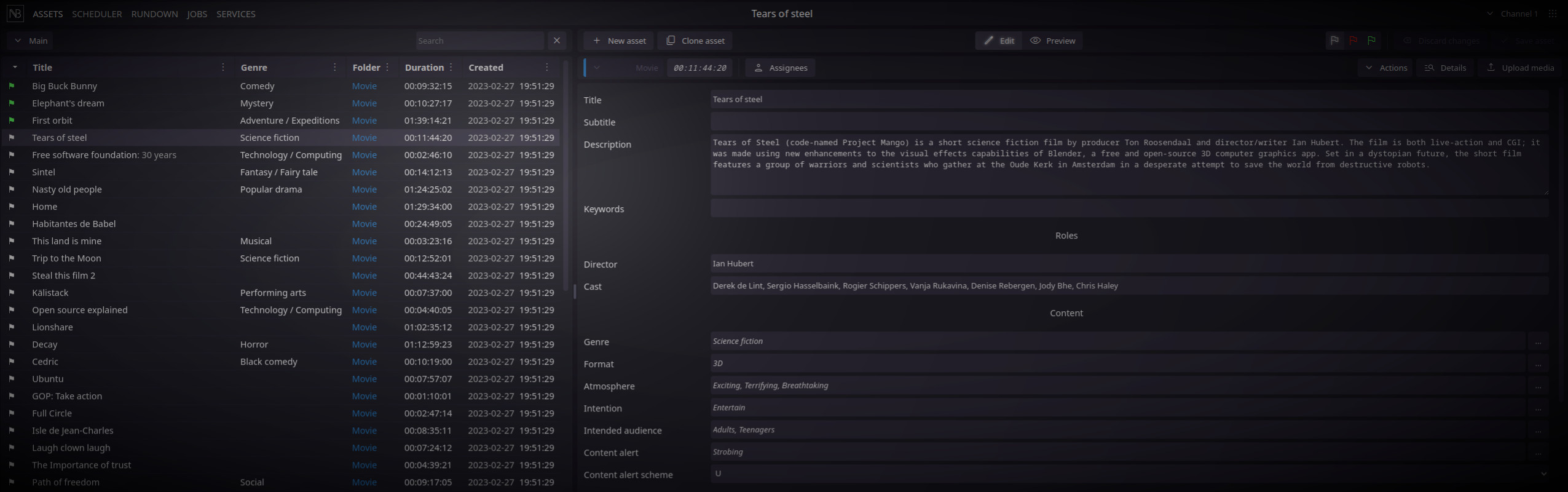
Simple and fast media catalog based on EBU Core includes a description of asset genre, editorial format, atmosphere, rights, relations, and technical metadata, while its very fast search engine makes navigation among media files very easy.
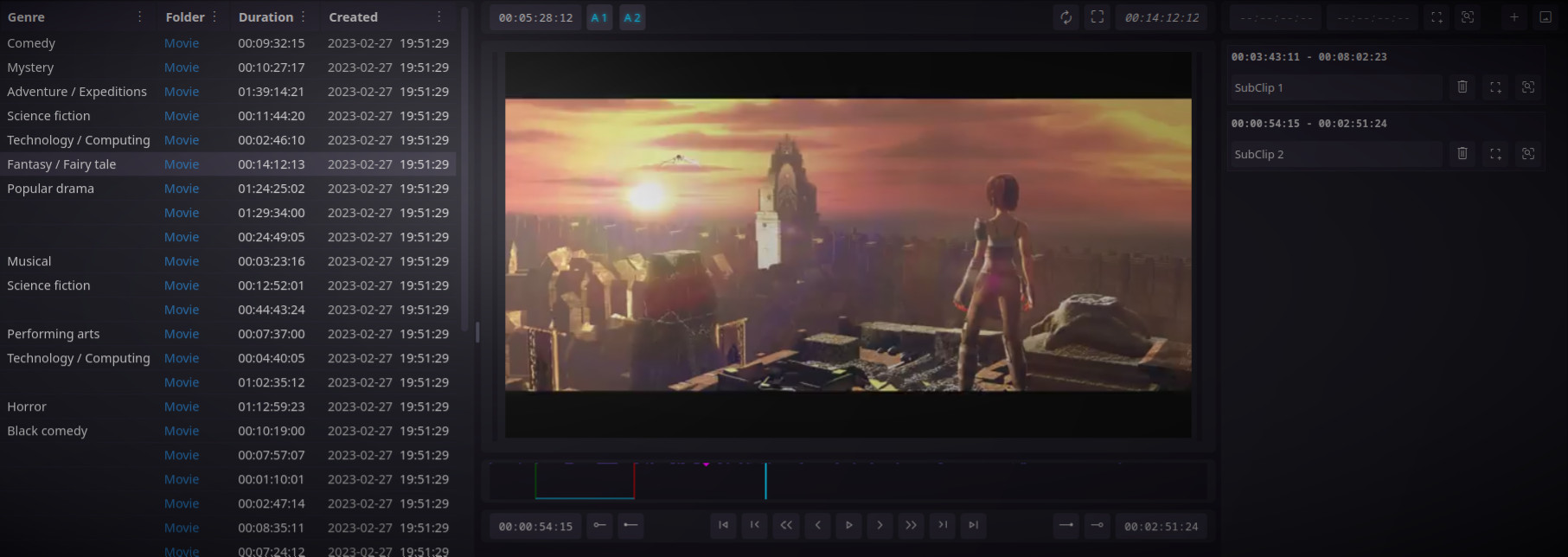
The low-resolution preview allows for editorial review, trimming, and the creation of sub-clips.
Video and audio cross-conversion and normalization
A preliminary media analysis and normalization guarantee its standards compliance. This process includes metadata extraction, aspect ratio fixing, crop and rotation detection, smart frame rate and size normalization and EBU R128 loudness correction.
Automatic cross-conversion servers transcode files for playout, web, low-res proxies, customer previews, etc. For h.264 and HEVC, Nebula can take advantage of NVIDIA nvenc and leverage the speed of transcoding using GPUs.

It is possible to start conversions automatically (rule-based) or trigger them from the user interface.
Linear scheduling
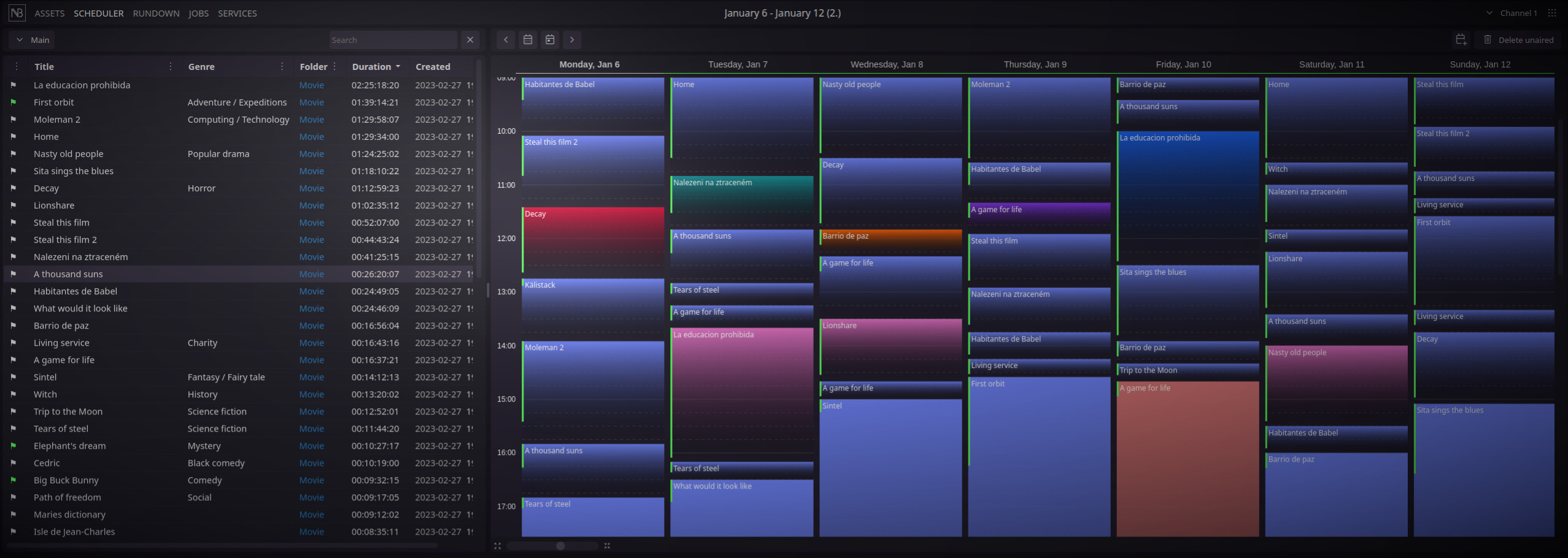
Nebula provides a simple and user-friendly way to schedule linear broadcasting. Macro- and micro-scheduling patterns are finished intuitively using drag&drop, including live events.
Nebula has also the ability to schedule for playback assets, which aren't finished yet. As soon as a media file is created the media file and rundown item are paired automatically.
The optional Dramatica module makes program planning even easier; depending on the particular broadcast scheme, Dramatica selects and automatically completes convenient shows, self-promotions, trailers, and fillings.
It is the way to create a playlist for a music station where an algorithm automatically creates a playlist based on a predefined scheme. Each clip in the rundown is picked by its editorial format, genre, tempo, atmosphere, etc.
Playout control
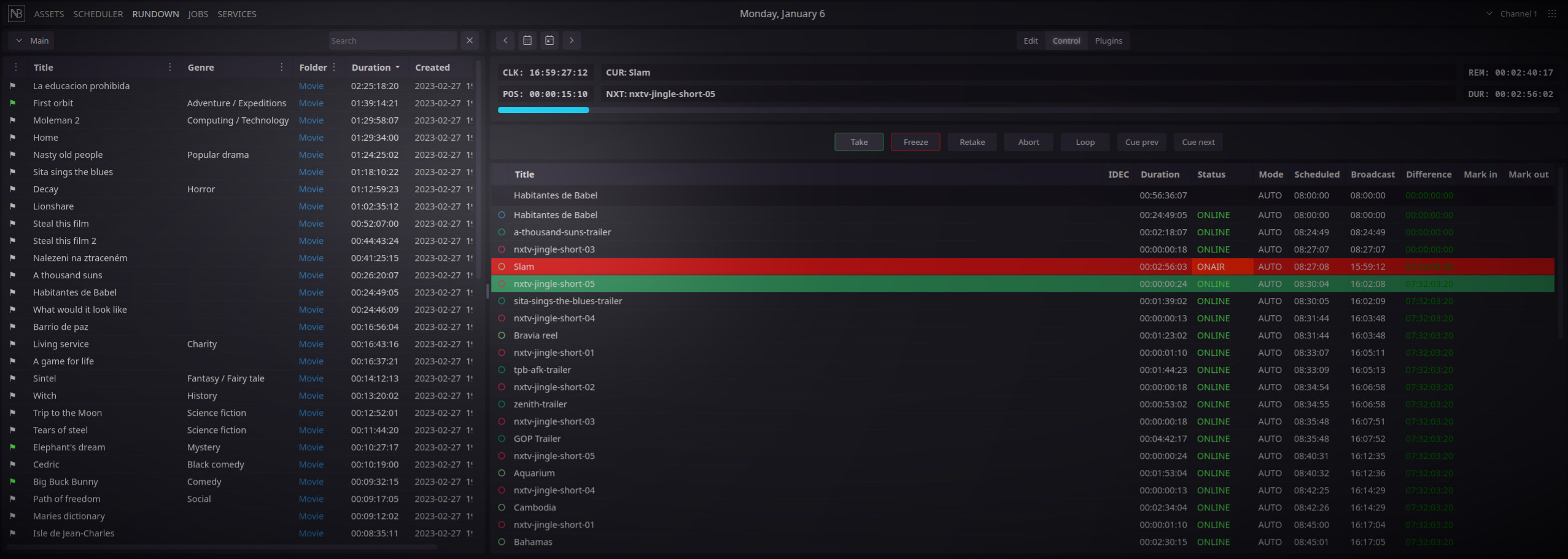
For linear broadcasting, Nebula can control CasparCG or another playout server (using a custom plugin). Broadcasting can run autonomously with and option of starting blocks at a specified time.
Users - master control room operators - can interfere with the rundown using Firefly client, or the web interface, executing graphics or change run order until the last moment.
Playout control module offers a plug-in interface for secondary events execution such as CG, router or studio control, recorders control and so on. Right at the operator's fingertips.
Publishing
Nebula can be linked to a company website via the API. Media files are automatically uploaded to the web or social networks after the planned program is broadcasted.
Statistics and reporting
Nebula allows generating various statistics and reports for collective rights management societies like OSA, DACS, etc. in an xls file.
Management and monitoring
A simple web based interface allows various management tasks (services and jobs monitoring, user management...) as well as simplified MAM access for editorial work without Firefly installed.
Nebula provides extensive system metrics in Prometheus format. Grafana dashboard can be used for their visualization and alerting in case of problems.
Reliability
Nebula is under active development and is in production since 2012 with no intentitons of abandoning the project, and we have a roadmap for several years. We listen to our customers, and we change our priorities in order to meet requests from the production.
We do not attempt to include numerous features that no one will ever use. Instead, we have spent many years working alongside Nebula operators, learning from each other. We believe that Nebula covers all common tasks in a broadcast environment.
Legal
Nebula is developed and maintained by imm studios, z.s.
License
This program is free software: you can redistribute it and/or modify it under the terms of the GNU General Public License as published by the Free Software Foundation, either version 3 of the License, or (at your option) any later version.
This program is distributed in the hope that it will be useful, but WITHOUT ANY WARRANTY; without even the implied warranty of MERCHANTABILITY or FITNESS FOR A PARTICULAR PURPOSE. See the GNU General Public License for more details.
Need help?
- Join Open Source Broadcasting group on Discord
- Professional support for Nebula is provided by Nebula Broadcast
- User documentation is available on docs.nebulabroadcast.com
- Found a bug? Please create an issue
FFmpeg
FFmpeg·C
一套完整的音视频处理工具集,能解码、编码、转码、推流和封装几乎所有格式,是搭建播放器、转码服务和流媒体管线的底层基础设施。
音视频转码+4视频转码与编辑硬核
66899+23815k2026-11-10 23:03 UTC
HandBrake
HandBrake·C
开源跨平台视频转码工具,能把 DVD/蓝光和各种格式的视频批量转成 H.264/H.265 等现代编码,自带预设和滤镜,适合整理片源和压缩体积。
视频转码+4视频转码与编辑
24957+401.7k1.11.22026-11-10 22:22 UTC

filmcraft
storytold·Rust
用纯 Rust 从零实现的开源非线性视频编辑器,支持多轨道剪辑与视频处理,适合想要轻量、高性能剪辑工具的用户。
视频编辑+4视频转码与编辑
18000+2367.4kv0.19.02026-11-10 23:23 UTC

Waifu2x-Extension-GUI
AaronFeng753·C++
集成 Waifu2x、Real-ESRGAN、Real-CUGAN 等多种超分模型与 RIFE 等补帧算法的图形界面工具,可批量放大视频、图片和 GIF 并提升帧率。
超分辨率+4视频转码与编辑
17214+191.1kv3.143.012026-11-10 13:39 UTC