
notes

nextcloudAGPL-3.0活跃维护

Nextcloud 的轻量笔记应用,提供无干扰的 Markdown 写作与阅读体验,笔记直接存在自己的 Nextcloud 里。

✎ Distraction-free notes and writing

v6.1.0发布于 2026-09-15 11:32 UTC744star162fork同步于 2026-11-10 05:59 UTC

怎么上手

README 里没有找到可直接复制的安装命令

README 里没有找到可直接复制的安装命令,请到 README 或官方文档查看安装方式。

硬件要求

README 没有说明硬件要求。

下载:源码 zip·GitHub Releases(安装包)本站不镜像安装包

项目说明

这个项目的说明还在生成中,先参考下面「最近发版」和 README。

最近发版

5 个版本v6.1.0
  1. v6.1.0最新正式版2026-09-15 · 2026-09-15 11:32 UTC

    Added

    • 📚 Note template support notes#1971
    • 📊 Note details tab in the sidebar notes#1974
    • 🔢 Expose file versions in the sidebar notes#1972
    • Setting to show last viewed note or welcome screen on start up notes#1578
    • Add highlights for notes and categories notes#1839
    • Setting to show/hide hidden files notes#1541
    • Improve attachment storage, add attachment deletion endpoint notes#1998
    • Add Nextcloud 36 support notes#1997
    • 🧪 Add JS unit test setup, covering Util.js notes#1989

    Changed

    • ➕ Move "New category" next to the categories caption notes#1968
    • Declare AGPL-3.0-or-later as SPDX identifier notes#1992
    • Add playwright to .nextcloudignore notes#1991
    • Add release relay job notes#1993
    • Wait for the Notes API before running the Playwright tests notes#2027
    • Bump version to 6.1.0-beta.3 notes#2010
    • Add changelog draft for 6.1.0 (beta2 state) notes#2002
    • Bump version to 6.1.0-beta.2 and generalize author info notes#2001

    Fixed

    • 🎨 Notes list design feedback: hide category label for uncategorized notes, remove divider line, right-align category names notes#2004

    Dependencies

  2. v6.0.22026-08-17 · 2026-08-17 13:06 UTC
    查看更新说明

    6.0.2

    Added

    Changed

    • return 404 when attachment path resolves to a folder notes#1923
    • hide dot-prefixed folders from category list notes#1984
    • eslint config file and reach green CI notes#1943
    • do not expose internal exception notes#1935
    • pass onLoaded as option in createEditor notes#1934

    Dependencies

  3. v5.0.22026-06-26 · 2026-06-26 12:03 UTC
    查看更新说明
  4. v6.0.12026-06-25 · 2026-06-25 22:50 UTC
    查看更新说明
  5. v6.0.02026-06-02 · 2026-06-02 08:35 UTC
    查看更新说明

    Added

    Changed

    Fixed

    Dependencies

用户点评

登录用户的真实使用记录,可按版本和硬件筛选
共 0 条

    还没有人点评。第一个说出真实体验的人最有价值。

    README 原文

    未翻译

    Notes

    REUSE status

    The Notes app is a distraction free notes taking app for Nextcloud. It provides categories for better organization and supports formatting using Markdown syntax. Notes are saved as files in your Nextcloud, so you can view and edit them with every Nextcloud client. Furthermore, a separate REST API allows for an easy integration into apps (Android, iOS, as well as 3rd-party apps which allow convenient access to your Nextcloud notes). Further features include marking notes as favorites.
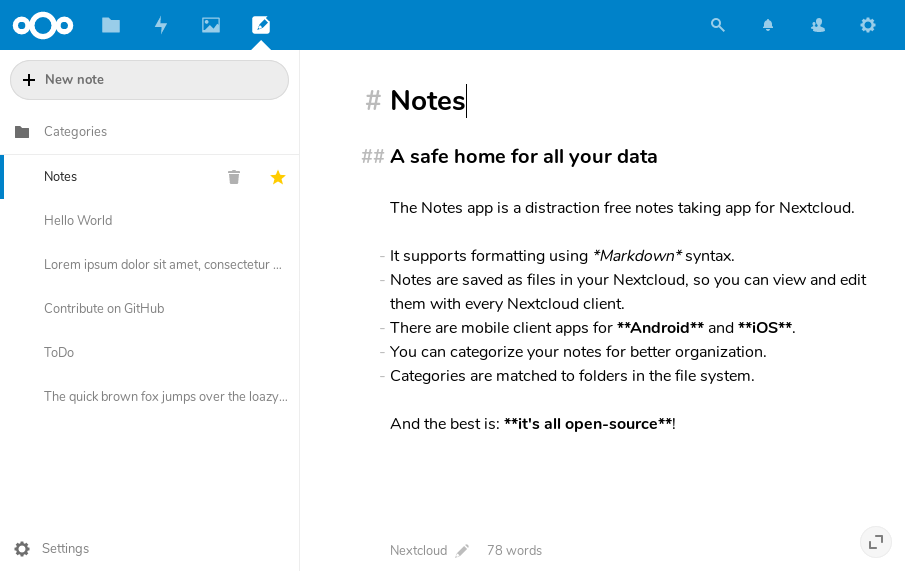
    Screenshot of Nextcloud Notes

    :rocket: Installation

    In your Nextcloud, simply navigate to »Apps«, choose the category »Office«, find the Notes app and enable it. Then open the Notes app from the app menu.

    Nextcloud will notify you about possible updates. Please have a look at CHANGELOG.md for details about changes.

    :exclamation: Bugs

    Before reporting bugs:

    :busts_in_silhouette: Maintainers

    :warning: Developer Info

    Test Node tests

    Building the app

    1. Clone this into your apps folder of your Nextcloud
    2. In a terminal, run the command make dev-setup to install the dependencies
    3. Then to build the Javascript run make build-js or make watch-js to rebuild it when you make changes
    4. Enable the app through the app management of your Nextcloud

    REST API for third-party apps

    The notes app provides a JSON-API for third-party apps. Please have a look at our API documentation.

    Admin configuration

    It is possible to specify different defaults for the notes settings of new users using occ commands like these:

    occ config:app:set notes noteMode --value="preview"
    occ config:app:set notes fileSuffix --value=".md"
    occ config:app:set notes defaultFolder --value="Shared notes"
    
    SettingProperty nameDefaultOther available option(s)
    Display mode for notesnoteModerich (if the Text app is enabled), otherwise editedit, preview
    File extension for new notesfileSuffix.md.txt
    Folder to store your notesdefaultFolderNotesCustom
