默认忽略 node_modules 及 dist/build 目录,且超过 10000 行或 250kB 的文件不会提示重构;新增引用不会自动高亮,需按 Shift+Alt+H 刷新;部分重构仅有 Quick Fix 入口,需用 Alt+Enter 或灯泡触发
abracadabra
nicoespeonMIT活跃维护VS Code 里的 JS/TS 自动重构扩展,把常用重构操作变成快捷命令,帮你在改老代码时少手动折腾。
JS & TS automated refactorings for the VS Code editor ✨ It's magic ✨
9.12.0发布于 2026-01-28 19:33 UTC897star +1 / 7 天54fork同步于 2026-11-11 05:50 UTC
在 VS Code 扩展面板搜索 "Abracadabra" 并点击安装 硬件要求按 README 说明
README 未说明,作为 VS Code 扩展在编辑器内运行
VS Code 的 JS/TS 自动重构扩展,提供 40+ 种安全重构让改代码更快
VS Code 里的 JS/TS 自动重构扩展,把常用重构操作变成快捷命令,帮你在改老代码时少手动折腾。
核心能力
- 提供 40+ 种自动重构如提取变量、提取类型、翻转 if/else
- 通过命令面板、快捷键和 Quick Fix 灯泡触发重构
- 支持 .js/.jsx/.ts/.tsx/.vue/.svelte 文件
- 可高亮标识符及其所有引用,便于识别 I/O 代码
- 可在设置中禁用不需要的 Quick Fix 与配置忽略目录
容易踩的坑
内容由模型根据 README 生成,可能不完整或不准确,以官方文档为准。看原文 README
- 9.12.0Stand Out 🎸最新正式版2026-01-28 · 2026-01-28 19:33 UTC
Added
- [New Refactoring] "Extract to Instance Property" to turn a local variable in a class method into an instance property. For TypeScript, it creates a private class property declaration. For JavaScript, it initializes the property in the constructor. (#883)

Fixed
- "Invert Boolean Logic" now correctly negates
inandinstanceofoperators in chained logic. Previously,!(a && "key" in obj)would incorrectly become!a || "key" in objinstead of!a || !("key" in obj). (#1285)
- 9.11.0I'll Make a JSDoc Out of You ⚔️2026-01-23 · 2026-01-23 14:07 UTC
查看更新说明
Added
- [New Refactoring] "Convert Comment to JSDoc" to turn single-line comments into JSDoc ones faster.

- Improve "Remove Redundant Else" so it does not add an unnecessary
returnstatement when all nested branches of the if-statement exit.
- 9.10.0I'm a Believer 🦅2025-12-10 · 2025-12-10 20:41 UTC
查看更新说明
Changed
- Extracting an object property value would not detect similar values in the scope. Now it does! Thanks @SelrahcD for reporting this one! (#1269)
const userConfig = { apiBaseUrl: "https://api.example.com", // 👇 Extracting this `30000` now detects all 4 occurrences! apiTimeout: 30000, dbTimeout: 30000, cacheTimeout: 30000 }; const apiTimeout = 30000; - 9.9.12025-11-26 · 2025-11-26 03:22 UTC
查看更新说明
Fixed
- When you type
${}in a string literal, Abracadabra can automatically convert it into a template literal. But the code is technically invalid until you type the variable name. Thus, Abracadabra was reporting an error message every time you do so. Since this is intended, we silenced that. No more noise!
- When you type
- 9.9.0For the First Time as a Param 🧊2025-07-16 · 2025-07-16 13:52 UTC
查看更新说明
Added
- [New Refactoring] "Extract Parameter" which converts a variable declaration into a function parameter. Thank you @pinage404 for finishing this one!
用户点评
登录用户的真实使用记录,可按版本和硬件筛选共 0 条
还没有人点评。第一个说出真实体验的人最有价值。
🧙 Abracadabra
Refactoring (noun): a change made to the internal structure of software to make it easier to understand and cheaper to modify without changing its observable behavior.
— "Refactoring: Improving the Design of Existing Code" by Martin Fowler



With Abracadabra, you can quickly and safely refactor existing code in VS Code.
VS Code ships with a few basic refactorings. Abracadabra supercharges your editor with:
- 🎁 Much, much more refactorings
- ⚡ Shortcuts to trigger the most useful ones in no-time
- 💡 Quick Fixes to suggest refactorings when appropriate
- 🛠 Options to customize the UX to your needs
- 💬 Refactorings that work with
.js,.jsx,.ts,.tsx,.vueand.sveltefiles
Refactor Legacy Code in a snap! 👌
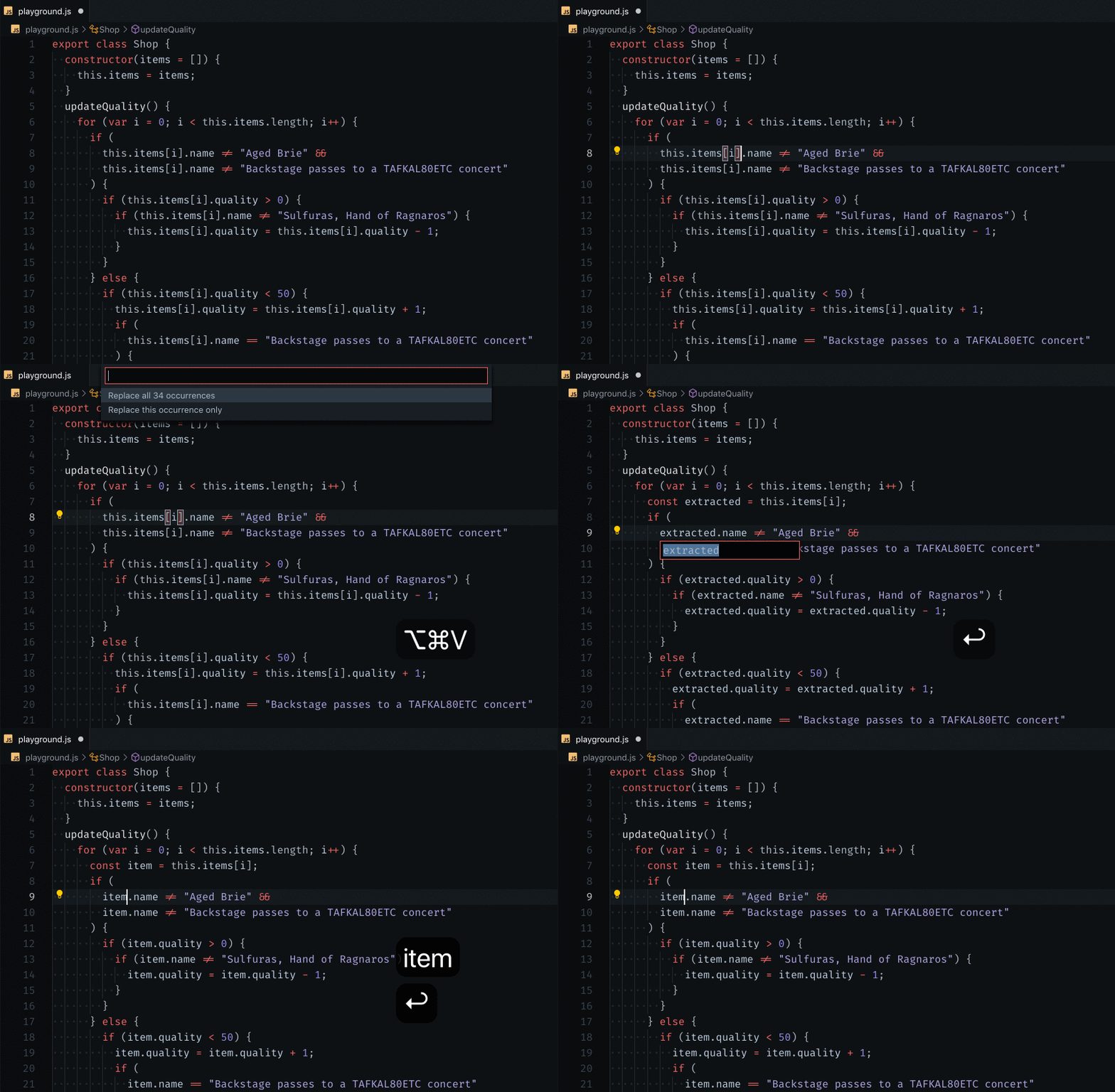
Installation
- Click on the Extensions icon (usually on the left-hand side of your editor).
- Search for "Abracadabra".
- Find the extension in the list and click the install button.
List of available refactorings
We have 40+ automated refactorings such as Extract Variable, Extract Type, Flip If/Else, etc.
👉 Here's the full catalog of refactorings available
All refactorings are available through the Command Palette.
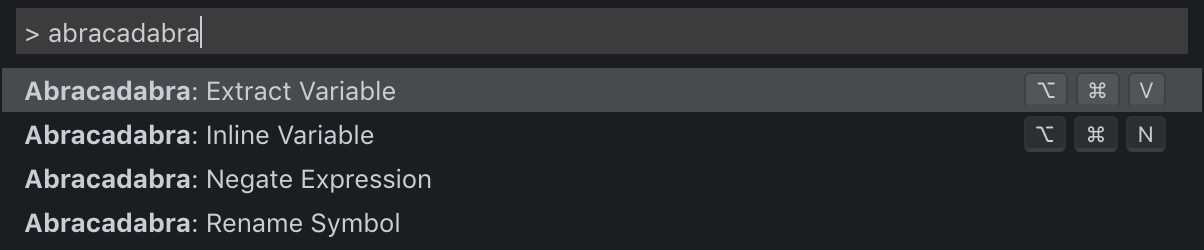
Some refactorings have default keybindings configured, but you can change that.
All other refactorings are available through VS Code Quick Fixes. You can access them by clicking on the lightbulb that appear next to the code 💡 or use the default shortcut Alt ↵.
Pro Tip: You can also disable the Quick Fixes you never use in VS Code settings 🔥 (look for Abracadabra)
Features that support refactorings
Besides refactorings, Abracadabra also gives you some extra features that are here to support refactoring work.
Highlight Identifiers
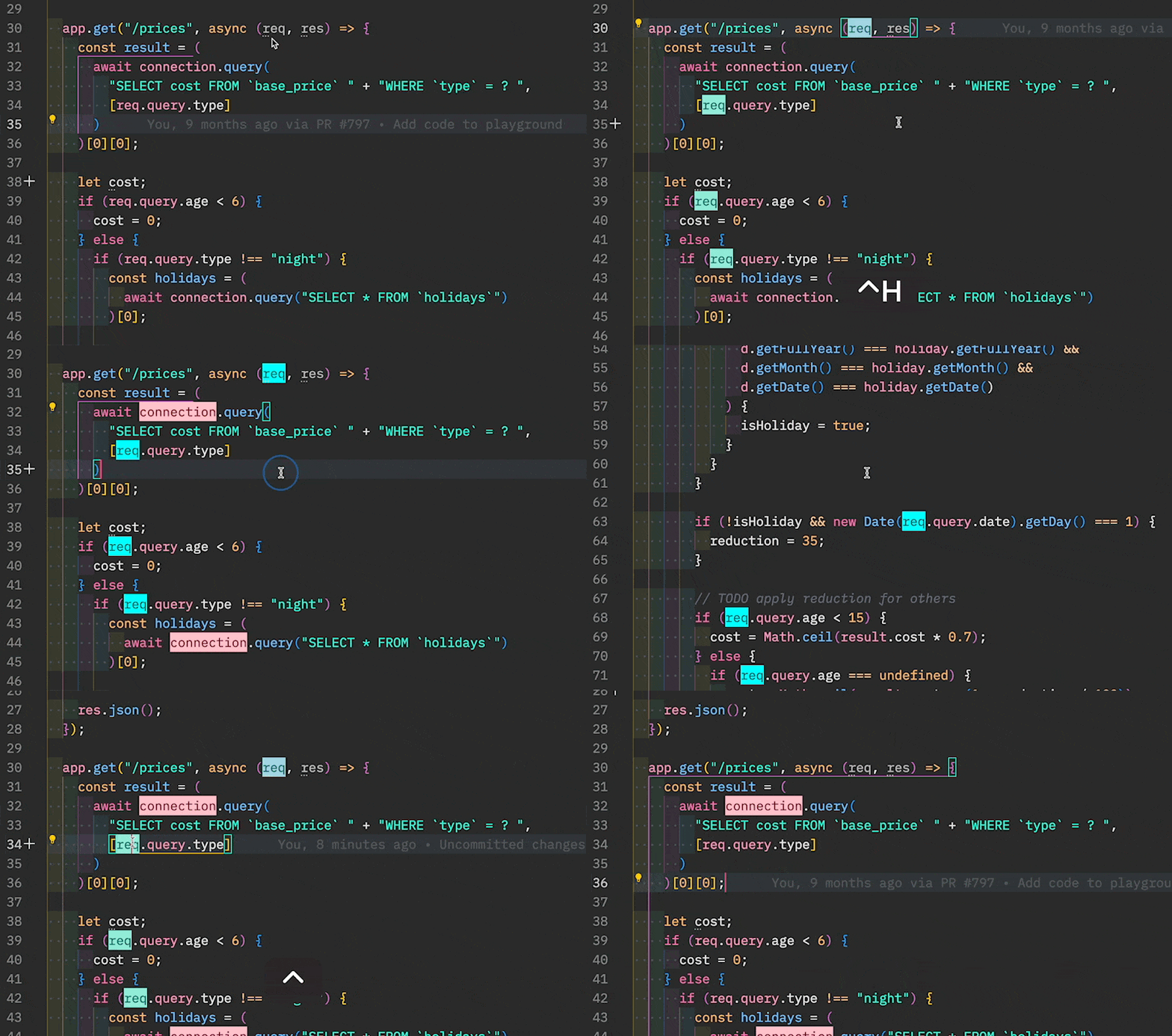
When working with Legacy Code, a very useful refactoring consists in extracting pure logic out of the I/O code that is hard to test (eg. HTTP calls).
To help you spot all the I/O bits in a chunk of code, Abracadabra can highlight them for you!
| Feature | Keybinding | On Mac |
|---|---|---|
| Toggle Highlight | Ctrl + Alt + H | ⌃ H |
| Refresh Highlights | Shift + Alt + H | ⌃ ⌥ H |
| Remove All Highlights | Ctrl + Shift + Alt + H | ⇧ ⌃ H |
- Put your cursor over an Identifier you want to highlight
- Press
Ctrl + Alt + H
All references to this Identifier will be highlighted. The highlight will persist even when you modify the code.
To remove, either:
- Put your cursor over a highlighted reference and press
Ctrl + Alt + Hagain - Press
Ctrl + Shift + Alt + Hfrom anywhere, to remove all highlights
This is handy for marking I/O code when refactoring, but you can use it to highlight any interesting Identifier and its references. Here are a few typical use cases:
- Mark all usages of a variable, to help you regroup them
- Identify variables that are always passed together in function calls
Does it highlights new references automatically?
Say you have highlighted a variable. Now you add some more code that refers to the same variable.
It won't be automatically highlighted.
We could. But a naive implementation of this would constantly parse the AST of the code you are working with, which would probably affect your editor performances (not good).
One way to do it would be to toggle highlight over the reference once to remove the old highlight, then again to get the new reference! But that's annoying!
That's why you have a "Refresh Highlights" command. Hit Shift + Alt + H and references will be recomputed again for you!
Configuration
| Setting | Description | Default |
|---|---|---|
abracadabra.ignoredFolders | Folders where it won't propose refactorings | ["node_modules"] |
abracadabra.ignoredPatterns | Glob patterns where it won't propose refactorings | ["dist/*", "build/*"] |
abracadabra.maxFileLinesCount | Don't propose refactorings on files that have more lines of code than this threshold | 10.000 |
abracadabra.getMaxFileSizeKb | Don't propose refactorings on files that bigger than this threshold (in kB) | 250 |
abracadabra.autoConvertToTemplateLiteral | Automatically convert a string into a template literal when you insert ${} | true |
For the glob patterns, read glob's documentation to see what you can filter out.
All refactorings that appear in Quick Fix suggestions can also be disabled in your VS Code settings 🔥 (look for Abracadabra)
Release Notes
Have a look at our CHANGELOG to get the details of all changes between versions.
Versioning
We follow SemVer convention for versioning.
That means our releases use the following format:
<major>.<minor>.<patch>
- Breaking changes bump
<major>(and reset<minor>&<patch>) - Backward compatible changes bump
<minor>(and reset<patch>) - Bug fixes bump
<patch>
Contributing
Contributing Guide
Read our contributing guide to learn about our development process, how to propose bugfixes and improvements, and how to build and test your changes to Abracadabra.
Good First Issues
To help you get your feet wet and become familiar with our contribution process, we have a list of good first issues that contains things with a relatively limited scope. This is a great place to get started!
Contributors
Thanks goes to these wonderful people (emoji key):
This project follows the all-contributors specification.
Contributions of any kind are welcome!
Alternatives
Building automated refactoring for JavaScript is not easy, and it takes time. Since this is a side-project, it doesn't get as much time as it should to cover everything you need.
If Abracadabra doesn't fit your need for something, here are the other extensions I recommend you check:
- JS CodeFormer which is built by Chris Stead. Chris built the first JS refactorings extension in VS Code back in the days, so he knows his stuff 👍
- P42 JavaScript assistant is an impressive tool built by Lars Grammel. It is not maintained anymore, but it may have refactorings that Abracadabra doesn't.
- JavaScript Booster is a popular extension that mimics Webstorm's UX for refactoring—which was a source of inspiration for Abracadabra. Worth having a look.
There are some things I think Abracadabra does better. Other things Abracadabra does worse. The goal with this extension is to provide automated refactorings that are easy to use and VS Code misses. If others are implementing them, I'm more than happy to recommend (and use) their tool!
Have a look, give them a try, use a combination of tools that work best for you.

License
💁 MIT
vscode
microsoft·TypeScript
微软开源的跨平台代码编辑器,基于 Electron 和 TypeScript 构建,支持插件扩展、调试和 Git 集成,适合日常开发写代码。
代码编辑器+4编辑器 / IDE
195292+20844k1.145.32026-11-11 05:15 UTC
neovim
neovim·Vim Script
Vim 的分支版本,用 Lua 做配置和插件开发,内置 LSP 与异步 API,让终端编辑器更好扩展、更好用。
文本编辑器+4编辑器 / IDE进阶
103581+1197.4kv0.12.62026-11-11 03:17 UTC
zed
zed-industries·Rust
用 Rust 打造的高性能多人协作代码编辑器,由 Atom 和 Tree-sitter 作者开发,主打低延迟编辑与实时协同编码。
代码编辑器+4编辑器 / IDE进阶
94706+85412kv1.27.02026-11-11 02:58 UTC

AFFiNE
toeverything·TypeScript
把文档、白板、表格融为一体的开源知识库,可离线使用、支持多人实时协作,是 Notion 和 Miro 的替代方案。
知识库+4编辑器 / IDE硬核
74436+1495.5kv2026.11.10-canary.9052026-11-11 03:36 UTC