README 只给出 CMake 构建入口,各平台依赖需按 wiki 的 Ubuntu/Mac/Windows 编译页单独安装;上传到 Dropbox、Imgur 等服务需额外安装对应插件
跨平台截图分享客户端,截完图直接上传拿链接
跨平台截图分享工具,支持 Windows、Mac 和 Linux,截图后可快速上传到图床并生成分享链接。
核心能力
- 支持 Windows、Mac、Linux 三平台
- 截图后一键上传并复制分享链接
- 通过插件保存到 Dropbox、Imgur、FTP 等
- 内置截图编辑器可先标注再上传
容易踩的坑
内容由模型根据 README 生成,可能不完整或不准确,以官方文档为准。看原文 README
- v1.6.2最新正式版2026-05-31 · 2026-05-31 17:49 UTC
ScreenCloud 1.6.2 (2026-05-31)
- Fix auto-update regression after Qt 6 upgrade
- v1.6.12026-05-31 · 2026-05-31 13:20 UTC
查看更新说明
ScreenCloud 1.6.1 (2026-05-31)
- Fix multi-monitor screen capture regression after Qt 6 upgrade
- v1.6.02026-05-24 · 2026-05-24 20:52 UTC
查看更新说明
ScreenCloud 1.6.0 (2026-05-24)
- Upgrade to Qt 6
- Add dark-mode support on Linux (GNOME-only)
- v1.5.32020-10-25 · 2020-10-25 17:54 UTC
查看更新说明
ScreenCloud 1.5.3 (2020-10-25)
- Add Ctrl + C shortcut to capture selection overlay
- Minor bug fixes and tweaks to the editor
- Fix OpenSSL errors on Windows
- v1.5.22020-10-20 · 2020-10-20 16:58 UTC
查看更新说明
ScreenCloud 1.5.2 (2020-10-20)
- Wayland support
- Add ability to make an existing ScreenCloud process perform actions (e.g capture screenshots) from the command line
- Add new tool to editor: cursor tool
用户点评
登录用户的真实使用记录,可按版本和硬件筛选共 0 条
还没有人点评。第一个说出真实体验的人最有价值。
ScreenCloud 
This is the source code for the ScreenCloud client. ScreenCloud is an easy to use screenshot sharing tool that works on Windows, Mac and Linux. For more info, see: http://screencloud.net/
You can also upload to other services, including your own FTP server, Imgur, Dropbox and more through the use of plugins.
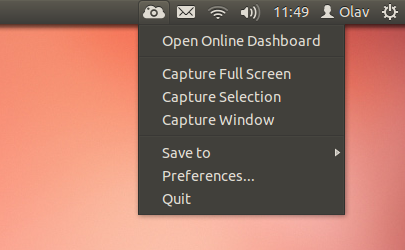
Features
- Open Source and cross-platform(Windows, Mac & Linux)
- Fast and easy: Snap a photo, paste the link, done!
- Plugin support, save to Dropbox, Imgur, etc.
- Built in screenshot editor.
Compiling
ScreenCloud uses the CMake build system, start off by downloading the appropriate version for your OS from the CMake website or your distro's repositories. After installing CMake, choose the OS you're compiling on from the the list below:
Roadmap
Here's a quick list of features I've wanted to implement, but not gotten around to yet. Feel free to contribute to this list:
- Translation support
- Updating the wiki