Windows 必须用 webui.bat,webui.sh 是 bash 脚本在 PowerShell 里跑不了;RTX 50 系列需要 R580 以上驱动才能用 cu130,否则会退回冻结在 torch 2.11 的 cu128;AMD ROCm 需先正常安装再手动替换 PyTorch,之后不要跑 uv sync 或 --recreate,否则会被 PyPI 的 torch 覆盖;默认端口是 8848,且模型权重需放在 ./models 目录下。
OmniChar
omnicharGPL-3.0活跃维护把角色的脸、身材、服装和声音打包进一个 .char 文件,让同一个角色在不同扩散模型和视频生成工具里保持一致,省去反复调参对齐的麻烦。
The open .char format for consistent characters. Face, body, wardrobe & voice in one file, consistent across every model.
v1.3.36发布于 2026-10-29 12:20 UTC582star +2 / 7 天73fork同步于 2026-11-10 23:56 UTC
git clone https://github.com/omnichar/OmniChar
cd OmniChar/core
./webui.sh --install --extra all
./webui.sh 硬件要求按 README 说明
README 给出了各模型训练时的显存峰值(512px):FLUX.2 约 8.6GB、FLUX.1 dev 4-bit 约 10.4GB、Krea 2 4-bit 约 11.9GB、Z-Image Turbo 约 13.4GB、MiniMax H3 约 12.7GB(需 64GB 系统内存),LTX-2.5 需要 48GB。生成比训练更耗显存,Krea 2 在 1024 分辨率下推理峰值接近 36GB,Z-Image Turbo 在 1024² 下约 11.5GB。支持 NVIDIA(Linux 已测试、Windows 支持)、Apple Silicon MPS(代码路径存在但未测试)、AMD ROCm(未测试),纯 CPU 也能运行但非常慢。
纯 CPU 可运行支持 Apple Silicon需要 CUDA支持 ROCm / AMD多卡 / 张量并行
开源 AI 角色工作室,用一个可移植的 .char 文件跨模型保持角色的脸、身体、服装和声音一致
把角色的脸、身材、服装和声音打包进一个 .char 文件,让同一个角色在不同扩散模型和视频生成工具里保持一致,省去反复调参对齐的麻烦。
核心能力
- 用单个 .char 文件打包脸、身体、服装与声音
- 支持 FLUX.2、FLUX.1、Krea 2、Z-Image Turbo 等模型的训练与生成
- 可在本地 GPU、ComfyUI 节点或托管 API 模型上生成
- 提供 --lowvram 低显存配置,启用分块、切片与 int8 量化
- 安装时自动探测 GPU 计算能力并选择匹配的 PyTorch CUDA 版本
容易踩的坑
内容由模型根据 README 生成,可能不完整或不准确,以官方文档为准。看原文 README
- v1.3.36v1.3.36 - quantisation fix h3最新正式版2026-10-29 · 2026-10-29 12:20 UTC
Full Changelog: https://github.com/omnichar/OmniChar/compare/v1.3.35...v1.3.36
- v1.3.35v1.3.35 - identity scoring update2026-10-27 · 2026-10-27 13:19 UTC
查看更新说明
Full Changelog: https://github.com/omnichar/OmniChar/compare/v1.3.34...v1.3.35
- v1.3.34v1.3.34 - face scoring fix2026-10-27 · 2026-10-27 10:20 UTC
查看更新说明
Full Changelog: https://github.com/omnichar/OmniChar/compare/v1.3.33...v1.3.34
- v1.3.33v1.3.33 - continuity scoring2026-10-26 · 2026-10-26 11:03 UTC
查看更新说明
Full Changelog: https://github.com/omnichar/OmniChar/compare/v1.3.32...v1.3.33
- v1.3.32v1.3.32 - model load optimisation2026-10-16 · 2026-10-16 12:26 UTC
查看更新说明
Full Changelog: https://github.com/omnichar/OmniChar/compare/v1.3.31...v1.3.32
用户点评
登录用户的真实使用记录,可按版本和硬件筛选共 0 条
还没有人点评。第一个说出真实体验的人最有价值。
Omnichar Studio
Open-source studio for AI characters. One portable .char, working across every model.
Build a character once and keep the same face, body, clothes and voice across shots and models. Generate locally on your own GPU, in ComfyUI, or with hosted models.
Try it in your browser · Install locally · ComfyUI node · Getting started · Workflows




Supported models
| Model | Train | Generate | Trains on a 16GB card |
|---|---|---|---|
| FLUX.2 (klein Base 4B / 9B) | yes | yes | yes, ~8.6GB |
| FLUX.1 dev (4-bit) | yes | yes | yes, ~10.4GB |
| Krea 2 (RAW, 4-bit) | yes | yes | yes, ~11.9GB |
| Z-Image Turbo | yes | yes | yes, ~13.4GB |
| MiniMax H3 (video, sound) | yes | yes | yes but slowly, ~12.7GB |
| LTX-2.5 (video, sound) | yes | yes | no, wants 48GB |
| Hosted models (API Nodes) | no | yes | no GPU needed |
Those are training peaks at 512px. Training is cheaper than generating, and a LoRA trained at 512 applies at any generation resolution. On a 16GB card H3 moves its text encoder to the CPU, which is why it costs the least VRAM and the most time, and it wants 64GB of system RAM to do that. Not every row has been run on a 16GB card, and Benchmark results says which were measured and which are interpolated, alongside the full per-card matrix and timings.
Install
You need Python 3.11+. The web UI ships as a Python package, so there is no
Node step. --install --extra all installs everything: the engine, the model runtime, the trainer
and the UI.
macOS / Linux:
git clone https://github.com/omnichar/OmniChar
cd OmniChar/core
./webui.sh --install --extra all
./webui.sh                         # http://127.0.0.1:8848
Windows (use webui.bat; webui.sh is a bash script and will not run in PowerShell):
git clone https://github.com/omnichar/OmniChar
cd OmniChar/core
.\webui.bat --install --extra all
.\webui.bat

rem If the CUDA build is wrong for your card, name the index yourself:
.\webui.bat --install --extra all --torch-index cu130
On NVIDIA, --install reads your GPU's compute capability and pulls the matching CUDA build of
PyTorch, RTX 50-series included. Everything lands in core/.venv, which Omnichar owns; an
environment already activated in your shell is never touched. Re-running --install is safe, and
it is also how you update: it upgrades the prebuilt web UI package, so git pull followed by
--install moves both halves forward.
Both versions are printed at launch, and Omnichar checks PyPI once a day in the background and says so when either half is behind:
Versions: omnichar-core 1.3.16, omnichar-frontend 1.3.15
UPDATE AVAILABLE: omnichar-frontend 1.3.15 -> 1.3.16
  Update with: ./webui.sh --install  (or: pip install -U omnichar-frontend)
Set INLINE_NO_UPDATE_CHECK=1 to skip the check.
Prefer pip? pip install -r requirements.txt from the repo root installs the whole app from PyPI,
then run inline-studio.
No GPU? Deploy Omnichar on RunPod →
What has been run, and what has a code path nobody has verified:
| Hardware | Status | Extra steps |
|---|---|---|
| NVIDIA, Linux | Tested, Z-Image Turbo 1024² on a T4 (16GB); Krea 2 1024² and LoRA training on an L40S (48GB) | None |
| NVIDIA, Windows | Supported | PyPI's default torch is CPU-only on Windows, so --install picks the CUDA build for your card |
| Apple Silicon (MPS) | Code path exists, untested | None. No int8 quantising on MPS, so a model must fit unified memory; ComfyUI int8 loads |
| AMD (ROCm), Linux | Untested, reports welcome | Needs a ROCm build of PyTorch, see below |
| AMD (ROCm), Windows | Untested, reports welcome | Needs AMD's own PyTorch wheels (pytorch.org has none for Windows), see below |
| CPU only | Works, very slow | ./webui.sh --cpu |
RTX 50-series (Blackwell)
RTX 50-series cards are compute capability sm_120, and no wheel built for CUDA 12.4 or 12.6 has
kernels for them. --install reads the capability off the driver and picks cu130, so a plain
.\webui.bat --install --extra all is all you need.
Old driver? CUDA 13 needs driver R580 or newer. If yours predates it, --install picks cu128
and says so: cu128 still has sm_120 but is frozen at torch 2.11 and will never update, so update
the driver when you can.
--torch-index takes a short name (cu130, cu128, cu126), a full index URL, or cpu. Naming it
explicitly also replaces an already-installed torch, which a plain re-run will not do, so you
rarely need --recreate. INLINE_TORCH_INDEX does the same thing.
Not sure what you have? .\webui.bat --print-torch-index prints what the driver reported and which
index would be used, and installs nothing. That one line is what to paste into a bug report.
AMD (ROCm)
Nobody has verified this yet, so treat it as a starting point. Install normally first, then replace PyTorch, so nothing can overwrite your ROCm build afterwards:
cd core
./webui.sh --install --extra runtime

# Pick the index matching YOUR ROCm version: https://pytorch.org/get-started/locally/
uv pip install --python .venv/bin/python --force-reinstall \
  --index-url https://download.pytorch.org/whl/rocm6.2 torch

# hip should print a version, not None
.venv/bin/python -c "import torch; print(torch.cuda.is_available(), torch.version.hip)"
Windows: pytorch.org publishes no ROCm wheels for Windows, so a short name like gfx1201 or
rocm6.4 is refused. AMD publishes its own index per GPU family; pass its full URL. For an
RX 9000-series card (gfx1200/gfx1201):
.\webui.bat --install --extra all --torch-index https://rocm.nightlies.amd.com/v2/gfx120X-all/
Do not run uv sync or pass --recreate afterwards; both put the PyPI torch back over your ROCm
build. The dtype heuristics key off NVIDIA compute capability, which is meaningless on RDNA and
CDNA, so open an issue either way.
Generation VRAM, so you can judge before downloading
Krea 2 is 26GB on disk and generation peaks near 36GB at 1024, so a 40GB card is the practical floor for inference. Training is far cheaper, see the table above. Z-Image Turbo is the low-VRAM path for generation: it is distilled to run CFG-free, so 1024² fits in about 11.5GB.
webui.sh (macOS/Linux) and webui.bat (Windows) map friendly flags onto the engine's INLINE_*
environment variables. core/main.py takes the same flags. Run --help for the full list.
| Flag | Env var | What it does |
|---|---|---|
--listen | INLINE_HOST=0.0.0.0 | Bind all interfaces so other machines can reach it |
--port N | INLINE_PORT | Port to serve on (default 8848) |
--models-dir PATH | INLINE_MODELS_DIR | Where weights are scanned from (default ./models) |
--data-dir PATH | INLINE_DATA_DIR | Where runs and takes are written |
--lowvram | INLINE_PROFILE=lowvram | Tight-VRAM profile (tiling, slicing, int8) |
--cpu | INLINE_PROFILE=cpu | Force CPU generation |
--vram-budget GB | INLINE_VRAM_BUDGET_GB | Treat the GPU as having GB of usable VRAM |
--multi-gpu [SPEC] | INLINE_PARALLEL | Split one image's denoise across GPUs; auto with 2+ GPUs |
--torch-index WHICH | INLINE_TORCH_INDEX | With --install, override the PyTorch wheel index |
--print-torch-index | n/a | Print the GPU probe and chosen index, then exit |
--extra NAME | n/a | Add an install extra: runtime, server, training, all |
--recreate | n/a | Rebuild .venv from scratch |
--dev / --rebuild | n/a | Live-reload dev loop / force a fresh SPA build |
From source (UI development): build the SPA with npm ci && npm run build:spa, then serve it
with cd core && uv run python main.py --front-end-root ../dist-web. Or ./webui.sh --dev for
Vite HMR on :5173.
ComfyUI custom node
A .char is not tied to this app. The
ComfyUI custom node reads the same file, so a
character built here applies on a ComfyUI graph, and one built there opens in the Characters
panel.
Workflows: build a .char,
FLUX.2 Klein 9B,
MiniMax H3.
Characters
Getting the same person across shots normally means training a LoRA for each one, or re-wiring the same reference photos into every node by hand. Build a character once instead, then pick it from a dropdown.
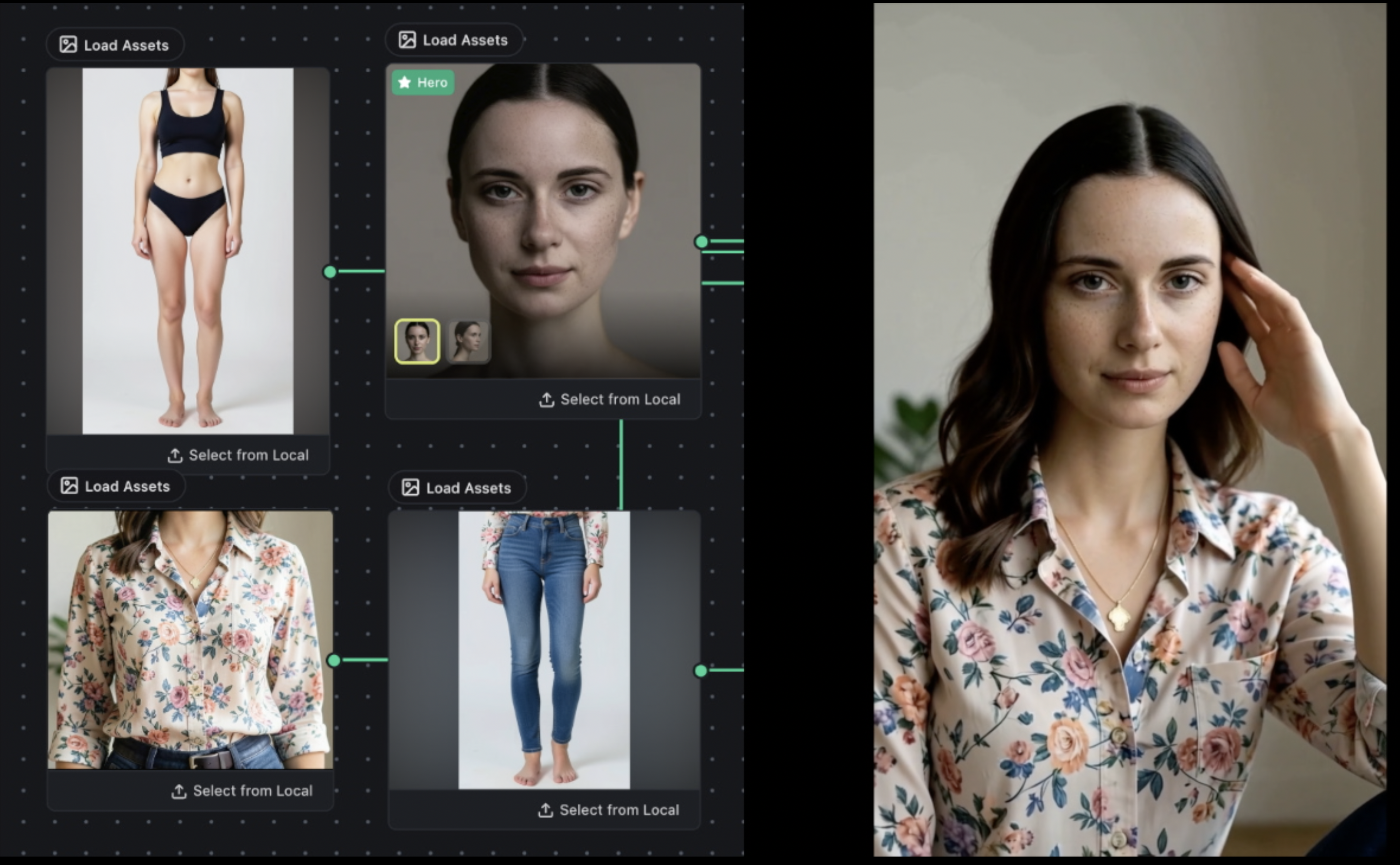
Workflow: Minimax H3. Consistent face, body & cloths via reference identity →
Drop in a photo or two and Omnichar compiles a .char: one portable file holding your
references and an identity fingerprint. Describe the scene, and the references carry the likeness.
On MiniMax H3 the same person moves and speaks, in video with sound. Every take comes back with a
continuity score out of 100, so drift shows up as a number. On a clip the score carries the worst
frame and the second it happened, so a dip cannot hide behind an average.
- FLUX.2 applies a character with no training at all. The references ride in the prompt's token sequence, so picking one costs nothing but the render.
- Krea 2 has no reference channel, so it trains a small adapter for the character once, then reuses it on every render.
- MiniMax H3 does both. Reference to Video reads the references directly, and its other three nodes have no reference channel, so they take a trained adapter instead.
- Hosted models take a character too. Wire one into Nano Banana Pro or MiniMax H3 Reference to Video on fal and the references and locked description go out with the request, the same as on a local node.
Not every hosted model will take a face. Seedance 2.0 rejects any reference image with one in it, so a character reaches it as build and wardrobe only. The node says so before you run, rather than after you have paid for a video of somebody else.
How characters work, in detail →
Train a LoRA
Train on your own images, or on short video clips, on your own GPU with no cloud step. The training
nodes sit on the same canvas as everything else: wire them up, press Start, watch it run. The
finished .safetensors lands in models/loras/, where the LoRA loader node picks it up, so you can
generate with it straight away.
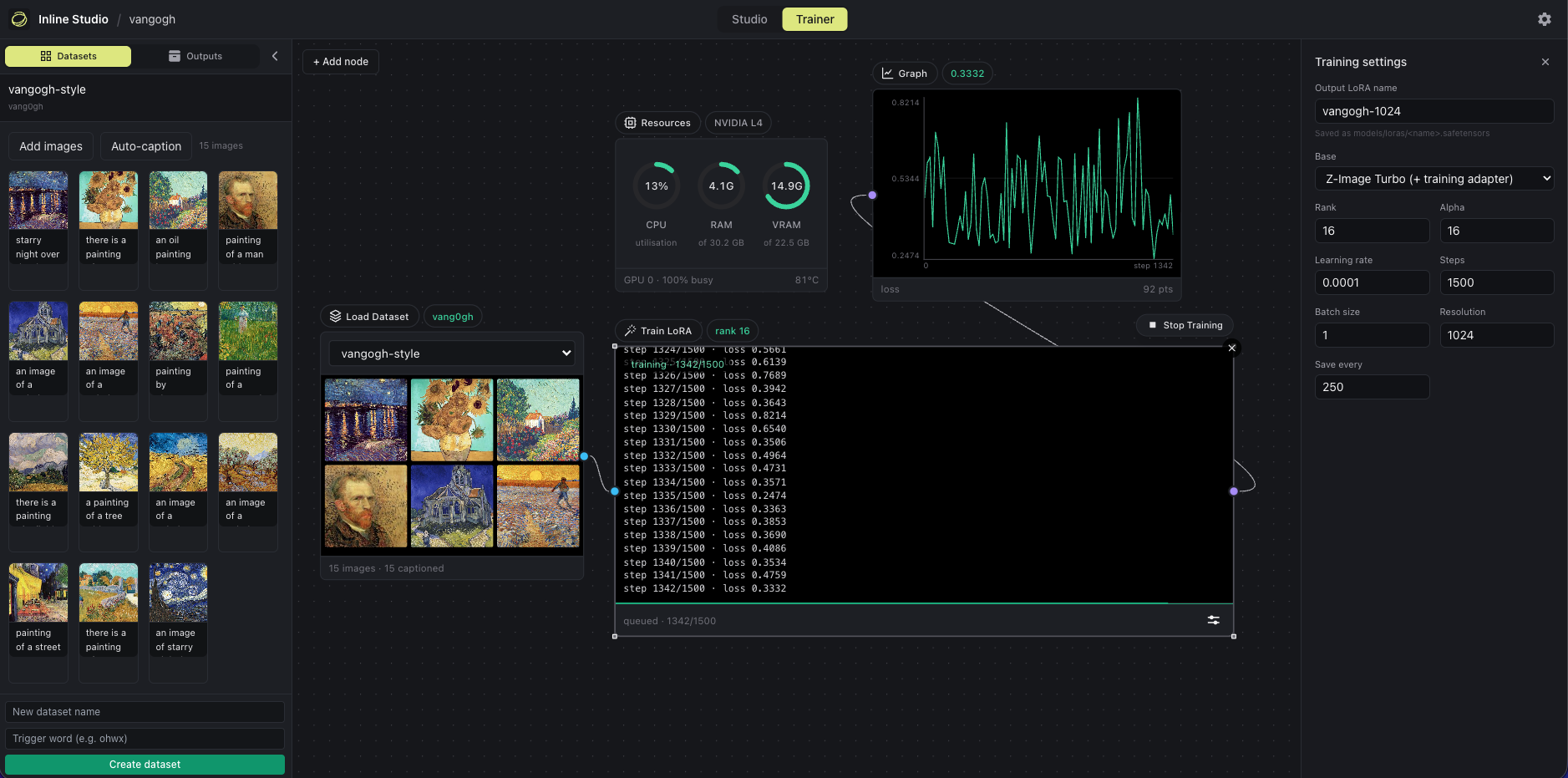
[ Load Dataset ] --> [ Caption ] --> [ Train LoRA ] --> [ Graph ]
                                          |
                                          +--> Resources (VRAM monitor)
Hyperparameters sit behind an Adjust button, so the node face stays a status surface. MiniMax H3 trains on stills for look and style, or on clips to learn motion as well, and one dataset can hold both. LTX-2.5 trains on clips, and can also learn a transform between a reference clip and a target one, which upstream calls an IC-LoRA.
The image models train on stills. FLUX.1 trains on dev - it is guidance-distilled rather than step-distilled, so it is its own training base and needs no adapter, and 4-bit puts it on a 12GB card at 512px. FLUX.2 trains on a klein Base build, 4B or 9B, and the adapter still loads on the distilled build afterwards. Krea 2 and Z-Image are covered in TRAINING.md.
Already installed with --extra all? The trainer is ready. Otherwise
./webui.sh --install --extra training.
Windows: MiniMax H3 training maps the whole 62 GB bf16 checkpoint into memory. On a 64 GB machine it crashed with a 64 GB page file on each of two drives and ran with 128 GB on each.
TRAINING.md is the full reference: which base to train on · benchmarks · training on clips · control LoRAs · datasets and outputs · stop and resume · trigger words
A worked example: skin-lora-krea-2-raw,
trained here on Krea 2 RAW from the 26 pairs published as
krea2-skin-lora.
Generate
Drop a model node, wire a prompt, hit Run. One node, no loader or sampler wiring. Either put a
.safetensors in core/models/diffusion_models/, or use the node's model popup to download the
diffusion model, VAE and text encoder with visible progress. Nothing is fetched behind your back.
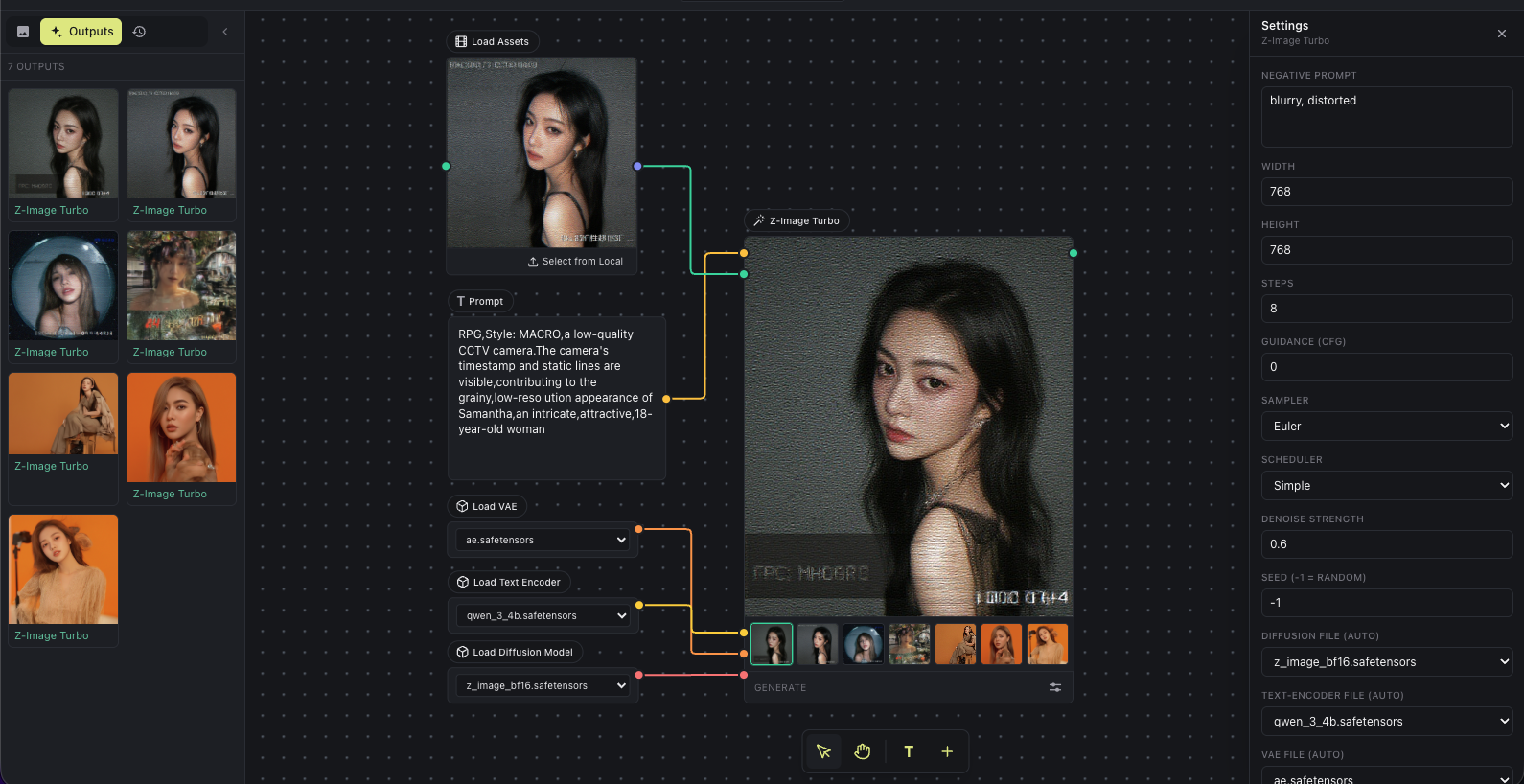
- Z-Image Turbo is the low-VRAM starting point, distilled to run CFG-free.
- Krea 2 is a 12.9B MMDiT, published as an undistilled RAW base alongside an 8-step distilled Turbo build.
- FLUX.2 is natively multi-reference: wire several images and the prompt addresses them by position. One node covers klein 4B and 9B, their Base builds, and dev.
- MiniMax H3 generates video and its soundtrack in one pass, as four nodes (text, image, first and last frame, reference). 24fps, 5 to 15 seconds. See the open weights guide.
- LTX-2.5 is Lightricks' 22B model, video with sound again, as three nodes (text, image, first and last frame). 24fps, 1 to 20 seconds. Every node has a Fast mode on the distilled transformer and a Quality mode on dev.
- ControlNet steers a local render with a pose, depth or edge map. Control Space is a 3D pose editor in a node, so you can build the skeleton rather than find a reference photo.
Most builds load. For MiniMax H3 that means the full bf16 file, the pruned build, and the
fp8_scaled build, which is the same model at 21.0GB instead of 66.3GB. The mxfp8 and nvfp4
H3 transformers do not load. A build the node cannot read is listed along with the reason, and a
quantisation it does not recognise is refused rather than guessed at.
ComfyUI int8 support. The int8_convrot and int8_tensorwise files you use in ComfyUI load
here unchanged, except LTX-2.5's Gemma encoder, and stay int8 in VRAM, about half their bf16 size.
A smaller file downloads faster, but it does not use less VRAM. Fitting the model to your card is the device policy's job whichever build you start from.
core/models/
  diffusion_models/  krea2_turbo_bf16.safetensors        <- Krea 2 Turbo (generate)
                     krea2_raw_bf16.safetensors          <- Krea 2 RAW (train)
                     flux-2-klein-4b.safetensors         <- FLUX.2 default, Apache 2.0
                     flux-2-klein-base-4b.safetensors    <- FLUX.2 base build, for training
                     flux-2-klein-base-9b.safetensors    <- FLUX.2 9B base, for training (gated)
                     flux1-dev.safetensors               <- FLUX.1 dev, generate and train
                     minimax_h3_fl2va_pruned_int8_convrot.safetensors   <- H3 text, image, first/last frame
                     minimax_h3_ref2va_pruned_int8_convrot.safetensors  <- H3 reference node
                     ltx-2.5-22b-distilled-transformer-bf16.safetensors  <- LTX fast mode
                     ltx-2.5-22b-dev-transformer-bf16.safetensors        <- LTX quality mode, and training
  text_encoders/     qwen3vl_4b_bf16.safetensors         <- Krea 2
                     qwen_3_4b.safetensors               <- FLUX.2 klein 4B, shared with Z-Image
                     qwen_3_8b.safetensors               <- FLUX.2 klein 9B
                     t5xxl_fp16.safetensors              <- FLUX.1 sequence encoder
                     clip_l.safetensors                  <- FLUX.1 pooled encoder
                     qwen3vl_32b_minimax_h3_nvfp4_awq.safetensors       <- H3, Qwen3-VL-32B
                     MiniMax-H3-processor/
                     gemma4-12b-with-proj-ltx-2.5-bf16.safetensors       <- LTX
  vae/               qwen_image_vae_diffusers.safetensors
                     ae.safetensors                      <- FLUX.1, the same file Z-Image uses
                     flux2-vae.safetensors
                     minimax_h3_video_vae_int8_convrot.safetensors
                     minimax_h3_audio_vae_fp32.safetensors
                     ltx-2.5-video-vae-bf16.safetensors
                     ltx-2.5-audio-vae-bf16.safetensors
  loras/             your trained adapters land here
  controlnet/        ControlNet and control-LoRA files
Krea 2's VAE is the diffusers-format one from Qwen/Qwen-Image;
ComfyUI's qwen_image_vae.safetensors holds the same weights in a layout diffusers cannot read.
MiniMax H3 is big: the int8 builds above come to about 40GB for the first three nodes and 61GB with the reference node. Training needs the 66.3GB bf16 transformer on top. Measured before the int8 default on a 45GB card, a 10 second clip at 960x544 takes about 7.2 minutes, peaking at 38.9GB VRAM and 46.7GB of system RAM, so plan on 64GB of RAM. Canvas size is the biggest speed lever: 960x544 renders about 2.3x faster per step than 1344x768.
LTX-2.5 is gated and big: 71GB for fast mode, 122GB with quality mode. Accept the LTX-2 Community License on the model page first, with the account your Hugging Face token belongs to, or every download returns a permission error. It streams its own weights, so a card that cannot hold the whole model still runs, just slowly.
FLUX.2 dev on a 24GB card: take the ungated
diffusers/FLUX.2-dev-bnb-4bit folder rather
than the fp8 single file. A diffusers folder is a valid checkpoint anywhere a single file is.
Everything else is public and needs no token.
Add a Generate node and pick a model: hosted, closed models across image, video and audio, with no GPU and no setup. Bring your own provider key; it stays on your machine and you pay the provider per render, with each node estimating the price first.
The initial provider is fal: FLUX.2, FLUX.2 Edit, GPT Image 2, Nano Banana, Seedance, MiniMax H3, LTX, Sonilo and more. Add your key in Settings. MiniMax H3 and LTX are on the canvas both ways, as API nodes and as local nodes with no per-render cost.
Your characters work here too. Nano Banana Pro and MiniMax H3 Reference to Video take
a .char from the same wire a local node uses, and score what comes back against it.
Local and hosted mix freely in one project, and either way the frame keeps its full take history.
With two or more GPUs, Inline Core can cut a single image's latency by running its denoise loop collectively across them. The GPUs share the sampling of one image, so a single render finishes faster. This is different from running one image per GPU.
Built on xDiT in an isolated worker group, one process per
GPU. The split method follows the interconnect Core detects: PipeFusion over PCIe, Ulysses with
NVLink. Turn it on with ./webui.sh --multi-gpu after uv pip install -e ".[runtime,parallel]".
The split methods and the INLINE_PARALLEL syntax are in
core/README.md.
How it works
A frame holds every take you have generated for it. Generating again adds a take rather than overwriting the last one, so you can always go back to an earlier attempt. Export zips a project into one archive: inputs, outputs and the graph that turned one into the other, so whoever opens it can re-run the pipeline exactly. Video Director, Trim Video and Trim Audio nodes cut the result into a sequence.
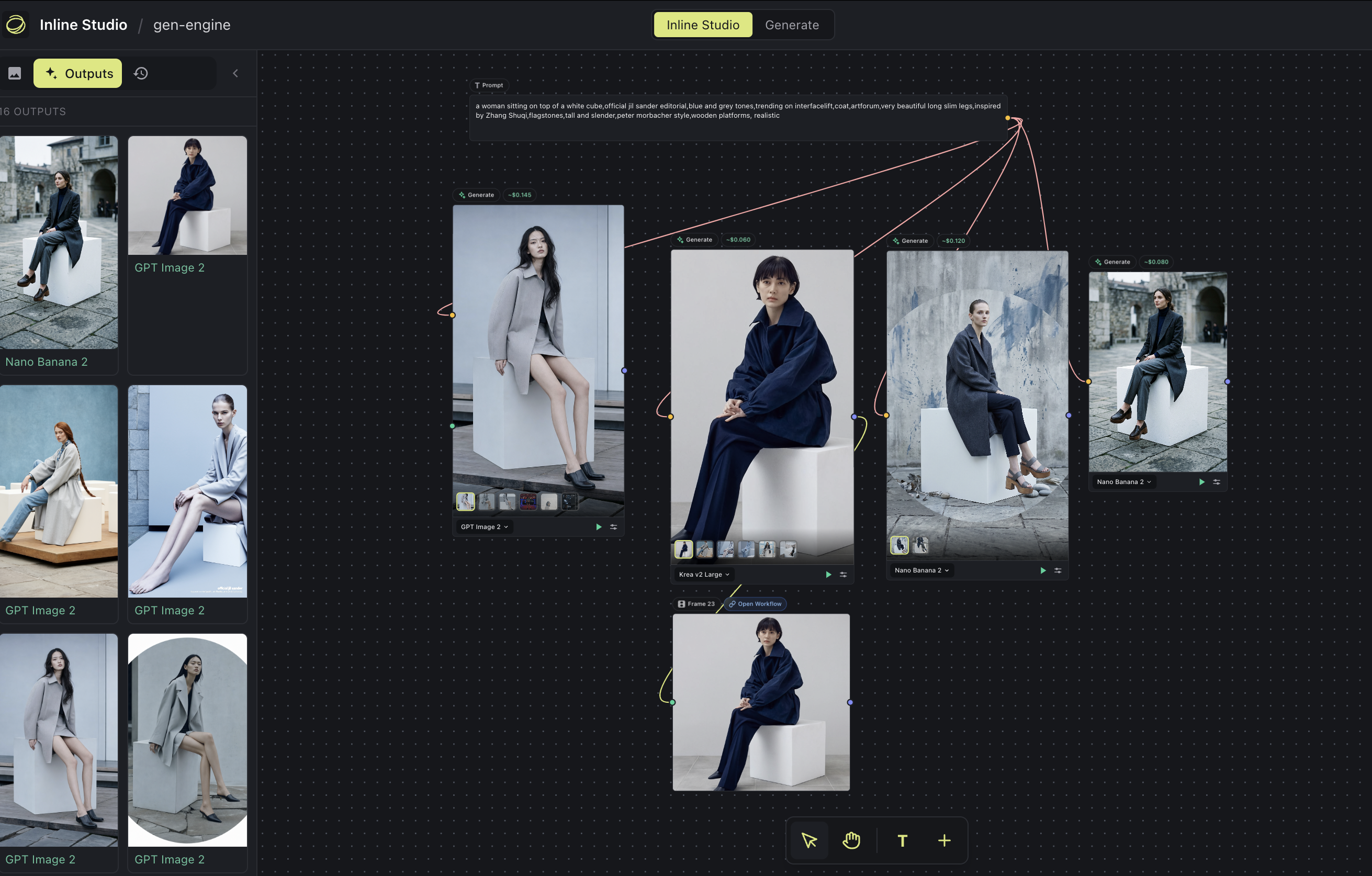
It runs as a single process on one port: the Inline Core engine (Python) serves the web UI and does the generation. No desktop install, no separate backend. For the engineering story see core/README.md and core/CLAUDE.md.
Every route the app exposes is documented at /api while it is running - open
http://127.0.0.1:8848/api. The reference is served by the app itself and needs no network. Like
the rest of the surface it is unauthenticated, so --listen publishes it too.
Follow the Animated Short Film tutorial →
Extensions
Install community-built nodes from a GitHub repo, from the Extensions dialog or a repo URL. Every install is security-reviewed, dependencies are isolated from the shared torch runtime, and nodes appear on the canvas immediately with no restart.
Browse the registry, or copy the extension guide to build your own.
FAQ
Is Omnichar free? Yes, free and open source under GPL-3.0. Local generation and training cost nothing to run. Hosted models are billed by the provider.
What is a .char file? One portable file holding a character: your reference photos, an
identity fingerprint, a locked description, any adapter trained from the same photos, and a voice
clip if you add one. It is not tied to this app. The ComfyUI custom node
reads the same file, and a character built there opens in the Characters panel here.
Which models take a character? FLUX.2 and MiniMax H3 Reference to Video read the references directly, with nothing to train. Krea 2 and H3's other nodes have no reference channel, so they take an adapter trained once from the same photos. On fal, Nano Banana Pro and H3 Reference to Video take one too. Seedance 2.0 rejects any reference with a face in it, so a character reaches it as build and wardrobe only. See Characters.
Do I need a GPU? Not for the canvas, planning, editing or hosted models, and not for Omnichar Cloud, which runs in the browser. Local generation and LoRA training need one; see the table at the top.
Can I train a LoRA locally? Yes, for all six local models, on your own GPU: stills for the image models, and short clips too for MiniMax H3 and LTX-2.5. The training nodes sit on the same canvas as everything else. See TRAINING.md.
What models can I run? Locally: Z-Image Turbo, FLUX.1, FLUX.2, Krea 2, MiniMax H3 and LTX-2.5. Hosted: the fal catalogue, with more providers to follow. Adding a new local model is a Core change, not a UI release.
The UI is a blank page on Windows. You are on a build older than v1.3.0. A clean Windows install
maps .js to text/plain in the registry, Python honours that, and browsers will not run a module
script served under it. Update and Core sets the type itself. Nothing to change on your machine.
Contributing
Issues, ideas and pull requests are all welcome. Start with CONTRIBUTING.md for setup and the checks to run; CLAUDE.md is the deeper engineering guide. By taking part you agree to our Code of Conduct.
Want to help by using it for real? We run a paid trial feedback program: use Omnichar on your own work, tell us what helps and what gets in the way, and get paid for your time. Come say hi on Discord, or try the creator task.
Credits
- xDiT for the PipeFusion and Ulysses parallelism behind the multi-GPU denoise.
- ai-toolkit by ostris, for the approach to training on a step-distilled model, and the Z-Image and Krea 2 training adapters.
- diffusers for the Krea 2 and MiniMax H3 reference implementations.
- Krea AI for Krea 2, under the Krea AI Community License.
- Black Forest Labs for FLUX.2: klein 4B, its Base build and the VAE are Apache 2.0; dev and the 9B builds are non-commercial. And for FLUX.1 dev, which is non-commercial - a LoRA trained on it inherits that.
- MiniMax for MiniMax H3, under the MiniMax H3 Community License.
- Lightricks for LTX-2.5, under the LTX-2 Community License, and for the paired dataset pipeline the control LoRA trainer follows.
License
GPL-3.0. Model weights are yours to obtain and carry their own licences, which the GPL does not change.
stable-diffusion-webui
AUTOMATIC1111·Python
基于 Gradio 的 Stable Diffusion 网页界面,把文生图、图生图、局部重绘等能力做成可视化操作面板,不用写代码就能跑图像生成。
图像生成+4图像生成进阶
165287+4131kv1.10.12026-03-02 07:00 UTC
ComfyUI
Comfy-Org·Python
基于节点图的扩散模型图形界面与后端,支持本地快速推理和 API 调用,方便搭建和调试图像生成工作流。
扩散模型+4图像生成进阶
146180+69417kv0.45.02026-11-10 22:53 UTC

OpenMontage
OpenMontageInc·Python
把 Claude、Cursor 等 AI 编程助手变成完整视频制作工作室,内置 12 条制作流水线和 100+ 工具,覆盖脚本、配音、图像生成到剪辑全流程。
视频制作+4图像生成硬核
79416+76211k2026-11-09 06:23 UTC

OpenMontage
calesthio·Python
把 Claude、Cursor 等 AI 编程助手变成完整的视频制作工作室,内置 12 条制作流水线和 100+ 工具,覆盖从生成到剪辑的全流程。
视频制作+4图像生成硬核
7786710k2026-11-03 17:42 UTC