必须挂载 /data 卷,否则容器重启后数据会丢失;国内拉取镜像慢可改用 registry.cn-hangzhou.aliyuncs.com/ossrs/oryx:5;浏览器使用 WebRTC WHIP 时不要用 localhost 或 127.0.0.1 访问。

oryx
ossrsMIT活跃维护开箱即用的开源视频服务套件,支持直播、WebRTC、HLS、RTMP 和 SRT,可在云端或自托管快速搭建在线视频平台。
Oryx (SRS Stack) is an AI-driven, all-in-one, out-of-the-box, and open-source video solution for creating online video services, including live streaming and WebRTC, in the cloud or through self-hosting.
v7.15.26发布于 2026-09-14 03:17 UTC894star +2 / 7 天161fork同步于 2026-11-10 17:54 UTC
docker run --restart always -d -it --name oryx -v $HOME/data:/data -p 80:2022 -p 443:2443 -p 1935:1935 -p 8000:8000/udp -p 10080:10080/udp ossrs/oryx:5 硬件要求按 README 说明
README 未说明 CPU、内存或显存要求;需开放 80/443/1935 TCP 与 8000/10080 UDP 端口,WebRTC WHIP 需用私有 IP、公网 IP 或域名访问,不能使用 localhost。
有 Docker 镜像
开箱即用的开源视频服务一体化方案,用 Docker 一键搭建直播与 WebRTC 平台
开箱即用的开源视频服务套件,支持直播、WebRTC、HLS、RTMP 和 SRT,可在云端或自托管快速搭建在线视频平台。
核心能力
- 用单个 Docker 容器集成 SRS、FFmpeg、Redis 与 Go 管理后台
- 支持 RTMP、WebRTC、HLS、HTTP-FLV、SRT 推拉流
- 内置鉴权、转推多平台、录制、转码与虚拟直播
- 通过 LEGO 自动申请 Let's Encrypt HTTPS 证书
- 提供 HTTP Open API 与直播转写、AI 助手等 OpenAI 集成能力
容易踩的坑
内容由模型根据 README 生成,可能不完整或不准确,以官方文档为准。看原文 README
- v7.15.26Release Oryx v7.15.26最新正式版2026-09-14 · 2026-09-14 03:17 UTC
[Codex: Fix Oryx image startup and update checkout action. v7.15.26
Remove UPX compression that caused the SRS and platform binaries to crash at startup. Upgrade GitHub workflows to actions/checkout v7 so they use the supported Node.js 24 runtime.
- v7.15:
- Docker: Upgrade the build and runtime toolchain and use SRS 7. v7.15.25
- HTTP-FLV: Always declare audio and video in the FLV header. v7.15.26
Co-authored-by: chatgpt-codex-connector[bot] <199175422+chatgpt-codex-connector[bot]@users.noreply.github.com>](https://github.com/ossrs/oryx/commit/feb0de9da406a1ae5a2997933754efa2597a10c0)
English
- docker pull ossrs/oryx:v7.15.26
- DigitalOcean: Tutorial
- Ubuntu Script: 88fdcfa91b49f71785e10b4346829525 linux-oryx-en.tar.gz
- aaPanel Plugin: a79eb73df1bd435dcae4bc7b403d4314 aapanel-oryx.zip
- Changelog
- Features
Chinese
- docker pull ossrs/oryx:v7.15.26
- Lighthouse: Tutorial
- Ubuntu Script: 22092f9efdac7ea3883628b3187a8dfe linux-oryx-zh.tar.gz
- BT Plugin: 336722c1ade67a8de896064720db2666 bt-oryx.zip
- aaPanel Plugin: a79eb73df1bd435dcae4bc7b403d4314 aapanel-oryx.zip
- Changelog
- Features
- v7.15:
- v5.15.20Release Oryx v5.15.20pre-release2024-07-22 · 2024-07-22 15:11 UTC
查看更新说明
Dubbing: Fix bug of changing window. v5.15.20
CHANGELOG:
- Forward: Support multiple forwarding servers. v5.15.1
- ENV: Refine the environment variables. v5.15.2
- OCR: Support OCR for image recognition. v5.15.3
- VLive: Support multiple virtual live streaming. v5.15.4
- Camera: Support multiple camera streaming. v5.15.5
- Transcript: Upgrade the hls.js to 1.4 for WebVTT. v5.15.6
- Disable version query and check. v5.15.7
- Change LICENSE from AGPL-3.0-or-later to MIT. v5.15.8
- Dubbing: Support scrolling card in fullscreen. v5.15.9
- Support external redis host and using 127.0.0.1 as default. v5.15.10
- Support setup global OpenAI settings. v5.15.11
- Add youtube-dl binary for dubbing etc. v5.15.12
- VLive: Fix bug when source codec is not supported. v5.15.13
- Forward: Fix high CPU bug. v5.15.14
- Support Go PPROF for CPU profiling. v5.15.15
- VLive: Support download by youtube-dl. v5.15.16
- Dubbing: Use gpt-4o and smaller ASR segment. v5.15.17
- Dubbing: Merge more words if in small duration. v5.15.17
- Dubbing: Allow fullscreen when ASR. v5.15.18
- Dubbing: Support disable asr or translation. v5.15.19
- Dubbing: Fix bug when changing ASR segment size. v5.15.20
- Dubbing: Refine the window of text. v5.15.20
English
- docker pull ossrs/oryx:v5.15.20
- DigitalOcean: Tutorial
- Ubuntu Script: 392d68d086d462bbfda35a6fb9406d86 linux-oryx-en.tar.gz
- aaPanel Plugin: 3be536f297594775befad923ff708e72 aapanel-oryx.zip
- Changelog
- Features
Chinese
- docker pull registry.cn-hangzhou.aliyuncs.com/ossrs/oryx:v5.15.20
- Lighthouse: Tutorial
- Ubuntu Script: 2175e6fb47ed92ef3bda3477d397e724 linux-oryx-zh.tar.gz
- BT Plugin: f289172a751bd179da90612868c71eda bt-oryx.zip
- aaPanel Plugin: 3be536f297594775befad923ff708e72 aapanel-oryx.zip
- Changelog
- Features
- v5.15.15Release Oryx v5.15.15pre-release2024-07-10 · 2024-07-10 09:41 UTC
查看更新说明
Remove linux/arm/v7 support. v5.15.15
CHANGELOG:
- Forward: Support multiple forwarding servers. v5.15.1
- ENV: Refine the environment variables. v5.15.2
- OCR: Support OCR for image recognition. v5.15.3
- VLive: Support multiple virtual live streaming. v5.15.4
- Camera: Support multiple camera streaming. v5.15.5
- Transcript: Upgrade the hls.js to 1.4 for WebVTT. v5.15.6
- Disable version query and check. v5.15.7
- Change LICENSE from AGPL-3.0-or-later to MIT. v5.15.8
- Dubbing: Support scrolling card in fullscreen. v5.15.9
- Support external redis host and using 127.0.0.1 as default. v5.15.10
- Support setup global OpenAI settings. v5.15.11
- Add youtube-dl binary for dubbing etc. v5.15.12
- VLive: Fix bug when source codec is not supported. v5.15.13
- Forward: Fix high CPU bug. v5.15.14
- Support Go PPROF for CPU profiling. v5.15.15
English
- docker pull ossrs/oryx:v5.15.15
- DigitalOcean: Tutorial
- Ubuntu Script: 84ed6ffe527e947f4eb9e767a5046ee2 linux-oryx-en.tar.gz
- aaPanel Plugin: 8df8d3628070b33157998ef0f2bb29c8 aapanel-oryx.zip
- Changelog
- Features
Chinese
- docker pull registry.cn-hangzhou.aliyuncs.com/ossrs/oryx:v5.15.15
- Lighthouse: Tutorial
- Ubuntu Script: cd36c777f7ac2d12236614d2a2ad4de3 linux-oryx-zh.tar.gz
- BT Plugin: 2763e55ddf52e940e0d57bdf76a46db5 bt-oryx.zip
- aaPanel Plugin: 8df8d3628070b33157998ef0f2bb29c8 aapanel-oryx.zip
- Changelog
- Features
- v5.14.25Release Oryx v5.14.252024-07-10 · 2024-07-10 09:25 UTC
查看更新说明
CHANGELOG:
- Merge features and bugfix from releases. v5.14.1
- Dubbing: Support VoD dubbing for multiple languages. v5.14.2
- Dubbing: Support disable translation, rephrase, or tts. v5.14.3
- Dubbing: Highlight the currently playing group. v5.14.3
- NGINX: Support set the m3u8 and ts expire. v5.14.3
- HLS: Set m3u8 expire time to 1s for LLHLS. v5.14.4
- HLS: Use fast cache for HLS config. v5.14.4
- Transcript: Support set the force_style for overlay subtitle. v5.14.5
- Transcript: Use Whisper response without LF. (#163). v5.14.5
- Token: Fix bug for Bearer token while initializing. v5.14.6
- Room: Enable dictation mode for AI-Talk. v5.14.7
- Dubbing: Refine download button with comments. v5.14.8
- Room: AI-Talk support post processing. v5.14.9
- Website: Support setting title for popout. v5.14.10
- Transcript: Support set the video codec parameters. v5.14.11
- Transcript: Support subtitle with WebVTT format. v5.14.12
- Transcript: Fix overlay transcoding parameters parsing bug. v5.14.13
- Use port 80/443 by default in README. v5.14.14
- Use fastfail for test and utest. v5.14.15
- Rename project to Oryx. v5.14.15
- API: Support kickoff stream by name. v5.14.16
- AI-Talk: Refine the delay of ASR to 3s. v5.14.17
- AI-Talk: Ignore silent ASR text. v5.14.18
- Refine installer for lightsail. v5.14.19
- Update model to gpt-3.5-turbo, gpt-4-turbo, gpt-4o. v5.14.20
- Transcript: Upgrade the hls.js to 1.4 for WebVTT. v5.14.21
- Disable version query and check. v5.14.22
- Support Go PPROF for CPU profiling. v5.14.23
- Forward: Fix high CPU bug. v5.14.24
- VLive: Refine wait timeout. v5.14.25
English
- docker pull ossrs/oryx:v5.14.25
- docker pull ossrs/oryx:5
- DigitalOcean: Tutorial
- Ubuntu Script: c99fb4a8f0b5140d90df4e6a885bd6b2 linux-oryx-en.tar.gz
- aaPanel Plugin: 6012fdefd6bec4cc2a7e36a588ca740b aapanel-oryx.zip
- Changelog
- Features
Chinese
- docker pull registry.cn-hangzhou.aliyuncs.com/ossrs/oryx:v5.14.25
- docker pull registry.cn-hangzhou.aliyuncs.com/ossrs/oryx:5
- Lighthouse: Tutorial
- Ubuntu Script: 85bca0f7ca39956d60961957c9dcce60 linux-oryx-zh.tar.gz
- BT Plugin: 15f7ab720d515608513cea06afa8fedb bt-oryx.zip
- aaPanel Plugin: 6012fdefd6bec4cc2a7e36a588ca740b aapanel-oryx.zip
- Changelog
- [Features](https://ossrs.net/lts/zh-cn/
- v5.15.11Release Oryx v5.15.11pre-release2024-07-05 · 2024-07-05 08:06 UTC
查看更新说明
CHANGELOG:
- Forward: Support multiple forwarding servers. v5.15.1
- ENV: Refine the environment variables. v5.15.2
- OCR: Support OCR for image recognition. v5.15.3
- VLive: Support multiple virtual live streaming. v5.15.4
- Camera: Support multiple camera streaming. v5.15.5
- Transcript: Upgrade the hls.js to 1.4 for WebVTT. v5.15.6
- Disable version query and check. v5.15.7
- Change LICENSE from AGPL-3.0-or-later to MIT. v5.15.8
- Dubbing: Support scrolling card in fullscreen. v5.15.9
- Support external redis host and using 127.0.0.1 as default. v5.15.10
- Support setup global OpenAI settings. v5.15.11
English
- docker pull ossrs/oryx:v5.15.11
- DigitalOcean: Tutorial
- Ubuntu Script: 9864eef5dd0e5dbee2be425a4ccede99 linux-oryx-en.tar.gz
- aaPanel Plugin: c2eac1cf331ae9ad1ec5517088e3dbd7 aapanel-oryx.zip
- Changelog
- Features
Chinese
- docker pull registry.cn-hangzhou.aliyuncs.com/ossrs/oryx:v5.15.11
- Lighthouse: Tutorial
- Ubuntu Script: 92417c72fa44b3608d4ea8d2080ed6f6 linux-oryx-zh.tar.gz
- BT Plugin: 87711672122c3e959c24edee7d90e419 bt-oryx.zip
- aaPanel Plugin: c2eac1cf331ae9ad1ec5517088e3dbd7 aapanel-oryx.zip
- Changelog
- Features
用户点评
登录用户的真实使用记录,可按版本和硬件筛选共 0 条
还没有人点评。第一个说出真实体验的人最有价值。
ORYX



Oryx(SRS Stack), is an all-in-one, out-of-the-box, and open-source video solution for creating online video services, including live streaming and WebRTC, on the cloud or through self-hosting.
Note: We renamed the project from SRS Stack to Oryx, because we only need a new name for AI assistant to identify SRS and SRS Stack. AI assistant is confused with SRS and SRS Stack.
Oryx makes it easy for you to create an online video service. It is made using Go, Reactjs, SRS, FFmpeg, and WebRTC. It supports protocols like RTMP, WebRTC, HLS, HTTP-FLV, and SRT. It offers features like authentication, streaming on multiple platforms, recording, transcoding, virtual live events, automatic HTTPS, and an easy-to-use HTTP Open API.
Oryx is built on SRS, FFmpeg, React.js, and Go, with Redis included, and integrates OpenAI services. It is a media solution designed for various useful scenarios.
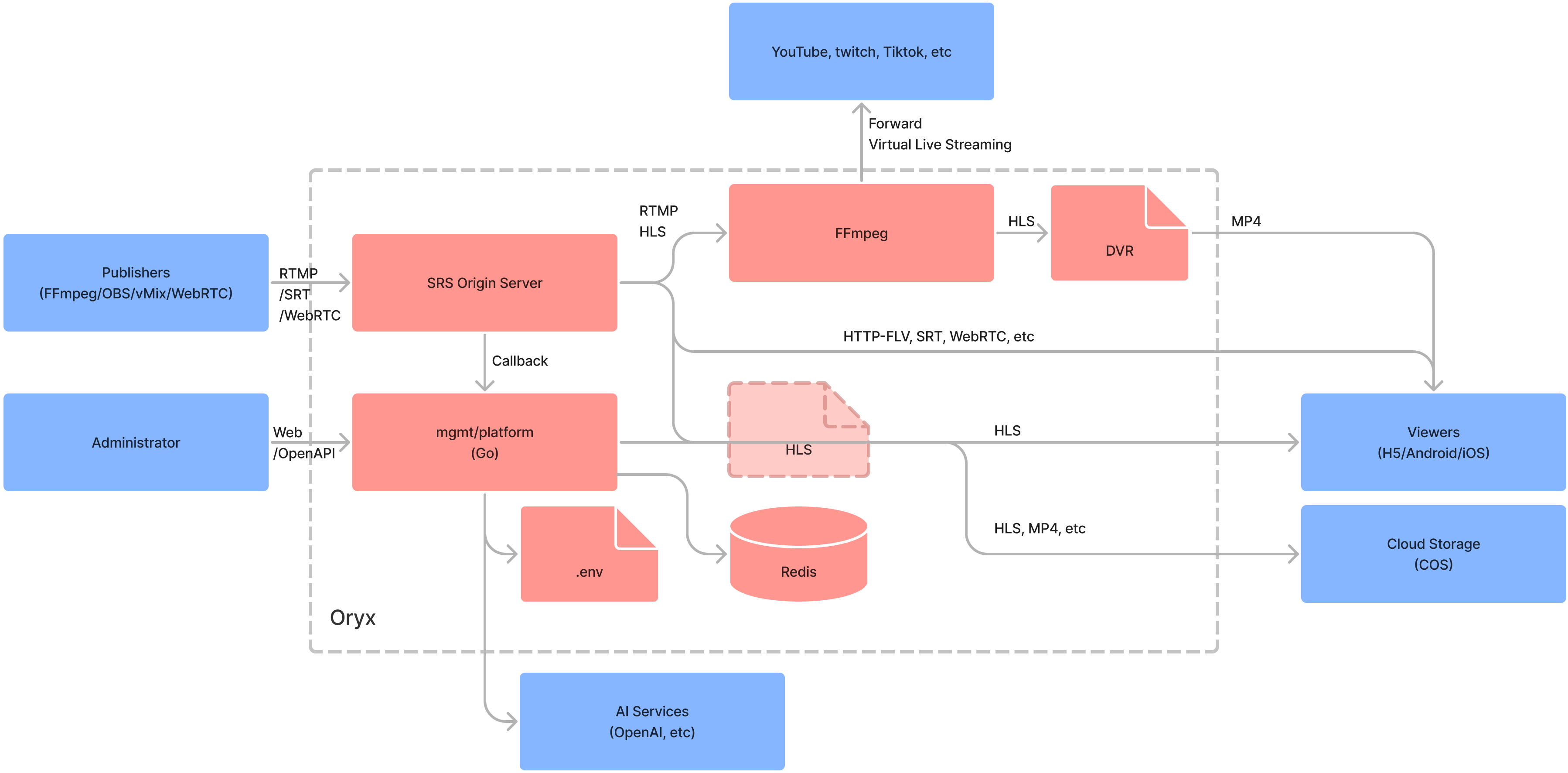
Note: For more details on the Oryx, please visit the following link.
Usage
Run Oryx in one docker, then open http://localhost in browser:
docker run --restart always -d -it --name oryx -v $HOME/data:/data \
  -p 80:2022 -p 443:2443 -p 1935:1935 -p 8000:8000/udp -p 10080:10080/udp \
  ossrs/oryx:5
Important: Remember to mount the
/datavolume to avoid losing data when the container restarts. For instance, if you mount/datato$HOME/data, all data will be stored in the$HOME/datafolder. Be sure to modify this according to your desired directory.
Important: To use WebRTC WHIP in a browser, avoid using localhost or 127.0.0.1. Instead, use a private IP (e.g., https://192.168.3.85), a public IP (e.g., https://136.12.117.13), or a domain (e.g., https://your-domain.com). To set up HTTPS, refer to this post.
Note: In China, use
registry.cn-hangzhou.aliyuncs.com/ossrs/oryx:5to accelerate the Docker pull process and ensure the proper language is set.
The ports used for Oryx:
80/tcp: The HTTP port, you can also use2022instead, such as-p 2022:2022etc.443/tcp: The HTTPS port, you can also use2443instead, such as-p 2443:2443etc.1935/tcp: The RTMP port, to support publish stream by RTMP to Oryx.8000/udp: The WebRTC UDP port, to transport WebRTC media data like RTP packets.10080/udp: The SRT UDP port, to support publish stream via SRT protocol.
You have the option to modify the volumes for Oryx and direct them to different directories.
/dataThe global data directory..well-knownThe directory for Let's Encrypt ACME challenge.configThe .env for password, srs/redis/nginx/prometheus config, and SSL files.dvrThe dvr storage directory, save dvr files.legoThe LEGO Let's Encrypt ACME challenge directory.recordThe record storage directory, save record files.redisThe redis data directory, the publish secret and record configuration.signalsThe signals storage directory, save signal files.uploadThe upload storage directory, save upload files.vliveThe storage directory for virtual live, save video files.transcriptThe storage directory for transcription, save transcription files.nginx-cacheThe storage directory for nginx cache, save cache files.srs-s3-bucketThe mount directory for AWS S3 compatible storage.
You can use environment variables to modify the settings.
MGMT_PASSWORD: The mgmt administrator password.REACT_APP_LOCALE: The i18n config for ui,enorzh, default toen.
Note: The
MGMT_PASSWORDis also saved in/data/config/.env, you can modify it by yourself.
To access additional environment variables, please refer to the Environments section.
Sponsor
Would you like additional assistance from us? By becoming a sponsor or backer of SRS, we can provide you with the support you need:
- Backer: $5 per month, online text chat support through Discord.
- Sponsor: $100 per month, online meeting support, 1 meeting per month in 1 hour.
Please visit OpenCollective to become a backer or sponsor, and send us a direct message on Discord. We are currently providing support to the developers listed below:

We at SRS aim to establish a non-profit, open-source community that assists developers worldwide in creating your own high-quality streaming and RTC platforms to support your businesses.
FAQ
Tutorials
- Getting Started: Blog, EN, CN.
- Support WordPress Plugin: Blog, EN, CN or WordPress Plugin.
- Support Automatic HTTPS: Blog, EN, CN.
- Support aaPanel to install on any linux: Blog, EN, CN.
- Support DVR to local disk: Blog, EN, CN.
- Support Virtual Live Streaming: CN.
- Support Stream IP Camera: Blog, EN, CN.
- Support build small HLS deliver CDN by Nginx.
- Support Live Streaming: CN.
- Support Realtime SRT Streaming: CN.
- Support DVR to Tencent Cloud Storage or VoD: CN.
- Support Typecho Plugin: CN.
- Support live stream transcoding: Blog, EN, CN.
- Support transcription for converting speech to text: Blog, EN, CN.
- Support AI assistant for live room: Blog, EN, CN
- Support video dubbing for multiple languages: Blog, EN, CN
- Support OCR for video stream: Blog, EN, CN
Other more use scenarios is on the way, please read this post.
Features
The features that we're developing:
- A mgmt support authentication and automatic updates.
- Run SRS in docker, query status by docker and SRS API.
- Support publish by RTMP/WebRTC, play by RTMP/HTTP-FLV/HLS/WebRTC.
- SRS container use docker logs
json-fileand rotate for logging. - Support high-resolution and realtime(200~500ms) live streaming by SRT.
- Run SRS hooks in docker, to callback by SRS server.
- Support publish by SRT, play by RTMP/HTTP-FLV/HLS/WebRTC/SRT.
- Change redis port and use randomly password.
- Support integrity with tencent cloud VoD.
- Support restreaming to multiple platforms.
- Support WordPress Plugin: SrsPlayer.
- Support aaPanel to install on any linux.
- Support DVR to local disk.
- Support upgrade to latest version manually.
- Support HTTPS by let's encrypt with LEGO.
- Support virtual live streaming, covert file or other resource to live.
- Support self-host HLS CDN, to serve 10k+ viewers.
- Support Typecho Plugin: Typecho-Plugin-SrsPlayer.
- Support DVR to TencentCloud storage.
- Support pull RTSP from IP Camera and stream to YouTube/Twitch/Facebook.
- Support live streaming transcoding by FFmpeg, see #2869.
- Support transcription for converting speech to text.
- Support AI assistant for live room.
- Support video dubbing for multiple languages.
- Support limit the streaming duration to limit the fee.
- Support GB28181 by SRS 5.0 container.
- Support WebRTC face to face chat, see #2857.
- Support WebRTC video chat room, see #2924.
- Support a set of tools for developer, see #2891.
- Collect logs of mgmt and containers together.
- Stop, restart and upgrade containers.
- Support logrotate to manage the logs.
- Enhance prometheus API with authentication.
- Integrate with prometheus and node-exporter.
License
Oryx is an open-source project, licensed under the MIT license.
We also used the following open-source projects:
- FFmpeg: A complete, cross-platform solution to record, convert and stream audio and video.
- Redis: Redis is an in-memory data store used by millions of developers as a cache, vector database, document database, streaming engine, and message broker.
- youtube-dl: Command-line program to download videos from YouTube.com and other video sites.
Other frameworks we used:
- Reactjs: The library for web and native user interfaces.
- Go: Build simple, secure, scalable systems with Go.
Developer
For development, please refer to the Environments about the API and architecture.
2022.11

immich
immich-app·TypeScript
自托管的照片和视频管理方案,可替代 Google Photos,支持自动备份、相册浏览和移动端同步,数据完全掌握在自己手里。
自托管相册+4媒体库 / 流媒体服务
118701+2767.5kv3.3.62026-11-10 16:51 UTC
jellyfin
jellyfin·C#
自建媒体服务器后端,把本地电影、剧集和音乐整理成可流式播放的媒体库,并提供 API 供各类客户端接入。
媒体服务器+4媒体库 / 流媒体服务
59189+1075.8kv12.42026-11-10 16:35 UTC

srs
ossrs·C++
简单高性能的实时流媒体服务器,支持 RTMP、WebRTC、HLS、SRT 等主流协议和多种音视频编码,适合搭建低延迟直播与分发服务。
流媒体服务器+4媒体库 / 流媒体服务
29436+35.7kv6.0-r32026-10-31 00:42 UTC
livekit
livekit·Go
基于 WebRTC 的实时音视频传输栈,用 SFU 架构把人和 AI 接进同一个房间,适合做语音 AI、视频通话和直播。
实时音视频+4媒体库 / 流媒体服务
22131+452.6kv1.13.112026-11-10 16:01 UTC