需先安装 node、grunt 及 package.json 依赖才能构建;本地调试 Firefox 需额外安装 web-ext,Chrome 需在 chrome://extensions 手动加载 build/all 目录;打包用 grunt build,产物在 dist/chromium-mv3、dist/chromium-mv2 或 dist/firefox
passbolt_browser_extension
passboltAGPL-3.0活跃维护Passbolt 团队密码管理器的浏览器扩展,支持 Firefox、Edge 和 Chrome,方便团队成员在浏览器里安全存取和共享密码。
Browser extensions (Firefox, Edge & Chrome) for Passbolt the open source password manager for teams
v5.17.1发布于 2026-10-26 15:04 UTC281star108fork同步于 2026-11-10 18:03 UTC
git clone [email protected]:passbolt/passbolt_browser_extension.git
cd passbolt_browser_extension
npm ci
grunt 硬件要求按 README 说明
README 未说明硬件要求,仅需 node、grunt 及 package.json 中的依赖
Passbolt 团队密码管理器的浏览器扩展,负责加密代码完整性与安全随机数
Passbolt 团队密码管理器的浏览器扩展,支持 Firefox、Edge 和 Chrome,方便团队成员在浏览器里安全存取和共享密码。
核心能力
- 在浏览器扩展内运行加密代码,保证加密逻辑完整性
- 提供安全随机数生成器,支撑密钥与密码学操作
- 支持 Firefox、Edge 与 Chrome 三个浏览器
- 用 grunt 将 src 打包到 build/all 并支持 watch 自动重建
- 用 Jest 运行单元测试并生成覆盖率报告
容易踩的坑
内容由模型根据 README 生成,可能不完整或不准确,以官方文档为准。看原文 README
- v5.17.1最新正式版2026-10-26 · 2026-10-26 15:04 UTC
Passbolt 5.17.1 “Yet Again” is a maintenance release for the browser extension only. It clarifies the errors shown when configuring passkeys as a second factor at the organisation level, and fixes an autofill performance problem on highly dynamic pages such as infinite-scroll sites. Thank you to everyone who reported these issues.
Changelog
Maintenance
PB-55514 Improve autofill performances and skip disabled inputs PB-55543 Clarify WebAuthn error on the MFA organisation settings page
- v5.17.02026-10-20 · 2026-10-20 10:27 UTC
查看更新说明
Song: https://www.youtube.com/watch?v=Hef-Zf6frk0
Passbolt 5.17.0 "Mad World" introduces passkeys for multi factor authentication, improves autofill reliability across websites, makes permission changes easier to review when moving resources, and brings PIN code resources to QuickAccess. This release also includes security fixes and performance improvements.
Passkeys for MFA
Passbolt 5.17 adds passkeys as a second authentication factor, alongside the TOTP, Yubikey OTP and Duo providers that are already supported. It answers a requirement that many organisations now include in their procurement processes: multi-factor authentication that resists phishing, which one-time codes cannot provide.
Built on the WebAuthn/FIDO2 standard, it is bound to the domain of the Passbolt instance, and the browser refuses to use it anywhere else, so a lookalike site has nothing to capture. Basically, one-time code can be typed into a fake login page and relayed to the real site by an attacker. Passkeys cannot be used this way and protects against this kind of phishing.
Passkeys are available in every edition. Once an administrator enables them in Administration > Multi-factor authentication, each user can register up to ten passkeys from Profile > Multi-factor authentication, using a security key such as a YubiKey or the biometrics built into their laptop, phone, such as Touch ID or Windows Hello.
From then on, Passbolt asks for the passkey right after sign-in, as it does for the other providers. Users can tick "Remember this device for a month" to skip the check on a trusted device, or leave it unticked to verify every time. Organisations using Passbolt Pro edition, and wanting a stricter posture can disable this option in the Multi-factor authentication policy settings, so that every sign-in requires the passkey.
This first step covers multi-factor authentication. Storing passkeys for third-party websites as a resource type and Passwordless sign-in to Passbolt will follow in upcoming releases.
A new autofill detection engine
Autofill is a core part of the Passbolt browser experience, and version 5.17 rebuilds its detection engine from scratch. It tackles two familiar frustrations: no autofill on a form that clearly needs it, and an autofill icon in a field that has nothing to do with credentials.
Getting this right is harder than it looks, because no two websites build their forms the same way. Field names differ, labels come in many languages, and the underlying code varies widely from one site to the next. A handful of regular expressions could only go so far, and the previous engine had reached its limits.
The new engine understands the context of each field, from the structure of the form to the labels around it, before deciding whether to step in. The first benchmarks are very promising: on our internal test set, form detection rises from 74% with the previous engine to 93.4%, while processing cost stays low.
A test set is not the web, though, and this is where the community comes in: we are eager to hear how the engine behaves on the websites our users rely on every day. For those curious about the inner workings, a detailed blog post will follow.
Safer permission handling during resource moves
Passbolt 5.17 brings the permission review introduced in 5.14 to moves of resources and folders. Creating a resource in a shared folder, editing a shared resource and now moving items all ask for the same explicit confirmation.
A move needs this step because placing a resource in a shared folder, or taking it out of one, can change who has access to it. Previously, users chose between keeping the current permissions and applying those of the destination folder, without seeing what either opti
- v5.16.22026-10-12 · 2026-10-12 09:23 UTC
查看更新说明
Passbolt 5.16.2 "Running Up That Hill” is a maintenance release for Microsoft Edge only, migrating the Edge extension to Manifest V3. Chrome and Firefox users are not affected.
The migration follows Microsoft's timeline for deprecating Manifest V2. Since mid-September 2026, the Edge Add-ons store has displayed a warning to users on extensions still built on Manifest V2, including Passbolt until this release. Microsoft expects to start deprecating those extensions for enterprise customers in early 2027, and has not said when deprecation will be completed for everyone.
Manifest V3 is the extension platform Chromium browsers are standardising on, and it is not new to Passbolt. The Chrome extension has used it since version 4.8.0 in May 2024, and this release brings the Edge extension onto the same battle-tested codebase. With the migration complete, Passbolt is ahead of Microsoft’s Manifest V2 deprecation, and the warning on the Edge store listing can be removed. Otherwise, the extension works as before.
For more details on what changed under the hood, the blog post published during the Chrome migration still explains the technical changes accurately.
Neither administrators nor end users need to do anything. The update rolls out automatically through the existing Edge Add-ons listing, with accounts and settings preserved.
Changelog
Maintenance
- PB-55198 - EDGE - WP1.1 - Create emitOnWorker in workerService
- PB-55199 - EDGE - WP1.2 - Improve postLogoutService
- PB-55200 - EDGE - WP1.3 - Update postLoginService
- PB-55201 - EDGE - WP1.4 - Update ResourceCreatePage to handle Edge new tab page
- v5.16.0Enjoy the Silence2026-09-17 · 2026-09-17 10:00 UTC
查看更新说明
Song: https://www.youtube.com/watch?v=gI6fQ2IXMjE
Passbolt 5.16.0 introduces Offline Mode, allowing users to access their credentials when the Passbolt server is unreachable.
Offline mode (Beta)
During server maintenance, data center interventions, or network outages, teams lose access to critical credentials needed to restore systems, if those credentials are locked inside an unreachable Passbolt server.
Offline mode closes this availability gap by providing secure read-only access to essential credentials when the server is unreachable. This ensures business continuity, satisfies compliance mandates for disaster recovery, and eliminates the need for insecure, stale manual exports.
The administrator enables Offline Mode in the administration settings and can use Role-Based Access Control (RBAC) to refine which roles have access.
Individual users allowed to access the capability can then select and mark specific resources within the application to make them available offline. Once marked for offline use, credentials can be accessed directly via the QuickAccess menu in the Passbolt browser toolbar.
Offline storage is limited to a maximum of 1,000 resources per user. The feature currently supports only password and TOTP resource types with encrypted metadata. Upcoming releases will add support for other resource types and the ability to mark resources offline in bulk.
Security Considerations
Offline resources are accessible for 5 minutes per session by default and encrypted information persists in browser storage for up to 7 days without server connectivity. Passbolt Pro allows administrators to adjust both session durations and data retention limits to align with organisational compliance requirements.
Once synchronised, credentials marked for offline access are cached on every browser connected to the same Passbolt account making them available across all devices.
Beta Testing
Because Offline Mode is in Beta and will be undergoing a third-party security review, it should be used for testing purposes only. A follow-up blog post covering its mechanics, limitations, and additional security considerations will be published soon.
We welcome your feedback if you test it on a non-production instance.
Maintenance and security
As usual, this release ships a round of third-party dependency upgrades and security advisory fixes, with no user-visible impact. It also addresses minor bugs reported by the community. Check out the changelog for more information.
Conclusion
Many thanks to everyone who provided feedback, reported bugs, and contributed to making Passbolt better!
Changelog
Added
- PB-28188 EPIC - Offline mode
- PB-51230 OFM WP1.3 Add offline item in ResourceEntity
- PB-51233 OFM WP2.1 Create OfflineResourcesOPFSStorage
- PB-51234 OFM WP2.2 Create OfflineSecretsOPFSStorage
- PB-51239 OFM WP2.6 Create OfflineSettingsLocalStorage
- PB-51240 OFM WP3.1 Create OfflineSettingsApiService
- PB-51241 OFM WP3.2 Create MarkOfflineResourceApiService
- PB-51242 OFM WP3.3 Create UnmarkOfflineItemApiService
- PB-51452 OFM WP4.1 Create findOfflineSettingsService
- PB-51453 OFM-WP2.7 Create MetadatakeyOPFSStorage
- PB-51455 OFM WP4.2 Create getOrFindOfflineSettingsService
- PB-51456 OFM WP4.3 Create saveOfflineSettingsService
- PB-51458 OFM WP4.4 Create deleteOfflineSettingsService
- PB-51462 OFM WP4.5 Update findAndUpdateResourcesLocalStorageService
- PB-51467 OFM WP4.6 Update ResourceUpdateService to update offline resource and secret local storage
- PB-51482 OFM WP4.7 Update FavoriteResourceService and deleteResourceService to update offline resource
- PB-51485 OFM WP7.1 Create OfflineModeServiceWorkerService
- PB-51486 OFM WP6.1 Create quickAccessEvents to handle offline login and data read
- PB-51487 OFM WP6.2 Create offlineEvents to handle offline events
- PB-51489 OFM WP5.8 Create AuthLoginOfflineController
- PB-51491 OFM WP4.9 U
- v5.15.02026-08-20 · 2026-08-20 07:19 UTC
查看更新说明
Song: https://youtu.be/SLNqxQXMV1w?si=M3l6Zz4GffohF-OZ
Passbolt 5.15.0 improves form detection for autofill, makes permission changes easier to review, and adds several security and administration improvements. This release also introduces new session management tooling and additional safeguards for Passbolt Pro.
Clearer permission confirmation changes
Permission changes are now easier to understand before they take effect, helping users avoid accidental access changes. New badges clearly show whether a permission is being added, modified, or deleted, so users can see exactly what will change at a glance.
Deleted permissions can also be rolled back to their original state before confirmation, making access changes easier to review and adjust.
Improved autofill detection
Autofill now works more reliably on modern websites that were previously unsupported. Improved form detection helps users fill credentials more consistently and with less manual effort, resulting in a smoother autofill experience.
This is the first step in a broader series of autofill improvements, with upcoming releases focused on reducing false positives and further refining form classification. A technical blog article explaining those improvements in detail will be published after the next release.
Miscellaneous Improvements
Administrators are now notified whenever any user is deleted, giving them better visibility into account removals across the organisation. Previously, notifications were sent only when an administrator was deleted.
Conclusion
Many thanks to Luca Crippa, Ashik Mohamed, meifukun and to everyone who provided feedback, reported bugs, and contributed to making passbolt better!
Changelog
Added
PB-53103 - AUTOFILL EPIC - Autofill improvements PB-53105 - Add ShadowDomDictionary and InFormFieldDictionary PB-53107 - Create ShadowRootResolverService PB-53108 - Add ShadowRootCollectorService PB-53109 - Add ShadowRootCacheService PB-53110 - Add ShadowMutationObserverService PB-53120 - Add ShadowDomQueryService PB-53121 - Add ShadowDomFocusHealerService PB-53122 - Add InFormFieldGeometryService PB-53123 - Update InFormCallToActionField to use ShadowRootCacheService, ShadowDomQueryService and InFormFieldGeometryService PB-53124 - Find username element through shadow doms if needed PB-53125 - Switch from DomUtils to InFormFieldGeometryService in InformMenuField PB-53126 - Listen for focus event on the whole page to detect missed inputs PB-53127 - Refactor InFormManager to use previously created services PB-53128 - Refactor DomUtils PB-53574 - Shadow dom should solve duck-types as a shadow root PB-53619 - Shadow dom piercing is missing on the autofill resolver PB-53394 - Global new design of share dialog
Fixed
PB-48042 - Sign-in with SSO secondary CTA alignment on sign-in with passphrase page PB-52353 - Clicking on several items is not possible when filtering the grid by expired PB-52539 - Left side bar alignment adjustments PB-53329 - Discrepancy in data (group or member) display when we remove and add them again PB-53819 - Fix height for share dialog badges and dropdowns PB-53820 - Fix revert button disappearing at certain widths PB-53921 - Fix application crash after creating a resource in a shared folder while transferring ownership PB-53497 - Fix crash when is-authenticated endpoint response is not JSON
Security
PB-53357 - Fix js-yaml GCVE-0-2026-59869 - HIGH CVSS3.1 PB-53358 - Fix brace-expansion GHSA-3jxr-9vmj-r5cp - HIGH CVSS4.0 PB-53386 - Potential Cross Site Scripting (XSS) via window.location.href (Low) PB-53391 - Fix svgo GHSA-2p49-hgcm-8545 - HIGH CVSS3.1 PB-53392 - Fix fast-uri GHSA-4c8g-83qw-93j6 - HIGH CVSS3.1 PB-53401 - Fix shell-quote GHSA-395f-4hp3-45gv - HIGH CVSS4.0 PB-53402 - Fix websocket-driver GHSA-xv26-6w52-cph6 - CRITICAL
用户点评
登录用户的真实使用记录,可按版本和硬件筛选共 0 条
还没有人点评。第一个说出真实体验的人最有价值。
      ____                  __          ____
     / __ \____  _____ ____/ /_  ____  / / /_
    / /_/ / __ `/ ___/ ___/ __ \/ __ \/ / __/
   / ____/ /_/ (__  |__  ) /_/ / /_/ / / /_
  /_/    \__,_/____/____/_.___/\____/_/\__/

Open source password manager for teams
(c) 2026 Passbolt SA
https://www.passbolt.com
License
Passbolt - Open source password manager for teams
(c) 2026 Passbolt SA
This program is free software: you can redistribute it and/or modify it under the terms of the GNU Affero General Public License (AGPL) as published by the Free Software Foundation version 3.
The name "Passbolt" is a registered trademark of Passbolt SA, and Passbolt SA hereby declines to grant a trademark license to "Passbolt" pursuant to the GNU Affero General Public License version 3 Section 7(e), without a separate agreement with Passbolt SA.
This program is distributed in the hope that it will be useful, but WITHOUT ANY WARRANTY; without even the implied warranty of MERCHANTABILITY or FITNESS FOR A PARTICULAR PURPOSE. See GNU Affero General Public License for more details.
You should have received a copy of the GNU Affero General Public License along with this program. If not, see GNU Affero General Public License v3.
About passbolt
Passbolt is an open source password manager for teams. It allows to securely share and store credentials. For instance, the wifi password of your office, or the administrator password of a router, or your organisation social media account password, all of them can be secured using Passbolt.
You can try a demo of passbolt at https://demo.passbolt.com.
You will need to install a plugin, you can find a step by step guide in the website help section
Or, of course, you can use the code in this repository to build it yourself and run it!
About passbolt browser extension
A browser extension is needed to maintain a higher level of security, e.g. to ensure the integrity of the cryptographic code and provide a secure random number generator. In the future it will also be used to provide feature such as auto filling your passwords when visiting known websites.
How does it look like?
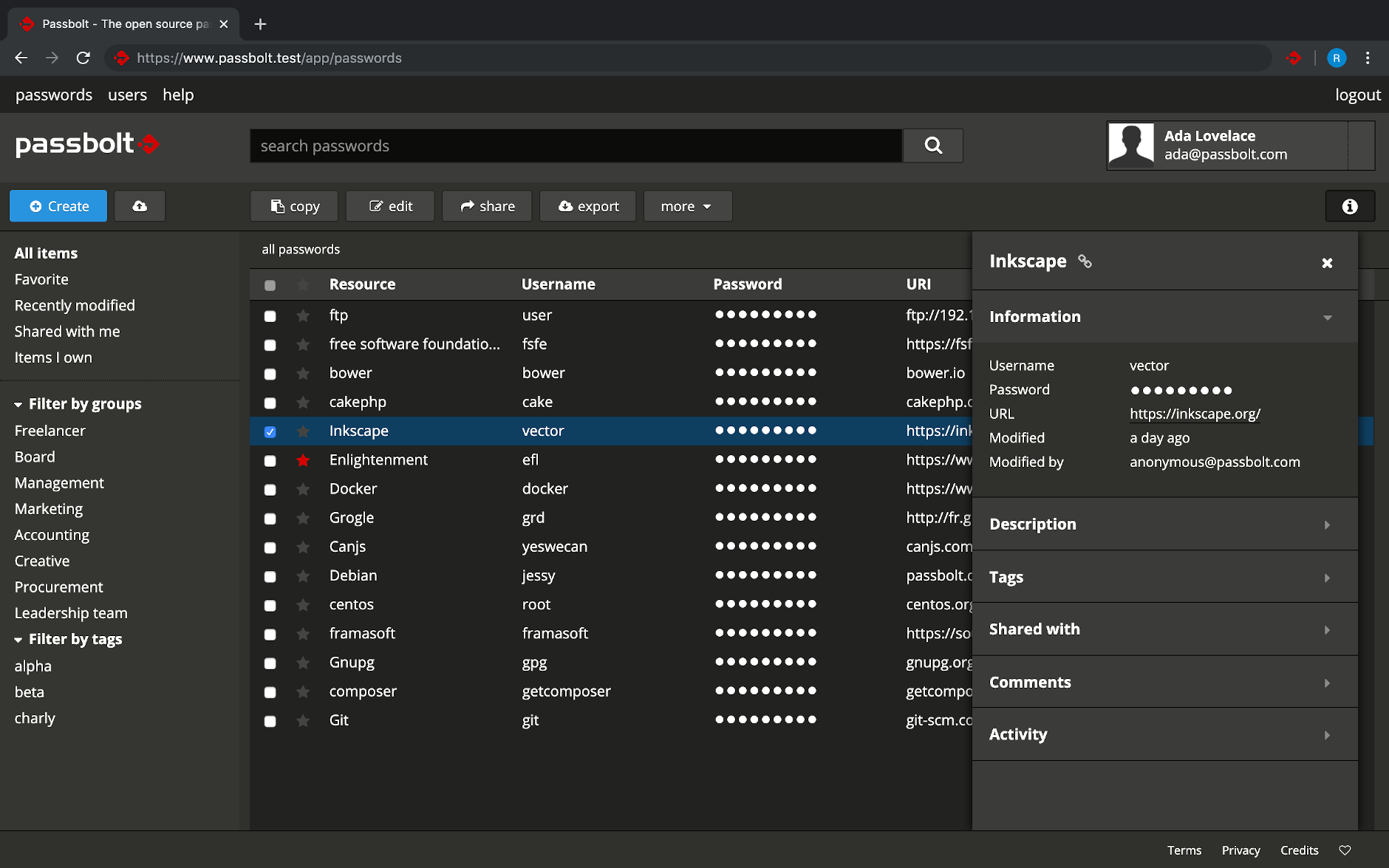

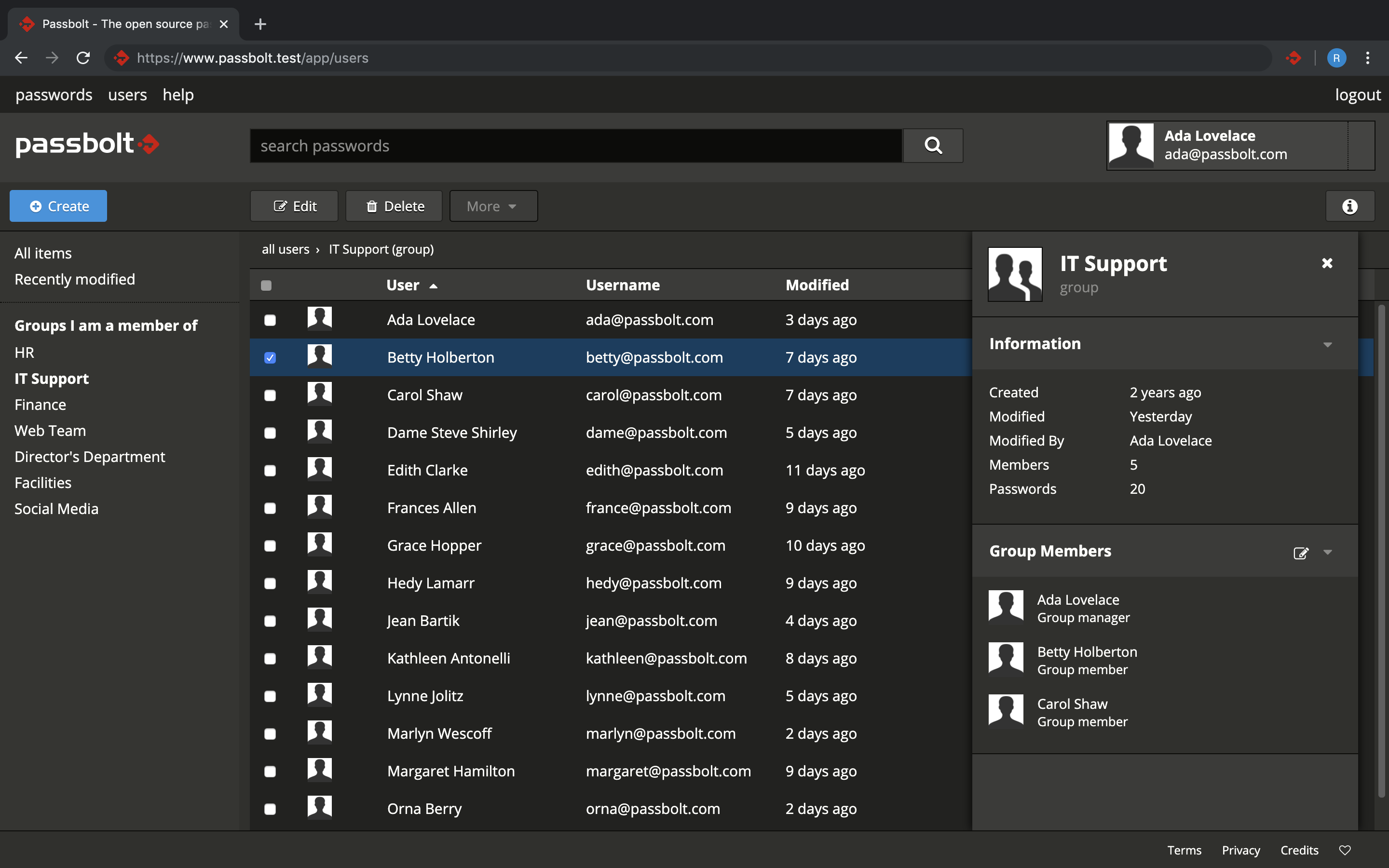
Contributing
Please check CONTRIBUTING.md for more information about how to get involved.
Reporting a security Issue
If you've found a security related issue in Passbolt, please don't open an issue on GitHub. Follow our responsible disclosure process: https://www.passbolt.com/docs/contribute/security/vulnerability/.
Quick how-to for developers
This is just a quick getting started guide, for more information and productivity tips checkout CONTRIBUTING.md
Prerequisite
You will need node, grunt and the dependencies listed in packages.json.
git clone [email protected]:passbolt/passbolt_browser_extension.git
cd passbolt_browser_extension
npm ci
For convenience you can also install web-ext (for firefox), crx (for chrome) globally,
otherwise can can be found in node_modules.
sudo npm install web-ext -g
sudo npm install crx -g
Quick bundling the build/all source
The non-minified source code is located in /src. It can be 'bundled' to build/all as follow:
grunt
In order to rebuild the code in this directory automatically while you are editing the src you can use the grunt watch task:
grunt watch
Test a local version of the plugin
Firefox
To launch an instance of Firefox with your local version of the add-on installed.
cd build/all
web-ext run
This instance will be reloaded everytime there is a change in the /build/all code or by pressing the r
key on the keyboard when web-ext is running.
You can debug the application script by opening the
browser console.
Chrome
Go to the the extension page at chrome://extensions/ click on the 'load unpacked extension' button. Point to your build/all directory and you are good to go. You debug the application script by clicking on index.html in "inspect views".
Packaging the application
You can build the crx or xpi (zip) packages using the following command.
grunt build
The build can be found under dist/chromium-mv3 or dist/chromium-mv2 or dist/firefox.
Updating the vendors or the styleguide
You can update the vendors or the styleguide in the package.json and run the copy task
in grunt to deploy them in the appropriate places. Check the Gruntfile.js
for more information.
npm update
grunt copy:vendors
grunt copy:styleguide
The build can be found under dist/chromium-mv3 or dist/chromium-mv2 or dist/firefox.
Unit testing
Unit testing is handle by Jest. It provides ways to run them and also build code coverage reports.
To run unit tests:
grunt test
To run unit tests with coverage:
grunt test-coverage
Once the code coverage report is generated you can find the result in the folder coverage.
Jest also provides an HTML version of the reports avaiable at coverage/lcov-report/index.html.
Credits

keepassxc
keepassxreboot·C++
跨平台开源密码管理器,兼容 KeePass 数据库格式,把账号密码集中加密保管,支持 YubiKey 等硬件密钥,本地存储不上云。
密码管理器+4密码管理
29906+652.0k2.8.02026-11-10 15:40 UTC
clients
bitwarden·TypeScript
Bitwarden 官方客户端集合,覆盖网页、浏览器扩展、桌面和命令行,用一套 TypeScript 代码统一管理密码与凭据。
密码管理+4密码管理
14203+302.2kdesktop-v2026.10.42026-11-10 17:24 UTC
keeweb
keeweb·HTML
跨平台免费密码管理器,兼容 KeePass 数据库格式,用浏览器或桌面端统一管理密码,免去多设备同步和格式迁移的麻烦。
密码管理器+4密码管理
13038+41.2kv1.18.72026-05-08 03:29 UTC
KeePassDX
Kunzisoft·Kotlin
Android 上的轻量级 KeePass 密码管理器,可在单一加密文件中编辑凭据,并安全地自动填充表单,支持指纹和 Passkey。
密码管理器+4密码管理
7654+184334.5.82026-11-01 09:37 UTC