首次使用需运行 pnpm run setup 配置 Claude Code hooks,否则收不到事件;npx 方式默认占用 3001 端口,源码开发用 3000 端口;npx 发布的二进制默认开启匿名遥测,需设 AGENT_FLOW_TELEMETRY=false 或 DO_NOT_TRACK=1 关闭
agent-flow
patolesApache-2.0活跃维护实时可视化 Claude Code 多智能体编排过程,能直观看到智能体如何思考、分支和协作,方便调试复杂 Agent 工作流。
Real-time visualization of Claude Code agent orchestration — see your agents think, branch, and coordinate as they work.
v0.9.4发布于 2026-10-28 23:12 UTC1,777star +4 / 7 天218fork同步于 2026-11-10 17:48 UTC
npx agent-flow-app 硬件要求按 README 说明
README 未说明,未提及显存或 GPU 要求;只需 Node.js 20+ 与 pnpm,浏览器或 VS Code 兼容 IDE 1.85+ 即可运行
把 Claude Code 和 Codex 的 agent 执行过程实时画成节点图,方便看清它怎么思考和调用工具
实时可视化 Claude Code 多智能体编排过程,能直观看到智能体如何思考、分支和协作,方便调试复杂 Agent 工作流。
核心能力
- 用交互式节点图实时展示工具调用、分支与返回流
- 通过 Claude Code hooks 的 HTTP 服务接收事件,实现零延迟流式推送
- 读取 Codex 的 rollout JSONL 文件,展示工具调用与 token 计数
- 支持多会话标签页并行跟踪,可平移缩放并点击查看详情
- 提供时间线、文件关注热力图与消息转录面板
容易踩的坑
内容由模型根据 README 生成,可能不完整或不准确,以官方文档为准。看原文 README
- v0.9.4v0.9.4: Follow sessions into git worktrees最新正式版2026-10-28 · 2026-10-28 23:12 UTC
- Fix: sessions that enter a git worktree mid-session no longer freeze (#69)
- When a session runs
EnterWorktree, Claude Code moves its transcript and subagent folder into the worktree's project folder. Agent Flow kept reading the old path, so nothing after the move appeared, including the session's subagents. It now follows the session to its new folder and picks up where it left off - Subagents that older Claude Code versions wrote under the worktree's project folder, while the session's transcript stayed put, are now found too
- When a session runs
- Fix: sessions that enter a git worktree mid-session no longer freeze (#69)
- v0.9.3v0.9.3: Local server hardening, Workflow subagents, Timeline models2026-10-28 · 2026-10-28 22:50 UTC
查看更新说明
- Security: Agent Flow's local servers now reject requests from web pages (#102)
- The standalone app and the dev relay only answer requests addressed to a loopback name (
127.0.0.1,localhostor[::1]). Before, a malicious page could use DNS rebinding to read the event stream, which includes commands, file paths and tool output - The hook server applies the same check and also rejects any request that carries an
Originheader, so a page can no longer POST fake agent events to it. hook.js and Claude Code never send one, so existing hook setups keep working
- The standalone app and the dev relay only answer requests addressed to a loopback name (
- The Timeline panel now shows the model(s) each agent used under its name, and the full agent name and models on hover (#91)
- Models are recorded in first-seen order on the agent's timeline row, so the record survives after a subagent finishes and fades out, and after seeking. An agent that switched models (e.g. with
/model) shows each one
- Models are recorded in first-seen order on the agent's timeline row, so the record survives after a subagent finishes and fades out, and after seeking. An agent that switched models (e.g. with
- Fix: subagents spawned by the Workflow tool now appear (#57, #56)
- Newer Claude Code writes their transcripts under
subagents/workflows/wf_<id>/, which the flat subagent scan never looked in. Discovery is now recursive, writes there keep the session alive, and Workflow subagent nodes complete when the Workflow finishes
- Newer Claude Code writes their transcripts under
- Security: Agent Flow's local servers now reject requests from web pages (#102)
- v0.9.2v0.9.2: Hook setup safety and background subagent fixes2026-10-09 · 2026-10-09 09:55 UTC
查看更新说明
- Fix: hook setup no longer removes other tools' hooks from
~/.claude/settings.json(#73)- Setup (
npx agent-flow-app,pnpm run setup, and the VS Code extension) treated any hook URL starting withhttp://127.0.0.1:as its own, so loopback HTTP hooks registered by other tools were deleted on install. On every activation, the VS Code extension also rewrote them into Agent Flow command hooks - Only Agent Flow's own command hook and its legacy bare-origin HTTP hook (
http://127.0.0.1:<port>) are matched now. This also fixes setup being skipped when another tool's loopback hook made it look already installed - A
settings.jsonthat can't be parsed is now left untouched with an error, instead of being replaced by a file that only contains hooks - Settings are written via a temp file and rename, so an interrupted write can't truncate them
- Setup (
- Fix: uninstalling the VS Code extension now removes its hooks. The uninstall script was excluded from the packaged extension, so
vscode:uninstallhad nothing to run and Agent Flow's hooks stayed insettings.json - Fix: background subagents were marked done the moment they launched (#92)
- Claude Code runs
Agent/Tasksubagents in the background by default. Their immediate tool_result only confirms the launch, but Agent Flow treated it as the finish, so the node completed at once and then looked busy again on its next tool call, or vanished and silently dropped the rest of its events - Background subagents now complete when their
<task-notification>arrives, including ones launched before Agent Flow attached. Failed or killed runs are marked in the return summary
- Claude Code runs
- Fix: per-agent model detection (#91)
- Subagents get their model from the parent transcript (
resolvedModelon the launch result), so replayed or branched sessions and subagents whose transcript is never tailed now show a model - Placeholder
<synthetic>model ids (written on API errors and interrupts) no longer replace the real model
- Subagents get their model from the parent transcript (
- Fix: in review mode, the elapsed time, scrubber knob and counters stood still while playback ran through a stretch with no events, and only caught up on the next event or on pause (#90)
- Fix: session switching and replay races in the web view (#78)
- Re-selecting the session already on screen no longer freezes event delivery, and live events no longer skip events that hadn't been replayed yet
- Restoring a paused snapshot no longer plays it at 1x under the LIVE badge, and the snapshot cache is cleared on reset
- Fix: hook setup no longer removes other tools' hooks from
- v0.9.1v0.9.1 — Windows Claude Code session discovery fix2026-07-06 · 2026-07-06 21:32 UTC
查看更新说明
- Fix: Claude Code session discovery on Windows — workspace-to-project-dir matching is now case-insensitive on win32 (#57, part of #4)
- VS Code reports drive letters lowercase (
c:\...) while Claude Code encodes them uppercase (C--...), so the encoded-directory lookup, the subfolder-session prefix check, and the cwd containment check could all silently miss — no sessions appeared at all - The workspace project dir is now resolved to its actual on-disk casing at startup, and all path comparisons are case-folded on Windows (matching the Codex-side fix from 0.9.0)
- VS Code reports drive letters lowercase (
- Fix: Claude Code session discovery on Windows — workspace-to-project-dir matching is now case-insensitive on win32 (#57, part of #4)
- v0.9.0v0.9.0 — New model support + Codex discovery fixes2026-07-06 · 2026-07-06 21:16 UTC
查看更新说明
- New model support — Claude Fable 5 / Mythos 5, Sonnet 5, Opus 4.8, GPT-5.x Codex (#57)
- Context window sizing:
fable/mythosfamily recognized as 1M context (previously fell back to 200k, showing the gauge 5× overfull);gpt-*family recognized as 400k as the fallback when Codex doesn't report its own authoritative window. Sonnet 5 / Opus 4.8 already matched the existing family patterns - Cost display: per-model-family blended $/M rates (Fable/Mythos $10/$50, Opus $5/$25, Sonnet $3/$15, Haiku $1/$5, GPT-5.x Codex $1.75/$14) replace the single Sonnet-class rate that was applied to every agent. Agents now carry the detected model ID, and the cost pill, summary panel, and per-tool breakdown all use the owning agent's rate
- Context window sizing:
- Codex session discovery fixes — addresses reports of Codex sessions not appearing
- Windows: workspace/cwd matching is now case-insensitive on win32 (VS Code reports
c:\..., Codex writesC:\...— sessions never matched) - Large
session_meta: the first-line reader now grows up to 1MB instead of a fixed 64KB — newer Codex versions embed full base instructions and AGENTS.md content, which silently broke cwd extraction and skipped the session - Silent cwd mismatch: when recent Codex sessions exist but none ran in the current workspace, a warning now says so (the most common cause: launching
npx agent-flow-appfrom a different directory than the Codex session). Warnings are visible without--verbose
- Windows: workspace/cwd matching is now case-insensitive on win32 (VS Code reports
- Fix: assistant messages in Codex sessions were labeled "CLAUDE" in the transcript panels and canvas bubbles — the label now follows the session runtime ("CODEX") (#49)
- New model support — Claude Fable 5 / Mythos 5, Sonnet 5, Opus 4.8, GPT-5.x Codex (#57)
用户点评
登录用户的真实使用记录,可按版本和硬件筛选共 0 条
还没有人点评。第一个说出真实体验的人最有价值。
Agent Flow
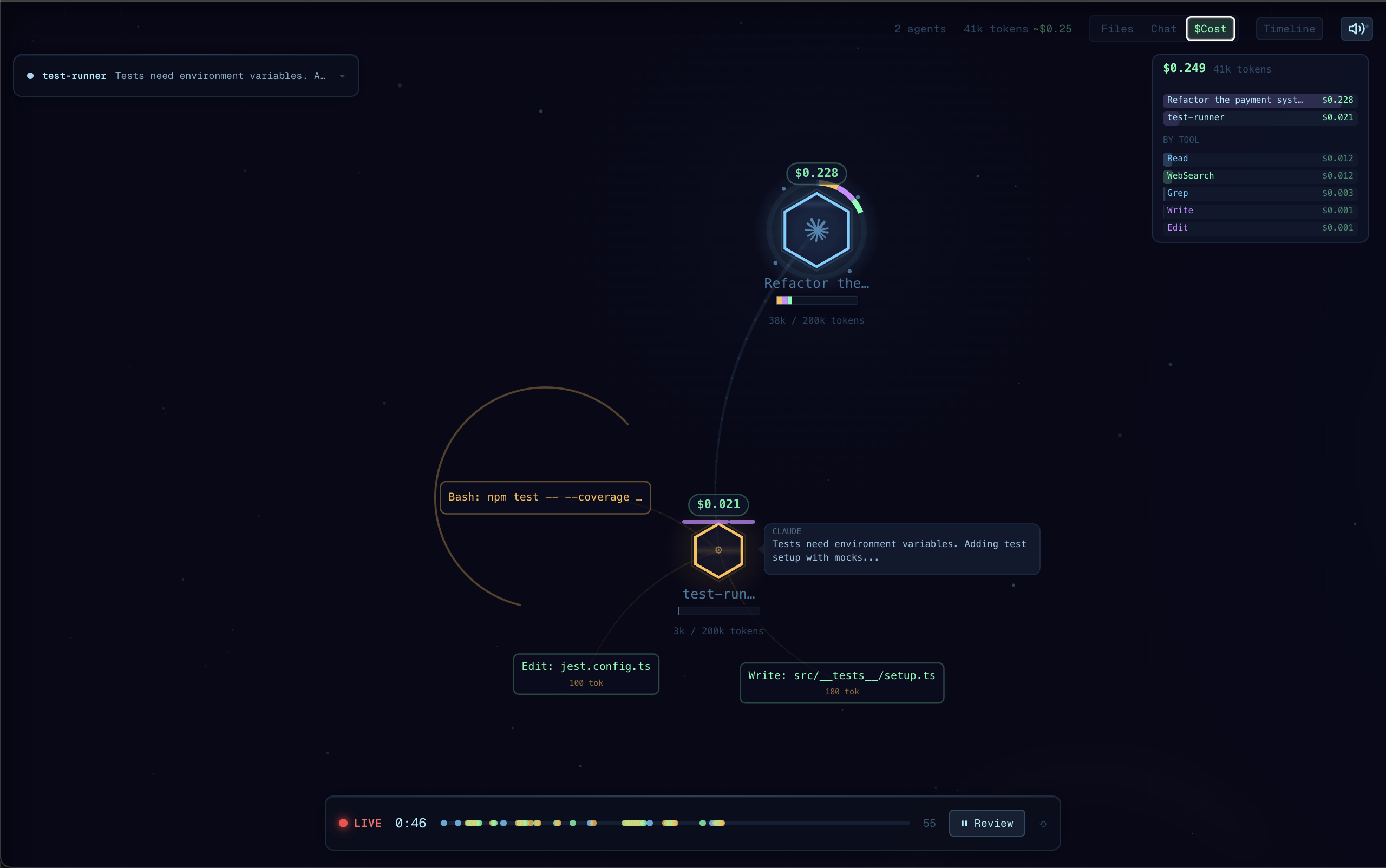
Real-time visualization of Claude Code and Codex agent orchestration. Watch your agents think, branch, and coordinate as they work. Demo video here.
Why Agent Flow?
I built Agent Flow while developing Antics, a game creation platform driven by AI agents. Debugging agent behavior was painful, so we made it visual. Now we're sharing it.
Claude Code is powerful, but its execution is a black box — you see the final result, not the journey. Agent Flow makes the invisible visible:
- Understand agent behavior — See how Claude breaks down problems, which tools it reaches for, and how subagents coordinate
- Debug tool call chains — When something goes wrong, trace the exact sequence of decisions and tool calls that led there
- See where time is spent — Identify slow tool calls, unnecessary branching, or redundant work at a glance
- Learn by watching — Build intuition for how to write better prompts by observing how Claude interprets and executes them
Features
- Live agent visualization: Watch agent execution as an interactive node graph with real-time tool calls, branching, and return flows
- Claude Code + Codex: Auto-detects sessions from both runtimes concurrently and shows them side-by-side, or restrict to one via the
agentVisualizer.runtimesetting - Claude Code hooks: Lightweight HTTP hook server receives events directly from Claude Code for zero-latency streaming
- Codex rollout tailing: Reads
~/.codex/sessions/**/rollout-*.jsonl(respectsCODEX_HOME) and surfaces tool calls, reasoning, and authoritative token counts from Codex's own event stream - Multi-session support: Track multiple concurrent agent sessions with tabs
- Interactive canvas: Pan, zoom, click agents and tool calls to inspect details
- Timeline & transcript panels: Review the full execution timeline, file attention heatmap, and message transcript
- JSONL log file support: Point at any JSONL event log to replay or watch agent activity
Getting Started
Quick Start (no VS Code required)
npx agent-flow-app
This starts the visualizer in your browser. Start a Claude Code session in another terminal — events will stream in real-time.
Options:
--port <number>— change the server port (default: 3001)--no-open— don't open the browser automatically--verbose— show detailed event logs
Standalone Web App (from source)
git clone https://github.com/patoles/agent-flow.git
cd agent-flow
pnpm i
pnpm run setup      # configure Claude Code hooks (one-time)
pnpm run dev        # start the web app + event relay
Open http://localhost:3000 and start a Claude Code session in another terminal — events will stream to the browser in real-time.
VS Code Extension
- Install the extension
- Open the Command Palette (
Cmd+Shift+P) and run Agent Flow: Open Agent Flow - Start a Claude Code or Codex session in your workspace — Agent Flow will auto-detect it
Agent Flow automatically configures Claude Code hooks the first time you open the panel. To manually reconfigure, run Agent Flow: Configure Claude Code Hooks from the Command Palette.
Runtime selection
By default Agent Flow watches both Claude Code (~/.claude/projects/) and Codex (~/.codex/sessions/) concurrently in all three entry points (VS Code extension, pnpm run dev, npx agent-flow-app). Sessions are shown side-by-side and tagged by runtime. If you only use one, the other is a harmless no-op — no visible effect, no user action needed.
To restrict to one runtime:
- VS Code extension: set
agentVisualizer.runtimeto"auto"/"claude"/"codex"in your settings pnpm run devandnpx agent-flow-app: set theAGENT_FLOW_RUNTIMEenvironment variable toclaudeorcodex(defaults to watching both)
For non-default Codex installs, set the CODEX_HOME environment variable.
JSONL Event Log
You can also point Agent Flow at a JSONL event log file:
- Set
agentVisualizer.eventLogPathin your VS Code settings to the path of a.jsonlfile - Agent Flow will tail the file and visualize events as they arrive
Commands
| Command | Description |
|---|---|
Agent Flow: Open Agent Flow | Open the visualizer panel |
Agent Flow: Open Agent Flow to Side | Open in a side editor column |
Agent Flow: Connect to Running Agent | Manually connect to an agent session |
Agent Flow: Configure Claude Code Hooks | Set up Claude Code hooks for live streaming |
Keyboard Shortcut
| Shortcut | Action |
|---|---|
Cmd+Alt+A (Mac) / Ctrl+Alt+A (Win/Linux) | Open Agent Flow |
Settings
| Setting | Default | Description |
|---|---|---|
agentVisualizer.runtime | "auto" | Which agent runtime(s) to watch: "auto" (both), "claude", or "codex" |
agentVisualizer.devServerPort | 0 | Development server port (0 = production mode) |
agentVisualizer.eventLogPath | "" | Path to a JSONL event log file to watch |
agentVisualizer.autoOpen | false | Auto-open when an agent session starts |
Requirements
- Node.js 20+ (LTS recommended)
- pnpm
- Claude Code CLI
- For the VS Code extension: a VSCode-compatible IDE 1.85+ (e.g. VS Code, Cursor, Windsurf)
Development
pnpm i              # install dependencies for all packages
pnpm run setup      # configure Claude Code hooks (one-time)
pnpm run dev        # start dev server + event relay
pnpm run dev starts both the Next.js dev server and an event relay that receives Claude Code events and streams them to the browser via SSE.
Other scripts:
| Script | Description |
|---|---|
pnpm run dev:demo | Start with demo/mock data |
pnpm run dev:relay | Run the event relay server standalone |
pnpm run dev:extension | Watch-build the extension |
pnpm run build:all | Production build (webview + extension) |
pnpm run build:web | Build the Next.js web app |
pnpm run build:extension | Build the extension |
pnpm run build:webview | Build the webview assets |
Star History
Author
Created by Simon Patole, for Antics.
Privacy & Telemetry
Agent Flow ships opt-out anonymous usage telemetry, enabled by default only
in the published npx agent-flow-app binary. pnpm run dev and the VS Code
extension emit nothing. Only aggregate events are sent — session count,
duration, event count, OS/arch, Agent Flow version, distinct model IDs
observed, which runtimes were watched, and error class names. Prompts, file
paths, tool calls, user info, and environment variables are never sent.
- Turn off:
export AGENT_FLOW_TELEMETRY=falseorexport DO_NOT_TRACK=1(disabled installs write zero state to disk — no~/.agent-flow/directory) - Inspect the payload:
cat ~/.agent-flow/telemetry/events.jsonl - Full schema + exact fields: see the v0.8.1 entry in
extension/CHANGELOG.md or the
serialize()function in scripts/telemetry.ts - Reset your anonymous identity: delete
~/.agent-flow/installation-id— a fresh random UUIDv4 will be generated on next run
License
Apache 2.0 — see LICENSE for details.
The name "Agent Flow" and associated logos are trademarks of Simon Patole. See TRADEMARK.md for usage guidelines.