README 未提供源码编译细节,需前往 peazip-sources 目录或官网查看详细构建说明;项目使用 Lazarus/FreePascal 编写,自行编译需准备对应工具链。
PeaZip
peazipLGPL-3.0活跃维护跨平台的文件与压缩包管理器,能解压 RAR、7Z、ZIP 等几十种格式,还支持分卷、压缩和带认证的加密。
Free Zip / Unzip software and Rar file extractor. Cross-platform file and archive manager. Features volume spanning, compression, authenticated encryption. Supports 7Z, 7-Zip sfx, ACE, ARJ, Brotli, BZ2, CAB, CHM, CPIO, DEB, GZ, ISO, JAR, LHA/LZH, NSIS, OOo, PAQ/LPAQ, PEA, QUAD, RAR, RPM, split, TAR, Z, ZIP, ZIPX, Zstandard.
11.4.0发布于 2026-10-17 06:08 UTC8,113star +18 / 7 天427fork同步于 2026-11-10 17:32 UTC
README 未提供安装命令,仅指向官网下载页面 https://peazip.github.io 硬件要求按 README 说明
README 未说明具体硬件要求;支持 BSD、Linux、macOS、Windows 原生运行,另提供免安装便携版。
支持 Apple Silicon
跨平台开源压缩解压工具,支持 200+ 格式,可替代 WinZip/WinRAR
跨平台的文件与压缩包管理器,能解压 RAR、7Z、ZIP 等几十种格式,还支持分卷、压缩和带认证的加密。
核心能力
- 支持 200+ 种压缩格式及变体,含 7z、rar、zip、zstandard
- 处理分卷压缩包(001、r01、z01 等)
- 支持多种加密标准、双因素认证与加密密码管理器
- 内置文件管理器,支持搜索、重复文件检测与内容预览
- 可将 GUI 操作导出为 CLI 脚本
容易踩的坑
内容由模型根据 README 生成,可能不完整或不准确,以官方文档为准。看原文 README
- 11.4.0PeaZip 11.4.0最新正式版2026-10-17 · 2026-10-17 06:08 UTC
PeaZip 11.4.0 continues the effort to strengthen security, with improved validation of input, extensive use of range check, removal of use of console for backend tasks.
Usability is also improved with enhanced auto-refresh for file browser, and ability to browse .lnk files destination dirs on Windows (Ctrl+P).
Backend are updated with Pea 1.34 and 7z/p7zip 26.04.
Sources are compiled with Lazarus 4.x, and are still compatible with Lazarus 3.x and 2.x.
A total of 243 file extensions are now supported as archives by PeaZip.
- 11.3.0PeaZip 11.3.02026-09-26 · 2026-09-26 07:51 UTC
查看更新说明
PeaZip 11.3.0 provides improved ZPAQ support, new test function for PEA archives, mandatory master password for the integrated Password Manager, and usability improvements as the new "Open with" picker screen (Shift+F12).
Backend are updated to 7z/p7zip 26.03 and Pea 1.33.
Due to multiple security fixes and improvements it is recommended to update to the new version.
Sources are compiled with Lazarus 4.x, and are still compatible with Lazarus 3.x and 2.x.
A total of 243 file extensions are now supported as archives by PeaZip.
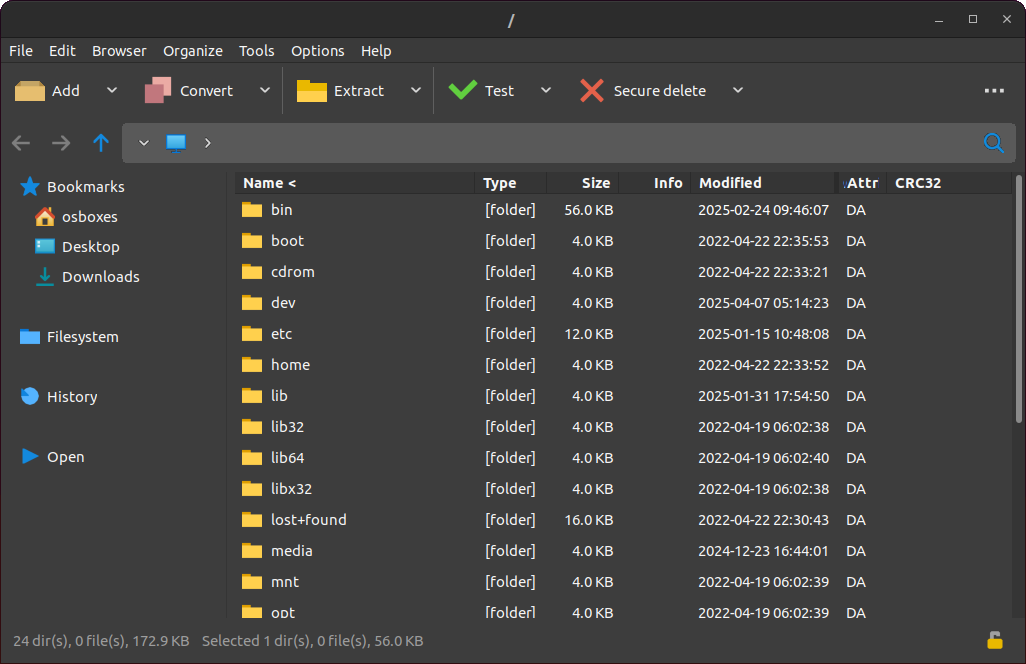
PeaZip screenshot, on Linux with dark theme, browsing a .zip archive
- 11.2.0PeaZip 11.2.02026-07-12 · 2026-07-12 09:14 UTC
查看更新说明
PeaZip 11.2.0 is focused on multiple QOL improvements: functions picker (F12) searching supported functions and applying chosen function to selected items, improved keyboard shortcuts, drag and drop, and file manager's auto-refresh.
Backend are updated to 7z/p7zip 26.02 and Pea 1.32.
Sources are compiled with Lazarus 4.x, and are still compatible with Lazarus 3.x and 2.x.
A total of 243 file extensions are now supported as archives by PeaZip, with the addition of .ZIM files (Wikipedia and Project Gutenberg data dumps).
- 11.1.0PeaZip 11.1.02026-05-11 · 2026-05-11 08:33 UTC
查看更新说明
PeaZip 11.1.0 improves direct extraction from app's file manager, overhauling the "Extract to..." context menu group, with addition of last output path, and Bookmarks, Filesystem, and History submenus.
This release is focused on QOL enhancements and security fixes.
Backend are updated to 7z/p7zip 26.01, non-Windows alternative 7z/p7zip updated to Tino Reichardt's 7-Zip ZS 25.01, and Pea 1.31.
Sources are compiled with Lazarus 4.x, and are still compatible with Lazarus 3.x and 2.x.
- 11.0.0PeaZip 11.0.02026-04-06 · 2026-04-06 06:54 UTC
查看更新说明
PeaZip reaches major release 11.0.0, which consolidates the 10.x line evolution with bugfixes, code cleanup, and file / archive manager improvements.
The new release speeds up archive browsing, enhances Bookmarks and internal drag and drop (it is now possible to drag&drop items to Tabs and Breadcrumb bar), improves zoom and fractional scaling, supports alternative rendering styles for icons, adds new functions for batch archives testing and password entropy rating.
Backend are updated to 7z/p7zip 26.00 and Pea 1.30.
Sources are compiled with Lazarus 4.2, and are still compatible with Lazarus 3.x and 2.x.
In-app drag&drop from file manager to address breadcrumb, PeaZip running on Linux in dark mode, with Sharp rendering style selected.
用户点评
登录用户的真实使用记录,可按版本和硬件筛选共 0 条
还没有人点评。第一个说出真实体验的人最有价值。
PeaZip Free Archiver
| GitHub | GitHub Latest | SourceForge | Flathub |
|---|---|---|---|
 |  |  |  |
PeaZip is a free archive manager utility for BSD, Linux, macOS, and Windows, which offers a cross-platform Open Source alternative to proprietary software (WinZip, WinRar, etc.), also available as portable package not requiring installation.
Works with 200+ archive types and variants (7z, ace, arc, brotli, bz2, cab, gz, iso, pea, rar, tar, wim, zip, zipx, zpaq, zstandard...), handles spanned archives (001, r01, z01...).
Can convert existing archives, split/join files, edit comments, search in archives, add files to separate archives.
Supports multiple archive encryption standards, provides file hashing tools, and can export GUI tasks as CLI scripts.
PeaZip also provides a capable file manager: bookmarking, search, instant content filter, duplicate files detection, integrated text, hex, and image viewers.
Features
- Cross-platform running as a native application on:
- BSD (x86-64)
- Linux (x86-64, and aarch64)
- macOS/Darwin (Intel x86-64, and aarch64 e.g. Mx Apple Silicon SoC family)
- Windows/Win64 (x86, and x86-64) compatible with Wine/ReactOS
- Open-source: Uses LGPLv3 license.
- Security-focused: Strong encryption, two-factor authentication, encrypted password manager, and secure deletion.
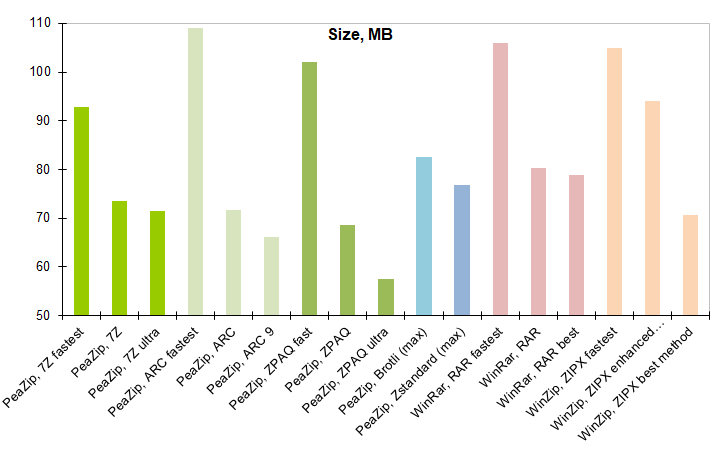
- Powerful compression: Uses Open Source technologies from 7-Zip/p7zip, FreeArc, PAQ/ZPAQ, PEA, UPX, Brotli, and Zstd projects.
Build Instructions
- Sources are available in the peazip-sources Git directory repository, and from Sources webpage, alongside detailed instructions for compiling the binaries and building installable and portable packages for various target systems.
- Source snapshots for each release can be found in the Releases section as
peazip-x.y.z.src.zippackages. - PeaZip is written in Lazarus/FreePascal, and Windows installers are scripted using InnoSetup, also using a Delphi/Pascal-like syntax.