Gif 弹幕需额外引入 Gif subspec 并使用 DanmakuGifCell 与 DanmakuGifCellModel;displaying 方法不在主线程调用,绘制时需自行处理多线程;不调用 stop() 不会释放 DanmakuKit 相关内存

DanmakuKit
qyz777MIT更新放缓高性能 iOS 弹幕库,提供弹幕渲染与轨道调度等基础能力,方便在视频播放器里快速接入流畅的弹幕功能。
高性能弹幕框架 DanmakuKit is a high performance library that provides the basic functions of danmaku.
1.6.0发布于 2026-06-25 08:09 UTC243star29fork同步于 2026-11-07 07:33 UTC
pod 'DanmakuKit', '~> 1.5.0' 硬件要求按 README 说明
README 未说明,仅要求 iOS 10.0+(SwiftUI 需 iOS 14.0+)与 Swift 5.0+
iOS 弹幕框架,用 cellModel 生成弹幕并支持同步或异步绘制
高性能 iOS 弹幕库,提供弹幕渲染与轨道调度等基础能力,方便在视频播放器里快速接入流畅的弹幕功能。
核心能力
- 用 cellModel 生成弹幕 cell,支持同步或异步绘制
- 提供浮动、顶部、底部三种弹幕发射类型
- 支持调速、轨道高度与显示区域调整
- 支持单条弹幕暂停播放及点击回调
- 支持 Gif 弹幕与 SwiftUI
容易踩的坑
内容由模型根据 README 生成,可能不完整或不准确,以官方文档为准。看原文 README
- 1.6.0Feature:支持MacOS与SwiftUI手势优化最新正式版2026-06-25 · 2026-06-25 08:09 UTC
- 支持了MacOS平台
- 修复了SwiftUI手势无法传递的问题
- 1.5.2Bugfix2025-04-01 · 2025-04-01 03:13 UTC
这个版本没有写更新说明。
- 1.5.1Bugfix2025-03-21 · 2025-03-21 05:59 UTC
查看更新说明
danmakuCell复用问题修复
- 1.5.0支持SwiftUI2024-02-06 · 2024-02-06 06:52 UTC
查看更新说明
新增SwiftUI兼容接口,新增SwiftUI subspec
- 1.4.2支持SPM2024-01-05 · 2024-01-05 03:45 UTC
这个版本没有写更新说明。
用户点评
登录用户的真实使用记录,可按版本和硬件筛选共 0 条
还没有人点评。第一个说出真实体验的人最有价值。


DanmakuKit(简体中文)
Introduction
DanmakuKit is a high performance library that provides the basic functions of danmaku. It provides a set of processes that allow you to generate the danmaku cell via cellModel, and each danmaku can be drawn either synchronously or asynchronously.
As shown in the GIF below, DanmakuKit offers three types of danmaku launch: floating, top and bottom.

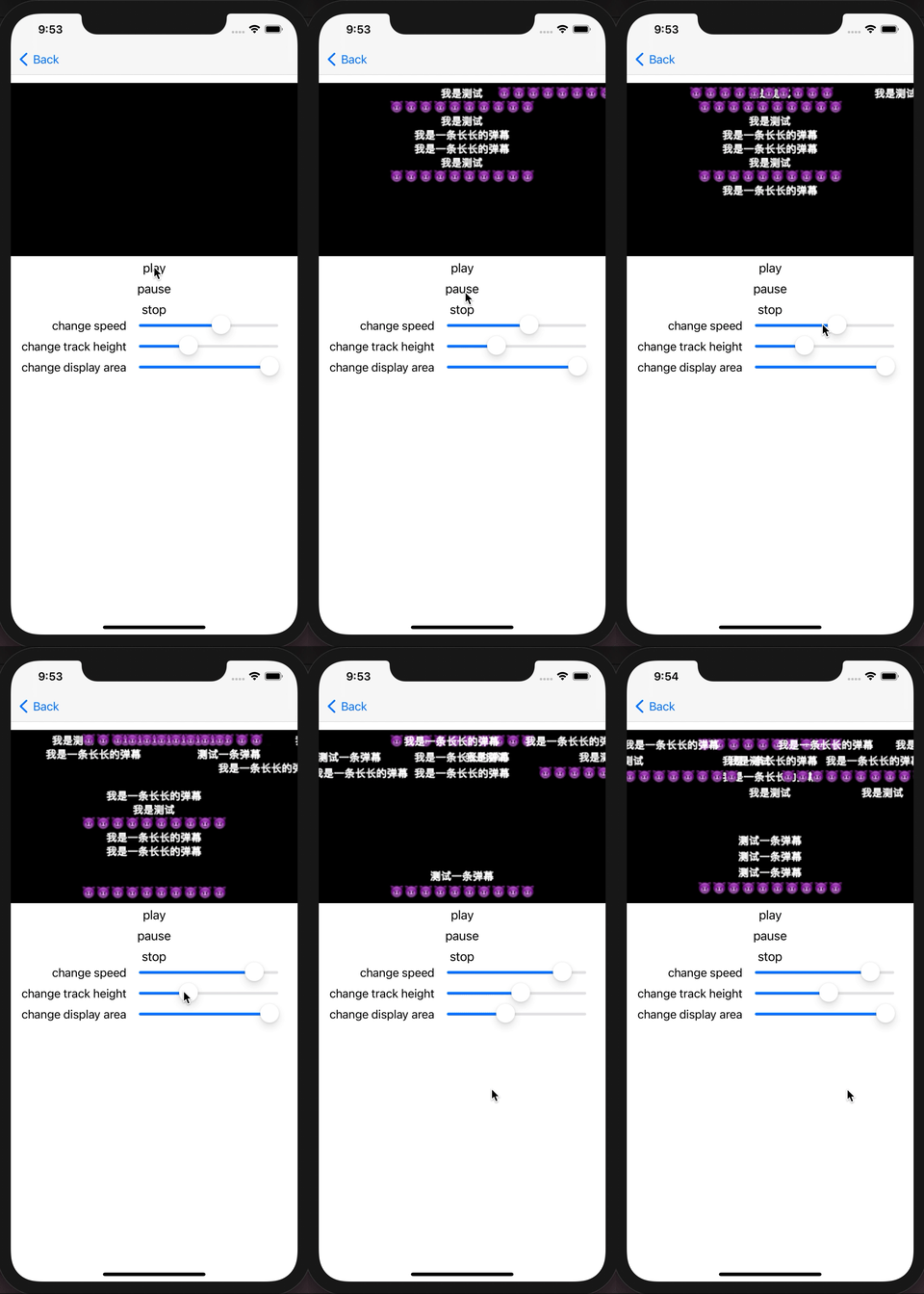
Supported features
- Speed adjustment
- Track height adjustment
- Display area adjustment
- Click callback
- Support to pause or play a single danmaku
- Provides property to specify whether danmaku can overlap
- Support to disable danmaku for different types of tracks
- Support for setting progress property to render the danmaku immediately on the view
- Support to clean up all danmaku
- Support Gif Danmaku
- SwiftUI
Use Guide
Draw Danmaku
- Implement a model to inherit from the DanmakuCellModel. In this model you need to add your own properties and methods to draw the danmaku.
class DanmakuTextCellModel: DanmakuCellModel {
    var identifier = ""

    var text = ""

    var font = UIFont.systemFont(ofSize: 15)

    var offsetTime: TimeInterval = 0

    var cellClass: DanmakuCell.Type {
        return DanmakuTextCell.self
    }

    var size: CGSize = .zero

    var track: UInt?

    var displayTime: Double = 8

    var type: DanmakuCellType = .floating

    var isPause = false

    func calculateSize() {
        size = NSString(string: text).boundingRect(with: CGSize(width: CGFloat(Float.infinity
            ), height: 20), options: [.usesFontLeading, .usesLineFragmentOrigin], attributes: [.font: font], context: nil).size
    }

    func isEqual(to cellModel: DanmakuCellModel) -> Bool {
        return identifier == cellModel.identifier
    }
}
- Implement a View inherited from DanmakuCell. Then you need to override the
displayingmethod, and use CGContext draw your danmaku. It is important to note when calldisplayingmethod was not in the main thread, so you need to consider multithreading.
class DanmakuTextCell: DanmakuCell {
    required init(frame: CGRect) {
        super.init(frame: frame)
        backgroundColor = .clear
    }

    required init?(coder: NSCoder) {
        fatalError("init(coder:) has not been implemented")
    }

    override func displaying(_ context: CGContext, _ size: CGSize, _ isCancelled: Bool) {
        guard let model = model as? DanmakuTextCellModel else { return }
        let text = NSString(string: model.text)
        context.setLineWidth(1)
        context.setLineJoin(.round)
        context.setStrokeColor(UIColor.white.cgColor)
        context.saveGState()
        context.setTextDrawingMode(.stroke)
        let attributes: [NSAttributedString.Key: Any] = [.font: model.font, .foregroundColor: UIColor.white]
        text.draw(at: .zero, withAttributes: attributes)
        context.restoreGState()
        context.setTextDrawingMode(.fill)
        text.draw(at: .zero, withAttributes: attributes)
    }
}
- Pass the DanmakuCellModel to the DanmakuView to display danmaku.
let danmakuView = DanmakuView(frame: CGRect(x: 0, y: 0, width: 350, height: 250))
view.addSubview(danmakuView)
let cellModel = DanmakuTextCellModel(json: nil)
cellModel.displayTime = displayTime
cellModel.text = contents[index]
cellModel.identifier = String(arc4random())
cellModel.calculateSize()
cellModel.type = .floating
danmakuView.shoot(danmaku: cellModel)
Play Danmaku
Call play() method to start display danmaku.
danmakuView.play()
Call pause() method to pause the play of danmaku.
danmakuView.pause()
Call stop() method to stop display danmaku and clean up resource. The memory associated with DanmakuKit is not cleaned up until this method is called. This method will be invoked when DanmakuView destroyed.
danmakuView.stop()
Gif Danmaku
If you want to display GIF on a danmaku, then import the Gif subspec and use the DanmakuGifCell and DanmakuGifCellModel.
Other Features
See the Example project for more features.
Requirements
swift 5.0+
iOS 10.0+, SwiftUI iOS 14.0+
Installation
Cocoapods
DanmakuKit is available through CocoaPods. To install it, simply add the following line to your Podfile:
pod 'DanmakuKit', '~> 1.5.0'
Swift Package Manager
DanmakuKit is also available through Swift Package Manager. To install it, simply add the dependency to your Package.Swift file:
dependencies: [
    .package(url: "https://github.com/qyz777/DanmakuKit.git", from: "1.6.0"),
],
targets: [
    .target( name: "YourTarget", dependencies: ["DanmakuKit"]),
]
License
DanmakuKit is available under the MIT license. See the LICENSE file for more info.

iina
iina·Swift
macOS 上基于 mpv 的现代视频播放器,用 Swift 编写,界面原生美观,支持几乎所有视频格式,适合替代 QuickTime 日常看片。
视频播放器+4视频播放器进阶
47082+473.0kv1.5.12026-11-10 03:26 UTC
video.js
videojs·TypeScript
开源媒体播放器框架,支持 HTML 和 React,统一处理 HLS、DASH 等流媒体格式,帮你在网页里快速搭出稳定可定制的视频播放器。
视频播放器+4视频播放器进阶
40155+487.5k[email protected]2026-11-10 22:39 UTC
mpv
mpv-player·C
轻量级命令行视频播放器,基于 FFmpeg 解码,支持硬件加速、字幕渲染和脚本扩展,适合在终端或嵌入其他应用中播放音视频。
命令行播放器+4视频播放器进阶
38050+1143.6kv0.42.02026-11-10 16:51 UTC

peach
peach-mitao·Python
本地优先的视频元数据刮削与媒体库管理工具,自动整理影片信息并支持自托管播放,适合搭建个人影音库。
媒体库管理+4视频播放器进阶
14845+1641.7kv0.57.02026-11-10 05:46 UTC