SwiftLint
A tool to enforce Swift style and conventions, loosely based on the now
archived GitHub Swift Style Guide.
SwiftLint enforces the style guide rules that are generally accepted by the
Swift community. These rules are well described in popular style guides like
Kodeco's Swift Style Guide.
SwiftLint rules are predominantly based on SwiftSyntax.
Some rules still hook into Clang and
SourceKit to access type information.


This project adheres to the
Contributor Covenant Code of Conduct.
By participating, you are expected to uphold this code.
Switch Language:
中文,
한국어
Video Introduction
To get a high-level overview of SwiftLint, we encourage you to watch this
presentation recorded January 9th, 2017 by JP Simard (transcript provided):

Installation
SwiftLint can be used as a command plugin
or a build tool plugin.
Add
.package(url: "https://github.com/SimplyDanny/SwiftLintPlugins", from: "<version>")
to your Package.swift file to consume the latest release of SwiftLint
automatically or pin the dependency to a specific version:
.package(url: "https://github.com/SimplyDanny/SwiftLintPlugins", exact: "<version>")
Therein, replace <version> with the desired minimum or exact version.
[!NOTE]
Consuming the plugins directly from the SwiftLint repository comes
with several drawbacks. To avoid them and reduce the overhead imposed, it's
highly recommended to consume the plugins from the dedicated
SwiftLintPlugins repository,
even though plugins from the SwiftLint repository are also absolutely
functional. If the plugins from SwiftLint are preferred, just use the URL
https://github.com/realm/SwiftLint in the package declarations above.
However, SwiftLintPlugins
facilitates plugin adoption massively. It lists some of the reasons that
drive the plugins as provided by SwiftLint itself very troublesome. Since
the plugin code and the releases are kept in sync, there is no difference
in functionality between the two, but you spare yourself a lot of time and
trouble using the dedicated plugins repository.
This document assumes you're relying on SwiftLintPlugins.
Use the following link to add SwiftLint as a Package Dependency to an Xcode
project:
https://github.com/SimplyDanny/SwiftLintPlugins
brew install swiftlint
Add the following to your Podfile:
pod 'SwiftLint'
This will download the SwiftLint binaries and dependencies in Pods/ during
your next pod install execution and will allow you to invoke it via
${PODS_ROOT}/SwiftLint/swiftlint in your Script Build Phases.
Installing via Cocoapods also enables pinning to a specific version of
SwiftLint rather than simply the latest (which is the case with
Homebrew).
Note that this will add the SwiftLint binaries, its dependencies' binaries, and
the Swift binary library distribution to the Pods/ directory, so checking in
this directory to SCM such as Git is discouraged.
mint install realm/SwiftLint
Put this in your MODULE.bazel:
bazel_dep(name = "swiftlint", version = "0.52.4", repo_name = "SwiftLint")
Or put this in your WORKSPACE:
load("@bazel_tools//tools/build_defs/repo:http.bzl", "http_archive")

http_archive(
    name = "build_bazel_rules_apple",
    sha256 = "390841dd5f8a85fc25776684f4793d56e21b098dfd7243cd145b9831e6ef8be6",
    url = "https://github.com/bazelbuild/rules_apple/releases/download/2.4.1/rules_apple.2.4.1.tar.gz",
)

load(
    "@build_bazel_rules_apple//apple:repositories.bzl",
    "apple_rules_dependencies",
)

apple_rules_dependencies()

load(
    "@build_bazel_rules_swift//swift:repositories.bzl",
    "swift_rules_dependencies",
)

swift_rules_dependencies()

load(
    "@build_bazel_rules_swift//swift:extras.bzl",
    "swift_rules_extra_dependencies",
)

swift_rules_extra_dependencies()

http_archive(
    name = "SwiftLint",
    sha256 = "c6ea58b9c72082cdc1ada4a2d48273ecc355896ed72204cedcc586b6ccb8aca6",
    url = "https://github.com/realm/SwiftLint/releases/download/0.52.4/bazel.tar.gz",
)

load("@SwiftLint//bazel:repos.bzl", "swiftlint_repos")

swiftlint_repos()

load("@SwiftLint//bazel:deps.bzl", "swiftlint_deps")

swiftlint_deps()
Then you can run SwiftLint in the current directory with this command:
bazel run -c opt @SwiftLint//:swiftlint
Pre-Built Package
Download SwiftLint.pkg from the
latest GitHub release and
run it.
From Source
Make sure the build tool Bazel and a
recent Swift toolchain are
installed and all tools are discoverable in your PATH.
To build SwiftLint, clone this repository and run make install.
Setup
[!IMPORTANT]
While it may seem intuitive to run SwiftLint before compiling Swift source
files to exit a build early when there are lint violations, it is important
to understand that SwiftLint is designed to analyze valid source code that
is compilable. Non-compiling code can very easily lead to unexpected and
confusing results, especially when executing with --fix/--autocorrect
command line arguments.
Build Tool Plugins
SwiftLint can be used as a build tool plugin for both
Swift Package projects
and Xcode projects.
The build tool plugin determines the SwiftLint working directory by locating
the topmost config file within the package/project directory. If a config file
is not found therein, the package/project directory is used as the working
directory.
The plugin throws an error when it is unable to resolve the SwiftLint working
directory. For example, this will occur in Xcode projects where the target's
Swift files are not located within the project directory.
To maximize compatibility with the plugin, avoid project structures that require
the use of the --config option.
Swift Package Projects
[!NOTE]
Requires installing via Swift Package Manager.
Build tool plugins run when building each target. When a project has multiple
targets, the plugin must be added to the desired targets individually.
To do this, add the plugin to the target(s) to be linted as follows:
.target(
    ...
    plugins: [.plugin(name: "SwiftLintBuildToolPlugin", package: "SwiftLintPlugins")]
),
Swift Package Command Plugin
[!NOTE]
Requires installing via Swift Package Manager.
The command plugin enables running SwiftLint from the command line as follows:
swift package plugin swiftlint
Xcode Projects
[!NOTE]
Requires installing via Xcode Package Dependency.
Build tool plugins run as a build phase of each target. When a project has
multiple targets, the plugin must be added to the desired targets individually.
To do this, add the SwiftLintBuildToolPlugin to the Run Build Tool Plug-ins
phase of the Build Phases for the target(s) to be linted.
[!TIP]
When using the plugin for the first time, be sure to trust and enable
it when prompted. If a macros build warning exists, select it to trust
and enable the macros as well.
For unattended use (e.g. on CI), package plugin and macro
validations can be disabled with either of the following:
-
Using xcodebuild options:
-skipPackagePluginValidation
-skipMacroValidation
-
Setting Xcode defaults:
defaults write com.apple.dt.Xcode IDESkipPackagePluginFingerprintValidatation -bool YES
defaults write com.apple.dt.Xcode IDESkipMacroFingerprintValidation -bool YES
[!IMPORTANT]
The unattended use options bypass Xcode's validation dialogs
and implicitly trust all plugins and macros, which has security implications.
Unexpected Xcode Project Structures
Project structures where SwiftLint's configuration file is located
outside of the package/project directory are not directly supported
by the build tool plugin. This is because it isn't possible to pass
arguments to build tool plugins (e.g., passing the config file path).
If your project structure doesn't work directly with the build tool
plugin, please consider one of the following options:
- To use a config file located outside the package/project directory, a config
file may be added to that directory specifying a parent config path to the
other config file, e.g.,
parent_config: path/to/.swiftlint.yml.
- You can also consider the use of a
Run Script Build Phase in place of the build
tool plugin.
Xcode Run Script Build Phase
[!NOTE]
Based upon the installation method used, the shell command syntax in the
Run Script Build Phase may be different or additional configuration could
be required. Refer to the installation instructions for
more information.
If the build tool plugin does not work for your project setup or when
additional custom setup is required, SwiftLint can be added as a Run Script
Build Phase. This is useful when a project setup relies on the --config
SwiftLint option; or to lint all targets together in a single swiftlint
invocation. File inclusions and exclusions can be configured in the
.swiftlint.yml configuration.
To do this, add a custom script to a Run Script phase of the Build Phases
of the primary app target, after the Compile Sources phase. Use the
following script implementation:
if command -v swiftlint >/dev/null 2>&1
then
    swiftlint
else
    echo "warning: `swiftlint` command not found - See https://github.com/realm/SwiftLint#installation for installation instructions."
fi
If you're using the SwiftLintPlugin in a Swift package,
you may refer to the swiftlint executable in the
following way:
SWIFT_PACKAGE_DIR="${SWIFT_PACKAGE_DIR:-${BUILD_DIR%Build/*}SourcePackages}"
SWIFTLINT_CMD="$SWIFT_PACKAGE_DIR/artifacts/swiftlintplugins/SwiftLintBinary/SwiftLintBinary.artifactbundle/macos/swiftlint"

if test -f "$SWIFTLINT_CMD" 2>&1
then
    "$SWIFTLINT_CMD"
else
    echo "warning: `swiftlint` command not found - See https://github.com/realm/SwiftLint#xcode-run-script-build-phase for installation instructions."
fi
[!NOTE]
The SWIFTLINT_CMD path uses the default Xcode configuration and has been
tested on Xcode 15/16. In case of another configuration (e.g. a custom
Swift package path), please adapt the values accordingly.
If you run xcodebuild with -clonedSourcePackagesDirPath, set
SWIFT_PACKAGE_DIR to <that path> before running the script.
[!TIP]
Uncheck Based on dependency analysis to run swiftlint on all incremental
builds, suppressing the unspecified outputs warning.
Consideration for Xcode 15.0
Xcode 15 made a significant change by setting the default value of the
ENABLE_USER_SCRIPT_SANDBOXING build setting from NO to YES.
As a result, SwiftLint encounters an error related to missing file permissions,
which typically manifests as
error: Sandbox: swiftlint(19427) deny(1) file-read-data.
To resolve this issue, it is necessary to manually set the
ENABLE_USER_SCRIPT_SANDBOXING setting to NO for the specific target that
SwiftLint is being configured for.
Consideration for Apple Silicon
If you installed SwiftLint via Homebrew on Apple Silicon, you might experience
this warning:
warning: SwiftLint not installed, download from https://github.com/realm/SwiftLint
That is because Homebrew on Apple Silicon installs the binaries into the
/opt/homebrew/bin folder by default. To instruct Xcode where to find
SwiftLint, you can either add /opt/homebrew/bin to the PATH environment
variable in your build phase:
if [[ "$(uname -m)" == arm64 ]]
then
    export PATH="/opt/homebrew/bin:$PATH"
fi

if command -v swiftlint >/dev/null 2>&1
then
    swiftlint
else
    echo "warning: `swiftlint` command not found - See https://github.com/realm/SwiftLint#installation for installation instructions."
fi
or you can create a symbolic link in /usr/local/bin pointing to the actual
binary:
ln -s /opt/homebrew/bin/swiftlint /usr/local/bin/swiftlint
Additional Considerations
If you wish to fix violations as well, your script could run
swiftlint --fix && swiftlint instead of just swiftlint. This will mean
that all correctable violations are fixed while ensuring warnings show up in
your project for remaining violations.
If you've installed SwiftLint via CocoaPods the script should look like this:
"${PODS_ROOT}/SwiftLint/swiftlint"
Visual Studio Code
To integrate SwiftLint with Visual Studio Code, install the
vscode-swiftlint
extension from the marketplace.
Fastlane
You can use the official
swiftlint fastlane action
to run SwiftLint as part of your fastlane process.
swiftlint(
    mode: :lint,                            # SwiftLint mode: :lint (default) or :autocorrect
    executable: "Pods/SwiftLint/swiftlint", # The SwiftLint binary path (optional). Important if you've installed it via CocoaPods
    path: "/path/to/lint",                  # Specify path to lint (optional)
    output_file: "swiftlint.result.json",   # The path of the output file (optional)
    reporter: "json",                       # The custom reporter to use (optional)
    config_file: ".swiftlint-ci.yml",       # The path of the configuration file (optional)
    files: [                                # List of files to process (optional)
        "AppDelegate.swift",
        "path/to/project/Model.swift"
    ],
    ignore_exit_status: true,               # Allow fastlane to continue even if SwiftLint returns a non-zero exit status (Default: false)
    quiet: true,                            # Don't print status logs like 'Linting ' & 'Done linting' (Default: false)
    strict: true                            # Fail on warnings? (Default: false)
)
Docker
SwiftLint is also available as a Docker image using
Ubuntu. So just the first time you need to pull the docker image using the
next command:
docker pull ghcr.io/realm/swiftlint:latest
Then following times, you just run swiftlint inside of the docker like:
docker run -it -v `pwd`:`pwd` -w `pwd` ghcr.io/realm/swiftlint:latest
This will execute swiftlint in the folder where you are right now (pwd),
showing an output like:
$ docker run -it -v `pwd`:`pwd` -w `pwd` ghcr.io/realm/swiftlint:latest
Linting Swift files in current working directory
Linting 'RuleDocumentation.swift' (1/490)
...
Linting 'YamlSwiftLintTests.swift' (490/490)
Done linting! Found 0 violations, 0 serious in 490 files.
Here you have more documentation about the usage of
Docker Images.
MegaLinter
SwiftLint is also embedded in MegaLinter, an
open-source aggregator of linters for CI. See its
SwiftLint documentation
for setup instructions.
Command Line Usage
$ swiftlint help
OVERVIEW: A tool to enforce Swift style and conventions.

USAGE: swiftlint <subcommand>

OPTIONS:
  --version               Show the version.
  -h, --help              Show help information.

SUBCOMMANDS:
  analyze                 Run analysis rules
  docs                    Open SwiftLint documentation website in the default web browser
  generate-docs           Generates markdown documentation for selected group of rules
  lint (default)          Print lint warnings and errors
  baseline                Operations on existing baselines
  reporters               Display the list of reporters and their identifiers
  rules                   Display the list of rules and their identifiers
  version                 Display the current version of SwiftLint

  See 'swiftlint help <subcommand>' for detailed help.
Run swiftlint in the directory containing the Swift files to lint. Directories
will be searched recursively.
To specify a list of files when using lint or analyze
(like the list of files modified by Xcode specified by the
ExtraBuildPhase Xcode
plugin, or modified files in the working tree based on git ls-files -m), you
can do so by passing the option --use-script-input-files and setting the
following instance variables: SCRIPT_INPUT_FILE_COUNT
and SCRIPT_INPUT_FILE_0, SCRIPT_INPUT_FILE_1, ...,
SCRIPT_INPUT_FILE_{SCRIPT_INPUT_FILE_COUNT - 1}.
Similarly, files can be read from file lists by passing
the option --use-script-input-file-lists and setting the
following instance variables: SCRIPT_INPUT_FILE_LIST_COUNT
and SCRIPT_INPUT_FILE_LIST_0, SCRIPT_INPUT_FILE_LIST_1, ...,
SCRIPT_INPUT_FILE_LIST_{SCRIPT_INPUT_FILE_LIST_COUNT - 1}.
These are same environment variables set for input files to
custom Xcode script phases.
Working With Multiple Swift Versions
SwiftLint hooks into SourceKit so it continues working even as Swift evolves!
This also keeps SwiftLint lean, as it doesn't need to ship with a full Swift
compiler, it just communicates with the official one you already have installed
on your machine.
You should always run SwiftLint with the same toolchain you use to compile your
code.
You may want to override SwiftLint's default Swift toolchain if you have
multiple toolchains or Xcodes installed.
Here's the order in which SwiftLint determines which Swift toolchain to use:
$XCODE_DEFAULT_TOOLCHAIN_OVERRIDE$TOOLCHAIN_DIR or $TOOLCHAINSxcrun -find swift/Applications/Xcode.app/Contents/Developer/Toolchains/XcodeDefault.xctoolchain/Applications/Xcode-beta.app/Contents/Developer/Toolchains/XcodeDefault.xctoolchain~/Applications/Xcode.app/Contents/Developer/Toolchains/XcodeDefault.xctoolchain~/Applications/Xcode-beta.app/Contents/Developer/Toolchains/XcodeDefault.xctoolchain
sourcekitd.framework is expected to be found in the usr/lib/ subdirectory of
the value passed in the paths above.
You may also set the TOOLCHAINS environment variable to the reverse-DNS
notation that identifies a Swift toolchain version:
TOOLCHAINS=com.apple.dt.toolchain.Swift_2_3 swiftlint --fix
On Linux, SourceKit is expected to be located in
/usr/lib/libsourcekitdInProc.so or specified by the LINUX_SOURCEKIT_LIB_PATH
environment variable.
Git pre-commit Hook
SwiftLint can be run as a pre-commit hook.
Once installed, add this to the
.pre-commit-config.yaml in the root of your repository:
repos:
  - repo: https://github.com/realm/SwiftLint
    rev: 0.57.1
    hooks:
      - id: swiftlint
Adjust rev to the SwiftLint version of your choice. pre-commit autoupdate
can be used to update to the current version.
SwiftLint can be configured using entry to apply fixes and fail on errors:
- repo: https://github.com/realm/SwiftLint
  rev: 0.57.1
  hooks:
    - id: swiftlint
      entry: swiftlint --fix --strict
Rules
Over 200 rules are included in SwiftLint and the Swift community (that's you!)
continues to contribute more over time.
Pull requests
are encouraged.
You can find an updated list of rules and more information about them in the
Rule Directory.
You can also check the
Source/SwiftLintBuiltInRules/Rules
directory to see their implementation.
Opt-In Rules
opt_in_rules are disabled by default (i.e., you have to explicitly enable them
in your configuration file).
Guidelines on when to mark a rule as opt-in:
- A rule that can have many false positives (e.g.
empty_count)
- A rule that is too slow
- A rule that is not general consensus or is only useful in some cases
(e.g.
force_unwrapping)
Disable rules in code
Rules can be disabled with a comment inside a source file with the following
format:
// swiftlint:disable <rule1> [<rule2> <rule3>...]
The rules will be disabled until the end of the file or until the linter sees a
matching enable comment:
// swiftlint:enable <rule1> [<rule2> <rule3>...]
For example:
// swiftlint:disable colon
let noWarning :String = "" // No warning about colons immediately after variable names.
// swiftlint:enable colon
let hasWarning :String = "" // Warning generated about colons immediately after variable names.
Including the all keyword will disable all rules until the linter sees a
matching enable comment:
// swiftlint:disable all
// swiftlint:enable all
For example:
// swiftlint:disable all
let noWarning :String = "" // No warning about colons immediately after variable names.
let i = "" // Also no warning about short identifier names.
// swiftlint:enable all
let hasWarning :String = "" // Warning generated about colons immediately after variable names.
let y = "" // Warning generated about short identifier names.
It's also possible to modify a disable or enable command by appending
:previous, :this or :next for only applying the command to the previous,
this (current) or next line respectively.
For example:
// swiftlint:disable:next force_cast
let noWarning = NSNumber() as! Int
let hasWarning = NSNumber() as! Int
let noWarning2 = NSNumber() as! Int // swiftlint:disable:this force_cast
let noWarning3 = NSNumber() as! Int
// swiftlint:disable:previous force_cast
Run swiftlint rules to print a list of all available rules and their
identifiers.
Configuration
Configure SwiftLint by adding a .swiftlint.yml file from the directory you'll
run SwiftLint from. The following parameters can be configured:
Rule inclusion:
disabled_rules: Disable rules from the default enabled set.opt_in_rules: Enable rules that are not part of the default set. The
special all identifier will enable all opt in linter rules, except the ones
listed in disabled_rules.only_rules: Only the rules specified in this list will be enabled.
Cannot be specified alongside disabled_rules or opt_in_rules.analyzer_rules: This is an entirely separate list of rules that are only
run by the analyze command. All analyzer rules are opt-in, so this is the
only configurable rule list, there are no equivalents for disabled_rules
and only_rules. The special all identifier can also be used here to enable
all analyzer rules, except the ones listed in disabled_rules.
# By default, SwiftLint uses a set of sensible default rules you can adjust. Find all the available rules
# by running `swiftlint rules` or visiting https://realm.github.io/SwiftLint/rule-directory.html.

# Rules turned on by default can be disabled.
disabled_rules:
  - colon
  - comma
  - control_statement

# Rules turned off by default can be enabled.
opt_in_rules:
  - empty_count

# Alternatively, specify all rules explicitly by uncommenting this option and removing the above two.
# only_rules:
#   - empty_parameters
#   - vertical_whitespace

# Rules only run by `swiftlint analyze`. These are all opt-in.
analyzer_rules:
  - explicit_self

# Case-sensitive paths to include during linting. Directory paths supplied on the
# command line will be ignored. Wildcards are supported.
included:
  - Sources

# Case-sensitive paths to ignore during linting. Takes precedence over `included`. Wildcards
# are supported.
excluded:
  - Carthage
  - Pods
  - Sources/ExcludedFolder
  - Sources/ExcludedFile.swift
  - Sources/*/ExcludedFile.swift

# If true, SwiftLint will not fail if no lintable files are found.
allow_zero_lintable_files: false

# If true, SwiftLint will treat all warnings as errors.
strict: false

# If true, SwiftLint will treat all errors as warnings.
lenient: false

# The path to a baseline file, which will be used to filter out detected violations.
baseline: Baseline.json

# The path to save detected violations to as a new baseline.
write_baseline: Baseline.json

# If true, SwiftLint will check for updates after linting or analyzing.
check_for_updates: true

# Configurable rules can be customized. All rules support setting their severity level.
force_cast: warning # implicitly
force_try:
  severity: warning # explicitly

# Rules that have both warning and error levels can set just the warning level implicitly.
line_length: 110

# To set both levels implicitly, use an array.
type_body_length:
  - 300 # warning
  - 400 # error

# To set both levels explicitly, use a dictionary.
file_length:
  warning: 500
  error: 1200

# Naming rules can set warnings/errors for `min_length` and `max_length`. Additionally, they can
# set excluded names and allowed symbols.
type_name:
  min_length: 4 # warning
  max_length: # warning and error
    warning: 40
    error: 50
  excluded: i(Phone|Pad|Pod) # regex pattern
  allowed_symbols: ["_"]
identifier_name:
  min_length:
    error: 4 # only error
  excluded: # excluded via string array
    - id
    - URL
    - GlobalAPIKey

# The default reporter (SwiftLint's output format) can be configured as `checkstyle`, `codeclimate`, `csv`,
# `emoji`, `github-actions-logging`, `gitlab`, `html`, `json`, `junit`, `markdown`, `relative-path`, `sarif`,
# `sonarqube`, `summary`, or `xcode` (default).
reporter: "xcode"
You can also use environment variables in your configuration file,
by using ${SOME_VARIABLE} in a string.
Defining Custom Rules
In addition to the rules that the main SwiftLint project ships with, SwiftLint
can also run two types of custom rules that you can define yourself in your own
projects:
1. Swift Custom Rules
These rules are written the same way as the Swift-based rules that ship with
SwiftLint so they're fast, accurate, can leverage SwiftSyntax, can be unit
tested, and more.
Using these requires building SwiftLint with Bazel as described in
this video or its associated code in
github.com/jpsim/swiftlint-bazel-example.
2. Regex Custom Rules
You can define custom regex-based rules in your configuration file using the
following syntax:
custom_rules:
  # Rule identifier.
  pirates_beat_ninjas:
    # Optional regex that defines paths to include during linting.
    included:
      - ".*\\.swift"
    # Optional regex that defines paths to exclude during linting.
    excluded:
      - ".*Test\\.swift"
    # Optional rule name.
    name: "Pirates Beat Ninjas"
    # Matching pattern.
    regex: "([nN]inja)"
    # Number of regex capture group to highlight the rule violation at. Optional, defaults to 0 (the whole match).
    capture_group: 0
    # SyntaxKinds to match. optional.
    match_kinds:
      - comment
      - identifier
    # Optional violation message.
    message: "Pirates are better than ninjas."
    # Optional violation severity.
    severity: error
  no_hiding_in_strings:
    regex: "([nN]inja)"
    # Syntax kinds to match. optional.
    match_kinds: string
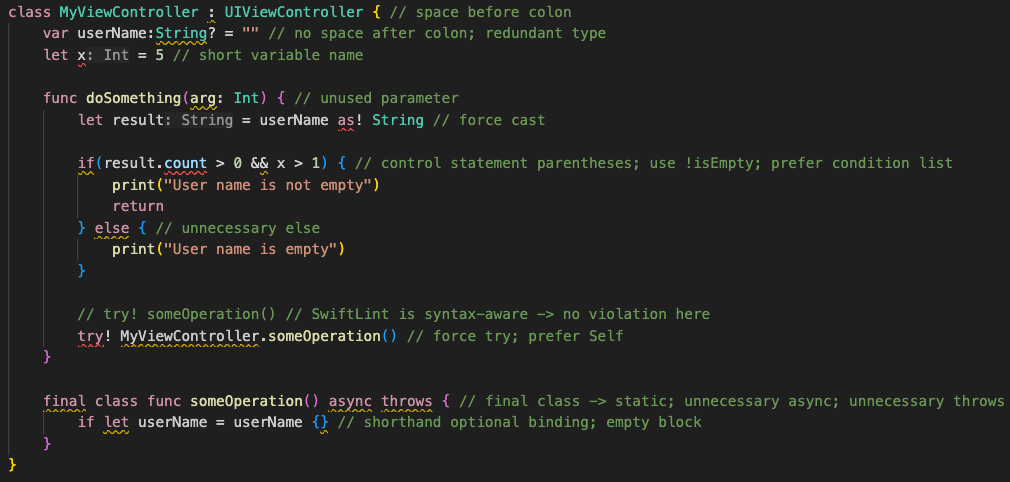
This is what the output would look like:

It is important to note that the regular expression pattern is used with the
flags s and m enabled, that is .
matches newlines
and ^/$
match the start and end of lines,
respectively. If you do not want to have . match newlines, for example, the
regex can be prepended by (?-s).
You can filter the matches by providing one or more match_kinds, which will
reject matches that include syntax kinds that are not present in this list. Here
are all the possible syntax kinds:
argumentattribute.builtinattribute.idbuildconfig.idbuildconfig.keywordcommentcomment.markcomment.urldoccommentdoccomment.fieldidentifierkeywordnumberobjectliteralparameterplaceholderstringstring_interpolation_anchortypeidentifier
All syntax kinds used in a snippet of Swift code can be extracted asking
SourceKitten. For example,
sourcekitten syntax --text "struct S {}" delivers
source.lang.swift.syntaxtype.keyword for the struct keyword andsource.lang.swift.syntaxtype.identifier for its name S
which match to keyword and identifier in the above list.
If using custom rules in combination with only_rules, you must include the
literal string custom_rules in the only_rules list:
only_rules:
  - custom_rules

custom_rules:
  no_hiding_in_strings:
    regex: "([nN]inja)"
    match_kinds: string
Unlike Swift custom rules, you can use official SwiftLint builds
(e.g. from Homebrew) to run regex custom rules.
Auto-correct
SwiftLint can automatically correct certain violations. Files on disk are
overwritten with a corrected version.
Please make sure to have backups of these files before running
swiftlint --fix, otherwise important data may be lost.
Standard linting is disabled while correcting because of the high likelihood of
violations (or their offsets) being incorrect after modifying a file while
applying corrections.
Analyze
The swiftlint analyze command can lint Swift files using the
full type-checked AST. The compiler log path containing the clean swiftc build
command invocation (incremental builds will fail) must be passed to analyze
via the --compiler-log-path flag.
e.g. --compiler-log-path /path/to/xcodebuild.log
This can be obtained by
- Cleaning DerivedData (incremental builds won't work with analyze)
- Running
xcodebuild -workspace {WORKSPACE}.xcworkspace -scheme {SCHEME} > xcodebuild.log
- Running
swiftlint analyze --compiler-log-path xcodebuild.log
Analyzer rules tend to be considerably slower than lint rules.
Using Multiple Configuration Files
SwiftLint offers a variety of ways to include multiple configuration files.
Multiple configuration files get merged into one single configuration that is
then applied just as a single configuration file would get applied.
There are quite a lot of use cases where using multiple configuration files
could be helpful:
For instance, one could use a team-wide shared SwiftLint configuration while
allowing overrides in each project via a child configuration file.
Team-Wide Configuration:
disabled_rules:
  - force_cast
Project-Specific Configuration:
opt_in_rules:
  - force_cast
Child/Parent Configs (Locally)
You can specify a child_config and/or a parent_config reference within a
configuration file. These references should be local paths relative to the
folder of the configuration file they are specified in. This even works
recursively, as long as there are no cycles and no ambiguities.
A child config is treated as a refinement and thus has a higher priority,
while a parent config is considered a base with lower priority in case of
conflicts.
Here's an example, assuming you have the following file structure:
ProjectRoot
    |_ .swiftlint.yml
    |_ .swiftlint_refinement.yml
    |_ Base
        |_ .swiftlint_base.yml
To include both the refinement and the base file, your .swiftlint.yml should
look like this:
child_config: .swiftlint_refinement.yml
parent_config: Base/.swiftlint_base.yml
When merging parent and child configs, included and excluded configurations
are processed carefully to account for differences in the directory location
of the containing configuration files.
Path merging follows these rules:
included/excluded entries from each config are resolved relative to that
config file's directory.- Child entries override conflicting parent entries.
- The merged path lists are computed as:
merged.included = (parent.included - child.excluded) + child.included
merged.excluded = (parent.excluded - child.included) + child.excluded
This means a child config can re-include a path excluded by its parent and can
exclude a path included by its parent.
Child/Parent Configs (Remote)
Just as you can provide local child_config/parent_config references,
instead of referencing local paths, you can just put urls that lead to
configuration files. In order for SwiftLint to detect these remote references,
they must start with http:// or https://.
The referenced remote configuration files may even recursively reference other
remote configuration files, but aren't allowed to include local references.
Using a remote reference, your .swiftlint.yml could look like this:
parent_config: https://myteamserver.com/our-base-swiftlint-config.yml
Every time you run SwiftLint and have an Internet connection, SwiftLint tries
to get a new version of every remote configuration that is referenced. If this
request times out, a cached version is used if available. If there is no cached
version available, SwiftLint fails – but no worries, a cached version should be
there once SwiftLint has run successfully at least once.
If needed, the timeouts for the remote configuration fetching can be specified
manually via the configuration file(s) using the
remote_timeout/remote_timeout_if_cached specifiers. These values default
to 2 seconds or 1 second, respectively.
Command Line
Instead of just providing one configuration file when running SwiftLint via the
command line, you can also pass a hierarchy, where the first configuration is
treated as a parent, while the last one is treated as the highest-priority
child.
A simple example including just two configuration files looks like this:
swiftlint --config .swiftlint.yml --config .swiftlint_child.yml
Nested Configurations
In addition to a main configuration (the .swiftlint.yml file in the root
folder), you can put other configuration files named .swiftlint.yml into the
directory structure. For a given file, SwiftLint walks up from that file's
directory towards the root configuration and uses the first nested
.swiftlint.yml it finds as a child config.
That nested config applies only to files in its directory subtree. Files in
other subtrees continue using the main config (or their own nearest nested
config).
Because SwiftLint stops at the first match while walking up the directory tree,
at most one nested configuration is merged per file (in addition to the
main configuration).
.swiftlint.yml files are only considered as a nested configuration if they
have not been used to build the main configuration already (e. g. by having
been referenced via something like child_config: Folder/.swiftlint.yml).
Also, parent_config/child_config specifications of nested configurations
are getting ignored because there's no sense to that.
If one (or more) SwiftLint file(s) are explicitly specified via the --config
parameter, that configuration will be treated as an override, no matter whether
there exist other .swiftlint.yml files somewhere within the directory.
So if you want to use nested configurations, you can't use the --config
parameter.
License
MIT licensed.
About
SwiftLint is utterly maintained by volunteers contributing to its success
entirely in their free time. As such, SwiftLint isn't a commercial product
in any way.
Be kind to the people maintaining SwiftLint as a hobby and accept that their
time is limited. Support them by contributing to the project, reporting issues,
and helping others in the community.
Special thanks go to MacStadium for providing
physical Mac mini machines to run our performance tests.

We also thank Realm (now MongoDB) for their initial contributions and setup of
the project.

