AppImage 需先 chmod +x 赋予执行权限才能运行;Ghidra 反编译等功能需额外安装对应插件;从源码构建需参考官方 Building Docs,README 未给出构建命令
cutter
rizinorgGPL-3.0活跃维护基于 rizin 的开源逆向工程图形界面平台,把反汇编、调试和二进制分析整合到可视化界面里,适合做恶意样本分析和漏洞研究。
Free and Open Source Reverse Engineering Platform powered by rizin
v2.5.0发布于 2026-06-30 18:37 UTC20,191star +16 / 7 天1,543fork同步于 2026-11-10 17:24 UTC
chmod +x Cutter*.AppImage; ./Cutter*.AppImage 硬件要求按 README 说明
README 未说明
基于 rizin 的开源逆向工程平台,带图形界面,用来分析二进制文件
基于 rizin 的开源逆向工程图形界面平台,把反汇编、调试和二进制分析整合到可视化界面里,适合做恶意样本分析和漏洞研究。
核心能力
- 以 rizin 为分析后端提供图形化逆向界面
- 支持 Python 与原生 C++ 插件扩展
- 可集成 Ghidra 反编译器等社区插件
- 提供 Linux、macOS、Windows 多平台发行包
- 提供 Docker 镜像便于快速部署
容易踩的坑
内容由模型根据 README 生成,可能不完整或不准确,以官方文档为准。看原文 README
- v2.5.02.5.0最新正式版2026-06-30 · 2026-06-30 18:37 UTC
- Use Rizin v0.9.1
- New Preferences tab to query and modify Rizin configuration variables (evars) directly from the UI
- New window listing all keybindings, browsable and searchable from the preferences
- Register, variable, and memory value tooltips while debugging or emulating, including sub-register values and previews of values inside brackets
- Follow conditional branch targets with the Enter/Return key in both Disassembly and Graph views
- Debugging improvements:
- Add an interface to change and specify register profiles
- Allow setting an RzRun profile before starting a debugging session
- Support debuginfod servers in the initial analysis options dialog
- Fix a deadlock in remote debug connections
- Types widget improvements:
- Make type and variable names clickable
- Show variables of the selected type in the Types tab
- Add rename and "set type class" options
- Search bars added to the Console and the XRefs dialog
- Docking is now optional — widgets can be floated freely instead of being forced to dock, with a new "Enable/Disable Docking" shortcut
- More information shown in the navigation bar
- Better use of screen space — configurable Quick Filter visibility and item-count label
- Add a toggle to show raw strings in the Strings widget
- Add a vertical scrollbar to the Hex panel
- Add an "Add Flag" option to the hexdump context menu
- Remember the IO mode (e.g. read-only vs. read-write) for recently opened files
- Show fewer entries in the Omnibar by default
- Switch to use Qt 6.11.0
- Updated translations, with support for languages that have multiple regional variants
- Various bugfixes and refactoring
Notes for packagers:
- The minimum required CMake version is now 3.12
- v2.5.0-rc12.5.0-rc1pre-release2026-06-21 · 2026-06-21 12:34 UTC
查看更新说明
Use Rizin 0.9.0
- v2.4.12.4.12025-05-11 · 2025-05-11 14:58 UTC
查看更新说明
- Rizin 0.8.1
- Fix JSDEC plugin location in Windows release package
- macOS release package signing fixes
- Better align disassembly arrows
- v2.4.02.4.02025-04-28 · 2025-04-28 03:14 UTC
查看更新说明
- Use Rizin 0.8.0
- Switch to use Qt 6 by default (Qt5 still available for older Linux distros)
- Appimage now supports running on wayland natively
- Add a scrollbar to the disassembly window
- Add nicer display of 1-instruction loops
- Debugger improvements (#3407 #3411 #3410)
- Fix
io.vacheckbox - previously it didn't had any effect - Fix single key shortcuts getting triggered in text input fields
- Updated translations
- Various bugfixes and refactors (67 commits total)
Notes for Linux package maintainers:
- It is recommended to compile using Qt6 assuming pyside6 is available
- New build options for additional version suffix and disabling inclusion of git commit hash (#3422)
- .appdata.xml gets installed by default
- v2.4.0-rc12.4.0-rc1pre-release2025-04-27 · 2025-04-27 07:19 UTC
查看更新说明
- Use Rizin 0.8.0
- Switch to use Qt 6 by default
- Add a scrollbar to the disassembly window
- Add nicer display of 1-instruction loops
- Fix
io.vacheckbox - previously it didn't had any effect - Various bugfixes and refactors
- Updated translations
用户点评
登录用户的真实使用记录,可按版本和硬件筛选共 0 条
还没有人点评。第一个说出真实体验的人最有价值。
Cutter
Cutter is a free and open-source reverse engineering platform powered by rizin. It aims at being an advanced and customizable reverse engineering platform while keeping the user experience in mind. Cutter is created by reverse engineers for reverse engineers.

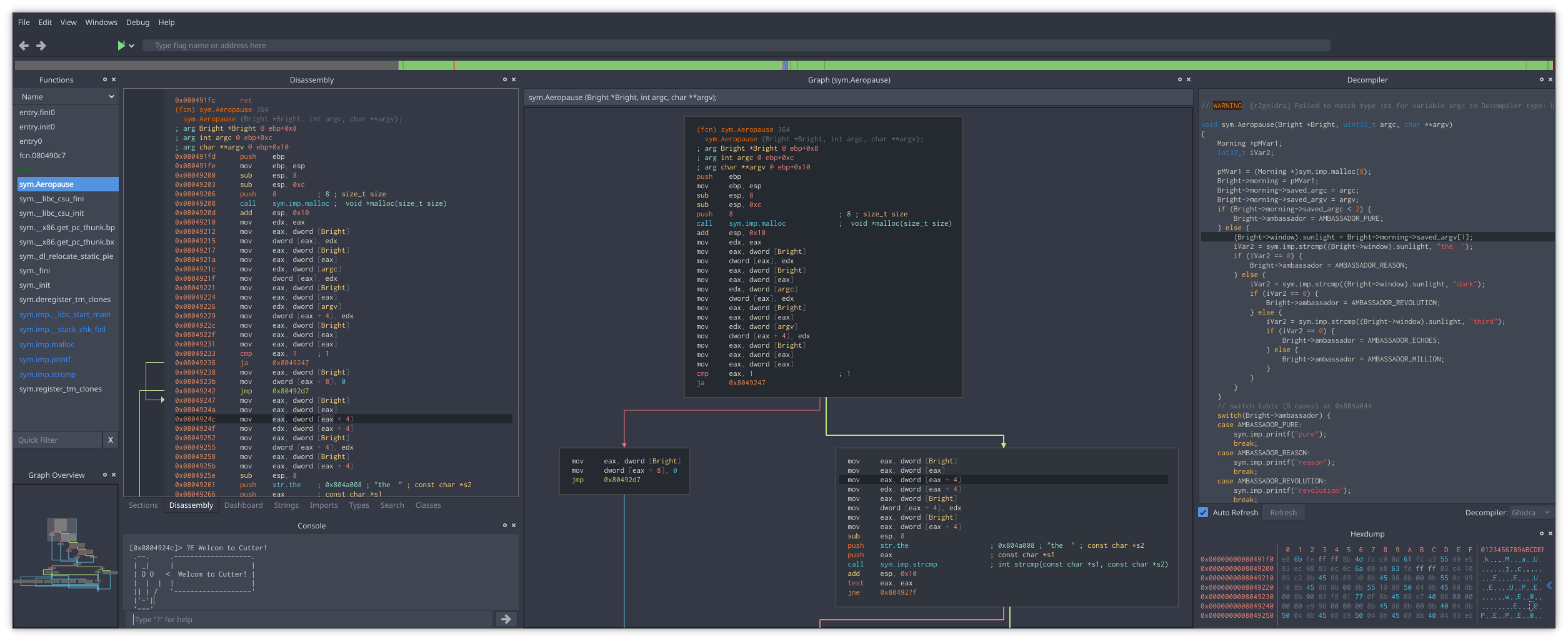
Learn more at cutter.re.
Getting Cutter
Download
Cutter release binaries for all major platforms (Linux, macOS, Windows) can be downloaded from GitHub Releases.
-
Linux: If your distribution provides it, check for
cutterpackage in your package manager (orcutter-re/rz-cutter). If not available there, we have setup repositories in OBS for some common distributions. Look at https://software.opensuse.org/package/cutter-re and follow the instructions there. Otherwise download the.AppImagefile from our release, make it executable and run as below or use AppImageLauncher.chmod +x Cutter*.AppImage; ./Cutter*.AppImage -
macOS: Download the
.dmgfile or use Homebrew Cask:brew install --cask cutter -
Windows: Download the
.ziparchive, or use either Chocolatey or Scoop:choco install cutterscoop bucket add extrasfollowed byscoop install cutter
Build from sources
To build Cutter from sources, please check the Building Docs.
Docker image
To deploy cutter using a pre-built Dockerfile, it's possible to use the provided configuration. The corresponding README.md file also contains instructions on how to get started using the docker image with minimal effort.
Documentation
User Guide
Contribution Guidelines
Developers Docs
Plugins
Cutter supports both Python and Native C++ plugins.
Our community has built many plugins and useful scripts for Cutter such as the native integration of Ghidra decompiler or the plugin to visualize DynamoRIO code coverage. You can find a list of cutter plugins linked below. Feel free to extend it with your own plugins and scripts for Cutter.
Getting Help
Please use the following channels to ask for help from Cutter developers and community:
- Telegram: https://t.me/cutter_re
- Mattermost: https://im.rizin.re
- IRC: #cutter on https://web.libera.chat/
- Twitter: @cutter_re
rea
morluto·TypeScript
用 AI Agent 做逆向工程,从应用行为分析一路深入到原生二进制,覆盖 Android、C++ 等多平台场景。
逆向工程+4逆向工程
449300+10486111krea-agents-6.8.02026-11-10 13:53 UTC

ghidra
NationalSecurityAgency·Java
NSA 开源的软件逆向工程框架,支持反汇编、反编译和二进制分析,可替代 IDA Pro 做恶意代码分析与漏洞研究。
逆向工程+4逆向工程
99290+84411kGhidra_12.2_build2026-11-10 11:31 UTC

gpt4free
xtekky·Python
聚合多家厂商语言模型的 Python 接口库,通过逆向方式免费调用 GPT、DeepSeek、Gemini 等模型,省去官方 API 费用。
逆向工程+4逆向工程
67023+313kv8.9.22026-11-03 02:49 UTC
librepods
librepods-org·Kotlin
让 AirPods 在 Android 和 Linux 上也能用的逆向工程工具,支持电量监控、入耳检测、助听器模式和对话感知等原生功能。
逆向工程+4逆向工程
30696+391.9kv1.0.42026-11-09 11:31 UTC