需 ComfyUI ≥ 0.37.0,旧版本节点会缺失或显示异常;模型文件要按表单独下载到 diffusion_models、text_encoders、vae、loras 等目录,加载器变红即缺文件;装完要重启 ComfyUI 并用 Ctrl+F5 刷新浏览器,否则节点可能不显示。
ComfyUI-MiniMaxH3-Director
seesee75-commitsGPL-3.0活跃维护在 ComfyUI 里给 MiniMax H3 视频模型加了一条时间轴编辑器,用分镜提示词、首尾关键帧、图/视频/音频参考和联合音频来编排镜头,还能实时预览采样、重拍和镜头串联。
A timeline editor for MiniMax H3 inside ComfyUI - storyboard prompts, first/last keyframes, image/video/audio references, joint audio, live sampling preview, retakes and shot chaining.
v1.0.1发布于 2026-11-03 07:43 UTC346star +2 / 7 天42fork同步于 2026-11-10 18:02 UTC
cd ComfyUI/custom_nodes
git clone --branch v1.0.1 https://github.com/seesee75-commits/ComfyUI-MiniMaxH3-Director
python -m pip install -r requirements.txt 硬件要求按 README 说明
README 说明在 16 GB 显存显卡上以 1280×704 加 Turbo 测试通过,显存更小的卡可用 5 秒渲染段和更小分辨率;模型、文本编码器和 VAE 约需 60 GB 磁盘空间。未说明 CPU 运行与具体 GPU 厂商型号。
在 ComfyUI 里用时间线逐镜头规划 MiniMax H3 视频,自动分段渲染并拼接成任意长度的带声成片
在 ComfyUI 里给 MiniMax H3 视频模型加了一条时间轴编辑器,用分镜提示词、首尾关键帧、图/视频/音频参考和联合音频来编排镜头,还能实时预览采样、重拍和镜头串联。
核心能力
- 按 H3 帧网格把长视频切成约十秒渲染段,逐段续接画面与声音
- 时间线为每个镜头单独配置文本、镜头运动、素材卡和台词
- 用图片卡保持角色一致,用音频卡配音或锁定歌曲
- 支持首尾帧、参考图、控制视频(姿态/边缘/深度)与局部重绘
- 内置分镜板与 H3 Guide 图文教程,可选本地或 API 模型写提示词
容易踩的坑
内容由模型根据 README 生成,可能不完整或不准确,以官方文档为准。看原文 README
- v1.0.11.0.1最新正式版2026-11-03 · 2026-11-03 07:43 UTC
- Example files are copied when you open an example, not on start (#35). Opening an example workflow copies the
h3-example-*files it uses into ComfyUI's input folder (a file already there is kept); nothing else lands there, and files you delete stay deleted until you open an example that needs them again. API users:POST /ng/example_media. - Nodes below a card no longer drift down (#37). A card's height can differ by a few pixels between two measurements (browser zoom, display scaling); every upward step pushed the nodes below again. Only growth beyond the largest height so far moves them now.
- Installs from the Manager without a GPU warning (#36). The package no longer declares
GPU :: NVIDIA CUDA: ComfyUI's install check compares that against "CUDA" or "CPU" and reported a conflict on every machine. The pack runs wherever ComfyUI runs MiniMax H3.
- Example files are copied when you open an example, not on start (#35). Opening an example workflow copies the
- v1.0.01.0.0 - H3 Director: videos of any length2026-10-26 · 2026-10-26 06:06 UTC
查看更新说明
The H3 Director plans a video of any length shot by shot and renders it with MiniMax H3 as render parts that continue into each other in picture and sound — a minute-long music video, a story with recurring characters and their voices, shots that start on your own pictures.
Coming from 0.3.x? Your workflows keep working: the timeline Director is still there as MiniMax H3 Director (Legacy). The new H3 Director sits next to it under MiniMax H3 → NG.
Highlights
- Studio in the node: prompt, look, shots on a timeline, audio lanes, a control lane, every setting under the gear.
- Cards for pictures, videos, sounds and notes; characters stay recognizable (References), voices and locked songs.
- Pictures output, Storyboard node with Qwen Image 2.1 drawing, Control videos (pose, canny, depth, inpaint).
- Nine example workflows in ComfyUI's Templates (search "H3 Director"), each with its example files and its chapter of the guide.
- H3 Guide node and GUIDE.md; SKILL.md so an AI agent can install the pack and help when something goes wrong.
- Technical report on planning, continuation and the measurements behind it:
docs/paper.
The example videos
The
wfN_*.mp4files below are what each example workflow made when it was opened from Templates and run through the interface, unchanged except for choosing the local model files. The guide was followed step by step, and what went wrong on the way was fixed before this release (see CHANGELOG).File Workflow Length Time on a 16 GB card wf1_text_to_video.mp4 1 Text to video 15 s — wf2_characters_and_voice.mp4 2 Characters and voice 15 s — wf3_music_video.mp4 3 Music video 30 s — wf4_shots_from_pictures.mp4 4 Shots from pictures 15 s, 768×1152 13 min wf6_storyboard.mp4 6 Storyboard 20 s 24 min wf7_control_video.mp4 7 Control video (pose) 10 s 35 min wf8_inpaint.mp4 8 Inpaint 10 s 42 min wf9_custom_sampling.mp4 9 Custom sampling 15 s 18 min Install
ComfyUI Manager: search "MiniMax H3 Director". Or download Source code (zip) below, unpack it into
ComfyUI/custom_nodes/, runpython -m pip install -r requirements.txtwith ComfyUI's Python and restart ComfyUI. Needs ComfyUI ≥ 0.37.0. Models: see the README; ComfyUI offers missing files when a workflow opens.Known limits
- Tested on one machine (RTX 5060 Ti 16 GB, Windows, ComfyUI 0.42); other GPUs and Linux/macOS are untested.
- Generated sound loses some brightness over many render parts; a locked song does not.
- A control video steers the movement, but the shot text wins where they disagree (in workflows 7 and 8 the figure keeps walking away when the person in the source turns back).
- Most measurements are single-seed.
Please report problems as issues with the console traceback and the workflow JSON.
- v1.0.0-beta.1v1.0.0-beta.1 - H3 Director: videos of any length (pre-release)pre-release2026-10-26 · 2026-10-26 05:59 UTC
查看更新说明
v1.0.0-beta.1 — H3 Director: videos of any length (pre-release)
This is a pre-release for testing. ComfyUI Manager and the Registry still install 0.3.2 (the Legacy timeline Director) until 1.0.0 is final.
The H3 Director plans a video of any length shot by shot and renders it with MiniMax H3 as render parts that continue into each other in picture and sound — a minute-long music video, a story with recurring characters and their voices, shots that start on your own pictures.
Highlights
- Studio in the node: prompt, look, shots on a timeline, audio lanes, a control lane, every setting under the gear.
- Cards for pictures, videos, sounds and notes; characters stay recognizable (References), voices and locked songs.
- Pictures output, Storyboard node with Qwen Image 2.1 drawing, Control videos (pose, canny, depth, inpaint).
- Nine example workflows in ComfyUI's Templates, each with its example files and its chapter of the guide.
- H3 Guide node and GUIDE.md; SKILL.md so an AI agent can install the pack and help.
- Technical report on planning, continuation and the measurements behind it:
docs/paper.
The example videos
The
wfN_*.mp4files below are what each example workflow made when it was opened from Templates and run through the interface, unchanged except for choosing the local model files. They are the test of this release: the guide was followed step by step, and what went wrong on the way was fixed (see CHANGELOG).File Workflow Length Time on a 16 GB card wf1_text_to_video.mp4 1 Text to video 15 s — wf2_characters_and_voice.mp4 2 Characters and voice 15 s — wf3_music_video.mp4 3 Music video 30 s — wf4_shots_from_pictures.mp4 4 Shots from pictures 15 s, 768×1152 13 min wf6_storyboard.mp4 6 Storyboard 20 s 24 min wf7_control_video.mp4 7 Control video (pose) 10 s 35 min wf8_inpaint.mp4 8 Inpaint 10 s 42 min wf9_custom_sampling.mp4 9 Custom sampling 15 s 18 min Install
Download Source code (zip) below, unpack it into
ComfyUI/custom_nodes/, runpython -m pip install -r requirements.txtwith ComfyUI's Python, restart ComfyUI. Needs ComfyUI ≥ 0.37.0. Models: see the README; ComfyUI offers missing files when a workflow opens.Known limits
- Tested on one machine (RTX 5060 Ti 16 GB, Windows, ComfyUI 0.42); other GPUs and Linux/macOS are untested.
- Generated sound loses some brightness over many render parts; a locked song does not.
- A control video steers the movement, but the shot text wins where they disagree (in workflows 7 and 8 the figure keeps walking away when the person in the source turns back).
- Most measurements are single-seed.
Please report problems as issues with the console traceback and the workflow JSON.
- v0.3.20.3.22026-10-01 · 2026-10-01 22:29 UTC
查看更新说明
A voice on the subject, not on the timeline (issue #10). Every subject slot has an Add voice button (Refs ON), or drop an audio file on the slot. That clip is sent to the model as an
<Audio N>reference tied to that subject:<Audio 1> is the voice-timbre reference for <Subject 1> (S1). <Audio 2> is the voice-timbre reference for <Subject 2> (S2).It is not on the timeline, so it is not bounded by the render window and takes no output time — two voice references and a background track no longer compete for one lane, and the render stays as short as you made it. It does not depend on the audio-track switch either: a voice on a subject is as deliberate as the subject's image. Voices go first in
<Audio N>order (slot order), then whatever sits on the timeline, inside H3's cap of three audio clips; a clip that does not fit is named. The timeline's audio clips and their Voice of menu work as before. A slot with no reference image cannot be a<Subject N>, so its voice goes out as a plain voice reference, which the tooltip says. Override Audio together with a reference video still wins (a reference video's soundtrack is numbered first), and it names the voice it set aside. The log warns when a voice file is under the 2 s the model card asks for. - v0.3.10.3.12026-10-01 · 2026-10-01 21:51 UTC
查看更新说明
@Brioch's pull request #18, carried over by hand: it had stopped merging after 0.2.3–0.3.0 touched the same planner and docs, so its behaviour was re-implemented on the current code and its tests re-written against it. Every idea below is theirs.
- A reference no longer spends output time. A reference is an input to the model, not content
in the video —
<Video k>and<Audio j>are never composited — but a clip had to overlap the render window to be sent at all, and adding one stretched the window to cover it. The model card wants each reference audio clip 10–15 s long, so three of them grew the output to 45 s: three times the longest video H3 can make. Neither reference track touches the output length now, and a clip is sent from wherever it sits; it lands after the last one, which for anything longer than the window is out in the shaded area, where a reference belongs. A 5 s render sends all three. Position still decides one thing, for audio only: whether the clip is also part of the muxed soundtrack — inside the window it is both, past it a reference only, which the clip's info panel says. A parked reference video is sent whole on its own trim instead of losing its head to a window start it has nothing to do with. A retake keeps the old rule. (lockclips are not references and still have to be in the window: a lock is a position in time.) - Every audio clip on the track plays its own file again. With two clips loaded both showed
up in the prompt and both drew their waveform, but only one could be heard: the editor stamped
the decoded buffer onto every clip that matched it, and a standalone clip has no blob URL to
match on, so the test was
undefined === undefinedfor the whole track. Only the preview was affected; what was sent to the model was always right. - A reference clip that cannot be read says which one. A missing file or a trim past the end of
the audio was dropped in silence — and because
<Audio N>is numbered before any file is opened, that label and every one after it then named a reference the model never got. The log now names the clip and its label. - Both per-type caps (3 audio, 3 video) name the clip they drop, like every other limit.
- Override Audio wins over the audio track outside the editor too: sent together, every
<Audio N>label would be one off (a reference video's soundtrack is numbered first). The clips set aside are named, and Override Audio warns when the video it wants the soundtrack from is parked past the window.
- A reference no longer spends output time. A reference is an input to the model, not content
in the video —
用户点评
登录用户的真实使用记录,可按版本和硬件筛选共 0 条
还没有人点评。第一个说出真实体验的人最有价值。
MiniMax H3 Director for ComfyUI
Videos of any length with MiniMax H3, planned shot by shot inside ComfyUI. Put your characters, voices, songs and pictures on cards, write the shots on a timeline, press Generate. The Director cuts the video into render parts of about ten seconds, renders them one after another and joins them into one video with sound — picture and sound continue across every join.




Coming from 0.3.x? Your workflows keep working: the timeline Director is still there as MiniMax H3 Director (Legacy). The new H3 Director sits next to it under MiniMax H3 → NG.
See it
Each clip was made by the example workflow with the same number — opened from ComfyUI's Templates, models chosen, Run pressed. Click a preview for the whole video with sound.
Longer videos made with the Director: 3 minutes, References · 1 minute, First / last frame.
What it does
- Any length. The planner splits the video into H3 render parts on H3's frame grid; each part continues the previous one in picture and sound. Long songs, one-minute stories and multi-shot scenes in one Run.
- Shots on a timeline. Every shot has its own text, camera, cards and spoken lines; audio lanes run across shots.
- Your characters and voices. Image cards keep a figure recognizable (References mode); Audio cards give it a voice or lock a song exactly so H3 animates to it.
- Shots from pictures. First / last frame mode starts or ends shots exactly on your pictures.
- Pictures instead of video. One picture per shot, from text and references.
- Storyboard. Lay out numbered panels with pictures, texts and Qwen Image 2.1 drawings, then send them to the Director.
- Control videos. Pose, edges, depth or an inpaint mask steer the picture through the official H3 ControlNet.
- Optional AI. A local model (Ollama, LM Studio) or an API writes shots, prompts and card descriptions on request.
- A guide inside ComfyUI. The H3 Guide node shows the illustrated guide next to every example workflow.
Requirements
- ComfyUI ≥ 0.37.0 (native loops; tested with 0.42).
- GPU: tested on a 16 GB card at 1280×704 with Turbo; smaller cards work with 5 s render parts and smaller sizes.
- Disk: about 60 GB for the H3 models, text encoder and VAEs.
Installation
-
ComfyUI Manager: search "MiniMax H3 Director" and install, or download Source code (zip) of v1.0.1 and unpack it into
ComfyUI/custom_nodes/ComfyUI-MiniMaxH3-Director— or clone the tag:cd ComfyUI/custom_nodes git clone --branch v1.0.1 https://github.com/seesee75-commits/ComfyUI-MiniMaxH3-Director -
Install the one dependency with ComfyUI's Python:
python -m pip install -r requirements.txt(OpenCV). -
Restart ComfyUI and reload the browser (Ctrl+F5).
The example files (pictures, a voice, a song, a walk video with its pose and mask) are copied into ComfyUI's input
folder when you open an example workflow that uses them, named h3-example-…, so it opens ready to run. Nothing is
copied on start; delete them when you no longer need them.
Models
Every workflow carries the download links of its models; ComfyUI offers missing files when the workflow opens. The Director lists every file it uses, found or missing, with its download under Settings → Models.
| What | File | Folder |
|---|---|---|
| H3 model: First / last frame | minimax_h3_fl2va_pruned_int8_convrot.safetensors | models/diffusion_models |
| H3 model: References | minimax_h3_ref2va_pruned_int8_convrot.safetensors | models/diffusion_models |
Text encoder (type minimax) | qwen3vl_32b_minimax_h3_nvfp4_awq.safetensors | models/text_encoders |
| Video VAE | minimax_h3_video_vae_fp16.safetensors | models/vae |
| Audio VAE | minimax_h3_audio_vae_fp32.safetensors | models/vae |
| Preview VAE | taeh3.safetensors | models/vae_approx |
| Turbo LoRA (First / last frame) | minimax_h3_fl2v_turbo_8step_v1.0_comfyui_bf16.safetensors | models/loras |
| Turbo LoRA (References) | minimax_h3_ref2v_turbo_4step_v0.1_comfyui_bf16.safetensors | models/loras |
Extra models for control videos, masks, storyboard drawing and lyrics timing are listed with their links in the guide, chapter 2.
Example workflows
Open them from ComfyUI's Templates (search "H3 Director"); each one opens with its guide chapter.
| Workflow | What it shows | |
|---|---|---|
| 1 | Text to video | three shots from text alone, with a spoken line |
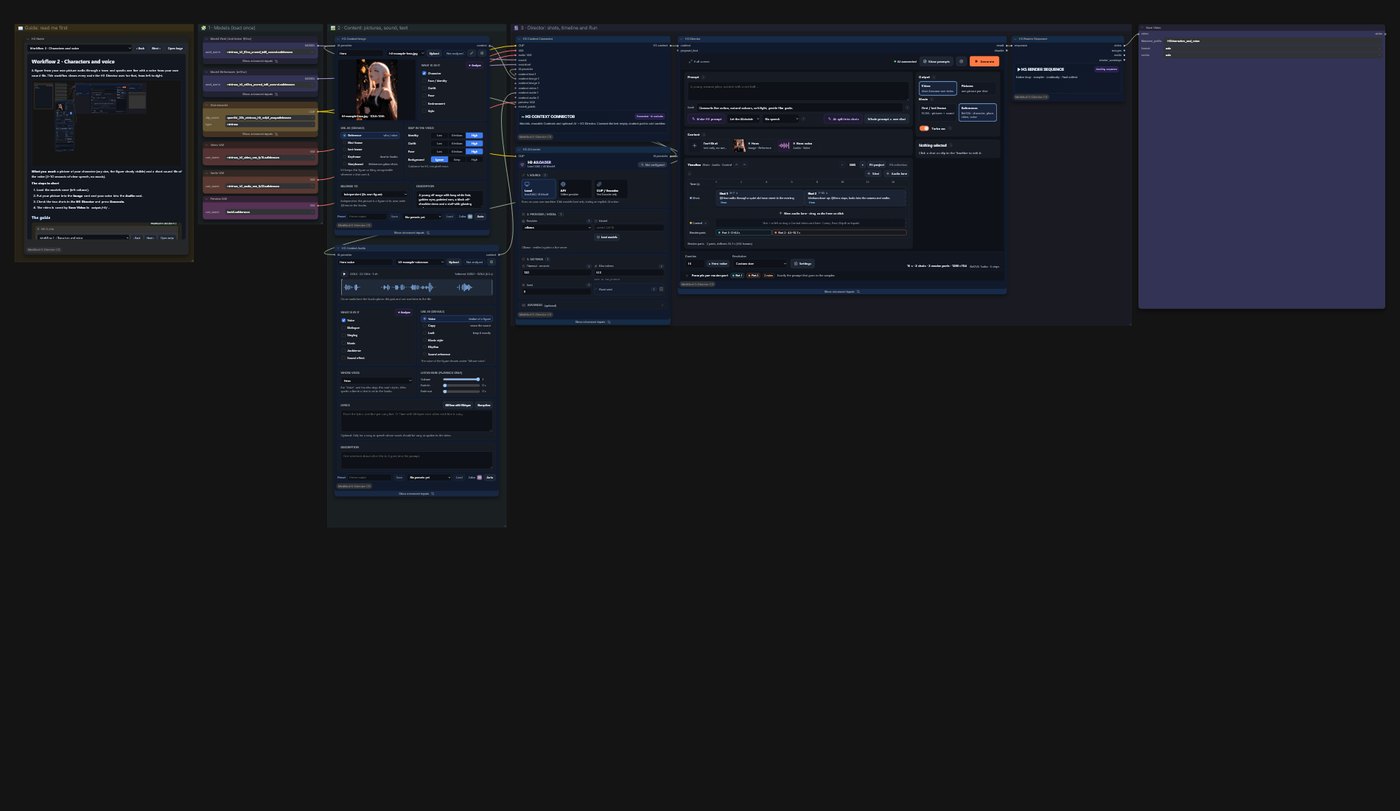
| 2 | Characters and voice | your character from a picture, speaking with a voice from a sound file |
| 3 | Music video | a singer to a locked song, lyrics timed with Whisper |
| 4 | Shots from pictures | every shot starts exactly on one of your pictures |
| 5 | Pictures | one picture per shot instead of a video |
| 6 | Storyboard | a storyboard sheet with Qwen-drawn panels, sent to the Director |
| 7 | Control video | your character moves like the person in another video (pose) |
| 8 | Inpaint | a person in footage replaced by your character |
| 9 | Custom sampling | the render loop with ComfyUI's own sampler nodes |

The guide
The whole guide — models, the Studio, cards, modes, sound, every setting, the AI, pictures, storyboard, control videos, tips — is in GUIDE.md (one file) and inside ComfyUI in the H3 Guide node (MiniMax H3 → NG).
Stuck? An AI agent (Claude, ChatGPT, …) can install the pack and help you: point it at SKILL.md — installation, models, the example workflows and a checklist of what goes wrong and how to fix it. How it works underneath — planning, continuation, the seam-aware collector, the per-part compiler and the measurements behind them — is in the technical report.
Legacy Director
The original timeline Director (one H3 run per Run, up to about 15 s) stays available as MiniMax H3 Director (Legacy) with its workflows; its documentation is in docs/legacy-director.md.
Troubleshooting
- Nodes missing or look broken: restart ComfyUI and reload the browser with Ctrl+F5.
- A loader is red: download the file (Models above) or choose your own file in the loader.
- Out of memory: Settings → Render part 5 s, the int8 video VAE, or Resolution Fast.
- More in the guide's Tips and problems.
Report bugs as an issue with the console traceback, the workflow JSON and the model files you used.
Credits
The legacy timeline editor is derived from LTX Director by
WhatDreamsCost and its CS fork by CGlide. The H3 Director,
planner, Studio, cards and storyboard are by seesee75. MiniMax H3 by
MiniMax, ComfyUI packaging by Comfy-Org; the taeh3
preview decoder by Kijai. The example pictures, song, voice and walk video are provided by the author for the examples.
License
GPL-3.0 — see LICENSE.
Open-Sora
hpcaitech·Python
开源视频生成模型,用高效架构和训练方案降低高质量视频制作门槛,让普通开发者也能训练和部署文生视频模型。
视频生成+4视频生成
29923+43.1kv1.32026-04-09 01:52 UTC

Wan2.1
Wan-Video·Python
开源的大规模视频生成模型,支持高质量文生视频,为 AIGC 视频创作提供可用的生成能力。
视频生成+4视频生成
17414+124.0k2026-03-05 09:38 UTC
FramePack
lllyasviel·Python
让视频扩散模型在普通显卡上也能跑起来,通过帧打包技术大幅降低显存占用,实现实用的长视频生成。
视频生成+4视频生成
17353+81.7kwindows2025-10-16 01:28 UTC
CogVideo
zai-org·Python
开源文生视频和图生视频模型,CogVideoX 支持从文本或图片生成视频,适合搭建视频生成推理服务。
视频生成+4视频生成
13192+61.4kv1.02025-11-04 11:19 UTC