预览不会自动打开,需手动执行命令或快捷键;PlantUML 需自备服务器或本地 .jar;Pandoc/PDF 导出依赖本地已安装的工具;把整个磁盘作为工作区会跳过笔记索引
vscode-markdown-preview-enhanced
shd101wyy活跃维护VS Code 里功能最全的 Markdown 预览扩展之一,支持数学公式、流程图、导出 PDF/HTML 等,让写文档和预览一步到位。
One of the "BEST" markdown preview extensions for Visual Studio Code
0.8.40发布于 2026-10-09 01:24 UTC2,116star +1 / 7 天273fork同步于 2026-11-08 14:51 UTC
在 VS Code 扩展市场安装 shd101wyy.markdown-preview-enhanced;打开 .md 后按 ctrl-k v(macOS 为 cmd-k v)打开侧边预览 硬件要求按 README 说明
README 未说明,作为 VS Code 扩展在本地运行,无需 GPU 或显存
VS Code 里的 Markdown 增强预览扩展,把数学公式、图表和导出都塞进编辑器
VS Code 里功能最全的 Markdown 预览扩展之一,支持数学公式、流程图、导出 PDF/HTML 等,让写文档和预览一步到位。
核心能力
- 预览与源码自动滚动同步
- 支持 KaTeX/MathJax 数学排版
- 渲染 Mermaid、PlantUML、Graphviz 等图表
- 用 code chunk 在文档内执行代码块
- 支持 Pandoc 转换与 PDF 导出
容易踩的坑
内容由模型根据 README 生成,可能不完整或不准确,以官方文档为准。看原文 README
- 0.8.40最新正式版2026-10-09 · 2026-10-09 01:24 UTC
Picked up from crossnote 0.9.42
The extension now pins crossnote 0.9.42.
- Non-ASCII (and spaced) relative image/link paths load again in HTML/PDF export,
Open in Browserandcrossnote serve— crossnote's path resolver fed markdown-it's already-percent-encoded link destinations (./图.png→./%E5%9B%BE.png) topathToFileURL, which encoded the%signs a second time, so every exported<img src>with non-ASCII characters in its relative path was a URL no browser resolves (ERR_FILE_NOT_FOUND, #2441 reported by @NarrowWoodBridge). The fix also repairs@import-ed images (the?cache-busterno longer becomes part of the file name, #2328 reported by @ahoy123), keeps#heading/#gh-dark-mode-onlyfragments working, and fixes base64 image embedding for such files. A file whose name contains a literal%xxsequence is now read the way a browser reads the link (a%20b.pngmeansa b.png), and notebook-root-relative destinations in relative renders (/img.pngwith relative paths) are written as URL paths (forward slashes,%/#/?/spaces/parentheses escaped, query and fragment preserved) instead of raw OS paths (crossnote#522 by @eneskemalergin). Together with this extension's #2443, images under folders whose name contains#or?now load in the preview as well. <picture>/srcsetimages follow the preview theme and load everywhere — GitHub-style light/dark markup (<source media="(prefers-color-scheme: dark)" srcset="…">) left the dark candidate resolving against the webview origin (broken image with no fallback — Chromium commits to the matched<source>and never falls back to the<img>, #2271 reported by @garysassano);srcseton<img>and<source>is now resolved exactly likesrc(one candidate at a time,1x/480wdescriptors kept — this also fixes Open in Browser and Chrome PDF/PNG export), and the matched variant follows the preview's rendered background rather than the system scheme, re-evaluated on theme change; other media queries and exported HTML keep standard browser behavior (crossnote#521 by @eneskemalergin).- Imports work again without an extension, from absolute paths and
file://URLs —@import "Caddyfile"now imports the file as written (shown as a code block, per the documented behaviour) instead of failing onCaddyfile.md, while@import "note"still findsnote.md(#2236 reported by @traits); a lonerenders as an ordinary image instead of being treated as a file import, and![]()now also acceptsdata:image/svg+xmlURIs — raw HTML<img src="data:image/svg+xml,…">already rendered, andjavascript:/data:text/htmllinks are still rejected (#2241 reported by @piknockyou); Windows drive paths, UNC paths (\\server\share\…) andfile:///…URLs are used as written again instead of being joined under the note's folder (#2349 reported by @suminosin)..jsimports keep their notebook-directory-only rule — an absolute orfile://.jsimport still emits no script — and afile://.cssimport is still linked by itsfile://URL, which the VS Code preview cannot load (.lesscompiles inline and works) (crossnote#523, crossnote#524 by @eneskemalergin). - **
```csvfenced blocks render as tables
- Non-ASCII (and spaced) relative image/link paths load again in HTML/PDF export,
- 0.8.392026-09-27 · 2026-09-27 03:49 UTC
查看更新说明
Picked up from crossnote 0.9.41
The extension now pins crossnote 0.9.41.
- WaveDrom diagram labels can no longer inject live SVG event handlers (XSS) — crossnote's earlier fix for WaveDrom code execution (vscode-mpe#2315) made the diagram source inert strict JSON, but valid-but-malicious data passed through: WaveDrom interprets an array-valued signal label as an SVG element description, so
name: ["image", {href: "missing.png", onerror: "alert(1)"}]had the client-side renderer build a real<image onerror=…>element — after sanitization had finished. Opening an exported HTML file executed the handler with code chunks disabled, and a hosted export ran the script in the site's origin; the preview was equally reachable. Reportedly a bypass of CVE-2026-11422; reported by @avrlab233 (GHSA-xgfr-fvr6-h5qv, fixed in shd101wyy/crossnote#518). The diagram data is now sanitized before any renderer sees it: event-handler attributes andjavascript:/vbscript:/data:text/htmlURLs are stripped, elements that could execute script, embed an HTML document, or retarget attributes via SMIL animation are dropped, and — because WaveDrom's markup library emits attribute values and label text without XML escaping — quotes and angle brackets in those positions are escaped, closing the attribute-value and text-injection breakouts found while reviewing the fix. Benign label elements (like["image", {href: "icon.png"}]) render exactly as before, an image-label href containing&now renders instead of failing XML parsing, and every render path (preview, presentation, HTML export) is covered.
- WaveDrom diagram labels can no longer inject live SVG event handlers (XSS) — crossnote's earlier fix for WaveDrom code execution (vscode-mpe#2315) made the diagram source inert strict JSON, but valid-but-malicious data passed through: WaveDrom interprets an array-valued signal label as an SVG element description, so
- 0.8.382026-09-26 · 2026-09-26 02:30 UTC
查看更新说明
Bug fixes
- Opening a second markdown document as the preview custom editor renders into its own tab — with markdown files associated to the preview custom editor (a hand-added
"*.md": "markdown-preview-enhanced"entry inworkbench.editorAssociations, or any other way of opening two files as custom editors) whilepreviewModeis the default Single Preview, the second document's tab stayed completely blank and the first tab, still open in the background, was re-titled and rendered the second document's content instead of its own. Custom editor panels are created and managed by VS Code, one per document — but the extension registered the first one as the shared "single preview" panel, so every subsequent open reused that panel and the render output for the new document was written into the old tab. Custom editor panels are now tracked as their own class, pinned to the document they were resolved for and never retargeted through the single-preview machinery: each tab renders its own file, live updates and refreshes reach the right panel, closing one tab no longer unregisters the others, and Close All Previews also closes them (#2433 reported by @Andrea79).
- Opening a second markdown document as the preview custom editor renders into its own tab — with markdown files associated to the preview custom editor (a hand-added
- 0.8.372026-09-25 · 2026-09-25 15:27 UTC
查看更新说明
Bug fixes
- A hand-added
"*.md": "markdown-preview-enhanced"editor association survives restarts — on every activation (and everymarkdown-preview-enhanced.*setting change) the extension syncedworkbench.editorAssociationstopreviewMode, and outside Previews Only that meant deleting every markdown pattern mapped tomarkdown-preview-enhancedfrom the user settings — including one the user had added by hand to open markdown files in the preview custom editor while keeping the regular preview mode, so the entry was gone after each VS Code restart (#2429 reported by @Andrea79, fixed in #2431 by @Waynting). The extension now remembers which patterns it wrote itself for Previews Only and only ever removes those; a manually added association is left alone, and one whose value the user has since changed is not touched either. Switching away from Previews Only still removes the associations that mode added. Setups that are in Previews Only when this version first starts are adopted, so switching away later still cleans up after the older version. - Note indexing refuses the home directory as a notebook root, and says so — the no-workspace fallback of
getWorkspaceFolderUriresolves a markdown file that lives outside every workspace folder to its parent directory, so a loose file opened directly from~made the note index (backlinks, tags, wikilink completion, the graph view — reachable without any preview open, e.g. by typing[/#) recursively stat and read everything under the home directory. On macOS that walks~/Library(Mail, Messages, iCloud data) — the #2376 filesystem scan, again, one directory lower. The home directory is now refused exactly like filesystem-root notebooks: the index build is skipped extension-side (so the refusal holds on the currently pinned crossnote, not only from crossnote 0.9.40 on) and a once-per-root notification explains why notes are not indexed, localized in all ten languages and offering Open Folder…. Unlike drive roots it also warns when no folder is open: a markdown file directly in~is rare, and the walk it would trigger is exactly what #2376 reported (reported by @prawnsalad; the runtime refusal and an oversized-walk warning land in crossnote via shd101wyy/crossnote#514).
Picked up from crossnote 0.9.40
The extension now pins crossnote 0.9.40.
- Local fonts and images in
.crossnote/style.lessload in the preview — a relativeurl(...)in the user stylesheet (@font-face { src: url('fonts/MyFont.woff2') },background-image: url(./bg.png)) never resolved: crossnote compiles style.less and inlines it into a<style>tag, so the browser resolved those references against the preview document instead of the stylesheet — inside a VS Code webview nothing exists there. Local fonts silently fell back to the default while remote ones (Google Fonts, anyhttps://URL) kept working, which made the failure look arbitrary (#2424 reported by @patriknusszer; fixed in shd101wyy/crossnote#513 by @Waynting). References are now resolved against style.less's own directory when it is loaded and rewritten into webview-loadable URLs for the preview (file://…in every export format). Absolute URLs,url(#fragment)paint servers, paths escaping the stylesheet's directory, and missing files are left untouched, and_Start Crossnote Server_keeps its own root-relativeurl(/files/…)references working (shd101wyy/crossnote#516). - **Mermaid and wavedrom CLI exports no longer run through a shell ([CVE-20
- A hand-added
- 0.8.362026-09-20 · 2026-09-20 13:32 UTC
查看更新说明
Features
-
Start/Stop crossnote Server in the context menus — right-clicking inside a markdown editor now offers Markdown Preview Enhanced: Start Crossnote Server next to the existing Open Preview to the Side and Open Graph View entries, and both context menus (editor and Explorer right-click on a
.md/.qmd/… file) also offer Markdown Preview Enhanced: Stop Crossnote Server while a server is actually running, so the wiki server is startable and stoppable in one click without the command palette. Both entries are hidden in the web extension (the server needs to spawn a process); Stop only appears while thecrossnoteServerRunningcontext key is set, so it adds no clutter when nothing runs. The product name is capitalized as Crossnote in the titles, consistent with the project branding, and the titles are localized in all ten supported languages. -
New commands "Open Current Source in Editor" and "Open Current Source in Editor and Close Preview" (#2420 by @HappyOnigiri) — Open the Markdown file the focused preview is rendering in a text editor, either alongside the preview or replacing it. This is the way back to the source after following links inside the preview, where the preview shows
subdir/c.mdbut the tab it was opened from still refers toa.md; it also gives"previewMode": "Previews Only"an exit into the editor, since the preview occupies the tab there. The editor opens in the preview's own editor group, and the preview tab is only closed once the editor has opened, so a failure to open leaves the preview in place. -
Build standalone Wiki command —
Markdown Preview Enhanced: Build standalone Wiki (HTML)packs the folders of the current workspace (or the folder of the loose file, when no workspace is open) into one standalone, read-only HTML file, with the same config resolution as the extension. A save dialog asks where to store the file (defaultindex.html) and the result can be opened right away; the preview context menu's Export ▸ Wiki item builds the same file for the whole workspace and shares the dialog. What the exported file actually is — since crossnote 0.9.37 a frozen, read-only copy of the whole serve app — is described in the crossnote section below. Desktop only. -
Start/Stop crossnote Server commands —
Markdown Preview Enhanced: Start Crossnote Serverruns thecrossnote serveCLI as a child process for the folders of the current workspace (multi-root workspaces serve every folder, exactly like the CLI), loading config the same way the extension does, and offers the server URL in an "Open in browser" notification.Markdown Preview Enhanced: Stop Crossnote Serverstops it. The port defaults to 3000 (auto-increments when busy) and is configurable viamarkdown-preview-enhanced.crossnoteServePort. The server runs in its own process because crossnote's serve server mutates process-global state (build directory, the file-URL mapper) that the extension host's own previews rely on. The CLI is bundled at build time from thecrossnote/cliexport; a build against a crossnote without it skips the bundle and the commands explain at runtime. Desktop only — the web extension cannot spawn processes.
Bug fixes
-
The wiki export progress notification closes when the file is saved —
Build standalone Wikishowed "Building the standalone wiki…" with a progress notification that stayed open after the "Standalone wiki saved (N notes)" message appeared, until the user dismissed that message: the progress task was awaiting the saved notification's promise, so the progress legitimately considered itself still running until then. The task now ends when the file is written, and the saved message (with its localized Open button) is shown after it. -
Start Crossnote Server no longer opens a blank page — the command's build directory (the
crossnote/folder populated by `gulp cop
-
用户点评
登录用户的真实使用记录,可按版本和硬件筛选共 0 条
还没有人点评。第一个说出真实体验的人最有价值。
English · 简体中文 · 繁體中文 · 日本語 · 한국어 · Français · Español · Português · Nederlands · Türkçe
Supporting this project
Markdown Preview Enhanced is an open source project released under the University of Illinois/NCSA Open Source License. Its ongoing development is made possible thanks to the support by these awesome backers. You can help make this project better by supporting us on GitHub Sponsors, PayPal, or 微信支付 Wechat Pay. Thank you!
Sponsors
These GitHub Sponsors and Backers help push this project forward 🎉.
Introduction
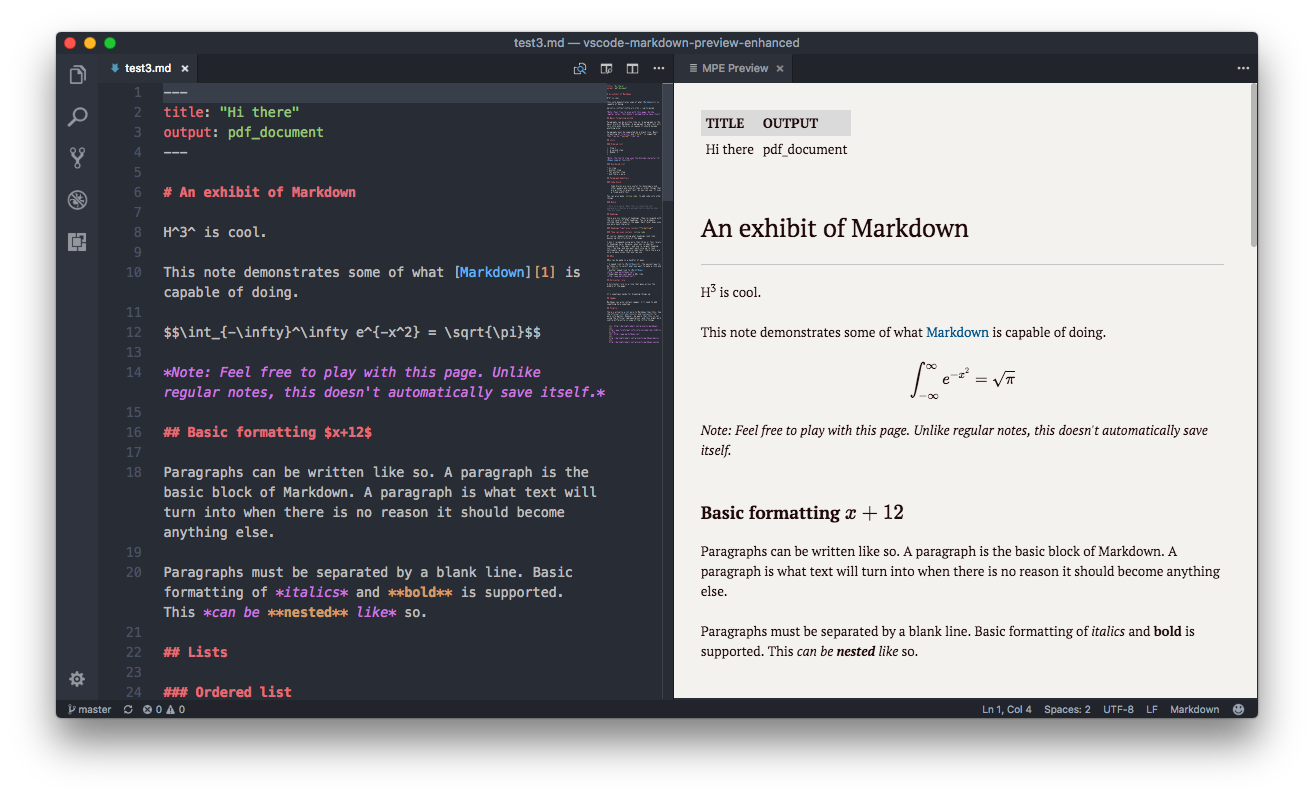
Markdown Preview Enhanced is an extension that provides you with many useful functionalities such as automatic scroll sync, math typesetting, mermaid, PlantUML, WebSequenceDiagrams, pandoc, PDF export, code chunk, presentation writer, etc. A lot of its ideas are inspired by Markdown Preview Plus and RStudio Markdown.
Feel free to ask questions, post issues, submit pull request, and request new features.
For more information about this project and how to use this extension, please check out our documentation ⬇︎
Getting Started
- Open a project folder with File → Open Folder… (opening an entire drive as the workspace skips note indexing — wikilinks, backlinks, tags and the graph — with a warning).
- Open a Markdown file (
.md). - Open the preview — it does not start on its own: right-click the editor and choose Markdown Preview Enhanced: Open Preview to the Side, press ctrl-k v (cmd-k v on macOS), or run Markdown Preview Enhanced: Open Preview from the Command Palette.
See the Keybindings table below for more shortcuts.
Privacy
This extension does not collect, transmit, or share your data with any external service. The core preview, scroll sync, math typesetting, diagram rendering, and all editor features run entirely on your local machine. No telemetry, no tracking, no phone-home.
- Markdown content — rendered locally; never leaves your machine.
- Math (KaTeX/MathJax) — typeset locally or via a CDN JavaScript library you configure (default: jsdelivr).
- Diagrams (Mermaid, Graphviz, Vega, WaveDrom, D2, TikZ) — rendered locally using bundled or system-installed tools.
- PlantUML — rendered via your own PlantUML server (
plantumlServerconfig) or a local.jarfile. Unless explicitly configured to usekroki.io, no diagram data is sent to any remote service. - Image upload (imgur, sm.ms, qiniu) — opt-in only. Requires you to manually trigger the upload and configure API credentials.
- Pandoc / ebook / PDF export — uses locally installed tools; no data is uploaded.
If you have any questions about data handling, please open an issue.
Documentation
To check out the documentation, visit
Contact me if you are willing to help translate the documentation :)
Keybindings
The cmd key for Windows is ctrl.
| Shortcuts | Functionality |
|---|---|
| cmd-k v or ctrl-k v | Open preview to the Side |
| cmd-shift-v or ctrl-shift-v | Open preview |
| cmd-k shift-l or ctrl-k shift-l | Open locked preview to the Side |
| cmd-k cmd-shift-l or ctrl-k ctrl-shift-l | Toggle preview lock |
| ctrl-shift-s | Sync preview / Sync source |
| shift-enter | Run Code Chunk |
| ctrl-shift-enter | Run all Code Chunks |
| cmd-= or cmd-shift-= | Preview zoom in |
| cmd-- or cmd-shift-_ | Preview zoom out |
| cmd-0 | Preview reset zoom |
| esc | Toggle sidebar TOC |
Changelog
Please check the Releases page of this project.
License
markitdown
microsoft·Python
把 PDF、Office 文档等各类文件转成 Markdown 的 Python 工具,方便喂给 LLM 或做文档处理。
文档转换+4Markdown 编辑器
194805+57415kv0.1.92026-11-07 00:14 UTC
memos
usememos·Go
开源可自托管的轻量笔记应用,把日常想法按时间线整理,数据完全归自己所有,可自由选择私密或分享。
自托管笔记+4Markdown 编辑器
64385+574.9k26.11.02026-11-10 14:41 UTC

marktext
marktext·TypeScript
一款简洁优雅的跨平台 Markdown 编辑器,支持实时预览、专注模式和打字机模式,适合日常写作与文档编辑。
Markdown 编辑器+3Markdown 编辑器
63834+1544.7kv0.23.02026-11-10 07:55 UTC

rich
Textualize·Python
Python 终端富文本渲染库,能在命令行里输出彩色文字、表格、进度条、Markdown 和语法高亮,让终端界面更好看、更好读。
终端渲染+4Markdown 编辑器
57784+432.5kv15.0.02026-11-07 11:26 UTC