项目级配置需在根目录放 .bladeformatterrc.json 或 .bladeformatterrc,否则只走编辑器设置;排除文件要另建 .bladeignore,使用 gitignore 语法;默认开启 PHP 语法检查,可用 noPhpSyntaxCheck 关闭
在 VSCode 扩展市场搜索并安装 shufo.vscode-blade-formatter;开发调试:npm install && npm run watch 硬件要求按 README 说明
README 未说明,作为 VSCode 扩展在本地编辑器进程内运行,无 GPU 或显存要求
VSCode 里的 Blade 模板格式化插件,自动整理 Laravel 视图缩进与空格
在 VSCode 里一键格式化 Laravel Blade 模板文件,统一缩进和排版,省去手动整理模板代码的麻烦。
核心能力
- 自动缩进 Blade 指令内部的标记
- 自动为 Blade 模板标记补齐空格
- 支持 PHP 8 空安全运算符与命名参数
- 支持 PSR-2 风格格式化指令内代码
- 按 tailwind.config.js 自动排序 Tailwind 类名
容易踩的坑
内容由模型根据 README 生成,可能不完整或不准确,以官方文档为准。看原文 README
- v0.26.4最新正式版2026-10-25 · 2026-10-25 12:33 UTC
0.26.4 (2026-10-25)
Miscellaneous
- 🤖 add dotenv to dev dependencies (e0de760)
- 🤖 bump @vscode/vsce to v4 (cda41ed)
- 🤖 bump action/checkout to v7 (ba58dd5)
- 🤖 bump action/setup-node to v7 (c3b84a2)
- 🤖 bump blade-formatter to 1.44.6 (4224a32)
- 🤖 bump mocha to v12.x (f1ea37c)
- 🤖 bump test-electron to 3.1.0 (cc4de7f)
- 🤖 change vscodeignore pattern for esbuild (0269fa0)
- 🤖 migrate from webpack to esbuild (da1a387)
- 🤖 migrate from yarn to npm (5bfcd35)
- 🤖 remove unnecessary webpack dependencies (a94b52b)
- 🤖 remove unnecessary webpack-node-externals (979978e)
- 🤖 update biome config to v2 (3b7f05f)
- deps: update actions/labeler action to v7 (d962c63)
- deps: update actions/stale action to v11 (0d9f8c8)
- deps: update dependency sponsorkit to v19 (3ca6ff6)
- deps: update endbug/add-and-commit action to v11 (d86e84f)
- v0.26.32026-03-25 · 2026-03-25 10:33 UTC
查看更新说明
0.26.3 (2026-03-25)
Fixes
- package.json & yarn.lock to reduce vulnerabilities (b01055d)
Miscellaneous
- 🤖 bump blade-formatter to 1.44.4 (8f259ba)
- deps: bump flatted from 3.3.3 to 3.4.2 (32c689c)
- deps: bump lodash from 4.17.21 to 4.17.23 (3a4f4ad)
- deps: bump undici from 7.13.0 to 7.24.1 (2b2970f)
- deps: update actions/cache action to v5 (6ac37f5)
- deps: update actions/checkout action to v6 (a7a3541)
- deps: update actions/labeler action to v6 (784a8d0)
- deps: update actions/setup-node action to v6 (efc6750)
- deps: update actions/stale action to v10 (6766b85)
- deps: update all minor update of dev dependencies (fc7894f)
- deps: update dependency ajv to v8.18.0 [security] (fb91c14)
- deps: update dependency webpack to v5.104.1 [security] (1196bbd)
- deps: update github/codeql-action action to v4 (626e5e7)
- v0.26.22025-08-11 · 2025-08-11 09:55 UTC
查看更新说明
0.26.2 (2025-08-11)
Miscellaneous
- v0.26.12025-07-18 · 2025-07-18 21:05 UTC
- v0.26.02025-07-18 · 2025-07-18 20:59 UTC
查看更新说明
用户点评
登录用户的真实使用记录,可按版本和硬件筛选共 0 条
还没有人点评。第一个说出真实体验的人最有价值。

vscode-blade-formatter
An opinionated Blade file formatter for VSCode. Marketplace page is here.
You can also format programmatically with the same syntax using the blade-formatter that this extension relies on.
Features
- Automatically indent markup inside directives
- Automatically add spacing to blade template markers
- PHP 8 support (null safe operator, named arguments) 🐘
- PSR-2 support (format inside directives)
- Automatically sort Tailwind CSS classes with respect of
tailwind.config.js
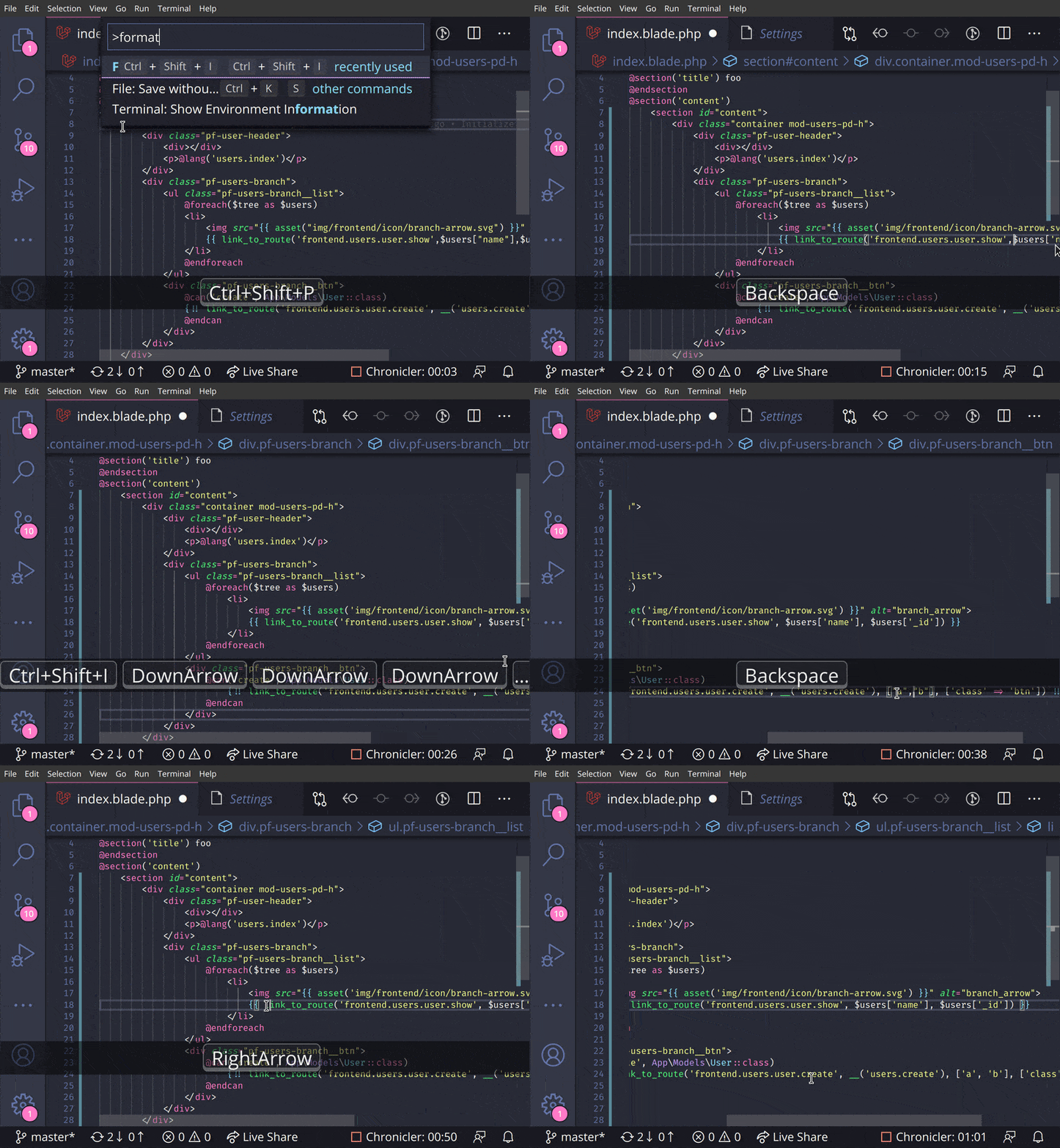
Screencast
Extension Settings
| setting | description | default |
|---|---|---|
Blade Formatter: format Enabled | Whether it enables or not | true |
Blade Formatter: format Indent Size | An indent size | 4 |
Blade Formatter: format Wrap Line Length | The length of line wrap size | 120 |
Blade Formatter: format Wrap Attributes | The way to wrap attributes. [auto|force|force-aligned|force-expand-multiline|aligned-multiple|preserve|preserve-aligned] | auto |
Blade Formatter: format Wrap Attributes Min Attrs | Minimum number of html tag attributes for force wrap attribute options. Wrap the first attribute only if force-expand-multiline is specified in wrap attributes | 2 |
Blade Formatter: format Sort Tailwind Css Classes | Sort Tailwind CSS classes automatically | false |
Blade Formatter: format Sort HTML Attributes | Sort HTML Attributes in the specified order. [none | alphabetical | code-guide | idiomatic | vuejs] | none |
Blade Formatter: format Indent Inner Html | Indent <head> and <body> sections in html. | false |
Blade Formatter: format use Tabs | Use tab as indentation character | false |
Blade Formatter: format Custom Html Attributes Order | Comma separated custom HTML attributes order. e.g. id, data-.+, class, name. To enable this you must specify sort html attributes option as custom. You can use regex for attribute names. | none |
Blade Formatter: format No Multiple Empty Lines | Collapses multiple blank lines into a single blank line. | false |
Blade Formatter: format No PHP Syntax Check | Disable PHP Syntax check. Enabling this will suppress syntax error reporing. | "" |
Blade Formatter: format No Single Quote | Use double quotes instead of single quotes for php expression. | false |
Blade Formatter: format No Trailing Comma Php | If set to true, no trailing commas are printed for php expression. | false |
Blade Formatter: format Component Prefix | Specify custom prefixes for component names separated by comma. e.g. x-,livewire. This changes the format rules applied to custom components e.g. preserve style in attributes. | x-,livewire |
Blade Formatter: format PHP Version | A php version using for syntax compatibility. | 8.4 |
Blade Formatter: Dont Show New Version Message | If set to 'true', the new version message won't be shown anymore. | false |
Configuration file: .bladeformatterrc.json or .bladeformatterrc
To configure settings per project, put .bladeformatterrc.json or .bladeformatterrc to your project root will vscode-blade-formatter treat it as setting files.
Configuration file will like below:
{
    "indentSize": 4,
    "wrapAttributes": "auto",
    "wrapAttributesMinAttrs": 2,
    "wrapLineLength": 120,
    "endWithNewLine": true,
    "noMultipleEmptyLines": false,
    "useTabs": false,
    "sortTailwindcssClasses": true,
    "sortHtmlAttributes": "none",
    "noPhpSyntaxCheck": false,
    "noSingleQuote": false,
    "noTrailingCommaPhp": false,
    "componentPrefix": ["x-", "livewire:"],
    "phpVersion": "8.4"
}
Ignoring Files: .bladeignore
To exclude files from formatting, create a .bladeignore file in the root of your project. .bladeignore uses gitignore syntax
# Ignore email templates
resources/views/email/**
Disabling format in file
To disable formatting in your file, you can use blade comments in the following format:
{{-- blade-formatter-disable --}}
    {{ $foo }}
    {{ $bar }}
{{-- blade-formatter-enable --}}
To disable formatting on a specific line, you can use comment in the following format:
{{-- blade-formatter-disable-next-line --}}
    {{ $foo }}
To disable formatting for an entire file, put a {{-- blade-formatter-disable --}} comment at the beginning of the file:
{{-- blade-formatter-disable --}}

{{ $foo }}
TODO
- Add more option for HTML formatting rules
- Add option for PHP formatting rules
- Automate package publishing flow
- Integration test
Release Notes
see CHANGELOG.md
Related Projects
- blade-formatter - CLI blade formatter this extension relies on
- prettier-plugin-blade - Prettier plugin for Blade
- coc-blade - coc.nvim Extension by @yaegassy
Contributing
- Fork it
- Create your feature branch (
git checkout -b my-new-feature) - Commit your changes (
git commit -am 'Add some feature') - Push to the branch (
git push origin my-new-feature) - Create new Pull Request
Development
$ npm install
$ cp .env.example .env # set your app insight key
$ npm run watch # watch changes
Testing
$ npm install
$ cp .env.example .env # set your app insight key
$ npm run compile
$ npm run test
$ npm run test:e2e
Sponsors

Contributors
LICENSE
MIT
Data and telemetry
This extension collects usage data and sends it to Azure Application Insight to improve extension. This extension respects the telemetry.enableTelemetry setting.
To opt out, please set the telemetry.enableTelemetry setting to false. Learn more in FAQ.
vscode
microsoft·TypeScript
微软开源的跨平台代码编辑器,基于 Electron 和 TypeScript 构建,支持插件扩展、调试和 Git 集成,适合日常开发写代码。
代码编辑器+4编辑器 / IDE
195271+18744k1.145.22026-11-10 23:17 UTC
neovim
neovim·Vim Script
Vim 的分支版本,用 Lua 做配置和插件开发,内置 LSP 与异步 API,让终端编辑器更好扩展、更好用。
文本编辑器+4编辑器 / IDE
103562+1007.4kv0.12.62026-11-10 22:02 UTC
zed
zed-industries·Rust
用 Rust 打造的高性能多人协作代码编辑器,由 Atom 和 Tree-sitter 作者开发,主打低延迟编辑与实时协同编码。
代码编辑器+4编辑器 / IDE
94676+82412kv1.27.02026-11-10 23:05 UTC

AFFiNE
toeverything·TypeScript
把文档、白板、表格融为一体的开源知识库,可离线使用、支持多人实时协作,是 Notion 和 Miro 的替代方案。
知识库+4编辑器 / IDE
74427+1405.5kv2026.11.9-canary.9072026-11-10 18:08 UTC