需确保 IDE 支持 JCEF,否则编辑器无法正常显示;无需卸载默认 Markdown 插件,本插件编辑器显示在默认编辑器之后
markdown-editor
shuzijunApache-2.0活跃维护IntelliJ IDEA 插件,提供所见即所得 Markdown 编辑体验,写文档时不用来回切换预览窗口,直接在 IDE 里排版和阅读。
IntelliJ Platform A full-featured WYSIWYG editor for markdown
v2.0.5发布于 2023-03-19 16:11 UTC213star +1 / 7 天46fork同步于 2026-11-10 18:04 UTC
安装插件后打开 .md 文件,在编辑器底部选择 Markdown Editor 硬件要求按 README 说明
README 未说明
IntelliJ 平台的 Markdown 所见即所得编辑器插件,支持三种编辑模式
IntelliJ IDEA 插件,提供所见即所得 Markdown 编辑体验,写文档时不用来回切换预览窗口,直接在 IDE 里排版和阅读。
核心能力
- 提供所见即所得、即时渲染、分屏三种编辑模式
- 支持大纲、数学公式、思维导图、流程图、甘特图等
- 支持图片粘贴、上传或拖拽快速插入
- 可直接用 IDE 打开文件,与默认 Markdown 插件共存
容易踩的坑
内容由模型根据 README 生成,可能不完整或不准确,以官方文档为准。看原文 README
- v2.0.5最新正式版2023-03-19 · 2023-03-19 16:11 UTC
- v2.0.42023-01-16 · 2023-01-16 11:37 UTC
- v2.0.22022-09-05 · 2022-09-05 09:44 UTC
查看更新说明
- v2.0.12022-08-06 · 2022-08-06 15:40 UTC
查看更新说明
Added
Changed
- Upgrade vditor to
3.8.17
Fixed
Removed
- Upgrade vditor to
- v2.0.02022-05-15 · 2022-05-15 10:37 UTC
查看更新说明
- Upgrade vditor to
3.8.14 - Modify upload file directory selection and overwrite reminder. fix #43
- Modify export file directory selection and overwrite reminder.
- Modify compatible to version 221
- Upgrade vditor to
用户点评
登录用户的真实使用记录,可按版本和硬件筛选共 0 条
还没有人点评。第一个说出真实体验的人最有价值。
markdown-editor
IntelliJ Platform A full-featured WYSIWYG editor for markdown
- English Document
- 中文文档
- Useful Links
Features
- Support three editing modes: WYSIWYG, Instant Rendering and Split View
- Support outline, mathematical formulas, mind maps, charts, flowcharts, Gantt charts, timing charts, heading anchors, code highlighting, graphviz rendering.
- Support picture paste, file upload or drag and insert quickly.
- Support using IDE to open files quickly
- More function reference vditor features
Introduction
- After installing the plugin, open the .md file,select Markdown Editor at the bottom of the editor.
- There is no need to uninstall the default markdown plugin. The editor of the current plugin appears after the default editor.
- Ensure that the IDE supports JCEF.
Demo
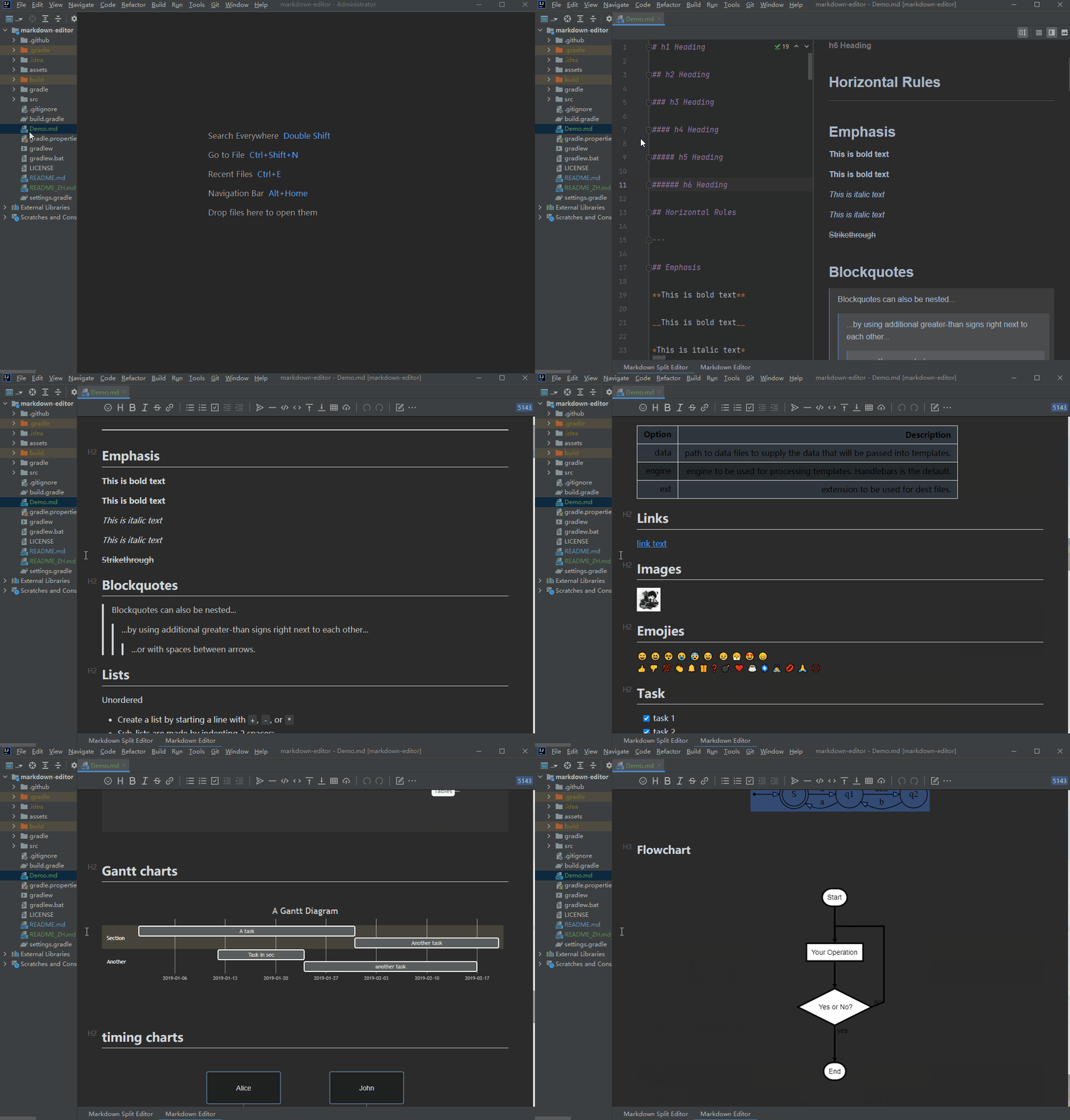
Acknowledgement
markitdown
microsoft·Python
把 PDF、Office 文档等各类文件转成 Markdown 的 Python 工具,方便喂给 LLM 或做文档处理。
文档转换+4Markdown 编辑器
194764+53315kv0.1.92026-11-07 00:14 UTC
memos
usememos·Go
开源可自托管的轻量笔记应用,把日常想法按时间线整理,数据完全归自己所有,可自由选择私密或分享。
自托管笔记+4Markdown 编辑器
64382+544.9k26.11.02026-11-10 14:41 UTC

marktext
marktext·TypeScript
一款简洁优雅的跨平台 Markdown 编辑器,支持实时预览、专注模式和打字机模式,适合日常写作与文档编辑。
Markdown 编辑器+3Markdown 编辑器
63830+1504.7kv0.23.02026-11-10 07:55 UTC

rich
Textualize·Python
Python 终端富文本渲染库,能在命令行里输出彩色文字、表格、进度条、Markdown 和语法高亮,让终端界面更好看、更好读。
终端渲染+4Markdown 编辑器
57777+362.5kv15.0.02026-11-07 11:26 UTC