需要本机已有登录状态的 Chrome,否则无法复用社交身份;播客以外的平台操作依赖浏览器后端,需确认浏览器协议兼容性;CLI 安装脚本仅给出 macOS 版本,Windows 需用桌面安装包。

socai
socai-ioApache-2.0活跃维护用 Rust 打造的浏览器智能体,能真正理解 Instagram、LinkedIn 等社交平台,快速精准地完成深度调研与自动化操作。
Agent that actually understands social platforms. Fast. Precise. Deep.
v0.6.18发布于 2026-11-08 05:05 UTC256star31fork同步于 2026-11-11 00:01 UTC
curl -fsSL https://socai-downloads.oss-cn-hangzhou.aliyuncs.com/releases/latest/install.sh | sh
socai integrate install all 硬件要求按 README 说明
README 未说明显存或 GPU 要求;依赖本机已登录的 Chrome 浏览器运行,播客功能无需浏览器或登录。
让 AI Agent 真正读懂社交平台,复用已登录 Chrome 像人一样搜索、读帖、抓评论
用 Rust 打造的浏览器智能体,能真正理解 Instagram、LinkedIn 等社交平台,快速精准地完成深度调研与自动化操作。
核心能力
- 为每个平台构建深度本体,理解实体、状态与流程
- 复用已登录 Chrome 会话,保留账号社交状态不被封
- 支持搜索、开帖、展开评论、读主页、OCR 图片、转写视频
- 覆盖小红书、X、抖音、TikTok、Instagram、LinkedIn 等平台
- 提供 CLI 并可接入 Codex、Claude Code、Cursor 等 Agent 宿主
容易踩的坑
内容由模型根据 README 生成,可能不完整或不准确,以官方文档为准。看原文 README
- v0.6.18socai 0.6.18最新正式版2026-11-08 · 2026-11-08 05:05 UTC
downloads
China mirror:
GitHub archive:
- universal mac dmg — supports Apple Silicon and Intel Macs.
- windows app installer (.exe) — desktop app for Windows 10/11 (x64).
- macOS CLI installer — one-command macOS CLI install.
- universal mac CLI tarball — standalone
socaiCLI. - macOS CLI checksum
- Windows CLI installer — one-command Windows CLI install.
- Windows CLI zip — standalone
socai.exeCLI. - Windows CLI checksum
The macOS app build is signed and notarized. The Windows app installer is not yet code-signed, so SmartScreen may warn on first run — choose "More info" then "Run anyway".
changes
What's Changed
- fix(xhs): preserve comment continuation and image-only replies by @Asksocai in https://github.com/socai-io/socai/pull/472
- fix(xhs): keep complete account previews concise and scope observed counts by @Asksocai in https://github.com/socai-io/socai/pull/473
- feat(desktop): support Excel and CSV chat attachments by @IRONICBo in https://github.com/socai-io/socai/pull/477
Full Changelog: https://github.com/socai-io/socai/compare/v0.6.17...v0.6.18
- v0.6.17socai 0.6.172026-11-06 · 2026-11-06 16:30 UTC
查看更新说明
downloads
China mirror:
GitHub archive:
- universal mac dmg — supports Apple Silicon and Intel Macs.
- windows app installer (.exe) — desktop app for Windows 10/11 (x64).
- macOS CLI installer — one-command macOS CLI install.
- universal mac CLI tarball — standalone
socaiCLI. - macOS CLI checksum
- Windows CLI installer — one-command Windows CLI install.
- Windows CLI zip — standalone
socai.exeCLI. - Windows CLI checksum
The macOS app build is signed and notarized. The Windows app installer is not yet code-signed, so SmartScreen may warn on first run — choose "More info" then "Run anyway".
changes
What's Changed
- fix(release): preserve the public release author identity by @IRONICBo in https://github.com/socai-io/socai/pull/471
Full Changelog: https://github.com/socai-io/socai/compare/v0.6.16...v0.6.17
Desktop file attachments
This full release includes the attachment support introduced in the v0.6.16 manual-install preview (PR #470):
- Attach multiple Word (.docx), text-bearing PDF and PNG/JPEG/WebP files from the native chat composer, up to 10 files per message and 20 MiB per file.
- Show original filenames and attachment cards, remove draft attachments, reopen saved conversation attachments and save unchanged originals.
- Read Word body text/tables and PDF text locally. Large images use a smaller reading copy while preserving the original download.
- The default Socai Pro service endpoint is
https://agentcn-api.socai.io, currently served from Singapore. The two legacy API hostnames also route to Singapore.
Verification and limitations
The macOS attachment feature was exercised in the native UI before this packaging release: Word/PDF/image transport in one message, original-file downloads with matching SHA-256, reopening history after an app restart, and a Word/PDF follow-up answer completed. The three file formats were selected in separate picker openings; simultaneous selection was separately exercised with two PNG files. This release workflow changes packaging and version metadata, not the attachment behavior.
The managed model still returned
Unsupported Imagein combined image analysis. Image understanding is not represented as fixed. Scanned PDFs, Word embedded-image OCR, and detailed layout understanding are not included. Windows package installation checks are not end-user attachment acceptance.The database route is separate from the desktop API route: Singapore's backend still depends on a Hangzhou RDS tunnel until the separately tracked TLS/direct-connection cutover has been completed.
- v0.6.16v0.6.16 — Desktop attachments previewpre-release2026-11-06 · 2026-11-06 15:27 UTC
查看更新说明
Desktop v0.6.16 — file attachments (manual-install preview)
Downloads
This is not the same full release format as v0.6.15. It contains a manually installed Mac preview, not the notarized DMG, Windows installer, signed automatic updater or CLI release set. The website's stable download and automatic updater intentionally remain on v0.6.15. Use the version-specific links above for this preview. The China ZIP was fully downloaded and its SHA-256 matches the GitHub archive.
Attach Word (.docx), PDF and images directly from the desktop chat composer. Select several files in one native picker, see their original names and type icons, remove a draft attachment, and ask a short question about the files. Saved conversations keep their attachment cards; use the download action to save an unchanged original.
Scope
- Up to 10 attachments per message, 20 MiB per file.
- Word body text and tables, text-bearing PDFs, PNG/JPEG/WebP images.
- Large images use a smaller reading copy; originals remain unchanged.
- Image-only/scanned PDFs require uploading the scanned pages as images. Word embedded-image OCR and layout analysis are not included.
Installation and update channel
Download
socai-macos-universal.zip, unzip it, and opensocai.app. This is a manually built macOS universal preview for Apple Silicon and Intel, not a notarized automatic update. The package uses ad-hoc code signing, not Developer ID signing or Apple notarization. macOS may prevent opening it under the system's security policy; it is not represented as a notarized installer. Its SHA-256 checksum is supplied alongside the ZIP. DMG creation failed locally withResource busy, so no DMG is included.The existing signed desktop updater and China OSS
latestaliases remain unchanged. A new Windows installer is not included; the existing Windows binary has not been renamed or republished as v0.6.16. GitHub Actions was not used.Actual desktop verification
- Selected real Word, PDF and image files in the native app and sent all three in one message using the default short prompt. The three file types were selected in separate picker openings; simultaneous multi-selection was separately observed with two PNG files.
- All three
read_filecalls completed: Word body text, extracted PDF text, and image bytes. - Saved all three originals from their conversation cards through native Save dialogs. Every downloaded file matched its input SHA-256.
- Quit the ARM build, launched the universal app, and reopened the conversation from history. All three original filenames and save controls remained available.
- In the universal app, a short follow-up asking to summarize Word and PDF without browsing completed successfully using local files. This does not count as image-analysis acceptance.
- Frontend build and 18 regression checks passed; both macOS architectures compiled; universal code-signature integrity and ZIP integrity checks passed. GitHub Actions was not used. Windows and Intel runtime acceptance were not performed.
Known issue: managed image interpretation
The current managed model returned
Unsupported Imageeven though the image was uploaded and delivered successfully. It repeatedly attempted other reading methods and then attempted to browse a link from the image. That acceptance task was cancelled. End-to-end combined Word/PDF/image analysis is not marked passed. Image interpretation and unnecessary browsing remain separate follow-up issues; this preview verifies the attachment transport, storage, reopening and original-download path only. It do - v0.6.15socai 0.6.152026-11-02 · 2026-11-02 13:48 UTC
查看更新说明
downloads
China mirror:
GitHub archive:
- universal mac dmg — supports Apple Silicon and Intel Macs.
- windows app installer (.exe) — desktop app for Windows 10/11 (x64).
- macOS CLI installer — one-command macOS CLI install.
- universal mac CLI tarball — standalone
socaiCLI. - macOS CLI checksum
- Windows CLI installer — one-command Windows CLI install.
- Windows CLI zip — standalone
socai.exeCLI. - Windows CLI checksum
The macOS app build is signed and notarized. The Windows app installer is not yet code-signed, so SmartScreen may warn on first run — choose "More info" then "Run anyway".
changes
Full Changelog: https://github.com/socai-io/socai/compare/v0.6.14...v0.6.15
- v0.6.14socai 0.6.142026-11-02 · 2026-11-02 10:41 UTC
查看更新说明
downloads
China mirror:
GitHub archive:
- universal mac dmg — supports Apple Silicon and Intel Macs.
- windows app installer (.exe) — desktop app for Windows 10/11 (x64).
- macOS CLI installer — one-command macOS CLI install.
- universal mac CLI tarball — standalone
socaiCLI. - macOS CLI checksum
- Windows CLI installer — one-command Windows CLI install.
- Windows CLI zip — standalone
socai.exeCLI. - Windows CLI checksum
The macOS app build is signed and notarized. The Windows app installer is not yet code-signed, so SmartScreen may warn on first run — choose "More info" then "Run anyway".
changes
What's Changed
- fix(xhs): keep parent-comment pagination in the comments column by @IRONICBo in https://github.com/socai-io/socai/pull/421
- fix(xhs): retain virtualized comments and register native scrolling by @IRONICBo in https://github.com/socai-io/socai/pull/422
- fix(xhs): preserve comment collection failure metadata by @IRONICBo in https://github.com/socai-io/socai/pull/423
- fix(release): keep legacy OSS downloads synchronized by @tonyc-ship in https://github.com/socai-io/socai/pull/424
- fix(desktop): paint workspace before remote startup reads by @IRONICBo in https://github.com/socai-io/socai/pull/425
- fix(desktop): preserve enabled recharge channels across languages by @IRONICBo in https://github.com/socai-io/socai/pull/437
- fix(weixin): read older articles after publisher migration by @Asksocai in https://github.com/socai-io/socai/pull/439
- feat(core): read bounded Word body text with ZIP entry guards by @Asksocai in https://github.com/socai-io/socai/pull/440
- feat: integrate social workflows and explicit Desktop model recovery by @Asksocai in https://github.com/socai-io/socai/pull/441
- fix(worker): register isolated read-only builtin skills by @Asksocai in https://github.com/socai-io/socai/pull/442
New Contributors
- @Asksocai made their first contribution in https://github.com/socai-io/socai/pull/439
Full Changelog: https://github.com/socai-io/socai/compare/v0.6.13...v0.6.14
用户点评
登录用户的真实使用记录,可按版本和硬件筛选共 0 条
还没有人点评。第一个说出真实体验的人最有价值。
Makes your agent actually understand social platforms.




Social media platforms are hard to access for agents. Scrapers get you banned. Generic computer use methods are slow, expensive and lack the know-hows.
socai, instead, builds the deep ontology of each platform. This enables agents to actually understand the entities, states and flows in each platform. Then socai reuses your signed-in Chrome -- and thus keeps your social status -- to search, open posts, expand comments, read profiles, OCR images, transcribe video and so on, just like a human does.

| Instagram research | Xiaohongshu research |
|---|---|
| https://github.com/user-attachments/assets/4849e0f3-87d5-4a0d-8e0b-2a58e3d0267a | https://github.com/user-attachments/assets/8aebcded-f365-4f12-b9c4-102cc1fa964d |
Supported platforms
RedNote (Xiaohongshu) — search, authors, posts, comments, media, OCR, and transcription.
socai xhs search "sugar-free tea" --num-notes 10 --num-comments 8
socai xhs author <author_id> --num-notes 10
socai xhs get-notes --note '<note_id>=<xsec_token>' --num-comments 8
socai xhs comment '<note_url>' --text 'Exact comment text'
X — search, profiles, posts, and replies.
socai x search "open source" --num 10
socai x profile <handle>
socai x get-posts --post https://x.com/<handle>/status/<id> --num-comments 8
socai x reply https://x.com/<handle>/status/<id> --text 'Exact reply text'
Douyin — search, videos, authors, and comments.
socai dy search "coffee" --num 20
socai dy author <author_id> --num 10
socai dy get-videos --video <url> --num-comments 8
TikTok — search, videos, profiles, and comments.
socai tiktok search "coffee" --num 20
socai tiktok author <handle> --num 10
socai tiktok get-videos --video <url> --num-comments 8
Instagram — search, profiles, posts, reels, and comments.
socai instagram search "coffee" --num 10
socai instagram profile nike
socai instagram get-posts --post https://www.instagram.com/p/<shortcode>/ --num-comments 8
socai instagram search_accounts "nike"
socai instagram comment https://www.instagram.com/p/<shortcode>/ --text 'Exact comment text'
LinkedIn — people, companies, posts, and comments.
socai linkedin search "product designer" --type people --num 10
socai linkedin profile <id>
socai linkedin company <company>
socai linkedin get-posts --post https://www.linkedin.com/posts/<id> --num-comments 8
socai linkedin comment https://www.linkedin.com/posts/<id> --text 'Exact comment text'
WeChat Media Platform — search articles and read full article text.
socai weixin search "personal agent" --num 10
socai weixin search "personal agent" --num 3 --read
socai weixin read 'https://mp.weixin.qq.com/s/ARTICLE_ID'
Podcasts — discover Chinese and international shows, search episodes, and read summaries or transcripts from BidClub’s indexed library. No browser or login required.
socai podcast shows "Lex"
socai podcast episodes --show <show_id> --limit 5
socai podcast search "artificial intelligence" --limit 5
socai podcast read <episode_slug> --section digest
socai podcast read <episode_slug> --section transcript
Filters, comments, and the rest of the commands are in the user guide.
Get started
Desktop app for macOS and Windows:
CLI on macOS:
curl -fsSL https://socai-downloads.oss-cn-hangzhou.aliyuncs.com/releases/latest/install.sh | sh
Connect the installed CLI to Codex, Claude Code, Cursor, Gemini CLI, OpenCode, GitHub Copilot, and other local Agent Skills hosts:
socai integrate install all
socai integrate status --json
The portable socai-social-research Skill keeps agent-driven research read-only and covers all six supported platforms.
Windows installation, agent setup, platform commands, Chrome profiles, run artifacts, and local development are documented in the guide.
Browser protocol compatibility and security boundaries are documented in the browser backend support matrix.
Built with socai
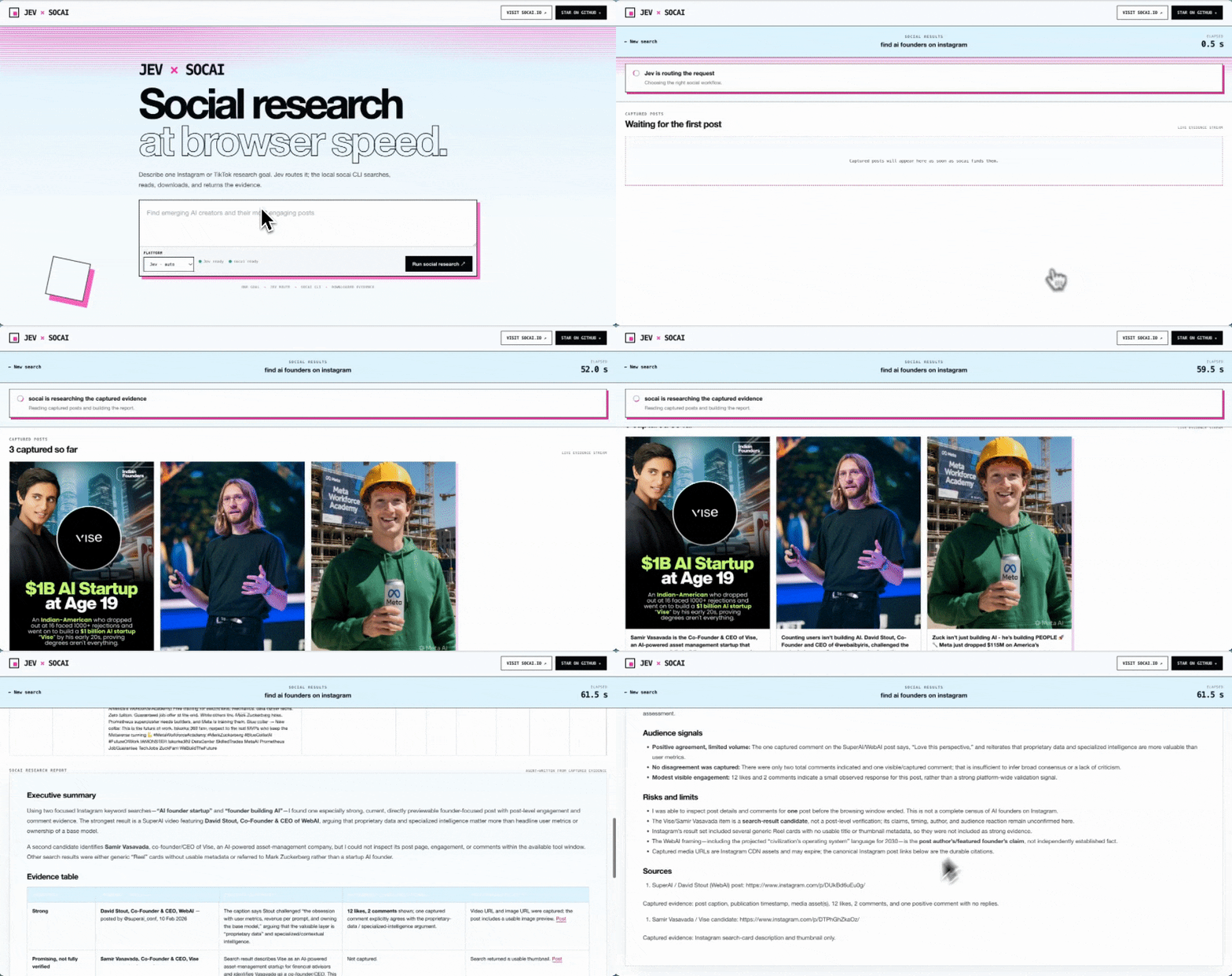
Jev Social is a local-first demo that lets Jev choose bounded socai CLI operations for Instagram, TikTok, and LinkedIn. Captured post cards stay visible while a source-linked research report streams into the browser.
Community
Join WeChat group:
If socai is useful, star the repo.
browser-use
browser-use·Python
开源的 Python 库,让大模型直接操控浏览器完成点击、填表、抓取等网页任务,省去手写 Playwright 脚本的麻烦。
浏览器自动化+4电脑 / 浏览器 Agent进阶
120594+36413k1.0.12026-11-10 23:09 UTC

browser
lightpanda-io·Zig
用 Zig 从零编写的无头浏览器,专为 AI 和自动化场景设计,兼容 CDP 协议,可替代 Playwright、Puppeteer 驱动网页抓取与 Agent 任务。
无头浏览器+4电脑 / 浏览器 Agent进阶
41789+2692.1k1.0.32026-11-10 23:15 UTC

UI-TARS-desktop
bytedance·TypeScript
字节开源的多模态 AI Agent 桌面栈,把前沿模型和 Agent 基础设施连起来,让 Agent 能像人一样操作 GUI、浏览器和电脑完成任务。
多模态Agent+4电脑 / 浏览器 Agent
39586+214.0kv0.3.12026-10-09 01:29 UTC
Jobs_Applier_AI_Agent
feder-cr·Python
自动投递简历的求职机器人,能按简历匹配度筛选岗位并批量提交申请,睡觉时也能持续找工作。
求职自动化+4电脑 / 浏览器 Agent进阶
32455+564.8kusage-counter2026-11-10 02:38 UTC