Seems to be working alright
Tokyo-Night-Linux
stronk-devUnlicense长期未更新把 VS Code 的 Tokyo Night 配色移植到 Linux 桌面,统一 i3/polybar、sway/waybar、rofi、GTK、Spotify 和 Discord 的深色外观。
Dark theme for i3+polybar, sway+waybar, rofi, GTK, spotify and Discord based on the Tokyo Night vscode theme
0.2发布于 2021-07-19 19:44 UTC522star24fork同步于 2026-11-07 07:34 UTC
README 里没有找到可直接复制的安装命令,请到 README 或官方文档查看安装方式。
硬件要求
README 没有说明硬件要求。
项目说明
这个项目的说明还在生成中,先参考下面「最近发版」和 README。
- 0.2Initial Useable Releasepre-release最新正式版2021-07-19 · 2021-07-19 19:44 UTC
- 0.1Initial Releasepre-release2021-07-15 · 2021-07-15 08:49 UTC
查看更新说明
Dark theme based on the Tokyo night VS code theme. GTK theme is a manually modified dark theme, by search-and-replacing CSS colour codes, so it may still contain some inconsistencies
GTK theme can be installed using lxappearance and/or gnome-tweaks
用户点评
登录用户的真实使用记录,可按版本和硬件筛选共 0 条
还没有人点评。第一个说出真实体验的人最有价值。
Tokyo Night Linux theme
This collection is aimed to make your Linux environment look like the vscode Tokyo Night theme. This is currently still a WIP, so expect colour inconsistencies or unthemed applications.
Although replacing your icon theme is not required, this theme goes well with the Numix icon theme.
The GTK theme was made by modifying the Material Black theme
The included Discord theme is pulled from here Tokyo Night (Credits to @Dyzean for the suggestion)
If you are using KDE Plasma, you can use the Kvantum Tokyo Night theme (Credits to @JuniorSuperTux for the suggestion)
Dependencies
Theming
- lxappearance: Can be used to apply the GTK theme
- gnome-tweaks: Can be used to apply the GTK theme
- spicetify-cli: Used to apply the Spotify theme
- betterdiscord: Used to apply the Discord theme
- betterdiscordctl: Used to install betterdiscord
- VS code Tokyo Night theme
Optional Utils
- powerline: Status bar for Bash. For example, it shows you what Git repo you are in
- cava, neofetch, lolcat, cowsay, wisdom-mod, bash-pipes, cbonsai: important stuff
- bpytop: resource monitor
- nm-applet: manage your (wireless) connections and has a tray icon
- kalu-kde: Notifies you about Arch news or updates and has a tray icon
- logiops: Used to trigger keyboard combinations using gestures
- blueman: bluetooth tray icon
- gdm-tools-git: If using GDM to login to a user (and select between multiple window managers), use this to set the theme
When using I3 as window manager
- clipit: Clipboard manager
- picom-ibhagwan-git: If you want transparent and rounded borders in I3
- polybar: Status bar
- polybar-themes: Is included in the repo, but should be installed separately as well to get all their dependencies.
- autotiling: Automatically sets in which direction a window will split based on if the parent container is wider or taller
- rofi: Used as a program launcher and power menu
- arandr: Used to manually set monitor properties
- maim: screen capture
- xclip: X selection to clipboard
- bynanz: record screen to gif
- hsetroot: to change the background colour when picom is running
When using Sway as window manager
- autotiling: Automatically sets in which direction a window will split based on if the parent container is wider or taller
- kanshi: Used to automatically set monitor properties
- rofi: Used as a program launcher and power menu
- clipman: Clipboard manager
- Waybar: Status bar
- mako: Used for notifications
- slurp: wayland selection to clipboard
- grim: screenshot utility for wayland
- wf-recorder: record screen to video
File overview and Configuration
File Index
-
.config
- BetterDiscord: Contains theme files for Discord
- gtk-3.0: Sets some theme settings
- i3: Example i3 config with auto starting applications, borders and gaps settings, etc
- kanshi: Example config for using Kanshi to set your wayland monitors
- Picom: Example config for enabling transparency and rounded corners when using I3.
- Polybar: Theme and config for the status bar when using I3 with modules n shit enabled
- Spicetify: Contains theme for modifying Spotify
- Sway: Example sway config with auto starting applications, borders and gaps settings, etc
- Waybar: Theme and config for the status bar when using Sway
- Wofi: Actually contains an example config and theme for Rofi and Wofi, although we are using Rofi in the configs
-
/etc/logid.conf: Optional example configuration for the Logitech MX Master mouse, using gestures to call certain key combinations set in the I3/Sway config
-
/usr/share/themes/UltimateBlack-0.1: GTK theme. Will be updated and renamed in the near future.
-
.bash_profile: Optional example config. Runs when you login (including via SSH). contains commented code to autostart xorg (and I3)
-
.bashrc: Optional example config. Runs whenever a new terminal is opened. Example config with ST and Powerline
-
.vimrc: Optional example vim config
-
.Xdefaults: Optional example config. Edit terminal colours and urxvt settings when using Sway as window manager
-
.xinitrc: Optional example config. Runs on X server startup and starts I3
-
.Xresources: Optional example config. Edit terminal colours and urxvt settings when using I3 as window manager
Configuration
- GTK theme: If certain colours aren't to your liking, you can
grep -rl "old_string" . | xargs sed -i 's/old_string/new_string/g'to replace specific colour codes quickly. If you go this route you might want to do this to the source, since the original theme has more different colours. - Spotify: Manually edit ./config/spicetify/Themes/Base/color.ini
- Polybar comes bundled with various modules. Check out their wiki for more info. Also check out the readme of polybar-themes if you are using I3.
- Picom can be be configured for more or less transparency or different kinds of blur. The included config uses dual-kawase blur which goes over an image as background
Installation
Copying files
All the files go into your home directory, except for:
- /etc/logid.conf
- /usr/share/themes/TokyoNight
If using polybar-themes, install it from the original source first to get all their dependencies and fonts. Then you can overwrite their files with the included ones.
Apply Theme
- GTK: Run lxappearance and/or gnome-tweaks and select the included theme
- Spotify:
- Run
spicetifyonce to generate a config file - Run
spicetify backup apply enable-devtoolto backup the default theme - Run
spicetify config current_theme Baseto set the current theme to the one we provide - Run
spicetify applyand restart spotify
- Run
- Discord: After running
betterdiscordctl installgo into the newly added Better Discord entry in the settings menu. - GDM: Run
gnomeconf2gdm(from gdm-tools-git) after applying the GTK theme to set the colour scheme of the login screen
Notes
- GDM does not start .xinitrc . If you are using I3, it is easier to just type in
startxafter logging in - Certain GTK programs, like Gimp and Firefox, might have to be set to follow the system theme from their settings
- A modified version of console-solarized-git is coming in order to modify the Linux shell colours to match our theme.
Screenshots
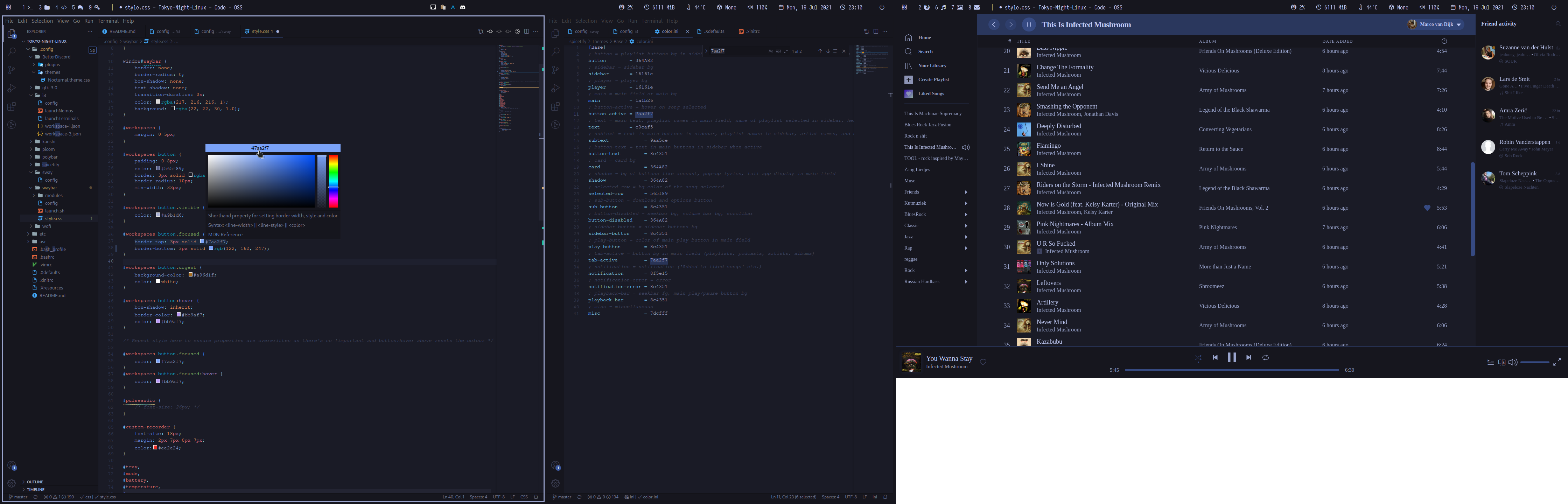
I3 with Polybar
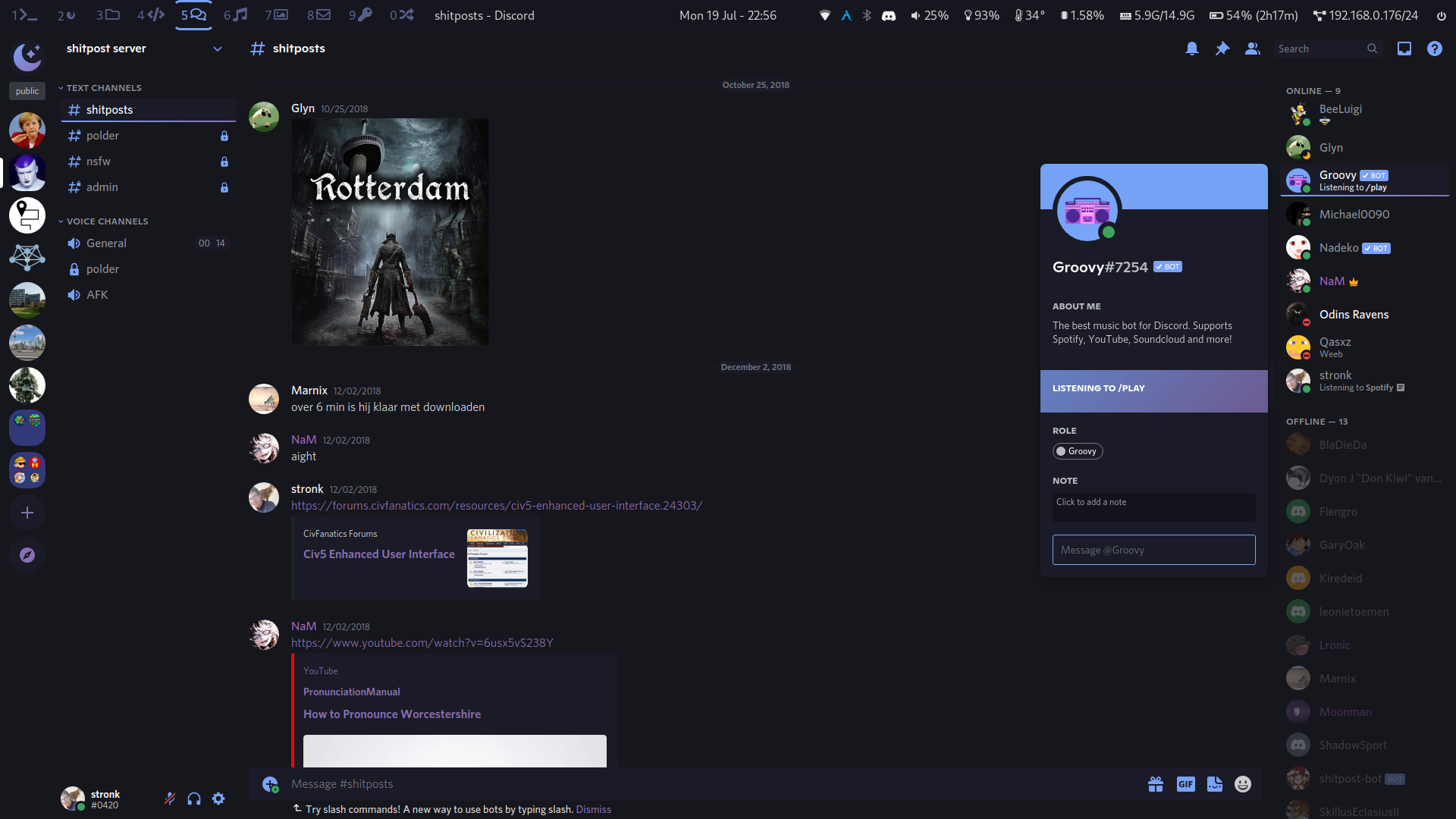
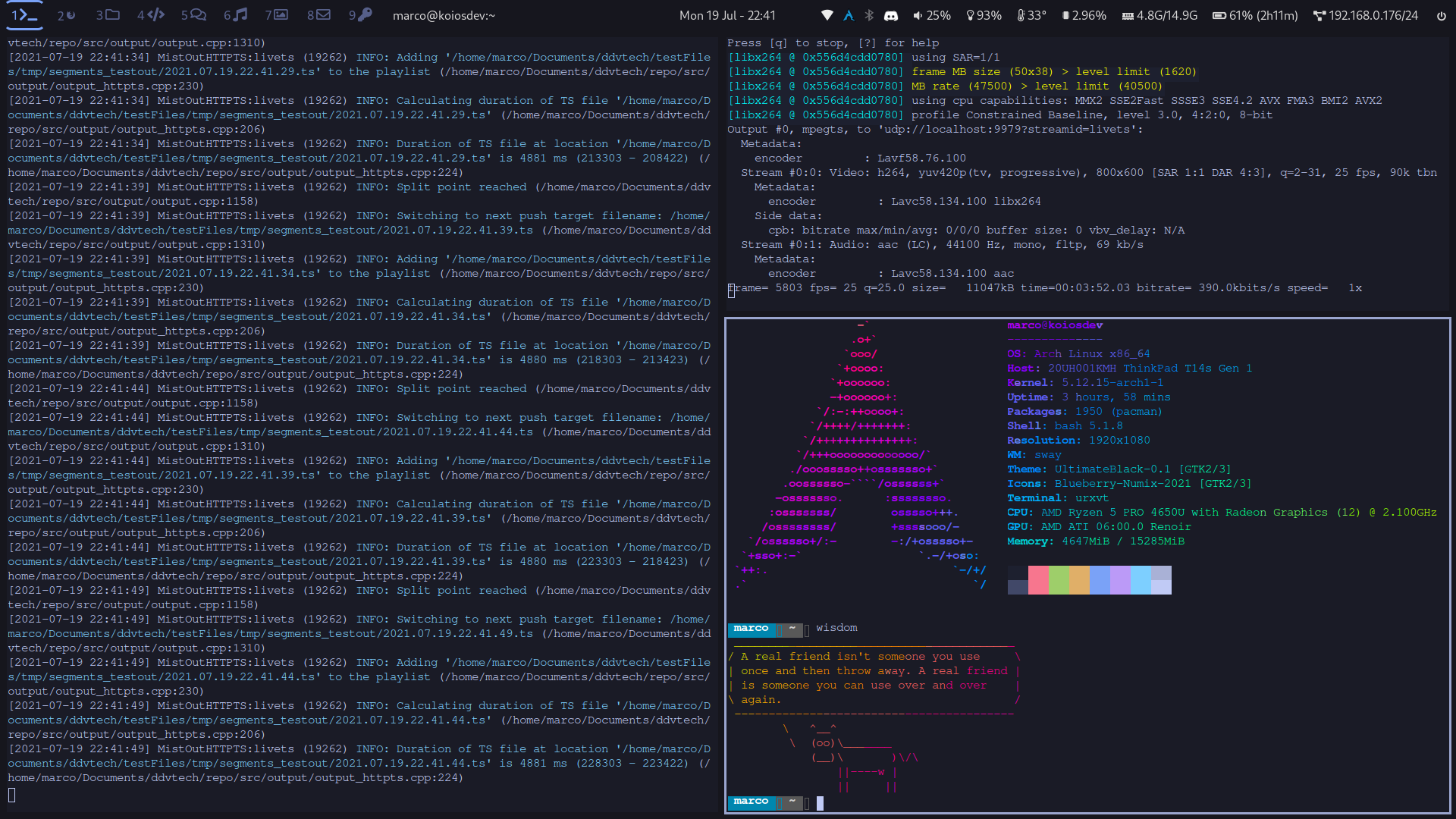
Sway with Waybar



puter
HeyPuter·TypeScript
一个可自托管的开源云端桌面环境,把文件存储、应用和界面搬到浏览器里,相当于自己搭一个私有网盘加在线操作系统。
云桌面+4桌面环境 / 窗口管理器
44123+234.2k26.112026-11-10 09:33 UTC
serenity
SerenityOS·C++
从零手写的类 Unix 桌面操作系统,自带内核、浏览器和桌面环境,适合想深入理解操作系统底层实现的人阅读和动手改造。
操作系统+4桌面环境 / 窗口管理器
33957+103.5k2026-11-09 12:47 UTC

daedalOS
DustinBrett·JavaScript
在浏览器里跑起一套完整的桌面环境,窗口、任务栏、文件系统一应俱全,适合做 Web 版桌面演示或在线工作台。
浏览器桌面+3桌面环境 / 窗口管理器
13101+31.2k2026-10-22 03:46 UTC

serpantinum
ilyamiro·QML
基于 QML 和 Quickshell 打造的 Wayland 桌面 Shell,为 Hyprland、Niri、Sway 等合成器提供统一的面板、启动器与桌面组件。
Wayland+4桌面环境 / 窗口管理器
7659+24358v2.5.02026-11-09 23:37 UTC