mpv 与 yt-dlp 需手动运行脚本下载,FFmpeg 才会在构建时自动获取;Windows 需预装 Edge WebView2 与 Visual Studio 2022 C++ 构建工具;需 Node.js 20+ 与 pnpm 9.x,项目锁定 pnpm 9.1.0
ynotv
tbeezyAGPL-3.0活跃维护一款现代开源的 Windows IPTV 播放器,支持 M3U、Xtream 和 EPG 节目单,还能接入 Stremio 与 Nuvio 媒体库,方便集中观看直播频道。
Modern FOSS Windows IPTV Player w/ Stremio & Nuvio integration
v2.5.7发布于 2026-10-08 14:16 UTC449star34fork同步于 2026-11-07 23:37 UTC
git clone https://github.com/tbeezy/ynotv.git
cd ynotv
pnpm install
bash scripts/download-mpv-tauri.sh
pnpm dev 硬件要求按 README 说明
仅支持 Windows 平台;README 未说明显存或 GPU 型号要求,播放由 mpv 承担
Windows 上的开源 IPTV 播放器,基于 Tauri 与 mpv,整合 Stremio、Nuvio 与 Jellyfin
一款现代开源的 Windows IPTV 播放器,支持 M3U、Xtream 和 EPG 节目单,还能接入 Stremio 与 Nuvio 媒体库,方便集中观看直播频道。
核心能力
- 支持 M3U、Xtream Codes 与 Stalker 源及多 EPG 源
- 内嵌 mpv 播放,支持自定义参数与外部播放器
- 自动检测卡死或失效流并切换备用源
- 批量探测频道流健康度并标注分辨率、帧率、码率
- 内置 DVR 录制与定时录制,支持多画面 2x2 同播
容易踩的坑
内容由模型根据 README 生成,可能不完整或不准确,以官方文档为准。看原文 README
- v2.5.7最新正式版2026-10-08 · 2026-10-08 14:16 UTC
v2.5.7
Added
- Provider connection and account info on screen - Press
Oduring playback (rebindable underSettings → Shortcuts, or use the new button next to the stream stats button) for a card with the provider's active and max connections, account status, expiry date, and server host. Xtream and Stalker sources are queried live. - Jellyfin playlists play in their own order - Starting a Jellyfin playlist now carries the whole queue into the player. Next/previous step through the playlist instead of jumping to the next episode, playback stops at the end of the list, and a
From playlistbadge on the Now Playing bar shows your position and opens the full list. - Subtitles from Stremio/Nuvio add-ons load on demand - The subtitle dialog shows what your add-ons offer for the language you select and downloads only the track you choose. Supports translation addons that required queueing the file.
- Search all Stalker sources at once - VOD search has an
All Stalker Sourcesoption that queries every Stalker source together, with results in per-source tabs and a progress indicator while the servers are being searched. - Display the full channel path - Two optional settings show the full
Source / Category / Channelpath instead of just the category or channel name: one underSettings → Live TVfor the EPG program details pane, and one in the overlay settings for the channel info overlay. - Side-by-side sections in 3-column view -
Display Sections in a RowunderSettings → Live TVplaces the player next to the program window rather than above it, so categories, channels, player, and guide sit side by side - ideal for ultrawide displays. - Lock a channel's custom logo - The EPG Editor's Channel tab has a
Locktoggle next to the Logo URL field. While it's on, the logo you set is not replaced when the channel's EPG match changes, its EPG source is switched, or Automatch runs. Rescan Allfor local folders - One button scans every configured local movie and series folder for new files at once.- Right-click context menu for local items - Right-clicking a local movie or episode opens a context menu, and the Review Unmatched step gains a
Fix match selectedaction for correcting a specific item's match. - Delete empty failover groups -
Delete Empty (N)in the Failover Groups dialog removes the leftover groups that contain no channels - Restore your provider's category order -
Server Orderin Manage Categories re-fetches the category order directly from your provider and applies it - UEFA Nations League support - UEFA competitions have been added to Sports.
- Support mode for diagnosing playback - Enable
Settings → Debug → Support modeto start the video engine with detailed logging - Manual connection limit per source for DVR - Your provider's simultaneous connection limit is detected automatically, but you can now set your own.
Max Simultaneous ConnectionsunderSettings → Sourcesoverrides it, overlapping recordings warn when that number is reached, and your value is kept across syncs. - A way out of every recording conflict - Scheduling a recording that conflicts no longer leaves you stuck. The program and channel menus always offer
Ignore and record
Fixed
- Recording conflicts reported when the connection limit wasn't reached - Scheduling an overlapping recording was flagged as a conflict even when the source allowed more simultaneous connections
- 3-column EPG progress bar not updating in real time - In the 3-column view, the progress bar and currently airing program only refreshed when a row scrolled into view or the app reloaded. They now stay in sync as time advances, rolling over to the next program automatically and refreshing every 10 seconds while the guide is open.
Extra words to stripnot accepting commas - In the EPG Editor's Automatch Missing section, typing a comma deleted it imme
- Provider connection and account info on screen - Press
- v2.5.62026-09-23 · 2026-09-23 00:10 UTC
查看更新说明
v2.5.6
Added
- Redesigned EPG Editor - The EPG Editor has been overhauled with a cleaner layout for easier use, and EPG matching has been reworked to be more reliable.
- Lock a channel to a specific EPG source - Selecting a guide in the EPG Editor locks that channel to that feed, so a higher-priority global source can't replace your choice on the next sync. Channels filled by a Global EPG are locked the same way. A new
🔒 Matchestab lists every locked match in a playlist. Recommended to rematch your channels if you matched before and it wasn't saving. - Open EPG Editor directly from Live TV - A pencil button in the EPG toolbar opens the editor scoped to the category you're currently viewing. Clicking a channel jumps straight into that channel's editor.
- Match EPG by your renamed channel name - If you've renamed a channel, it can now match its guide using your custom name instead of the provider's original. This prevents a channel that was matching incorrectly by its raw provider name from continuing to pull in the wrong guide. A TVG-ID override or a feed lock still takes priority.
- Smarter automatic EPG matching - Automatch Missing can now ignore common provider decorations like
|DE|,HD,FHD,HEVC,RAW, orBACKUPbefore matching (with support for adding your own words), so Xtream and Stalker channels match without needing to be renamed. When a channel name could match more than one EPG entry, it's listed for you to pick from instead of being guessed. - Stalker server VOD search - Search for VODs through the source server without loading categories first, enable in
Settings → Source → Stalker Preferences. - Reconnect strategy for recordings - How recordings handle a dropped connection can now be configured under
Settings → DVR → Stream Compatibility.Auto(default) recovers from dropped connections, stalls, and network errors.Aggressivealso retries when a stream ends unexpectedly, for providers that need it.Offdisables reconnecting entirely for servers that reject retry attempts. - Advanced FFmpeg arguments for recordings - Custom input and output FFmpeg arguments can be added for all recordings under
Settings → DVR → Stream Compatibility, useful for providers that require specific flags such as custom headers, a larger probe size, or a bitstream filter. Arguments that would conflict with the recorder are rejected before saving. - Media info badges for Xtream movies and series - Movie and series detail pages now display stream resolution, video and audio codec, bitrate, audio channels, container format, and estimated file size as badges. Details already reported by the provider are used as-is; file size is only fetched over the network when the provider didn't include it.
- Rename channels and categories in place - Manage Channels and Manage Categories now include a pencil button (or double-click the name) to rename an entry without opening a separate dialog. One click restores the original source name.
- Delete all failover groups - The Failover Groups dialog now has a
Delete Allbutton with a confirmation step for quickly clearing all failover groups at once. - Failed automatic VOD sync notifications - When an automatic VOD refresh fails due to bad credentials, an HTTP error, or a provider being unavailable, a notification toast now appears naming the source and the error.
- Backups now include Sports and EPG match data - Export files now include Sports team channel links, Sports favorites, EPG feed locks, the "match by my channel name" flag, and the latest UI layout keys.
Fixed
- Recordings failing on some HLS channels - Channels using non-standard segment extensions (such as
.cssor.webp) no longer trigger a reconnect at the end of every segment, which was flooding the provider and causing HTTP 403 rate-limit errors. - Recording duration limit reported as ignored - The duration limit is
- v2.5.52026-09-12 · 2026-09-12 13:41 UTC
查看更新说明
v2.5.5
Fixed
- App icon disappearing - Fixed a bug where app icon would disappear, showing a blank default icon.
- Stalker VOD Categories not loading past 1st 14 items - Fixed a bug where only the first 14 items where shown
- v2.5.42026-09-12 · 2026-09-12 06:44 UTC
查看更新说明
v2.5.4
Added
- Option to launch on Windows startup - ynoTV can now start automatically when you sign in to Windows, optionally launching minimized to the system tray. Enable under
Settings → UI. - Stalker VOD preferences - How VOD Movies and Series categories load for Stalker/MAC portals can now be tuned under
Settings → Sources → Stalker Preferences. Options include a page fetch concurrency setting and a category cache timer. - Quick-link current channel to a Sports team - The currently playing channel can be linked to a Sports team directly from the Sports sidebar without leaving the player.
- Widgets and VOD lists remembering scroll position - Widgets, VOD categories, and the Local tab now restore your scroll position when returning to them, keep the active channel in view
- Dates in View All Programs - The All tab now displays each program's date with day headers, making it easier to browse catch-up content across multiple days.
- Widget scaling up to 400% - Widget and overlay scale can now be set up to 400%, up from the previous 200% maximum. The settings preview caps at 250% to keep the panel readable.
- DVR padding changed to number input - The Schedule Recording dialog now uses minute and second input fields instead of sliders, so any padding value can be typed in directly.
- Source names in the channel list - Categories that contain channels from more than one playlist can now display each channel's source name alongside a source count.
Fixed
- Jellyfin incorrectly trying to transcode - The app now advertises full playback capabilities to the Jellyfin server, allowing MKV, HEVC, DTS, and other formats to play directly and preventing the format error pop-up.
- EPG and logos missing for some channels - M3U attributes with non-standard casing (e.g.
tvg-ID,TVG-ID,tvg-Id) or spacing are now parsed correctly, so those channels properly match their EPG guide data and logos. - Sports favorites linking to the wrong team - Team favorites are now matched with league awareness. A repair prompt will appear for any saved favorites that no longer match a valid team, instead of silently skipping them.
- Unavailable local files showing in playlists and favorites - Local movies and episodes whose files are missing, on a disconnected drive, or no longer in a scanned folder are now hidden from playlists and favorites automatically.
- Option to launch on Windows startup - ynoTV can now start automatically when you sign in to Windows, optionally launching minimized to the system tray. Enable under
- v2.5.32026-09-07 · 2026-09-07 17:49 UTC
查看更新说明
v2.5.3
Added
- Jellyfin Integration (Beta) - Uses the WebUI, playback hands off to the embedded player with full player controls. Opt in under
Settings → Jellyfin. Currently does not support controller/phone remote. - View All Programs in three-column EPG - The View All Programs panel has been added to the three-column EPG layout for browsing past and future programs and accessing catch-up content.
- Multiple proxy profiles - Multiple SOCKS5 proxy profiles can now be saved and switched between under
Settings → Sources → Proxies. - Failover group list sorting - Failover groups can be sorted by name, creation date, or channel count in ascending or descending order. The selected sort order is remembered between sessions.
- Updated app icon - The app icon has been updated. Alternative icons, including the previous one, can be selected under
Settings → About. - Auto-sort favorites alphabetically - Favorites can be automatically kept sorted A–Z instead of using manual ordering. Enable under
Settings → Live TV → Favorites. - Catch-up channel filter - A filter button in the Live TV channel list header shows only channels with catch-up support. Enable under
Settings → Navigation. - Quick probe - Right-click any channel in the EPG to run a quick stream probe without opening the full probe tool for average bitrate metadata, autoenables bitrate badges on use.
- Probe and Failover access from Favorites and custom groups - The channel probe can now be launched scoped to the current Favorites or custom group view. The Failover overlay also includes a new button to open the Failover group manager directly.
- Bulk import for MAC portals - MAC/Stalker portal credentials can now be bulk-imported from a pasted list.
- AFL support - The Australian Football League has been added to Sports leagues, team pages, and stream matching.
- Local library quick cleanup - A
Clean Unavailableaction scans local library folders and removes entries whose files or folders no longer exist. Missing files can also be removed individually from the Local view. - Duplicate detection when adding to playlists - Adding local movies or episodes that are already in a playlist now prompts for confirmation before creating duplicates
- Local metadata language - TMDb metadata lookups for the local library will now use the language selected in Metadata settings.
- Preserved scroll position in Custom Groups Manager - Moving categories in the Custom Groups Manager no longer resets the list scroll position.
Fixed
- Certain Settings not persisting after restart - Resolved an issue where certain settings were not saved correctly and would revert on restart.
- Category strip rendering transparently - The category strip no longer appears see-through in certain themes.
- Three-column EPG layout in UI v1/v2 - The three-column layout now renders correctly in the v1 and v2 UI designs, with uniform program cards and full-width program details.
- Auto-hide sidebar flashing on hide - The auto-hide category sidebar no longer flashes when transitioning to the hidden state.
- Sidebar background bleeding content - The sidebar now uses a solid background, preventing underlying content from showing through when using optimizations.
- Jellyfin Integration (Beta) - Uses the WebUI, playback hands off to the embedded player with full player controls. Opt in under
用户点评
登录用户的真实使用记录,可按版本和硬件筛选共 0 条
还没有人点评。第一个说出真实体验的人最有价值。
ynoTV







A feature-rich, open source IPTV player for Windows built on Tauri v2 and mpv.

Screenshots:
| EPG with preview | VOD |
|---|---|
| 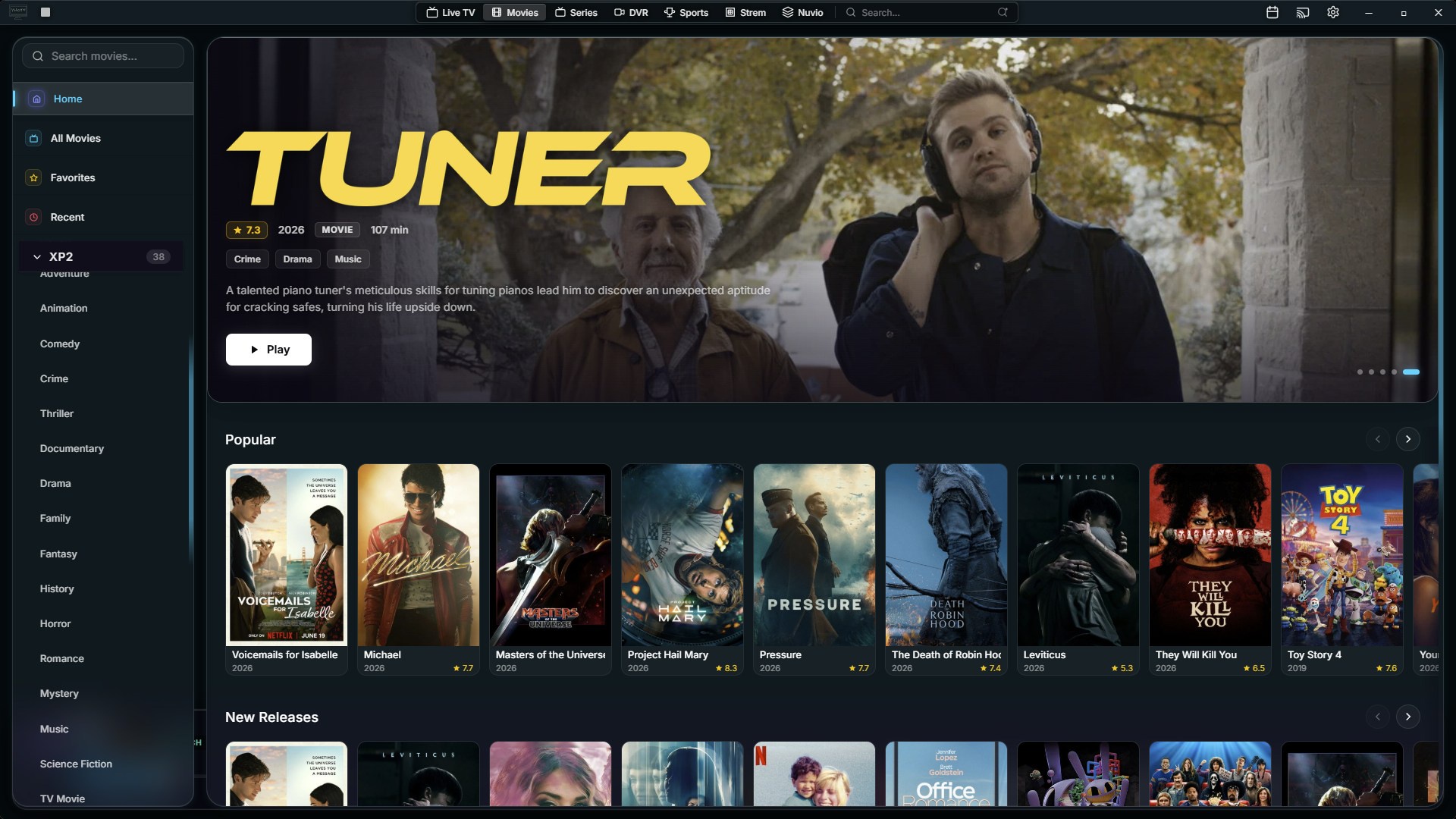 |
| Playlist Editor | EPG Editor |
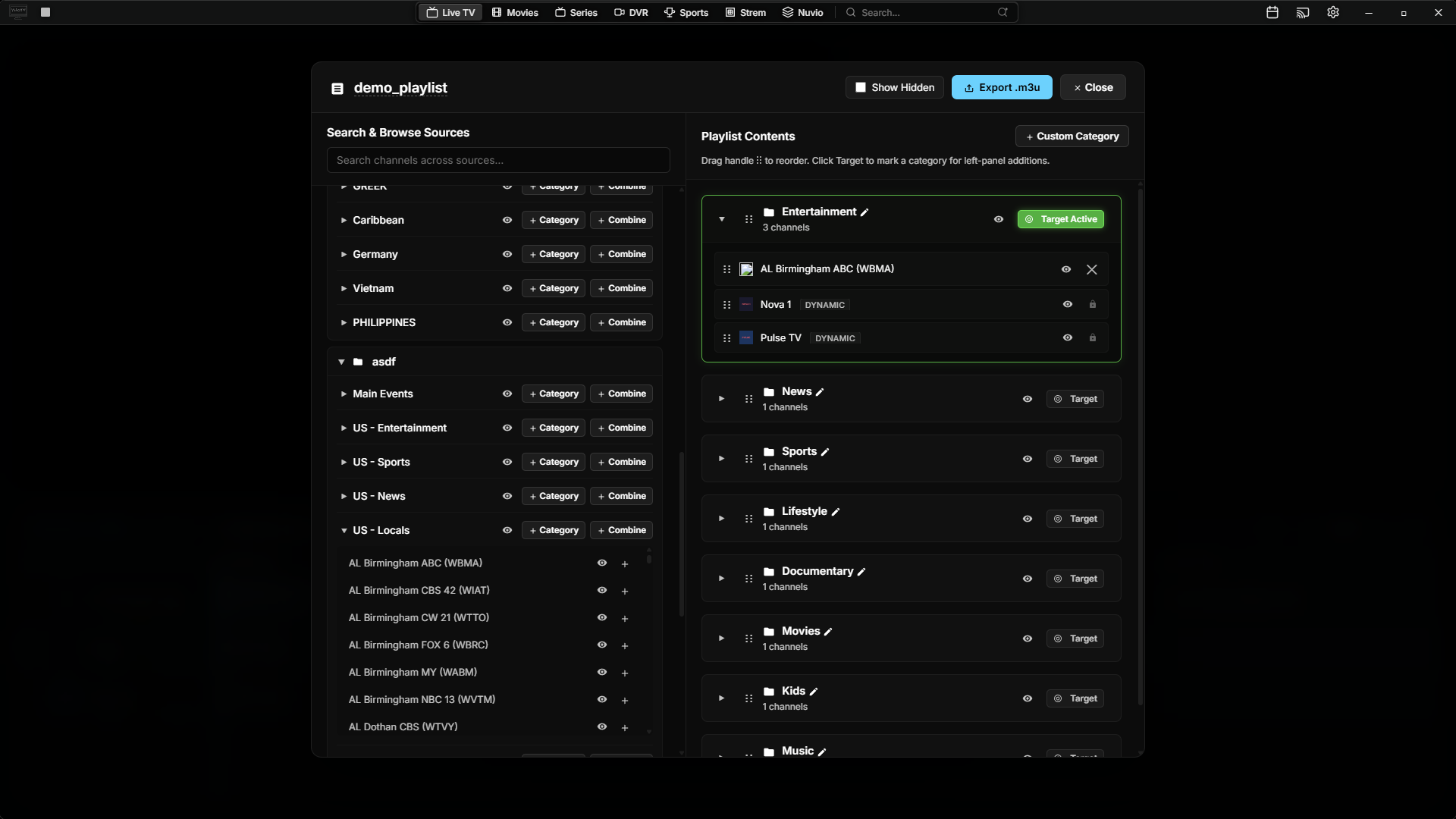 |  |
| Watchlist Option with autoswitch | Strem View |
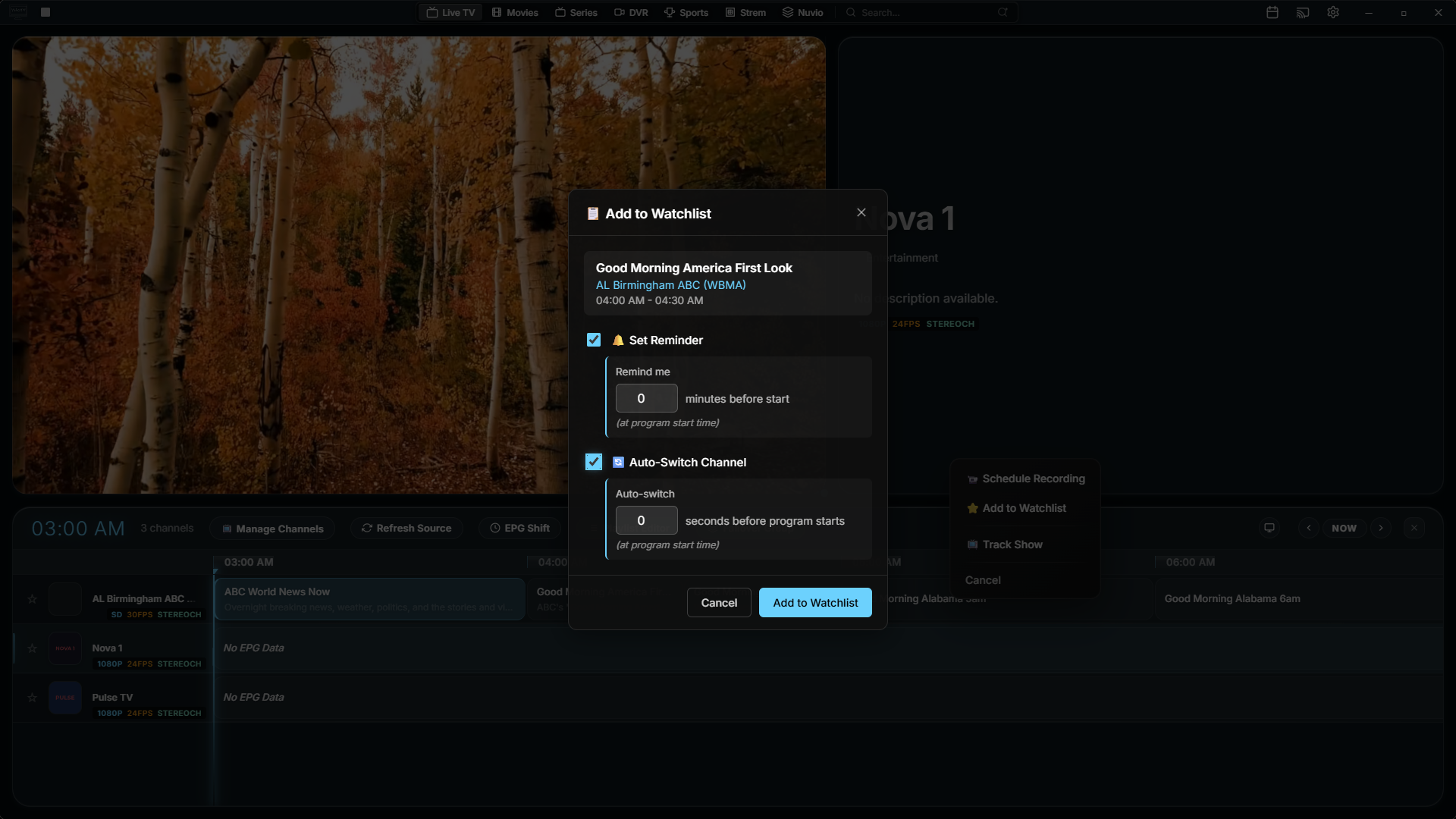 | 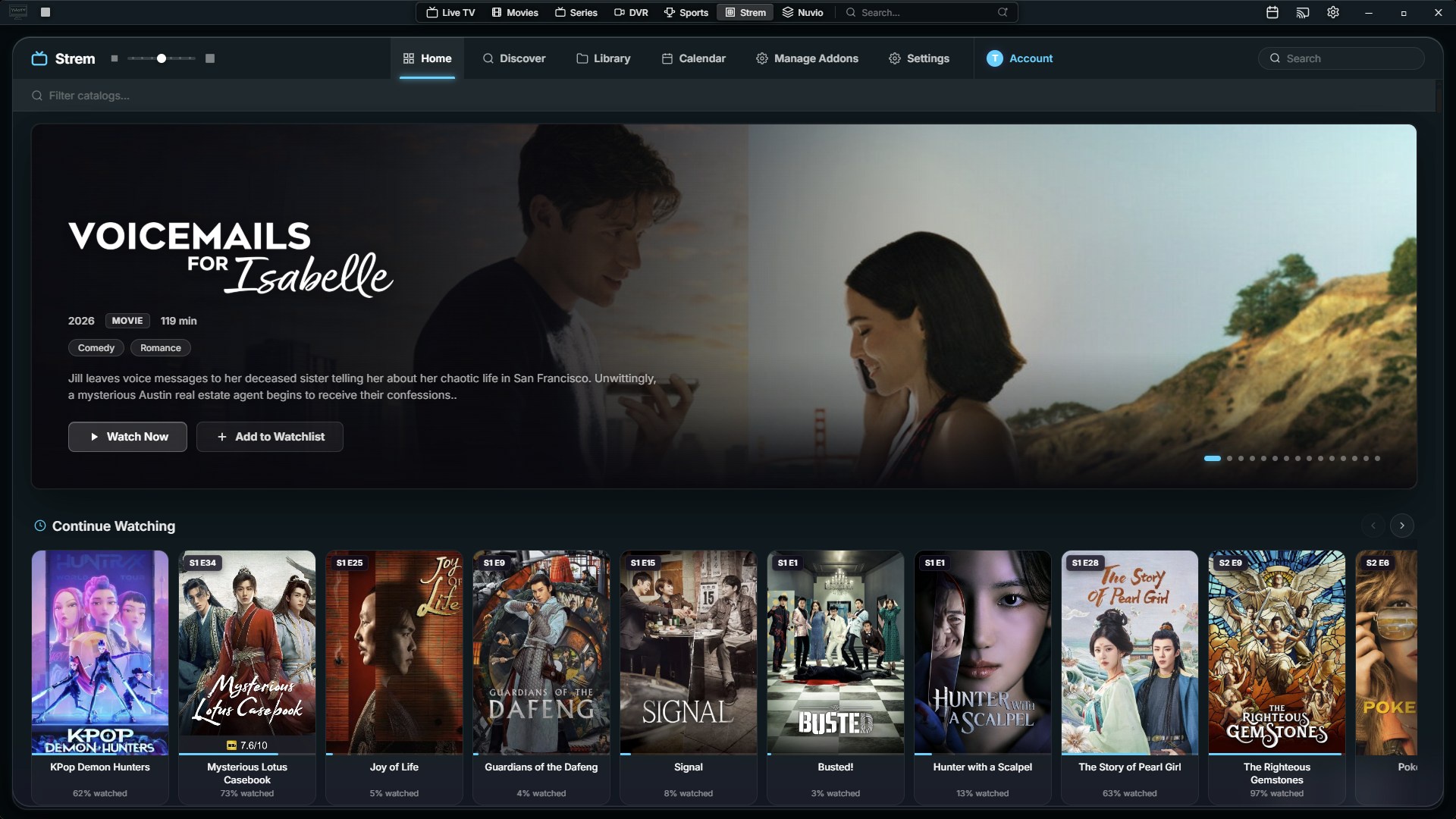 |
| Sports View | Themes |
 | 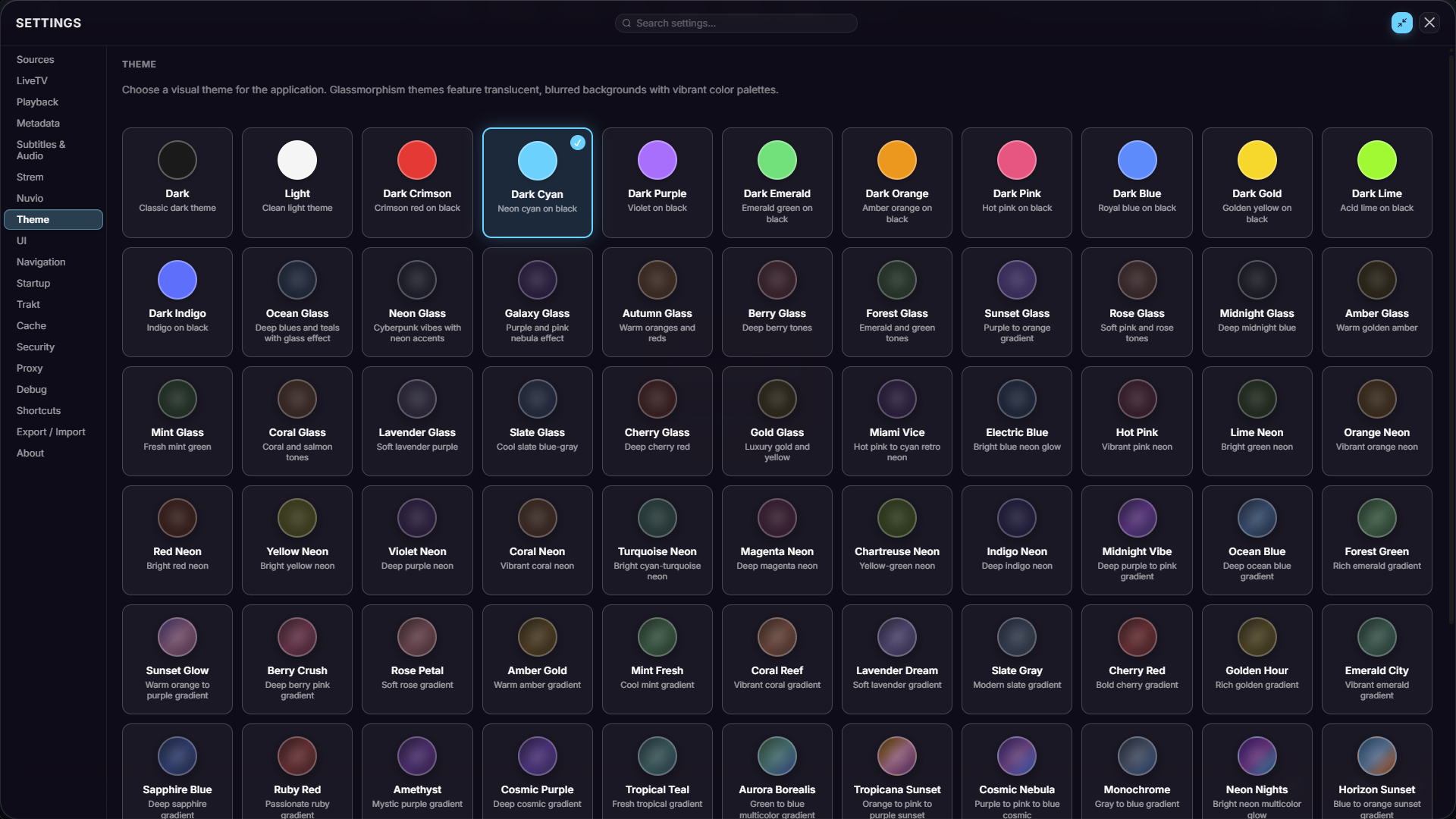 |
| Multiview Menu | PiP View |
 |  |
| Multiview 2x2 | DVR Page |
 |  |
Features
- M3U, Xtream Codes & Stalker Support - multiple EPG sources supported
- Stremio Integration & Addons support - Integrated optional stremio login to sync watchlist/addons or add addons directly
- Nuvio Integration - Integrated login for 2 way sync with watchlist, addons, plugins, collections, settings
- Jellyfin Integration (Beta) - Connect your personal Jellyfin server to browse and stream your libraries
- Playlist Editor - Create Custom playlist from your sources, move categories/channels from one into another
- Grid-style EPG - with an integrated preview window
- Catchup & Cache Time Shift - instant replays on supported channels
- Automatic Stream Fallback - detects and switches away from stalled or dead streams
- Smart Auto-Group for Failover - Auto-cluster duplicate channels into failover groups, with Always Play Primary
- Controllers & Phone Remote - Full gamepad support with spatial navigation, remappable buttons, and chord combos. Use your phone as a remote with QR pairing (guide browser, sports, and multiview tabs)
- Channel Stream Probe & IPTV Checker - Bulk stream health checks (alive/dead/geoblocked/DRM), auto-fill resolution/FPS/bitrate badges, one-click disable of dead channels, and sort groups by quality
- Local Library - Add local movie/series folders auto-matched with TMDB metadata, with watch progress and backup inclusion
- Sports Team Channel Linking - Link teams to channels for one-tap game watching, with auto-linking and backup streams with auto-swap
- Simkl, Discord & OpenSubtitles Integration - Scrobble to Simkl, show what you're watching on Discord, and download subtitles from OpenSubtitles
- 24 UI Languages - Full localization support
- Transparent EPG Guide, Category Folders & Logo Editor - Translucent overlay guide, folder grouping of categories, and bulk logo customization
- Sports Tab - real-time scores and detailed game stats with instant search to find channel
- Cast to TV - Cast to any supported TV devices on your local network
- Export Playlist to M3U - Export any modifications you've done into an .m3u
- Trakt integration - Scrobble directly to your Trakt account
- Widget System - Display live sports score in overlay
- VOD Support - rich metadata via TMDB and RPDB with saved progress
- Subtitle Integration - Subsource support for VODs
- Popout Player & External player - play streams in a seperate MPV window or your choice in an external player
- Backup DNS/URLs - automatically swaps when the current source fails
- Favorites & Custom Groups - pull from any source
- Channel Management - rename, hide, and sort categories and channels freely
- EPG Editor - change tvg-id, logos, or auto-match to a different entry
- Embedded MPV Playback - with support for custom parameters
- Multiview - resizable PiP, also supporting up to four simultaneous streams in a 2x2 grid
- Channel & EPG Search - instant results with advanced filtering options
- Watchlist & Reminders - auto-swaps to a channel when a program goes live
- Built-in DVR - record any stream or schedule for later
- TV Calendar - powered by TVMaze for auto-setting reminders on upcoming shows
- Reprogrammable Hotkeys - Fast navigation with ease of access
- 40+ Built-in Themes - something for every preference
Building from Source
Prerequisites
- Node.js 20.x or higher
- pnpm 9.x or higher — install with
npm install -g pnpm(the project specifies9.1.0via thepackageManagerfield; if you have corepack enabled, the correct version is used automatically) - Rust (latest stable) — required for the Tauri backend. Install via rustup
- Git
Windows additional requirements:
- Microsoft Edge WebView2 — required for Tauri's rendering engine
- Visual Studio 2022 with C++ build tools
- Windows 10 SDK
Instructions
1. Clone the repository
git clone https://github.com/tbeezy/ynotv.git
cd ynotv
2. Install dependencies
pnpm install
3. Download mpv sidecar
FFmpeg is downloaded automatically during the build step, but mpv (and yt-dlp) must be downloaded manually first:
bash scripts/download-mpv-tauri.sh
(Optional) If you also want to pre-download FFmpeg manually:
cd packages/app
node scripts/download-ffmpeg.js
cd ../..
4. Run in development mode
pnpm dev
This starts both the Vite UI dev server and the Tauri app concurrently.
5. Build for production
pnpm tauri build
Build output is located at:
packages/app/src-tauri/target/release/bundle/
Recovery builds: if a user's database is too large and the app fails to start, there is a one-off database recovery screen (export → rebuild → import) that ships disabled by default. See docs/recovery-build.md for how to enable it.
Data & File Locations
Configuration
%APPDATA%\com.ynotv.app\
├── settings.json          # Sources, shortcuts, and preferences
└── .windows-state.json    # Window size and position
Database (SQLite)
%LOCALAPPDATA%\com.ynotv.app\app.db
The database stores channels, categories, EPG programs (7-day window), VOD movies and series, watchlist entries, reminders, DVR schedules and recordings, channel metadata, and source sync timestamps.
Logs
Debug logging can be enabled in Settings > Debug. Log output is written to:
%APPDATA%\com.ynotv.app\logs\app.log
DVR Recordings
The recording directory is configurable in Settings > DVR. The default location is:
%USERPROFILE%\Videos\ynoTV Recordings\
Keyboard Shortcuts
All shortcuts are fully customizable in Settings > Shortcuts.
Playback
| Action | Default |
|---|---|
| Play / Pause | Space |
| Seek Forward | Right Arrow |
| Seek Backward | Left Arrow |
| Mute / Unmute | M |
| Select Subtitle (Modal) | J |
| Select Audio Track (Modal) | A |
| Toggle Fullscreen | F |
| Replay Last Stream | Q |
Navigation
| Action | Default |
|---|---|
| Channel Up | Up Arrow |
| Channel Down | Down Arrow |
Interface
| Action | Default |
|---|---|
| Toggle Live TV (Guide + Categories) | L |
| Toggle Guide | G |
| Toggle Categories | C |
| Toggle DVR | R |
| Toggle Sports | U |
| Toggle TV Calendar | T |
| Toggle Settings | , |
| Toggle Jellyfin | K |
| Show / Hide Stats | I |
| Focus Search | S |
| Toggle EPG View Layout | E |
| Close / Back | Esc |
Layout
| Action | Default |
|---|---|
| Layout: Main View | 1 |
| Layout: Picture in Picture | 2 |
| Layout: Big + Bottom Bar | 3 |
| Layout: 2×2 Grid | 4 |
Star History
Disclaimer
Built with the help of AI.
ynoTV is a media player only. It does not provide, host, distribute, or facilitate access to any streaming services, broadcast content, channel lists, or IPTV subscriptions of any kind.
All content, streams, and playlists are sourced, configured, and managed solely by the end user. The developers have no knowledge of, control over, or responsibility for any third-party content accessed through the application.
Users are solely responsible for ensuring that any content they access complies with the laws and regulations applicable in their jurisdiction. The developers do not condone or support the use of this application to access unlicensed or unauthorized content.
Metadata displayed within the application is sourced from publicly available third-party databases including TVMaze and TMDB. ynoTV does not claim ownership of this metadata.
Credits
ynoTV builds on the following open source projects and services:
- sbtlTV — original foundation
- Tauri — desktop application framework
- mpv — video playback engine
- FFmpeg — recording and thumbnail generation
- TVMaze — TV schedule and show metadata
- TMDB — movie and series metadata
- Trakt.tv - Scrobble support & catalogs
- Stremio — for building an open addon ecosystem that makes third-party integration possible
- Nuvio — for creating a fantastic open source media platform and making their codebase publicly available
- Jellyfin — for their incredible open source media system and personal streaming platform
- Harbor — Stremio integration and various features
- Simkl — scrobbling support for movies and series
- OpenSubtitles — subtitle downloads in the player
- SubSource — subtitle search for movies and series
- yt-dlp — YouTube trailer playback
- RatingPosterDB — rating badges on VOD posters
License
iptv
iptv-org·TypeScript
收集全球公开可用的 IPTV 频道,整理成 M3U 播放列表,方便直接导入播放器观看各地直播电视。
IPTV+4IPTV / 直播
143730+2698.6k2026-11-10 00:10 UTC

Tvlist-awesome-m3u-m3u8
imDazui
汇总可用的 IPTV 直播源和 M3U/M3U8 播放列表,方便在 Kodi 等播放器里直接导入看电视直播。
直播源+4IPTV / 直播
30374+213.5k2025-11-14 10:50 UTC

live
fanmingming·JavaScript
提供可直连访问的电视和广播台标图标库,以及配套的 EPG、M3U 转换工具,解决 IPTV 播放列表缺少台标和节目单的问题。
IPTV+4IPTV / 直播
28808+144.2k2026-11-10 14:19 UTC

iptv-api
Guovin·Python
自动采集、校验并测速 IPTV 直播源,生成可直接播放的 M3U/TXT/API 结果,支持自定义频道、IPv4/IPv6 与 Docker、Actions 多端部署。
IPTV+4IPTV / 直播
26049+407.7k3.1.02026-10-14 01:21 UTC