需 PHP > 5.3.0 且 WordPress > 4.0;已有博客启用前应关闭其他 Markdown 插件以免语法转换冲突;修改语法高亮等设置后需重新更新文章才生效
githuber-md
terrylinoooGPL-3.0长期未更新WordPress 的 Markdown 编辑器插件,支持 KaTeX 和 MathJax 数学公式渲染,让博客写作和公式排版更顺手。
Markdown editor plugin for WordPress.
1.17.0发布于 2025-09-03 16:05 UTC687star109fork同步于 2026-11-07 07:33 UTC
将插件文件上传到 /wp-content/plugins/wp-githuber-md 目录,或在 WordPress 插件页面直接安装;然后在 Plugins 菜单启用插件 硬件要求按 README 说明
README 未说明
WordPress 的 Markdown 编辑器插件,支持实时预览、图片粘贴与 HTML 转 Markdown
WordPress 的 Markdown 编辑器插件,支持 KaTeX 和 MathJax 数学公式渲染,让博客写作和公式排版更顺手。
核心能力
- Markdown 存 post_content_filtered,解析后的 HTML 存 post_content
- 提供实时预览、拼写检查与语法高亮
- 支持从 Photoshop 复制图片直接粘贴上传
- 内置 HTML 转 Markdown 工具迁移旧文章
- 支持 Mermaid、KaTex、MathJax、流程图与序列图
容易踩的坑
内容由模型根据 README 生成,可能不完整或不准确,以官方文档为准。看原文 README
- 1.17.0最新正式版2025-09-03 · 2025-09-03 16:05 UTC
What's Changed
- Fix XSS issues.
- Image upload support Cheveveto. by @lategege in https://github.com/terrylinooo/githuber-md/pull/313
- Fix some problem with prism and update prismjs to by @Nyx1197 in https://github.com/terrylinooo/githuber-md/pull/320
New Contributors
- @lategege made their first contribution in https://github.com/terrylinooo/githuber-md/pull/313
- @Nyx1197 made their first contribution in https://github.com/terrylinooo/githuber-md/pull/320
Full Changelog: https://github.com/terrylinooo/githuber-md/compare/1.16.2...1.17.0
- 1.16.22023-05-23 · 2023-05-23 12:46 UTC
查看更新说明
- Test up to PHP 8.2.5 and WordPress 6.2.2
- Upgrade mermaid.js to 9.4.3
- Fix coding style
- 1.16.12021-10-31 · 2021-10-31 16:00 UTC
查看更新说明
- Fix issue #253 - KaTax... by @xxNull-lsk
- Fix issue #252 - Bulk action... by @hmaragy
- Improve #252 Update composer.json to allow bedrock installs by@jawngee
- Fix issue #230 - jsdeliver url by @Bronya0
- Test up to WordPress 5.8.1
- Test up to PHP 8.0
- 1.16.02021-02-16 · 2021-02-16 08:22 UTC
查看更新说明
- Fix issue #209 - HTML unescaped in code blocks.
- Fix issue #210 - Inline MathJax is not displayed.
- Upgrade Mermaid JavaScript library from 8.0.0 to 8.9.0
- Upgrade KaTax JavaScript library from 0.11.1 to 0.12.0
- Upgrade Flowchart.js JavaScript library from 1.11.3 to 1.14.1
- 1.15.02020-04-29 · 2020-04-29 11:48 UTC
查看更新说明
- New feature - Keyword suggestion tool.
用户点评
登录用户的真实使用记录,可按版本和硬件筛选共 0 条
还没有人点评。第一个说出真实体验的人最有价值。
Markdown editor plugin for WordPress

An all-in-on WordPress Markdown Plugin provides a variety of features such as Markdown editor, live-preview, image-paste, HTML-to-Markdown helper, and more..
How it works
- WP Githuber MD will save your Markdown content into
wp_posts.post_content_filtered. - Parse the Markdown to HTML, save the parsed HTML content into
wp_posts.post_content.
This plugin will detect your Markdown content and decide what scripts will be loaded, to avoid loading unnecessary scripts.
For example, if you enabled syntax highlight, you have to update your post again to take effects.
Demo
GIF animation
The demo shows you the following steps:

- Convert HTML to Markdown by using
HTML to Markdowntool.

- Cut up a selection area of an image and copy it from Photoshop, then paste it to Markdown Editor.

- Click "Update" button to save Markdown to
post_content_filteredand save HTML topost_content(it is what you will see in result). - View the result.
Video
Requirement
- PHP version > 5.3.0
- WordPress version > 4.0
- Tested up to 5.5.1
Download
| source | download |
|---|---|
| WordPress | https://wordpress.org/plugins/wp-githuber-md |
| GitHub repository | https://github.com/terrylinooo/githuber-md/releases |
| PHP Composer | composer create-project terrylinooo/githuber-md wp-githuber-md |
Installation
- Upload the plugin files to the
/wp-content/plugins/wp-githuber-mddirectory, or install the plugin through the WordPress plugins screen directly. - Activate the plugin through the
Pluginsscreen in WordPress. - Go to the
WP Githuber MDmenu in Plugins and set your Markdown options.
Suggestions
The better situation to use this plugin is you just started a new blog.
If you're planning to use this plugin in an existing blog, be sure to:
- Turn off other Markdown plugins, because the similar plugins might do the same things when submitting your posts, may have some syntax conversion issues between Markdown and HTML.
- My personal suggestion is to turn off
revisionandauto-save, there are options in setting page.
Features
- All-in-one Markdown editor.
- Live preview.
- Spell check.
- Enable / disable Markdown for single post.
- Support Gutenberg editor.
- Support custom post types.
- HTML-to-Markdown helper
- Image copy & paste (support uploading to Imgur.com and sm.ms)
- Syntax highlight.
- Flow chart.
- KaTex.
- Sequence diagram.
- Mermaid.
- MathJax.
- Emoji.
- Github flavored Markdown task list.
- Markdown extra...
- Keyword suggestion tool.
Sceenshots
| thumbnail | screenshot | description | |
|---|---|---|---|
| Image copy & paste |  | view | Uplaoding images becomes much more eaiser, just copy and paste, then done. You can upload to your upload folder or host your images to Imgur.com. |
| HTML to Markdown |  | view | Convert your old posts into Markdown by using HTML-to-Markdown helper that beside the Editor. |
| Syntax Highlighing |  | view | Use Google prettify.js for the Editor's live-preview pane, and use prism.js for the fontend pages. You can choose your favorite theme for syntax hgihlighing. |
| Mermaid |  | view | Mermaid is a Markdownish syntax for generating flowcharts, sequence diagrams, class diagrams, gantt charts and git graphs. |
| KaTex |  | view | KaTex is a fast, easy-to-use JavaScript library for TeX math rendering on the web. |
| Flow Chart | 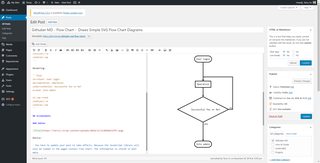 | view | Draws simple SVG flow chart diagrams from textual representation of the diagram. |
| Sequence Diagram |  | view | Turns Text Into Vector UML sequence diagrams. |
| Setting Page 1 |  | view | Markdown settings. |
| Setting page 2 |  | view | Modules settings. |
Author
Created by Terry L. and contributors. Thanks for the donators for supporting me, and the translators such as CoLocal and others for providing translation.
Notes
Development
make up
make wp.init-dev-site
Then, you can visit http://localhost:8000 to view the development site. Log in to the admin dashboard with username: admin and password: admin.
License
GPLv3 or later
markitdown
microsoft·Python
把 PDF、Office 文档等各类文件转成 Markdown 的 Python 工具,方便喂给 LLM 或做文档处理。
文档转换+4Markdown 编辑器
194764+53315kv0.1.92026-11-07 00:14 UTC
memos
usememos·Go
开源可自托管的轻量笔记应用,把日常想法按时间线整理,数据完全归自己所有,可自由选择私密或分享。
自托管笔记+4Markdown 编辑器
64382+544.9k26.11.02026-11-10 14:41 UTC

marktext
marktext·TypeScript
一款简洁优雅的跨平台 Markdown 编辑器,支持实时预览、专注模式和打字机模式,适合日常写作与文档编辑。
Markdown 编辑器+3Markdown 编辑器
63830+1504.7kv0.23.02026-11-10 07:55 UTC

rich
Textualize·Python
Python 终端富文本渲染库,能在命令行里输出彩色文字、表格、进度条、Markdown 和语法高亮,让终端界面更好看、更好读。
终端渲染+4Markdown 编辑器
57777+362.5kv15.0.02026-11-07 11:26 UTC