默认只识别 values.yaml,使用其他文件名需配置 helm-intellisense.customValueFileNames;多个 values 文件按列表从下往上解析,顺序写反会导致覆盖结果不符预期;默认保存时自动执行 Lint,可用 lintFileOnSave 关闭
Helm-Intellisense
tim-koehlerMIT更新放缓VS Code 插件,为 Helm 模板提供基于 values.yaml 的自动补全和智能提示,写 chart 时不用再手动翻查变量名。
Extension for Visual Studio Code - Intellisense in helm-templates from the values.yaml
暂无版本2,321star28fork同步于 2026-11-07 07:32 UTC
在 VS Code 扩展市场搜索并安装 Tim-Koehler.helm-intellisense 硬件要求按 README 说明
README 未说明,作为 VS Code 扩展在编辑器内运行,无特殊硬件要求
VS Code 扩展,为 Helm 模板提供 values.yaml 的智能补全与校验
VS Code 插件,为 Helm 模板提供基于 values.yaml 的自动补全和智能提示,写 chart 时不用再手动翻查变量名。
核心能力
- 自动读取并解析 chart 的 values.yaml 提供补全
- 支持 .tpl 文件中定义的 Named Templates 补全
- 支持 Helm 变量与 yaml 锚点、标签的补全
- 提供 Lint 命令校验模板路径是否指向有效值
- 可配置多个自定义 values 文件并按顺序覆盖合并
容易踩的坑
内容由模型根据 README 生成,可能不完整或不准确,以官方文档为准。看原文 README
暂无 release 数据(可能没有发版,或尚未同步)。
用户点评
登录用户的真实使用记录,可按版本和硬件筛选共 0 条
还没有人点评。第一个说出真实体验的人最有价值。


Extension to help writing Helm-Templates by providing intellisense
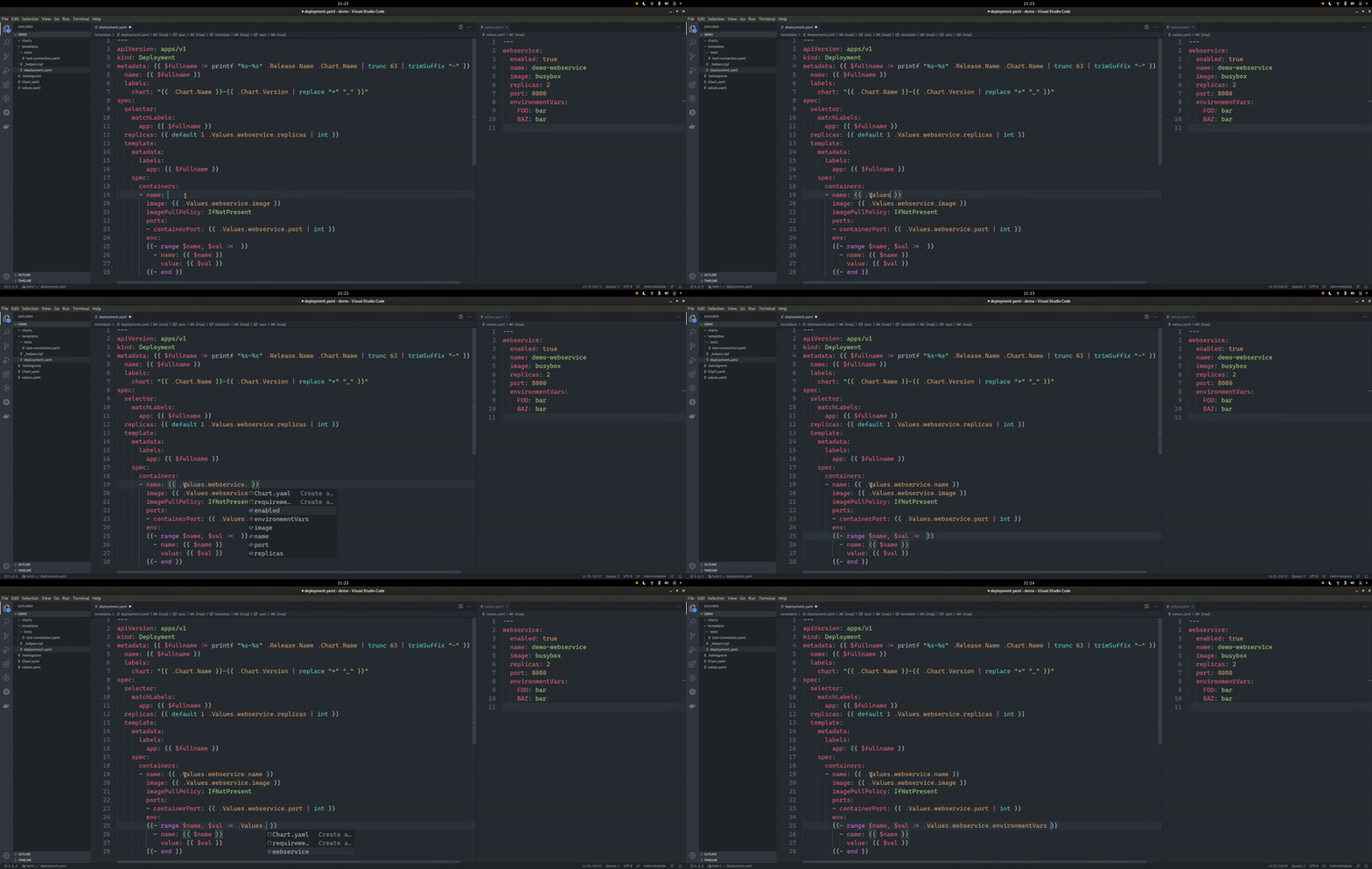
Features
- The
values.yamlfile of the chart will be read and evaluated automatically to provide intellisense. - Autocomplete will also work for all
Named Templatesdefined in the any.tplfile. - Autocomplete for defined helm variables.
- Compatible with Windows and Linux/Unix.
- Support for custom named value files is provided (see settings section below).
- Lint command to validate correct values templating and usage of NamedTemplates.
- Support and autocomplete for
yamlanchors and labels - The extension is compatible with the
Kubernetesextension. - Working with language type
yamlandhelm-template.
Commands
Helm-Intellisense: Lint: This command parses the currently active document and validates that all paths(like.Values.foo.bar) point to valid values.Helm-Intellisense: Lint Chart: Equivalent toLintcommand but for all files in the chart of the file that is currently active.
Settings
| Setting | Description |
|---|---|
helm-intellisense.customValueFileNames | Defines list of possible files containing values(default: values.yaml) |
helm-intellisense.lintFileOnSave | If set to true the Helm-Intellisense: Lint command will be executed on save (default: true) |
helm-intellisense.excludeFromLinting | Define a list of filenames which should be excluded from linting. Wildcards are also possible (Example: *.gotmpl) |
Multiple value files (overriding)
When mulitple value files are defined they are parsed from the bottom up:
"helm-intellisense.customValueFileNames": [
    "prod-values.yaml",
    "dev-values.yaml",
    "values.yaml"
]
In this case values will be overwritten/merged by dev and dev by prod. This also means that the linter will only throw an error if a certain key is not found in any of the specified files.

kubernetes
kubernetes·Go
生产级的容器编排与调度平台,用来自动化部署、扩缩容和管理跨主机的容器化应用。
容器编排+4容器 / Kubernetes
128976+8945kv1.37.22026-11-10 17:04 UTC

uptime-kuma
louislam·JavaScript
自托管的网站与服务可用性监控面板,支持 HTTP、TCP、Ping 等多种探活方式,通过实时图表和告警通知掌握服务宕机情况。
可用性监控+4容器 / Kubernetes
93454+1098.7k2.5.92026-11-10 04:49 UTC
mall
macrozheng·Java
基于 Spring Boot + MyBatis 的完整电商系统,含前台商城和后台管理,覆盖商品、订单、会员、促销等模块,用 Docker 容器化部署。
电商系统+4容器 / Kubernetes
85031+1730kv1.0.32026-09-15 02:34 UTC

moby
moby·Go
构建容器化系统的开源协作项目,提供可拼装的组件,用来搭建和定制自己的容器平台,也是 Docker 的上游基础。
容器引擎+3容器 / Kubernetes
72363+819kdocker-v29.9.32026-11-10 16:48 UTC