开发需先按 Tauri 官方指南装好各系统前置依赖,Windows 还需 Visual Studio C++ Build Tools、Rust 1.81.0+ 和 NodeJS v16.18.0+;Windows 10 LTSC 或精简版系统若卸载了 Edge/WebView2 会导致应用打不开;Linux 上音频无法播放需另装 pipewire-alsa 包。
cd lrcget
npm install
npm run tauri dev 硬件要求按 README 说明
README 未说明硬件要求;提供 Windows、Linux、macOS(Intel 与 Apple Silicon)安装包,Windows 端依赖 WebView2。
支持 Apple Silicon
批量扫描本地音乐目录,自动下载同名 LRC 同步歌词并保存到原目录
批量下载 LRC 同步歌词,为本地离线音乐库自动匹配并保存歌词文件,省去逐首手动查找的麻烦。
核心能力
- 递归扫描所选目录中的音乐文件
- 按文件名匹配下载 LRC 同步歌词
- 歌词与音乐文件同名并保存在同目录
- 作为 LRCLIB 官方客户端调用其歌词服务
容易踩的坑
内容由模型根据 README 生成,可能不完整或不准确,以官方文档为准。看原文 README
- 2.2.2最新正式版2026-11-04 · 2026-11-04 08:54 UTC
Changelog:
- Switched to LRCLIB's v2 search API for faster, lighter searches, with automatic fallback to v1 for older LRCLIB instances.
- Added "Word Synced" badges to lyrics search results, My LRCLIB results, and the library track list.
- 2.2.12026-10-24 · 2026-10-24 04:36 UTC
查看更新说明
Changelog:
- Improved LRCLIB reliability with higher rate limits for LRCGET, automatic retries, and smarter request pacing.
- Added a countdown in the Download window when downloads pause due to rate limits, plus clearer error messages.
- Improved publishing and flagging reliability, including fixing how report reasons are submitted.
- Fixed scanning audio files with large embedded cover art by increasing the metadata allocation limit to 64 MB (#372).
- Updated the word segmentation library to simplify reproducible builds, including NixOS packaging (#407).
- Standardized Linux executable and package filenames to lowercase
lrcget, while keeping the display name “LRCGET” (#431).
Thanks to @BrenekH and @LeisureLinux for their contributions!
- 2.2.02026-09-05 · 2026-09-05 20:33 UTC
查看更新说明
Changelog
Download and export
- Added optional automatic lyrics export after bulk downloads, available for your entire library, individual albums, and artists. Choose plain lyrics (
.txt), synced lyrics (.lrc), or embedding into supported MP3/FLAC files. Automatic export is disabled by default, and embedding still requires enabling the experimental option in Settings. - Added download options directly to the Download popup: download for all tracks, only tracks without synced lyrics, or only tracks without any lyrics.
- Download and mass-export options now remember your preferred export formats across app restarts.
Lyrics editor and playback
- Improved the word-by-word syncing workflow. Press
Zto sync the selected word boundary and advance, continuing to the next line after the final boundary. Added shortcuts for navigating boundaries and replaying lines, plus a next-word hint for narrow segments. - Added multi-selection for word boundaries, merging segments with
Delete/Backspace, and splitting segments by double-clicking where you want to split. - Improved automatic word splitting for multilingual lyrics, including better handling of Japanese text and punctuation.
- Added a keyboard shortcuts menu, accessible from the keyboard button or
Ctrl+/. You can now customize shortcuts, see conflicting assignments, and reset them to defaults. Button tooltips also show their assigned shortcuts. - Added playback speed controls from 0.5x to 2x in both the main player and lyrics editor, making it easier to sync fast vocals.
- Added multiple-line selection and a floating toolbar to shift selected lines' start timestamps backward or forward, or delete them together.
- Improved line timing controls: syncing a line's start now shifts its existing word timings with it, and
Enteralso sets the previous line's end. Added shortcuts to nudge line end times by 100 ms. - Added word-sync status indicators and color-coded end timestamps to make gaps and overlapping lines easier to spot.
Big thanks to @seijihariki for the word-sync, shortcut customization, and playback speed improvements (#357)!
Library browsing
- Added search to the Albums and Artists tabs, with the search text carried across library tabs.
- Improved library search with full-text matching, word-prefix support, and results ordered by relevance.
- Album and artist names are now clickable in track lists and the Now Playing panel, taking you directly to their library pages.
Bug fixes
- Fixed writing embedded lyrics to MP3 files (#340 by @M23SNEZ3, fixes #339), including handling malformed language fields in ID3v2 comment tags.
- Fixed the Download button continuing to spin after a bulk download has finished (#378 by @mzsf, fixes #352).
- Fixed an error in LRCLIB challenge verification used when publishing or flagging lyrics (#384 by @SollyBunny).
Thanks so much to everyone who contributed to this release!
If you're here before version 2.0.0, check out the v2.0.0 changelog to learn more about all the new features!
- Added optional automatic lyrics export after bulk downloads, available for your entire library, individual albums, and artists. Choose plain lyrics (
- 2.1.02026-04-25 · 2026-04-25 21:42 UTC
查看更新说明
Changelog:
- Redesigned the app UI with a cleaner, more neutral color scheme for better contrast and visual hierarchy in both light and dark modes. For everyone who asked “Why is it pink/purple everywhere?”, I heard you!
- Sped up Albums and Artists list tabs by adding proper indexes in the database (fixes #257).
- Fixed individual lyrics export error in the lyrics editor (addresses #325).
If you're here before version 2.0.0, check out the v2.0.0 changelog to learn more about all the new features!
- 2.0.12026-04-23 · 2026-04-23 18:21 UTC
查看更新说明
Changelog:
- Lyrics editor no longer blocks saving when both plain and synced lyrics are empty.
- Added ability to import synced lyrics from an .lrc file (via file picker) or directly from clipboard into the lyrics editor.
- Removed dead code and refactored the mass lyrics exporter to use a background queue (similar to the downloader). You can now close the export modal and reopen it later via the header button to check progress.
- Reduced memory overhead during mass download and export operations by limiting log buffers and removing unnecessary reactive arrays that are causing memory leaks.
If you're here before version 2.0.0, check out the v2.0.0 changelog to learn more about all the new features!
用户点评
登录用户的真实使用记录,可按版本和硬件筛选共 0 条
还没有人点评。第一个说出真实体验的人最有价值。
LRCGET
Utility for mass-downloading LRC synced lyrics for your offline music library.
LRCGET will scan every files in your chosen directory for music files, then and try to download lyrics to a LRC files having the same name and save them to the same directory as your music files.
LRCGET is the official client of LRCLIB service.
Download
🎉 Latest version: v2.2.1
Visit the release page to download.
Windows
EXE installer (recommended): LRCGET_2.2.1_x64-setup.exe
MSI installer: LRCGET_2.2.1_x64_en-US.msi
Linux
Flatpak build (recommended, for most Linux distros):
Deb packages (for Ubuntu 24.04+ and Linux Mint 22+): LRCGET_2.2.1_amd64.deb
RPM packages (for Fedora, openSUSE, etc.): LRCGET-2.2.1-1.x86_64.rpm
AppImage (for most Linux distros): LRCGET_2.2.1_amd64.AppImage
macOS
Mac x64 (Intel): LRCGET_2.2.1_x64.dmg
Mac Apple Silicon: LRCGET_2.2.1_aarch64.dmg
Screenshots
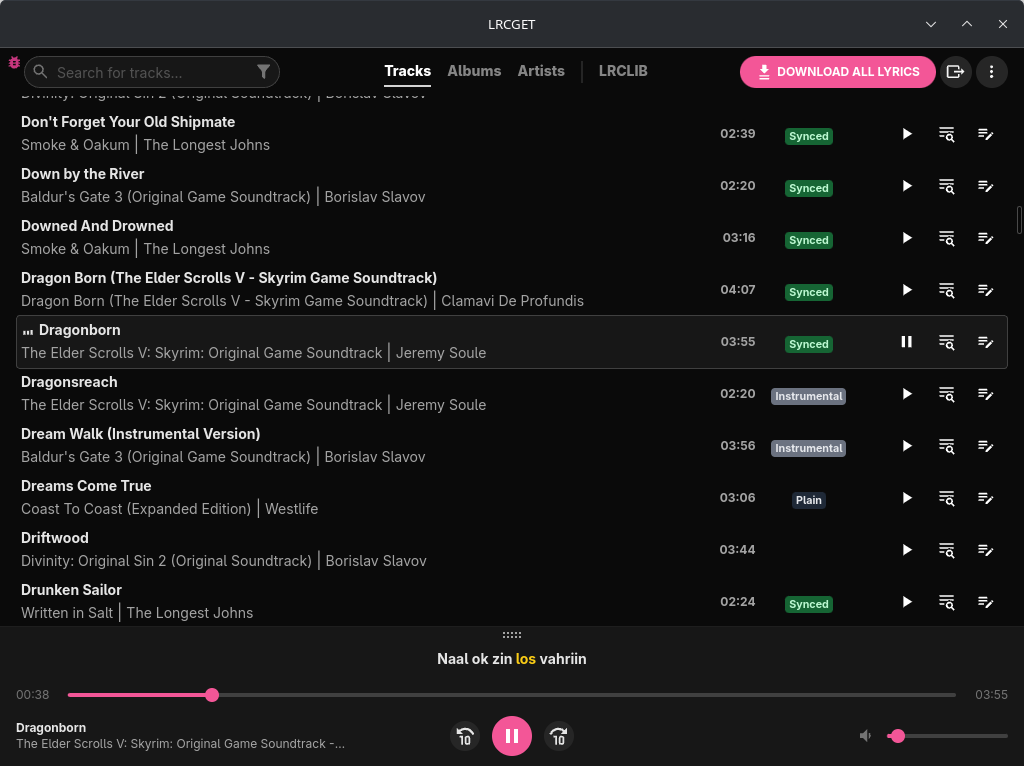
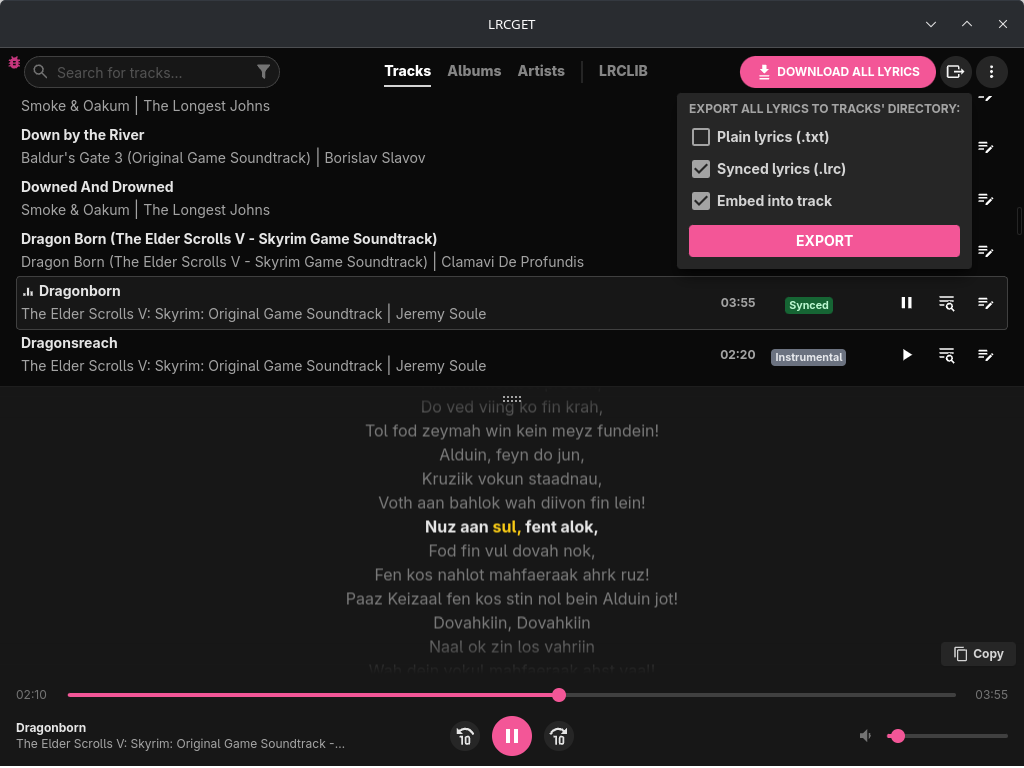
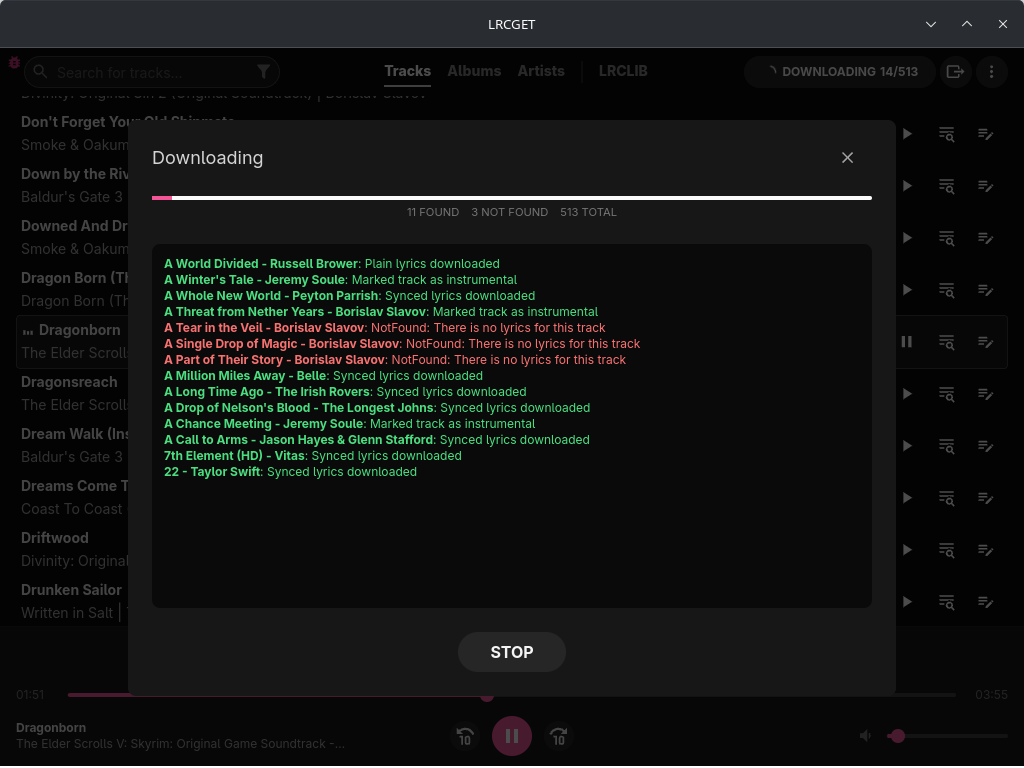
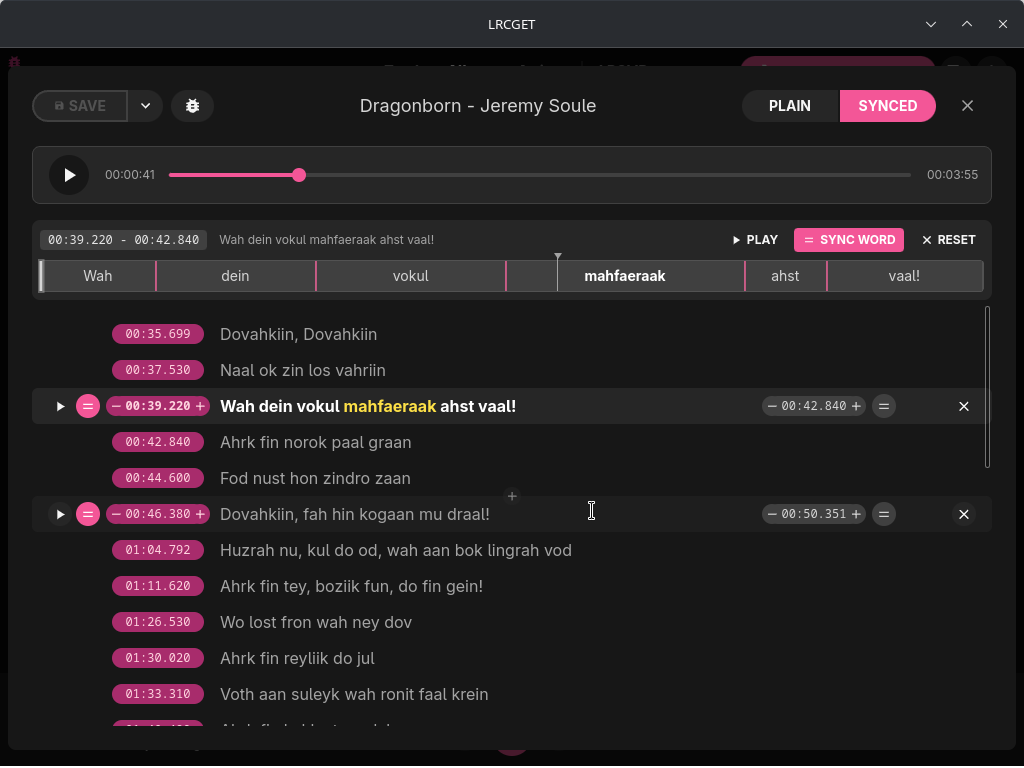
Donation
Toss a coin to your developer?
GitHub Sponsors (Recommended - 100% of your support goes to the developer):
https://github.com/sponsors/tranxuanthang
Buy Me a Coffee:
https://www.buymeacoffee.com/thangtran
Paypal:
https://paypal.me/tranxuanthang98
Monero (XMR):
43ZN5qDdGQhPGthFnngD8rjCHYLsEFBcyJjDC1GPZzVxWSfT8R48QCLNGyy6Z9LvatF5j8kSgv23DgJpixJg8bnmMnKm3b7
Litecoin (LTC):
ltc1q7texq5qsp59gclqlwf6asrqmhm98gruvz94a48
Troubleshooting
Audio cannot be played in Linux (Ubuntu and other distros)
Try to install pipewire-alsa package. For example, in Ubuntu or Debian-based distros:
sudo apt install pipewire-alsa
App won't open in Windows 10/11
If you are using Windows 10 LTSC, or have tried running some scripts to debloat Windows 10 (which will uninstall Microsoft Edge and its webview component), you might have issues as LRCGET depends on WebView2. Reinstalling Microsoft Edge might fix the problem (see issue https://github.com/tranxuanthang/lrcget/issues/45).
Scrollbar is invisible in Linux (KDE Plasma 5/6)
The exact cause is still unknown, but it can be fixed by going to System Settings > Appearance > Global Theme > Application Style > Configure GNOME/GTK Application Style... > Change to something other than breeze (Awaita or Default) > Apply (see comment https://github.com/tranxuanthang/lrcget/issues/44#issuecomment-1962998268)
Contact
If you prefer to contact by email:
Development
LRCGET is made with Tauri.
To start developing the application, you need to do the prerequisites steps according to your operating system.
For example, you need the following components to start the development in Windows:
- Microsoft Visual Studio C++ Build Tools
- Rust 1.81.0 or higher
- NodeJS v16.18.0 or higher
Start the development window with the following command:
cd lrcget
npm install
npm run tauri dev
Building
Start the build process with the following command:
cd lrcget
npm install
npm run tauri build
Your built binaries are located at:
./src-tauri/target/release/
For more detailed instruction, follow the building guide to build the application according to your OS platform.

lx-music-desktop
lyswhut·TypeScript
基于 Electron 的跨平台桌面音乐播放器,聚合多源在线音乐搜索与播放,界面清爽,适合日常听歌。
音乐播放器+4音乐播放器
55238+1067.1kv2.12.62026-11-10 04:44 UTC
spotube
team-spotube·Kotlin
开源跨平台音乐播放器,桌面和手机都能用,通过 Spotify 和 YouTube 等公开来源获取歌曲,无需付费订阅即可播放。
音乐播放器+4音乐播放器
50712+762.4kv6.0.02026-11-10 08:05 UTC
pear-desktop
pear-devs·TypeScript
基于 Electron 的跨平台桌面音乐播放器,为 YouTube Music 等流媒体服务提供增强扩展,支持 Windows、macOS 和 Linux。
音乐播放器+4音乐播放器
34017+212.0kv3.12.02026-11-08 01:55 UTC

YesPlayMusic
qier222·Vue
基于 Electron 和 Vue 的第三方网易云音乐播放器,界面精致,支持 Windows、macOS、Linux 以及 PWA,让你在桌面端也能获得流畅的在线听歌体验。
网易云音乐+4音乐播放器
33616+194.7kv0.4.112026-10-10 11:05 UTC