需先在 cloud.trigger.dev 注册账号并创建项目才能部署;自托管需按 Docker Compose 或 Helm 指南单独搭建;任务需用唯一 id 导出才能被识别
trigger.dev
triggerdotdevApache-2.0活跃维护用 TypeScript 编写和部署持久化 AI Agent 与后台工作流,自带调度、重试和编排能力,无需自己搭建任务队列和基础设施。
Trigger.dev – build and deploy durable AI agents and workflows
v4.8.3发布于 2026-10-30 12:22 UTC16,737star +10 / 7 天1,524fork同步于 2026-11-10 05:24 UTC
npm install @trigger.dev/sdk 硬件要求按 README 说明
README 未说明硬件要求,仅提到可配置任务的 vCPU 数与内存(Machines),未提及 GPU 或显存
有 Docker 镜像
用 TypeScript 写 AI 工作流的开源平台,长任务无超时、自带重试与可观测性
用 TypeScript 编写和部署持久化 AI Agent 与后台工作流,自带调度、重试和编排能力,无需自己搭建任务队列和基础设施。
核心能力
- 用 task() 在代码库中定义任务,无超时限制
- 内置持久化、自动重试、队列与幂等控制
- 支持 waitpoint 暂停任务等待人工审批
- Realtime 订阅运行状态并流式输出 LLM 响应
- 通过 build extensions 运行浏览器、Python、FFmpeg
容易踩的坑
内容由模型根据 README 生成,可能不完整或不准确,以官方文档为准。看原文 README
- helm-v4.8.3Helm Chart 4.8.32026-10-30 · 2026-10-30 12:35 UTC
查看更新说明
Installation
helm upgrade --install trigger \
  oci://ghcr.io/triggerdotdev/charts/trigger \
  --version "4.8.3"
Changes
See commit history for detailed changes in this release.
- v4.8.3trigger.dev v4.8.3最新正式版2026-10-30 · 2026-10-30 12:22 UTC
trigger.dev v4.8.3
Upgrade
npx trigger.dev@latest update  # npm
pnpm dlx trigger.dev@latest update  # pnpm
yarn dlx trigger.dev@latest update  # yarn
bunx trigger.dev@latest update  # bun
Self-hosted Docker image:
ghcr.io/triggerdotdev/trigger.dev:v4.8.3Release notes
Read the full release notes: https://trigger.dev/changelog/v4-8-3
What's changed
Improvements
- CLI and MCP logins are now bound to the machine that started them. Approving a login in your browser sends you back to the CLI automatically, or, when the browser is on another machine, shows a code to paste into the terminal (or pass with
trigger.dev login --code). Older CLI versions will need to upgrade to log in. (1a36c23fb) - Add
trigger webhooks set-secretandtrigger webhooks generate-secret, which store a webhook endpoint's signing secret without printing it.set-secretreads the secret from a pipe, an environment variable or a.envfile, andgenerate-secretsaves the new secret to an env file. When the endpoint already has a secret, both ask how long the old one keeps working (or take--previous-secret-ttl 24hin scripts). The MCP server'sset_webhook_secretandgenerate_webhook_secretdescriptions now point AI agents at these commands, so the secret stays out of the agent's context. (daaaa41db) - Deprecates the legacy Bun runtime.
runtime: "bun"(and its explicit spelling"bun-legacy"), which deploys Bun 1.3.3 with Node.js 20 alongside it, now prints a deprecation warning, and deploys that use it will be rejected from January 5, 2027. Switch toruntime: "bun-1.4"(Bun 1.4.4 on an image with no Node.js binary) and redeploy. (5f8171cab) - Add
trigger.refresh(ctx, id)to request an earlier status check for a Convex-tracked run, so applications using Trigger Realtime can publish results without waiting for the next scheduled poll. Requests are coalesced and rate-limited, use the existing completion callback, and retain polling as a recovery fallback. (ee5e5da40) - Add private-beta OIDC authentication for deployed Cloud tasks, with an AWS credential provider and environment-specific setup instructions. Install
@aws-sdk/client-ststo use@trigger.dev/sdk/oidc/aws, upgrade your deployment CLI, and redeploy. Contact us to enable access for your organization. (65352bc90)
Bug fixes
- Fix parent and root metadata updates being lost after one update could not be applied. Only that update is now skipped, and the rest are written. Metadata keys that name only the root, such as
$.or$.., are now ignored on a run's own metadata instead of throwing, and rejected for parent and root metadata, which fails the whole request. (53441fd20) - Fix reloading a chat mid-turn after its access token was refreshed. A token refresh during a streaming turn persisted a resume cursor from the middle of the turn, so a reload resumed past chunks the page needed and failed to rebuild the assistant message ("No tool invocation found for tool call ID"). The persisted cursor now stays at the start of the turn until it completes, so a reload replays the whole turn. (
9fd1de656)
Server changes
These changes affect the self-hosted Docker image and Trigger.dev
- CLI and MCP logins are now bound to the machine that started them. Approving a login in your browser sends you back to the CLI automatically, or, when the browser is on another machine, shows a code to paste into the terminal (or pass with
- helm-v4.8.2Helm Chart 4.8.22026-10-29 · 2026-10-29 13:42 UTC
查看更新说明
Installation
helm upgrade --install trigger \
  oci://ghcr.io/triggerdotdev/charts/trigger \
  --version "4.8.2"
Changes
See commit history for detailed changes in this release.
- v4.8.2trigger.dev v4.8.22026-10-29 · 2026-10-29 13:33 UTC
查看更新说明
trigger.dev v4.8.2
Upgrade
npx trigger.dev@latest update  # npm
pnpm dlx trigger.dev@latest update  # pnpm
yarn dlx trigger.dev@latest update  # yarn
bunx trigger.dev@latest update  # bun
Self-hosted Docker image:
ghcr.io/triggerdotdev/trigger.dev:v4.8.2Release notes
Read the full release notes: https://trigger.dev/changelog/v4-8-2
What's changed
Breaking changes
- Query dashboard APIs reject run tokens and public access tokens without user delegation. Existing API key access, including restricted keys with the required query scopes, is unchanged. MCP dashboard access remains supported through delegated tokens for current organization members.
- The legacy
clickhouseevent store is retired: task events now go toclickhouse_v2. If you self-host withEVENT_REPOSITORY_DEFAULT_STORE=clickhouse, switch it toclickhouse_v2and follow the self-hosting guide to copy older events, which no longer show until you do.
Improvements
-
Deployed tasks now keep a valid short-lived run token for their whole run: the token is refreshed during long runs and before a run resumes from a checkpoint. A warm-started task no longer keeps the previous run's token when the next run has none, and run credentials are left out of runner debug logs. (
aa9de9d94) -
Upgrade
socket.io-clientto 4.8.4 so projects using the SDK and CLI installws8.21 instead of 8.17.1, which has published advisories (GHSA-96hv-2xvq-fx4p, GHSA-58qx-3vcg-4xpx). The old pin blocked upgradingwswithout a package manager override. (2df9860b4) -
Adds the
bun-1.4runtime.runtime: "bun-1.4"deploys on Bun 1.4.4 in a Bun-only image with no Node.js binary, and the run controller itself runs under Bun.runtime: "bun"is unchanged (Bun 1.3 with Node.js alongside it);bun-legacyis accepted as an explicit spelling of the same runtime. On Bun 1.4 the worker no longer crashes at startup on the--no-warnings=ExperimentalWarningflag. (a8a87850b) -
Add an experimental Convex component for triggering tasks transactionally and reading their status and results through reactive queries, without configuring webhooks. (
3c1cf656c) -
Run metadata operations now reject JSON-path keys that use escaped dots to reach
__proto__,constructororprototype. (dce5048a8) -
Use short-lived run tokens for supported SDK operations inside deployed tasks when available, retaining environment-key compatibility for unsupported operations and missing or expired tokens. Explicit credentials still take precedence. Public-token helpers use server-side minting with run tokens rather than signing locally. (
5a1c14239)Project and organization queries, and branch overrides targeting another PREVIEW or DEVELOPMENT environment, keep using compatibility credentials. Branch headers do not change credential selection in STAGING or PRODUCTION. Chat subscriptions reread implicit credentials for each connection.
-
runs.subscribeToRunnow ends after the run completes. Thefor awaitloop exits right after the update with the final status, and the subscription stops its connection, so a script that subscribes to a run exits on its own. PassstopOnCompletion: falseto keep the subscription open after completion. ([485ab83aa](https://github.com/triggerdotdev/trigger.dev/commit/485ab83aaf5
- v4.8.1trigger.dev v4.8.12026-10-23 · 2026-10-23 14:28 UTC
查看更新说明
trigger.dev v4.8.1
Upgrade
npx trigger.dev@latest update  # npm
pnpm dlx trigger.dev@latest update  # pnpm
yarn dlx trigger.dev@latest update  # yarn
bunx trigger.dev@latest update  # bun
Self-hosted Docker image:
ghcr.io/triggerdotdev/trigger.dev:v4.8.1Release notes
Read the full release notes: https://trigger.dev/changelog/v4-8-1
What's changed
Bug fixes
- Fix
trigger deployfailing on self-hosted instances with custom base images. Stages built on a custom image now keep the trust store that image ships with. (b5ed66b74)
Server changes
These changes affect the self-hosted Docker image and Trigger.dev Cloud:
- Alerts can now watch the result of any supported query: raise when a value crosses a threshold, when matching rows stop appearing, or when new matching rows appear. Create them from the Query page, the Dashboard Agent or the API, and see the alert's values charted on its page.
All packages: v4.8.1
@trigger.dev/build, @trigger.dev/core, @trigger.dev/linear, @trigger.dev/python, @trigger.dev/react-hooks, @trigger.dev/redis-worker, @trigger.dev/rsc, @trigger.dev/schema-to-json, @trigger.dev/sdk, @trigger.dev/slack, trigger.dev
Contributors
@Mariefay, Eric Allam, Wes Mason, github-actions[bot], @nicktrn, Katia Bulatova, Paul Cioanca
Full changelog: https://github.com/triggerdotdev/trigger.dev/compare/v4.8.0...v4.8.1
- Fix
用户点评
登录用户的真实使用记录,可按版本和硬件筛选共 0 条
还没有人点评。第一个说出真实体验的人最有价值。

Build and deploy fully‑managed AI agents and workflows
Website | Docs | Issues | Example projects | Feature requests | Public roadmap | Self-hosting





About Trigger.dev
Trigger.dev is the open-source platform for building AI workflows in TypeScript. Long-running tasks with retries, queues, observability, and elastic scaling.
The platform designed for building AI agents
Build AI agents using all the frameworks, services and LLMs you're used to, deploy them to Trigger.dev and get durable, long-running tasks with retries, queues, observability, and elastic scaling out of the box.
-
Long-running without timeouts: Execute your tasks with absolutely no timeouts, unlike AWS Lambda, Vercel, and other serverless platforms.
-
Durability, retries & queues: Build rock solid agents and AI applications using our durable tasks, retries, queues and idempotency.
-
True runtime freedom: Customize your deployed tasks with system packages – run browsers, Python scripts, FFmpeg and more.
-
Human-in-the-loop: Programmatically pause your tasks until a human can approve, reject or give feedback.
-
Realtime apps & streaming: Move your background jobs to the foreground by subscribing to runs or streaming AI responses to your app.
-
Observability & monitoring: Each run has full tracing and logs. Configure error alerts to catch bugs fast.
Key features
- JavaScript and TypeScript SDK - Build background tasks using familiar programming models
- Long-running tasks - Handle resource-heavy tasks without timeouts
- Durable cron schedules - Create and attach recurring schedules of up to a year
- Trigger.dev Realtime - Trigger, subscribe to, and get real-time updates for runs, with LLM streaming support
- Build extensions - Hook directly into the build system and customize the build process. Run Python scripts, FFmpeg, browsers, and more.
- React hooks - Interact with the Trigger.dev API on your frontend using our React hooks package
- Batch triggering - Use batchTrigger() to initiate multiple runs of a task with custom payloads and options
- Structured inputs / outputs - Define precise data schemas for your tasks with runtime payload validation
- Waits - Add waits to your tasks to pause execution for a specified duration
- Preview branches - Create isolated environments for testing and development. Integrates with Vercel and git workflows
- Waitpoints - Add human-in-the-loop judgment at critical decision points without disrupting workflow
- Concurrency & queues - Set concurrency rules to manage how multiple tasks execute
- Multiple environments - Support for DEV, PREVIEW, STAGING, and PROD environments
- No infrastructure to manage - Auto-scaling infrastructure that eliminates timeouts and server management
- Automatic retries - If your task encounters an uncaught error, we automatically attempt to run it again
- Checkpointing - Tasks are inherently durable, thanks to our checkpointing feature
- Versioning - Atomic versioning allows you to deploy new versions without affecting running tasks
- Machines - Configure the number of vCPUs and GBs of RAM you want the task to use
- Observability & monitoring - Monitor every aspect of your tasks' performance with comprehensive logging and visualization tools
- Logging & tracing - Comprehensive logging and tracing for all your tasks
- Tags - Attach up to ten tags to each run, allowing you to filter via the dashboard, realtime, and the SDK
- Run metadata - Attach metadata to runs which updates as the run progresses and is available to use in your frontend for live updates
- Bulk actions - Perform actions on multiple runs simultaneously, including replaying and cancelling
- Real-time alerts - Choose your preferred notification method for run failures and deployments
Write tasks in your codebase
Create tasks where they belong: in your codebase. Version control, localhost, test and review like you're already used to.
import { task } from "@trigger.dev/sdk";

//1. You need to export each task
export const helloWorld = task({
  //2. Use a unique id for each task
  id: "hello-world",
  //3. The run function is the main function of the task
  run: async (payload: { message: string }) => {
    //4. You can write code that runs for a long time here, there are no timeouts
    console.log(payload.message);
  },
});
Deployment
Use our SDK to write tasks in your codebase. There's no infrastructure to manage, your tasks automatically scale and connect to our cloud. Or you can always self-host.
Environments
We support Development, Staging, Preview, and Production environments, allowing you to test your tasks before deploying them to production.
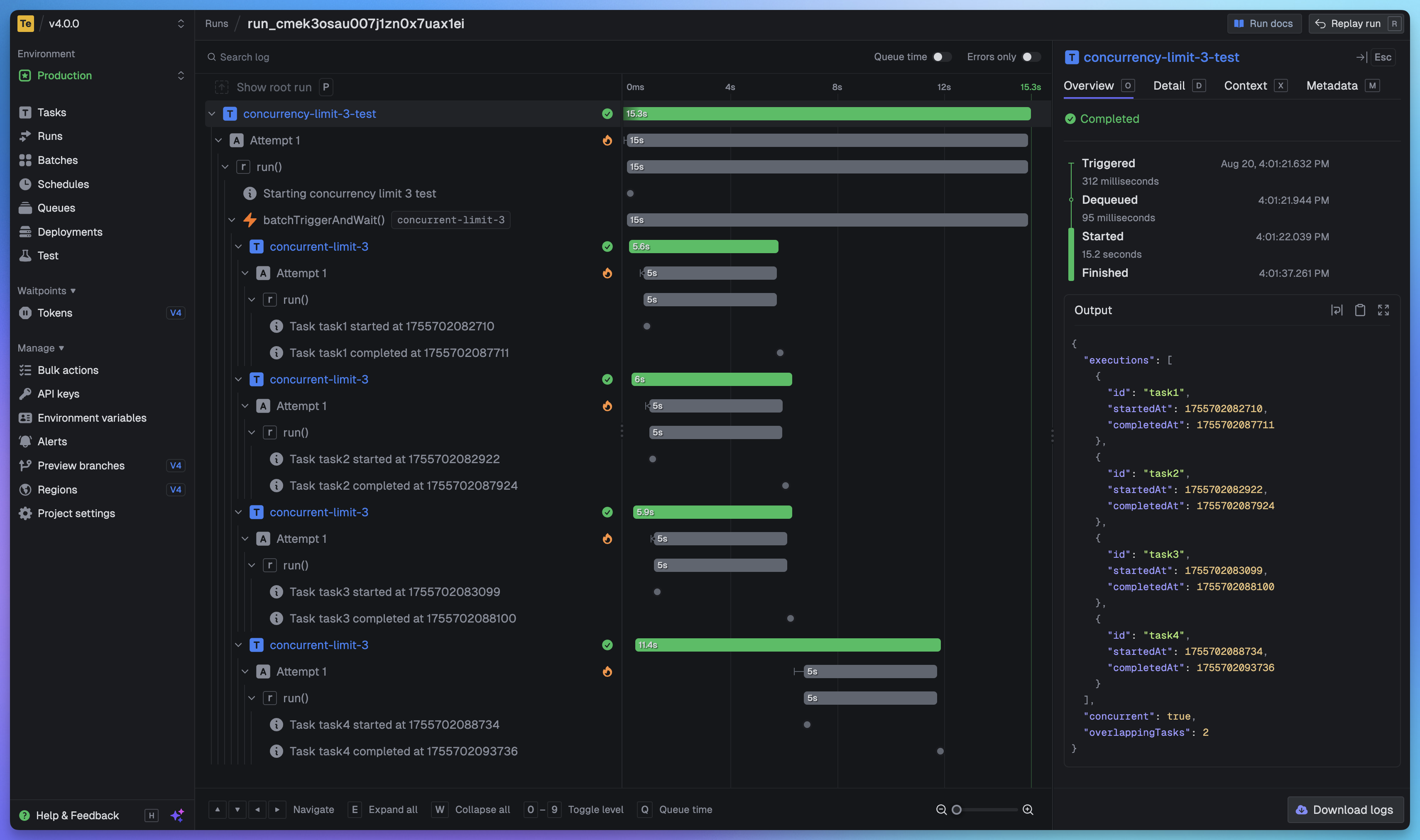
Full visibility of every job run
View every task in every run so you can tell exactly what happened. We provide a full trace view of every task run so you can see what happened at every step.
Getting started
The quickest way to get started is to create an account and project in our web app, and follow the instructions in the onboarding. Build and deploy your first task in minutes.
Useful links:
- Quick start - get up and running in minutes
- How it works - understand how Trigger.dev works under the hood
- Guides and examples - walk-through guides and code examples for popular frameworks and use cases
Self-hosting
If you prefer to self-host Trigger.dev, you can follow our self-hosting guides:
- Docker self-hosting guide - use Docker Compose to spin up a Trigger.dev instance
- Kubernetes self-hosting guide - use our official Helm chart to deploy Trigger.dev to your Kubernetes cluster
Support and community
We have a large active community in our official Discord server for support, including a dedicated channel for self-hosting.
Development
To setup and develop locally or contribute to the open source project, follow our development guide.