Chrome 142 起不再支持 --load-extension,首次启动需按弹窗提示到 chrome://extensions 手动加载解压扩展;Windows 安装若报 torch c10.so 或 onnxruntime 的 DLL 错误,需先装 Microsoft Visual C++ Redistributable;Docker 方式默认后端端口 9335、VNC 端口 6080,VNC 默认密码为 vibesurf。
VibeSurf
vibesurf-ai更新放缓开源的 AI 浏览器智能助手,通过浏览器扩展和 CDP 协议把网页操作交给 Agent 自动完成,适合搭建浏览器自动化工作流。
A powerful browser assistant for vibe surfing 一个开源的AI浏览器智能助手
0.5.18发布于 2026-01-17 12:22 UTC482star56fork同步于 2026-11-07 07:31 UTC
curl -LsSf https://astral.sh/uv/install.sh | sh
uv tool install vibesurf
vibesurf 硬件要求按 README 说明
README 未说明显存或 GPU 型号要求;支持本地 LLM(如 Ollama)运行,Docker 方式建议 --shm-size=4g 并需 SYS_ADMIN 权限。
有 Docker 镜像
开源 AI 浏览器智能体,把可复用工作流与多智能体并行结合,省 token 又提速
开源的 AI 浏览器智能助手,通过浏览器扩展和 CDP 协议把网页操作交给 Agent 自动完成,适合搭建浏览器自动化工作流。
核心能力
- 拖拽式浏览器工作流,定义一次反复运行几乎不耗 token
- 多智能体在不同标签页并行执行,支持广度和深度研究
- 支持 Ollama 等本地 LLM 与自定义 API,数据不出本机
- 以 Chrome 扩展形式集成,无需切换应用
- 提供 Docker 镜像,含 VNC 远程浏览与一键部署
容易踩的坑
内容由模型根据 README 生成,可能不完整或不准确,以官方文档为准。看原文 README
- 0.5.18Docker Support: Deploy VibeSurf Anywhere with One Command最新正式版2026-01-17 · 2026-01-17 12:22 UTC
🐳 Docker Deployment Now Available
VibeSurf can now run in Docker containers for cloud deployment and enhanced security. The containerized environment acts as a sandbox, making it safer and more convenient to use.
Quick Start
Option 1: Using docker-compose (Recommended)
# 1.  Clone VibeSurf Repo
git clone https://github.com/vibesurf-ai/VibeSurf
#  Optional: Edit docker-compose.yml to modify envs

# 2. Start VibeSurf
docker-compose up -d

# 3. Access VibeSurf
# - Backend: http://localhost:9335
# - Browser VNC (Web): http://localhost:6080 (default password: vibesurf)
Option 2: Using docker run
Pull the image
docker pull ghcr.io/vibesurf-ai/vibesurf:latest
Run the container
docker run --name vibesurf -d --restart unless-stopped \
-p 9335:9335 \
-p 6080:6080 \
-p 5901:5901 \
-v ./data:/data \
-e IN_DOCKER=true \
-e VIBESURF_WORKSPACE=/data/vibesurf_workspace \
-e RESOLUTION=1440x900x24 \
-e VNC_PASSWORD=vibesurf \
--shm-size=4g \
--cap-add=SYS_ADMIN \
ghcr.io/vibesurf-ai/vibesurf:latest
View browser in docker via VNC:
http://127.0.0.1:6080/Or you can use claude code or codex to control vibesurf browser and real-time preview in vscode, following below:
Open the Internal Browser
- Open the Command Palette:
Windows/Linux: Ctrl + Shift + P macOS: Cmd + Shift + P - Type and select: Simple Browser: Show
- Enter the URL: http://127.0.0.1:6080/
- Press Enter.
Adjust VNC Screen Size
- Click the Settings icon (gear button) on the left sidebar of the VNC viewer.
- Under Scaling Mode, select Local Scaling.
- This will allow the VNC screen to automatically resize to fit the window.
https://github.com/user-attachments/assets/e8c83a08-2d0b-4a59-805a-5c54dbc1dbae
What's Changed
- Fix BrowserEvaluateJavaScript component multiline input escape sequen… by @vvincent1234 in https://github.com/vibesurf-ai/VibeSurf/pull/145
- Update README video section with YouTube tutorial link by @vvincent1234 in https://github.com/vibesurf-ai/VibeSurf/pull/146
Full Changelog: https://github.com/vibesurf-ai/VibeSurf/compare/0.5.7...0.5.8
What's Changed
- Bu by @vvincent1234 in https://github.com/vibesurf-ai/VibeSurf/pull/147
Full Changelog: https://github.com/vibesurf-ai/VibeSurf/compare/0.5.8...0.5.9
- Open the Command Palette:
- 0.4.10Add CDP-based console and network logging actions2026-01-04 · 2026-01-04 12:18 UTC
查看更新说明
- Add start_console_logging and stop_console_logging actions to monitor browser console output
- Add start_network_logging and stop_network_logging actions to capture HTTP traffic
- Console logs saved to both .log (human-readable) and .json (structured) formats
- Network logs saved as HAR (HTTP Archive) format with full request/response details
- Add Fetch content from URL
- Fix video subtitle
Full Changelog: https://github.com/vibesurf-ai/VibeSurf/compare/0.4.8...0.4.9
- 0.4.7VibeSurf integration for Claude Code2026-01-03 · 2026-01-03 05:06 UTC
查看更新说明
VibeSurf integration for Claude Code - Control real browsers, execute AI skills, run workflows, and integrate with external apps.
https://github.com/vibesurf-ai/claude-surf
# Add the marketplace
/plugin marketplace add vibesurf-ai/claude-surf

# Install the plugin
/plugin install surf
What You Can Do
- Browser Control - Navigate websites, interact with elements
- AI Skills - Search, crawl, extract data, summarize content
- Workflows - Execute pre-built automation workflows
- App Integrations - Gmail, GitHub, Slack, and 100+ apps via Composio/MCP
- Browser-Use Agent - Parallel multi-task automation using AI sub-agents
https://github.com/user-attachments/assets/84783c9a-a37f-4fbd-aac6-381ee49cb0c8
- 0.4.6HTTP API for VibeSurf Actions and Workflow Skills2026-01-01 · 2026-01-01 04:13 UTC
查看更新说明
Happy New Year! 🎉🎉
In this version, we expose all VibeSurf actions as HTTP REST APIs, enabling programmatic control of browser automation, AI skills, and workflow execution.
Core Endpoints
Search Actions
GET /api/tool/search?keyword=browserReturns available actions with descriptions. Filter by keyword or list all.
Get Action Parameters
GET /api/tool/{action_name}/paramsReturns JSON schema for action parameters.
Execute Action
POST /api/tool/execute
Content-Type: application/json

{
  "action_name": "execute_browser_use_agent",
  "action_params": {
    "tasks": [
      {"task": "Open VibeSurf official website"},
      {"task": "Open VibeSurf GitHub repo"}
    ]
  }
}
What You Can Do
Browser Control
- Atomic operations:
browser.click_element,browser.input_text,browser.scroll_down - Browser state:
browser.get_current_state,browser.get_all_tabs - Browser task execution via
execute_browser_use_agent
AI Skills
advanced_search- Intelligent web search with LLMcrawl- Extract structured data from websitescode- Execute JavaScript in browser contextsummary- Summarize content with AI- type / to find more
Integration Tools
- Composio toolkit support via
extra_toolparameter - Control Gmail, Google Calendar, GitHub, and 100+ apps
Workflow Execution
- Execute pre-built workflow templates via action API
- Combine deterministic automation with AI intelligence
Example Usage
Execute parallel browser tasks:
curl -X POST 'http://127.0.0.1:9335/api/tool/execute' \
  -H 'Content-Type: application/json' \
  -d '{
    "action_name": "execute_browser_use_agent",
    "action_params": {
      "tasks": [
        {"task": "Search for VibeSurf documentation"},
        {"task": "Open GitHub trending page"}
      ]
    }
  }'
Perform advanced web search:
curl -X POST 'http://127.0.0.1:9335/api/tool/execute' \ -H 'Content-Type: application/json' \ -d '{ "action_name": "advanced_search", "action_params": { "query": "latest AI browser automation tools" } }' - Atomic operations:
- 0.3.16Optimize workflow skills and fix bugs2025-12-30 · 2025-12-30 01:46 UTC
查看更新说明
Full Changelog: https://github.com/vibesurf-ai/VibeSurf/compare/0.3.15...0.3.16
用户点评
登录用户的真实使用记录,可按版本和硬件筛选共 0 条
还没有人点评。第一个说出真实体验的人最有价值。
VibeSurf: A powerful browser assistant for vibe surfing



Note: VibeSurf can be used in Claude Code for control and real-time preview of browsers. For more details, see the claude-surf.
Note: VibeSurf is also available in Open-Claw. Install with:
npx clawhub@latest install vibesurf. For more details, see claw-surf.
VibeSurf is the first open-source AI agentic browser that combines workflow automation with intelligent AI agents - delivering browser automation that's faster, cheaper, and smarter than traditional solutions.
🎯 Why VibeSurf? Save 99% of token costs with workflows, run parallel AI agents across tabs, and keep your data private with local LLM support - all through a seamless Chrome extension.
🐳 Quick Start with Docker: Get up and running in seconds with our Docker image - no complex setup required!
☁️ Non-Docker Deployment: For cloud manual deployment with noVNC browser visualization, see docs/cloud-manual-start.md.
If you're as excited about open-source AI browsing as I am, give it a star! ⭐
✨ Key Features
-
🔄 Revolutionary Browser Workflows: Create drag-and-drop workflows that consume virtually zero tokens - define once, run forever. Perfect for auto-login, data collection, and repetitive tasks with 100x speed boost.
-
🚀 Multi-Agent Parallel Processing: Run multiple AI agents simultaneously across different browser tabs for massive efficiency gains in both deep and wide research.
-
🧠 Intelligent AI Automation: Beyond basic automation - perform deep research, intelligent crawling, content summarization, and adaptive browsing with AI decision-making.
-
🔒 Privacy-First Architecture: Full support for local LLMs (Ollama, etc.) and custom APIs - your browsing data never leaves your machine during vibe surfing.
-
🎨 Seamless Chrome Extension: Native browser integration without switching applications - feels like a natural part of your browser with intuitive UI.
-
🐳 One-Click Docker Deployment: Get started instantly with our Docker image - includes VNC access for remote browsing and easy scaling.
🚀 Browser Workflow Magic
Why Browser Workflow Matters
🎯 Efficiency First: Most browser operations follow predictable patterns - why rebuild them every time with agents? Workflows let you define once, run forever.
💰 Token Savings: Workflows consume virtually zero tokens, only using them when dynamic information retrieval is needed. Save costs while maintaining intelligence.
⚡ Speed & Reliability: Deterministic workflows deliver consistent, fast, and highly accurate results. No more waiting for agents to "think" through repetitive steps.
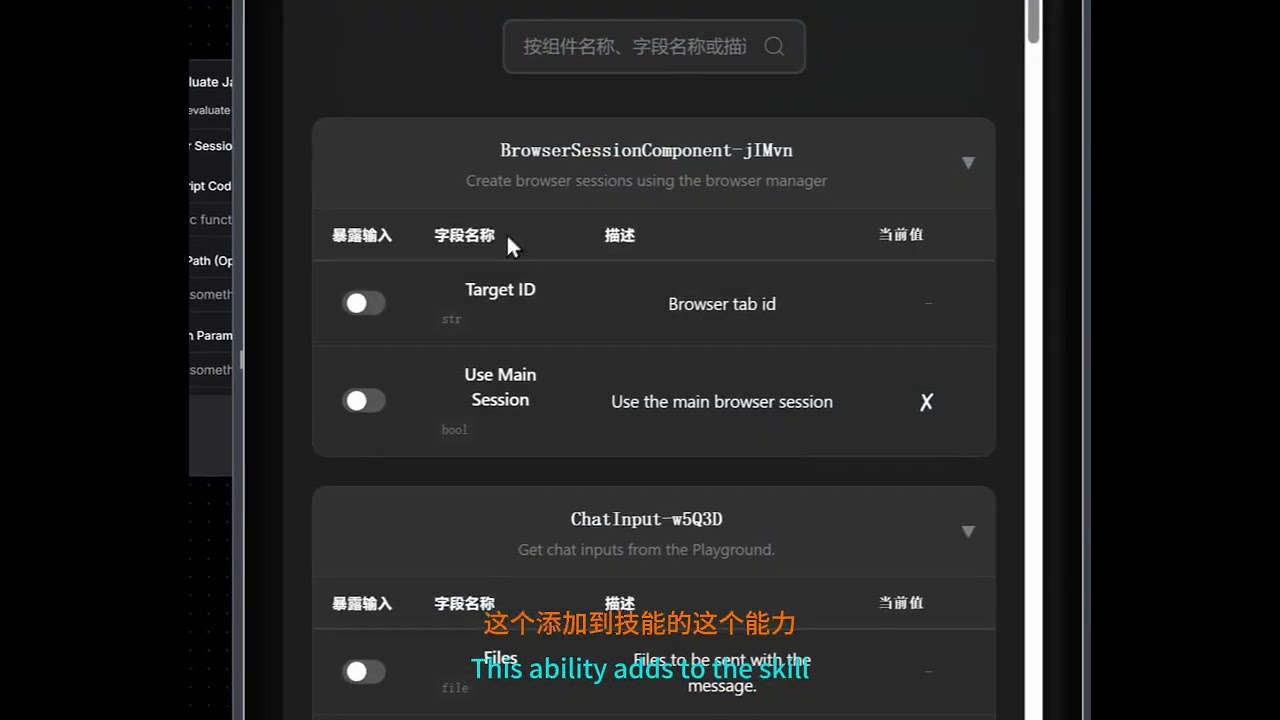
A tutorial that step-by-step guides you from scratch on using VibeSurf to build a browser automation workflow that searches X and extracts results. Beyond the basics, it demonstrates how to transform this workflow into a deployable API and integrate it as a custom Skill within Claude Code.
👉 Explore Workflow Templates - Get started with pre-built workflows for common tasks!
🛠️ Installation
For Windows users: You can also download and run our one-click installer: VibeSurf-Installer.exe
Note: If you encounter DLL errors related to torch c10.so or onnxruntime during installation, please download and install the Microsoft Visual C++ Redistributable.
Get VibeSurf up and running in just three simple steps. No complex configuration required.
1. Install uv
Install uv package manager from the official website
MacOS/Linux
curl -LsSf https://astral.sh/uv/install.sh | sh
Windows
powershell -ExecutionPolicy ByPass -c "irm https://astral.sh/uv/install.ps1 | iex"
2. Install VibeSurf
Install VibeSurf as a tool
uv tool install vibesurf
Tip: Use
uv tool upgrade vibesurfto upgrade to the latest version.Full Installation: To install with all optional features (including PyTorch, OCR, and advanced document processing), use
uv tool install vibesurf[full].
3. Launch VibeSurf
Start the VibeSurf browser assistant
vibesurf
Note: To run in headless browser mode without a visible GUI, use the
--headlessflag:vibesurf --headless
Note: Starting from Chrome 142, the --load-extension flag is no longer supported. When you first start VibeSurf, the browser will show a popup displaying the extension path. To manually load the extension:
- Open chrome://extensions
- Enable Developer mode
- Click "Load unpacked" and navigate to the extension folder
Typical Extension Locations:
-
Windows:
C:\Users\<username>\AppData\Roaming\uv\tools\vibesurf\Lib\site-packages\vibe_surf\chrome_extension -
macOS:
~/.local/share/uv/tools/vibesurf/lib/python3.<version>/site-packages/vibe_surf/chrome_extension(replace<version>with your Python version, e.g.,python3.12)Tip: Besides the popup, you can also find the extension path in the command line startup logs. For macOS users, press
Cmd+Shift+Gin Finder, paste the path, and press Enter to navigate directly to the folder.
4. Start to Use
Your browser does not support playing this video!
🐳 Docker (Alternative)
You can also run VibeSurf in Docker with browser VNC access:
Option 1: Using docker-compose (Recommended)
# 1. Clone VibeSurf Repo
git clone https://github.com/vibesurf-ai/VibeSurf
cd VibeSurf
# Optional: Edit docker-compose.yml to modify envs

# 2. Start VibeSurf
docker-compose up -d

# 3. Access VibeSurf
# - Backend: http://localhost:9335
# - Browser VNC (Web): http://localhost:6080 (default password: vibesurf)
Note: The VNC browser environment defaults to English input. Press
Ctrl + Spaceto switch to Chinese Pinyin input method.
Note: To use a proxy, set the
HTTP_PROXYandHTTPS_PROXYenvironment variables indocker-compose.yml(e.g.,HTTP_PROXY: http://proxy.example.com:8080).
Option 2: Using docker run
# Pull the image
docker pull ghcr.io/vibesurf-ai/vibesurf:latest

# Run the container
docker run --name vibesurf -d --restart unless-stopped \
  -p 9335:9335 \
  -p 6080:6080 \
  -p 5901:5901 \
  -v ./data:/data \
  -e IN_DOCKER=true \
  -e VIBESURF_BACKEND_PORT=9335 \
  -e VIBESURF_WORKSPACE=/data/vibesurf_workspace \
  -e RESOLUTION=1440x900x24 \
  -e VNC_PASSWORD=vibesurf \
  --shm-size=4g \
  --cap-add=SYS_ADMIN \
  ghcr.io/vibesurf-ai/vibesurf:latest
👩💻 For Contributors
Want to contribute to VibeSurf? Follow these steps to set up your development environment:
1. Clone Repository
git clone https://github.com/vibesurf-ai/VibeSurf.git
cd VibeSurf
2. Setup Environment
MacOS/Linux
uv venv --python 3.12
source .venv/bin/activate
uv pip install -e .
Full Installation (with all optional features)
uv pip install -e ".[full]"
Windows
uv venv --python 3.12
.venv\Scripts\activate
uv pip install -e .
3. Build Frontend (Optional)
If you're working on frontend changes, you need to build and copy the frontend to the backend directory:
# Navigate to frontend directory
cd vibe_surf/frontend

# Install frontend dependencies
npm ci

# Build the frontend
npm run build

# Copy build output to backend directory
mkdir -p ../backend/frontend
cp -r build/* ../backend/frontend/
4. Start Debugging
Option 1: Direct Server
uvicorn vibe_surf.backend.main:app --host 127.0.0.1 --port 9335
Option 2: CLI Entry
uv run vibesurf
🗺️ Roadmap
We're building VibeSurf to be your ultimate AI browser companion. Here's what's coming next:
-
Smart Skills System - Completed Add
/searchfor quick information search,/crawlfor automatic website data extraction and/codefor webpage js code execution. Integrated native APIs for Xiaohongshu, Douyin, Weibo, and YouTube. -
Third-Party Integrations - Completed Connect with hundreds of popular tools including Gmail, Notion, Google Calendar, Slack, Trello, GitHub, and more through Composio integration to combine browsing with powerful automation capabilities
-
Agentic Browser Workflow - Completed Create custom drag-and-drop and conversation-based workflows for auto-login, data collection, and complex browser automation tasks
-
Powerful Coding Agent - In Progress Build a comprehensive coding assistant for data processing and analysis directly in your browser
-
Intelligent Memory & Personalization - Planned Transform VibeSurf into a truly human-like companion with persistent memory that learns your preferences, habits, and browsing patterns over time
🎬 Demo
How to use?
Your browser does not support playing this video!
Dozens of agent running in on browser
Your browser does not support playing this video!
📝 License
This repository is licensed under the VibeSurf Open Source License, based on Apache 2.0 with additional conditions.
👏 Acknowledgments
VibeSurf builds on top of other awesome open-source projects:
Huge thanks to their creators and contributors!
💬 Join Our Community
Welcome to join our WeChat group for discussions!
browser-use
browser-use·Python
开源的 Python 库,让大模型直接操控浏览器完成点击、填表、抓取等网页任务,省去手写 Playwright 脚本的麻烦。
浏览器自动化+4电脑 / 浏览器 Agent进阶
120594+36413k1.0.12026-11-10 23:09 UTC

browser
lightpanda-io·Zig
用 Zig 从零编写的无头浏览器,专为 AI 和自动化场景设计,兼容 CDP 协议,可替代 Playwright、Puppeteer 驱动网页抓取与 Agent 任务。
无头浏览器+4电脑 / 浏览器 Agent进阶
41789+2692.1k1.0.32026-11-10 23:15 UTC

UI-TARS-desktop
bytedance·TypeScript
字节开源的多模态 AI Agent 桌面栈,把前沿模型和 Agent 基础设施连起来,让 Agent 能像人一样操作 GUI、浏览器和电脑完成任务。
多模态Agent+4电脑 / 浏览器 Agent
39586+214.0kv0.3.12026-10-09 01:29 UTC
Jobs_Applier_AI_Agent
feder-cr·Python
自动投递简历的求职机器人,能按简历匹配度筛选岗位并批量提交申请,睡觉时也能持续找工作。
求职自动化+4电脑 / 浏览器 Agent进阶
32455+564.8kusage-counter2026-11-10 02:38 UTC