需要 WakaTime 账号和 API key,安装后会被提示输入;在线 IDE 需把 API key 写入全局环境变量 WAKATIME_API_KEY;SSH 远程连接时若服务器为多人共享,需按官方指南强制插件在本地运行

vscode-wakatime
wakatimeBSD-3-Clause活跃维护在 VS Code 里自动记录你写代码的时间,并按项目、语言生成编程活动统计,适合想量化自己编码习惯的开发者。
Visual Studio Code plugin for automatic time tracking and metrics generated from your programming activity.
暂无版本1,511star220fork同步于 2026-11-07 07:32 UTC
在 VS Code 中按 F1 或 ⌘+Shift+P 输入 install,选择 Extensions: Install Extension,再输入 wakatime 回车,然后输入 API key 硬件要求按 README 说明
README 未说明
VS Code 插件,自动记录你的编程活动并生成时间统计与指标
在 VS Code 里自动记录你写代码的时间,并按项目、语言生成编程活动统计,适合想量化自己编码习惯的开发者。
核心能力
- 自动生成编码活动的时间追踪与指标
- 在状态栏显示今日编码活动,可关闭
- 通过命令面板配置 WakaTime 相关设置
- 支持自定义状态栏对齐方式与优先级
- 配置存于 ~/.wakatime.cfg,可设 disabled 禁用
容易踩的坑
内容由模型根据 README 生成,可能不完整或不准确,以官方文档为准。看原文 README
暂无 release 数据(可能没有发版,或尚未同步)。
用户点评
登录用户的真实使用记录,可按版本和硬件筛选共 0 条
还没有人点评。第一个说出真实体验的人最有价值。
WakaTime for Visual Studio Code



WakaTime is an open source VS Code plugin for metrics, insights, and time tracking automatically generated from your programming activity.
Installation
-
Press
F1or⌘ + Shift + Pand typeinstall. PickExtensions: Install Extension.
-
Type
wakatimeand hitenter.
-
Enter your api key, then press
enter.(If you’re not prompted, press
F1or⌘ + Shift + Pthen typeWakaTime API Key.) -
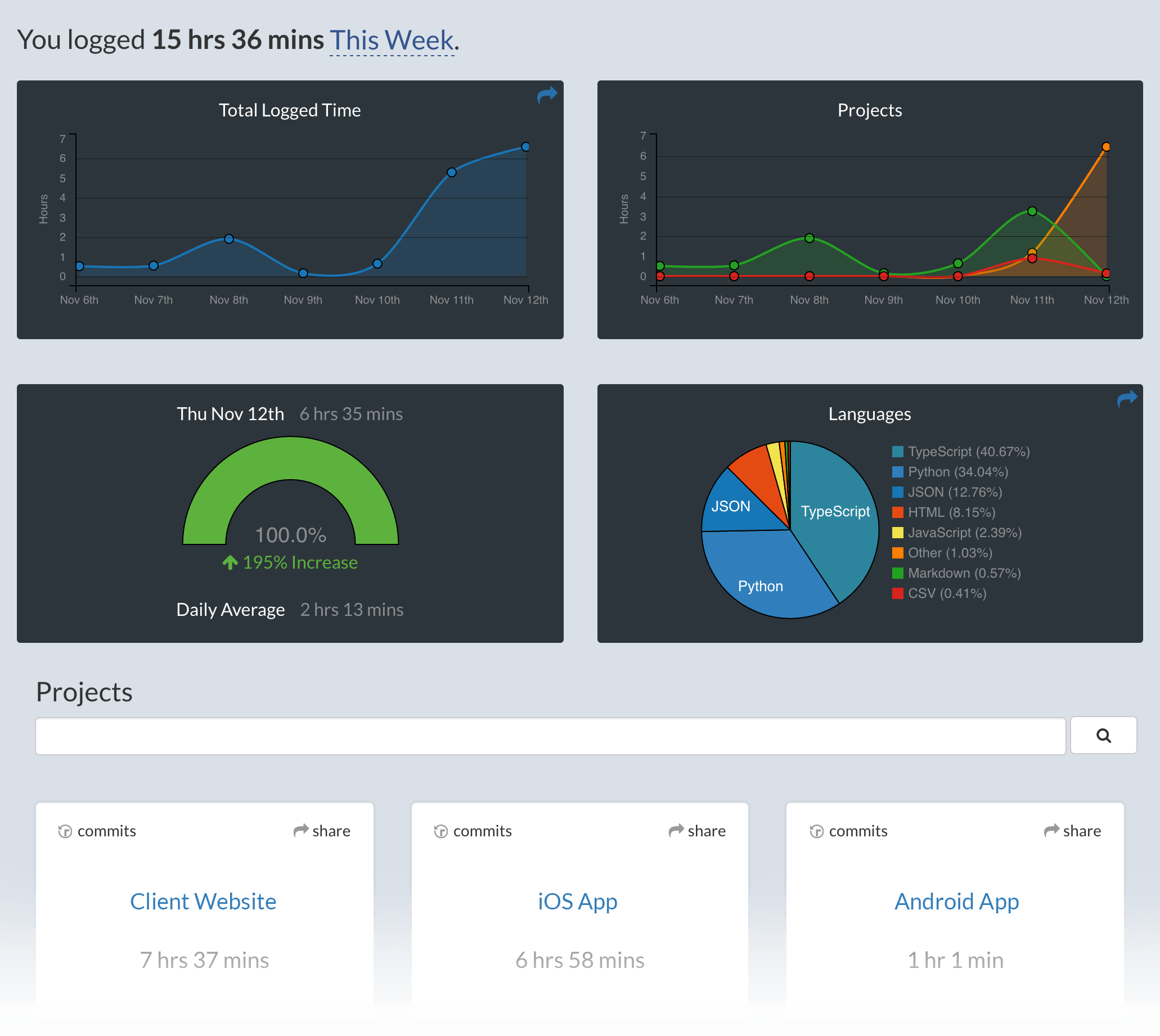
Use VSCode and your coding activity will be displayed on your WakaTime dashboard
Usage
Visit https://wakatime.com to see your coding activity.
Configuring
VS Code specific settings are available from ⌘ + Shift + P, then typing wakatime.
For example, to hide today's coding activity in your status bar:
Press ⌘ + Shift + P then set WakaTime: Status Bar Coding Activity to false.
Status Bar Alignment
You can customize the position and priority of the WakaTime status bar item:
- Alignment: Set
wakatime.aligntoleftorrightto control which side of the status bar shows the WakaTime item - Priority: Set
wakatime.alignPriorityto a number to control the order (higher values appear more to the left)
Both settings require restarting VS Code to take effect.
Extension settings are stored in the INI file at $HOME/.wakatime.cfg.
More information can be found from wakatime-cli.
If using an online IDE like gitpods, add your api key to global ENV key WAKATIME_API_KEY.
Notes:
$HOMEdefaults to$HOME- To disable the extension at startup add
disabled=trueto your config, this operation can also be performed by pressing⌘ + Shift + Pand selectingWakaTime: Disable.
Troubleshooting
First, turn on debug mode:
- Press
F1or⌘ + Shift + P - Type
> WakaTime: Debug, and pressEnter. - Select
true, then pressEnter.
Next, open your Developer Console to view logs and errors:
Help → Toggle Developer Tools
Errors outside the scope of vscode-wakatime go to $HOME/.wakatime/wakatime.log from wakatime-cli.
If your error message contains "won't send heartbeat due to backoff" then delete your ~/.wakatime/wakatime-internal.cfg file to trigger an API connection so we can see the real error message.
The How to Debug Plugins guide shows how to check when coding activity was last received from your editor using the Plugins Status Page.
Microsoft Windows Only: Using WakaTime behind a corporate proxy? Try enabling your Windows Root Certs inside VS Code with the win-ca extension:
Press Ctrl + Shift + X, search for win-ca, press Install.
For more general troubleshooting info, see the wakatime-cli Troubleshooting Section.
SSH configuration
If you're connected to a remote host using the ssh extension you might want to force WakaTime to run locally instead on the server. This configuration is needed when the server you connect is shared among other people. Please follow this guide.
Uninstalling
-
Click the Extensions sidebar item in VS Code.
-
Type
wakatimeand hit enter. -
Click the settings icon next to WakaTime, then click Uninstall.
-
Delete the
~/.wakatime*files in your home directory, unless you’re still using WakaTime with another IDE.
Contributing
Pull requests, bug reports, and feature requests are welcome! Please search existing issues before creating a new one.
To run from source:
git clone [email protected]:wakatime/vscode-wakatime.gitcd vscode-wakatimenpm installnpm run watch- Install the extension from the marketplace
- Then symlink
~/.vscode/extensions/wakatime.vscode-wakatime-*/dist/extension.jsto./dist/extension.js
Or to run the web version from source:
git clone [email protected]:wakatime/vscode-wakatime.gitcd vscode-wakatimenpm installnpm run compilenpm run open-in-browser- Go to localhost:3000 in your web browser
Many thanks to all contributors!
Made with :heart: by the WakaTime Team.