文件需设为「Anyone with the link」否则报 Permission Denied;Drive 约 1 小时后会断开连接,大文件需加 --continue;用 --cookies-from-browser 时 Linux Chromium 系需额外装 gdown[secretstorage],Windows Chrome 127+ 无法读取 cookie 需改用 Firefox
gdown
wkentaroMIT活跃维护从 Google Drive 下载公开文件的小工具,curl/wget 搞不定大文件或病毒扫描提示时用它,一条命令就能拿到文件。
Google Drive public file downloader when curl/wget fails.
v6.5.1发布于 2026-10-29 03:52 UTC5,484star +3 / 7 天430fork同步于 2026-11-10 17:36 UTC
pip install gdown 硬件要求按 README 说明
README 未说明,仅要求 Python 3.10 或更高版本,无 GPU 或显存要求
绕过 Google Drive 大文件确认页的命令行下载器,curl/wget 失败时用它
从 Google Drive 下载公开文件的小工具,curl/wget 搞不定大文件或病毒扫描提示时用它,一条命令就能拿到文件。
核心能力
- 跳过病毒扫描确认页,大文件也能下完
- 递归下载整个 Drive 文件夹
- 把 Docs/Sheets/Slides 导出为 docx/xlsx/pptx 或 PDF
- 用 --continue 断点续传,配合 --retries 自动重试
- 支持任意 HTTP/HTTPS URL,可当 curl/wget 替代
容易踩的坑
内容由模型根据 README 生成,可能不完整或不准确,以官方文档为准。看原文 README
- v6.5.1最新正式版2026-10-29 · 2026-10-29 03:52 UTC
Fixed
- Report unknown progress totals for compressed or chunked HTTP responses instead of comparing decoded bytes against Content-Length. (#544)
- v6.5.02026-10-29 · 2026-10-29 02:38 UTC
查看更新说明
Changed
- Name cached-download staging directories after their file, hidden, so a killed download's leftover is recognizable. (#541)
Fixed
- v6.4.22026-10-09 · 2026-10-09 00:50 UTC
查看更新说明
Fixed
- Sanitize Windows-invalid file and folder names when downloading from Google Drive. (#534)
- v6.4.12026-09-29 · 2026-09-29 09:19 UTC
查看更新说明
Fixed
- Support Google Drive file URLs ending in
/previewor without a/viewor/editsuffix. (#532)
- Support Google Drive file URLs ending in
- v6.4.02026-09-17 · 2026-09-17 09:16 UTC
查看更新说明
Added
- Optional cancellation events for
download()andcached_download()interrupt stalled response reads and download waits without shortening network timeouts, raisingDownloadCancelledwhile preserving partial-file cleanup. (#525)
Changed
- An invalid
--speedvalue now reports the accepted units instead of an internal function name. (#527)
Removed
importlibis no longer exported from thegdownpackage; it was listed in__all__by accident. (#526)
- Optional cancellation events for
用户点评
登录用户的真实使用记录,可按版本和硬件筛选共 0 条
还没有人点评。第一个说出真实体验的人最有价值。


Google Drive public file/folder downloader when curl/wget fails.
Why?
Downloading public files from Google Drive with curl or wget doesn't work — Google serves a confirmation page for large files, and the URL formats are a mess.
gdown gets around that:
- Skips the virus-scan confirmation page so large downloads actually finish
- Downloads folders recursively
- Exports Google Docs/Sheets/Slides as PDF, DOCX, CSV, etc.
- Resumes partial downloads with
--continue - Also works with plain HTTP/HTTPS URLs as a curl/wget replacement
Install
Requires Python 3.10 or later.
pip install gdown
Or with uv:
uv tool install gdown
Quick start
# Just paste a Google Drive URL
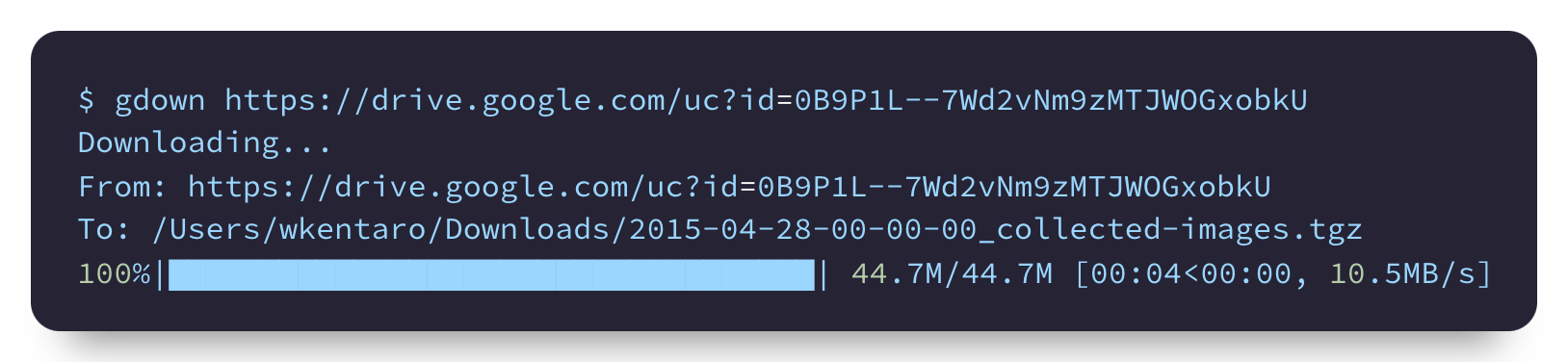
gdown https://drive.google.com/uc?id=1l_5RK28JRL19wpT22B-DY9We3TVXnnQQ

# Or copy-paste a share link directly
gdown 'https://drive.google.com/file/d/0B9P1L--7Wd2vU3VUVlFnbTgtS2c/view?usp=sharing'
Usage
CLI
Files
# Download by URL
gdown https://drive.google.com/uc?id=1l_5RK28JRL19wpT22B-DY9We3TVXnnQQ

# Download by file ID
gdown 1l_5RK28JRL19wpT22B-DY9We3TVXnnQQ

# Download from a share link
gdown 'https://drive.google.com/file/d/0B9P1L--7Wd2vU3VUVlFnbTgtS2c/view?usp=sharing'

# Save to a specific path
gdown https://drive.google.com/uc?id=0B9P1L--7Wd2vU3VUVlFnbTgtS2c -O /tmp/spam.txt

# Resolve the filename (with its real extension) without downloading
gdown https://drive.google.com/uc?id=0B9P1L--7Wd2vU3VUVlFnbTgtS2c --json
--json is in beta and its output format may change in a future release; pass
--quiet to silence the beta warning in scripts. The output is an array of
{url, path} entries, where path is the filename Google Drive reports. This
lets you choose a name while keeping the original extension:
url="https://drive.google.com/uc?id=0B9P1L--7Wd2vU3VUVlFnbTgtS2c"
filename=$(gdown "$url" --json | jq -r '.[0].path')
gdown "$url" -O "my_name.${filename##*.}"
Folders
# Download an entire folder
gdown https://drive.google.com/drive/folders/15uNXeRBIhVvZJIhL4yTw4IsStMhUaaxl -O /tmp/folder

# List folder contents as a JSON array (each entry has url and path)
gdown https://drive.google.com/drive/folders/15uNXeRBIhVvZJIhL4yTw4IsStMhUaaxl --json

# Filter by path and download matches
gdown https://drive.google.com/drive/folders/15uNXeRBIhVvZJIhL4yTw4IsStMhUaaxl --json \
  | jq -r '.[] | select(.path | test("shad")) | .url' \
  | xargs -n1 gdown
Folder URLs are detected automatically. A bare folder ID still requires
--folder because file and folder IDs have the same format.
Google Docs, Sheets, Slides
# Download a Google Slides file (default: pptx)
gdown "https://docs.google.com/presentation/d/15umvZKlsJ3094HNg5S4vJsIhxcFlyTeK/edit?usp=sharing"

# Export as PDF instead
gdown "https://docs.google.com/presentation/d/15umvZKlsJ3094HNg5S4vJsIhxcFlyTeK/edit" --format pdf
Default export formats: Docs → docx, Sheets → xlsx, Slides → pptx.
Resume, speed limit, proxy
# Resume a partially downloaded file
gdown https://drive.google.com/uc?id=1l_5RK28JRL19wpT22B-DY9We3TVXnnQQ --continue

# Limit download speed
gdown https://drive.google.com/uc?id=1l_5RK28JRL19wpT22B-DY9We3TVXnnQQ --speed 10MB

# Download via proxy
gdown https://drive.google.com/uc?id=1l_5RK28JRL19wpT22B-DY9We3TVXnnQQ --proxy http://proxy:8080

# Give up when the server sends nothing for 30 seconds
gdown https://drive.google.com/uc?id=1l_5RK28JRL19wpT22B-DY9We3TVXnnQQ --timeout 30
Other options
# Skip TLS certificate verification
gdown https://drive.google.com/uc?id=1l_5RK28JRL19wpT22B-DY9We3TVXnnQQ --no-check-certificate

# Download as your signed-in Google account, reusing your browser's cookies
gdown https://drive.google.com/uc?id=1l_5RK28JRL19wpT22B-DY9We3TVXnnQQ --cookies-from-browser firefox

# Read and save cookies in a file other than ~/.cache/gdown/cookies.txt
gdown https://drive.google.com/uc?id=1l_5RK28JRL19wpT22B-DY9We3TVXnnQQ --cookies ./cookies.txt

# Don't read or save cookies
gdown https://drive.google.com/uc?id=1l_5RK28JRL19wpT22B-DY9We3TVXnnQQ --no-cookies

# Use a custom User-Agent
gdown https://drive.google.com/uc?id=1l_5RK28JRL19wpT22B-DY9We3TVXnnQQ --user-agent "MyApp/1.0"
Pipe to stdout
gdown https://github.com/wkentaro/gdown/archive/refs/tags/v4.0.0.tar.gz -O - --quiet | tar zxvf -
Any URL
gdown also works with regular URLs, not just Google Drive:
gdown https://httpbin.org/ip -O ip.json
[!NOTE] For Google Drive URLs, gdown automatically extracts the file ID and downloads the actual file. Use curl or wget to download the raw HTML page instead.
Python
import gdown

# Download a file
url = "https://drive.google.com/uc?id=1l_5RK28JRL19wpT22B-DY9We3TVXnnQQ"
gdown.download(url=url, output="fcn8s_from_caffe.npz")

# Download by file ID
gdown.download(id="0B9P1L--7Wd2vNm9zMTJWOGxobkU", output="output.npz")

# Download from a share link
url = "https://drive.google.com/file/d/0B9P1L--7Wd2vNm9zMTJWOGxobkU/view?usp=sharing"
gdown.download(url=url, output="output.npz")

# Download with hash verification and caching
gdown.cached_download(
    url=url,
    path="output.npz",
    hash="md5:fa837a88f0c40c513d975104edf3da17",
    postprocess=gdown.extractall,
)

# Track download progress
def on_progress(bytes_so_far: int, bytes_total: int | None) -> None:
    if bytes_total is not None:
        print(f"\r{bytes_so_far / bytes_total * 100:.1f}%", end="")

gdown.download(url=url, output="output.npz", quiet=True, progress=on_progress)

# Download a folder
url = "https://drive.google.com/drive/folders/15uNXeRBIhVvZJIhL4yTw4IsStMhUaaxl"
gdown.download_folder(url=url)

# Download a folder by ID
gdown.download_folder(id="15uNXeRBIhVvZJIhL4yTw4IsStMhUaaxl")
FAQ
"Permission Denied" error
Make sure the file sharing is set to "Anyone with the link".
Download still fails even with "Anyone with the link"
Google throttles downloads when too many people access the same file, but lets a signed-in account through. If you can still open the file in your browser, reuse that browser's cookies:
gdown --cookies-from-browser firefox https://drive.google.com/uc?id=FILE_ID
Supported browsers: brave, chrome, chromium, edge, firefox, opera, safari,
vivaldi, whale. gdown saves the cookies to
~/.cache/gdown/cookies.txt, so later runs need no flag. That file then
holds your whole google.com session, Gmail and Account included, so treat
it like a password. To revoke it, delete the file and sign out of Google in
that browser.
Platform notes:
- Linux Chromium-family browsers using GNOME Keyring require
secretstoragein gdown's Python environment. Install withpip install 'gdown[secretstorage]'or runuvx --from 'gdown[secretstorage]' gdown --cookies-from-browser chrome URL. Firefox needs no extra dependency. - macOS asks for your login password once to unlock the Chromium-family keychain entry; Firefox needs nothing.
- Windows Chrome 127+ encrypts cookies so other programs cannot read them. Use Firefox there.
- Safari requires Full Disk Access for your terminal.
If none of that works, export a Netscape cookies.txt with a browser
extension such as Get cookies.txt LOCALLY
and pass it with --cookies cookies.txt. gdown rewrites that file while
resolving each Google Drive file, whether or not it downloads it.
Download stops after ~1 hour
Google Drive terminates connections after approximately 1 hour for large files.
Use --continue to reuse earlier partial downloads and skip completed files.
Add --retries N for up to N automatic retries per file after a transient
connection failure, timeout, or incomplete transfer:
gdown --continue --retries 3 https://drive.google.com/uc?id=<file_id>
gdown --continue --retries 3 https://drive.google.com/drive/folders/<folder_id>
Retries default to zero and use exponential backoff with jitter, capped at 30
seconds. Retries resume the current transfer automatically; --continue controls
whether earlier downloads are reused. Python callers can pass retries=3 to
download, download_folder, or cached_download.
Retries require a filesystem destination; stdout and file-like outputs are not
supported. Folder discovery and --json do not retry. If a server refuses the
requested byte range, gdown stops that file and preserves the partial download.
When a file exhausts its retries in a folder, remaining files are attempted and
failures are reported at the end. Permission/quota errors and cancellation are
not retried.
Can I use gdown for non-Google-Drive URLs?
Yes. It works with any public HTTP/HTTPS URL.
Contributing
Install just 1.58.0 or newer and
uv. Recipes use Bash;
on Windows, install Git for Windows and make its Bash available on PATH.
git clone https://github.com/wkentaro/gdown.git
cd gdown
just setup   # install dependencies
just test    # run tests
just lint    # run linters
License
MIT (LICENSE)
yt-dlp
yt-dlp·Python
功能丰富的命令行音视频下载器,支持从 YouTube 等大量网站抓取视频和音频,还能调用 SponsorBlock 自动跳过广告片段。
命令行下载器+4下载管理器
206678+82318k2026.10.262026-11-04 07:16 UTC

Motrix
agalwood·TypeScript
基于 aria2 的全功能下载管理器,支持 HTTP、FTP、BT 和磁力链接,界面清爽,跨 Windows、macOS、Linux 使用。
下载管理器+4下载管理器
58107+2125.1kv2.4.12026-11-09 16:32 UTC

cobalt
imputnet·Svelte
一个开源的社交媒体下载器,支持从 Instagram、TikTok、Twitter、Reddit、SoundCloud 等平台保存视频和音乐,界面清爽、无需广告。
社交媒体下载+4下载管理器
45960+774.1k2026-04-06 11:59 UTC
aria2
aria2·C++
轻量级命令行下载工具,支持 HTTP、FTP、BitTorrent、Metalink 等多种协议和多源并发下载,适合脚本化批量下载和远程 RPC 控制。
下载工具+4下载管理器
43463+414.0krelease-1.37.02026-06-25 14:49 UTC