自定义模板的 command name 和 label 必须唯一,否则会覆盖内置模板;snippet 必须是合法的 SnippetString,否则模板不生效;languageIds 中排除某语言需在标识符前加 - 且不能有空格
vscode-surround
yatkiMIT更新放缓VS Code 扩展,用快捷键给选中的代码块快速套上 if、try/catch、循环等包裹模板,省去手动敲外层结构。
🔥 A simple yet powerful extension to add wrapper templates around your code blocks
v1.5.0发布于 2022-08-08 21:48 UTC1,257star62fork同步于 2026-11-07 07:32 UTC
在 VS Code 扩展市场搜索并安装 yatki.vscode-surround 硬件要求按 README 说明
README 未说明
VS Code 扩展,给选中的代码块快速套上 if、try-catch、函数等包裹模板
VS Code 扩展,用快捷键给选中的代码块快速套上 if、try/catch、循环等包裹模板,省去手动敲外层结构。
核心能力
- 右键或快捷键唤出快速选择菜单挑选包裹模板
- 内置 if、tryCatch、for、函数声明、region 等常用模板
- 支持多选区域同时包裹并保留原有缩进格式
- 可在设置中自定义模板并绑定独立快捷键
- 用 languageIds 按语言启用或排除模板
容易踩的坑
内容由模型根据 README 生成,可能不完整或不准确,以官方文档为准。看原文 README
- v1.5.0最新正式版2022-08-08 · 2022-08-08 21:48 UTC
- #81 Added browser support. Now extension works on VSCode for Web 🎉 .
- v1.4.02022-08-08 · 2022-08-08 17:32 UTC
查看更新说明
- #80 Added support for inserting snippets when nothing is selected
- Improved line trimming
- v1.3.02022-05-02 · 2022-05-02 15:27 UTC
查看更新说明
#83 Bugfix - Custom snippet list bug fixed #76 Feature Request -
showUpdateNotificationsoption was added. - v1.2.22021-07-30 · 2021-07-30 16:37 UTC
查看更新说明
Fixes #74 - Multi-selection bug is fixed Fixes #70 - Placeholders are not working for multiple selections
- v1.2.12021-07-22 · 2021-07-22 21:00 UTC
查看更新说明
Fixes #73 - Not adhering to selected text bug
用户点评
登录用户的真实使用记录,可按版本和硬件筛选共 0 条
还没有人点评。第一个说出真实体验的人最有价值。
Surround


Features
- Now works on VSCode for Web 🚀New!
- Supports language identifiers
- Supports multi selections
- Fully customizable
- Custom wrapper snippets
- You can assign shortcuts for each wrapper snippets separately
- Nicely formatted (Preserves indentations)
- Sorts recently used snippets on top
Demo 1: Choosing a wrapper snippet from quick pick menu
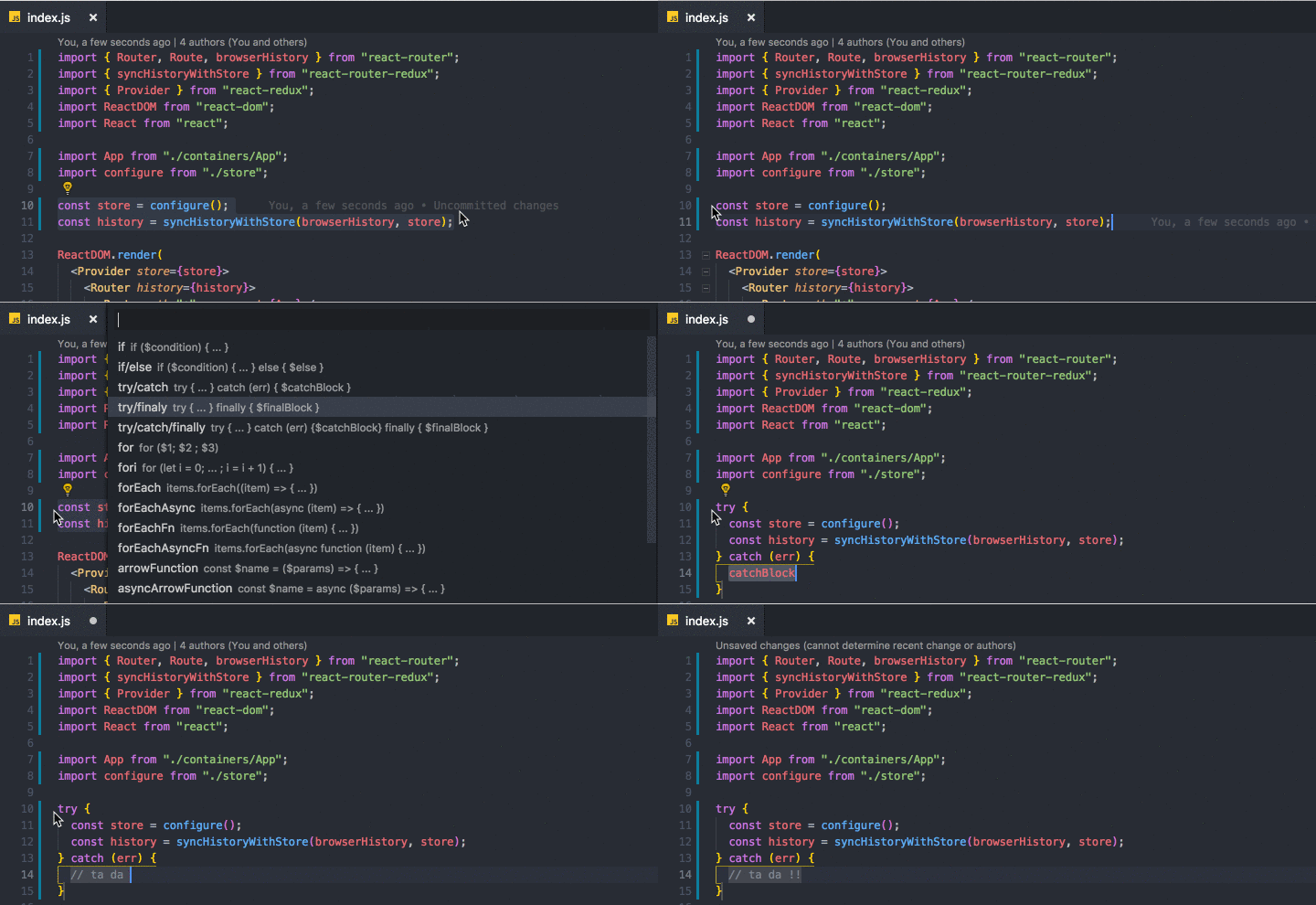
Demo 2: Wrapping multi selections

How To Use
After selecting the code block, you can
- right click on selected code
- OR press (ctrl+shift+T) or (cmd+shift+T)
to get list of commands and pick one of them.
Hint
Each wrapper has a separate command so you can define keybindings for your favorite wrappers by searching
surround.with.commandNamein the 'Keyboard Shortcuts' section.
List of commands
| Command | Snippet |
|---|---|
surround.with (ctrl+shift+T) | List of all the enabled commands below |
surround.with.if | if ($condition) { ... } |
surround.with.ifElse | if ($condition) { ... } else { $else } |
surround.with.tryCatch | try { ... } catch (err) { $catchBlock } |
surround.with.tryFinally | try { ... } finally { $finalBlock } |
surround.with.tryCatchFinally | try { ... } catch (err) {$catchBlock} finally { $finalBlock } |
surround.with.for | for ($1) { ... } |
surround.with.fori | for (let i = 0; ... ; i = i + 1) { ... } |
surround.with.forEach | items.forEach((item) => { ... }) |
surround.with.forEachAsync | items.forEach(async (item) => { ... }) |
surround.with.forEachFn | items.forEach(function (item) { ... }) |
surround.with.forEachAsyncFn | items.forEach(async function (item) { ... }) |
surround.with.arrowFunction | const $name = ($params) => { ... } |
surround.with.asyncArrowFunction | const $name = async ($params) => { ... } |
surround.with.functionDeclaration | function $name ($params) { ... } |
surround.with.asyncFunctionDeclaration | async function $name ($params) { ... } |
surround.with.functionExpression | const $name = function ($params) { ... } |
surround.with.asyncFunctionExpression | const $name = async function ($params) { ... } |
surround.with.element | <element>...</element> |
surround.with.comment | /** ... */ |
surround.with.region | #region $regionName ... #endregion |
surround.with.templateLiteral 🚀New! | ... (Also replaces single and double quotes with backtick) |
surround.with.templateLiteralVariable 🚀New! | ${...} (Also replaces single and double quotes with backtick) |
surround.with.iife 🚀New! | (function $name($params){ ... })($arguments); |
Options
showOnlyUserDefinedSnippets(boolean): Disables default snippets that comes with the extension and shows only used defined snippets.showRecentlyUsedFirst(boolean): Recently used snippets will be displayed on top.showUpdateNotifications(boolean): Shows notification when there is a new version of the extension.
Configuration
Each wrapper snippet config object is defined as ISurroundItem like below:
interface ISurroundItem {
  label: string; // must be unique
  description?: string;
  detail?: string;
  snippet: string; // must be valid SnippetString
  disabled?: boolean; // default: false
  languageIds?: string[];
}
Editing/Disabling existing wrapper functions
Go to "Settings" and search for "surround.with.commandName".
Example surround.with.if:
{
  "label": "if",
  "description": "if ($condition) { ... }",
  "disabled": false,
  "snippet": "if(${1:condition}) {\n\t$TM_SELECTED_TEXT\n}$0"
}
Adding new custom wrapper functions
Go to "Settings" and search for surround.custom and edit it like below.
{
  "surround.custom": {
    // command name must be unique
    "yourCommandName": {
      // label must be unique
      "label": "Your Snippet Label",
      "description": "Your Snippet Description",
      "snippet": "burrito { $TM_SELECTED_TEXT }$0", // <-- snippet goes here.
      "languageIds": ["html", "javascript", "typescript", "markdown"]
    },
    // You can add more ...
  }
}
Defining language-specific snippets
With version 1.1.0, you can define snippets based on the document type by using languageIds option.
Visit VSCode docs the full list of language identifiers.
1. Enabling a snippet for ALL languages
If you want to allow a snippet to work for all document types, simply REMOVE languageIds option.
OR set it to ["*"] as below:
{
  "label": "if",
  "description": "if ($condition) { ... }",
  "disabled": false,
  "snippet": "if(${1:condition}) {\n\t$TM_SELECTED_TEXT\n}$0",
  "languageIds": ["*"] // Wildcard allows snippet to work with all languages
}
2. Enabling a snippet for ONLY specified languages
If you want to allow a snippet to work with html, typescript and typescriptreact documents, you can use the example below.
{
  "label": "if",
  "description": "if ($condition) { ... }",
  "disabled": false,
  "snippet": "if(${1:condition}) {\n\t$TM_SELECTED_TEXT\n}$0",
  "languageIds": ["html", "typescript", "typescriptreact"]
}
3. Disabling a snippet for ONLY specified languages
If you want to allow a snippet to work with all document types EXCEPT html, typescript and typescriptreact documents,
you can add - (MINUS) sign as a prefix to the language identifiers (without a whitespace).
{
  "label": "if",
  "description": "if ($condition) { ... }",
  "disabled": false,
  "snippet": "if(${1:condition}) {\n\t$TM_SELECTED_TEXT\n}$0",
  "languageIds": ["*", "-html", "-typescript", "-typescriptreact"]
}
IMPORTANT NOTES:
- All command names and labels must be unique. If you do not provide a unique command name or label, your custom wrapper functions will override existing ones.
- You can redefine all snippets as long as you provide a valid
SnippetString. Read More
Contribution
As always, I'm open to any contribution and would like to hear your feedback.
PS: Guide for running @vscode/test-web on WSL 2
Just an important reminder:
If you are planning to contribute to any open source project, before starting development, please always open an issue and make a proposal first. This will save you from working on features that are eventually going to be rejected for some reason.
Logo
I designed the logo on canva.com and inspired by one of their free templates.
LICENCE
MIT (c) 2021 Mehmet Yatkı
Enjoy!
vscode
microsoft·TypeScript
微软开源的跨平台代码编辑器,基于 Electron 和 TypeScript 构建,支持插件扩展、调试和 Git 集成,适合日常开发写代码。
代码编辑器+4编辑器 / IDE
195262+17844k1.145.22026-11-10 17:16 UTC
neovim
neovim·Vim Script
Vim 的分支版本,用 Lua 做配置和插件开发,内置 LSP 与异步 API,让终端编辑器更好扩展、更好用。
文本编辑器+4编辑器 / IDE
103547+857.4kv0.12.62026-11-10 16:22 UTC
zed
zed-industries·Rust
用 Rust 打造的高性能多人协作代码编辑器,由 Atom 和 Tree-sitter 作者开发,主打低延迟编辑与实时协同编码。
代码编辑器+4编辑器 / IDE
94661+80912kv1.27.02026-11-10 16:11 UTC

AFFiNE
toeverything·TypeScript
把文档、白板、表格融为一体的开源知识库,可离线使用、支持多人实时协作,是 Notion 和 Miro 的替代方案。
知识库+4编辑器 / IDE
74421+1345.5kv2026.11.9-canary.9072026-11-10 16:20 UTC