部分能力(Addon、Context Packages、Time Machine、多 Agent 交接)标注为 Research 或实验性接口,不要当作稳定功能;Shadow Mode 的节省数据是基于未压缩 token 数的模拟基线,不是第二次实测;provider 实测节省需要代理的 counterfactual holdout,仅接入上下文路径时只记录准备结果
lean-ctx
yvgudeApache-2.0活跃维护为 AI 编码代理提供上下文网关,按任务筛选相关上下文、接入本地知识并记录可审计的证据链,支持 CLI、MCP 和代理路径。
LeanCTX is the Context Gateway for AI Systems. Select task-relevant context, apply supported controls, connect local knowledge and inspect recorded evidence. Open-source Engine: CLI, MCP, hooks and supported proxy paths.
v3.12.2发布于 2026-11-05 07:05 UTC3,941star +6 / 7 天365fork同步于 2026-11-10 17:40 UTC
在 AI 工具与数据之间做上下文网关,按任务筛选内容、施加访问控制并留下可查证据
为 AI 编码代理提供上下文网关,按任务筛选相关上下文、接入本地知识并记录可审计的证据链,支持 CLI、MCP 和代理路径。
核心能力
- 用 16 种读取模式(full、map、signatures、diff 等)返回聚焦的文件视图
- 对支持的调用施加路径权限、内容过滤和上下文预算控制
- 本地保留任务、发现与决策记录,跨会话延续上下文
- 用 savings、shadow、gain 等命令查看 token 用量与模拟成本对比
- 通过 CLI、MCP、hooks 和代理路径接入现有 AI 工具
容易踩的坑
内容由模型根据 README 生成,可能不完整或不准确,以官方文档为准。看原文 README
- v3.12.2最新正式版2026-11-05 · 2026-11-05 07:05 UTC
Added
- LeanCTX | Hive is open.
lean-ctx hive connectandhive linkconnect an instance to hive.leanctx.com (or a self-hosted Hive), andhiveis back in help, suggestions and completions; 3.12.0 and 3.12.1 shipped the connector switched off.
Security
- Write destinations stay inside the project without a Workspace (GHSA-483j-9vcj-2gxx).
ctx_package save,ctx_pack export, thectx_edit/ctx_patchbackups,ctx_checkpoint restoreand thectx_knowledgeexport wrote to the path the model passed, so an absolute or../path left the project in the default configuration. A write destination now goes through the path jail with or without a Workspace; reads are unchanged. Reported by kasparovabi.
Fixed
- A directory granted with
lean-ctx allow-pathis walkable (#2190).ctx_search,ctx_treeandctx_globrefused a granted folder below a protected home location such as~/Libraryalthoughctx_readread its files. A walk inside a granted directory now runs; a grant never makes home, a filesystem root or a privacy-guarded home folder walkable. - A dogfood or release-candidate build updates to its release. The update check read
3.12.1-dogfood.9as 3.12.9 and answered "already up to date"; a prerelease now sorts before its release, as in SemVer. - Updates no longer switch an existing setup to the governor, and 3.12.1's switch is
undone. The 3.12.1 update moved every unpinned Claude Code, CodeBuddy, Cursor, Codex,
Gemini and Copilot CLI setup to the governor without the lean-ctx MCP server. An update or
setup refresh now keeps the MCP, hybrid or replace setup it finds. A host that 3.12.1 switched
automatically (a
*.pre-governor-<version>.bakbackup or an interrupted migration, and no governor pin) gets its previous mode back on the nextlean-ctx setup,lean-ctx updateorinit --agent <host>. The mode is read from the backup and pinned.init --agent <host> --mode governor|governor-mcpnow pins that choice too, so the repair leaves it alone. - New Claude Code installs get
governor-mcp. Governor hooks plus the lean-ctx MCP server with deferred tools, so Hive, the agent bus and knowledge work from the first session. New installs of the other hosts get the standard MCP setup. - Claude Code always keeps a search tool. The standard setup denied native Grep/Glob even
when
~/.claude.jsonhad no lean-ctx MCP server. That happened after the 3.12.1 migration, when a server or daemon of the previous build re-rendered the standard hooks, and sessions then had neither native search norctx_search. The deny is now written only together with the MCP entry, and a refresh removes it when the entry is missing.lean-ctx doctorreports a pinned standard mode or a native-tool deny without the MCP server, with the repair command. - An older binary no longer overwrites a newer setup. Every explicit setup and init records its version. The silent hook refresh of a server or daemon still running from before an update leaves the setup alone when a newer build wrote it.
- A host pin selects the mode of later refreshes.
[governor] pinned.<host>(written byinit --agent <host> --mode <m>) is honoured by every setup and refresh path, not only by the governor default. gainand the cockpit count the governor's applied savings. Applied R1.bash, R2 and R4 decisions are recorded asgovernor:<rule>savings; shadow decisions still count nothing. R1.read already did.- Test processes of every LeanCTX crate stay off production endpoints. The guard that
sends test traffic to a loopback sink recognised only the Engine's own unit tests and
processes cargo launched for the Engine or
lean-ctxpackage. Since the crate split, the unit tests of the server, Hive, hooks and proxy crates, and the binaries they spawn, sent telemetry to production, each as a new installation. Any process of alean-ctx…or
- LeanCTX | Hive is open.
- v3.12.12026-11-04 · 2026-11-04 10:08 UTC
查看更新说明
LeanCTX | OSS 3.12.1
A security and governance release. Shell, file and Hive paths now fail closed: the shell gate checks every command it lets through, its policy can no longer be changed from an agent's own environment, and native Read/Grep follow the secret-path rule. LeanCTX on a machine is now an instance, and it speaks Hive-Protocol 2.2 with LeanCTX | Hive.
Full list: CHANGELOG.md.
Highlights
- Governor setup by default on Claude Code. New installs get native tools plus two hooks (
hook govern,hook rewrite-enforce) and no MCP server: about 86 tokens of fixed prefix per turn instead of ~2,950. Measured ×0.88 against native Claude Code on long conversations. Existing setups switch once onupdate, with backups.lean-ctx init --agent claude --mode hybridkeeps thectx_*tools, and that choice is pinned. CodeBuddy, Cursor, Codex CLI, Gemini CLI and Copilot CLI get the same default. - Governor rule R4 groups large Bash output whose lines differ only in numbers, timestamps or ids. The exact original stays in the archive (
ctx_expand). Errors, tracebacks and diffs stay verbatim. Shadow by default. ctx_read symbol="name"reads one function or class. A read without a range returns files up to 300 lines whole and larger files as an outline capped at ~1,500 tokens.ctx_shellasks before refusing an unlisted program: allow once, for the session, always, or deny, in your AI tool's approval dialog.- Opt-in: long-session elision in the proxy. Once a Claude Code conversation passes ~180 kB (~50k tokens), the proxy can replace old tool outputs (over 2 KB, older than the last 8 messages) with a short note that names the archived full text. It is off by default: measured on Claude Code with Haiku 5.5 over three runs (44 long tasks per arm), it cut cost to ×0.67–0.92 against native but solved 37 of 44 tasks against 42 of 44, when the model answered without reading back an elided early output. Turn it on with
[proxy] long_session_elide = trueorLEAN_CTX_PROXY_LONG_SESSION_ELIDE=on. lean-ctx hive docs import --markdownturns docs into LeanCTX | Hive pages, one section per heading, re-revising only what changed.- Hive-Protocol 2.2. Agents check each other's task results (
ctx_tasks action=verify). A connected instance now carries corrections, supersedes and withdrawals of its facts to the vault. - emspace spaces work without setup.
ctx_readnames the page that documents a file, andctx_providerreads one page section. - Knowledge has no fact limit. Facts leave memory only by quality. The knowledge store keeps a change journal (
ctx_knowledge action=changes).
Security
- Shell gate: every command the hooks let run without the
lean-ctx -cwrap is now checked: heredocs,lean-ctx …prefixes,&&chains with reads, Mistral Vibe, Codex, Copilot and PowerShell. Release builds take shell-security settings only from the built-in defaults and~/…/config.toml, never fromLEAN_CTX_SHELL_*,HOMEorXDG_*set by the agent. lean-ctx calls from an agent's shell follow an allowlist. Over-long or too deeply nested commands are refused instead of crashing the hook. - Approvals mirror your AI tool. The hooks no longer answer "allow" for every call. They allow only what the host's own permission settings would have run without asking.
- Native Read and Grep follow the secret-path rule on Claude Code, CodeBuddy, Cursor, Copilot CLI and Gemini CLI.
- PathJail writes stay in the active project by default (
path_jail_scope = projects).ctx_multi_repo add_rootpasses the jail. Project policies can no longer drop the built-in exclusions for.env*, keys and credentials. - Signatures are verified against a trusted key: context capsules, every signed audit-trail entry, context packages, addons and
compliance verify.--allow-untrusted-signerrestores the old check wh
- Governor setup by default on Claude Code. New installs get native tools plus two hooks (
- v3.12.02026-10-29 · 2026-10-29 15:52 UTC
查看更新说明
🚀 LeanCTX 3.12.0: meet the Cockpit
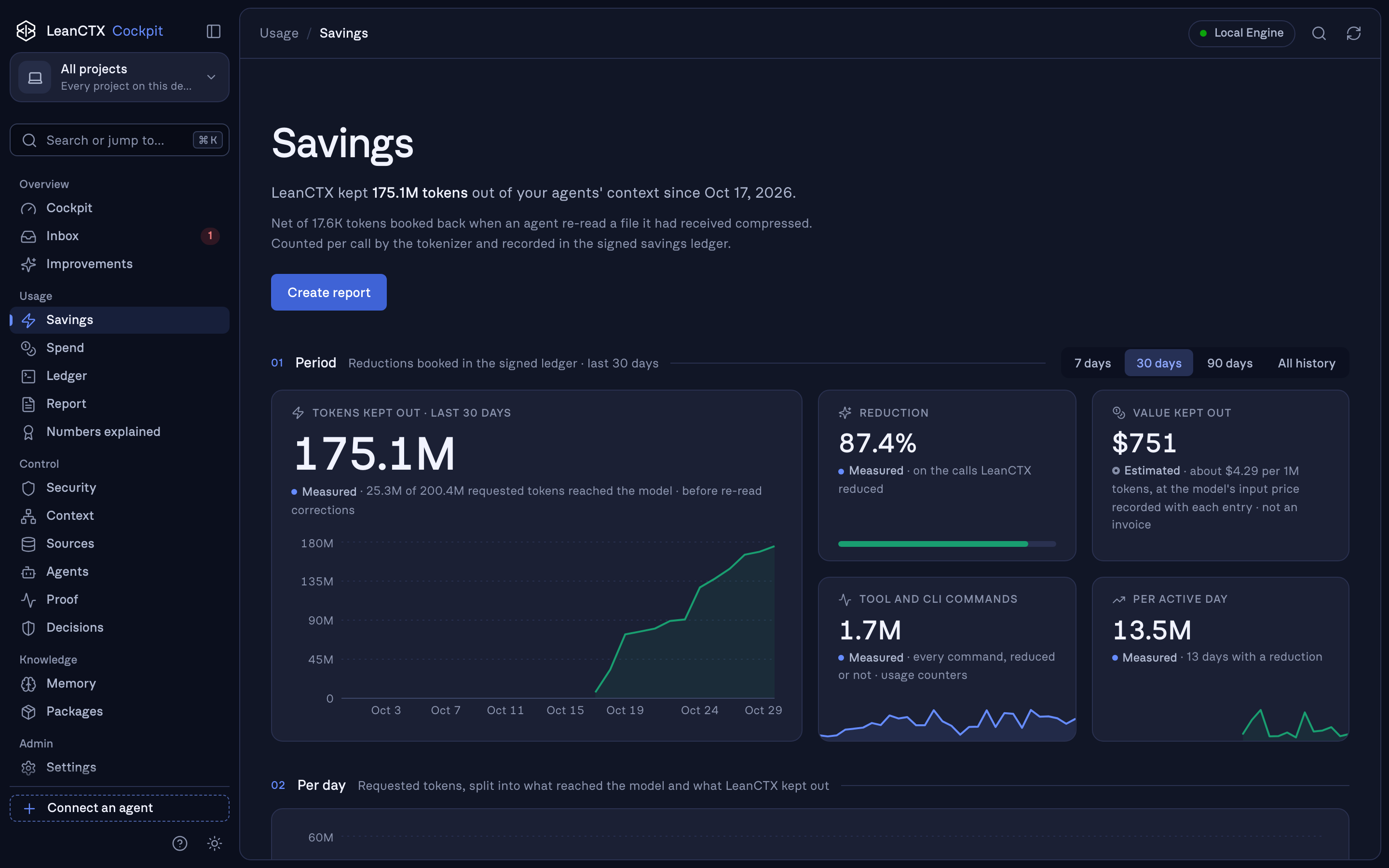 The new Cockpit, Savings view. Our own dogfooding numbers since Oct 17: every figure is measured from the signed savings ledger on this machine.
3.12.0 brings the LeanCTX Cockpit: one local place for everything LeanCTX does for your agents. What it kept out of the context, what it cost, what it protected and what it can prove. It is free for everyone, runs only on
127.0.0.1, needs no account, and installs itself.lean-ctx update # then start any agent session; the Cockpit installs itself lean-ctx cockpit # opens it in your browser✨ The Cockpit
- One place for savings, spend and proof.
lean-ctx cockpit(orlean-ctx dashboard) starts in the background, reuses a running instance, picks a free port and stops withlean-ctx cockpit stop. - Your familiar commands open it. On a terminal,
lean-ctx gain,gain --web,gain --live,watch,wrappedandcockpit --exportopen the matching view. Scripts, CI,--jsonand--terminalkeep their text output exactly as before. - Every page, free, no plan checks.
- Cockpit shows protection and open findings side by side.
- Savings, Spend and the Ledger of every call.
- Report.
- Numbers explained, with every formula and price source.
- Security, Context, Sources, Agents, Proof, Decisions.
- Memory, Packages, Inbox and Improvements.
- Honest numbers. Every figure carries a trust label: measured, estimated, evidenced or derived.
- Installs itself, signed and verified.
- A fresh install with install.sh, PowerShell, npm or Homebrew ships it.
- An update from 3.11 and AUR's
lean-ctx-binget it at the next agent session, without a command. - Every package is checked against the LeanCTX signing keys before it runs.
- Opt out with
LEAN_CTX_NO_COCKPIT=1.
- Light and dark, desktop to phone.
📚 Knowledge from your repository
lean-ctx import docsturnsAGENTS.md,CLAUDE.md,.cursorrules,.cursor/rulesanddocs/into project facts, each anchored to its file and section.lean-ctx import gitlearns decisions, fixes and dead ends from your commit history. It reads no diffs and no authors.- Every fact passes the same secret and personal-data screening as any other import.
lean-ctx knowledge export-agents-md --writewrites them back as a marked section ofAGENTS.md.
🔒 Security: eight advisories fixed
- GHSA-rxv5-4c3x-g4q6:
ctx_executecode in languages other than shell now needs your approval, in the same dialog asctx_shell. - GHSA-rrww-7924-w72f: project provider configs load only in trusted workspaces.
- GHSA-h693-v7jv-vmv9: the SSRF guard blocks NAT64, 6to4 and Teredo IPv6 forms.
- GHSA-53h5-q4m8-vg3x: gateway-held provider keys need the lean-ctx token.
- GHSA-pv78-9chr-hj3c: proof and knowledge export paths stay inside the project.
- GHSA-gvg8-285q-m62g: signed handoffs prove who signed, not only that nothing changed.
- GHSA-jhf9-3pv4-m469: "no web fetches" policy packs also close provider egress.
- GHSA-79fg-7cj5-4xmm: an untrusted project config cannot widen write paths.
Thank you to everyone who reported them responsibly.
🧭 Focus
3.12.0 keeps what selects, controls and proves
- One place for savings, spend and proof.
- v3.11.4v3.11.4 — LeanCTX Engine: more reliable agent tool calls2026-10-11 · 2026-10-11 21:31 UTC
查看更新说明
A bugfix release: tool calls that an agent gets almost right are now served instead of refused, edits survive indentation slips, and the Claude Code plugin wakes the agent only once per finished background job. Agent Tools protocol and data formats are unchanged.
Fixed
- Searching a broad directory searches the project instead of failing.
ctx_search,ctx_globandctx_treecalled on~,/or another directory that contains the session's project now walk the project and say so in the first line of the result. Before, they answered "refusing to scan" and agents repeated the same call. Without a bound project the refusal now names the fix: pass the project directory aspath. - Agents can read their own instruction files. Skills, commands, sub-agent definitions, rules and plans under
~/.claude,~/.codex/skillsand~/.codex/prompts,~/.agents/skills,~/.cursor,~/.gemini/commandsand OpenCode's~/.config/opencode, plus the globalCLAUDE.md,AGENTS.mdandGEMINI.md, open read-only on first use. Credentials and settings beside them, such as~/.codex/auth.jsonor~/.claude/.credentials.json, stay closed, and LeanCTX tools cannot write there. A skill linked in from elsewhere below~is followed read-only; a link into a protected location or outside~is not, and links inside dependency folders such asnode_modulesare never followed. - A missing file comes with the file that was meant.
ctx_read,ctx_search,ctx_globandctx_treename the existing path when the requested one has a typo, another extension, or was written relative to the wrong directory (src/x.rsforrust/src/x.rs). - Paths with spaces work when written shell-style. On macOS and Linux a path such as
My\ Project/notes.mdor'/Users/me/My Project'turned intoMy/ Projectand was reported as missing. Backslash escapes and surrounding quotes are now removed. - Common argument spellings are accepted.
file_path,filePath,fileandfilenamework aspath,cmdascommand(for MCP calls andlean-ctx call), apathinside actx_searchqueries[]entry scopes that one query,ctx_globacceptsglobforpattern, andctx_patchreplace_allacceptsold_string/new_string. A replacement must still be named explicitly, so a missing one is never taken as "delete every match"; two spellings with different values are rejected. - An edit whose indentation is off still applies. When
old_stringmatches exactly one place in the file at a uniformly different indentation,ctx_editandctx_patch(replace_unique) apply it there and shiftnew_stringby the same amount, and say so. Uneven or ambiguous matches still fail with the exact-match error. - Read modes and glob patterns with small typos work.
lines:72:92,lines:72..92,lines 72-92and a capitalisedFullare read as the mode they spell;**.rsandsrc**are read as**/*.rsandsrc*/**. ctx_readno longer fails with "per-file lock contention". When an earlier read of the same file holds its lock for more than 10 seconds, the read proceeds without it.- No more "Retry the read" after LeanCTX opened a dependency folder. When a path in a dependency cache or an agent folder is still refused after it was opened read-only, the error now gives the actual reason.
lean-ctx callresolves these paths the same way as the MCP server. - The Claude Code plugin wakes the agent once per finished job. When the agent itself had already read a finished background job with
ctx_shell(background_action="status"or"cancel"), the plugin announced the same result again on the next turn, costing a whole extra turn.
Changed
- The token-saving curve in the Claude Code cockpit is drawn true to time and to scale. The x axis now runs from the session's first lean-ctx call to now, the y axis starts at zero, the raw total sits behind "kept out" as a dim envelope, moments in which tokens were kept o
- Searching a broad directory searches the project instead of failing.
- v3.11.32026-10-11 · 2026-10-11 14:01 UTC
查看更新说明
PathJail opens the home directory by default, the gateway keeps downstream MCP sessions alive between calls, Windows updates and CUDA 13 GPU embeddings work, and Claude Code gets a gateway cockpit. Agent Tools protocol and data formats are unchanged.
Changed
- PathJail opens your whole home directory by default. The default
path_jail_scope = homenow admits everything below~for reading and writing; before, it admitted only paths inside a project, read-only outside the session's project. Protected locations stay closed: every top-level dot entry (~/.ssh,~/.aws,~/.config, shell rc files, other agents'~/.claude,~/.codex, …),~/Library,~/AppDataand~/snap, and everything outside~. The previous behaviour is the new scopeprojects(lean-ctx config set path_jail_scope projects), the strictest one staysproject. A scope you set yourself is kept;homeset explicitly now means the wider scope too. Every installation without its own setting shows a one-time notice on its next interactive command.
Fixed
- Windows: a second update or
enable-gpuno longer fails (#2048). Each update moves the runninglean-ctx.exeaside tolean-ctx.old.exe. The process that does this is still running from that file, so it cannot delete it, and the next update refused to start withstale Windows rollback binary exists. The next update now deletes the leftover file. If an old lean-ctx process (an editor's MCP server, a daemon) still runs from it, the file is renamed aside and removed by a later update once that process has exited; only when even that rename fails does the update stop and say which process to close.lean-ctx dev-installuses the same cleanup. lean-ctx enable-gpuon the CUDA build it would install says so (#2048) instead of downloading and reinstalling the same binary.lean-ctx enable-gpu --forcestill reinstalls it.- GPU embeddings work with CUDA 13 runtimes (#2049).
onnxruntime-gpuon PyPI is built for CUDA 13 since 1.27, andpip install "onnxruntime-gpu[cuda,cudnn]"installs the CUDA 13 wheels, which put the DLLs intosite-packages\nvidia\cu13\bin\x86_64(Linux:nvidia/cu13/lib). LeanCTX looked only for CUDA 12 libraries (cudart64_12.dll,libcudart.so.12) in the CUDA 12 wheel directories, solean-ctx embeddings statusreportedCUDA runtime: not loadablealthough everything was installed. LeanCTX now reads which CUDA major the selected ONNX Runtime's CUDA provider was built for from the provider's import table and searches and preloads the matching CUDA 12 or CUDA 13 libraries, including the new wheel layout andCUDA_PATH_V13_*toolkits. - Windows: the CUDA check no longer fails on every machine (#2049). The check loads
onnxruntime_providers_cuda.dlldirectly; outside ONNX Runtime its initialisation refuses to run, which Windows reports as error 1114 after every dependency has already loaded (Linux reports the same case as a missingProvider_GetHost, which was already handled).embeddings statustherefore saidnot loadableand indexing warned about a CPU fallback while ONNX Runtime was in fact using the GPU, and GPU-sized embedding batches were never used. Error 1114 now counts as loaded; other loader errors show their Windows error code and meaning instead of a bareLoadLibraryExW failed. CUDA runtime: OKmeans the GPU is really used (#2049). ONNX Runtime loads cudart and cuDNN by name only when a session starts, so a provider DLL that loads (for example through a CUDA toolkit onPATH) could still fall back to CPU without a word.embeddings statusnow also requires the CUDA runtime and cuDNN to resolve, preloads them before the provider is registered, and names the library that is missing otherwise.- Clearer CUDA diagnostics on Windows (#2048, #2049). Instead of a bare
LoadLibraryExW failed,lean-ctx embeddings statuslists the missing DLLs and every directory it searched, says when no NVIDIA driver (`nvcuda
- PathJail opens your whole home directory by default. The default
用户点评
登录用户的真实使用记录,可按版本和硬件筛选共 0 条
还没有人点评。第一个说出真实体验的人最有价值。
LeanCTX
Context Gateway for AI Systems.
Control what your AI can see.
LeanCTX sits between AI tools and the information they read. It selects task-relevant context, applies supported access and content controls before delivery, and records the context operations and delivery evidence it can observe. Your application, agent loop and model stay yours.
The open-source LeanCTX | OSS runs locally through CLI, MCP, hooks and proxy paths. The LeanCTX SDK embeds supported Engine capabilities in your application.
Where it sits
Files · repositories · tool results · configured providers
                          │
                          ▼
                LeanCTX Context Gateway
             Select · Control · Learn · Prove
                          │
                          ▼
                Your AI application / agent
                          │
                          ▼
                     Your model
- Select: give AI the context the task needs, with search, structural views, compression and reuse.
- Control: apply configured path permissions, content filters and context budgets to supported calls.
- Learn: retain local task records and connect code and knowledge across sessions, within the configured access and retention rules.
- Prove: inspect source references, policy decisions and usage evidence. A context-only integration records its prepared result; the host owns the subsequent model call.
For coding workflows, start with Claude Code, Cursor or Codex. The installation matrix distinguishes first-class paths from other compatibility references.
| Your work | Start here |
|---|---|
| Improve the context path of existing AI tools | Community setup |
| Apply shared context controls across an organization | Enterprise — licensed controls and deployment scope |
| Build context control into your application | LeanCTX SDK — stable interfaces and separate SDK/OEM terms |
What is LeanCTX? · Where LeanCTX fits · Architecture
Why developers use LeanCTX
- Focused input — use less of the context window for repeated reads and noisy output.
- Configured controls — bound file access and filter supported results before delivery.
- Continuity — retain local task, finding and decision records across sessions.
- Existing tools — configure a supported integration with
lean-ctx setup. - Inspectable usage — separate token estimates, provider observations and calculated costs.
- Model choice — keep your own model calls and application workflow.
Inside LeanCTX | OSS
The Engine puts Select, Control, Learn and Prove into the context paths of your existing AI tools. Your host keeps control of the task, agent loop and model.
1. Select — the context each task needs
Search and structural views help an agent find relevant information before reading entire files. Supported read and shell paths can return focused views of files and command output, with references for recovering detail.
- File reads: 16 read modes (
full,map,signatures,diff,lines:N-M,density:X, …) — eligible cached re-reads return a compact reference instead of repeating content - Target density (
density:0.4): SDE-style budget compression — keeps the highest-entropy lines until ~40% of the original tokens remain, deterministic - JIT disclosure:
signaturescarries line spans and points atlines:N-Mfor targeted expansion — outline first, bodies on demand - Shell output: 85+ shell-output patterns compress git, npm, cargo, docker, kubectl, terraform and more (250+ passthrough rules)
- Tree-sitter AST: structural understanding for 27 languages — not just text compression
- Source recovery (CCR): supported compact views retain source or archive references for expansion through
ctx_expandor the reference API. Recovery depends on permissions, retention and the source remaining available. Read modes and detail →
2. Control — configured rules on supported paths
- PathJail and roles: constrain tool filesystem access to the configured scope.
- Content filters: configured detectors can warn, redact or block on supported paths. Detection coverage and enforcement depend on the integration and settings.
- Context budgets: bound selected input and supported tool output.
- Host-owned model choice: the host chooses the model and performs any model calls outside the Engine's observed path.
Review the security policy for defaults, supported controls and coverage limits. A filesystem boundary is not an operating-system sandbox.
3. Learn — connect work across sessions
Keep useful task records and discover relationships between code and local knowledge. Learning here means context continuity; it does not train your model.
- Session memory (CCP): persist task/facts/decisions across chats — structured recovery queries survive compaction
- Knowledge graph: temporal facts with validity windows, relations and lifecycle
- Property Graph: multi-edge code graph (imports, calls, exports, type_ref) powers impact analysis and search ranking
- Permission-bound reuse: access and retention rules still apply when stored
context is retrieved. Experimental
.ctxpkgexport is described under Research below.
4. Prove — inspect what the Engine recorded
Inspect source references, recorded policy decisions and delivery evidence from
supported paths. lean-ctx inspect explains observed context operations. A
context-only integration records its prepared result; it cannot prove a later
model call made by the host.
- Cockpit (
lean-ctx cockpit): local browser view with token tracking, compression stats, spend and recorded calls - Audit export: retain the recorded evidence for review within its stated scope.
- Context Proof (
ctx_proof,ctx_verify): exportable audit trail (verifier, SLO, pipeline and provenance records) plus runtime-checked policy claims (PathJail per touched file, budget)
Usage and cost — measure the result
Context controls and evidence come first. Usage estimates and calculated costs help you assess their operational effect; they do not prove answer quality.
Shadow Mode — a simulated baseline
Shadow Mode estimates what the same work would have cost without LeanCTX, without changing the active workflow. The baseline is simulated from the uncompressed token counts and the same outcome signals, not a second measured run, so its reports estimate cost, tokens and CPAO deltas; they do not measure answer quality.
LeanCTX records local cost and outcome signals without adding those reports to agent context. CPAO (cost per accepted outcome) is one comparison metric; Shadow Mode provides simulated savings estimates. Keep estimates, provider-measured usage and outcome quality separate.
lean-ctx savings --period week                 # costs, token savings, and CPAO
lean-ctx value-report --format markdown --last 20  # recent outcome quality
lean-ctx shadow --latest                       # latest baseline comparison
Quick start: usage tracking
# Enable shadow mode for savings comparison
lean-ctx config set shadow.enabled true

# After using LeanCTX for a while:
lean-ctx savings
lean-ctx shadow --latest
- Web & Research (
ctx_url_read): pull a public web page, PDF, or YouTube transcript into context as compressed, citation-backed text —facts/quotesreturn claims with a confidence score + source URL, relevance-ranked research-compression distils to a token budget, SSRF-guarded (http/https only) - Graph-Powered Intelligence: hybrid search (BM25 + embeddings + graph proximity via RRF), incremental git-diff updates
- LSP-backed symbols:
ctx_patch op=replace_symboledits a whole symbol body andctx_callgraphfinds references, through rust-analyzer, typescript-language-server, pylsp or gopls - Multi-Agent — Research (
ctx_agent,ctx_handoff): experimental local agent handoff with context transfer bundles, diary system, and shared state; not a hosted or generally available team service - Archive Full-Text Search (
ctx_expand search_all): FTS5-powered cross-archive search over all previously archived tool outputs - PR Context Packs:
lean-ctx pack --prbuilds a PR-ready context pack (changed files, related tests, impact, artifacts) - Context Packages — Research:
lean-ctx pack createbundles local Knowledge, Graph and Session state into.ctxpkgfiles with SHA-256 integrity; this is experimental local packaging, not a generally available Context Kits or hosted sharing product - Context Time Machine — Research:
lean-ctx snapshot create|list|show|verify|restore|publish|importhandles git-anchored, signed local snapshots and file-based sharing; dashboard replay and restore are experimental, and hosted history or a hosted registry is not a generally available product - Observability:
lean-ctx cockpitshows local activity and recorded context metrics (Savings · Spend · Report · Proof, recorded calls in the Ledger);lean-ctx gainis the terminal summary (--jsonfor scripts), andgain --svg/--sharecreates a shareable card or self-hostable page - Usage ledger:
lean-ctx savingsis a local per-event ledger with tokenizer transparency, bounce-netting and a tamper-evident SHA-256 chain; provider-measured savings require the proxy's counterfactual holdout - HTTP mode:
lean-ctx servefor Streamable HTTP MCP +/v1/tools/call(used by the Cookbook and external clients)
Addons — Research preview
Addon manifests and gateway integration remain experimental Research interfaces.
Local addon release|add|list commands handle signed packages; they do not
provide a public marketplace, hosted registry, managed distribution or addon search. A package can carry a sandboxed WASM module or an [mcp] declaration
for an external server.
lean-ctx addon release ./my-addon   # build a signed .ctxpkg — no artifact host, no CI
lean-ctx addon add ./my-addon-1.0.0.ctxpkg   # verify, disclose, ask, install
lean-ctx addon list                 # what's installed, what loads, what's wired
- Publish it yourself — the module travels inside the signed package, so the signature covers the executable bytes. Nothing external to host, hash or serve, and no pipeline of your own.
- Verified locally, then asked —
addre-checks the signature on your machine rather than trusting its source, checks every module against its pinned SHA-256, prints the publisher key and the exact command any declared server would run, and only then prompts. - LeanCTX never installs the server for you — no
uv tool install, nonpx. Fetching a declared tool stays your step, where your own package manager's trust model applies. The manifest says how to run it. - Folded in, not just proxied — opt-in post-processing runs addon output through the same pipeline as your code: compress to a budget, spill oversized blobs to a
ctx_expandhandle, index into BM25 / graph / knowledge. A typedintegrationroutes specific tools straight intoctx_expand,ctx_callgraphandctx_knowledge. - Untrusted by default — addon results pass through secret scrubbing and are tagged untrusted in the integration pipeline. Scrubbing covers configured detection patterns, not every possible secret.
The local workflow verifies signatures and module hashes, shows the publisher
key and declared command before installation, and never installs the external
server. Opt-in post-processing can send addon results through compression,
ctx_expand, BM25, graph and knowledge. Results remain untrusted; configured
secret scrubbing does not cover every possible secret. See the
status-qualified addon guide for the boundary.
Research directions
LeanCTX remains the Context Gateway for AI Systems. These research directions extend its context capabilities; they are not supported product commitments.
- Hosted context history — local snapshot create/show/verify/restore and signed file-based sharing are experimental Research; a hosted registry and model-view comparison remain future work.
- Context as Code — declarative pipelines, profiles, and policies in TOML, versioned like infrastructure
- Unified Context Graph — code, tests, commits, CI runs, and knowledge entries in a single semantic graph
- Cross-agent context controls — explore context roles, budgets, and permissions while the host retains agent scheduling and workflow execution
- Context Observability — SLOs on context consumption, anomaly detection, OpenTelemetry / Prometheus export
The full roadmap lives in VISION.md.
How it works
LeanCTX works on two planes — what your agents read and what they send to the model:
read path:   AI tool  →  (MCP tools + shell)  →  lean-ctx  →  your repo + CLI
wire path:   AI tool  →  lean-ctx proxy        →  model provider   (supported, configured requests)
- MCP server (read path): exposes
ctx_*tools (read modes, caching, deltas, search, memory, multi-agent) - Shell hook (read path): transparently compresses common commands so the LLM sees less noise
- Request proxy (wire path, opt-in):
lean-ctx proxy enableroutes supported requests through a local proxy. Configured transformations can reduce eligible prompt, history and tool-result content while respecting supported provider-cache boundaries. Provider-specific effort mapping (proxy.effort), verbosity controls and volatile-prefix handling have their own compatibility limits. Recovery requires retained, authorized artifacts; usage and cost evidence depend on the provider data the path observes. - Property Graph: multi-edge code graph powers impact analysis, related file discovery, and search ranking
- Session memory: persists selected session state for recovery when authorized records remain available
- Cockpit (
lean-ctx cockpit): local browser view for inspecting context activity and records visible to LeanCTX
Get started
# 1) Install (pick one)
curl -fsSL https://leanctx.com/install.sh | sh      # universal (no Rust needed)
brew tap yvgude/lean-ctx && brew install lean-ctx    # macOS / Linux
npm install -g lean-ctx-bin                          # Node.js
cargo install lean-ctx                               # Rust

# 2) One-command setup for your agent
lean-ctx wrap cursor      # or: wrap claude / wrap codex

# Inspect recorded context metrics after your AI's first lean-ctx call.
lean-ctx cockpit          # Savings · Spend · Report · Proof in the browser (also: lean-ctx dashboard)
lean-ctx gain --terminal  # the same numbers as a terminal summary (--json for scripts)
lean-ctx cockpit stop     # stop the background Cockpit server (--foreground keeps it in the terminal)
lean-ctx wrap registers the MCP server and configures the supported local
transport for that agent. Undo anytime with lean-ctx unwrap cursor.
Claude Pro/Max: subscription OAuth cannot use a custom
ANTHROPIC_BASE_URL.lean-ctx wrap claudetherefore adds no proxy redirect while enabling thectx_*tools and shell-output compression; an existing custom endpoint remains untouched. Claude wire-level request compression requiresANTHROPIC_API_KEY. See advanced proxy setup.
lean-ctx onboard          # connect all detected AI tools (zero prompts)
lean-ctx setup            # interactive wizard with every option
Building from source on Windows? Clone the repo and run ./install.ps1 in PowerShell — it builds the release binary and installs it into Cargo's bin directory (pass -BuildOnly to build without installing).
The current release workflow signs new Windows binaries as Thinkery AG, including the binaries inside ZIP archives and Python companion wheels. Earlier releases may still contain unsigned executables. Signing does not guarantee acceptance by every Windows security policy.
If Windows blocks an older unsigned download, use WSL or build locally with
cargo install lean-ctx; do not disable system-wide security protections for
this tool. Windows-side MCP clients can launch the WSL installation with
wsl lean-ctx mcp.
See Windows signing and verification and #1820 for verification status.
- Disable immediately (current shell):
lean-ctx-off - Run a single command uncompressed:
lean-ctx -c --raw "git status" - Only activate in AI agent sessions: set
shell_activation = "agents-only"in~/.config/lean-ctx/config.toml - Per-project config override: create
.lean-ctx.tomlin your project root (auto-merged with global config) - Docker projects sharing
/workspace: create.lean-ctx-idwith a unique name to prevent context collisions - Update:
lean-ctx update - Diagnose (shareable):
lean-ctx doctor --json
Real-world scenarios
LeanCTX grows with you. Below are the journeys most people actually take — each links to a complete, function-by-function walkthrough in the Reference (every CLI command and the complete MCP tools are documented there).
🟢 Your first setup
"I just installed it — now what?"
lean-ctx wrap cursor  # one-command setup for your agent
lean-ctx doctor       # confirm you're wired up
wrap configures the supported integration; doctor checks the resulting setup.
→ Journey 1 — Setup & Onboarding
📖 Coding every day
"Stop re-reading the same files."
lean-ctx read src/server.rs -m map   # API surface, ~13 tok on re-read
lean-ctx -c "git status"             # compressed shell output
Your agent reads less and searches smarter — automatically. → Journey 2 — Daily Use
🧠 Resume where you left off
"My new chat forgot everything."
lean-ctx overview                    # task-aware project recap
lean-ctx knowledge recall "auth"     # facts that survive resets
lean-ctx knowledge consolidate       # import session + compact lifecycle
lean-ctx knowledge consolidate --all # compact every project store
Session memory + a project knowledge graph persist across chats. → Journey 3 — Memory & Knowledge
🗺️ Understand a new codebase
"Where does this function ripple to?"
lean-ctx graph impact src/auth.rs    # blast radius
lean-ctx smells scan                 # code-smell hotspots
A multi-edge property graph powers impact analysis + ranked search. → Journey 4 — Code Intelligence
🔌 Providers & multi-repo
"Pull in GitHub issues and our Postgres schema."
lean-ctx provider list
lean-ctx serve --root ./api --root ./web   # multi-repo
External data flows through the same consolidation pipeline. → Journey 5 — Advanced & Integrations
🛠️ Keep it healthy
"Update, fix, or cleanly remove."
lean-ctx doctor --fix
lean-ctx update
Self-healing diagnostics; surgical uninstall that only removes its own blocks. → Journey 6 — Lifecycle & Troubleshooting
🎛️ Take control of the window
"Budget my context like a pro."
lean-ctx plan "refactor billing" --budget 8000
lean-ctx compile --mode balanced
Phi-scored planning + knapsack compilation + a context ledger. → Journey 7 — Context Engineering
🤝 Run a team of agents
"Planner + coder + reviewer on one repo."
ctx_agent action=register role=dev
ctx_handoff action=create        # baton-pass with full context
Shared message bus, diaries, knowledge, and deterministic handoffs. → Journey 8 — Multi-Agent Collaboration
🏢 Headless in CI
"The same engine, headless in pipelines."
lean-ctx bootstrap # zero-prompt CI setup
Everything local works without an account. LeanCTX Hive (shared knowledge for teams and your own machines) follows with 3.12.1.
🎚️ Tune & govern
"Make it behave exactly how we want."
lean-ctx compression standard
lean-ctx harden               # enforce token discipline
Compression levels, tool profiles, themes, and rules governance. → Journey 10 — Customization & Governance
📊 Measure usage and cost
"Show me the numbers."
lean-ctx cockpit              # Savings · Spend · Report · Proof in the browser
lean-ctx gain --deep --terminal  # terminal: savings, cost, per-agent, heatmap (--json for scripts)
lean-ctx gain --svg           # shareable recap card (also: gain --share / gain --wrapped)
lean-ctx savings              # verified per-event ledger (auditable; savings verify)
All analytics live in the Cockpit and the CLI — never burning agent tokens. → Journey 11 — Analytics & Insights
📚 The full reference
"I want to read everything."
Every command and the generated MCP registry, organized as user journeys, plus appendices for the CLI map, MCP tools, and paths & config. → Reference index
Supported IDEs & AI tools
LeanCTX provides an MCP server. Client support depends on transport, tool handling, and configuration; the matrix below records the integration scope. Two integration modes are selected for supported agents:
| Mode | How it works | Best for |
|---|---|---|
| Hybrid | MCP for cached reads and references + shell hooks for command compression | Agents with shell access (Cursor, Claude Code, Codex, ...) |
| MCP | Complete tool set via MCP protocol, no shell hooks | Protocol-only agents (JetBrains, VS Code, Zed, ...) |
Agent compatibility matrix
| Agent | Hybrid | MCP | Setup |
|---|---|---|---|
| Cursor | ● | lean-ctx init --agent cursor | |
| Claude Code | ● | lean-ctx init --agent claude | |
| CodeBuddy | ● | lean-ctx init --agent codebuddy | |
| Augment CLI / VS Code | ● | lean-ctx init --agent augment | |
| Codex CLI | ● | lean-ctx init --agent codex | |
| Grok | ● | lean-ctx init --agent grok | |
| Gemini CLI | ● | lean-ctx init --agent gemini | |
| Windsurf | ● | lean-ctx init --agent windsurf | |
| GitHub Copilot | ● | lean-ctx init --agent copilot | |
| CRUSH | ● | lean-ctx init --agent crush | |
| Hermes | ● | lean-ctx init --agent hermes | |
| OpenCode | ● | lean-ctx init --agent opencode | |
| Pi | ● | lean-ctx init --agent pi | |
| Qoder | ● | lean-ctx init --agent qoder | |
| Amp | ● | lean-ctx init --agent amp | |
| Cline | ● | lean-ctx init --agent cline | |
| Roo Code | ● | lean-ctx init --agent roo | |
| Kiro | ● | lean-ctx init --agent kiro | |
| Antigravity | ● | lean-ctx init --agent antigravity | |
| Amazon Q | ● | lean-ctx init --agent amazonq | |
| Qwen | ● | lean-ctx init --agent qwen | |
| Trae | ● | lean-ctx init --agent trae | |
| Verdent | ● | lean-ctx init --agent verdent | |
| Aider | ● | lean-ctx init --agent aider | |
| Mistral Vibe | ● | lean-ctx init --agent vibe | |
| Continue | ● | lean-ctx init --agent continue | |
| JetBrains IDEs | ● | lean-ctx init --agent jetbrains | |
| QoderWork | ● | lean-ctx init --agent qoderwork | |
| VS Code | ● | lean-ctx init --agent vscode | |
| Zed | ● | lean-ctx init --agent zed | |
| Neovim | ● | lean-ctx init --agent neovim | |
| Emacs | ● | lean-ctx init --agent emacs | |
| Sublime Text | ● | lean-ctx init --agent sublime |
MCP clients need compatible transport, tool support, and configuration. The table lists setup targets; the client constraints distinguish verified integrations from generic compatibility.
When to use (and when not to)
Great fit if you...
- use AI coding tools daily and your sessions are shell-heavy (git/tests/builds)
- work in medium/large repos (50+ files / monorepos)
- want local context processing with inspectable network and telemetry controls
Skip it if you...
- mostly work in tiny repos and rarely call the shell from your AI tool
- always need raw/unfiltered logs (you can still use
--raw, but ROI is lower)
The honest fine print: the payoff depends on three levers — reach (own the
window via the proxy/engine, not just the ctx_* tool layer), context
lifetime (one long-lived session vs. a fresh process per phase), and
provider pricing (prompt-cache-priced vs. re-billed every turn). They stack
into a clear win where they line up and net to break-even where they don't.
See the win vs. break-even matrix
for the full breakdown and how to tune for each case.
Demo
Try these in any repo:
lean-ctx read rust/src/server/mod.rs -m map
lean-ctx -c "git log -n 5 --oneline"
lean-ctx gain                                   # terminal summary
lean-ctx cockpit                                # Savings · Spend · Report · Proof (browser)
lean-ctx benchmark report .
- The repo ships the exact tapes used to render the GIFs in
demo/ - Regenerate locally:
vhs demo/leanctx.tape
vhs demo/gain.tape
vhs demo/benchmark.tape
Benchmarks
Measurements and estimates require a declared workload and method. The earlier per-read-mode
compression table (map / signatures over 50 files) is withdrawn along
with the other historical figures in BENCHMARKS.md; measure
your own repository with lean-ctx benchmark report . instead. Cache references
can reduce repeated context; their token cost depends on the emitted result and tokenizer.
Measure the Engine's own advertised schema, instruction, and briefing overhead
with lean-ctx doctor overhead --gate. The deterministic
lean-ctx benchmark dual-arm --json replay reports a synthetic upper bound:
its baseline never uses the provider's prompt cache, while agent hosts can cache
the prefix with or without LeanCTX. It is not a provider invoice, an on/off
comparison or an outcome-quality evaluation. The on/off comparison the Engine
offers is the proxy's opt-in compression holdout ([proxy] compression_holdout).
Proxy rewrites preserve stable output for prompt-cache eligibility under the same
inputs and settings, and the compression engine checks that critical facts
(failing tests, error codes, locations) survive or it delivers the original.
Actual cache hits, prices, and discounts depend on the provider. Quality results
state their evidence tier (A mechanism … E production) — see
context-quality-v1.
A powered with/without quality study has not been run yet; the proxy's
compression holdout measures prompt size on real traffic and reports answer
quality as unknown. What each number can and cannot show, per data path:
measurement scope.
- Latest snapshot: BENCHMARKS.md
- Reproduce:
lean-ctx benchmark report .
Adoption and compatibility
- GitHub activity and releases show the current repository counts and release history.
- Supported integration paths distinguish verified setups from protocol compatibility.
- Generated MCP registry shows the current tool count and status.
- Published metrics state their measurement scope; adoption counts do not establish savings or outcome quality.
Docs
- Reference (every function, by user journey): docs/reference/ — 11 journeys + CLI/MCP/config appendices
- For AI agents / LLMs: llms.txt — a curated, machine-readable map of lean-ctx (per the llms.txt convention)
- Getting started: https://leanctx.com/docs/getting-started
- Tools reference: https://leanctx.com/docs/tools/
- CLI reference: https://leanctx.com/docs/cli-reference/
- What is LeanCTX: https://leanctx.com/what-is-leanctx/
- Comparison (vs RTK, Context+, MemGPT): https://leanctx.com/compare/
- Community and commercial options: https://leanctx.com/pricing/
- FAQ: discord-faq.md
- Feature catalog (SSOT snapshot): LEANCTX_FEATURE_CATALOG.md
- Monorepo guide: docs/guides/monorepo.md
- Semantic code intelligence: docs/guides/semantic-intelligence.md
- Architecture: ARCHITECTURE.md
- Vision: VISION.md
Privacy & security
- Inspectable telemetry controls: run
lean-ctx telemetry statusto see the effective setting andlean-ctx telemetry showto inspect the payload;lean-ctx telemetry disableturns reporting off. - Disableable update check (config
update_check_disabled = trueorLEAN_CTX_NO_UPDATE_CHECK=1) - 40+ security hardening fixes in v3.5.16 (path traversal, injection, CSPRNG, CSP, resource limits — details)
- Context Governance Benchmark self-assessment: graded C2 — Managed against the 32-control CGB v1.0-draft spec, gaps declared — docs/compliance/cgb-self-assessment.md
- Context processing runs locally; configured source providers, proxy/model requests, submitted feedback, updates, and enabled telemetry have their own network paths.
See SECURITY.md.
Uninstall
One command removes everything — it stops all processes, then deletes hooks, editor configs, rules, autostart (LaunchAgent/systemd), the data dir, and the binary itself:
lean-ctx uninstall                 # full clean removal
lean-ctx uninstall --dry-run       # preview every change, write nothing
lean-ctx uninstall --keep-config   # keep MCP configs + rules (for reinstall)
lean-ctx-off                       # or just disable for the current shell session
No binary on PATH (or you used the curl installer)? Run the same removal from the installer:
curl -fsSL https://leanctx.com/install.sh | sh -s -- --uninstall
If you installed via a package manager, uninstall removes everything it wrote and
tells you the one command to finish removing the binary:
brew uninstall lean-ctx        # Homebrew
cargo uninstall lean-ctx       # cargo install
npm uninstall -g lean-ctx-bin  # npm
Star History
Contributing
Start with CONTRIBUTING.md. Easy first PR: propose a new CLI compression pattern via the issue template.
License
LeanCTX | OSS and its open interfaces (rust/, packages/, docs/,
scripts/) are Apache-2.0. LICENSE.md and
LICENSE_MATRIX.toml are the path-level authority for
that Apache host.
The consolidated development tree also carries sdk/ (client bindings) and
ee/ (commercial Runtime, Suite and services) next to the host. Both keep
their own existing terms, are not Apache-2.0 and are not approved for
publication; the host-only mirror contains neither directory. Their presence
in one checkout relicenses nothing. SOURCE_LAYOUT.md lists
each path with its current terms.