YouTube 播放依赖外部 yt-dlp,首次会自动下载,需确保杀毒软件或防火墙不拦截;openSUSE 上不要混用来自不同软件仓库的 FFmpeg;从源码构建前需执行 git submodule update --init 更新子模块,且 CMake 需 3.16 以上。
QMPlay2
zaps166LGPL-3.0活跃维护基于 Qt 和 FFmpeg 的跨平台音视频播放器,支持绝大多数格式与编解码器,并提供硬件加速和视频滤镜。
QMPlay2 is a video and audio player which can play most formats and codecs.
26.08.02发布于 2026-08-02 11:24 UTC1,200star200fork同步于 2026-11-07 23:30 UTC
yay -S qmplay2-git 硬件要求按 README 说明
README 未说明显存要求;硬件解码按平台区分:CUVID 仅 NVIDIA,DXVA2 与 D3D11VA 用于 Windows,VA-API 用于 Linux/BSD,VideoToolBox 用于 macOS,Vulkan Video 需 FFmpeg >= 6.1;硬件加速默认关闭,需在设置中手动启用。
基于 Qt 和 FFmpeg 的音视频播放器,能播放 FFmpeg 支持的全部格式并内置 YouTube 浏览
基于 Qt 和 FFmpeg 的跨平台音视频播放器,支持绝大多数格式与编解码器,并提供硬件加速和视频滤镜。
核心能力
- 用 FFmpeg 解码,覆盖其支持的全部格式与编解码器
- 内置 YouTube 浏览器,可调整音视频质量优先级
- 支持 Vulkan Video、CUVID、DXVA2、D3D11VA、VA-API、VideoToolBox 硬解
- 支持 OpenGL 与 Vulkan 视频输出上的球形全景视图
- 自动检测隔行扫描并提供 Yadif 等去隔行滤镜
容易踩的坑
内容由模型根据 README 生成,可能不完整或不准确,以官方文档为准。看原文 README
- 26.08.02QMPlay2 26.08.02最新正式版2026-08-02 · 2026-08-02 11:24 UTC
All files for download are in "Assets" section below
Android experimental package is not provided anymore AppImage is not provided anymore
Changes in QMPlay2 26.08.02
- don't close panel when mouse is pressed inside window on full screen (regression fix),
- use BT.2020 surface for BT.2020 videos in Vulkan (enabled by default for Wayland),
- add support for BT.2020 TRC for sRGB conversion,
- display real gamma correction values,
- load and display LRC file contents,
- add option to hide QMPlay2 logo,
- fix HLG HDR display,
Windows 10 64-bit and Windows 11
Windows 7, Windows 8, Windows 8.1, Windows 10 32-bit
- download and install 64-bit,
- download portable 64-bit,
- download and install 32-bit,
- install VC Redist 32-bit or VC Redist 64-bit for
yt-dlp,
Windows XP
- download nojs - updates and MediaBrowser are not available,
- download offline - updates and most network services are not available, CDDB is disabled by default at first run,
macOS
- macOS Big Sur or higher is required,
- x86_64 and arm64 universal binary,
Other downloads (can be obsolete)
- 26.06.27QMPlay2 26.06.272026-06-27 · 2026-06-27 18:22 UTC
查看更新说明
All files for download are in "Assets" section below
QMPlay2-Win64-26.06.27.exehas been replaced byQMPlay2-Win64-26.06.27-v2.exedue to Qt bugs (see https://github.com/zaps166/QMPlay2/issues/1019).
Android experimental package is not provided anymore AppImage is not provided anymore
Changes in QMPlay2 26.06.27
- AVAudioFilter improvements and compatibility fix for FFmpeg 8.0,
- remove Rayman2 audio decoder (FFmpeg is able to play it),
- add OpenMPT with tracker-like optional visualizations,
- add option to YouTubeDL to add additional parameters,
- add gamma correction control for OpenGL and Vulkan,
- add option to move full screen panel to the right,
- multi-line text edit for comment in tag editor,
- fix possible crashes when loading playlist,
- fix popups on left panel on full screen,
- MediaBrowser fixes and improvements,
- add libsidplayfp 3.0 compatibility,
- Vulkan Video decoder fixes,
- added HDR metadata,
- remove Modplug,
- other minor fixes,
Windows 10 64-bit and Windows 11
Windows 7, Windows 8, Windows 8.1, Windows 10 32-bit
- download and install 64-bit,
- download portable 64-bit,
- download and install 32-bit,
- install VC Redist 32-bit or VC Redist 64-bit for
yt-dlp,
Windows XP
- download nojs - updates and MediaBrowser are not available,
- download offline - updates and most network services are not available, CDDB is disabled by default at first run,
macOS
- macOS Big Sur or higher is required,
- x86_64 and arm64 universal binary,
Other downloads (can be obsolete)
- 25.09.11QMPlay2 25.09.112025-09-11 · 2025-09-11 19:27 UTC
查看更新说明
All files for download are in "Assets" section below
Android experimental package is not provided anymore It's one of the last releases with AppImage
Changes in QMPlay2 25.09.11
- fix swapped Referer and User-Agent parameters,
- fix playing of some HLS streams,
- disable DRC audio on YouTube,
- fix "--opennew" parameter,
Windows 10 64-bit and Windows 11
Windows 7, Windows 8, Windows 8.1, Windows 10 32-bit
- download and install 64-bit,
- download portable 64-bit,
- download and install 32-bit,
- install VC Redist 32-bit or VC Redist 64-bit for
yt-dlp,
Windows XP
- download nojs - updates and MediaBrowser are not available,
- download offline - updates and most network services are not available, CDDB is disabled by default at first run,
Linux AppImage
- don't forget to make it executable before run,
- runs on old Linux distributions like openSUSE 13.1 (except VA-API due to driver version incompatibility),
- read this if you have old Python,
- you can use appimaged for system integration or you can extract files and integrate QMPlay2 manually,
- OpenSSL 1.1.1w is compiled from sources,
- dav1d 1.5.1, libass 0.17.4, FFmpeg 8.0, taglib 2.1.1, libva 2.22.0, librubberband 4.0.0, libgme 0.6.3, libsidplayfp 2.11.0, harfbuzz 9.0.0, libxml2 2.13.4, zvbi 0.2.43, Qt 5.15.14 are compiled from sources using Clang 12.0.1 with libc++,
- compiled on Ubuntu 16.04,
- requires glibc 2.18,
macOS
- macOS Big Sur or higher is required,
- x86_64 and arm64 universal binary,
Other downloads (can be obsolete)
- 25.09.03QMPlay2 25.09.032025-09-03 · 2025-09-03 19:40 UTC
查看更新说明
All files for download are in "Assets" section below
Android experimental package is not provided anymore It's one of the last releases with AppImage
Changes in QMPlay2 25.09.03
- add support for YouTube audio multi-language and DRC streams,
- add VP9 Vulkan decoder (requires FFmpeg 8.0),
- yt-dlp fixes,
Windows 10 64-bit and Windows 11
Windows 7, Windows 8, Windows 8.1, Windows 10 32-bit
- download and install 64-bit,
- download portable 64-bit,
- download and install 32-bit,
- install VC Redist 32-bit or VC Redist 64-bit for
yt-dlp,
Windows XP
- download nojs - updates and MediaBrowser are not available,
- download offline - updates and most network services are not available, CDDB is disabled by default at first run,
Linux AppImage
- don't forget to make it executable before run,
- runs on old Linux distributions like openSUSE 13.1 (except VA-API due to driver version incompatibility),
- read this if you have old Python,
- you can use appimaged for system integration or you can extract files and integrate QMPlay2 manually,
- OpenSSL 1.1.1w is compiled from sources,
- dav1d 1.5.1, libass 0.17.4, FFmpeg 8.0, taglib 2.1.1, libva 2.22.0, librubberband 4.0.0, libgme 0.6.3, libsidplayfp 2.11.0, harfbuzz 9.0.0, libxml2 2.13.4, zvbi 0.2.43, Qt 5.15.14 are compiled from sources using Clang 12.0.1 with libc++,
- compiled on Ubuntu 16.04,
- requires glibc 2.18,
macOS
- macOS Big Sur or higher is required,
- x86_64 and arm64 universal binary,
Other downloads (can be obsolete)
SHA-256
ba6d70310bf50ac3d12c1fa759ae79ca616a02b73b951f4f4d3c87ae17886956 QMPlay2-25.09.03-1-x86_64.AppImage 793273b948c63a0ad3528188756502ce449fa4d1aee5a77187041dca086122b0 QMPlay2-macOS-25.09.03.dmg 94f4df855fd8ec6b3c00550d7c86c10d71e97db5c69fd4b98148c88f21ebf1a6 QMPlay2-src-25.09.03.tar.xz 7a610d270acea72c2b086ba4a0e78d3330c0a6169dbddd8e8517aec3233b184c QMPlay2-Win32-25.09.03-qt5.exe 07cd7565607912eed05db2c6cb20837511e153a29d9af7e0c0b800e9e03ae3fc QMPlay2-Win64-25.09.03-deps.7z 744bd1101f6f1d09f40407ca19b002c706d2c202667cc30deef0fc11a9412dca QMPlay2-Win64-25.09.03.exe fbfc21f0c365057fbcbc2dba5248ef464d30586eff93de24215cde23267c8c1d QMPlay2-Win64-25.09.03-portable.7z 0844066f98e8d69b8381f0a32b286ff84ddeabdd030894986af427d1cca9e517 QMPlay2-Win64-25.09.03-qt5.exe 2a47247e0f964f76b28f65c7110f851fb6de4530ad13b12e9dcc6c08bcd95601 QMPlay2-Win64-25.09.03-qt5-portable.7z - 25.06.27QMPlay2 25.06.272025-06-27 · 2025-06-27 16:22 UTC
查看更新说明
All files for download are in "Assets" section below
Changes in QMPlay2 25.06.27
- Wayland: fix missing AudioCD and Tone generator context menus,
- always close panels with small delay when mouse leaves,
- fix window positioning on multi-monitor configuration,
- Wayland: fix video freeze on some compositors,
- remove character limit for yt-dlp parameters,
- ALSA: add SND_PCM_FORMAT_S24_3LE format,
- display size grip on Windows,
Windows 10 64-bit and Windows 11
Windows 7, Windows 8, Windows 8.1, Windows 10 32-bit
- download and install 64-bit,
- download portable 64-bit,
- download and install 32-bit,
- install VC Redist 32-bit or VC Redist 64-bit for
yt-dlp,
Windows XP
- download nojs - updates and MediaBrowser are not available,
- download offline - updates and most network services are not available, CDDB is disabled by default at first run,
Linux AppImage
- don't forget to make it executable before run,
- runs on old Linux distributions like openSUSE 13.1 (except VA-API due to driver version incompatibility),
- read this if you have old Python,
- you can use appimaged for system integration or you can extract files and integrate QMPlay2 manually,
- OpenSSL 1.1.1w is compiled from sources,
- dav1d 1.5.0, libass 0.17.3, FFmpeg 7.1, taglib 2.0.2, libva 2.22.0, librubberband 4.0.0, libgme 0.6.3, libsidplayfp 2.11.0, harfbuzz 9.0.0, libxml2 2.13.4, zvbi 0.2.43, Qt 5.15.14 are compiled from sources using Clang 12.0.1 with libc++,
- compiled on Ubuntu 16.04,
- requires glibc 2.18,
macOS
- macOS Big Sur or higher is required,
- x86_64 and arm64 universal binary,
Android
- it is experimental,
- it lacks of hardware video decoding, subtitles, and tag editor (taglib and libass are not compiled),
yt-dlpis not supported, so YouTube is disabled,- UI is designed for desktop devices, not for mobile devices.
Other downloads (can be obsolete)
SHA-256
0cb3a2873a1841f1eb74539306fa100863d00fa87228bef484ec937ef4ec957b  QMPlay2-25.06.27-2-x86_64.AppImage
3eccbcf16d5acc4b5eef3ce9bb2915f5ae54e544bc9bdf5ef1a6ee685d7b1ad4  QMPlay2-25.06.27-Android-armv7-experimental.apk
b7c74e5db9676ffc82d4381daa231ea24590e93862c26c31d9e356f70a470557  QMPlay2-macOS-25.06.27.dmg
285bbf1ed08bc65459b2eb9fadfe03f21be696c7818d4777c43579d45834bd6e  QMPlay2-src-25.06.27.tar.xz
97c7517e0b5ce58bf531cd39747843a0b701fb8ac02c18069d31105a3cb50116  QMPlay2-Win32-25.06.27-qt5.exe
34deefbad9a2515b1e58ed8275321898792b3224187bb878da95d509c844cbd7  QMPlay2-Win64-25.06.27-deps.7z
4b9a35bae4dfef974b4d621791
用户点评
登录用户的真实使用记录,可按版本和硬件筛选共 0 条
还没有人点评。第一个说出真实体验的人最有价值。
QMPlay2 - Qt Media Player 2
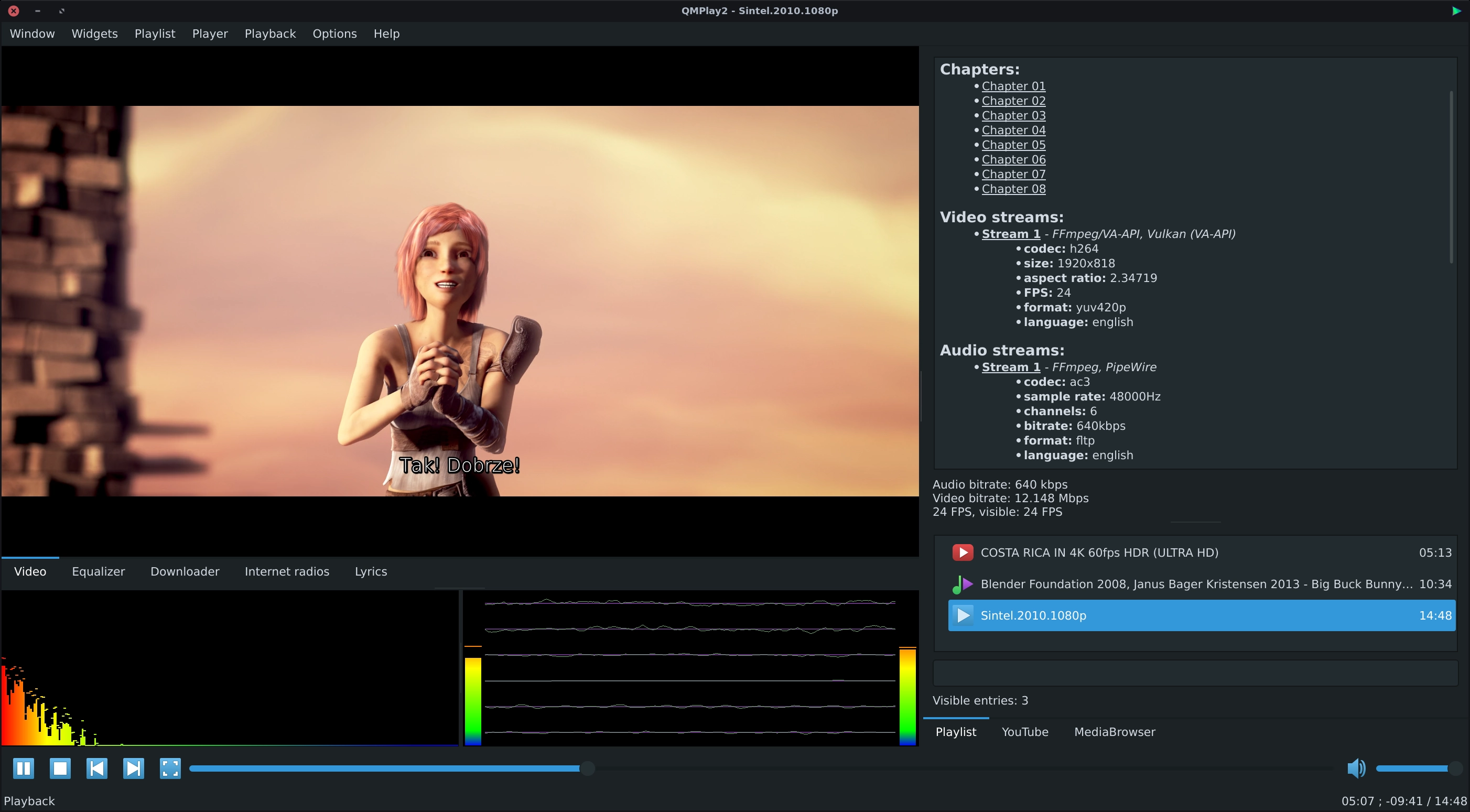
QMPlay2 is a video and audio player. It can play all formats supported by FFmpeg. It also supports Audio CD, raw files and chiptunes. It contains YouTube browser.
Table of Contents
- Installation
- YouTube
- Streamlink
- Spherical view
- ALSA
- Hardware acceleration
- Deinterlacing
- Hidden features
- Multimedia keys
- Installation from sources
- Building package RPM, DEB or any other
- Other information
Installation
Easy installation on Windows
- Download the Windows installer.
Easy installation on Arch Linux
- Install AUR client (e.g. yay),
- run the following command:
yay -S qmplay2-git
Easy installation on openSUSE
- Don't mix FFmpeg from different repositories!
- Run the following commands:
openSUSE Tumbleweed
sudo zypper ar https://ftp.gwdg.de/pub/linux/misc/packman/suse/openSUSE_Tumbleweed Packman
sudo zypper dup --allow-vendor-change --from "Packman"
sudo zypper in QMPlay2
Easy installation on Fedora
- Run the following commands:
sudo dnf install https://download1.rpmfusion.org/free/fedora/rpmfusion-free-release-$(rpm -E %fedora).noarch.rpm https://download1.rpmfusion.org/nonfree/fedora/rpmfusion-nonfree-release-$(rpm -E %fedora).noarch.rpm
sudo dnf groupupdate core
sudo dnf update
sudo dnf groupupdate multimedia --setop="install_weak_deps=False" --exclude=PackageKit-gstreamer-plugin
sudo dnf groupupdate sound-and-video
sudo dnf install qmplay2
Easy installation on Gentoo Linux
- Run the following command:
emerge --ask media-video/qmplay2
Easy installation on Slackware Linux
- Run the following command:
slpkg install QMPlay2
YouTube
You can change the default audio and video quality of YouTube contents. Click on the "Settings" icon on the left of the search bar, change the order of audio and/or video quality priorities and apply changes. If the chosen quality can't be found on YouTube content, QMPlay2 will try using the next entry on the quality list.
YouTube videos don't work without external "yt-dlp" software, so QMPlay2 will download it automatically. You can remove downloaded "yt-dlp" from settings.
Windows
- Make sure that antivirus or firewall doesn't block "yt-dlp" and doesn't block executing external applications!
- Vulkan might not switch to full screen exclusive on some configurations or obsolete drivers.
Streamlink
Examples:
streamlink -p QMPlay2 --player-http "URL" best
streamlink -p QMPlay2 -a /dev/stdin "URL" best
Spherical view
QMPlay2 supports spherical view on OpenGL and Vulkan video outputs. You can watch e.g. YouTube spherical videos by pressing "Ctrl+3". You can also enable it from the menu: "Playback->Video filters->Spherical view".
ALSA
If you are using your own ALSA configuration asound.conf or .asoundrc you should also append:
defaults.namehint.!showall on to the configuration file. Otherwise devices which were added may not be visible!
Hardware acceleration
QMPlay2 supports hardware video decoding: Vulkan Video, CUVID (NVIDIA only), DXVA2 (Windows), D3D11VA (Vulkan, Windows) VA-API (Linux/BSD only) and VideoToolBox (macOS only). Hardware acceleration is disabled by default, but you can enable it in "Settings->Playback settings":
- move hardware accelerated decoder on decoders list to the top,
- apply settings.
Hardware acceleration important information:
- CUVID, DXVA2 and VA-API use OpenGL video output, so OpenGL features are available, but CPU filters won't work.
- VkVideo, CUVID, D3D11VA and VA-API use Vulkan video output, so Vulkan features are available, but CPU filters won't work.
- DXVA2 requires "WGL_NV_DX_interop" extension.
- DXVA2 doesn't work with Vulkan.
- VA-API, CUVID and DXVA2 have its own deinterlacing filters. Their settings are available in "Settings->Video filters".
- VA-API on Vulkan uses its own deinterlacing filter only on Intel drivers.
- H.264 lossless movies (CRF 0 or QP 0) might not be properly decoded via VA-API.
- VideoToolBox doesn't support deinterlacing.
VA-API + OpenGL information:
VA-API + OpenGL uses EGL for OpenGL context creation. On X11 QMPlay2 tries to detect if EGL can be used, but the detection can fail. In this case you can try do it manually: export QT_XCB_GL_INTEGRATION=xcb_glx and run QMPlay2 from command line. If everything is working properly, you can export this variable globally. In case of multiple GPUs installed in system VA-API requires to use the same device as OpenGL. QMPlay2 detects it automatically, but if the detection fails, try to do it manually, e.g.: export QMPLAY2_EGL_CARD_FILE_PATH=/dev/dri/card1 and run QMPlay2 from command line. If everything is working properly, you can export this variable globally.
Deinterlacing
Video interlacing is automatically detected by QMPlay2. Go to "Settings->Video filters" for more options. If you have fast CPU (or low video resolution), you can use "Yadif 2x" deinterlacing filter for better quality.
You can enable deinterlacing filter on non-interlaced video if necessary (some interlaced videos may not have interlacing data), but remember to revert this setting on any other video! Otherwise the video quality and performance will be worse!
Hardware-accelerated video decoding uses its own video filtering, so the CPU deinterlacing method (e.g. "Yadif 2x") does nothing in this case. Of course you can adjust other deinterlacing settings in case of hardware acceleration.
Vulkan renderer has Yadif deinterlacing filter which is used by default for CPU decoded videos. You can change this behavior in Vulkan renderer settings. Moreover, Yadif Vulkan filter is used for hardware-decoded videos.
Chroma plane if pixel format is not YUV420 when XVideo is used as video output may not be properly deinterlaced.
Hidden features
Audio balance
Right click on volume slider and select "Split channels".
Last.fm scrobbling
Go to "Options->Modules settings" and click "Extensions" on the list. Find "LastFM" group box, select "Scrobble", type your login and password and then press "Apply".
Control files
Empty files in share directory (on Windows it is a directory with QMPlay2.exe):
portable- runs QMPlay2 in portable mode (settings are stored in applications directory),noautoupdates- disables auto-updates at first run.
Still images
Go to "Options->settings" and check "Read and display still images".
Custom user agent
You can specify a CustomUserAgent in QMPlay2.ini file in General section.
Disable covers cache
Set NoCoversCache to true in QMPlay2.ini file in General section.
Single instance
You can force single instance for QMPlay2: set "Allow only one instance" in "Settings->General settings".
Multimedia keys
Multimedia keys should work automatically (on Linux/BSD it might depend on your configuration).
Additionally In Linux/BSD you can associate keys with commands:
- using QMPlay2 binary, see:
QMPlay2 -h, - using MPRIS2:
- Toggle play/pause:
dbus-send --print-reply --dest=org.mpris.MediaPlayer2.QMPlay2 /org/mpris/MediaPlayer2 org.mpris.MediaPlayer2.Player.PlayPause. - Next:
dbus-send --print-reply --dest=org.mpris.MediaPlayer2.QMPlay2 /org/mpris/MediaPlayer2 org.mpris.MediaPlayer2.Player.Next - Prev:
dbus-send --print-reply --dest=org.mpris.MediaPlayer2.QMPlay2 /org/mpris/MediaPlayer2 org.mpris.MediaPlayer2.Player.Previous - Stop:
dbus-send --print-reply --dest=org.mpris.MediaPlayer2.QMPlay2 /org/mpris/MediaPlayer2 org.mpris.MediaPlayer2.Player.Stop
- Toggle play/pause:
Installation from sources
Don't forget to update submodules: git submodule update --init.
Build for Flatpak
Install required dependencies to build and run:
flatpak install org.flatpak.Builder org.kde.Platform/$(uname -m)/6.11 org.kde.Sdk/$(uname -m)/6.11
Build QMPlay2:
flatpak run org.flatpak.Builder build/flatpak --force-clean --ccache --user --install io.github.zaps166.QMPlay2.Devel.json
Optionally you can install VA-API driver for Intel GPUs:
flatpak install org.freedesktop.Platform.VAAPI.Intel/$(uname -m)/25.08
Clean build directories:
rm -rf ".flatpak-builder" "build/flatpak"
CMake requirements
For CMake build be sure that you have CMake 3.16 or higher.
You need devel packages:
Necessary:
- Qt5 >= 5.15.2:
- Qt5DBus - Linux/BSD only,
- Qt5Svg - for SVG icons,
- Qt5Qml - for MediaBrowser,
- Qt6Core5Compat - for Qt6,
- FFmpeg >= 4.0:
- libavformat - requires OpenSSL or GnuTLS for https support,
- libavcodec - for FFmpeg module only,
- libswscale,
- libavutil,
- libswresample,
- libavfilter (FFmpeg >= 5.1) - for FFmpeg audio filters,
- libavdevice - for FFmpeg module only, optional (enabled on Linux as default),
- glslc
Important:
- TagLib >= 1.11,
- libass - for OSD and non-graphical subtitles.
For modules (some of them can be automatically disabled if not found):
- FFmpeg (necessary module): libva (VA-API),
- Chiptune: libgme and libsidplayfp,
- AudioCD: libcdio and libcddb,
- ALSA (Linux only): libasound,
- OpenMPT: libopenmpt,
- PipeWire - libpipewire,
- PulseAudio - libpulse-simple,
- PortAudio: portaudio (v19),
- XVideo (X11 only): libxv.
Dependencies:
Arch Linux / Manjaro Linux dependencies
- Common packages:
sudo pacman -S cmake ninja gcc pkg-config ffmpeg libass libva libxv alsa-lib libcdio taglib libcddb libpulse libgme libsidplayfp qt6-base qt6-tools qt6-5compat qt6-svg qt6-declarative pipewire
Running the compilation for Linux/BSD using CMake:
- Install all needed packages and dependencies (in devel version) using package manager or compile it from sources.
- You can use
cmake-guifor graphical configuration. Otherwise follow the instructions below:- run CMake (also you can run with arguments which you want):
cmake -GNinja -B build -S ., - check the summary - which features are enabled - you can set/force them manually,
- if CMake finishes without errors, run:
ninja -C build, - if compiling finishes without errors, install it:
sudo ninja -C build install.
- run CMake (also you can run with arguments which you want):
CMake options (option - default value: description):
- CMake options and the default settings:
CMAKE_INSTALL_PREFIX- mostly it is/usr/local: installation directory.CMAKE_BUILD_TYPE-Release.LANGUAGES-All- a space-separated list of translations to compile into QMPlay2.SOLID_ACTIONS_INSTALL_PATH- Linux/BSD only, autodetect: you can specify the path manually.SET_INSTALL_RPATH- non-Windows only,ONon macOS,OFFanywhere else: sets RPATH after installation.USE_FFMPEG- ON: enable/disable FFmpeg module.USE_FFMPEG_VKVIDEO: autodetect: enabled if Vulkan is enabled and FFmpeg version is >= 6.1.USE_FFMPEG_VAAPI: autodetect: enabled if libva, libva-drm, and egl exist.USE_FFMPEG_AVDEVICE- autodetect on Linux,OFFon non-Linux OS: it allows to use e.g. V4L2 devices.USE_INPUTS- ON: enable/disable Inputs module.USE_EXTENSIONS- ON: enable/disable Extensions module.USE_MPRIS2- Linux/BSD only,ON: enable/disable MPRIS2 in Extensions module.USE_VISUALIZATIONS- ON: enable/disable Visualizations module.USE_AUDIOFILTERS- ON: enable/disable AudioFilters module.USE_VIDEOFILTERS- ON: enable/disable VideoFilters module.USE_OPENGL-ON: enable/disable OpenGL support.USE_VULKAN- autodetect: enable/disable Vulkan support.USE_AUDIOCD- autodetect: enabled if libcdio and libcddb exist: enable/disable AudioCD module.USE_ALSA-ONon Linux: enable/disable ALSA module.USE_PORTAUDIO-ONon non-Linux OS: enable/disable PortAudio module.USE_PULSEAUDIO- autodetect on Linux/BSD,OFFanywhere else: enable/disable PulseAudio module.USE_XVIDEO- autodetect on X11: enabled if libxv exists: enable/disable XVideo module.USE_CHIPTUNE_GME- autodetect: enabled if libgme exists.USE_CHIPTUNE_SID- autodetect: enabled if libsidplayfp exists.USE_TAGLIB-ON: enable/disable tag editor.USE_CMD- Windows only,OFF.USE_LASTFM-ON: enable/disable LastFM in Extensions module.USE_LIBASS-ON: enable/disable libass (subtitles engine) dependency.USE_CUVID-ON: enable/disable CUVID module.USE_LYRICS-ON: enable/disable lyrics module.USE_MEDIABROWSER-ON: enable/disable MediaBrowser module.USE_RADIO-ON: enable/disable Radio Browser module.USE_YOUTUBE-ON: enable/disable YouTube module.USE_ASAN-OFF: enable/disable address sanitizer.USE_UBSAN-OFF: enable/disable undefined behavior sanitizer.CMAKE_INTERPROCEDURAL_OPTIMIZATION-OFF: enable/disable link-time code generation (LTO).USE_GIT_VERSION-ON: append Git HEAD to QMPlay2 version (if exists).USE_UPDATES-ON: enable/disable software updates.FIND_HWACCEL_DRIVERS_PATH-OFF: Find drivers path for hwaccel, useful for universal package.BUILD_WITH_QT6- ON: Build with Qt6.
Using other Qt installation of CMake:
Qt6Widgets_DIR: path to the Qt6Widgets cmake directory (e.g.~/qtbase/lib/cmake/Qt6Widgets).Qt6DBus_DIR: path to the Qt6DBus cmake directory (e.g.~/qtbase/lib/cmake/Qt66Bus).Qt6LinguistTools_DIR: path to the Qt6LinguistTools cmake directory (e.g.~/qtbase/lib/cmake/Qt6LinguistTools).Qt6Svg_DIR: path to the Qt6Svg cmake directory (e.g.~/qtbase/lib/cmake/Qt6Svg).Qt6Qml_DIR: path to the Qt6Qml cmake directory (e.g.~/qtbase/lib/cmake/Qt6Qml).
Every CMake option must be prepended with -D and new value is set after =.
You can strip binaries during installation to save disk space: sudo ninja -C build install/strip.
Example commands (execute it in QMPlay2 directory with source code):
- Simple installation (rely on autodetection,
stripreduces size, but it makes debugging unavailable):
cmake -GNinja -B build -S . -DCMAKE_INSTALL_PREFIX=/usr
ninja -C build
sudo ninja -C build install/strip
- Use manually-specified install prefix, disable SID, use Polish language only and use manually-specified Solid actions path:
cmake -GNinja -B build -S . -DCMAKE_INSTALL_PREFIX=/usr -DUSE_CHIPTUNE_SID=OFF -DLANGUAGES="pl" -DSOLID_ACTIONS_INSTALL_PATH="/usr/share/solid/actions"
ninja -C build
sudo ninja -C build install
- Update icon theme, mime and desktop database (replace
/usr/share/by your install prefix path):
sudo update-desktop-database
sudo update-mime-database /usr/share/mime
sudo gtk-update-icon-cache /usr/share/icons/hicolor
- Uninstallation:
sudo ninja -C build uninstall
macOS:
- Install Brew and developer command line tools.
- Download and install Qt6 for macOS (ignore errors about missing XCode if any).
- Download and install CMake for macOS:
- create symlink for
cmakeCLI (from Bundle) to/usr/local/bin. - Install
pkg-configand all dependencies from Brew. - you can also compile them manually (especially
libass,ffmpeg(w/o most encoders),fribidi(w/oglib) andlibsidplayfp). - Set missing directories for dependencies (QtCreator or CMake GUI are recommended):
- set install prefix e.g. to Desktop directory (for Bundle),
- install via
ninja install- this creates a Bundle.
Windows (cross-compilation):
- Install all required MinGW packages (I recommend AUR MinGW packages).
- Some libraries are incompatible, use unneeded dependencies or don't exist in repository - you should built them on your own.
- Run
cmakefrom cross-compilation toolchain.
Other information for Windows
- You can compile QMPlay2 on Windows host, but you must prepare toolchain for your own (also with CMake advanced options for libraries and paths):
CMAKE_LIBRARY_PATH- where to find QMPlay2 dependency libraries,CMAKE_INCLUDE_PATH- where to find QMPlay2 dependency includes,CUSTOM_*_LIBRARIES- additional custom libraries for linker (useful for static linking),- I use my own PKGBUILDs for many MinGW libraries.
- Visual Studio can't compile QMPlay2.
Building package RPM, DEB or any other
You can look at Arch Linux PKGBUILD.
Other information
- QMPlay2 uses Concept icons created by Alexey Varfolomeev.

iina
iina·Swift
macOS 上基于 mpv 的现代视频播放器,用 Swift 编写,界面原生美观,支持几乎所有视频格式,适合替代 QuickTime 日常看片。
视频播放器+4视频播放器
47074+393.0kv1.5.12026-11-10 03:26 UTC
video.js
videojs·TypeScript
开源媒体播放器框架,支持 HTML 和 React,统一处理 HLS、DASH 等流媒体格式,帮你在网页里快速搭出稳定可定制的视频播放器。
视频播放器+4视频播放器
40145+387.5k[email protected]2026-11-10 01:09 UTC
mpv
mpv-player·C
轻量级命令行视频播放器,基于 FFmpeg 解码,支持硬件加速、字幕渲染和脚本扩展,适合在终端或嵌入其他应用中播放音视频。
命令行播放器+4视频播放器
38040+1043.6kv0.42.02026-11-10 10:46 UTC

peach
peach-mitao·Python
本地优先的视频元数据刮削与媒体库管理工具,自动整理影片信息并支持自托管播放,适合搭建个人影音库。
媒体库管理+4视频播放器
14795+1141.7kv0.57.02026-11-10 05:46 UTC