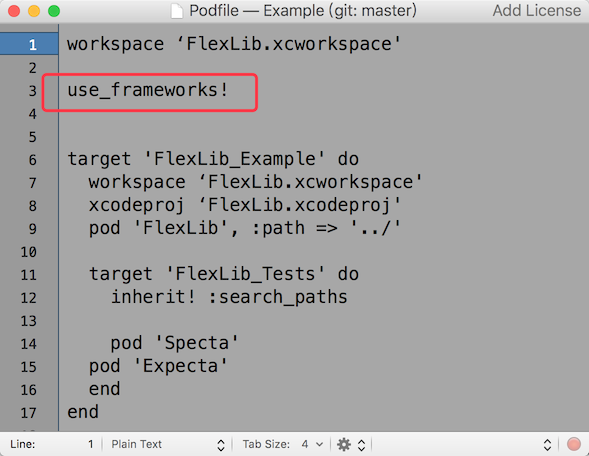
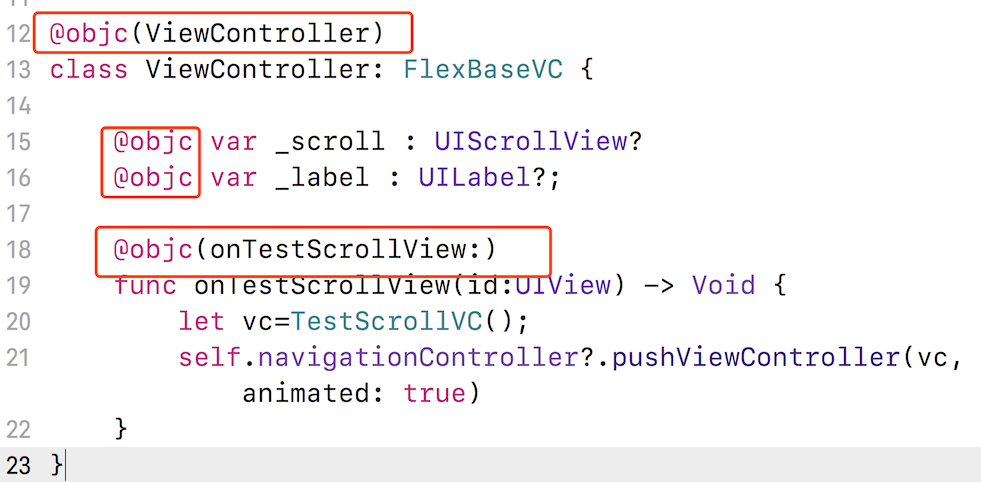
需在 Podfile 中配置 use_frameworks! 才能在 Swift 项目中使用;Swift 中变量和事件需加 @objc 关键字;遇到不认识的属性会输出日志,开发时不要忽略
用 XML 写 flexbox 布局的 iOS 界面框架,让 iOS 开发像写网页一样快
用 flexbox 模型和 XML 文件给 iOS 界面做布局,把网页那套快速布局能力搬到原生开发里,写界面像写网页一样简单。
核心能力
- 用 XML 文件描述 flexbox 布局
- 变量与 onPress 事件自动绑定
- 自动计算 UITableViewCell 高度
- FlexScrollView 自动管理 contentSize
- 支持热预览,改布局无需重启 App
容易踩的坑
内容由模型根据 README 生成,可能不完整或不准确,以官方文档为准。看原文 README
- 4.1.0FlexScrollView自适应高度最新正式版2025-04-24 · 2025-04-24 12:31 UTC
可以通过属性heightFitContent和widthFitContent根据其contentSize自动设置高度或者宽度
- 4.0.0性能优化2025-02-07 · 2025-02-07 01:29 UTC
查看更新说明
1.采用新的flex文件格式,编译后的flex布局文件大小减少80% 2.增加内存缓存,提升release模式下的加载性能 3.其他性能优化 该版本的加载性能与3.5.0相比提升10~50%
- 3.5.0 支持设置动态颜色2024-12-31 · 2024-12-31 00:45 UTC
查看更新说明
允许对任何使用颜色的地方设置动态颜色,格式为: 颜色1|颜色2
颜色1和颜色2可以是任何预定义颜色或者类似#aarrggbb格式的颜色
- 3.3.0增加通过链式调用修改布局属性2024-03-18 · 2024-03-18 10:13 UTC
这个版本没有写更新说明。
- 3.2.1升级yoga到1.19.0,适配XCode14.32023-04-13 · 2023-04-13 09:31 UTC
查看更新说明
升级yoga到1.19.0,适配XCode14.3
用户点评
登录用户的真实使用记录,可按版本和硬件筛选共 0 条
还没有人点评。第一个说出真实体验的人最有价值。
FlexLib


FlexLib
FlexLib is an Objective-C layout framework for iOS. It's based on flexbox model which is standard for web layout. So the layout capability is powerful and easy to use.
With FlexLib, you can write iOS UI much faster than before, and there are better adaptability.
- Screenshots
- Feature
- Advantage
- Usage
- Hot Preview
- Usage For Swift Project
- Example
- Attribute Reference
- FlexLib Classes
- Installation
- Intellisense
- FAQ
- About Flexbox
- Author
- License
Screenshots
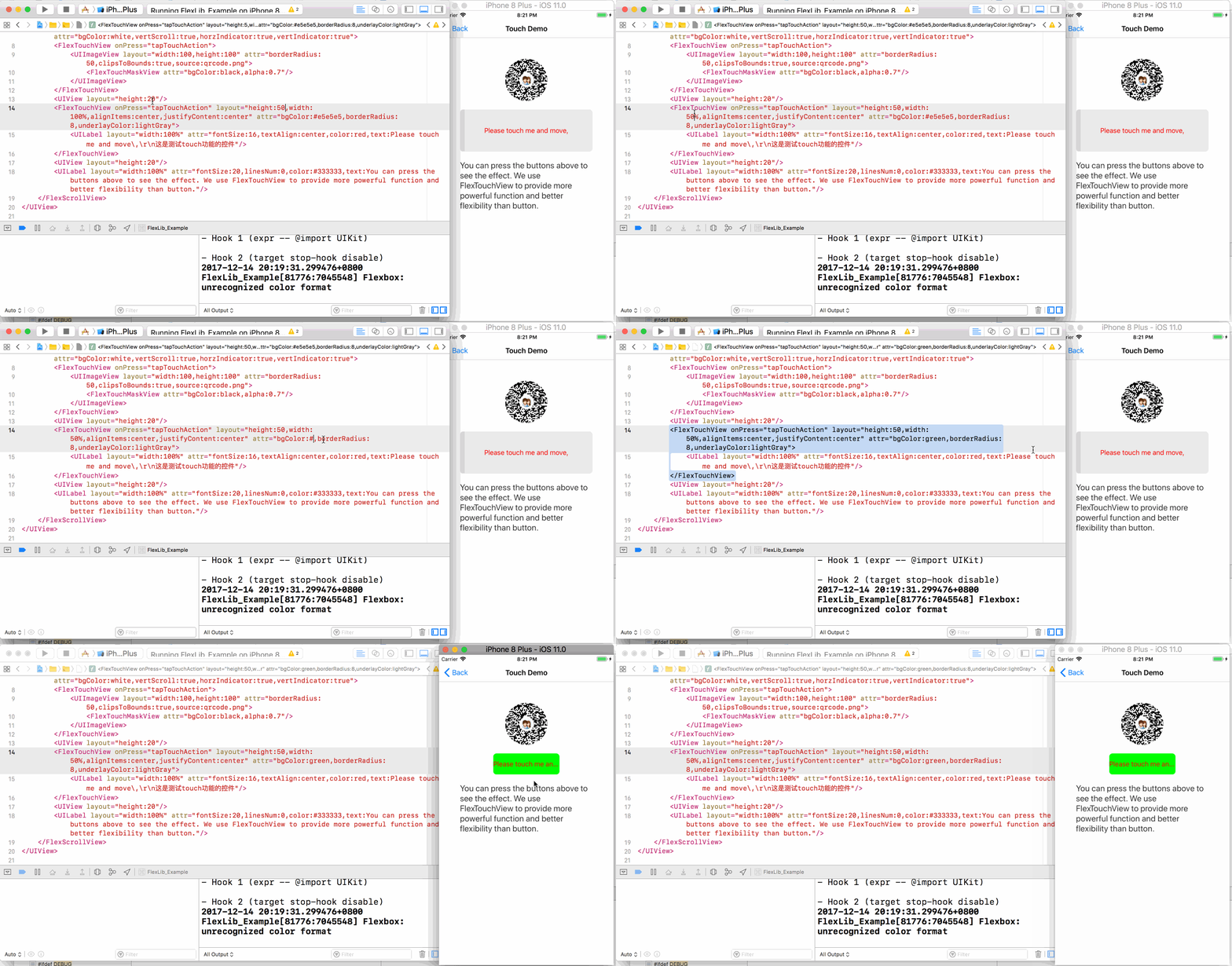
This demo is hot preview:
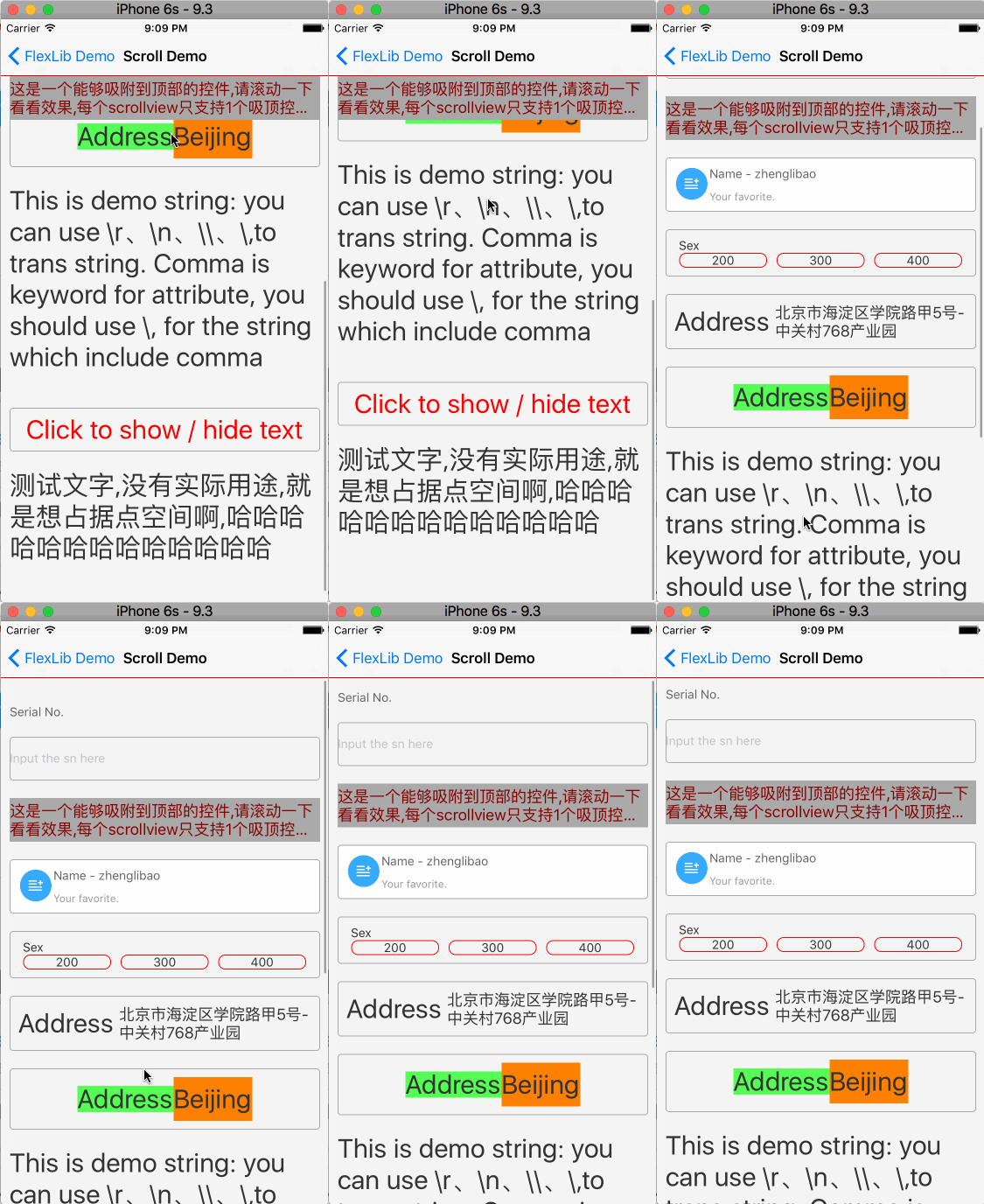
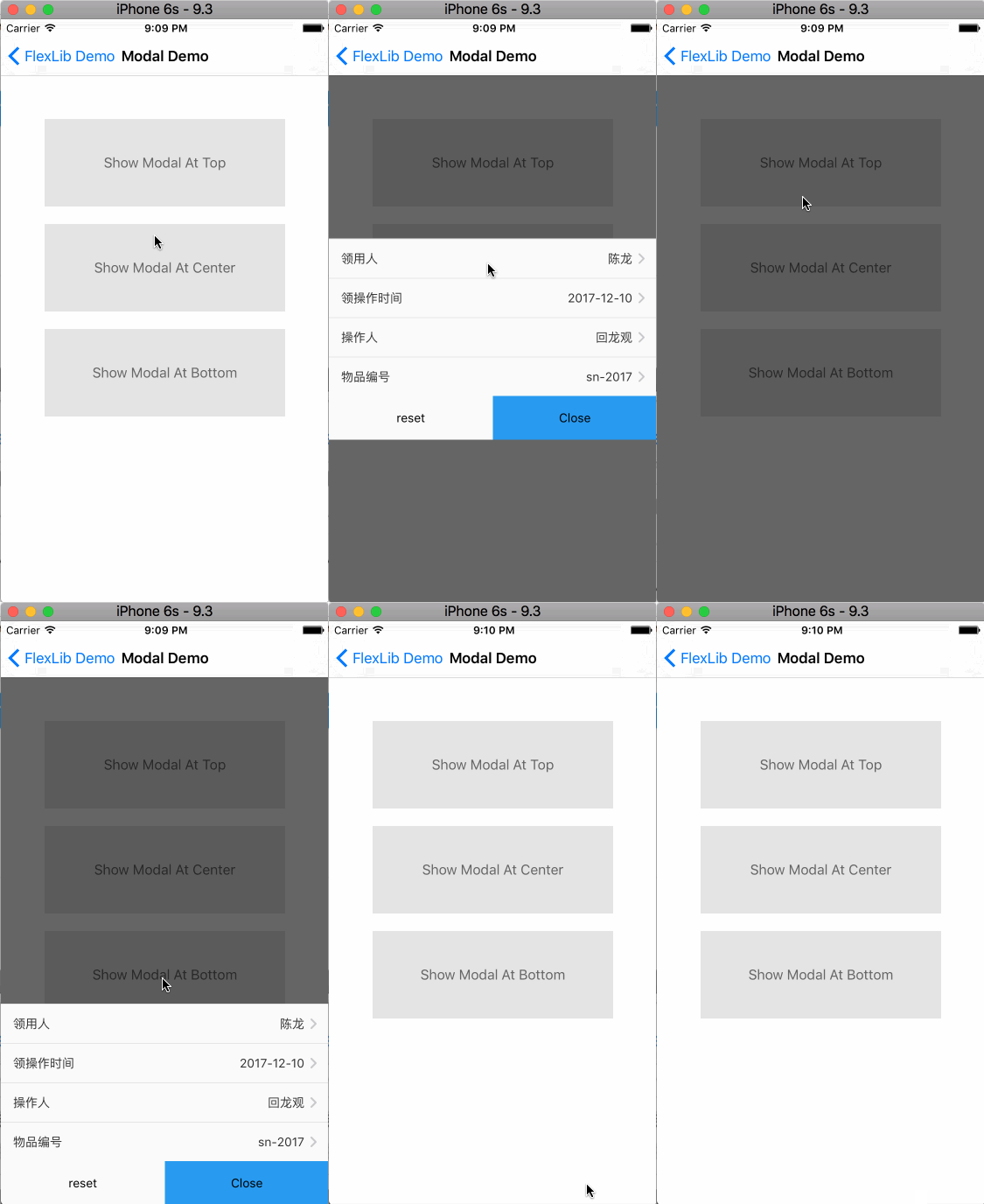
Can you imagine you almost need nothing code to implement the following effect?
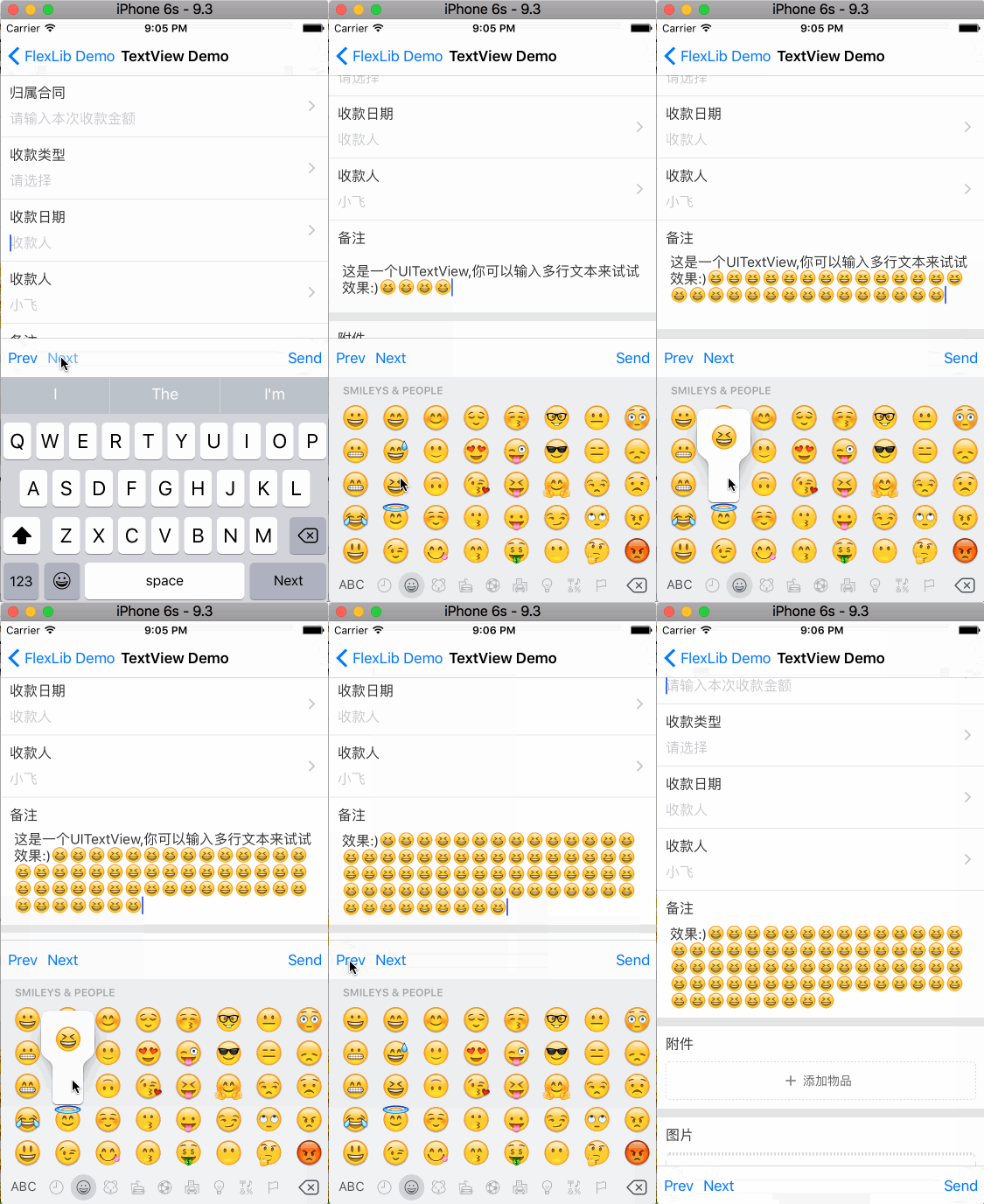
Avoid keyboard automatically
iPhone X adaption

Feature
- layout based on xml format
- auto variable binding
- onPress event binding
- support layout attribute (padding/margin/width/...)
- support view attribute (eg: bgColor/fontSize/...)
- support reference predefined style
- view attributes extensible
- UILabel fully support rich-text
- support modal view
- table cell height calculation
- support iPhoneX perfectly
- support hot preview
- auto adjust view to avoid keyboard
- keyboard toolbar to switch input field
- cache support for release mode
- support Swift project
- view all layouts in one page (Control+V)
- multi-language support
Advantage
- The speed of flexbox is much faster than autolayout.
-
Flexbox is more general than autolayout. Flexbox is standard for web and it's also used in ReactNative, Weex, AsyncDisplayKit, Android, ...
-
FlexLib has better readability. View the autolayout written by others is really boring.
-
For page like the following image, you don't need UITableView any more. Just write everything in one xml. It's much simpler and maintainable.
-
The calculation for height of complex UITableViewCell is really boring. With FlexLib, all the calculation is automatically.
-
FlexScrollView (the subclass of UIScrollView) can manage its contentSize automatically. I'm sure it will save you a lot of time.
-
To show or hide subview, just set hidden property. All the layout will refresh automatically.
-
Hot preview is magic. You can see the final effect on device without restart the app.
-
UILabel support rich-text and onPress for every rich-text part, and it also allow to change rich-text dynamically.
Usage
Use xml layout file for ViewController:
- Write layout with xml file.
The following is a demo file:
<?xml version="1.0" encoding="utf-8"?>

<UIView layout="flex:1,justifyContent:center,alignItems:center" attr="bgColor:white">
<UIView name="_test" onPress="onPressTest:" layout="width:40,height:40" attr="bgColor:lightGray"/>
</UIView>
- Derive view controller class from FlexBaseVC
@interface FlexViewController : FlexBaseVC
{
    // these will be binded to those control with same name in xml file
    UIView* _test;
}
@end

@implementation FlexViewController

- (void)viewDidLoad
{
    [super viewDidLoad];

    self.navigationItem.title = @"FlexLib Demo";
}
// This function will bind to onPress event
- (void)onPressTest:(id)sender {
    TestVC* vc=[[TestVC alloc]init];
    [self presentViewController:vc animated:YES completion:nil];
}
@end
- Now you can use the controller as normal:
    FlexViewController *vc = [[FlexViewController alloc] init];

    UINavigationController *nav = [[UINavigationController alloc] initWithRootViewController:vc];
    self.window.rootViewController = nav;

    [self.window makeKeyAndVisible];
Use xml layout file for TableCell:
-
Write layout with xml file. There is no difference than view controller layout except that it will be used for tabel cell.
-
Derive table cell class from FlexBaseTableCell:
@interface TestTableCell : FlexBaseTableCell
{
    UILabel* _name;
    UILabel* _model;
    UILabel* _sn;
    UILabel* _updatedBy;

    UIImageView* _return;
}
@end
@implementation TestTableCell
@end
- In cellForRowAtIndexPath callback, call initWithFlex to build cell. In heightForRowAtIndexPath, call heightForWidth to calculate height
- (nonnull UITableViewCell *)tableView:(nonnull UITableView *)tableView cellForRowAtIndexPath:(nonnull NSIndexPath *)indexPath {

    static NSString *identifier = @"TestTableCellIdentifier";
    TestTableCell* cell = [tableView dequeueReusableCellWithIdentifier:identifier];
    if (cell == nil) {
        cell = [[TestTableCell alloc]initWithFlex:nil reuseIdentifier:identifier];
    }
    return cell;
}
- (CGFloat)tableView:(UITableView *)tableView heightForRowAtIndexPath:(NSIndexPath *)indexPath
{
    if(_cell==nil){
        _cell = [[TestTableCell alloc]initWithFlex:nil reuseIdentifier:nil];
    }
    return [_cell heightForWidth:_table.frame.size.width];
}
Use xml layout file for other view:
-
Write layout xml file.
-
Use FlexFrameView to load xml file, you can set frame or make it flexible. After initiation, maybe you need to call layoutIfNeeded before add it to other view.
-
add this FlexFrameView to other traditional view
    //load TableHeader.xml as UITableView header

    CGRect rcFrame = CGRectMake(0, 0, [[UIScreen mainScreen] bounds].size.width, 0);
    FlexFrameView* header = [[FlexFrameView alloc]initWithFlex:@"TableHeader" Frame:rcFrame Owner:self];
    header.flexibleHeight = YES;
    [header layoutIfNeeded];

    _table.tableHeaderView = header;
Hot preview
You can see it here
Usage For Swift Project
- Adjust 'Podfile' to use frameworks
- Extend your swift class from FlexBaseVC, FlexBaseTableCell, etc
- For those variables, onPress events, class, you should declare them with @objc keyword. Like this:
Example
To run the example project, clone the repo, and open Example/FlexLib.xcworkspace with XCode to run.
Attribute Reference
FlexLib support two kinds of attribute: layout attribute and view attribute. Layout attribute conform with yoga implementation. View attribute can be extensible using FLEXSET macro.
Notice: FlexLib will output log when it doesn't recognize the attribute you provided. So you should not ignore the log when you develop your project.
FlexLib Classes
You can get it on Wiki-FlexLib Classes
Installation
FlexLib is available through CocoaPods. To install it, simply add the following line to your Podfile:
pod 'FlexLib'
Intellisense
You can get it on Wiki-VSCode Intellisense
FAQ
You can get it on Wiki-FAQ
About Flexbox
Author
zhenglibao, [email protected]. QQ Group: 687398178
If you have problem, you can:
I hope you will like it. :)
License
FlexLib is available under the MIT license. See the LICENSE file for more info.