ONNX 嵌入模型首次运行需联网下载约 558 MB,Codex 场景需 codex --yolo 才能访问网络;默认 Milvus Lite 单文件库位于 ~/.memsearch/milvus.db,切 Zilliz Cloud 或自建 Milvus 需改 milvus.uri 和 milvus.token;Claude Code 安装插件后需重启才生效。

memsearch
zilliztechMIT活跃维护给 Claude Code、Codex 等 AI 编码代理提供持久化统一记忆层,用 Markdown 存内容、Milvus 做向量检索,让代理跨会话记住上下文。
A persistent, unified memory layer for all your AI agents (e.g. Claude Code, Codex, DSH), backed by Markdown and Milvus.
v0.4.23发布于 2026-10-27 03:34 UTC2,856star +25 / 7 天282fork同步于 2026-11-10 17:44 UTC
/plugin marketplace add zilliztech/memsearch
/plugin install memsearch 硬件要求按 README 说明
README 未说明显存或 GPU 要求;默认使用 ONNX bge-m3 在本地 CPU 上做嵌入,首次启动会从 HuggingFace Hub 下载约 558 MB 模型。
支持 Apple Silicon
给各类 AI 编码代理提供跨平台持久语义记忆,记忆以 Markdown 存储、Milvus 做索引
给 Claude Code、Codex 等 AI 编码代理提供持久化统一记忆层,用 Markdown 存内容、Milvus 做向量检索,让代理跨会话记住上下文。
核心能力
- 记忆以 .md 文件为唯一真源,Milvus 仅作可重建的影子索引
- 跨 Claude Code、Codex、DSH、OpenClaw、OpenCode 共享同一份记忆
- 三层渐进检索:搜索、展开笔记、回溯原始对话
- 稠密向量 + BM25 稀疏检索 + RRF 重排的混合搜索
- SHA-256 内容哈希去重,文件监听器实时增量索引
容易踩的坑
内容由模型根据 README 生成,可能不完整或不准确,以官方文档为准。看原文 README
- v0.4.23最新正式版2026-10-27 · 2026-10-27 03:34 UTC
This release includes five merged fixes:
- DSH supports Windows command launchers, UTF-8 summary input and reliable child-process handoffs (#819).
- Codex capture uses unique temporary files on macOS (#820).
- DSH memory Web routes honor the host authentication and request-origin checks (#822).
memsearch expand --no-sectionreturns only the chunk's source range (#816).- DSH provides a recall hint and lets the agent search when needed; recall skills use the calling workspace's collection (#823).
Plugin versions: Claude Code 0.4.22, DSH 0.1.8, OpenClaw 0.3.22, OpenCode 0.4.2. Codex uses the current installer. Shared Windows maintenance fixes are included across the plugins. Existing memory files, anchors and configuration remain usable without data migration.
- v0.4.222026-10-23 · 2026-10-23 09:27 UTC
查看更新说明
MemSearch 0.4.22 includes memory reliability fixes across the CLI and agent integrations.
- Memory expansion begins at the retrieved chunk’s own section, Unix socket Milvus addresses use server connection handling, and compacted memory headings include a timestamp.
- Claude Code hooks select a working Python 3 interpreter, locate the bundled summary prompt reliably, reject native summarizer error responses, and deliver recall hints to the model.
- New DSH configurations use local ONNX embeddings. Existing embedding configurations remain unchanged.
- OpenClaw memory tools and session provenance support the current SDK. OpenCode capture reuses project roots during transcript scans.
- Claude Code and Codex hooks avoid global Milvus Lite process cleanup. Shared memory guidance and maintenance scripts are refreshed.
Released components: Python core 0.4.22; Claude Code 0.4.21; DSH 0.1.7; OpenClaw 0.3.21; OpenCode 0.4.1. Codex is installed from the current release commit.
What's Changed
- chore: release core 0.4.22 and memory plugins (#813)
- fix: select working Python 3 for Claude Code hooks (#809)
- fix(claude-code): locate summary prompt from the Stop script (#812)
- docs: clarify embedding setup across integrations (#810)
- fix(dsh): default unconfigured memory to ONNX (#811)
- fix(compact): time-stamp the Memory Compact heading (#768) (#796)
- fix: reject native Claude summarizer error responses (#805)
- fix(opencode): cache project roots during capture scans (#808)
- fix(claude-code): deliver the UserPromptSubmit recall hint to the model (#739)
- fix: treat unix socket Milvus URIs as a server (#784)
- fix:
expandstarts the section at the chunk's own heading (#775) - docs: simplify OpenCode setup and refresh plugin guidance (#801)
- feat(opencode): support V2 and release plugin 0.4.0 (#800)
- fix(openclaw): restore memory tools and session provenance (#799)
- fix(hooks): remove global Milvus Lite process cleanup (#797)
- chore(dsh): release 0.1.6 (#789)
- fix(dsh): use a producer-owned source kind for injected memory messages (#762)
- v0.4.212026-09-24 · 2026-09-24 08:08 UTC
查看更新说明
What's Changed
- release: prepare v0.4.21 (#765)
- Use the stable Jev alias and relocate evaluation docs (#761)
- Add optional Jev reranking and bilingual evaluation (#758)
- fix: prevent read paths from creating missing collections (#760)
- fix: search growing rows on Milvus Server (#757)
- fix(codex): filter composite host instruction envelopes (#754)
- fix(codex): parse response-item rollout messages safely (#751)
- fix(openclaw): update prompt hook compatibility (#744)
- v0.4.202026-09-12 · 2026-09-12 07:19 UTC
查看更新说明
What's Changed
- release: prepare v0.4.20 (#741)
- fix(dsh): snapshotEvents compat and stdin EOF for headless summarizer (#737)
- docs(plugin): explain model selection for forked skills (#733)
- fix(config): respect configured collection priority (#726)
- fix(hooks): avoid reindexing Milvus Lite on every plugin stop (#723)
- fix: clarify memory recall status messages (#722)
- fix(opencode): omit turn text when summaries fail (#719)
- perf(hooks): refresh the PyPI check off the session-start blocking path (#676) (#695)
- fix: enable best-effort Milvus Lite on Windows (#713)
- docs: route releases through repository skill (#712)
- fix: preserve latest session memory within context budget (#691)
- chore(release): bump plugin versions for single-source skills (#711)
- refactor(skills): single-source memory-config and memory-to-skill across platforms (#710)
- fix(opencode): run derive-collection.sh via argv, not a shell string (#681) (#682)
- ci: automate DSH plugin releases (#702)
- chore(dsh): release 0.1.3 (#701)
- v0.4.192026-08-23 · 2026-08-23 01:24 UTC
查看更新说明
What's Changed
- Bump versions for 0.4.19 release (#700)
- docs: use Codex product name consistently (#699)
- docs: add DeepSeek Harness plugin documentation (#698)
- fix(dsh): harden memsearch browser preview (#697)
- feat(dsh): add collapsible review dock and read-only .memsearch browser (#696)
- feat(dsh): add skill-candidate review panel UI to the web composer dock (#694)
- chore(dsh): release @zilliz/memsearch-dsh 0.1.1 (#690)
- feat(dsh): background maintenance (PROJECT.md/USER.md, skill distillation) (#689)
- fix(dsh): patch name must match npm package name (#688)
- chore(dsh): publish as @zilliz/memsearch-dsh (#687)
用户点评
登录用户的真实使用记录,可按版本和硬件筛选共 0 条
还没有人点评。第一个说出真实体验的人最有价值。
📰 What's New
-
Optional Jev reranking — rerank memory search results with Jev through the TypeSafe API, with no local model download. See configuration and the Chinese/English evaluation.
-
DeepSeek Harness support — MemSearch now brings automatic capture, recall hints, native skill-based recall, background maintenance, and a read-only memory browser to DeepSeek Harness (DSH).
-
Skills from memory — MemSearch now distills the workflows you repeat into reusable, installable agent skills (a third "procedural memory" layer) and keeps them up to date in the background. See Skills from Memory.
-
Advanced memory maintenance — optional background tasks keep durable
PROJECT.mdandUSER.mdnotes current across sessions. See Advanced Memory Maintenance.
Why memsearch?
- 🌐 All Platforms, One Memory — memories flow across Claude Code, Codex, DeepSeek Harness, OpenClaw, and OpenCode. A conversation in one agent becomes searchable context in all others — no extra setup
- 👥 For Agent Users, install a plugin and get persistent memory with zero effort; for Agent Developers, use the full CLI and Python API to build memory and harness engineering into your own agents
- 📄 Markdown is the source of truth — inspired by OpenClaw. Your memories are just
.mdfiles — human-readable, editable, version-controllable. Milvus is a "shadow index": a derived, rebuildable cache - 🔍 Progressive retrieval, hybrid search, smart dedup, live sync — 3-layer recall (search → expand → transcript); dense vector + BM25 sparse + RRF reranking; SHA-256 content hashing skips unchanged content; file watcher auto-indexes in real time
🧑💻 For Agent Users
Pick your platform, install the plugin, and you're done. Each plugin captures conversations automatically and provides semantic recall with zero configuration.
# Install
/plugin marketplace add zilliztech/memsearch
/plugin install memsearch
# Restart Claude Code to activate the plugin
After restarting, just chat with Claude Code as usual. The plugin captures every conversation turn automatically.
Verify it's working — after a few conversations, check your memory files:
ls .memsearch/memory/          # you should see daily .md files
cat .memsearch/memory/$(date +%Y-%m-%d).md
Recall memories — two ways to trigger:
/memory-recall what did we discuss about Redis?
Or just ask naturally — Claude auto-invokes the skill when it senses the question needs history:
We discussed Redis caching before, what was the TTL we chose?
# Install
git clone --depth 1 https://github.com/zilliztech/memsearch.git
bash memsearch/plugins/codex/scripts/install.sh
codex --yolo  # needed for ONNX model network access
After installing, chat as usual. Hooks capture and summarize each turn.
Verify it's working:
ls .memsearch/memory/
Recall memories — use the skill:
$memory-recall what did we discuss about deployment?
# Install the published plugin into your DSH profile
uv tool install "memsearch[onnx]"
dsh plugin --profile web add @zilliz/memsearch-dsh
# Restart that DSH profile, or start a new session
After installing, use DSH normally. Completed turns are captured automatically, and relevant memories are injected before the first model step only when they are useful.
Verify it's working:
ls .memsearch/memory/
Recall memories — ask naturally or tell DSH to use the registered memory-recall skill:
Use memory-recall to find what we decided about the deployment architecture.
The web profile also adds a compact MemSearch dock where you can review skill candidates and browse supported files under .memsearch/ without editing them.
# Install from ClawHub
openclaw plugins install --force clawhub:memsearch
openclaw config set plugins.entries.memsearch.hooks.allowConversationAccess true
openclaw config set plugins.entries.memsearch.hooks.allowPromptInjection true
openclaw gateway restart
After installing, chat in TUI as usual. The plugin captures each turn automatically.
Verify it's working — memory files are stored in your agent's workspace:
# For the main agent:
ls ~/.openclaw/workspace/.memsearch/memory/
# For other agents (e.g. work):
ls ~/.openclaw/workspace-work/.memsearch/memory/
Recall memories — two ways to trigger:
/memory-recall what was the batch size limit we set?
Or just ask naturally — the LLM auto-invokes memory tools when it senses the question needs history:
We discussed batch size limits before, what did we decide?
MemSearch gives OpenCode persistent memory across sessions. Install the plugin:
opencode plugin add @zilliz/memsearch-opencode
Completed turns are summarized into .memsearch/memory/ and indexed for recall. Pending work resumes after an interruption.
Ask about previous decisions or debugging sessions, and OpenCode can search memory, expand relevant notes, and look up the original conversation. The memory-recall, memory-config, and memory-to-skill Skills are included.
⚙️ Configuration (all platforms)
All plugins share the same memsearch backend. Configure once, works everywhere.
Embedding
Use ONNX bge-m3 for local CPU embeddings with no API key. On first launch the model (~558 MB) is downloaded from HuggingFace Hub.
memsearch config set embedding.provider onnx     # local, free
memsearch config set embedding.provider openai   # needs OPENAI_API_KEY
memsearch config set embedding.provider ollama   # local, any model
All providers and models: Configuration — Embedding Provider
Milvus Backend
Just change milvus_uri (and optionally milvus_token) to switch between deployment modes:
Milvus Lite (default) — zero config, single file. Great for getting started:
# Works out of the box, no setup needed
memsearch config get milvus.uri   # → ~/.memsearch/milvus.db
⭐ Zilliz Cloud (recommended) — fully managed, free tier available — sign up 👇:
memsearch config set milvus.uri "https://in03-xxx.api.gcp-us-west1.zillizcloud.com"
memsearch config set milvus.token "your-api-key"
You can sign up on Zilliz Cloud to get a free cluster and API key.
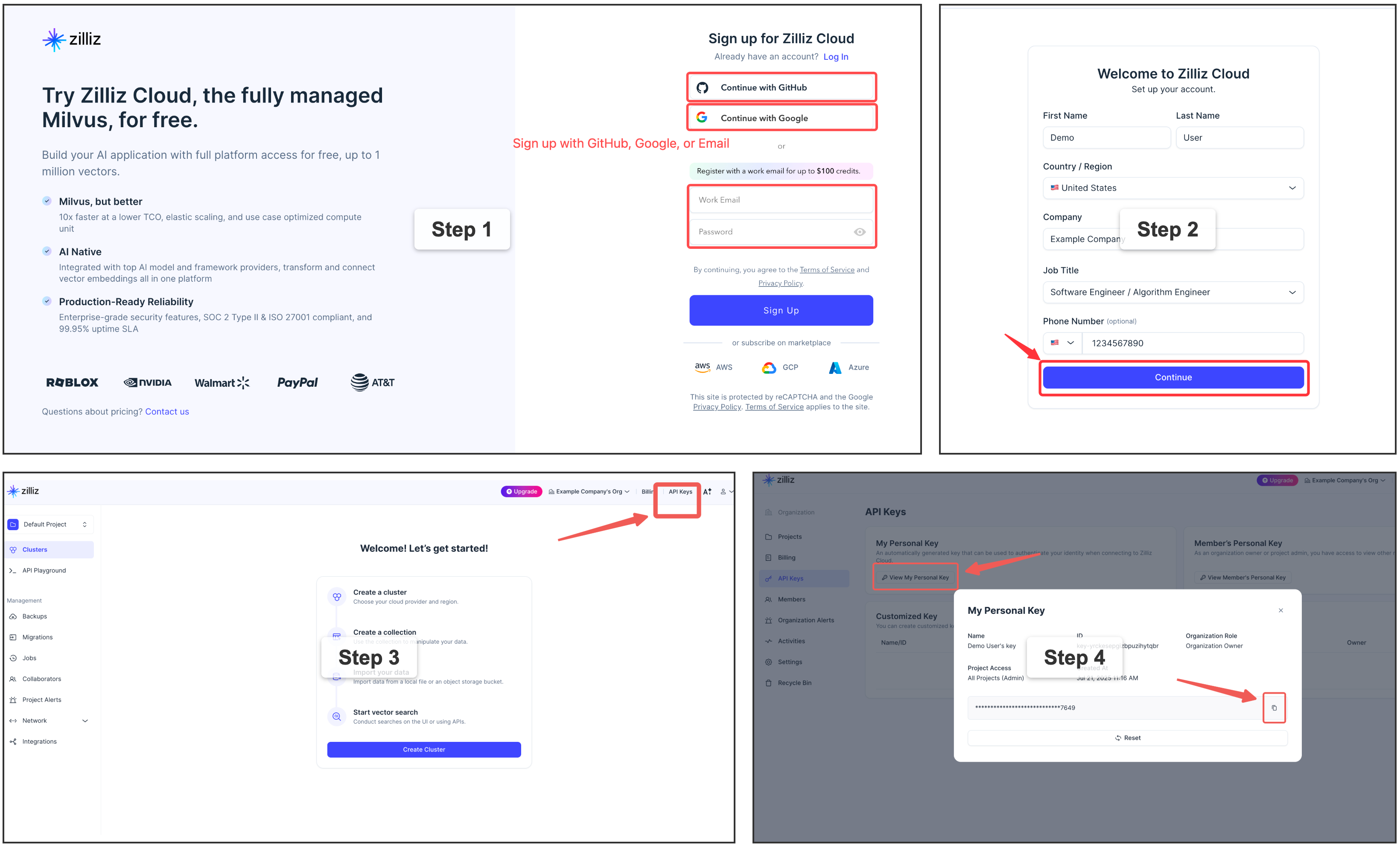
For multi-user or team environments with a dedicated Milvus instance. Requires Docker. See the official installation guide.
memsearch config set milvus.uri http://localhost:19530
📖 Full configuration guide: Configuration · Platform comparison
Capture Summarization Routing
Each plugin keeps its native capture summarizer unless you override it explicitly:
memsearch config set plugins.codex.summarize.model gpt-5.1-codex-mini
memsearch config set plugins.opencode.summarize.model anthropic/claude-haiku
Advanced users can route plugin summarization through a memsearch-managed API provider:
memsearch config set llm.providers.openai.type openai
memsearch config set llm.providers.openai.model gpt-5-mini
memsearch config set llm.providers.openai.api_key env:OPENAI_API_KEY
memsearch config set plugins.codex.summarize.provider openai
Leave plugins.<platform>.summarize.provider empty to preserve the platform's default behavior. Claude Code, Codex, OpenClaw, and OpenCode also accept native; DSH selects its headless-agent backend when the provider is unset. Plugin-specific summarize settings do not fall back to llm.model.
You can also disable automatic capture globally for a platform while keeping the plugin installed:
memsearch config set plugins.codex.summarize.enabled false
Advanced Memory Maintenance
Your agent can keep two higher-level notes current in the background: PROJECT.md — durable project state (active threads, decisions, risks, next steps) — and USER.md — your reusable preferences, working style, and recurring goals. They refresh after a session only when the journals changed and a minimum interval has passed, and they are off by default.
Turn them on by asking your agent — "enable MemSearch's PROJECT.md and USER.md maintenance" — and it configures them through the memory-config skill, which can also choose the model/provider, the interval, and custom prompts, or diagnose the current setup. Prefer editing files? The settings live under [plugins.<agent>.project_review] and [plugins.<agent>.user_profile] in your MemSearch config (both read .memsearch/memory and write .memsearch/PROJECT.md / .memsearch/USER.md by default).
If a background maintenance task seems silent, check .memsearch/.maintenance-state.json or ask the memory-config skill to inspect it; failed runs record last_error and retry on the next due run because failed input digests are not marked successful.
Skills from Memory
Beyond the episodic journals and the semantic PROJECT.md / USER.md notes, MemSearch grows a third memory layer — procedural memory: your agent turns the workflows you repeat into reusable, installable skills. You drive it entirely through your agent, in natural language — nothing to memorize:
- "Make a skill out of what we just did." — the agent drafts a skill from the session (reading the original transcript so the steps are exact, not guessed), saves it as a candidate, and offers to install it.
- "What skill candidates do I have? Install the deploy one." — the agent lists candidates and installs the one you pick into its own skill directory, where it becomes a real
/-command.
Under the hood, candidates live in a git-tracked .memsearch/skill-candidates/ store — diffable and revertible, and inert until you install one (that step is always yours). An optional background pass can also mine recurring workflows from your history on its own. Distilled skills follow the Agent Skills open standard, so one capture is portable across Claude Code, Codex, DSH, OpenClaw, OpenCode, and other compatible agents.
Turning it on is also just a sentence: ask your agent "enable MemSearch skill distillation" (or "make it more eager") and it configures things through the memory-config skill — it's off by default. Prefer editing files? The same settings live under [plugins.<agent>.memory_to_skill] in your MemSearch config. Full guide: Skills from Memory.
What can you use it for?
- Resume debugging threads — ask how a similar Redis, Docker, database, or deployment issue was fixed last time.
- Recover decision rationale — find why the project chose one architecture, library, migration path, or API design over another.
- Trace feature history — understand how a feature evolved across sessions, including the files changed and tradeoffs discussed.
- Do code archaeology — ask when and why a module, config, or workflow was changed before touching it again.
- Find the right session to resume — ask which previous conversation covered a topic, recover the relevant context, and continue from there.
- Carry context across agents — keep Claude Code, Codex, DeepSeek Harness, OpenClaw, and OpenCode working from the same project memory.
🛠️ For Agent Developers
Beyond ready-to-use plugins, memsearch provides a complete CLI and Python API for building memory into your own agents. Whether you're adding persistent context to a custom agent, building a memory-augmented RAG pipeline, or doing harness engineering — the same core engine that powers the plugins is available as a library.
🏗️ Architecture Overview
┌──────────────────────────────────────────────────────────────┐
│ 🧑💻 For Agent Users (Plugins) │
│ Claude Code · Codex · DSH · OpenClaw · OpenCode · Your App │
│ │ │
├────────────────────────────┬─────────────────────────────────┤
│ 🛠️ For Agent Developers │ Build your own with ↓ │
│ ┌─────────────────────────┴──────────────────────────────┐ │
│ │ memsearch CLI / Python API │ │
│ │ index · search · expand · watch · compact │ │
│ └─────────────────────────┬──────────────────────────────┘ │
│ ┌─────────────────────────┴──────────────────────────────┐ │
│ │ Core: Chunker → Embedder → Milvus │ │
│ │ Hybrid Search (BM25 + Dense + RRF) │ │
│ └────────────────────────────────────────────────────────┘ │
├──────────────────────────────────────────────────────────────┤
│ 📄 Markdown Files (Source of Truth) │
│ memory/2026-03-27.md · memory/2026-03-26.md · ... │
└──────────────────────────────────────────────────────────────┘
Plugins sit on top of the CLI/API layer. The API handles indexing, searching, and Milvus sync. Markdown files are always the source of truth — Milvus is a rebuildable shadow index. Everything below the plugin layer is what you use as an agent developer.
How Plugins Work (Claude Code as example)
Capture — after each conversation turn:
User asks question → Agent responds → Stop hook fires
                                          │
                     ┌────────────────────┘
                     ▼
              Parse last turn
                     │
                     ▼
         LLM summarizes (haiku)
         "- User asked about X."
         "- Claude did Y."
                     │
                     ▼
         Append to memory/2026-03-27.md
         with <!-- session:UUID --> anchor
                     │
                     ▼
         memsearch index → Milvus
Recall — 3-layer progressive search:
User: "What did we discuss about batch size?"
                     │
                     ▼
  L1  memsearch search "batch size"    → ranked chunks
                     │ (need more?)
                     ▼
  L2  memsearch expand <chunk_hash>    → full .md section
                     │ (need original?)
                     ▼
  L3  parse-transcript <session.jsonl> → raw dialogue
📄 Markdown as Source of Truth
  Plugins append ──→  .md files  ←── human editable
                          │
                          ▼
                  memsearch watch (live watcher)
                          │
                  detects file change
                          │
                          ▼
                  re-chunk changed .md
                          │
                  hash each chunk (SHA-256)
                          │
              ┌───────────┴───────────┐
              ▼                       ▼
       hash unchanged?          hash is new/changed?
       → skip (no API call)     → embed → upsert to Milvus
              │                       │
              └───────────┬───────────┘
                          ▼
                ┌──────────────────┐
                │  Milvus (shadow) │
                │  always in sync  │
                │  rebuildable     │
                └──────────────────┘
📦 Installation
# Install as a global CLI tool — recommended when you mainly use the
# `memsearch` command or any of the agent plugins (Claude Code, Codex,
# DSH, OpenClaw, OpenCode), which all shell out to the CLI.
uv tool install memsearch       # via uv
pipx install memsearch          # via pipx
pip install memsearch           # plain pip

# Install as a project dependency — use this if you want to import
# `memsearch` from your own Python code (e.g. via the MemSearch class).
uv add memsearch                # via uv, adds to pyproject.toml
pip install memsearch           # into an activated venv
# Install local ONNX support for the CLI
uv tool install "memsearch[onnx]"
pipx install "memsearch[onnx]"
pip install "memsearch[onnx]"

# As a project dependency
uv add "memsearch[onnx]"

# Other options: [openai], [google], [voyage], [jina], [mistral], [ollama], [local], [all]
🐍 Python API — Give Your Agent Memory
The Python API defaults to OpenAI (OPENAI_API_KEY). For local embeddings, pass embedding_provider="onnx".
from memsearch import MemSearch

mem = MemSearch(paths=["./memory"])

await mem.index()                                      # index markdown files
results = await mem.search("Redis config", top_k=3)    # semantic search
scoped = await mem.search("pricing", top_k=3, source_prefix="./memory/product")
print(results[0]["content"], results[0]["score"])       # content + similarity
import asyncio
from datetime import date
from pathlib import Path
from openai import OpenAI
from memsearch import MemSearch

MEMORY_DIR = "./memory"
llm = OpenAI()                                        # your LLM client
mem = MemSearch(paths=[MEMORY_DIR])                    # memsearch handles the rest

def save_memory(content: str):
    """Append a note to today's memory log (OpenClaw-style daily markdown)."""
    p = Path(MEMORY_DIR) / f"{date.today()}.md"
    p.parent.mkdir(parents=True, exist_ok=True)
    with open(p, "a") as f:
        f.write(f"\n{content}\n")

async def agent_chat(user_input: str) -> str:
    # 1. Recall — search past memories for relevant context
    memories = await mem.search(user_input, top_k=3)
    context = "\n".join(f"- {m['content'][:200]}" for m in memories)

    # 2. Think — call LLM with memory context
    resp = llm.chat.completions.create(
        model="gpt-5-mini",
        messages=[
            {"role": "system", "content": f"You have these memories:\n{context}"},
            {"role": "user", "content": user_input},
        ],
    )
    answer = resp.choices[0].message.content

    # 3. Remember — save this exchange and index it
    save_memory(f"## {user_input}\n{answer}")
    await mem.index()

    return answer

async def main():
    # Seed some knowledge
    save_memory("## Team\n- Alice: frontend lead\n- Bob: backend lead")
    save_memory("## Decision\nWe chose Redis for caching over Memcached.")
    await mem.index()  # or mem.watch() to auto-index in the background

    # Agent can now recall those memories
    print(await agent_chat("Who is our frontend lead?"))
    print(await agent_chat("What caching solution did we pick?"))

asyncio.run(main())
pip install memsearch anthropic
import asyncio
from datetime import date
from pathlib import Path
from anthropic import Anthropic
from memsearch import MemSearch

MEMORY_DIR = "./memory"
llm = Anthropic()
mem = MemSearch(paths=[MEMORY_DIR])

def save_memory(content: str):
    p = Path(MEMORY_DIR) / f"{date.today()}.md"
    p.parent.mkdir(parents=True, exist_ok=True)
    with open(p, "a") as f:
        f.write(f"\n{content}\n")

async def agent_chat(user_input: str) -> str:
    # 1. Recall
    memories = await mem.search(user_input, top_k=3)
    context = "\n".join(f"- {m['content'][:200]}" for m in memories)

    # 2. Think — call Claude with memory context
    resp = llm.messages.create(
        model="claude-sonnet-4-6",
        max_tokens=1024,
        system=f"You have these memories:\n{context}",
        messages=[{"role": "user", "content": user_input}],
    )
    answer = resp.content[0].text

    # 3. Remember
    save_memory(f"## {user_input}\n{answer}")
    await mem.index()
    return answer

async def main():
    save_memory("## Team\n- Alice: frontend lead\n- Bob: backend lead")
    await mem.index()
    print(await agent_chat("Who is our frontend lead?"))

asyncio.run(main())
pip install "memsearch[ollama]"
ollama pull nomic-embed-text          # embedding model
ollama pull llama3.2                  # chat model
import asyncio
from datetime import date
from pathlib import Path
from ollama import chat
from memsearch import MemSearch

MEMORY_DIR = "./memory"
mem = MemSearch(paths=[MEMORY_DIR], embedding_provider="ollama")

def save_memory(content: str):
    p = Path(MEMORY_DIR) / f"{date.today()}.md"
    p.parent.mkdir(parents=True, exist_ok=True)
    with open(p, "a") as f:
        f.write(f"\n{content}\n")

async def agent_chat(user_input: str) -> str:
    # 1. Recall
    memories = await mem.search(user_input, top_k=3)
    context = "\n".join(f"- {m['content'][:200]}" for m in memories)

    # 2. Think — call Ollama locally
    resp = chat(
        model="llama3.2",
        messages=[
            {"role": "system", "content": f"You have these memories:\n{context}"},
            {"role": "user", "content": user_input},
        ],
    )
    answer = resp.message.content

    # 3. Remember
    save_memory(f"## {user_input}\n{answer}")
    await mem.index()
    return answer

async def main():
    save_memory("## Team\n- Alice: frontend lead\n- Bob: backend lead")
    await mem.index()
    print(await agent_chat("Who is our frontend lead?"))

asyncio.run(main())
📖 Full Python API reference: Python API docs
⌨️ CLI Usage
Setup:
memsearch config init                              # interactive setup wizard
memsearch config set embedding.provider onnx       # switch embedding provider
memsearch config set milvus.uri http://localhost:19530  # switch Milvus backend
Index & Search:
memsearch index ./memory/                          # index markdown files
memsearch index ./memory/ ./notes/ --force         # re-embed everything
memsearch index . --ignore-file .gitignore         # opt in to repository ignore rules
memsearch search "Redis caching"                   # hybrid search (BM25 + vector)
memsearch search "auth flow" --top-k 10 --json-output  # JSON for scripting
memsearch expand <chunk_hash>                      # show full section around a chunk
Live Sync & Maintenance:
memsearch watch ./memory/                          # live file watcher (auto-index on change)
memsearch compact                                  # LLM-powered chunk summarization
memsearch stats                                    # show indexed chunk count
memsearch reset --yes                              # drop all indexed data and rebuild
📖 Full CLI reference with all flags: CLI docs
⚙️ Configuration
Embedding and Milvus backend settings → Configuration (all platforms)
Collection priority: integration-derived default → ~/.memsearch/config.toml → .memsearch.toml → explicit --collection or Python argument. Without an integration-derived default, the built-in collection is used.
📖 Full config guide: Configuration
🔗 Links
- 📖 Documentation — full guides, API reference, and architecture details
- 🔌 Platform Plugins — Claude Code, Codex, DeepSeek Harness, OpenClaw, OpenCode
- 💡 Design Philosophy — why markdown, why Milvus, competitor comparison
- 🦞 OpenClaw — the memory architecture that inspired memsearch
- 🗄️ Milvus | Zilliz Cloud — the vector database powering memsearch
🤝 Contributing
Bug reports, feature requests, and pull requests are welcome! See the Contributing Guide for development setup, testing, and plugin development instructions. For questions and discussions, join us on Discord.
📄 License
supabase
supabase·TypeScript
基于 Postgres 的一站式后端开发平台,提供专用数据库、认证、存储和向量检索能力,可替代 Firebase 快速搭建 Web、移动和 AI 应用。
Postgres+4向量化 / 重排服务
114745+12415kv1.26.082026-11-10 17:13 UTC

Langchain-Chatchat
chatchat-space·Python
基于 Langchain 和 ChatGLM、Qwen、Llama 等本地大模型搭建的知识库问答应用,支持 RAG 检索增强与 Agent 能力,可离线部署私有文档问答系统。
知识库问答+4向量化 / 重排服务
387136.3kv0.3.12025-11-10 09:27 UTC
WeKnora
Tencent·Go
把原始文档变成可查询的 RAG、自主推理 Agent 和自维护 Wiki 的开源 LLM 知识平台,适合搭建企业知识库与智能问答。
知识库+4向量化 / 重排服务
37103+3585.1kv0.9.02026-11-09 15:19 UTC

TencentDB-Agent-Memory
TencentCloud·TypeScript
把对话、文档和代码沉淀成聊天记忆、技能、LLM-Wiki、代码图谱四类可复用记忆资产,让多个 AI Agent 跨框架共享和治理长期记忆。
长期记忆+4向量化 / 重排服务
30746+1283.0kv2.0.32026-11-10 13:27 UTC